
Solaris-Zones: Linux IT Marbles Get a New Bag
Seldom is a data center asked to do less. More often, it's asked to do more with less—fewer computers and less power consumption. One significant industry discussion for the past few years has been regarding a reduction in the number of physical servers and an increase in the application-to-server ratio to maximize server utilization. Often, this increase is done via virtualization.
At Texas Instruments (TI), we have numerous data centers and design environments that thrive on the use of Linux and Solaris. Typically, each OS is installed on individual systems stacked high and aligned in rows throughout the data center. Linux applications run on Linux; Solaris applications run on Solaris.
Recently, a new virtualization solution has emerged that enables IT professionals to combine Linux and Solaris together within one physical environment. This solution reduces the number of physical systems in the computer environment and increases server work with greater efficiency.
One of the Solaris virtualization environments is called Solaris-Zones (also known as Solaris-Containers). Through the development of Open-Solaris, Solaris-Zones has been expanded to support zone branding. Solaris-Zones now enables the creation of “lx” branded zones. The lx branded zone supports the installation and execution of the Linux OS and its applications. When lx branded zones are used in conjunction with the ZFS (Zeta-byte File System), Linux environments are able to do more, faster.
Linux always has been about technical developers and enthusiasts doing whatever moves them. The security of Solaris-Zones combined with the power of Linux opens a huge new frontier of development freedom—from the enterprise environment to the single desktop. With Solaris-Zones, it's easy to define, create, install and execute Linux (lx) branded zones.
This article introduces lx branded zones and presents the necessary tools for each step of the zone management process. Readers should have some understanding of a chroot environment and the basic concepts of virtual machines (VMs) and the features they provide. Knowledge of these concepts is not required, but it will help in conveying what a zone is and create a better platform for understanding.
So, what is a zone? A zone provides security and virtualization in a unique way. The Solaris-Zone has its own filesystem with a root directory, system files and so on, like that of the primary environment of the physical system. The private root filesystem, one per zone, gives it the ability to be fully configurable and flexible. A zone provides nearly the same experience as the main OS. In this regard, it is like a VM without the VM hardware emulation layer.
The zone is provided with an operating environment but without a private dedicated kernel. The lack of a dedicated kernel is a huge performance enhancement—when you experience the boot process, you will see how fast it is compared to a normal boot. User and administrator experience within the zone is very similar to that of a full VM in flexibility, but like a chroot environment, it sheds the overhead of a full VM.
It is important to understand that a zone is not a full virtual machine in the sense that you would see with Xen or VMware or VirtualBox. A zone is an emulation layer, more akin to Wine perhaps, but at a more fundamental level. This, for example, means that an lx branded zone does not contain its own Linux kernel; rather, the kernel calls are redirected by the zone's emulation layer to the underlying Solaris kernel.
The zone provides security through isolation. Each zone has its own root account and password. The superuser within a zone has no special privileges to gain access to objects outside the zone. No account has rights to exit the zone or examine processes and files outside the zone. Advanced resource management is enabled when control of memory and CPU resources by zone is important. Resource management keeps zones from being harmed by others, including but not limited to CPU and memory starvation.
Note: the primary Solaris OS and the physical platform on which it executes are also known as a zone. It is defined as the global zone and continues to look and feel as it always has. All other zones are created from the global zone. Created zones are called sub or non-global zones. Non-global zones cannot create zones within themselves. Figure 1 illustrates the relationship between the global zone, non-global zones and possible VMs.
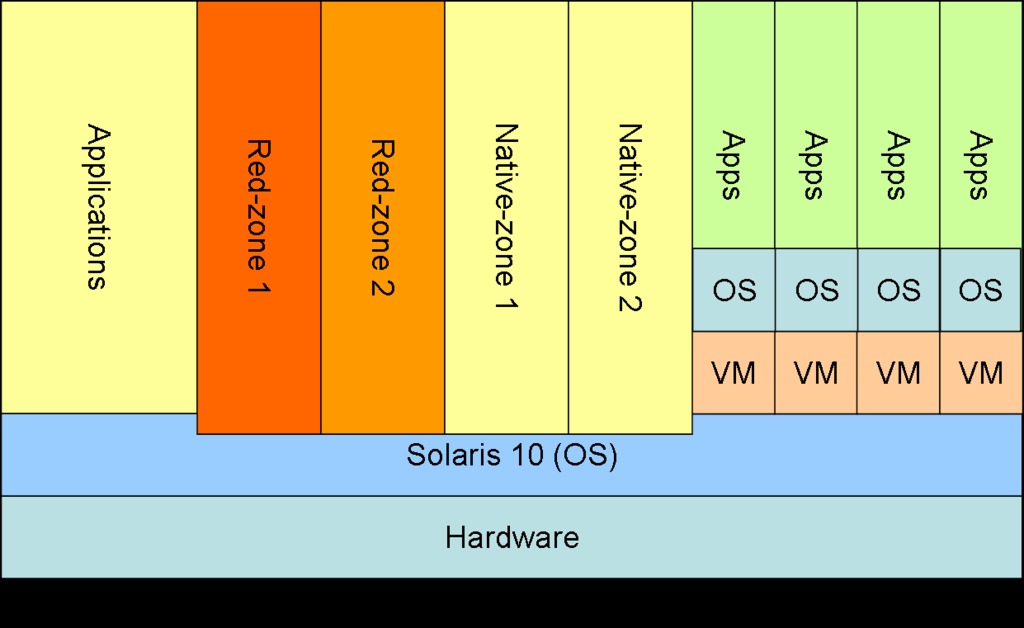
Figure 1. Relationships between Zones and VMs
Solaris-Zones became available with the release of Solaris 10 (later Open-Solaris). With these early releases, only a “native” Solaris zone could be defined, installed and executed. With the August 2007 release, Solaris-Zones includes support for zone branding to allow Linux installation and execution. By default, a zone is defined as native, unless it's defined explicitly as a Linux (lx) branded zone. Once a zone is branded lx, only Linux can be installed into that zone.
The zone experience is defined by a simple command set. Each command is used to manage one of the logical divisions of the zone maintenance process. The primary divisions of zone administration are define, install and execute. The zone experience is very simple; it involves only a few commands. Two of the commands provide support for the definition, installation and setup of zones, and the other two are used for a running zone:
zonecfg: define a zone (metadata only).
zoneadm: install/uninstall, boot and query.
zlogin: log in to a zone or connect to its console.
zonename: prints the name of the zone executed within.
Use the zonecfg command to define a zone. Although it is possible to define a zone without networking, all examples presented here define zones with networking. Listing 1 shows how to define a network interface for use by an lx branded zone. With zonecfg, you can create a minimal zone definition, set the zone's name, set its installation path and type and include a network interface. A minimum definition requires only the branding, zone name and the installation path. The zonecfg command must be executed as the superuser. In the examples here, the shell prompt is used to illustrate from which zone a command is run. The initial example below indicates the shell is within the global zone and ready to “define” a non-global zone by the use of the zonecfg command.
Note: ZFS (denoted or hinted at by path names) is used for performance; however, it is not required. Feel free to use any appropriate directory path to build one or more zones.
Listing 1. Defining an lx Zone
# List the name of the current zone
g-zone# zonename
global

# Start the zone definition action and define it as "lx"
# SUNWlx is the Sun provided "lx" zone template.
g-zone# zonecfg -z red-zone
red-zone: No such zone configured
Use 'create' to begin a new zone configuration.
zonecfg:red-zone> create -t SUNWlx
zonecfg:red-zone> set zonepath=/zpool01/zones/red-zone
zonecfg:red-zone> add net
zonecfg:red-zone:net> set address=192.168.1.10
zonecfg:red-zone:net> set physical=e1000g0
zonecfg:red-zone:net> end
zonecfg:red-zone> commit  # (redundant)
zonecfg:red-zone> exit

# List defined(configured) and running zones
g-zone# zoneadm list -cv
  ID NAME       STATUS      PATH                     BRAND    IP
   0 global     running     /                        native   shared
   - red-zone   configured  /zpool01/zones/red-zone  lx       shared
Adjust the paths accordingly to match your local environment. Items to consider are zonepath and network values. Change these to match available storage, local network requirements and available network interface. The first command shows that execution is in the global zone. The zonecfg command defines the name of the zone, the installation path and network attributes. The final command lists all configured and running zones. Once a zone is defined, use the zonecfg command to update or delete a zone configuration.
Note that not all properties can be updated or added after a zone has been installed. Generally, properties with this restriction are ones related to native zone definitions, not lx branded zones. For properties that can be changed after a zone is installed, the zone should be in a halted state or rebooted to make the change active.
The first example shows the red-zone as configured. This means it is defined only (metadata created and saved). Two properties in the example can be used to illustrate updating properties of an already-defined zone: zonepath and the network attributes. Each of them can be changed while the zone is halted (not running). If a zone has been installed and the zonepath is changed, the operator is required to move the physical location of the old zonepath to the location of the new zonepath manually. In the next example (Listing 2), the directory red-zone needs to be renamed to red-zone-x under the /zpool01/zones directory to complete the property update.
Listing 2. Changing Properties of a Defined Zone
# We determined the network address is incorrect and that it
# needs to be updated and we want a different storage location
g-zone# zonecfg -z red-zone
zonecfg:red-zone> set zonepath=/zpool01/zone/red-zone-x
zonecfg:red-zone> select net address=192.168.1.10
zonecfg:red-zone:net> set address=192.168.2.10
zonecfg:red-zone:net> end
zonecfg:red-zone> exit

# Use zonecfg's "info" sub-command to list the zone's definition
g-zone# zonecfg -z red-zone info
zonename: red-zone
zonepath: /zpool01/zone/red-zone-x
brand: lx
autoboot: false
bootargs:
pool:
limitpriv:
scheduling-class:
ip-type: shared
net:
        address: 192.168.2.10
        physical: e1000g0

# The zone definition can be deleted
g-zone# zoncfg -z red-zone delete -F
We now have a defined zone. Use the zoneadm command to complete the OS installation into the zone named red-zone. The sub functions of zoneadm are related to the execution status of a zone. The install process of an lx branded zone requires Linux media. The media can be provided in a physical form and loaded into the system's CD-ROM drive, or you can use the “green” method and provide the image as one or more ISO files.
Listing 3. Install a Zone
# List the zone definition (from Listing 1)
g-zone# zonecfg -z red-zone info
zonename: red-zone
zonepath: /zpool01/zones/red-zone
brand: lx
autoboot: false
bootargs:
pool:
limitpriv:
scheduling-class:
ip-type: shared
net:
        address: 192.168.1.10
        physical: e1000g0

# The ISO files:
g-zone# ls /zpool01/rh-media/rhel30-AS-U6/
rhel-3-u6-i386-as-disc1.iso  rhel-3-u6-i386-as-disc3.iso
rhel-3-u6-i386-as-disc2.iso  rhel-3-u6-i386-as-disc4.iso

# Install linux "desktop" distribution
g-zone# zoneadm -z red-zone install -d
 ↪/zpool01/rh-media/rhel30-AS-U6 desktop
Installing distribution 'Red Hat Enterprise Linux 3 Update 6'...
Installing cluster 'desktop'
Installing miniroot for zone 'red-zone'.
Attempting to locate 30 packages...

Installing 1 miniroot package...

Attempting to locate 29 packages...

Installing 29 miniroot packages...
...
Installation of zone 'red-zone' completed successfully.

Details saved to log file:
    "/zpool01/zones/red-zone/root/var/log/red-zone.install.1119.log"

# Query the zones status (changed to installed)
g-zone# zoneadm list -cv
  ID NAME       STATUS     PATH                     BRAND    IP
   0 global     running    /                        native   shared
   - red-zone   installed  /zpool01/zones/red-zone  lx       shared
Once the zone installation is complete, it's time to boot it. Create two shells, and run the commands shown in Listing 4. Connect to the zone console first, then boot the zone in the second shell to get the full console experience (it's very fast, you'll not want to miss it). The example zlogin connects to the zone's console device and configures the escape (exit the zlogin) as the “#.” (pound sign then period) key sequence. This key sequence should be unique and avoid issues that the default sequence of “~.” (tilde then period) can cause when connectivity to the global zone is remote.
Listing 4. Boot a Zone
# Connect to the red-zone console and watch it boot
g-zone(1)# zlogin C -e '#' red-zone

# Boot the red-zone in a second window
g-zone(2)# zoneadm -z red-zone boot

# **** example console output from first window ****
[Connected to zone 'red-zone' console]

[NOTICE: Zone booting up]
INIT: version 2.85 booting
                Welcome to Red Hat Enterprise Linux AS
                Press 'I' to enter interactive startup.
Configuring kernel parameters:  [  OK  ]
Setting clock : Mon Sep 29 20:20:56 EDT 2008 [  OK  ]
Setting hostname red-zone:  [  OK  ]
...
Starting atd: [  OK  ]
Starting firstboot:  [  OK  ]
Rotating KDC list [  OK  ]

Red Hat Enterprise Linux AS release 3 (Taroon Update 6)
Kernel 2.4.21 on an i686

red-zone login:
A non-global zone has nearly the same abilities as the global zone to provide services: login connections are not limited to text or console logins. The use of zlogin with no options (only the zone name) connects to the zone without a console, which creates a tty and invokes login. Any active zone service also can be used, such as XDM, SSH and FTP, to allow other forms of login.
Listing 5. Log In to a Zone
# Connect to zone's console
g-zone# zlogin -C -e '#' red-zone

# Login without a console (must always be root)
g-zone# zlogin red-zone
...
r-zone# zonename
red-zone
We now have a zone defined, installed and running. The examples presented here illustrate some of the administrative tasks associated with zones: reboot, shutdown, halt and deletion of an lx branded zone. Pay close attention to the shell prompts to identify the zone in which each command is run.
Listing 6. Zone Administration
# By default a zone will *not* auto boot when the system boots
g-zone# zonecfg -z red-zone set autoboot=true

# Reboot/stop a zone gracefully
g-zone# zlogin -C -e '#' red-zone

# Login, then use a normal Linux command (examples)
r-zone# reboot
r-zone# shutdown -r now
r-zone# telinit 6
r-zone# telinit 0  (once halted boot it from global zone)

# Bring down a zone hard (stop all execution now!)
g-zone# zoneadm -z red-zone halt

# Same as halt and boot (hard stop then boot)
g-zone# zoneadm -z red-zone reboot

# Uninstall the OS from a zone (still defined)
g-zone# zoneadm -z red-zone halt
g-zone# zoneadm -z red-zone uninstall [ -F ]

# Clone an installed zone's OS into another defined zone
# (when the source is on ZFS the clone takes seconds to
# install the new zone, otherwise may take many minutes!)
g-zone# zonecfg -z red-eye create -t red-zone
g-zone# zonecfg -z red-eye set zonepath=/zpool01/zones/red-eye
g-zone# zonecfg -z red-eye
zonecfg:red-eye> select net address=192.168.1.10
zonecfg:red-eye:net> set address=192.168.1.11
zonecfg:red-eye:net> end
zonecfg:red-eye> exit

g-zone# zoneadm list -cv
  ID NAME       STATUS      PATH                     BRAND    IP
   0 global     running     /                        native   shared
   - red-zone   installed   /zpool01/zones/red-zone  lx       shared
   - red-eye    configured  /zpool01/zones/red-eye   lx       shared

g-zone# zoneadm -z red-eye clone red-zone
Cloning zonepath /zpool01/zones/red-zone...

g-zone# zoneadm list -cv
  ID NAME       STATUS      PATH                     BRAND    IP
   0 global     running     /                        native   shared
   - red-zone   installed   /zpool01/zones/red-zone  lx       shared
   - red-eye    installed   /zpool01/zones/red-eye   lx       shared

# Remove a zone (No undo)
g-zone# zoneadm -z red-eye halt
g-zone# zoneadm -z red-eye uninstall -F
g-zone# zonecfg -z red-eye delete -F
The zone creation steps are straightforward and simple. The process may take only a few steps, but they are manual and error-prone. The zonetool.pl utility (see Resources) automates the zone creation process and includes detailed POD documentation. Run zonetool.pl without arguments or with the --help option to display usage details. Listing 7 shows an example of using zonetool.pl.
Listing 7. Zone Definition Using zonetool.pl
$ sudo zonetool.pl \
         [ --debug ] \
           --create \
           --zonename green-zone \
           --brand SUNWlx[,server ] \
           --zonepath /zpool01/zones \
         [ --autoboot ( true | false ) ] \
         [ --clone red-zone | --media /path/to/ISOs ] \
           --network 'e1000g0=192.168.1.10'
With relatively small amounts of disk and memory resources, a single physical server can host hundreds of zones. Each zone is usable by any number of users, and a single-user zone provides extreme flexibility. A single user can create more than one zone to test both server and client environments, and the applications will believe they are on unique physical hosts. A zone user may have use of the zone's unique root password or unfettered sudo access within that zone without concern for security and stability of the global zone and other non-global zones.
The lx branded zone does have its limitations. Much of the zone's power comes from securely shared resources with the global zone. The zone shares a kernel with the global zone and, therefore, places limits on kernel modules and drivers. Because zones are not full VMs, the Linux distributions that can be installed in an lx branded zone are limited. Support for other Linux releases is possible, and further interest in this technology will inspire continued development and support for additional Linux distributions. Review the Resources section of this article for more information on this and related topics.
Resources
Location of brandz installation extensions and other helpful items: opensolaris.org/os/community/brandz/downloads and opensolaris.org/os/community/brandz/todo/linux_2_6 (kernel 2.6 support).
Solaris lx branded zone information: docs.sun.com/app/docs/doc/819-2450/gchhk?a=view (everything), docs.sun.com/app/docs/doc/819-2450/gcwwm?a=view (planning), docs.sun.com/app/docs/doc/819-2450/gdajn?a=view (config), docs.sun.com/app/docs/doc/819-2450/gdbki?a=view (about...), docs.sun.com/app/docs/doc/819-2450/gdduh?a=view (install, boot, and so forth) and docs.sun.com/app/docs/doc/819-2450/gdqnv?a=view (moving and migrating).
zonetool.pl (Listing 8): ftp.linuxjournal.com/pub/lj/listings/issue180/10268.tgz.
zonetool.pl was inspired by an early version by M. Kiefer: www.sun.com/bigadmin/scripts/submittedScripts/zonetool.txt.
Dtrace information: www.sun.com/bigadmin/content/dtrace, wikis.sun.com/display/DTrace/Documentation and docs.sun.com/app/docs/doc/819-5488?l=en.
ZFS information: docs.sun.com/app/docs/doc/817-2271?l=en.
Victor Burns is married to his awesome wife Lisa of 25 years, and they have six children. Victor has been employed at Texas Instruments for 24 years. He enjoys working with the Boy Scouts and is an Eagle Scout from his youth. He thanks his family for its support.

