
Simplifying Backups with Zmanda Recovery Manager
Most modern enterprises process immense amounts of data as part of their day-to-day operations. On-demand access to this data is critical, and most enterprises invest heavily in relational database technologies to manage their data. Cutting-edge technologies at cost-effective prices have led many enterprises to adopt open-source databases such as MySQL. As a result, MySQL has become a core component of many data management solutions.
Traditionally, backup of data stored in relational databases like MySQL has been an art form, practiced by database administrators who have relied on a mix of command-line wizardry, custom scripts and, sometimes, just sheer luck. Successful data recovery often is seen as black magic, or almost. Not surprisingly, most backup and recovery strategies emphasize the backup phase, but they don't actually test whether data can be recovered successfully when it's needed.
Zmanda, Inc., a startup based in Sunnyvale, California, aims to bring sanity into the backup and recovery process of MySQL databases by incorporating industry best practices in its product—Zmanda Recovery Manager (ZRM) for MySQL. Zmanda's strong expertise in open-source backup and recovery software comes from many years of work by the company's core engineers on the award-winning Amanda open-source backup system, a project started at the University of Maryland back in 1991.
ZRM provides a comprehensive open-source solution for backup and recovery of MySQL databases. ZRM eases day-to-day backup and recovery tasks with its Web-based Zmanda Management Console (ZMC). The management console integrates with the Zmanda Network to provide on-line documentation and other support services for ZRM. Because it is open source and supports common standards, as well as open data formats for backups, ZRM frees you from vendor lock-in. ZRM's command-line interface (CLI) integrates well into existing backup and recovery processes.

Figure 1. Summary of Backup Parameters in Zmanda Management Console
Enabling advanced backup and recovery practices, ZRM provides Continuous Data Protection (CDP) for MySQL by combining filesystem-level snapshots along with data from MySQL binary logs. Filesystem snapshots help reduce database server downtime, especially when working with large databases. ZRM uses a flexible framework of plugins for snapshotting LVM, NetApp SnapManager, Windows VSS, Veritas VxFS and Solaris ZFS. Plugins for NetApp SnapManager and Veritas VxFS are sold separately.
Zmanda offers three versions of ZRM for MySQL: the ZRM Enterprise edition, ZRM Cluster edition and ZRM Community edition. The Enterprise edition includes a graphical installer, Zmanda Management Console, command-line interface and plugin framework. Three levels of support (Basic, Standard and Premium) are available for Enterprise edition customers. An annual subscription with basic support starts at $300 (US). Customers using the NDB storage engine with MySQL Cluster can take advantage of the ZRM Cluster edition. The Community edition is a freely downloadable subset of the Enterprise edition, licensed under the GNU GPLv2, which supports LVM snapshots but does not include the ZMC and the graphical installer.
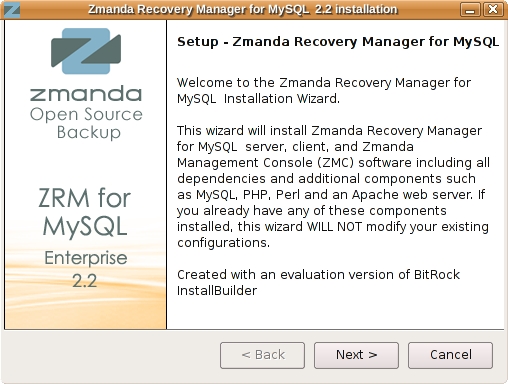
Figure 2. The graphical installer makes setting up ZRM a piece of cake.
I evaluated the Zmanda Recovery Manager for MySQL Enterprise edition version 2.2. The test platform (ZRM server) was Red Hat Enterprise Linux 5.1 installed on a PC with an Intel Dual Core 3GHz processor, 4GB of system memory and a 750GB SATA hard disk. I installed MySQL Community Server version 5.0.51a-0 locally on the ZRM server as well as on another PC with Ubuntu 7.10 server installed. With this configuration, I was able to test ZRM's ability to back up from and restore to local and remote MySQL servers. Note that MySQL versions 4.1.x are also supported by ZRM. Finally, I set up my test databases on a 50GB LVM (Logical Volume Manager) partition to test ZRM's hot backup capabilities.
Zmanda provides installation packages for ZRM on Red Hat Enterprise Linux, SUSE Linux Enterprise, Fedora, CentOS, Solaris and OpenSolaris. To install ZRM, download the ZRM graphical installer binary executable and ZRM license key file from the Zmanda Network site. The license key file has to be placed in /etc/zmanda/zmanda_license. A full installation of the ZRM Enterprise edition includes command-line tools, a MySQL server instance for use by ZRM, an Apache Web server instance for ZMC and a PHP 5.2.x and Perl 5.8.x environment.
Getting ZRM up and running is easy, if you're familiar with a MySQL environment on Linux. A couple minor but necessary post-installation tasks included setting up sudo permissions for the mysql system user and creating a MySQL server user account with the right privileges to perform backups and restores.
The ZMC is a Web-based interface that acts as a control panel for managing the backup and recovery process end to end. Each major function (for example, Backup, Monitor, Report, Admin and Restore) is represented by a tab and corresponding panel in ZMC's interface. A key concept to understand while using the ZMC is that of a “backup set”. A backup set defines a group of databases or tables in a database on a MySQL server. Once a backup set has been defined, a ZMC user can configure various actions for that backup set. To help you get a feel for ZRM, the following sections highlight ZRM functions accessible through the ZMC.
ZRM provides several ways to back up MySQL. Important factors to consider when choosing the best way to back up a MySQL database include database availability during backup and the size of your database.
Logical backup should be considered if you're looking for flexibility. A logical backup captures the output of the mysqldump utility and supports all MySQL storage engines except NDB. You can restore a logical backup to a platform different from the original. For example, a backup of a MySQL database running on an RHEL x86 system can be restored to a MySQL database running on a Solaris Sparc system. However, the flexibility of a logical backup comes at a price. MySQL tables are read-locked during backup. Also, restoring a large database can be slow, as SQL statements are used to re-create the database. Furthermore, the size of the backup can be larger than the actual database or table being backed up.
Raw backups should be considered if you want minimal database downtime or if your database size is really large. Raw backups can take advantage of filesystem-level snapshots to shorten backup times. Also, the backup size of a raw backup is the same as the size of the data being backed up, but a raw backup is restrictive because it can be restored only to the exact MySQL server version on the same kind of platform. If you have a large database and/or high transaction volume, you should consider using the quick snapshot option to reduce backup time further, because the filesystem snapshot becomes the backup and is not copied to the ZRM server. Note that on Linux, LVM snapshotting is supported only for local MySQL backups.
ZRM makes it easy to run a mix of full or incremental backups. Full backups include all data in a database, whereas incremental backups capture the changes since the last successful backup. Incremental backups require that binary logging is enabled on the MySQL server.
If data security is a requirement, ZRM can utilize SSL for remote backups, and it can encrypt backup images using standard encryption tools, such as GnuPG.
I tested ZRM's backup functionality by running variations of full and incremental, logical and raw (with the quick snapshot option) backups of a million-record database table. The backups completed without any problems, and I was able to verify this using the summary report page under the Report tab in the ZMC.
ZRM's monitoring function presents valuable information about the most recently run backup job as well as about currently running jobs. Information includes how much time the backup took, backup size and any warning or error messages. This feature was very helpful when tracking the progress of long-running backup jobs.
ZRM provides excellent reports that analyze the details about backup and restore jobs, including summary reports, custom reports, predefined reports and data integrity reports. ZRM Enterprise edition provides nine predefined reports and allows customized reporting using 30 preset data fields. You can use ZRM's reporting data within other applications via RSS feeds. You also can configure ZRM to send e-mail alerts about the status of backup jobs.
I found the Backup Application Performance Report to be quite useful, because it provides stats about the amount of time that tables were read-locked and the total backup time. This information could help a DBA schedule backups to avoid peak periods of database usage.
ZMC's administration function lets you define and manage users, manage backup sets, set up ZRM site defaults and customize ZMC preferences. ZMC implements role-based access control where users can be defined as an operator or an administrator. Administrators can manage all backup sets on the ZRM server; however, operators can manage only the backup sets they own.
ZRM simplifies the full or incremental recovery of lost data. Using ZMC, you select a backup set to be restored and specify a MySQL server to which to restore. If you want to verify your data manually after recovery, ZMC provides an option to shut down the MySQL server after recovery is complete.
Another option is point-in-time recovery, which lets you restore data selectively. Using the Visual Log Analyzer in ZMC, you can perform incremental recovery by specifying a given point in time or a binary log position up to which you want to recover.
To test ZRM's recovery functionality, I successfully restored the backups created from earlier tests. I also successfully restored the quick snapshot raw backup image of my million-record table to my remote MySQL server.
Even though the ZMC interface is relatively easy to understand, you may need more information about a specific ZRM feature. Fortunately, ZMC provides context-sensitive on-line documentation through the Zmanda Network. Other helpful resources include the Zmanda Wiki, forums and blogs. Zmanda's active on-line Community is helpful and responsive.
Zmanda Recovery Manager provides a robust, open and cost-effective backup and recovery solution for organizations relying on MySQL for their critical data. ZRM simplifies an otherwise intricate process of backup and recovery by managing complex open-source utilities through its Web-based console.
As with any evolving product, there always is room for improvement. Here are some of my suggestions: a smarter graphical installer that automates post-install tasks done manually today; a more sophisticated management console that enhances the user experience; snazzier graphical reports (think Google Analytics); and a ZRM virtual appliance (VM image) for easier deployment in virtualized environments.
Try out ZRM's open-source Community edition today. You'll see how effortless MySQL backup and recovery can be.
Q&A with Zmanda
We talked with Chander Kant, CEO and cofounder of Zmanda, as well as Paddy Sreenivasan, VP of Engineering and cofounder of Zmanda, about ZRM, open-source backup and growing an Open Source community.
AS: Why should customers look at Zmanda Recovery Manager and open source?
CK: Although products based on open source and open standards almost always come with lower initial cost of acquisition, the greater benefit is achieved over the life cycle of the deployment. Inherent freedom provided by open products enables IT managers to lower the cost of ongoing maintenance significantly. Let's say your organization is using an operating system that is popular today, but becomes out of favor in a few years' time. It is possible, actually probable, that a proprietary backup vendor will withdraw support for this unprofitable operating system. This would force you to make a choice between either using some ad hoc mechanism to back up that system or to replace the system with a different OS—both costly choices. Open Source communities are known to provide support for older (and sometimes obscure) platforms. Furthermore, the source code is available to compile or recompile the software for a particular operating system.
Future profitability of proprietary software vendors depends on locking in customers to their proprietary formats and components. For example, if you use proprietary backup products to write to a tape, the only way to recover data from that tape is to use the same (and in most cases, the exact version of the) product. If you were restoring from the tape seven years from now, you'd better have the specific version of the product lying around with a valid license or be ready to pay a premium price to recover your own data. In contrast, data backed up with Zmanda's products is always in an open format. Customers can recover their data even without using our products (of course, it is easier to recover if they do use our products). Also, the data can be repurposed for other applications (such as e-discovery).
AS: How did you come up with the idea of building an open-source database backup solution?
CK: We are the leading open-source backup company. For any backup company to be interesting for customers, you need a good database backup story. For us, it was a clear choice: MySQL is the leading open-source database—we had to be the core backup solution provider for MySQL.
AS: Why did you start Zmanda? How did you come up with the name?
CK: The company was founded around the Amanda open-source backup community. But we always wanted to do more than Amanda (such as our ZRM product line). So, we flipped A to Z and came up with Zmanda. Our slogan is that we are the “A to Z of Backup”.
AS: What are your plans to provide a VMware virtual image of ZRM?
CK: We are going to start offering a VM for the ZRM Community edition and see how the adoption goes. We do think it makes a lot of sense for ZRM to be shipped as a virtual appliance.
AS: Can you tell us what's on ZRM's road map?
CK: ZRM is growing in multiple directions. ZRM will be supported natively on Windows in an upcoming release. Today, you can back up MySQL running on Windows; however, you need a Linux server to run the ZRM core engine. Also, ZRM will be expanded to support MySQL-based applications, such as SugarCRM, MediaWiki and so on. So, not only will ZRM be able to back up the underlying MySQL database, but it also will be able to back up the surrounding environment—for example, a SugarCRM administrator simply can push one button for overall backup and recovery.
AS: What Linux distributions are supported by ZRM today?
PS: ZRM supports practically all RPM-based distributions. We also support other platforms like Mandriva and FreeBSD in our Community edition. Although we do not have a graphical user interface and installer for these platforms, we do provide default configurations that will allow you to do backups right away.
AS: How large and active is ZRM's community?
PS: The ZRM community is a mix of thousands of developers and end users. ZRM is written in Perl, and its architecture is plugin-based. This encourages more contributions from MySQL DBAs. Our engineers monitor forums actively, and usually you can expect a response within a day. We see thousands of downloads each month, and the community is active in suggesting features and answering questions. We have had numerous contributions from ZRM users/developers.
Users or developers from the community can become involved with Zmanda in many ways. They can contribute to the wiki, post or answer questions on our on-line forums and, of course, contribute by trying the products, providing QA feedback and patches.
AS: How often can users expect a release of ZRM Enterprise edition or the ZRM Community edition?
PS: We do a release of the Enterprise edition once every 3–4 months. Usually a release has a combination of new features, new platforms supported and bug fixes. On the other hand, the Community edition has no fixed schedule. We have done 13 (major and minor) releases in about 24 months. Critical security bugs are fixed within 24 hours.
AS: What does Zmanda expect to gain by making an open-source Community edition of ZRM freely available?
PS: We are an open-source company. We believe in bringing the best of open source to the enterprise as well as contributing to open source to make it enterprise-ready. We gain a good understanding of MySQL DBA work flows and features needed. Of course, the Community edition is the proving ground for our features. And, it helps us recruit good engineers.
We have made significant contributions to open source. Our contributions are not just in development. We maintain source trees, a bug-tracking system and documentation, and we help evangelize ZRM using Webinars, presentations, whitepapers and contributing to books.
Resources
Zmanda Recovery Manager: www.zmanda.com/backup-mysql.html
Zmanda Network: network.zmanda.com
ZRM Wiki: mysqlbackup.zmanda.com
ZRM Forums: forums.zmanda.com
Alolita Sharma has been involved with open source since the early days of Linux. As a software engineer and industry consultant, she promotes innovation through open source. She is cofounder and CEO of Technetra and OSI Board Member. She can be contacted at alolita.sharma@gmail.com.

