
Power Up!
On June 6, 2005, hell froze over, and Apple announced it was abandoning the PowerPC architecture it had helped develop in favor of processors from Intel, a company Apple had actively mocked for years. By August 2006, the transition was complete, and the largest maker of computers based on the PowerPC (or Power) architecture had become an Intel-only shop.
This transition affected one company more than almost anyone else. Terra Soft Solutions of Loveland, Colorado, has been working with Linux on PowerPC hardware longer than just about anyone. Its flagship product is Yellow Dog Linux (YDL), and for years, Terra Soft's major business was selling Apple PowerPC hardware with YDL pre-installed on it. Terra Soft actually had the distinction of being the only Apple reseller authorized to sell Macintosh hardware with something other than Mac OS installed on it. With Apple now out of the picture, Terra Soft's primary business had to change.
For the past couple years, Terra Soft has focused a lot of its attention on server products from IBM and on the PlayStation 3 from Sony. Now, with the PowerStation, Terra Soft is taking a step into the hardware business Apple vacated. Its Web site says it all in a single sentence: “The Power workstation is back.”

Figure 1. The internals of the PowerStation are easy to get to, and the box has numerous expansion opportunities.
Chips based on the Power architecture are found in many devices and products—from cars to mainframes to robots. Customers who relied on Apple for PPC-based workstation hardware were left in the lurch with Apple's Intel switch. For those that need it, being able to run PPC code without emulation on their local workstation is a big plus. The PowerStation was created to provide these developers with a high-quality open-source-friendly workstation. Not only is it more powerful than any PPC-based Power Mac from Apple, it also is more open and expandable.
The PowerStation comes with two dual-core 2.5GHz IBM 970MP processors, with 1MB of L2 cache per core. For memory, there are eight 667MHz DDR2 DIMM slots that allow the box to accommodate up to 32GB of RAM. Local storage is handled by a four-port SAS RAID controller and a single IDE controller. My test box was configured with a single 70GB SAS drive, 2GB of RAM and a DVD/CD-RW drive—nothing earth shattering, but decent enough.
Networking for the PowerStation is handled by dual Broadcom HT2000/BCM5780 Gigabit Ethernet ports. For serial I/O, there are two USB ports on the back and a couple more on the front of the case, two RS-232 serial ports and a single RJ45 VTY console port to round things out.
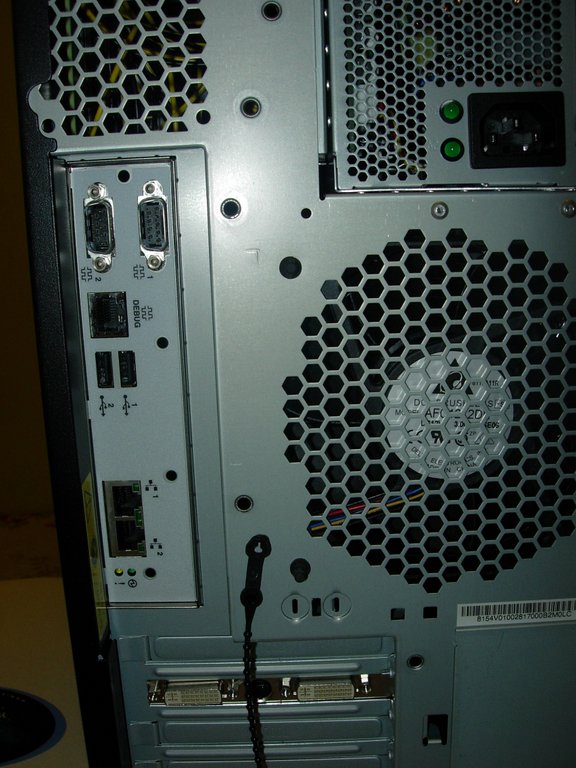
Figure 2. The Back of the PowerStation
For expansion, the motherboard has a single PCIe x16 connector (that comes filled with a 512MB ATI X1650 Pro graphics card), two PCIe x8 connectors and a single PCI-X connector.

Figure 3. The graphics card in the PowerStation was switched at the last minute to this ATI X1650 Pro.
Finally, power for the box is supplied by an 815-Watt power supply.
Accessing the box's internals is easy. The entire side of the case pops off at the press of a latch. The four SAS hard drive bays can be reached from behind a front panel that pops off just as easily as the side panel.
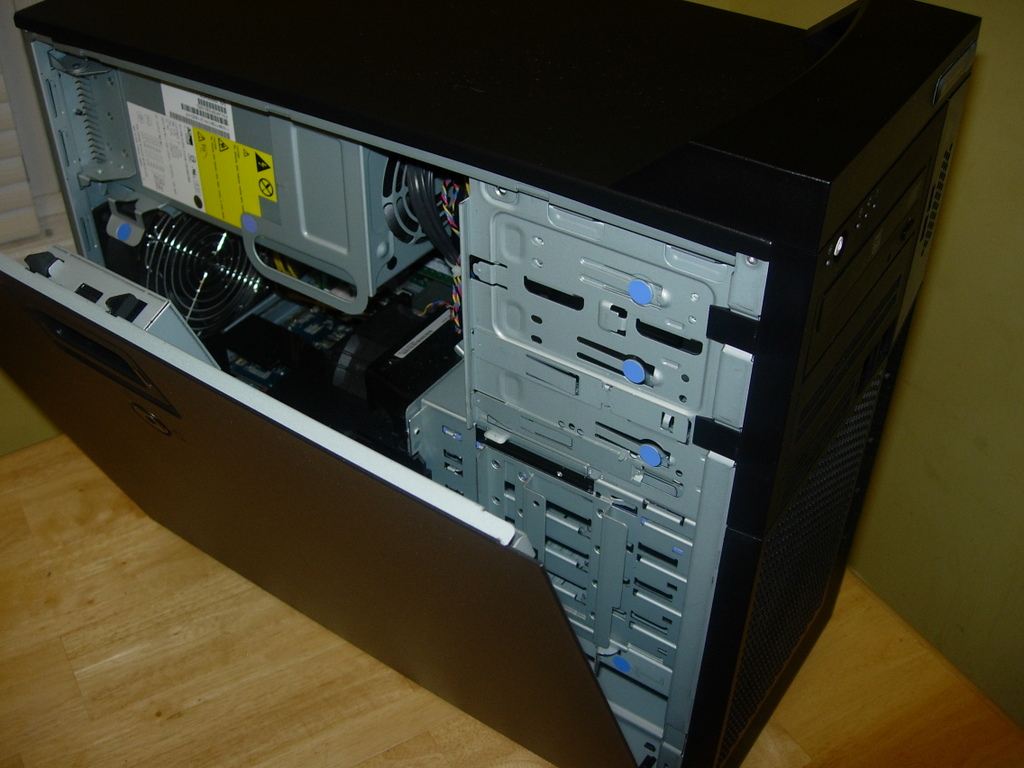
Figure 4. The PowerStation opens with the touch of a button.
The firmware for the box is the Slimline Open Firmware (SLOF)—a BSD-licensed version of Open Firmware (IEEE-1275), which is what Apple used on its PowerPC-based Mac computers.
There is no sound card built in to the PowerStation. I asked the fine folks at Terra Soft about it, and they replied that they were exploring options with regard to sound output and that they would be releasing a solution soon (hopefully, it will be in place by the time you read this article). They said it likely would be in the form of a USB sound card dongle instead of an internal PCIe card (in order to save precious PCIe slots for more important duties).

Figure 5. The PowerStation motherboard is dominated by the two IBM 970MP processors.
One final note on the hardware is that the PowerStation fans make a lot of noise. It's not as loud as a rackmount server, but it's louder than my scratch-built home server (and I think that it's too noisy at times). On top of the normal noise, the fans on the PowerStation cycle up and down as needed to keep the system at the optimal temperature, which causes the noise level to fluctuate from loud to very loud almost at random. The noise level is not too bad for a normal office environment, but it would be far too loud in a quieter space (such as a recording studio).
The PowerStation comes with Yellow Dog Linux 6 pre-installed. YDL began life in 1999 as an alternative to the Mac OS on Apple's PowerPC hardware. It is based on Red Hat Enterprise Linux and Fedora. Like every Red Hat/Fedora derivative I have ever used, it uses RPM for package management. Yum, which started as a Yellow Dog-specific add-on for simplifying package updates (and has been adopted by most RPM-based distributions) is naturally included, along with the graphical yum updater, Pup.
When first booting the PowerStation, you go through the normal Anaconda new-user setup. Unfortunately, this process crashed on me at the very end, forcing me to reboot the computer. It seemed like it was just a fluke, so I didn't worry about it too much, but I think it may have contributed to my Firefox problems (more on that later).
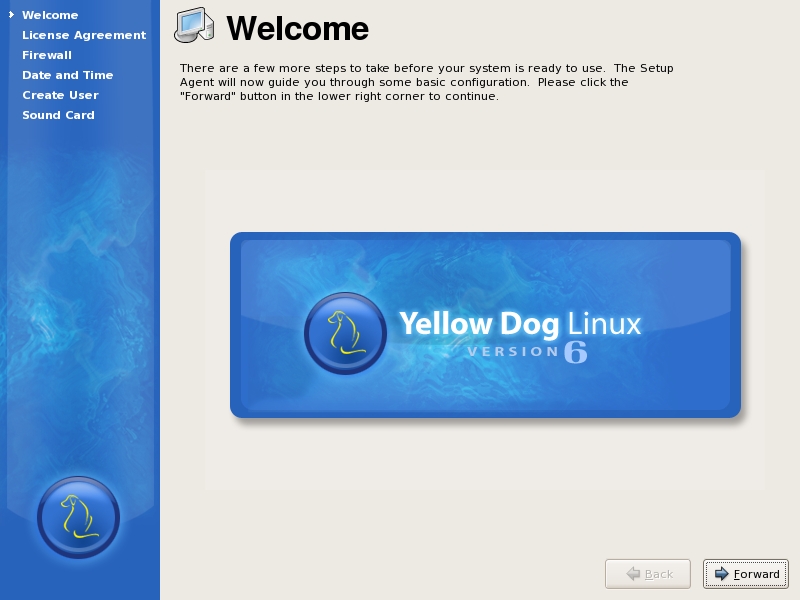
Figure 6. On initial boot, the PowerStation walks you through setting up an initial user.
The package selection available in the default YDL repositories is decent, but it's not as large as I am used to on Ubuntu and Fedora. The repositories configured out of the box include the Yellow Dog Base, Extras and Updates repositories, along with a PowerStation-specific one. Most of the basic apps—from Firefox to OpenOffice.org to The GIMP to PostgreSQL to Pidgin—are present and accounted for.
Although most of the packages I expected to find were available, a couple interesting ones were absent. One in particular (which happens to be one of my favorite applications), Inkscape, was missing. Thanks to the PowerPC Fedora Extras repository, I was able to install it easily.
A couple packages I wanted to use on the box, such as the renameutils (from www.nongnu.org/renameutils), were not available as pre-built RPM packages (as far as I could see, anyway). In the case of renameutils, I was able to download, compile and install the package manually.
One big thing I had to get used to on the PowerStation was the lack of GRUB. Yaboot is the bootloader for the PowerStation.
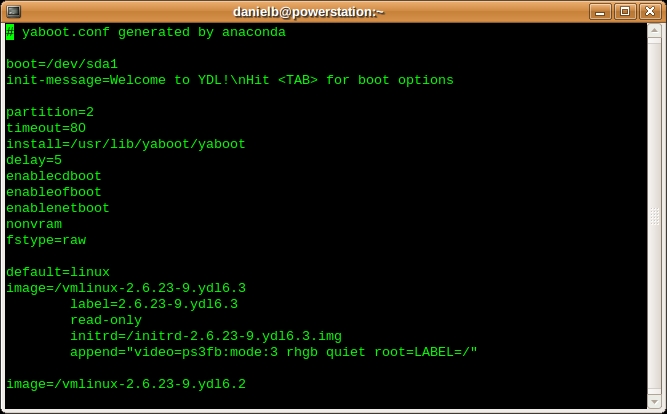
Figure 7. The Yaboot Configuration File
Being unfamiliar with Yaboot, I elected not to tinker with it or even spend much time looking at it. The system booted fine, and I didn't want to render the box unbootable inadvertently. The Yaboot configuration does look marginally similar to GRUB's, and I'll leave it at that.
Enlightenment is the default desktop environment for the PowerStation. The default theme and layout are nice, and the menus are well organized.
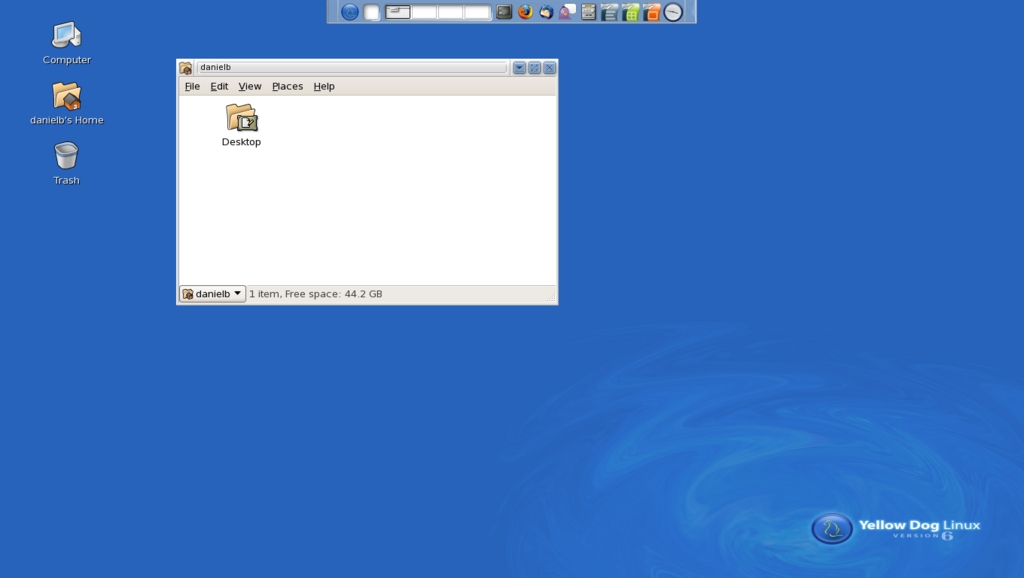
Figure 8. The PowerStation's Default Enlightenment + Nautilus Desktop
One interesting decision Terra Soft made was to configure the first Enlightenment desktop to run Nautilus full screen for file management purposes. This was a little confusing at first when I tried to change the Enlightenment wallpaper and nothing happened. To change the wallpaper of the first desktop, I had to change the GNOME wallpaper. Wallpaper issues aside, using Nautilus is a smart move, because it is one of the most advanced file managers available. I soon got used to using the first desktop for file management and the rest for running apps. This arrangement actually forced me to become better organized as different tasks were more clearly and cleanly separated. The other three desktops do not have Nautilus running on them, so they behave like regular Enlightenment desktops, animated backgrounds and all.
GNOME also is available out of the box as a session login option for those who prefer it, and KDE can be installed with the package manager.
There's no difference in running apps like The GIMP, OpenOffice.org or Firefox on an IBM Power processor as opposed to an Intel or AMD processor, so I won't go into running them other than to say they ran fine.
Performance is one of those tricky areas that are hard to define and nail down—especially when trying to compare the PowerStation to x86 workstations. One thing I can say without any equivocation is that the PowerStation definitely is speedy. Applications launch instantly (or nearly so), and everything feels fast and snappy. But “feelings” sometimes can lie, so to get a more accurate view, I turned to some performance testing.
For testing, I installed the Phoronix test suite. Unfortunately, although I was able to install it without trouble by following the directions on the Phoronix Test Suite Web site and run most of the tests, a few of them, including compiling the Linux kernel and calculating Pi to 32 million digits, failed. In the case of the Linux kernel compilation test, Phoronix reported that the test completed in 4.12 seconds. This compares to a time on my laptop of 4,407.53 seconds. Now, I am the first to admit that the PowerStation is much faster than my old laptop, but it is not a thousand times faster.
In the case of the Pi calculation test, the issue was that the test assumes you are running on x86, and it tries to load an x86 binary, which obviously won't run on the IBM 970MP-powered PowerStation. Thankfully, other tests in the Phoronix test suite provided more trustworthy results. The mencoder test, for example, which converts an 89MB avi file, took a respectable average of 42.13 seconds. See Table 1 for the results of some of the other Phoronix test suite tests I ran on the PowerStation.
Table 1. Phoronix Test Results on the PowerStation
| Test | Average Result |
|---|---|
| RAMspeed Average Integer Test | 2,661.78MB/s |
| OpenSSL | 36 signs per second |
| GnuPG 1GB file encryption | 21.96 seconds |
| Compress a 128MB file with lzma | 315.53 seconds |
| Compress a 512MB file with gzip | 39.38 seconds |
| Compress a 512MB file with parallel-bzip2 | 67.60 seconds |
| SQLite 2,500 insertions on indexed db | 74.05 seconds |
| SciMark composite test | 264.64Mflops |
| Timed PHP compilation | 82.93 seconds |
| IOMeter file server access pattern | 89.87 seconds |
| Timed Apache build | 54.48 seconds |
One caveat in my testing is that all of the tests shown in Table 1 finished with minor errors, such as “PHP Notice: Undefined offset: 0 in /usr/share/phoronix-test-suite/pts-core/functions/pts-functions_system_cpu.php on line X”. I don't think the errors skewed the results in either direction, but there is a bug somewhere that does not exist when the tests are run on an x86-based machine.
My original plan was to run these tests head to head against a quad-core Xeon system I was testing at the time. However, due to delays in receiving the PowerStation and some unforeseen issues with the Xeon system, I was not able to do this. Feel free to run the same tests on your workstation and compare your performance to the PowerStation.
One curious thing about the test results is that some of them are slower than the score achieved by my laptop—for example, the SQLite test. My old laptop is able to complete that test in an average of 62.63 seconds—more than ten seconds faster than the PowerStation. This may be because of the way the SQLite test works, or maybe it favors Intel processors—I don't know. In most tests, the PowerStation was faster, and in some tests significantly faster, which is what I expected.
My experience with the PowerStation was not without difficulties, however; although most issues were a result of the new nature of the product.
First and foremost on my list of issues is that Xorg on the PowerStation is unstable. It crashed several times. Even after updating the kernel to a more stable version, I still experienced crashes on occasion. However, this issue should be fixed by the time you read this, as it is known and Terra Soft is working on it.
Late in the development of the PowerStation there was a last-minute switch from using an XGI graphics card to using an ATI X1650 Pro. The reason for the switch, according to Terra Soft, was that the XGI graphics card was performing at a “sub-standard” level, and that “the resources required to enable reasonable X11 performance were not justified”. The full text of the graphics card announcement is here: lists.terrasoftsolutions.com/pipermail/yellowdog-announce/2008-July/000183.html.
Changing the graphics card pushed the delivery of the review unit back by almost an entire month. It's possible that this late change is responsible for some of the issues.
The next most annoying issue I encountered was the one I mentioned before. When I started Firefox after logging in the first time, I could go anywhere I wanted to on-line except any https:// Web sites. For some reason, Firefox complained about not having the Personal Security Manager, which was weird, because Firefox was installed (with all of the required pieces).
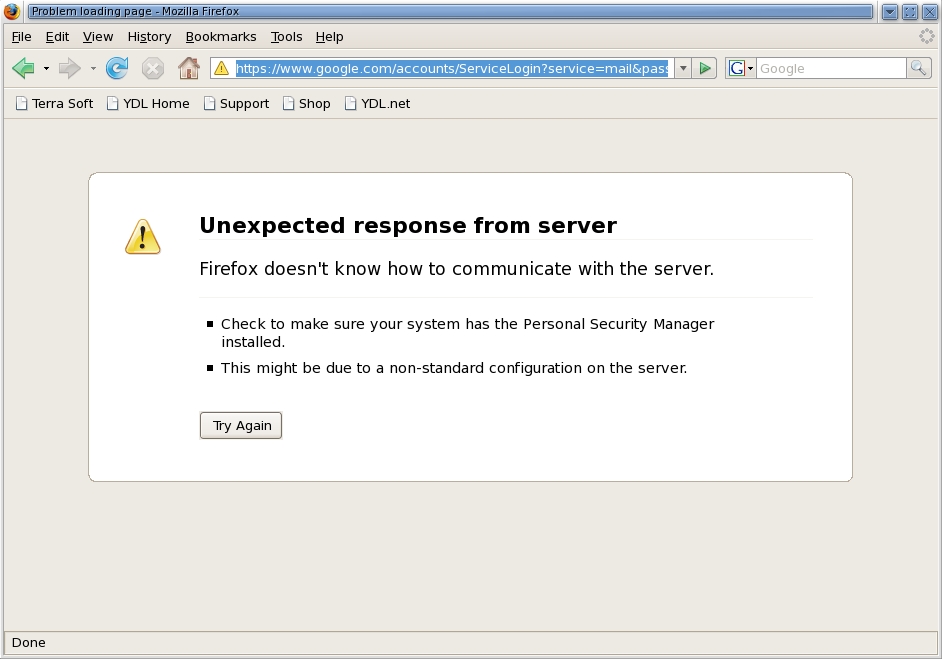
Figure 9. I ran into a strange Firefox error during testing.
The solution was to delete the default profile and create a new one using the profile manager, which leads me to believe that the default profile was corrupted in some way, probably due to the crash in the new-user setup wizard.

Figure 10. The fix for the Firefox error was to create a new profile and delete the old one.
To bring up the profile manager, first quit Firefox, and then open a terminal and type firefox -ProfileManager. With the profile manager open, I created a new profile and deleted the original one. The new profile worked fine, and I was able to connect to all of the secure https:// sites that I frequent, including my bank Web site and Webmail.
The next issue I ran into probably was my fault. Every PowerStation ships with a letter that has the root password specified on it. Unfortunately, I misplaced mine and had to talk with the support folks, who were very friendly and helpful, to get my root password. They had it on record, so I was able to get it without too much trouble.
The reason I needed the root password brings me to my last issue. Admittedly, this is in the realm of stylistic preference and not a “real” issue. Whenever you run an application that requires root privileges, you actually have to enter the root password. I never have liked this way of doing things. A much better option, in my opinion, is to have admin-level users run admin programs using sudo or gksudo. The fewer the number of people who actually know the root password, the better. I'm happiest when I never have to use the root password or log in as root. As I said before, this is more of a style issue, not a problem or showstopper in any way.
If you are a developer for Power-architecture systems and servers, I heartily recommend the PowerStation. It's a well-built, solid machine that can serve as your primary desktop as well as your main development box.
If you are just looking for a workstation, and you don't develop on or for Power, your best bet is to look elsewhere. Sure, nearly anyone could use the PowerStation as a full-time workstation. It has all the desktop applications most people require, but as focused as this system is on Power developers, non-Power developers would best be served with an x86-based system.
Resources
PowerStation Web Site: www.terrasoftsolutions.com/products/powerstation
Download Open-Source Slimline Open Firmware (SLOF): www-128.ibm.com/developerworks/power/pa-slof
Instructions for Installing Third-Party Repositories for YDL 6: blogs.ydl.net/billb/2008/03/02/third-party-repos-for-ydl-6
Phoronix Test Suite: phoronix-test-suite.com
Daniel Bartholomew lives with his wife and children in North Carolina. His normal on-line presence is at daniel-bartholomew.com, but he also can be found on Twitter as daniel_bart and on identi.ca (and Jaiku and Pownce) as bartholomew.

