
Power Up Your E-Mail with Mutt
E-mail—one of the Internet's first joys and evils. It brings us closer but forces us to weed through clutter, distractions and snake oil salesmen. Parsing and organizing the data is a tricky task. As with most jobs tricky and time-consuming, people marry a favorite tool. Presumably, you have an e-mail reader you hold dear to your heart. Nevertheless, I suggest you cheat on Thunderbird, Evolution or KMail for a day and experience the power of Mutt, the e-mail client underdog.
Mutt is a feature-rich, lightweight, text-based e-mail client. Yes, it's text-based. Don't let Mutt's simple presentation fool you. The text-based display is a feature, providing a customizable, concise viewport. The Mutt e-mail client will play nicely with remote IMAP, POP3 and SMTP servers. SSL connections also are supported. Whatever features Mutt does not provide, other tools, such as address books, Web browsers, document viewers and more, can be leveraged to enhance Mutt's innate abilities. So, why all the fuss when most e-mail clients can do the same? Mutt is faster, more customizable and less resource-intensive.
Need to sort quickly through hundreds of e-mail messages a day? Find that your current e-mail client takes up too much screen real estate? Maybe your e-mail client consumes too much memory? Do you want better e-mail threading for all those mailing lists to which you belong? Are you a system administrator who regularly needs a quick way to test e-mail servers? Tired of dealing with your laptop's mouse pad to read and send e-mail? Want to use Vim or Emacs to compose your e-mail? If any of these apply, Mutt will seduce you.
The first obvious advantage of Mutt is its small memory footprint. Below, I show the memory usage of KMail, Thunderbird, Evolution and Mutt on my system:
 VIRT  RES  SHR %MEM  COMMAND
 156m  37m  19m  3.7  thunderbird-bin
 161m  33m  19m  3.3  evolution
96352  23m  17m  2.3  kmail
14548 6092 3180  0.6  mutt
Mutt uses only a fraction of the memory used by most popular e-mail clients. So, if you are using older hardware, Mutt may speed up your computer by freeing some memory. Either way, Mutt will not hog your system's resources.
Another advantage of Mutt is the text-based display. For one, the interface is highly customizable. All fields and colors can be changed to meet your demands. Color new e-mail messages green and deleted messages red. Produce pretty, threaded message views. Anything is possible.
Mutt has it all and through a shell, no less. No longer will you need to open up IMAP access to your private server. Instead, ssh into the server and run Mutt.
Before I go into Mutt's other features, let's configure Mutt, so you can take a test drive. In this article, I focus on how to configure Mutt to work with an IMAP server. For my examples, I use Gmail's IMAP service. Because Gmail is a public, freely available service, everyone should be able to follow along. If you have another IMAP server you want to use, change the settings from my examples to match your IMAP server's configuration. If you are using Gmail, make sure you enable IMAP access to your account in Gmail's Settings→Forwarding and POP/IMAP.
First, install Mutt. I recommend using Mutt 1.5.17 or newer. Features I discuss here, such as IMAP header caching, are not available in older Mutt releases. Chances are, your distribution has the latest and greatest. So, use yum, apt-get or compile the source code from www.mutt.org. If your custom binaries ever produce warnings about unknown features, check that you have all necessary options enabled in the compile's configure step.
Before running Mutt the first time, let's configure your IMAP connection. Create and edit a ~/.muttrc file, and add the following configuration options (make sure to fill in your account specifics):
set from="YOUR NAME <USER@gmail.com>"
set imap_user=USER@gmail.com
set imap_pass=PASS
This sets your From line and IMAP user login. If you are not comfortable with your password being in plain text on the filesystem, do not set imap_pass in your ~/.muttrc. If imap_pass is not set, you will be prompted for a password when you execute Mutt.
Next, set your folder, the default location of your mailboxes. You also might want to set the spoolfile to your Gmail Inbox, so that Mutt opens it automatically:
set folder=imaps://imap.gmail.com
set spoolfile=imaps://imap.gmail.com/INBOX
Then, configure Mutt to save sent mail, or your record, into a Gmail folder named Sent. You also might want to configure a Draft, or postponed, folder:
set record=imaps://imap.gmail.com/Sent
set postponed=imaps://imap.gmail.com/Drafts
Make sure to enable header caching, or Mutt will have to download all of your Inbox's headers upon each execution:
set header_cache=~/.mutt_cache
Finally, you need to configure smtp.gmail.com as your SMTP server. By default, Mutt delivers e-mail using /usr/sbin/sendmail -oem -oi. In your case, use Gmail's SMTP server so that the e-mail envelope looks legitimate. Otherwise, your message might be flagged as spam for not originating from gmail.com:
set smtp_url="smtps://USER\@gmail.com:PASS@smtp.gmail.com/"
Again, leave out :PASS to increase security and enable a password prompt for each message sent.
Although these are the basics, the .muttrc file has the potential for a slew of options. Listing 1 is my entire .muttrc with some additional tweaks. Many of the options are just that, optional. The muttrc(5) man page explains them all, so be sure to give it a look.
Listing 1. Sample .muttrc File
# Local folder
set mbox_type=Maildir
set folder=~/Mail

# IMAP Settings
set realname="Victor Gregorio"
set from="Victor Gregorio <contactvictorg@gmail.com>"
set imap_user=contactvictorg@gmail.com
set folder=imaps://imap.gmail.com
set spoolfile=imaps://imap.gmail.com/INBOX
set record=imaps://imap.gmail.com/Sent
set postponed=imaps://imap.gmail.com/Drafts
mailboxes =INBOX # check for new email here
set header_cache=~/.mutt_cache

# Reading Mail
set timeout=10
set mail_check=5
set sort=threads
set sort_aux=date
set move=no
set mark_old=no
ignore * # ignore all headers except for ...
unignore Date: From: To: CC: Bcc: Subject:
hdr_order Subject: Date: From: To: CC: Bcc:
set index_format="%{%b %d} %-15.15L [%Z] %s" # custom index format

# Composing Mail
set editor="vim"
set markers=no
set signature=~/.sig
set include=yes
set forward_format="Fwd: %s"

# Sending Mail
set copy=yes
set smtp_url="smtps://contactvictorg\@gmail.com@smtp.gmail.com/"

# Pretty Colors
color status white blue
color index green  default ~N  # new
color index red default ~D  # deleted
color index brightmagenta default ~T  # tagged
color index brightyellow default ~F  # flagged
color header green default "^Subject:"
color header yellow default "^Date:"
color header yellow default "^To:"
color header yellow default "^Cc:"
color header yellow default "^Bcc:"
color header yellow default "^From:"
color header red default "^X-.*:"

# View Special Formats
set mailcap_path=~/.mailcap
auto_view text/html # auto-render html inline mutt
Finally, I also configure my ~/.mailcap file so that Mutt knows with which applications to open HTML e-mail, PDFs and images. I use w3m to auto-view HTML inline with Mutt. You also can use ELinks or Lynx:
text/html; echo && /usr/bin/w3m -dump %s; nametemplate=%s.html;
 ↪copiousoutput
application/pdf; /usr/bin/evince %s
image/jpeg; /usr/bin/display %s
image/gif; /usr/bin/display %s
image/png; /usr/bin/display %s
You are ready! Save all configuration files and run mutt. You will have to accept a security certificate from imap.gmail.com. If you choose to save the certificate, it will be saved in ~/.mutt_certificates.
The keyboard is your friend. Mutt is great for laptop users, because the heavy lifting is done by typing, not clicking. All the power of Mutt is yours without ever taking your hands off the keyboard.
Pressing Enter opens an e-mail message, the I key returns you to the mailbox's index. Use the arrows to move around, and press Q to quit just about any screen.
From the index, use Tab to skip to the next new messages, D to delete, F to flag and so forth. The top bar in your display will show some commonly used keystrokes. Enter ? to see the full list of available commands.
Color settings in Mutt are particularly useful in the index view. If you use the color settings from my example .muttrc, all new messages are displayed in green, flagged messages are displayed in yellow, deleted messages are red and tagged messages are purple (more on tagging later).

Figure 1. Mutt's Colors in Action
Now that you have access to your IMAP account and can send e-mail, here are some shortcuts for managing your Inbox. These shortcuts are the seductive draw of Mutt. You can zip through your e-mail quickly without ever touching a mouse.
First, you can sort and order your email by date, thread and many other fields by pressing O. Set the default sort method in .muttrc using set sort. I prefer to sort by threads (set sort=threads), then date (set sort_aux=date).

Figure 2. The Sort Options Available in the Index View
Sorting your Inbox by threads opens a new group of commands that apply to entire threads. For instance, if you want to delete an entire thread, use Ctrl-D while highlighting any e-mail in the thread. Delete large threads of e-mail with one keyboard stroke.
For a more concise view, limit your view to a subset of messages with the limit command, L. You can limit to unread, read, flag and more. All the standard sorting and tagging commands work when in a limited view. If you want to see your entire Inbox again, limit to all.
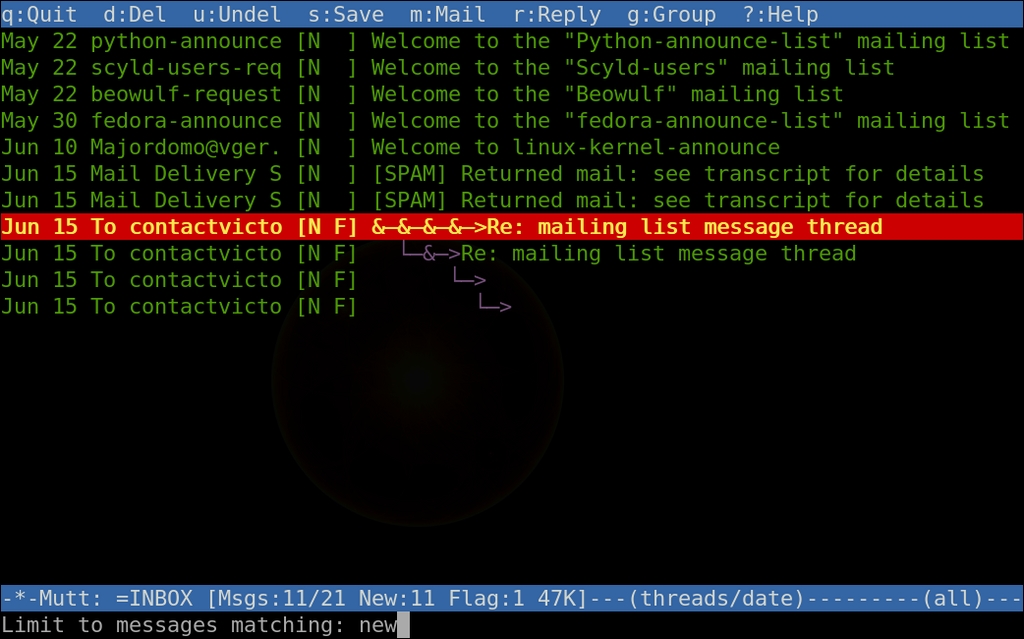
Figure 3. Mutt's View Limited to New Messages
Want to search for a message in your Inbox? If you are familiar with Vim, searching through e-mail in Mutt should be second nature. Simply press / as you would in Vim, and tell Mutt your search string. Searches take the form of regular expressions, so regex to your heart's desire!

Figure 4. Searching for Messages in Mutt
Speaking of regex, you can delete, flag or tag using regex as well. For instance, to delete all messages matching a pattern, press D. Fill in your regular expression match pattern and press Enter. With only a few keystrokes, you're done. Use F for flagging and T for tagging messages by regular expression matching.
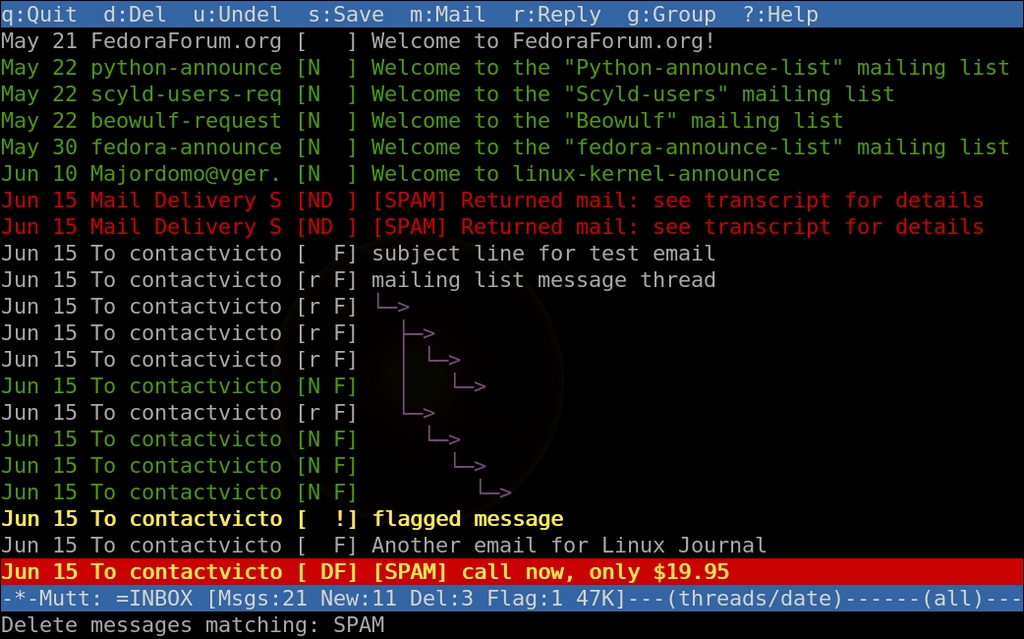
Figure 5. Deleting Messages Matching a Regex
So, what is all this tagging about? Mutt allows you to tag messages that you then can act on in one fell swoop. Think of it as a batch queue. Press T to tag messages into the queue, or use T to tag using regular expression matching. Then, use ; to prefix any command normally available to a single message, and all tagged messages will be affected in a batch.
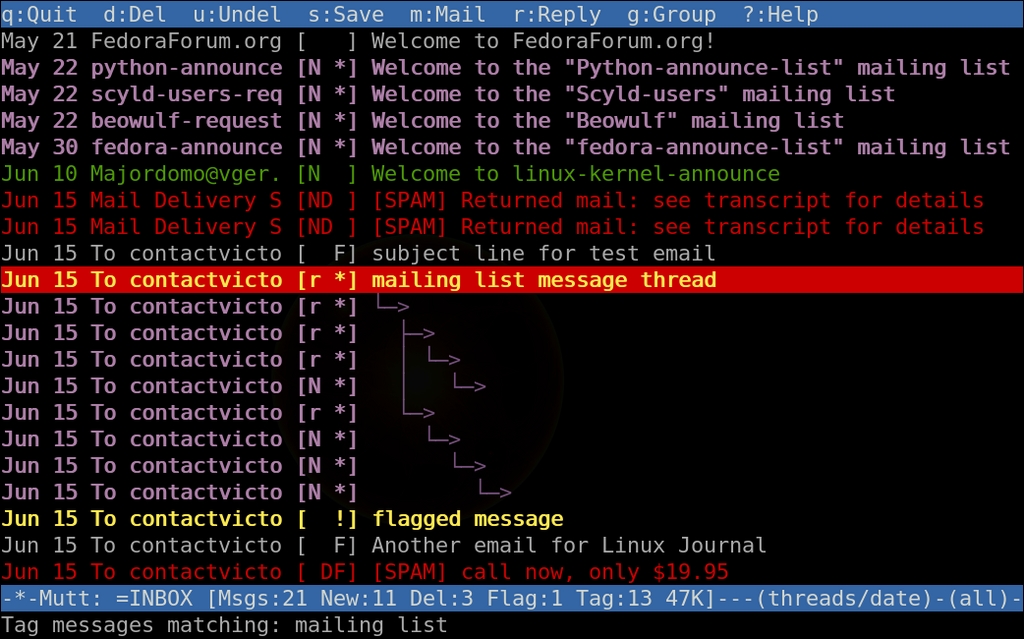
Figure 6. Tagging Mail Matching a Regex
Once messages are tagged, press ;-D to delete all tagged messages, ;-F to flag and so on. Again, pressing ? shows all available keystrokes. Imagine how quickly you now can delete the hordes of unread mailing-list messages.
Now, let's send a test message using the Gmail SMTP server. Press M to compose an e-mail message. Fill in the To: line, then the Subject: line. Your e-mail editor opens automatically. Write your message, save and quit. You will see a page that allows you to edit the Cc, Bcc and other fields. Finally, press Y to send the message.
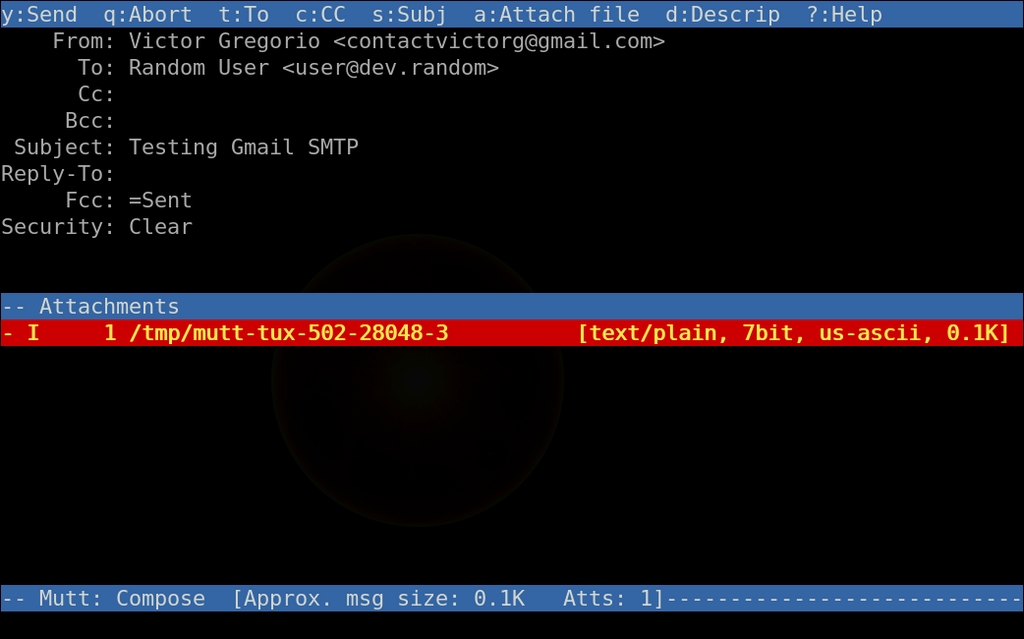
Figure 7. The Final Screen before Sending Mail in Mutt
Need an address book? No problem. By default, Mutt has support for alias, or contact, files. To start using aliases, create an empty ~/.mutt-alias file, then source and reference it inside your ~/.muttrc. Press A to save contacts while using Mutt. You can access contacts using Tab from the To, Cc or Bcc entry fields:
source ~/.mutt-alias
set alias_file=~/.mutt-alias
Alternatively, you can use abook. By design, the abook address book program integrates with the Mutt e-mail client. Install abook using your standard distribution tools, or compile the source code available at abook.sourceforge.net.
Set up a macro for A that calls abook. Macros are powerful tools in Mutt. They can pipe data into shell scripts or executables and allow for the customization of any keystroke:
set query_command= "abook --mutt-query '%s'"
macro index,pager A "<pipe-message>abook --add-email-quiet<return>"
With the new macro in place, press A to add a contact into your address book. You can query the abook contacts using Q.
Like most Linux power tools, Mutt is specialized. It manages e-mail very well and lets other programs worry about most of the rest. Editors and spell-checkers live outside of Mutt.
I prefer to use Vim. But, do you want to use GNU Emacs, GNU nano or another editor? Simply set it as your editor inside ~/.muttrc. By default, Mutt uses the $EDITOR environment variable if no editor is defined.
For spell-checking, I like Vim's spell-check as-you-type feature. Use these settings in your ~/.vimrc to underline misspelled words in red:
set spell
set spell spelllang=en_us
set spellfile=~/.vim/spellfile.add

highlight clear SpellBad
highlight SpellBad term=standout ctermfg=1
highlight SpellBad term=underline cterm=underline
highlight clear SpellCap
highlight SpellCap term=underline cterm=underline
highlight clear SpellRare
highlight SpellRare term=underline cterm=underline
highlight clear SpellLocal
highlight SpellLocal term=underline cterm=underline
Once Vim's spell-checking is enabled, you have these options available to you when your cursor is over a misspelled word:
zg to add a word to the word list.
zw to reverse.
zug to remove a word from the word list.
z= to get list of possible spellings.
Mutt has too many interesting features to outline in the scope of one article. However, one last feature I want to share with you is the bounce command. Bounce lets you resend a message to a new recipient. The message arrives at the new recipient from the original sender, not the bouncer. Why is this useful? Well, what if a ton of e-mail was sent to your work address instead of your personal e-mail address? Don't just forward the messages in bulk—bounce them. First, tag all the messages you want to bounce by pressing T and providing a regex search string that matches your selection. Use the sender's name, for example. Then, act on the queue by pressing B. Fill in your personal e-mail address, and press Enter to execute the bounce.
Do the keyboard commands seem obscure? They may at first, but they quickly will become resounding strokes of e-mail power chords. The effort will pay off. Mutt still is in active development, and you can expect this underdog to be around for a while.
There are some interesting features on the horizon for Mutt version 1.6. Brendan Cully, a Mutt developer and the SourceForge project administrator, provided this list of Mutt 1.6's features:
Native SMTP support.
IMAP/POP header and body caching, and maildir/MH header caching.
Significant IMAP performance enhancements (pipelined commands and IDLE support).
IMAP server-side search.
Flowed text support.
More flexible charset support.
User-defined variables (starting with $my_).
Large file support.
Attachment counts in the index.
Spam flagging.
S/MIME support.
Whatever version you use, check www.mutt.org for release details. If you want more, the muttrc(5) man page can walk you through all of the .muttrc parameters, and the mutt.org site has more examples. If you are feeling lazy, use muttrcbuilder.org to build a .muttrc file.
I hope that you have found some value in Mutt and that it improves your e-mail experience. If nothing else, Mutt can be an additional power tool in your sysadmin toolchest.
Resources
The Mutt E-Mail Client: www.mutt.org
The abook Address Book Program: abook.sourceforge.net
On-line .muttrc Generator: www.muttrcbuilder.org
Victor Gregorio lives in San Francisco, California, working as a Senior System Administrator and QA Engineer for Penguin Computing. He often can be found behind a camera or clicking away at a keyboard.

