
Paranoid Penguin - Secured Remote Desktop/Application Sessions
There are many different ways to control a Linux system over a network, and many reasons you might want to do so. When covering remote control in past columns, I've tended to focus on server-oriented usage scenarios and tools, which is to say, on administering servers via text-based applications, such as OpenSSH. But, what about GUI-based applications and remote desktops?
Remote desktop sessions can be very useful for technical support, surveillance and remote control of desktop applications. But, it isn't always necessary to access an entire desktop; you may need to run only one or two specific graphical applications.
In this month's column, I describe how to use VNC (Virtual Network Computing) for remote desktop sessions and OpenSSH with X forwarding for remote access to specific applications. Our focus here, of course, is on using these tools securely, and I include a healthy dose of opinion as to the relative merits of each.
So, which approach should you use, remote desktops or remote applications? If you've come to Linux from the Microsoft world, you may be tempted to assume that because Terminal Services in Windows is so useful, you have to have some sort of remote desktop access in Linux too. But, that may not be the case.
Linux and most other UNIX-based operating systems use the X Window System as the basis for their various graphical environments. And, the X Window System was designed to be run over networks. In fact, it treats your local system as a self-contained network over which different parts of the X Window System communicate.
Accordingly, it's not only possible but easy to run individual X Window System applications over TCP/IP networks—that is, to display the output (window) of a remotely executed graphical application on your local system. Because the X Window System's use of networks isn't terribly secure (the X Window System has no native support whatsoever for any kind of encryption), nowadays we usually tunnel X Window System application windows over the Secure Shell (SSH), especially OpenSSH.
The advantage of tunneling individual application windows is that it's faster and generally more secure than running the entire desktop remotely. The disadvantages are that OpenSSH has a history of security vulnerabilities, and for many Linux newcomers, forwarding graphical applications via commands entered in a shell session is counterintuitive. And besides, as I mentioned earlier, remote desktop control (or even just viewing) can be very useful for technical support and for security surveillance.
Having said all that, tunneling X Window System applications over OpenSSH may be a lot easier than you imagine. All you need is a client system running an X server (for example, a Linux desktop system or a Windows system running the Cygwin X server) and a destination system running the OpenSSH dæmon (sshd).
Note that I didn't say “a destination system running sshd and an X server”. This is because X servers, oddly enough, don't actually run or control X Window System applications; they merely display their output. Therefore, if you're running an X Window System application on a remote system, you need to run an X server on your local system, not on the remote system. The application will execute on the remote system and send its output to your local X server's display.
Suppose you've got two systems, mylaptop and remotebox, and you want to monitor system resources on remotebox with the GNOME System Monitor. Suppose further you're running the X Window System on mylaptop and sshd on remotebox.
First, from a terminal window or xterm on mylaptop, you'd open an SSH session like this:
mick@mylaptop:~$ ssh -X admin-slave@remotebox
admin-slave@remotebox's password: **********
Last login: Wed Jun 11 21:50:19 2008 from dtcla00b674986d
admin-slave@remotebox:~$
Note the -X flag in my ssh command. This enables X Window System forwarding for the SSH session. In order for that to work, sshd on the remote system must be configured with X11Forwarding set to yes in its /etc/ssh/sshd.conf file. On many distributions, yes is the default setting, but check yours to be sure.
Next, to run the GNOME System Monitor on remotebox, such that its output (window) is displayed on mylaptop, simply execute it from within the same SSH session:
admin-slave@remotebox:~$ gnome-system-monitor &
The trailing ampersand (&) causes this command to run in the background, so you can initiate other commands from the same shell session. Without this, the cursor won't reappear in your shell window until you kill the command you just started.
At this point, the GNOME System Monitor window should appear on mylaptop's screen, displaying system performance information for remotebox. And, that really is all there is to it.
This technique works for practically any X Window System application installed on the remote system. The only catch is that you need to know the name of anything you want to run in this way—that is, the actual name of the executable file.
If you're accustomed to starting your X Window System applications from a menu on your desktop, you may not know the names of their corresponding executables. One quick way to find out is to open your desktop manager's menu editor, and then view the properties screen for the application in question.
For example, on a GNOME desktop, you would right-click on the Applications menu button, select Edit Menus, scroll down to System/Administration, right-click on System Monitor and select Properties. This pops up a window whose Command field shows the name gnome-system-monitor.
Figure 1 shows the Launcher Properties, not for the GNOME System Monitor, but instead for the GNOME File Browser, which is a better example, because its launcher entry includes some command-line options. Obviously, all such options also can be used when starting X applications over SSH.
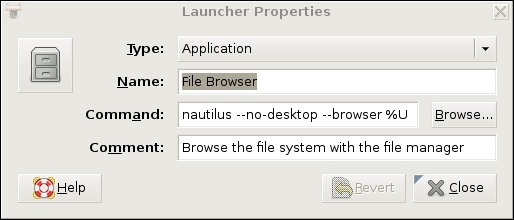
Figure 1. Launcher Properties for the GNOME File Browser (Nautilus)
If this sounds like too much trouble, or if you're worried about accidentally messing up your desktop menus, you simply can run the application in question, issue the command ps auxw in a terminal window, and find the entry that corresponds to your application. The last field in each row of the output from ps is the executable's name plus the command-line options with which it was invoked.
Once you've finished running your remote X Window System application, you can close it the usual way (selecting Exit from its File menu, clicking the x button in the upper right-hand corner of its window and so forth). Don't forget to close your SSH session too, by issuing the command exit in the terminal window where you're running SSH.
Now that I've shown you the preferred way to run remote X Window System applications, let's discuss how to control an entire remote desktop. In the Linux/UNIX world, the most popular tool for this is Virtual Network Computing, or VNC.
Originally a project of the Olivetti Research Laboratory (which was subsequently acquired by Oracle and then AT&T before being shut down), VNC uses a protocol called Remote Frame Buffer (RFB). The original creators of VNC now maintain the application suite RealVNC, which is available in free and commercial versions, but TightVNC, UltraVNC and GNOME's vino VNC server and vinagre VNC client also are popular.
VNC's strengths are its simplicity, ubiquity and portability—it runs on many different operating systems. Because it runs over a single TCP port (usually TCP 5900), it's also firewall-friendly and easy to tunnel.
Its security, however, is somewhat problematic. VNC authentication uses a DES-based transaction that, if eavesdropped-on, is vulnerable to optimized brute-force (password-guessing) attacks. This vulnerability is exacerbated by the fact that many versions of VNC support only eight-character passwords.
Furthermore, VNC session data usually is transmitted unencrypted. Only a couple flavors of VNC support TLS encryption of RFB streams, and it isn't clear how securely TLS has been implemented even in those. Thus, an attacker using a trivially hacked VNC client may be able to reconstruct and view eavesdropped VNC streams.
Luckily, as it operates over a single TCP port, VNC is easy to tunnel through SSH, through Virtual Private Network (VPN) sessions and through TLS/SSL wrappers, such as stunnel. Let's look at a simple VNC-over-SSH example.
But Don't Real Sysadmins Stick to Terminal Sessions?
If you've read my book or my past columns, you've endured my repeated exhortations to keep the X Window System off of Internet-facing servers, or any other system on which it isn't needed, due to X's complexity and history of security vulnerabilities. So, why am I devoting an entire column to graphical remote system administration?
Don't worry. I haven't gone soft-hearted (though possibly slightly soft-headed); I stand by that advice. But, there are plenty of contexts in which you may need to administer or view things remotely besides hardened servers in Internet-facing DMZ networks.
And, not all people who need to run remote applications in those non-Internet-DMZ scenarios are advanced Linux users. Should they be forbidden from doing what they need to do until they've mastered using the vi editor and writing bash scripts? Especially given that it is possible to mitigate some of the risks associated with the X Window System and VNC?
Of course they shouldn't! Although I do encourage all Linux newcomers to embrace the command line. The day may come when Linux is a truly graphically oriented operating system like Mac OS, but for now, pretty much the entire OS is driven by configuration files in /etc (and in users' home directories), and that's unlikely to change soon.
To tunnel VNC over SSH, your remote system must be running an SSH dæmon (sshd) and a VNC server application. Your local system must have an SSH client (ssh) and a VNC client application.
Our example remote system, remotebox, already is running sshd. Suppose it also has vino, which is also known as the GNOME Remote Desktop Preferences applet (on Ubuntu systems, it's located in the System menu's Preferences section). First, presumably from remotebox's local console, you need to open that applet and enable remote desktop sharing. Figure 2 shows vino's General settings.
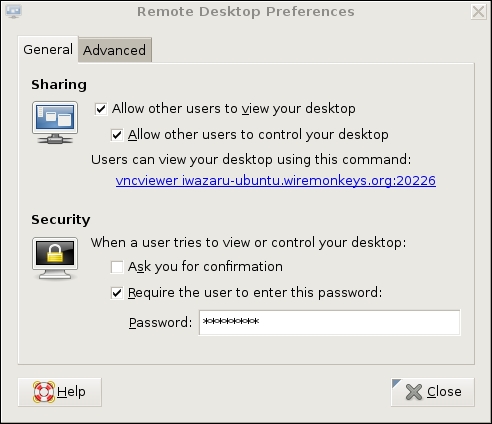
Figure 2. General Settings in GNOME Remote Desktop Preferences (vino)
If you want to view only this system's remote desktop without controlling it, uncheck Allow other users to control your desktop. If you don't want to have to confirm remote connections explicitly (for example, because you want to connect to this system when it's unattended), you can uncheck the Ask you for confirmation box. Any time you leave yourself logged in to an unattended system, be sure to use a password-protected screensaver!
vino is limited in this way. Because vino is loaded only after you log in, you can use it only to connect to a fully logged-in GNOME session in progress—not, for example, to a gdm (GNOME login) prompt. Unlike vino, other versions of VNC can be invoked as needed from xinetd or inetd. That technique is out of the scope of this article, but see Resources for a link to a how-to for doing so in Ubuntu, or simply Google the string “vnc xinetd”.
Continuing with our vino example, don't close that Remote Desktop Preferences applet yet. Be sure to check the Require the user to enter this password box and to select a difficult-to-guess password. Remember, vino runs in an already-logged-in desktop session, so unless you set a password here, you'll run the risk of allowing completely unauthenticated sessions (depending on whether a password-protected screensaver is running).
If your remote system will be run logged in but unattended, you probably will want to uncheck Ask you for confirmation. Again, don't forget that locked screensaver.
We're not done setting up vino on remotebox yet. Figure 3 shows the Advanced Settings tab.
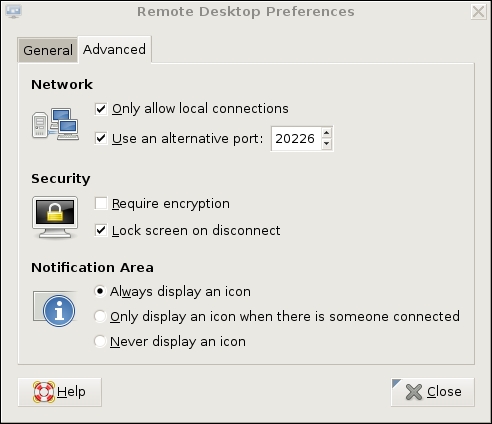
Figure 3. Advanced Settings in GNOME Remote Desktop Preferences (vino)
Several advanced settings are particularly noteworthy. First, you should check Only allow local connections, after which remote connections still will be possible, but only via a port-forwarder like SSH or stunnel. Second, you may want to set a custom TCP port for vino to listen on via the Use an alternative port option. In this example, I've chosen 20226. This is an instance of useful security-through-obscurity; if our other (more meaningful) security controls fail, at least we won't be running VNC on the obvious default port.
Also, you should check the box next to Lock screen on disconnect, but you probably should not check Require encryption, as SSH will provide our session encryption, and adding redundant (and not-necessarily-known-good) encryption will only increase vino's already-significant latency. If you think there's only a moderate level of risk of eavesdropping in the environment in which you want to use vino—for example, on a small, private, local-area network inaccessible from the Internet—vino's TLS implementation may be good enough for you. In that case, you may opt to check the Require encryption box and skip the SSH tunneling.
(If any of you know more about TLS in vino than I was able to divine from the Internet, please write in. During my research for this article, I found no documentation or on-line discussions of vino's TLS design details whatsoever—beyond people commenting that the soundness of TLS in vino is unknown.)
This month, I seem to be offering you more “opt-out” opportunities in my examples than usual. Perhaps I'm becoming less dogmatic with age. Regardless, let's assume you've followed my advice to forego vino's encryption in favor of SSH.
At this point, you're done with the server-side settings. You won't have to change those again. If you restart your GNOME session on remotebox, vino will restart as well, with the options you just set. The following steps, however, are necessary each time you want to initiate a VNC/SSH session.
On mylaptop (the system from which you want to connect to remotebox), open a terminal window, and type this command:
mick@mylaptop:~$ ssh -L 20226:remotebox:20226 admin-slave@remotebox
OpenSSH's -L option sets up a local port-forwarder. In this example, connections to mylaptop's TCP port 20226 will be forwarded to the same port on remotebox. The syntax for this option is “-L [localport]:[remote IP or hostname]:[remoteport]”. You can use any available local TCP port you like (higher than 1024, unless you're running SSH as root), but the remote port must correspond to the alternative port you set vino to listen on (20226 in our example), or if you didn't set an alternative port, it should be VNC's default of 5900.
That's it for the SSH session. You'll be prompted for a password and then given a bash prompt on remotebox. But, you won't need it except to enter exit when your VNC session is finished. It's time to fire up your VNC client.
vino's companion client, vinagre (also known as the GNOME Remote Desktop Viewer) is good enough for our purposes here. On Ubuntu systems, it's located in the Applications menu in the Internet section. In Figure 4, I've opened the Remote Desktop Viewer and clicked the Connect button. As you can see, rather than remotebox, I've entered localhost as the hostname. I've also entered port number 20226.

Figure 4. Using vinagre to Connect to an SSH-Forwarded Local Port
When I click the Connect button, vinagre connects to mylaptop's local TCP port 20226, which actually is being listened on by my local SSH process. SSH forwards this connection attempt through its encrypted connection to TCP 20226 on remotebox, which is being listened on by remotebox's vino process.
At this point, I'm prompted for remotebox's vino password (shown in Figure 2). On successful authentication, I'll have full access to my active desktop session on remotebox.
To end the session, I close the Remote Desktop Viewer's session, and then enter exit in my SSH session to remotebox—that's all there is to it.
This technique is easy to adapt to other versions of VNC servers and clients, and probably also to other versions of SSH—there are commercial alternatives to OpenSSH, including Windows versions. I mentioned that VNC client applications are available for a wide variety of platforms; on any such platform, you can use this technique, so long as you also have an SSH client that supports port forwarding.
Thus ends my crash course on how to control graphical applications over networks. I hope my examples of both techniques, SSH with X forwarding and VNC over SSH, help you get started with whatever particular distribution and software packages you prefer. Be safe!
Resources
The Cygwin/X (information about Cygwin's free X server for Microsoft Windows): x.cygwin.com.
Tichondrius' HOWTO for setting up VNC with resumable sessions—Ubuntu-centric, but mostly applicable to other distributions: ubuntuforums.org/showthread.php?t=122402.
Wikipedia's VNC article, which may be helpful in making sense of the different flavors of VNC: en.wikipedia.org/wiki/Vnc.
Mick Bauer (darth.elmo@wiremonkeys.org) is Network Security Architect for one of the US's largest banks. He is the author of the O'Reilly book Linux Server Security, 2nd edition (formerly called Building Secure Servers With Linux), an occasional presenter at information security conferences and composer of the “Network Engineering Polka”.

