
Paranoid Penguin - Samba Security, Part IV
For the past four months in this column, we've been building a secured Samba server for our local LAN, using Swat. To spare those of you who have been following this series a fourth summary of the usage scenario, let's suffice it to say, we're creating a series of file shares with varying user permissions.
This month, I wrap up the series by showing how to create a restricted, “owner-only” share and how to use mount.cifs to make persistent Samba mounts on your client systems.
Last month, we created a public share, SUPPER, and a nonpublic and group-readable share called CHORES. Prior to that, we had set up some global variables that are inherited by all shares. Those global variables were:
workgroup             = FED-CENTRAL
security              = user
client schannel       = yes
server schannel       = yes
map to guest          = Bad User
guest account         = nobody
unix password sync    = yes
valid users           = mick, knute, pepe, skippy, nobody
read list             = knute, pepe, skippy
write list            = mick
Attentive readers of Part II of this series [December 2008] may notice that I omitted “admin users” here, even though in Part II, I had set that to mick. This was an embarrassing mistake. On Ubuntu systems at least, this wreaks havoc with how Samba interacts with Linux file permissions.
You'll recall that setting “admin users” causes listed users to be logged on to Samba as root after successfully authenticating as themselves. In other words, if “admin users” is set to mick, any time mick successfully logs on to any share, he'll actually be logged on as root. The expected result is that mick, therefore, will have superuser privileges and won't be restricted from doing anything at all. In practice, the results tend to be much less predictable than that.
For example, on my Ubuntu 8.04 system, suppose I set “admin users” to mick, create a directory on the underlying Linux filesystem that's owned by mick and has permissions of -rwx------ (or 0700), and then I create a Samba share mapped to that directory that has no guest access or read access (that is, a share like the one I'm about to show you how to set up).
If I then try to connect to this share with this command:
bash-$ smbclient //CASA_DE_MICK/BUZZ-OFF -U mick
and enter the correct password when prompted, sure enough, silently and behind the scenes, I'll actually be logged on as root. But the result of this login will be:
Domain=[CASA_DE_MICK] OS=[Unix] Server=[Samba 3.0.28a]
tree connect failed: NT_STATUS_ACCESS_DENIED
What? How can this be? Access shouldn't be denied to anything, for root, should it? But denied it will be, if the share in question maps to a directory not owned by root. This may or may not happen on non-Ubuntu systems. My point is that using the “admin users” parameter may result in unpredictable interactions between Samba and Linux filesystems.
As I said last month, letting people use Samba shares with root privileges is dangerous anyhow. Samba client software isn't the correct tool for Samba system administration, Swat is. So now we have two good reasons always to leave “admin users” empty!
Now, let's move on to our share-specific settings. The smb.conf variables that configured SUPPER, as set via the Swat tool, looked like this:
path          = /home/mick/supper
read only     = yes
guest ok      = yes
invalid user  = root
valid users   =
read list     =
write list    = mick
admin users   =
hosts allow   = 192.168.44
hosts deny    = ALL
create mask   = 0644
browseable    = yes
available     = yes
These variables are set nearly the same for CHORES, except:
path          = /home/mick/chores
guest ok      = no
valid users   = +users
What do all these variables mean? I explained them in gory detail in the last three issues of LJ, and definitive descriptions can be found for all in the smb.conf(5) man page. Some of these will come into play this month too, as we create that restricted share.
You'll recall that our Samba server has four user accounts: pepe, skippy, knute and mick, which correspond to my three roommates and me. These are UNIX user accounts on my Samba server's underlying OS, with corresponding but separate entries in the Samba server's separate user database. (I explained how to create and synchronize Samba user accounts in Part II of this series, in the December 2008 issue.)
For our restricted share, BUZZ-OFF, only mick should have read access or write access. No other user should have any rights at all on this share. Accordingly, when we create the directory to which this share will point, we'll be sure it's owned by mick and has a permissions mask of 0700 (u+rwx,g-rwx,o-rwx), like this:
drwx------ 2 mick users 4096 2008-11-04 00:00 buzz-off
Figure 1 shows the first round of parameters we'll set upon creating this share in Swat's Basic View.
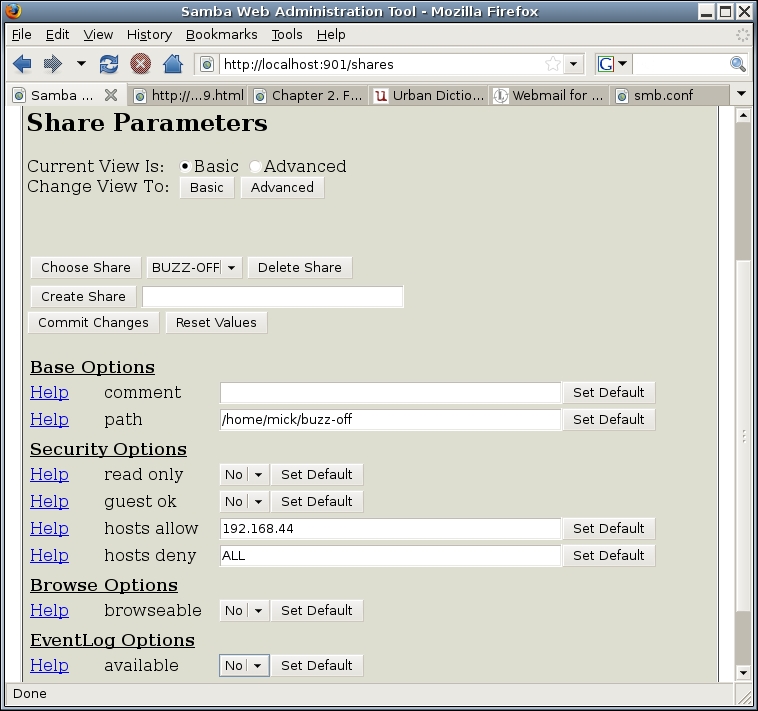
Figure 1. Restricted Share, Basic Settings
After setting the path, we set read only to no—I'll be creating new files in this share—and guest ok to no as well, because we don't want to allow any anonymous access. We'll set hosts allow and hosts deny the same as our other shares—to permit access only from the local LAN (your network address is, obviously, probably different).
We'll set browseable to no, so this share won't turn up in people's Network Neighborhood or in smbtree listings. To connect to this share, therefore, we'll need to specify its path when mapping it to a drive or connecting to it with smbclient.
And, we'll leave available set at no until we've clicked the Commit Changes button, clicked the Change View to Advanced button and changed some things in the Advanced View (Figure 2).
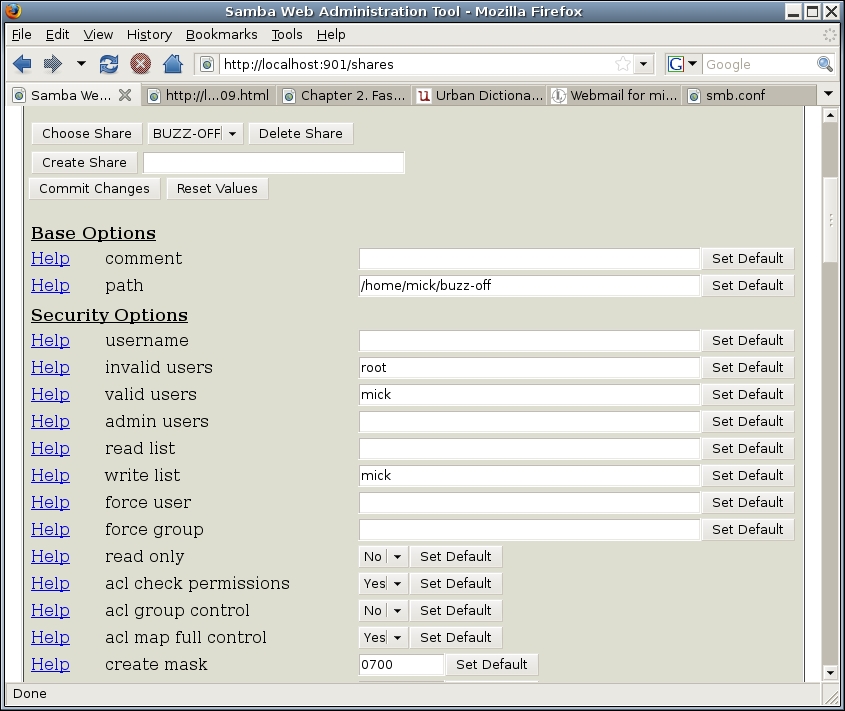
Figure 2. Restricted Share, Advanced Settings
As you can see, we're going to blank out the list of valid users except for mick and completely empty the contents of read list. The write list, however, correctly contains the single value of mick.
The only other setting we need to change is create mask, which we'll set to 0600. This is different from the 0700 mask we used when creating the directory itself; the directory's execute bit needs to be set so the directory can be used, but the contents of this directory, which is what the share represents, do not.
Now we can change available to yes and click the Commit Changes button. Our restricted share is ready for use!
To test this, let's first make sure the share doesn't turn up in the local Samba browse list. We can perform this test using smbtree, like so:
bash-$ smbtree -N -b
FED-CENTRAL
   \\CASA_DE_MICK   iwazaru-ubuntu server (Samba, Ubuntu)
      \\CASA_DE_MICK\print$   Printer Drivers
      \\CASA_DE_MICK\SUPPER   Mick's menus
      \\CASA_DE_MICK\CHORES   Chore lists
      \\CASA_DE_MICK\IPC$     IPC Service (iwazaru-ubuntu server
                              ↪(Samba, Ubuntu))
Sure enough, the new share BUZZ-OFF doesn't appear in the browse list. But, is it nonetheless usable by mick, its owner? Let's find out with smbclient:
bash-$ smbclient //CASA_DE_MICK/BUZZ-OFF -U mick
Password: ********
Domain=[CASA_DE_MICK] OS=[Unix] Server=[Samba 3.0.28a]
smb: \>
It worked. I've got a Samba prompt! There's no reason not to try a quick directory listing before exiting:
smb: \> dir
  .                         D        0  Tue Nov  4 23:17:34 2008
  ..                        D        0  Tue Nov  4 23:17:34 2008
  access-log_10312008.txt          665  Tue Nov  4 23:17:34 2008

        52008 blocks of size 262144. 13229 blocks available
smb: \> exit
Everything worked as expected. One last test—just to be sure, I want to try logging in to the share as a guest user. Remember that our Samba server is set up to treat any login involving a nonexistent user name as a guest login:
bash-$ smbclient //CASA_DE_MICK/BUZZ-OFF -U totallyfakeuser
Password: ********
Domain=[CASA_DE_MICK] OS=[Unix] Server=[Samba 3.0.28a]
tree connect failed: NT_STATUS_ACCESS_DENIED
It failed, in the expected and appropriate way. Our restricted share is accessible, insofar as we want it to be.
Now that I've got a restricted share available to me, suppose it will contain things I need to read and change on a regular basis. Do I need to access it via an interactive smbclient shell every time?
Of course not. The ability to mount remote Samba shares as though they were local volumes is one of the best things about Samba. You can do this by using the standard mount command, along with Samba's mount.cifs module, on your Samba client systems.
On Red Hat-derived and SUSE systems, the cifs filesystem and associated utilities are included with the standard samba-client package. On Debian, Ubuntu and other Debian derivatives, however, you'll need to install the package smbfs.
Although based on the same protocols, smbfs and cifs are actually two different things. cifs is newer than smbfs, and the smbmount command formerly used for mounting Samba file shares via the smbfs filesystem has been deprecated by the Samba team in favor of cifs and the mount.cifs module. smbfs and smbmount are still distributed with Samba, but they are not being actively maintained.
While we're installing Ubuntu packages, you'll also want the package winbind, which mount.cifs needs in order to resolve NetBIOS or Windows NT names (the Samba server we've been setting up uses NetBIOS name resolution, not Windows NT). SUSE users will need the package samba-winbind. I'm not positive, but I believe winbind is included in Red Hat/CentOS/Fedora's samba-client package.
After installing winbind, you should add the string wins to the hosts: line in /etc/nfsswitch.conf (only root can do this; you'll need to use su or sudo).
After mount.cifs and winbind are in place, you're ready to start mounting Samba shares. To to this manually from a command line, you can invoke the mount command as root or, as shown here, using sudo:
myclientlaptop-$ sudo mount -t cifs //CASA_DE_MICK/BUZZ-OFF
 ↪./mymountpoint -o rw,suid,user=mick
In this example, we're telling mount to use a filesystem type (-t) of cifs. We're mounting, obviously, the share BUZZ-OFF on the server //CASA_DE_MICK, using the mountpoint ./mymountpoint (which is an existing directory within my current working directory). Note that I can, if necessary, use my Samba server's IP address rather than its NetBIOS (or Windows NT) name, in which case, that part of the command would look something like //192.168.44.123/BUZZ-OFF.
The -o gives a list of options for this mount. The first option, rw, lets me both read files from and write them to the share. suid causes any set-uid bits on files in the share to be acknowledged. user passes my Samba user name to the mount.cifs module so it can authenticate the session. After entering the above command, I'll be prompted first for the root password and then for mick's password.
Whatever you do, do not enter your password on the command line using the password= option. Because shell commands may be logged in various places and are stored in shell histories, it's generally a terrible idea to use any password as a command argument.
If your Samba credentials are unimportant, for example, because they do not correspond to any user account with actual shell access, it's still a good idea to avoid passing its password to a command. A better option in that scenario is to use a credentials file, which is simply a text file containing a user name and password.
However, that method is not appropriate for storing any credentials you actually use to log in to systems. Even with strict file permissions set, it may be possible for some unauthorized person or process to copy or read the credentials file.
As with any type of filesystem mounting, you can save yourself typing by creating an entry for your mount in /etc/fstab. For the example we just used, a corresponding fstab entry would look like this:
//CASA_DE_MICK/BUZZ-OFF /home/mick/mymountpoint cifs
 ↪rw,noauto,suid,user=mick 0 0
As you can see, this line is very similar to the mount command line we used earlier. One new option here is noauto, which causes this line to be ignored at system startup—this Samba share won't be mounted until you issue a mount command, like this:
myclientlaptop-$ sudo mount /home/mick/mymountpoint
sudo will prompt you for the root password. (Again, if you aren't running Ubuntu, you could omit the sudo command and instead execute the rest of the command from a root shell session.) Then, mount will prompt you for mick's password.
Assuming authentication succeeds, you'll be able to use BUZZ-OFF as if it were part of your local filesystem, located in /home/mick/mymountpoint. When you're done working, you can unmount it like this:
bash-$ sudo umount /home/mick/mymountpoint
If you prefer your Samba mount to be activated every time your system starts, you can omit the noauto option in your fstab entry. However, unless you use a credentials file, you'll need to be present during each startup in order to enter the Samba password when prompted; otherwise, your startup will wait for you indefinitely. On a laptop system this probably isn't a problem, but on other types of systems it very well could be an issue.
Similarly, if your Samba server is unavailable for some reason when your client system starts up, this also can cause the client startup to hang or delay. When in doubt, stick to noauto mounting.
And, that's it for this series on Samba security. Funny how four columns can add up to only a basic tutorial, but I hope you've found it useful. Until next time, be safe!
Resources
“Samba Security, Part I”, LJ, November 2008: www.linuxjournal.com/article/10224
“Samba Security, Part II”, LJ, December 2008: www.linuxjournal.com/article/10256
“Samba Security, Part III”, LJ, January 2009: www.linuxjournal.com/article/10292
Mick Bauer (darth.elmo@wiremonkeys.org) is Network Security Architect for one of the US's largest banks. He is the author of the O'Reilly book Linux Server Security, 2nd edition (formerly called Building Secure Servers With Linux), an occasional presenter at information security conferences and composer of the “Network Engineering Polka”.
