
Paranoid Penguin - Samba Security, Part III
This month, we continue our exercise in building a secure file server for our local LAN using Samba. In case you missed the first two installments, this is a non-Internet-accessible file server to which users of a LAN can mount virtual disk volumes.
The example scenario I'm using is a boarding house in which I need to provide a world-readable file share containing menus (SUPPER), a group-readable share containing schedules of chores (CHORES) and a private share containing copies of Web logs (BUZZ-OFF).
Last month, we used Samba's Swat tool to configure our Samba server's Global settings. We then created four user accounts: mick, knute, pepe and skippy. Mick, of course, is me. Knute, Pepe and Skippy are the three FBI agents who rent my rooms and who are interested in my daily menus and weekly schedules of chores, but with whom I'd rather not share my Web logs.
This month, we create a public share for menus called SUPPER and a nonpublic but group-readable share for chore lists called CHORES. (We'll save the private share, BUZZ-OFF, for next time.)
As we've seen, Swat is arguably the best tool for configuring smb.conf, Samba's primary configuration file. Other tasks, like creating new user accounts, are best done from a command line (last month, we used the standard commands useradd and passwd to set up our accounts under Linux, and then smbpasswd to create corresponding Samba accounts).
To create shares, however, we can return to Swat. Unsurprisingly, the navigation button you must click is labeled Shares. After you do that, type the name SUPPER in the box to the right of the Create Share button, and then click that button. You should see something like Figure 1.
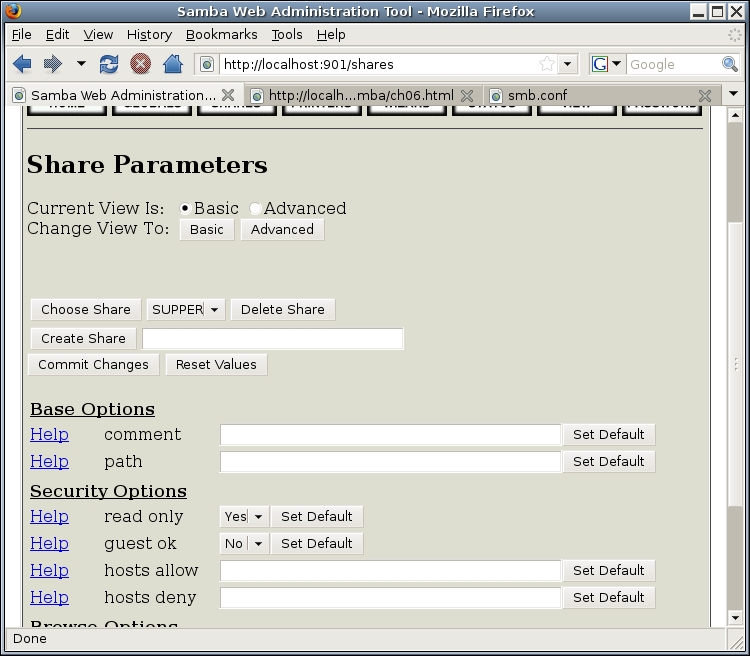
Figure 1. Creating a New File Share
Under Base Options, I set comment to Mick's Menus. Then, I set path to /home/mick/supper. This will be our weekly menu folder.
The value of path has to correspond to a real directory on your server. Furthermore, the Linux permissions and ownership of this directory need to be set to allow the desired level of access you want to grant. In this example, the directory listing of /home/mick/supper looks like this:
drwxr-xr-x 2 mick users 4096 2008-09-12 01:44 supper/
As you can see, the user mick has read-write-execute permissions, but group and other have only read-execute permissions. Now isn't the time for a primer on filesystem security (actually I've already written one: “Linux Filesystem Security”, in the October and November 2004 issues of Linux Journal). Suffice it to say for now that the commands for creating directories, setting user and group ownership and setting permissions, respectively, are mkdir, chown, chgrp and chmod.
A Note on Figures 1 and 2
The screenshots in Figures 1 and 2 show Ubuntu's default values for the various settings in Swat. They, therefore, do not provide, all by themselves, a model of how to configure Samba securely! Read the accompanying text for my recommended (secure) settings.
Let's set some security options shown in Figure 1. By default, at least on Ubuntu systems, Swat displays only four options under this section in its basic view, but that's a reasonable starting point.
The first of these is read only, which I leave at the Ubuntu default of yes, even though I want the user account mick to be able to publish new menus. (The setting write list, which I'll describe a little later in this article will override this setting.)
The second security setting shown in Figure 1 is guest ok, which I change to yes. (My guests, and those of my boarders, certainly will be keenly interested to know what side dishes will accompany Tuesday night's Coconut Tater-Tot Casserole.)
I should pause here for a quick review of how guest access works in Samba. Last month, when we configured Samba's global settings, we set the option map to guest to Bad User, which caused Samba to treat clients who log in with nonexistent user names as guests. We set the option guest account to nobody, which means that when people log on as a guest (either by providing a bad user name or by actually logging in as nobody), they will be logged in under the account nobody.
None of these global settings has any effect on a given share unless that share's guest ok option is set to yes. As we'll see shortly, that doesn't actually give guests any permissions on that share unless we do just a little more work.
First, there are two more security options to attend to in Figure 1: hosts allow and hosts deny can be used to define TCP Wrappers-like, network-level access controls on your share. You can learn everything you need to know about this from the hosts_access(5) man page.
In Figure 1, hosts allow will be set to 192.168.44., which means “allow access from clients whose source IP address' first three octets are 192.168.44”. In our example scenario, this corresponds to my local LAN address of 192.168.44.0/24. hosts deny is set to ALL, which means “deny access to all clients who do not match any value in hosts allow.”
In my opinion, there's no good reason not to use hosts allow and hosts deny with Samba unless your LAN is very complicated. It's not as important as making proper use of user and group accounts, enforcing the use of strong passwords and other things you should be doing, but it's nonetheless a useful layer in our defense onion.
At this point you may be wondering, how do we tell Samba who has write access and who has read-only access for this share? The four security options we've covered don't address that. The answer is, we've already established some default settings for this in the global section, and share-specific authorization controls can be set by switching from basic to advanced view in Swat, by clicking the Advanced button near the top of the screen. When you do that, you'll see something like Figure 2.
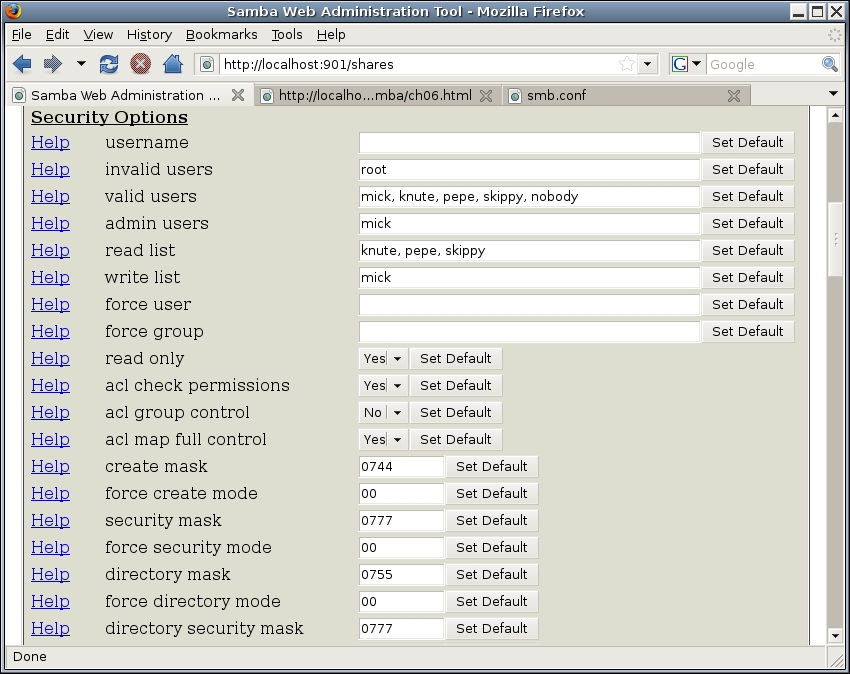
Figure 2. Share Security Options in Advanced View
But wait, what's this? Where did those values for valid users, read list and so forth come from, given my earlier sidebar note about these screenshots showing default settings?
As it happens, many of Samba's options can be declared both as global settings and as share-specific settings. When you set up a new share, Swat copies the values of any such options you set up under the global settings to the new share. So, Figure 2 represents Swat's settings after I've set up the global section but before I've fine-tuned the SUPPER share.
And, I do need to fine-tune it! On the one hand, invalid users is set to root as in the corresponding global option, which is a good value to propagate here; it's never a good idea to log in to much of anything directly as root.
But because I want this to be a public share, I'm going to remove all the users listed in valid users, which will have the effect of allowing clients to log in using any user name they provide. (Remember, though, anyone logging in with a user name outside the Samba user database or /etc/password will be logged on as nobody—that is, as a guest.)
Similarly, I'm going to empty read list as well, as read only is set to yes anyhow. (read list is sort of a blacklist: anyone whose user name is listed here will be granted only read access to this share regardless of any other setting in this share or under Globals.)
Another setting I'm going to empty is admin users. Like I said last month, this is a dangerous setting, and it's usually unnecessary. (I really shouldn't have set it to mick in the global section!) Not only will admin users operate with full Linux root privileges, all files they create will have a user owner of root, which can complicate both Samba and Linux filesystem permissions. Most of the time you might be tempted to set this option, it's probably sufficient instead simply to give that user write access.
And, you can do that with the option write list. In this case, we can leave the value of mick inherited from Globals.
The last security setting to change is create mask. This option determines the UNIX permissions that will be given to any files moved into or created in the share. Its value must be a chmod-style octal mode, as described in the chmod(1) man page.
The default value 0744, shown in Figure 2, translates to “owner read+write+execute, group read, other read”. However, because this share is going to contain text files, there's no reason for the group-execute bit to be set; 0644 (owner read+write, group read, other read) is a better choice.
To review, and for clarity's sake, Figure 3 shows the changed settings for these security options in Swat's advanced view.
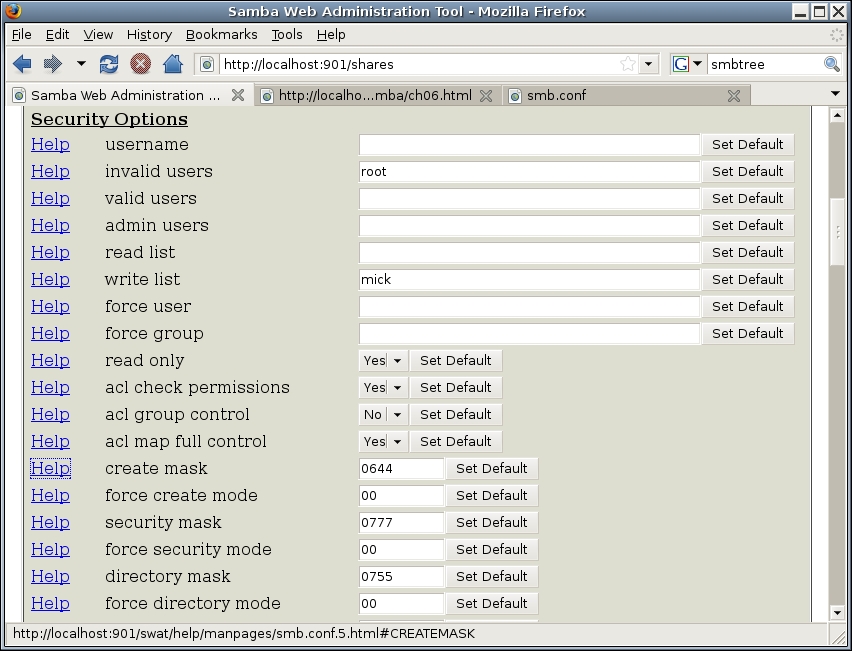
Figure 3. New Share Security Settings
We're almost done configuring this share. There are just two more options to check, and now you can switch back to basic view to find them quickly. The Browse Option browseable is set to yes by default on Ubuntu systems, which is appropriate for a public share.
The EventLog Option available, on the other hand, which is used to enable or disable a share, has the rather sensible default value of no. I say sensible, because it's never a good idea to activate anything before you're finished configuring and securing it! But, we are in fact done securing this share, so we'll change available to yes.
The last step is to click the Commit Changes button near the top of the Swat page. On my system, any time I click this button, the view resets to what appear to be default settings for printer shares! If this happens on your system too, all you need to do is click the Choose Share button again to display the changes you just committed.
After you create, delete or reconfigure a share, the changes will be applied immediately to your running Samba dæmons; there's no need to restart any of them.
Now that the SUPPER share is configured and available, it should start showing up in the Network Neighborhood (or other Windows network browser) of users connected to the LAN. Your Samba server, which we've configured to be a Browse Master for its workgroup, achieves this by sending out broadcasts.
However, in my experience, network browsers are often unreliable—it can take a while for your new workgroup, servers and shares to show up, and sometimes things disappear for no apparent reason. (Even for Windows clients, using the Map Network Drive feature to specify your share's path is both faster and more reliable than using the Network Neighborhood browser.)
So although you might get decent results testing your new share by simply firing up a network browser, I recommend using Samba's command-line tools instead, namely, smbclient and smbtree, which are included in Debian and Ubuntu's smbclient package, and in Red Hat and SUSE's samba-client package. I'll leave it to you to explore the smbtree(1) and smbclient(1) man pages, but I will give you a couple usage examples.
smbtree is a text-based Windows network browser that sometimes performs better than GUI-based browsers. To view all available workgroups, servers and public shares on your local LAN, use this command:
bash-$ smbtree -N -b
smbclient is a much more versatile command that can be used both to view and use Samba shares. To use smbclient to connect to our new share as the user nobody (guest), you can type:
bash-$ smbclient //CASA_DE_MICK/SUPPER -U nobody
Note the share-name syntax: //<servername>/<sharename>. You can use an IP address instead of the actual server name; this can result in a quicker login, because it allows smbclient to skip the name-resolution step. (Have I mentioned lately how inefficient the SMB/CIFS protocol is?)
Note also that to test the Bad User (guest-failover) behavior I described earlier, this command should be functionally equivalent to the previous one:
bash-$ smbclient //CASA_DE_MICK/SUPPER -U totallyfakeusername
You'll be prompted for a password. Simply press Enter without typing one (your nobody account shouldn't have a password!). If everything is working, you should see something like this:
Anonymous login successful
Domain=[FED-CENTRAL] OS=[Unix] Server=[Samba 3.0.28a]
smb: \>
At this point, you now have the Samba equivalent of an FTP shell—in fact, this environment is designed to be similar to FTP clients. To see a list of all available commands, you can enter ? or help. For now, we'll just do a quick directory by entering dir:
smb: \> dir
  .                            D     0  Tue Oct  7 13:22:28 2008
  ..                           D     0  Tue Oct  7 13:21:16 2008
  0-mon_filetmingon.txt             51  Mon Oct  6 21:05:34 2008
  1-tues_gruel.txt                  47  Tue Oct  7 13:05:54 2008
  2-wed_beefmushcasserole.txt        5  Tue Oct  7 13:06:32 2008

         52008 blocks of size 262144. 13782 blocks available
I'll leave it to you to figure out how to test copying files in both directions (put should work only for the user mick, but everyone else, including guests, should be able to list, get and read files).
On the strength of our SUPPER-creating experience, you'll find it fast and easy to create the group-readable share CHORES (which will contain lists of household tasks my boarders can perform in exchange for a rent discount). This share will be very similar to SUPPER: mick will have read and write access; pepe, skippy and knute will have read access only. However, unlike SUPPER, guest access will not be permitted.
Accordingly, after typing a new share name (CHORES) into the Create Share field and then clicking the Create Share button, we'll need to be sure to leave guest ok set to its default value of no. We'll set comment and path to Chore lists and /home/mick/chores, respectively (having first created this directory in a terminal window, and setting its ownership and permissions to be the same as for /home/mick/supper).
hosts allow and hosts deny can be the same as for SUPPER. browseable can be left at yes, but available should be left at no for now.
Figure 4 shows these settings (except available) for our new CHORES share.
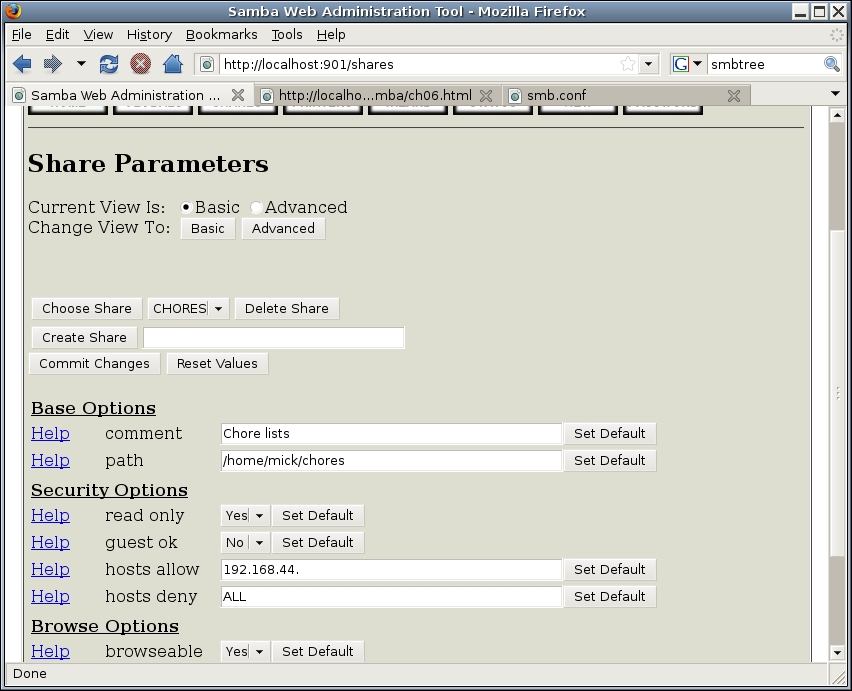
Figure 4. Basic View Settings (Customized) for CHORES
Now, we'll switch to Swat's advanced view for this share (if you aren't there already) by clicking the Advanced button. As with SUPPER, we'll blank out admin users, because we're paranoid, and also read users, as read only already is set to yes.
As you can see in Figure 5, however, I'm employing a bit of useful laziness in the valid users field for CHORES.
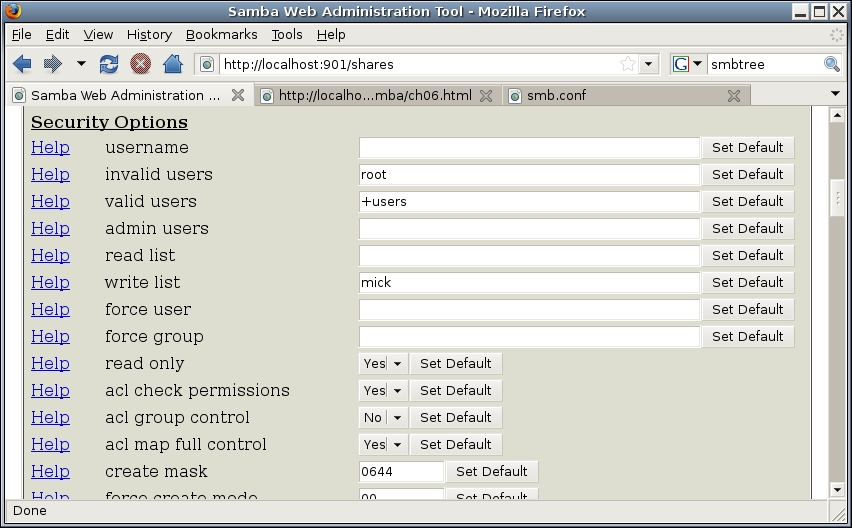
Figure 5. Advanced Security Settings (Customized) for CHORES
In the valid users field in Figure 5, the + in front of users instructs Samba to look up the name users in /etc/group, and then replace this entire value with a list of all members of the group users. Because on this server that group consists of mick, knute, pepe and skippy, Samba ultimately will set the value of valid users to mick, knute, pepe, skippy.
Needless to say, be careful with group names in this context. Before using one in Swat (or directly in smb.conf), be sure you know for certain exactly which user accounts belong to that group.
The quickest way to do this is to look up the group name in /etc/group and note its numeric value, noting also any secondary group members it has. Then, see which users in /etc/passwd have that group's number listed as its primary group.
Here's how this looks when enumerating the group users on my Ubuntu system:
mick@ubuntu@:~$ grep users /etc/group

users:x:100:

mick@ubuntu:~$ grep :100: /etc/passwd

dhcp:x:100:101::/nonexistent:/bin/false
mick:x:1003:100:Mick Bauer:/home/mick:/bin/sh
knute:x:1004:100:Knute:/home/knute:/bin/sh
pepe:x:1005:100:Pepe:/home/pepe:/bin/sh
skippy:x:1006:100:Skippy:/home/skippy:/bin/sh
As you can see, there are no secondary users listed at the end of the user's entry in /etc/group. My second grep command turned up five users, not the four I was expecting, but dhcp matched only because its numeric user ID (not its group ID) is 100.
The other settings we should change are create mask, which we'll again set to 0644, and then browseable, which we now can safely change to yes. Finally, we can click the Commit Changes button, and CHORES is ready to go. Preferably using another system, test it to make sure it works the way you expect.
That's all we've got space for this month. Next time, we'll create that third, mick-only share (I'll bet you can figure that out yourself beforehand), create persistent Samba mounts on our client systems using smbmount and at least briefly address some miscellaneous Samba security topics, such as how to make Samba automatically and safely serve people's home directories. Until then, be safe!
Resources
“Linux Filesystem Security, Part I”: www.linuxjournal.com/article/7667
“Linux Filesystem Security, Part II”: www.linuxjournal.com/article/7727
Mick Bauer (darth.elmo@wiremonkeys.org) is Network Security Architect for one of the US's largest banks. He is the author of the O'Reilly book Linux Server Security, 2nd edition (formerly called Building Secure Servers With Linux), an occasional presenter at information security conferences and composer of the “Network Engineering Polka”.
