
Paranoid Penguin - Samba Security, Part II
Last month, I began a multipart series of articles on how to build a secure file server based on Samba for local (non-Internet-facing) use. I gave an overview of file server security goals, described why Samba might be the best tool for the particular job of serving “network drives” to clients on different platforms connected to a Local Area Network, defined a number of Samba acronyms and concepts, and explained how to install the Samba server dæmons, client utilities and its configuration GUI, Swat.
This month, I expand upon our usage scenario and begin demonstrating how to construct an smb.conf file that executes this scenario in a secure fashion. As usual, I cover not only security, but also how to get things working in general—it isn't helpful to be told how to secure a process that isn't behaving the way you expect in the first place.
As I explained last month, we want to build a convenient and secure file server that supports both Windows and Linux (and other *nix) clients. Specifically, we want to build a non-Internet-facing Samba file service that supports several different levels of security: Guest (anonymous) access, read-only access for some authorized users and read/write access for other authorized users.
To use more Samba-specific terms, our server will operate with “user-mode” security, using a combination of local Linux/UNIX user account information and Samba-specific hashes of those users' passwords to authenticate access to workgroup resources. A workgroup, you may remember from last month, may include shares provided by multiple Samba servers, but each server in that workgroup must maintain its own user database independently (which is why Domains and Active Directories are better choices than workgroups for more complex environments). Accordingly, our sample workgroup will use a single server.
To flesh out our example scenario still further, let's suppose I've got a boardinghouse and my tenants are a trio of FBI special agents: Skippy, Knute and Pepe. Being fond of my cooking, they keep a close watch on my weekly meal schedule, which I post on my Samba server every Sunday night—you can bet nobody works late any evening on which tater tots will be served. This schedule is a public document, as far as I'm concerned (I'm vain about my cooking).
If my resident agents help mow the grass, feed the hedgehogs and tune the piano, they get a break on rent. So, I also maintain a schedule of chores they all can read, but which, of course, I don't want them to be able to change themselves (imagine the outrage if Pepe always got to feed the hedgehogs).
Besides, being secret agents after all, these guys don't want anyone else to know who'll be outside raking the compost on any given Saturday—you never know when the enemies of freedom might strike. So, the chore schedule is private, and it can be read but not altered by my tenants.
Finally, unbeknownst to the boys, their boss has asked me to log their Web-surfing activity from my firewall. Although the joke's on him (they all use TOR), these logs are nonetheless super-secret. Actually, those logs probably don't belong on any file server at all, but sometimes I amuse myself by adding fake entries to Skippy's log (“GET HTTP://thesharperimage.com/expensive_gifts_for_your_boss.html”), so my firewall stores them on a restricted share on the Samba server.
To summarize, I need to create a workgroup (I'll call it FED-CENTRAL) with four user accounts (skippy, knute, pepe and mick) and three file shares (SUPPER, CHORES and BUZZ-OFF).
With that, we are ready to go. Assuming you successfully installed the Samba server and client packages per last month's instructions, the first step in configuring Samba is to set some global variables.
There are two different ways to configure Samba. The first is by editing /etc/samba/smb.conf directly using your text editor of choice, and then restarting the smbd and nmbd Samba dæmons. You very well may gravitate to this method as soon as you're comfortable with Samba, because it's the quickest and most direct way to change Samba's behavior.
Lately, I've become a big fan of the second way, however: Swat, the Samba Web Administration Tool. If you're scandalized by my endorsing a graphical tool that requires you to set a root password (which, by default, doesn't exist on Ubuntu systems), see last month's column. Suffice it to say that in this case, I'm not talking about an Internet-facing system, and the educational benefits of Swat outweigh its security risks here.
Besides, Swat really isn't a crutch; it simply presents you with a Web form for assigning values to all possible variables in smb.conf, with convenient Help buttons that send you directly to the appropriate section of the relevant man page. The more you use Swat, the more comfortable you'll be editing smb.conf directly. How many GUIs can you say that about?
I'm going to assume you had no problems with the instructions I provided last month on installing Samba and Swat, including configuring and restarting inetd, and that Ubuntu users were able to stomach issuing the sudo passwd root to set a root password. (And, even if you weren't, or simply prefer not to use Swat, all of what follows still should be useful, because the variables and values in my Swat screenshots and examples are the same as those contained in smb.conf.)
Running Swat is easy. Simply start your browser of choice, and point it to http://localhost:901/. The first thing you'll see is Swat's Home page, which consists of a row of navigation buttons (Home, Globals, Shares, Printers and so forth). These appear on every one of Swat's screens, but unique to the Home page is a list of links to local man pages, HOWTOs and even complete books. I leave it to you to explore those; this page leads to a wealth of useful information for Samba users at all levels of skill and experience.
For now, however, let's dive right into Samba's global settings. If you click the Globals button, and then scroll down to where the actual settings begin, you should see something like Figure 1.
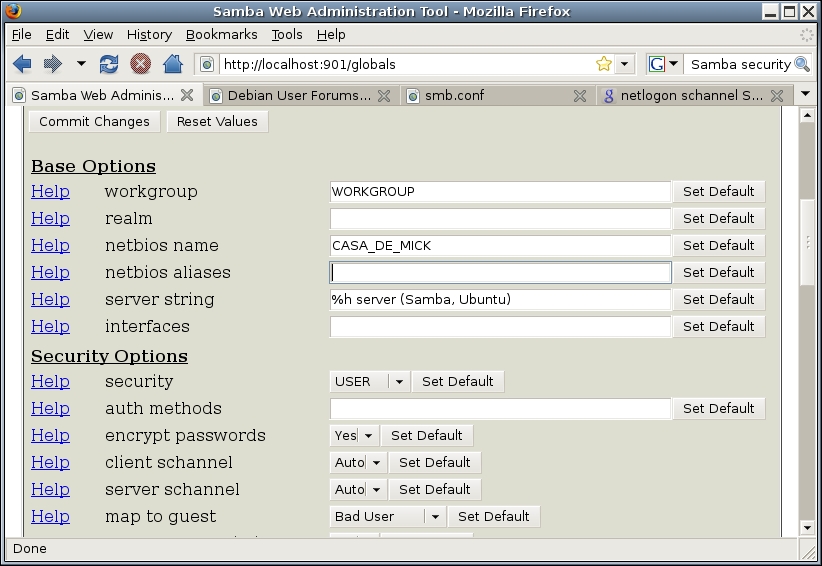
Figure 1. Some Global Settings
Obviously, we want to change the value of workgroup from WORKGROUP to FED-CENTRAL. The default for netbios name, however, is the hostname Samba automatically read in from /etc/hostname, and you usually can leave that alone, although you don't have to. This is the name that turns up in people's “network neighborhood” browser when they look for your server.
The default value for security, which is user, also is exactly what we want. The same is true of encrypt passwords being marked yes.
The next two variables, however, client schannel and server schannel, need to be changed. Schannel refers to the secure channel method of allowing Samba clients to log on to Samba servers, and we don't want this to be optional. We want it to be mandatory. Therefore, for both of those variables, we should change the value from auto to yes.
The last variable shown in Figure 1 is map to guest. That value tells Samba under what circumstances it should grant guest access to a client that has just had a failed login attempt. Samba's default for this is normally never, which effectively disables guest access. But, as you can see in Figure 1, on my Ubuntu system, the default value actually is Bad User, which means that if people try to log on with a nonexistent user name, they'll be given guest access.
If you scroll farther down on Samba's Global page, you should see something like Figure 2.
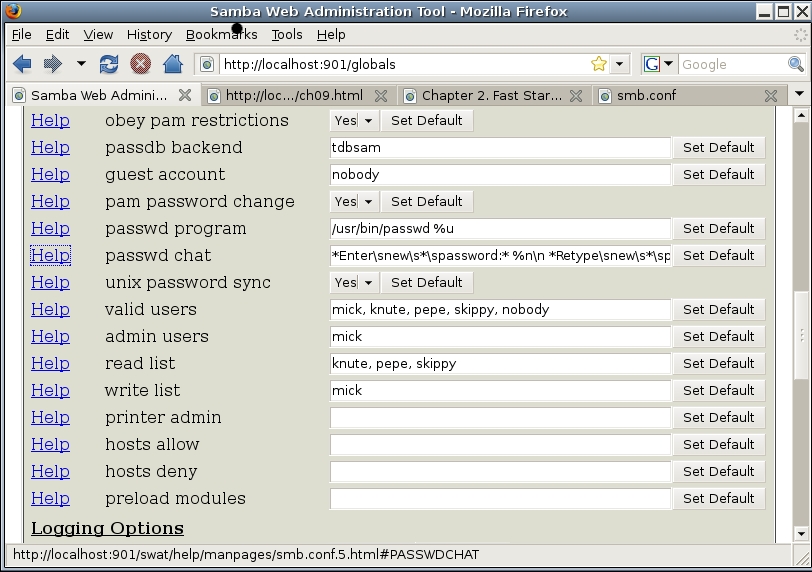
Figure 2. More Global Settings
Continuing through these global settings, obey pam restrictions implies that Samba will honor PAM (Pluggable Authentication Modules) settings. But in practice, if encrypt passwords remains set to yes, Samba will ignore PAM altogether.
passdb backend specifies what type of database Samba should use to store its password hashes. The default (tbdsam) is usually the best choice.
guest account is the local Linux account that will be used for clients who fail authentication, as I described earlier when talking about map to guest. passwd program, passwd chat and unix password sync involve how and whether Samba mediates end users' attempts to change their passwords via Samba (Windows file sharing) sessions. Leave these at the default settings unless you don't want users to be able to change their passwords that way.
By now, you may be wondering, what's the difference between Samba's password database and the list of hashes stored in /etc/shadow, given the fact that they correspond to the same set of local user accounts? The short answer is, Samba (SMB/CIFS) uses an authentication protocol with which UNIX password hashes are not compatible.
The bad news is that Samba's password database is, thus, totally redundant with Linux's, and it creates the potential for users having to remember two different passwords. The good news is that if passwd program and passwd chat are set correctly (which they should be by default, if you use your Linux distribution's official Samba packages), and unix password sync is set to yes, Samba automatically will update users' Linux passwords every time they change their Samba password. (I talk about this more in the next section.)
Moving on, valid users allows you to specify a list of Linux/UNIX user accounts to which you want to grant access to Samba shares. The default value "" (null) results in all local Linux accounts being valid. For our example scenario, I've set valid users to mick, knute, pepe, skippy and nobody.
admin users allows you to grant superuser privileges on all shares for one or more local user accounts, regardless of Samba or Linux file permissions on that share. Be careful with this setting! It has the effect of executing local commands as root on behalf of such users. In Figure 2, I've specified mick as an admin user, because I often use that account for system administration tasks anyhow.
read list allows you to specify which users should have default read-only permissions on shares. As you can see in Figure 2, I've set our read list to knute, pepe and skippy.
Similarly, write list specifies a list of users who should have read-write privileges by default. I've set that value to mick.
printer admin is out of the scope of this article for now (though I may cover printer shares later in this series). hosts allow and hosts deny, however, are noteworthy. They allow you to create TCP Wrappers-style access control lists. hosts allow is a whitelist of IP addresses, network addresses, hostnames or domain names that should be allowed to connect by default (assuming successful authentication, of course).
hosts deny is a blacklist, also consisting of IP addresses, network addresses and so forth, whose members won't even be permitted to attempt authentication. Samba will break any connection attempted by any host matching this list. The hosts_access(5) man page provides complete information about the syntax of the values of these two variables.
And, that's it for global settings, for now. To write the changes we've made to our working /etc/samba/samba.conf file, click Swat's Commit Changes button.
Some of the variables you set to custom strings, such as valid users, may not appear when the screen refreshes. To see them, simply click the Advanced View button (next to Change View To: near the top of the page).
The last task we've got space for this month is setting up our user accounts, and there are four steps:
Create the accounts under Linux.
Assign those accounts Linux passwords.
Create Samba password database entries for each.
Have the users change their Samba passwords.
Step one is to use whatever method you usually use to create user accounts on your system—either by using your system administration GUI of choice (such as GNOME's Users and Groups applet) or via the commands useradd, userdel and so forth.
For example, to create Pepe's account, I could use the following command. Note the sudo, necessary for Ubuntu. On other distributions, su to root before executing these commands, and omit the sudo that each begins with here:
bash-$ sudo useradd -c "Pepe" -m -g users pepe
This creates the user account pepe with the comment Pepe, automatically creates a home directory (/home/pepe) and assigns it to the group users. To be extra paranoid, you could insert the string -s /bin/false after -g users, which will disable normal Linux logins for Pepe's account, making it useless for anything other than Samba access.
Step two is to set each user's Linux password, like this:
bash-$ sudo passwd pepe
Obviously, you need to communicate whatever password you set here to Pepe in a secure fashion, and Pepe will need to change this password to something you don't know. (But that part happens in step four.)
Step three is to use the smbpasswd command to create each user's Samba password database entry, like so:
bash-$ sudo smbpasswd -a pepe
You'll be prompted to set and confirm Pepe's Samba password, after which the new account will be added. It's probably a good idea to use the same initial password here that you used in step two.
Finally, you'll want Pepe to log in to the system (assuming you didn't set his shell to /bin/false) and issue the following command:
pepe@casademick$ smbpasswd
Pepe will be prompted for his old password, his new password and confirmation of his new password. Assuming all three of those are good, Samba will change both Pepe's Samba password and his Linux password accordingly. Note that this synchronization does not occur when you create a new Samba password entry as root, using the -a flag.
If Pepe has an invalid shell, such as /bin/false, you'll have to let him sit at your console while you type the command sudo smbpasswd pepe, and then turn your back while he changes his password. You'll then need to do the same thing with the command sudo passwd pepe, because Samba does not synchronize Linux/UNIX passwords if you execute smbpasswd as root.
Regenerating smb.conf in Debian/Ubuntu
What if, in the process of tinkering with your Samba configuration, you so completely lose track of what you've changed versus what you started with that you want to begin again with the default /etc/samba/smb.conf file? And, what if you failed to create a backup copy of smb.conf before you changed it?
You might think Swat could do this. Swat has default buttons next to each configuration option. Clicking a default button is supposed to replace your custom value with the value from the default smb.conf file included with Samba. However, in my own experience, the behavior of these buttons is erratic. Sometimes null values are (incorrectly) returned, and clicking the default button for every option is time consuming anyhow.
My advice is that if you're using Debian or one of its derivatives, such as Ubuntu, and you need a fresh smb.conf file, you should completely un-install the package samba-common, and then re-install it. (This also will result in things that depend on samba-common to be un-installed, so note which packages you'll need to re-install after you've restored samba-common.)
In between removing and re-installing samba-common, you may want to check /etc/samba to make sure smb.conf is truly gone, and delete it if it isn't.
We've specified our usage scenario, set up some basic global settings using Swat and started adding users. Next month, we'll create the actual shares, but if you can't wait until then, you'll have no problem figuring out how using Swat's ample documentation. The “Official Samba 3.2.x HOWTO and Reference Guide” (see Resources) also may help. Have fun, and be safe!
Resources
Christopher R. Hertel's On-line Book Implementing CIFS, a Comprehensive Source of Information on All Things CIFS/SMB-Related: www.ubiqx.org/cifs
“The Official Samba 3.2.x HOWTO and Reference Guide”: us1.samba.org/samba/docs/man/Samba-HOWTO-Collection
Mick Bauer (darth.elmo@wiremonkeys.org) is Network Security Architect for one of the US's largest banks. He is the author of the O'Reilly book Linux Server Security, 2nd edition (formerly called Building Secure Servers With Linux), an occasional presenter at information security conferences and composer of the “Network Engineering Polka”.

