
PAM—Securing Linux Boxes Everywhere
If you are into British detective fiction and names like Sherlock Holmes, Sexton Blake, Mr. J. G. Reeder, Miss Marple, Hercule Poirot, Father Brown, Dr. John Evelyn Thorndyke and Lord Peter Wimsey mean anything to you, you also probably will recognize E. W. Hornung's (brother-in-law to Sir Arthur Conan Doyle, the creator of Sherlock Holmes) character: the white-glove thief, Raffles. In the “A Jubilee Present” short story, the thief is fascinated with an antique gold cup, displayed at the British Museum. Upon finding only one guard, Raffles questions him on the perceived lack of security and gets the confident answer, “You see, sir, it's early as yet; in a few minutes these here rooms will fill up; and there's safety in numbers, as they say.” With Linux, rather than security by numbers (which eventually is no good for the poor guard; see Resources for a link to the complete story), security is managed by Pluggable Authentication Modules (PAM). In this article, we study PAM's features, configuration and usage.
Let's start at the beginning and consider how an application authenticates a user. Without a common, basic mechanism, each application would need to be programmed with particular authentication logic, such as checking the /etc/passwd for a valid user and password. But, what if you have several different applications that need authentication? Do you include the same specific logic in all of them? And, what if your security requirements vary? Would you then have to modify and recompile all those applications? This wouldn't be a practical method and surely would become a vulnerability. How would you be sure that all applications were duly updated and correctly implemented your new specifications?
The PAM Project provides a solution by adding an extra layer. Programs that need authentication use a standard library or API (Application Programming Interface), and system administrators can configure what checks will be done by that library separately. (Checks are implemented via independent modules; you even can program your own modules.) This way, you can change your security checks dynamically, and all utilities will follow your new rules automatically. In other words, you can modify the authentication mechanism used by any PAM-aware application, without ever touching the application itself. For programmers, this also is a good thing, because they need not be concerned with the mechanisms that will be used. Simply by using the PAM libraries, whenever the application is run, the appropriate checks will be made (Figure 1).
The PAM library breaks down authentication in four areas or groups (Table 1). Note that all applications won't always require the four previous actions. For example, the passwd command will require only the last group. (Quick tip: how can you learn whether an application uses PAM? Use ldd to print the shared libraries required by the program, and check for libpam.so; see Listing 1 for an example.)
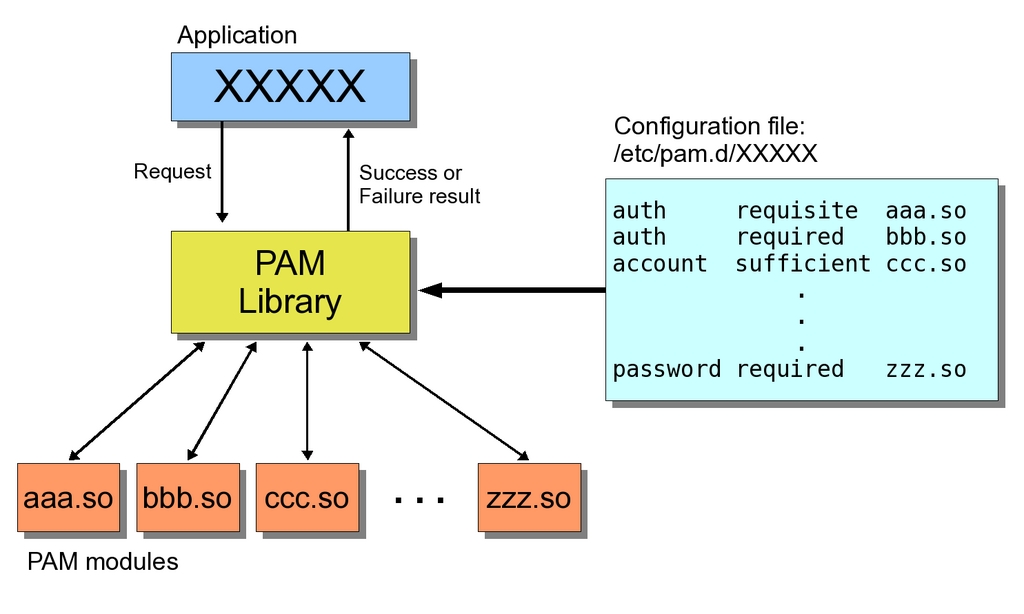
Figure 1. Whenever an application does an authentication request, the PAM library executes whatever modules are specified in the configuration file and decides whether to approve (success) or reject (failure) the request.
Listing 1. To learn whether a program uses PAM, use ldd and look for the libpam.so library. You need to provide the full path to the program; use whereis if you don't know it.
$ whereis login
login: /bin/login /etc/login.defs /usr/share/man/man3/login.3.gz
 ↪/usr/share/man/man1/login.1.gz
$ ldd /bin/login
        linux-gate.so.1 =>  (0xffffe000)
        libpam_misc.so.0 => /lib/libpam_misc.so.0 (0xb7eff000)
        libpam.so.0 => /lib/libpam.so.0 (0xb7ef3000)
        libaudit.so.0 => /lib/libaudit.so.0 (0xb7edf000)
        libc.so.6 => /lib/libc.so.6 (0xb7dac000)
        libdl.so.2 => /lib/libdl.so.2 (0xb7da8000)
        /lib/ld-linux.so.2 (0xb7f25000)
Table 1. PAM has four groups of checks, organized as stacks. The groups that will be used depend on what the user requires.
| auth | Related to user identification, such as when a user needs to enter a password. This is usually the first set of checks. |
| account | Has to do with user account management, including checking whether a password has expired or whether there are time-access restrictions. Once users have been identified by the authentication modules, the account modules will determine whether they can be granted access. |
| session | Deals with connection management, with actions such as logging entries or activities, or doing some cleanup actions after the session ends. |
| password | Includes functions such as updating users' passwords. |
Table 2. For each stack, modules are executed in sequence, depending on their control flags. You must specify whether the corresponding check is mandatory, optional and so on.
| required | This module must end successfully. If it doesn't, the overall result will be failure. If all modules are labeled as required, any single failure will deny authentication, although the other modules in the stack will be tried anyway. |
| requisite | Works like required, but in case of failure, returns immediately, without going through the rest of the stack. |
| sufficient | If this module ends successfully, other modules will be skipped, and the overall result will be successful. |
| optional | If this module fails, the overall result will depend upon the other modules. If there are no required or sufficient modules, at least one optional module should end successfully to allow authentication. |
For each service (such as login or SSH), you must define which checks will be done for each group. That list of actions is called a stack. Depending on the results of the actions in each stack, users will succeed or fail, and whatever they attempted to do will be allowed or rejected. You can specify each action in the stack for each service using a specific file at /etc/pam.d (the more current method) or by editing the single, catchall file /etc/pam.conf (the older method); in this article, we use the former method.
Note:
Remember that playing with configuration files can be dangerous to your health! A particularly nasty thing to do is remove all configuration files accidentally, because then you won't be able to log back in again. Make sure to back up all files before you start experimenting and have a live CD available just in case.
Each stack is built out of modules, executed sequentially in the given order. For each module, you can specify whether it's necessary (failure automatically denies access), sufficient (success automatically grants access) or optative (allows for alternative checks). Table 2 shows the actual control flags. The file for each service consists of a list of rules, each on its own line. (Longer lines can be split by ending with a \, but this is seldom required.) Lines that start with a hash character (#) are considered to be comments and, thus, are ignored. Each rule contains three fields: the context area (Table 1), the control flag (Table 2) and the module that will be run, along with possible (optional) extra parameters. Thus, the specification for the PAM checks for login would be found in the /etc/pam.d/login file.
The control flag field actually can be more complicated, but I won't cover all the details here. See Resources if you are interested. Also, you can use include, as in auth include common-account, which means to include rules from other files.
There is a special, catchall service called other, that is used for services without specific rules. A good start from a security point of view would be creating /etc/pam.d/other, as shown in Listing 2. All attempts are denied, and a warning is sent to the administrator. If you want to be more forgiving, substitute pam_unix2.so for pam_deny.so, and then the standard Linux authentication method will be used, although a warning will still be sent (Listing 3). If you don't care about security, substitute pam_permit.so instead, which allows entry to everybody, but don't say I didn't warn you.
Finally, give the files in /etc/pam.d a quick once-over. If you find configuration files for applications you don't use, simply rename the files, so PAM will fall back to your “other” configuration. Should you discover later that you really needed the application, change the configuration file back to its original name, and everything will be okay again.
Listing 2. A safe “other” definition forbids all generic access in absence of specific rules. The pam_deny.so module always returns failure, so all access attempts will be rejected, and pam_warn.so sends a warning to the sysadmin.
#
# default; deny all accesses
#
auth    required       pam_deny.so
auth    required       pam_warn.so
account required       pam_deny.so
password        required        pam_deny.so
password        required        pam_warn.so
session required        pam_deny.so
Listing 3. A PAM definition, equivalent to the standard UNIX security rules. Note: on some distributions, you might need to use pam_unix.so instead.
#
# standard UNIX minimalistic rules
#
auth    required        pam_unix2.so
account required        pam_unix2.so
password        required        pam_unix2.so
session required        pam_unix2.so
Listing 4. The /etc/pam.d/sshd specifies security rules for SSH connections. The pam_access.so module was added to the standard configuration to provide further checks.
auth    required        pam_unix2.so
auth    required        pam_nologin.so
account required        pam_unix2.so
account required        pam_access.so
session required        pam_limits.so
session required        pam_unix2.so
session optional        pam_umask.so
password        requisite       pam_pwcheck.so cracklib
password        required        pam_unix2.so use_authtok
Listing 5. The /etc/security/access.conf is used by pam_access.so to decide which users are allowed to log in and from which IPs. In this case, everybody from the local network can log in, but only remoteKereki is allowed external access.
+ : ALL : 192.168.
+ : remoteKereki : ALL
- : ALL : ALL
Listing 6. The password section of the /etc/pam.d/passwd file that enforces good practices for new passwords.
#
# retry=3 allows three tries for a new password
# minlen=10 requires at least ten characters
# ucredit=-1 requires at least one uppercase character
# lcredit=0 accepts any number of lowercase characters
# dcredit=-2 requires at least two digits
# ocredit=-1 requires at least one non-alphabetic symbol
#
password required pam_cracklib.so retry=3 minlen=10 \
     ucredit=-1 lcredit=0 dcredit=-2 ocredit=-1
#
# As pam_cracklib only checks passwords, but doesn't store
# them, we require the standard pam_unix module for this.
# The use_authtok parameter ensures pam_unix won't ask for a
# password by itself, but rather will use the one provided by
# pam_cracklib.
#
password  required pam_unix.so use_authtok nullok
To get a handle on all this, let's consider an actual application. I wanted to be able to access my machine remotely with SSH, but I didn't want to allow any other users (Listing 4). So, I configured my /etc/pam.d/sshd file. See the Modules, Modules Everywhere sidebar for more details on these and other modules. Here are some of the modules I used:
pam_unix2.so: provides traditional password, rights, session and password-changing methods, in the classic UNIX way.
pam_nologin.so: disallows login if the file /etc/nologin exists.
pam_access.so: implements extra rules for access control (more later in this article on how I used this).
pam_limits.so: enforces limits for users or groups according to the file /etc/security/limits.conf.
pam_umask.so: sets the file mode creation mask for the current environment (do info umask for more information).
pam_pwcheck: enforces password-strength checks (more details on further uses of this module later in this article).
If you check your own /etc/pam.d/sshd file, it probably will look like this, except for the pam_access module, which is the interesting part. This module implements added security controls based on the /etc/security/access.conf file. I edited it in order to specify who could access my machine (Listing 5). The first line means that anybody (ALL) can log in to my machine from within the internal network at home. The second line allows the remoteKereki user to access my machine from anywhere in the world, and the final line is a catchall that disables access to anybody not included specifically in these lines. I created the remoteKereki user with minimum rights to allow myself entry to the machine, and then I execute su and work as myself or even as root, if needed. If people guess the correct password for remoteKereki, it won't help them much, because attackers still will have to guess the password for the other, more useful, users. As it is, it provides an extra barrier before intruders can do serious damage.
I had to modify /etc/ssh/sshd_config by adding a line UsePAM yes, so sshd would use the PAM configuration. I had to restart SSH with /etc/init.d/sshd restart so the configuration would be used. For even more secure connections, you also could change the SSH standard port (22) to a different value, forbid root remote logins and limit retries to hinder brute-force attacks, but those topics are beyond the scope of this article. Do man ssh_config for more details.
Left on their own, most users will (trustingly and unknowingly) use easily guessable and never-changed passwords, simplifying the job for intruders. With PAM, you can enforce several good practices for password management by using the password stack and the pam_pwcheck.so module. This module does several checks on the strength of your password:
Is the new password too short?
Is the new password too similar to the old one?
Is the new password merely the old password, reversed or rotated (for example, safe123 and 123safe)?
Is the new password the same as the old one, with only case changes (such as sEcReT and SEcrET)?
Was the new password already used before? (Old passwords are stored in the /etc/security/opasswd file.)
You can add several parameters to the module (do man pam_pwcheck for complete documentation) for extra rules, such as:
minlen=aNumber: specifies the minimum length (by default, five characters) for the new password. If you set it to zero, all password lengths are accepted.
cracklib=pathToDictionaries: allows use of the cracklib library for password checks. If the new password is in a dictionary, a simple brute-force attack quickly will guess it.
tries=aNumber: sets how many attempts to allow, if previous attempts were rejected because they were too easy.
remember=aNumber: defines how many previous passwords will be remembered.
Another module provides similar functionality, pam_cracklib.so, but it has some different parameters. For example, you might specify how many characters must differ between your old and new password and whether you want to include digits, uppercase, lowercase and nonalphabetic characters. Do man pam_cracklib for more information.
There might be security in numbers (as the poor British Museum guard thought when he tried to deter Raffles from stealing the cup), but for Linux, PAM is the way to go. Without even resorting to rolling out your own modules, you can add plenty of flexibility to your security by setting up a few configuration files and rest assured that those rules will be obeyed globally.
Modules, Modules Everywhere
Your system's security depends on the modules you use. Modules are stored in /lib/security or /lib64/security (for 64-bit systems), but some distributions do not follow this standard. For example, you might find the modules in /usr/lib/security. You can write your own modules if you want (see Resources), but for starters, you probably will be able to manage with the standard ones. The following is a list of the more common modules. For more information, use the man command. Also note that there is no standard list of modules, and each distribution may include more modules or variations on the modules below.
pam_access: allows or refuses access, based on IPs, login names, host or domain names and so forth. By default, access rules are specified in /etc/security/access.conf. Whenever a user logs in, the access rules are scanned in order for the first match, and permission is granted or denied accordingly. See also pam_time for further restrictions.
pam_cracklib and pam_pwcheck: provide password strength-checking and disallow repeated, too simple and easily guessed possibilities. Users are prompted for a password, and if it passes the predefined rules and is considered strong, users are prompted again as a check.
pam_deny: simply denies access. It can be used to block users as a default rule. See also pam_permit.
pam_echo: displays a (configurable) text message to the user. See also pam_motd.
pam_env: allows setting or unsetting environment variables. The default rules are taken from /etc/security/pam_env.conf.
pam_exec: calls an external command.
pam_lastlog: displays the date and time of the last login.
pam_limits: sets limits on the system resources that a user might require. The default limits are taken from /etc/security/limits.conf.
pam_listfile: allows or denies services based on a file. For example, you could limit FTP access to users in the file /etc/ftpusers_ok by including the line auth required pam_listfile.so item=user sense=allow file=/etc/ftpusers_ok onerr=fail in the /etc/pam.d/ftpd file. See also pam_nologin.
pam_mail: informs users whether they have mail.
pam_mkhomedir: creates a user home directory, if it doesn't exist on the local machine. This allows you to use central authentication (NIS or LDAP, for example) and create user directories only when needed.
pam_motd: displays the “message of the day” file to users. See also pam_echo.
pam_nologin: disallows logins when /etc/nologin exists.
pam_permit: allows entry without checks—quite unsafe! See also pam_deny.
pam_rootok: allows access for the root user without further checks. This typically is used in /etc/pam.d/su to let root act as another user without entering a password. The file should contain the following lines (regarding the second line, see pam_wheel):
auth  sufficient   pam_rootok.so
auth  required     pam_wheel.so
auth  required     pam_unix.so
pam_succeed_if: tests for account characteristics, such as belonging to a certain group, having a certain UID and so on.
pam_time: restricts access to services depending on the day of the week and time of the day. The default rules are taken from /etc/security/time.conf. Note, however, that only the login time is enforced. There's no way to force the user to log out afterward.
pam_umask: sets the file mode creation mask.
pam_unix or pam_unix2: classic UNIX-style authentication, based on the /etc/passwd and /etc/shadow files. See also pam_userdb.
pam_userdb: authenticates against a database. See also pam_unix.
pam_warn: logs the service, terminal, user and more data to the system log. The module can be used anywhere, because it won't affect the authentication process.
pam_wheel: allows root access only to members of group wheel. This frequently is used for su, so only selected users can use it. See the pam_rootok entry for an example.
Resources
“A Jubilee Present” by E. W. Hornung: hornung.thefreelibrary.com/Raffles-Further-Adventures-Of-The-Amateur-Cracksman/2-1
Official PAM Documentation: www.kernel.org/pub/linux/libs/pam
Configuration File Details: www.kernel.org/pub/linux/libs/pam/Linux-PAM-html/sag-configuration-file.html
Commonly Available PAM Modules: www.kernel.org/pub/linux/libs/pam/Linux-PAM-html/sag-module-reference.html
Federico Kereki is a Uruguayan Systems Engineer, with more than 20 years' experience teaching at universities, doing development and consulting work, and writing articles and course material. He has been using Linux for many years now, having installed it at several different companies. He is particularly interested in the better security and performance of Linux boxes.

