
OpenMoko's Neo FreeRunner: Open to the Core
Okay, I'll admit it. I have a love-hate relationship with the Neo FreeRunner. But please, let me explain.
For more than a month now, I have carried the FreeRunner around with me. It is just such a cool little gadget, and I love what it represents: a completely open mobile device, the hardware and all. For those who are not familiar with it, the Neo FreeRunner is the highly anticipated mobile phone from the folks at OpenMoko. Although its previous phone, the Neo 1973, was targeted at hard-core developers, the FreeRunner “is a Linux-based touchscreen smartphone ultimately aimed at general consumer use as well as Linux desktop users and software developers”.
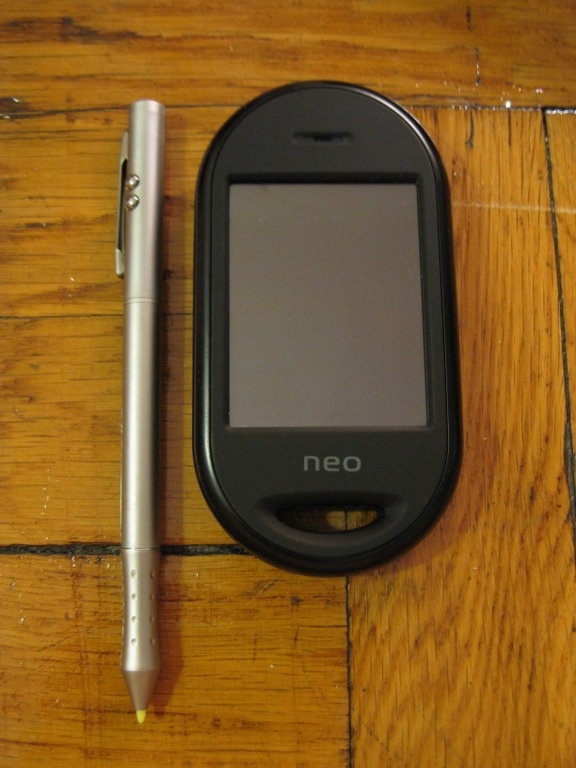
OpenMoko's Neo FreeRunner
Even though the goal is eventually to have a general-purpose, consumer-friendly phone, the FreeRunner is not quite ready for the prime-time phone market just yet. The OpenMoko team is fully aware of this, and became slightly uneasy when they learned that Linux Journal wanted to write a review. As such, the aim of this article is not to talk much about the FreeRunner as a phone, but rather as a handheld Linux device for developers.
A Linux geek couldn't ask for a better-equipped device than the FreeRunner. It comes with a 400MHz ARM processor, 256MB internal Flash storage, 128MB RAM and a microSD card slot for extra storage. The wireless capabilities of the FreeRunner also are impressive. It comes with tri-band GSM (with the option of either 850MHz or 900MHz on the low end), as well as GPRS, Bluetooth and Wi-Fi (using the Atheros AR6K chipset). To make things even more fun, the OpenMoko crew included two accelerometers and an assisted GPS chip. The device is a little bulky though, as it measures in at 120.7x62x18.5 millimeters and weighs around 180 grams. The FreeRunner is available on-line from openmoko.com for $399. If you plan to use it for serious development, you also may consider purchasing the $99 debug board that can be used to access the serial console.
One of the more exciting features is the FreeRunner's ability to boot from microSD cards. This means you can test other Linux distributions by installing them on microSD cards without formatting the main distribution that is installed in Flash. This flexibility is very exciting, and it offers an easy way to try before you buy.
The hardware definitely is appealing, but the most attractive thing about the FreeRunner is that it was built to run Linux. Although the official distribution of the FreeRunner is OM 2008.8, other options are available. Trolltech, the creators of Qt, produce the Qtopia distribution that runs very well on the FreeRunner. And, if you prefer a less-watered-down distribution, you'll be glad to learn that Debian also is available, in almost its entirety. Recently, an effort to port Gentoo to the FreeRunner has been started, and I'm sure other distributions will follow suit soon.
As I've said, I don't plan to spend much time talking about the FreeRunner as a phone. However, any review of a device that is sold as a phone wouldn't be complete without at least covering the basics. Unfortunately, the basics are about all there is to go on. The call quality is rather poor, and recipients of calls reported lots of static and popping on their end. Also, the interface is quite awkward, especially for advanced features, such as call waiting. There is no clear way to adjust the volume, because there is no hardware volume control button. Text messaging is incredibly tedious, due to the impossibly small on-screen keyboard.
There is a lot of room for improvement with the phone software. Much work needs to go into improving call quality before I would consider using the FreeRunner as a primary phone.
Because I decided not to use the FreeRunner as a phone, I thought it might be more interesting to install a full-featured Linux distribution. I chose Debian, as it is easily available, has a wide selection of packages and is the distribution with which I have the most experience.
The easiest way to install Debian is to run the install.sh shell script that is available from the DebianOnFreeRunner wiki page. You need to have an already-working installation of Linux installed on your FreeRunner, and it needs access to the Internet. You can use your desktop Linux PC or an installation of Linux in a virtual machine, such as VMware Fusion on Mac OS X.
It is quite easy to route traffic from a FreeRunner through a Linux PC. Each of the available distributions use the same default networking configuration and give the FreeRunner an IP of 192.168.0.202. Plug the USB cable in to the FreeRunner and your PC, and run the following commands:
# iptables -A POSTROUTING -t nat -j MASQUERADE -s 192.168.0.0/24
# sysctl -w net.ipv4.ip_forward=1
# ifconfig usb0 192.168.0.200
If your network is already using 192.168.0.0/24, you may need to use a different subnet mask. Once the USB network link is up, you should be able to SSH into the FreeRunner as root, with a blank password:
# ssh root@192.168.0.202
You may find that DNS is not resolving correctly from within the FreeRunner. To correct this, simply add an OpenDNS cache address to the FreeRunner's /etc/resolv.conf:
# echo nameserver 208.67.222.222 >> /etc/resolv.conf
# echo nameserver 208.67.220.220 >> /etc/resolv.conf
If your supported microSD card is placed in the FreeRunner, you can begin installing Debian onto it:
# wget http://pkg-fso.alioth.debian.org/freerunner/install.sh
# DASH_BINSH=false SD_PART1_FS=vfat sh install.sh
Here, we set the DASH_BINSH environment variable to false, so that the script installs the Bash shell instead of Dash. The SD_PART1_FS variable is set to vfat, so that the /boot partition on the SD card will be formatted with vfat instead of ext2. Some versions of the FreeRunner's bootloader, u-boot, do not support ext2, and although there are ways to remedy this, it simply is easier to use a vfat-formatted partition. You should have Debian installed within the hour, depending on the speed of your Internet connection. I must say, the Debian installers sure have improved a lot since the Potato days.
You might have noticed that I said “supported microSD card”. According to the FreeRunner, all microSD cards are equal, but some microSD cards are more equal than others. The OpenMoko wiki has a page that lists all microSD cards that are known to work with the FreeRunner. I consulted this page and purchased two Kingston SD-C02G 2GB microSD cards. The FreeRunner recognized the cards, and I was able to partition them and write files to them. However, during installation, I received errors that were apparently related to the SD media. I replaced the 2GB Kingston card with the 512MB SanDisk card that came with the FreeRunner, and the installation worked flawlessly. I later transferred the partitions from the 512MB card to the 2GB using my Kubuntu desktop PC.
Once installation is complete, you will want to reboot into Debian. First, power off your FreeRunner. Once it has safely powered down, press and hold the AUX button (on the top-left side of the device), and press the power button until the u-boot menu appears. Press the AUX button until “Boot from SD” is selected, then press the power button again. After a minute or two, the zhone interface should appear and you should be able to make and accept phone calls, provided you are using a supported SIM card.
As with microSD cards, the FreeRunner is rather picky about which SIM cards it accepts. When I first began testing the FreeRunner, I was using a first-generation iPhone as my primary phone. The SIM from my iPhone worked perfectly in the FreeRunner. A couple weeks later, I bought an iPhone 3G and received a new SIM with it, which also worked well with the FreeRunner. I eventually returned my 3G iPhone and received another new SIM card from AT&T. The FreeRunner would not register with the AT&T network via the new SIM. I tried a T-Mobile SIM to make sure there were no hardware problems, and it worked fine. After many, many hours of struggling with this issue, I finally discovered that there is a bug in the FreeRunner firmware that causes problems with certain SIM cards (OpenMoko bug #666). My previous SIM cards had a vendor and version number of 4022; however, the new SIM I received from AT&T had vendor and version number 2022. Unfortunately, the 2022 cards are newer and do not work with the FreeRunner. As it turns out, the OpenMoko wiki has a page that lists the compatibility status of various SIM cards. The good news is that once I figured out the problem, I was able to visit a local AT&T store and request a new 4022 SIM card, which they happily gave me.
Although most of us are quite familiar with open-source development, we normally get that experience only with software. It is one thing for JavaScript bugs to exist in our WordPress blogs, because it is easy to overlook and we know it probably will be fixed soon. However, I discovered that there is something different when dealing with open-source hardware. Most mobile devices go through months of testing and QC and are, therefore, typically ready for daily use in the real world. Applying the open-source mentality to something like a mobile phone is actually pretty challenging. Although I may excuse WordPress for the JavaScript bug, I fully expect any and every microSD card and SIM card to work with a phone I've purchased. But, I guess that is the price of freedom, flexibility and openness.
Although the FreeRunner includes all the internal components you need to develop something interesting, a few things are frustrating and could use improvements. For example, there is no hardware volume control and no way to switch to vibrate mode. Now, the FreeRunner has two buttons that can control software, so it may be just a matter of implementing the feature, but this is something that should be present on every phone. There are only two hardware buttons on the phone, which in itself isn't bad. However, the buttons are placed in awkward places on the sides of the phone. It is quite difficult to press either button while holding the phone in one hand. Powering on the device can be rather tricky, as you must hold the power button for just the right amount of time in order to get the device to boot. My girlfriend was unable to power on the FreeRunner even after studying it for a few minutes.
The phone charges over its USB port, which is quite convenient, but unfortunately, the port also is located in an awkward spot. It is difficult to make a call while the phone is plugged in, as the port is on the right-hand side of the phone, where your hand is normally gripping the phone.
Also, the battery must not be completely drained. According to the OpenMoko wiki, “this is an issue because the internal charging circuitry cannot be turned on until the FreeRunner has booted, and booting through USB power alone does not work.” It's the little things.
It's also the big things, like the stylus that comes with the FreeRunner. Every time I showed the FreeRunner to people, they laughed (out loud) when they saw the enormous stylus. In addition to being a stylus, it also functions as a full-sized pen, a flashlight and a laser pointer. Making matters worse, it contains four small batteries (to power the flashlight and laser pointer) at the opposite end from the tip that weigh it down and make it difficult to focus on small points on the screen, such as the keyboard. The “Matchbox” keyboard that is provided with the Debian distribution is marginally better than the one used by OM 2008.8 and Qtopia, but they both are painful to use.
I also found it rather annoying that I needed to remove the back of the case, the battery and the SIM card to swap out the microSD card. I was really looking forward to being able to boot multiple distributions during testing, but having to jump through these loops made that task a bit more tedious.
Speaking of loops, for the life of me, I cannot figure out why there is a lanyard loop on the bottom of the phone.
Oh, and it would really be nice if the FreeRunner provided a standard headphone jack rather than the 2.5mm jack that is included.
Despite these issues, I still feel that the OpenMoko team is doing tremendous work, and I am continually impressed as I dig deeper into the project. They are very clear that the FreeRunner is just a canvas for the community to build upon, as stated in this quote from OpenMoko developer Sean Moss-Pultz:
Think of our products as museums. We're building the environment. Each one different from the next. You'll get all the free art supplies you could imagine because we want you to add your own meaning. You choose: consume, create or both. Either way, you create your own meaning. It's about you.
I think that the OpenMoko team should reconsider the goal of eventually producing a consumer-usable phone. There are already plenty of those, and there isn't much else out there that is similar to the FreeRunner. Personally, I love the fact that I can run Debian on my phone. Having said that, I think there are a few areas where the OpenMoko team should focus their efforts.
First, the phone stack really needs work. The FreeRunner becomes a much more compelling alternative when I can use it as a phone. The call quality is currently bad enough that I would not recommend relying on it as your primary phone. I would rather carry a single device, rather than the FreeRunner in addition to a phone.
Second, the documentation is a mess. There is a lot of information on the OpenMoko wiki, but it is horribly organized, poorly written and often out of date. Many pages seem to hold the answer to your question, until you realize that the page was written for the Neo 1973, the FreeRunner's predecessor. Although a wiki follows in the spirit of a community-organized project, I'm not sure it's the best way to present official documentation. I spent a lot of time reading the wiki, only to become more confused.
Finally, OpenMoko should make a strong effort to support more microSD and SIM cards. Dealing with these two issues was probably the most frustrating thing about my experience with the FreeRunner.
Oh, and a note for the OpenMoko Marketing department. The people who buy the FreeRunner at this point are doing so because they really want to get involved and play with this cutting-edge device. This is the community; these are your fanboys and fangirls. They will support you and advertise for you, so how about including a couple OpenMoko stickers in the box?
I look forward to seeing what develops around OpenMoko and the Neo FreeRunner. There is still a long way to go before it is a usable phone, but as a geek gadget, the FreeRunner is a lot of fun. Linux geeks don't mind getting their hands dirty, so it is nice to have a gadget that can challenge us.
Resources
OpenMoko Web Site: www.openmoko.com
OpenMoko Community Wiki: wiki.openmoko.org
Debian on the FreeRunner: wiki.debian.org/DebianOnFreeRunner
Supported microSD Cards: wiki.openmoko.org/wiki/Supported_microSD_cards
Supported SIM Cards: wiki.openmoko.org/wiki/Carriers/ATT
OpenMoko's Sean Moss-Pultz on Design: tinyurl.com/57r334
Cory Wright has been using Linux since 1998, and mobile phones even longer. He is a developer and sysadmin at natuba.com, where he enjoys beating Will Reese at foosball and Wii Tennis. His Web site is at dnsfool.com.
