
One Box. Sixteen Trillion Bytes.
I recently had the need for a lot of disk space, and I decided to build a 16TB server on my own from off-the-shelf parts. This turned out to be a rewarding project, as it involved many interesting topics, including hardware RAID, XFS, SATA and system management issues involved with large filesystems.
I wanted to consolidate several Linux file servers that I use for disk-to-disk backups. These were all in the 3–4TB range and were constantly running out of space, requiring me either to adjust which systems were being backed up to which server or to reduce the number of previous backups that I could keep on hand. My overall goal for this project was to create a system with a large amount of cheap, fast and reliable disk space. This system would be the destination for a number of daily disk-to-disk backups from a mix of Solaris, Linux and Windows servers. I am familiar with Linux's software RAID and LVM2 features, but I specifically wanted hardware RAID, so the OS would be “unaware” of the RAID controller. These features certainly cost more than a software-based RAID system, and this article is not about creating the cheapest possible solution for a given amount of disk space.
The hardware RAID controller would make it as simple as possible for a non-Linux administrator to replace a failed disk. The RAID controller would send an e-mail message warning about a disk failure, and the administrator typically would respond by identifying the location of the failed disk and replacing it, all with no downtime and no Linux administration skills required. The entire disk replacement experience would be limited to the Web interface of the RAID controller card.
In reality, a hot spare disk would replace any failed disk automatically, but use of the RAID Web interface still would be required to designate any newly inserted disk as the replacement hot spare. For my company, I had specific concerns about the availability of Linux administration skills that justified the expense of hardware RAID.
For me, the above requirements meant using hot-swappable 1TB SATA drives with a fast RAID controller in a system with a decent CPU, adequate memory and redundant power supplies. The chassis had to be rack-mountable and easy to service. Noise was not a factor, as this system would be in a dedicated machine room with more than one hundred other servers.
I decided to build the system around the 3ware 9560 16-port RAID controller, which requires a motherboard that has a PCI Express slot with enough “lanes” (eight in this instance). Other than this, I did not care too much about the CPU choice or integrated motherboard features (other than Gigabit Ethernet). As I had decided on 16 disks, this choice pretty much dictated a 3U or larger chassis for front-mounted hot-swap disks. This also meant there was plenty of room for a full-height PCI card in the chassis.
I have built the vast majority of my rackmount servers (more than a hundred) using Supermicro hardware, so I am quite comfortable with its product line. In the past, I have always used Supermicro's “bare-bones” units, which had the motherboard, power supply, fans and chassis already integrated.
For this project, I could not find a prebuilt bare-bones model with the exact feature set I required. I was looking for a system that had lots of cheap disk capacity, but did not require lots of CPU power and memory capacity—most high-end configurations seemed to assume quad-core CPUs, lots of memory and SAS disks. The Supermicro SC836TQ-R800B chassis looked like a good fit to me, as it contained 16 SATA drives in a 3U enclosure and had redundant power supplies (the B suffix indicates a black-colored front panel).
Next, I selected the X7DBE motherboard. This model would allow me to use a relatively inexpensive dual-core Xeon CPU and have eight slots available for memory. I could put in 8GB of RAM using cheap 1GB modules. I chose to use a single 1.6GHz Intel dual-core Xeon for the processor, as I didn't think I could justify the cost of multiple CPUs or top-of-the-line quad-core models for the file server role.
I double-checked the description of the Supermicro chassis to make sure that the CPU heat sink is included with the chassis. For the SC836TQ-R800B, the heat sink had to be ordered separately.
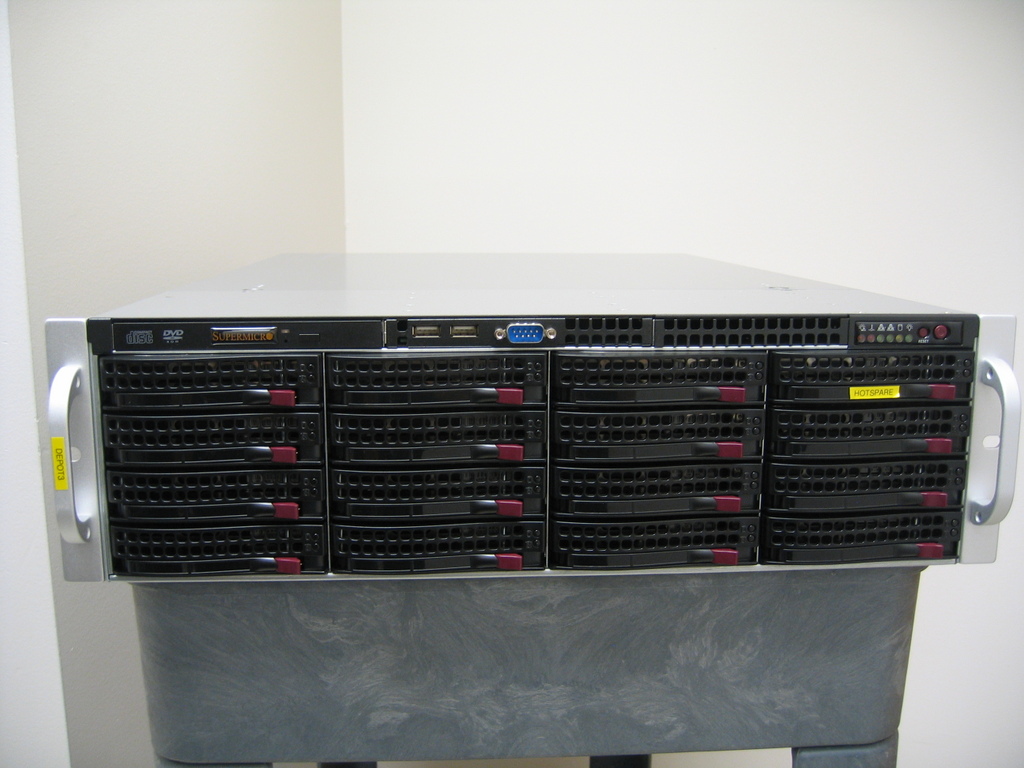
Figure 1. Front View of the Server Chassis
I wanted the best possible RAID performance, which means using the “write-back” setting in the RAID controller, as opposed to “write-through”. The advantage of write-back cache is that it should improve write performance by writing to RAM first and then to disk later, but the disadvantage is that data could be lost if the system crashes before the data was actually written to disk.
The battery backup unit (BBU) option for the 3ware 9560 RAID controllers protects this cached data from being lost by preserving it across reboots.
I had no problems finding all the hardware using the various price-comparison Web sites, although I was unable to find a single vendor that had every component I needed in stock. Beware that the in-stock indications on those price-comparison Web sites are unreliable. I followed up with a phone call for the big-ticket items to make sure they actually were in stock before ordering on-line. Table 1 shows the details.
Table 1. Parts List
| Quantity | Description | Source | Price per unit | Total price |
|---|---|---|---|---|
| 1 | Intel Xeon 5110 Woodcrest 1.6GHz | Newegg | $211 | $211 |
| 1 | Supermicro MB X7DBE-O | Newegg | $426 | $426 |
| 8 | ATP AP28K72S8BHE6S 1GB RAM modules | ATP | $65 | $520 |
| 1 | Supermicro Chassis SC836TQ-R800B | Super Warehouse | $923 | $923 |
| 1 | 3ware 9650SE-16ML | Newegg | $919 | $919 |
| 1 | 3ware BBU-Module-04 | The Nerds | $109 | $109 |
| 1 | Supermicro Heat Sink SNK-P0018 | Wired Zone | $30 | $30 |
| 16 | Seagate ST31000340AS | Newegg | $274 | $4,384 |
| Grand total: | $7,311 |
As you can see from Table 1, the hardware RAID components are about $1,000 of the total system cost.
The chassis is pretty much pre-assembled. I had to insert some additional motherboard stand-offs and put on the rackmounting rails. I also snapped off some of the material on the plastic cooling shroud to fit around the motherboard power cables.
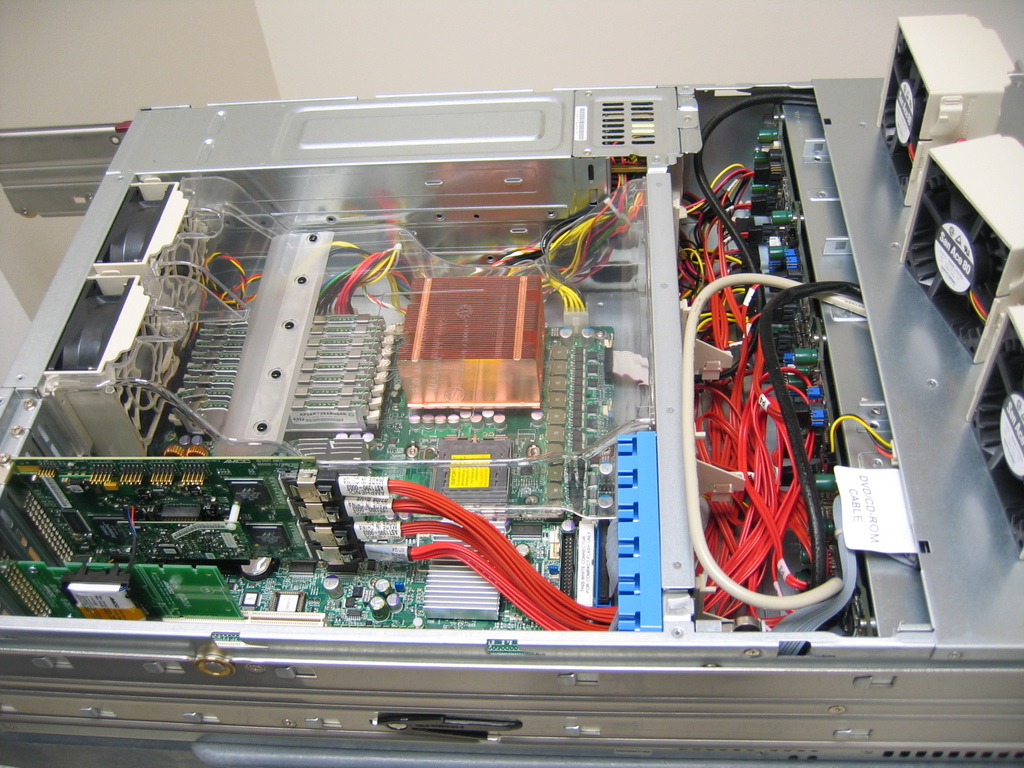
Figure 2. Inside View of the Server Chassis
The process of assembling the motherboard, CPU, heat sink, disks and memory was conventional, so I don't cover it here.
Most of the 3ware 9650 controllers use “multi-lane” SATA cables with a single connector on the controller fanning out into four individual SATA cables. As this is a 16-port controller, four of the multi-lane cables connect to the SATA backplane. I made the process of connecting the SATA cables much easier by first removing the chassis cooling fans—they pop out quite easily. I also had to remove a couple of the disk backplane power connectors to access the bottom-most SATA connector.
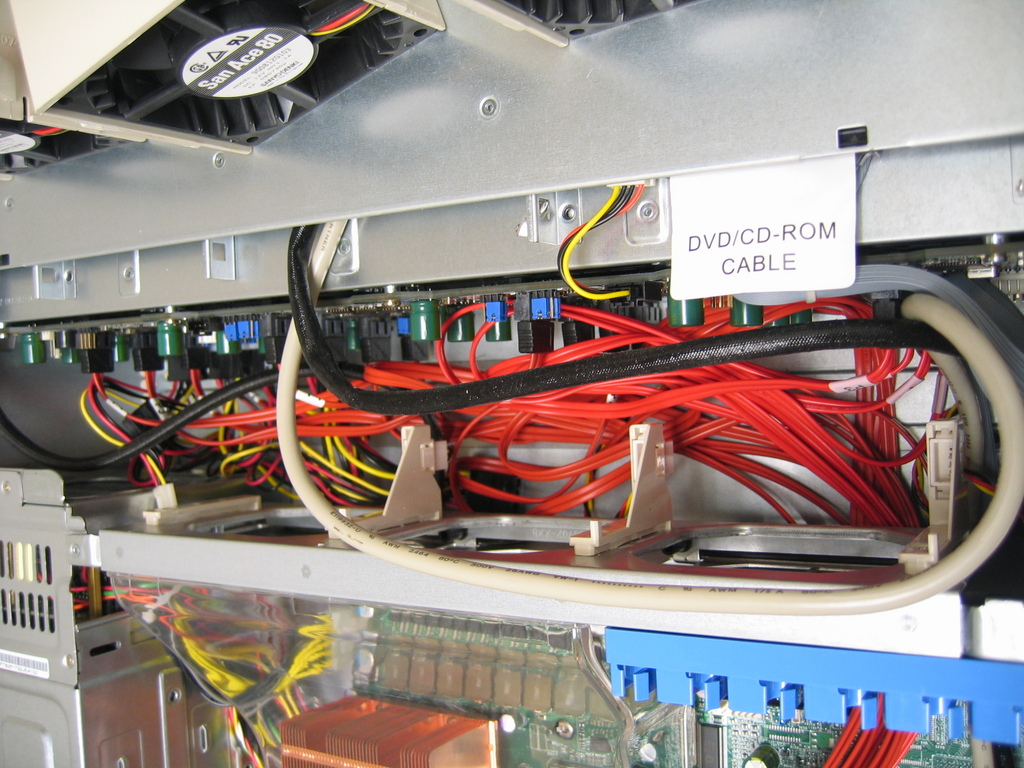
Figure 3. SATA Backplane with Cooling Fans Removed
Be sure to connect the correct SATA cable to the correct SATA port, as a mistake here would be a disaster. You will need to determine the physical location of a disk with certainty when it comes time to replace one, or you will risk destroying the entire array. Familiarize yourself with the cable and disk numbering schemes before proceeding. For example, in the set of four multi-lane cables that came with my controller, one cable was labeled with the first port at 0 (and ending at 3), and the other three had the first port at 1 (and ending at 4), while the backplane ports were numbered starting at 0 (and ending at 15), with the lowest numbered port at the bottom left (as viewed from the front). This seems to be a chassis-specific scheme, as other Supermicro chassis models number the ports from the top left down. SATA ports are numbered starting at 0 within the 3ware administrative interfaces. The 3ware administrative tools have a feature to “blink” a drive LED for locating a specific drive, but that is not supported in this particular Supermicro chassis.
The 3ware BBU typically is mounted on the controller card, but I have found that the controller starts complaining about battery temperature being too high unless there is generous airflow over the battery. I purchased the remote BBU option, which is a dummy PCI card that carries the battery and an extension cable that runs from the remote BBU to the main RAID controller card. I mounted the battery a couple PCI slots away from the RAID controller so it would be as cool as possible.
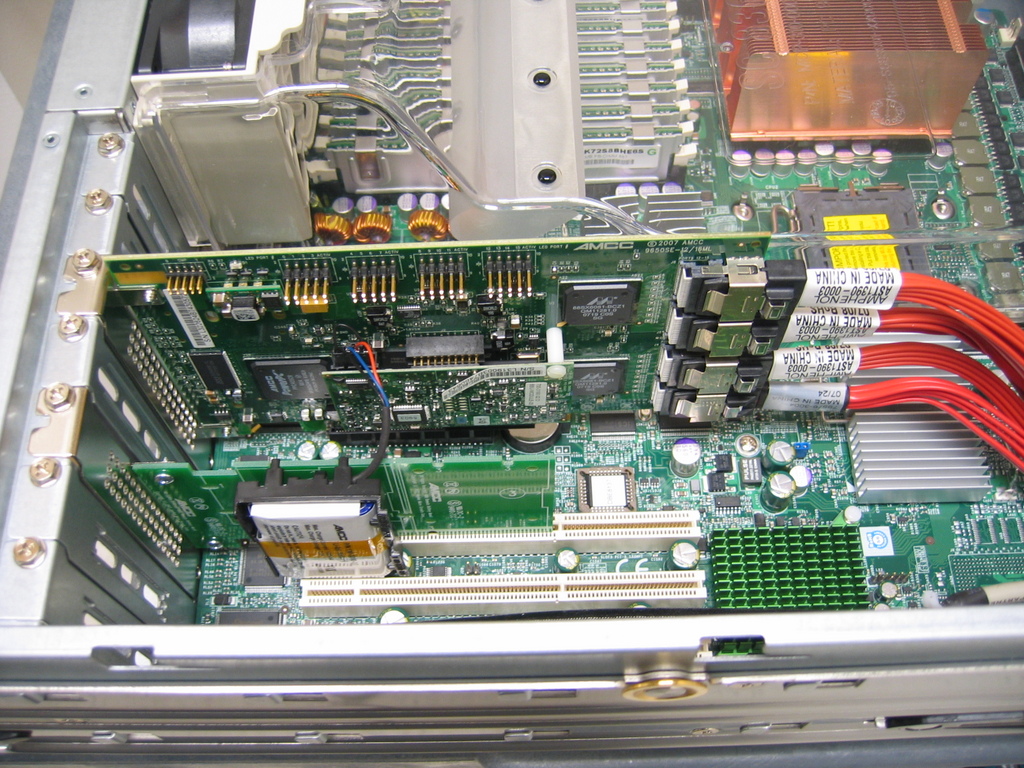
Figure 4. 3ware RAID Controller with Remote Battery Option
I planned to create a conventional set of partitions for the operating system and then a single giant partition for the storage of system backup files (named backup).
Some RAID vendors allow you to create an arbitrary number of virtual disks from a given physical array of disks. The 3ware interface allows only two virtual disks (or volumes) per physical array. When you are creating a physical array, you typically will end up with a single virtual disk using the entire capacity of the array (for example, creating a virtual disk from a RAID 1 array of two 1TB disks gives you a 1TB /dev/sda disk). If you want two virtual disks, specify a nonzero size for the boot partition. The first virtual disk will be created in the size you specify for the boot partition, and the second will be the physical array capacity minus the size of the boot partition (for example, using 1TB disks, specifying a 150GB boot partition yields a 150GB /dev/sda disk and an 850GB /dev/sdb disk).
You can perform the entire RAID configuration from the 3ware controller 3dbm BIOS interface before the OS boots (press Alt-3), or use the tw_cli command line or 3dm Web interface (or a combination of these) after the OS is running. For example, you could use the BIOS interface to set up just the minimal array you need for the OS installation and then use the 3dm Web interface to set up additional arrays and hot sparing after the OS is running.
For my 16-drive system, I decided to use 15 drives in a RAID 5 array. The remaining 16th drive is a hot spare. With this scheme, three disks would have to fail before any data was lost (the system could tolerate the loss of one array member disk and then the loss of the hot spare that would replace it). I used the 3ware BIOS interface to create a 100GB boot partition, which gave me a virtual sda disk and a virtual sdb disk of about 12.64TB.
I found the system to be very slow during the RAID array initialization. I did not record the time, but the initialization of the RAID 5 array seemed to take at least a day, maybe longer. I suggest starting the process and working on something else until it finishes, or you will be frustrated with the poor interactive performance.
I knew I had to use something other than ext3 for the giant data partition, and XFS looked like the best solution according the information I could find on the Web. Most of my Linux experience involves Red Hat's Linux Enterprise distribution, but I had trouble finding information on adding XFS support. I specifically wanted to avoid anything difficult or complicated to reproduce. CentOS seemed like the best OS choice, as it leveraged my Red Hat experience and had a trivial process for adding XFS support.
For the project system, I installed the OS using Kickstart. I created a kickstart file that automatically created a 6GB /, 150MB /boot and a 64GB swap partition on the /dev/sda virtual disk using a conventional msdos disk label and ext3 filesystems. (I typically would allocate less swap than this, but I've found through experience that the xfs_check utility required something like 26GB of memory to function—anything less and it would die with “out of memory” errors). The Kickstart installation ignored the /dev/sdb disk for the time being. I could have automated all the disk partitioning and XFS configuration via Kickstart, but I specifically wanted to play around with the creation of the large partition manually. Once the Kickstart OS install was finished, I manually added XFS support with the following yum commands:
yum install kmod-xfs xfs-utils
At this time, I downloaded and installed the 3ware tw_cli command line and 3dm Web interface package from the 3ware Web site. I used the 3dm Web interface to create the hot spare.
Next, I used parted to create a gpt-labeled disk with a single XFS filesystem on the 14TB virtual disk /dev/sdb. Another argument for using something other than ext3 is filesystem creation time. For example, when I first experimented with a 3TB test partition under both ext3 and XFS, an mkfs took 3.5 hours under ext3 and less than 15 seconds for XFS. The XFS mkfs operation was extremely fast, even with the RAID array initialization in progress.
I used the following commands to set up the large partition named /backup for storing the disk-to-disk backups:
# parted /dev/sdb
(parted) mklabel gpt
(parted) mkpartfs primary xfs 0% 100%
(parted) print

Model: AMCC 9650SE-16M DISK (scsi)
Disk /dev/sdb: 13.9TB
Sector size (logical/physical): 512B/512B
Partition Table: gpt

Number  Start   End     Size    File system  Name    Flags
1      17.4kB  13.9TB  13.9TB   xfs          primary
(parted)   quit

# mkfs.xfs /dev/sdb1
# mount /dev/sdb1 /backup
Next, I made the mount permanent by adding it to /etc/fstab.
I now considered the system to be pretty much functional, and the rest of the configuration effort was specifically related to the system's role as a disk-to-disk backup server.
I know I could have used SAS drives with an SAS controller for better performance, but SAS disks are not yet available in the capacities offered by SATA, and they would have been much more expensive for less disk space.
For this project, I settled on a 16-drive system with a 16-port RAID controller. I did find a Supermicro 24-drive chassis (SC486) and a 3ware 24-port RAID controller (9650SE-24M8) that should work together. It would be interesting to see whether there is any performance downside to such a large system, but this would be overkill for my needs at the moment.
There are still plenty of options and choices with the existing configuration that may yield better performance than the default settings. I did not pursue all of these, as I needed to get this particular machine into production quickly. I would be interested in exploring performance improvements in the future, especially if the system was going to be used interactively by humans (and not just for automated backups late at night).
Possible areas for performance tuning include the following:
1) RAID schemes: I could have used a different scheme for better performance, but I felt RAID 5 was sufficient for my needs. I think RAID 6 also would have worked, and I would have ended up with the same amount of disk space (assuming two parity drives and no hot spare), but my understanding is that it would be slower than RAID 5.
2) ext3/XFS filesystem creation and mount options: I had a hard time finding any authoritative or definitive information on how to make XFS as fast as possible for a given situation. In my case, this was a relatively small number of large (multi-gigabyte) files. The mount and mkfs options that I used came from examples I found on various discussion groups, but I did not try to verify their performance claims. For example, some articles said that the mount options of noatime, nodiratime and osyncisdsync would improve performance. 3ware has a whitepaper covering optimizing XFS and 2.6 kernels with an older RAID controller model, but I have not tried those suggestions on the controller I used.
3) Drive jumpers: one surprise (for me at least) was finding that the Seagate drives come from the factory with the 1.5Gbps rate-limit jumper installed. As far as I can tell, the drive documentation does not say that this is the factory default setting, only that it “can be used”. Removing this jumper enables the drive to run at 3.0Gbps with controllers that support this speed (such as the 3ware 9560 used for this project). I was able to confirm the speed setting by using the 3ware 3dm Web interface (Information→Drive), but when I tried using tw_cli to view the same information, it did not display the speed currently in use:
# tw_cli /c0/p0 show lspeed
/c0/p0 Link Speed Supported = 1.5 Gbps and 3.0 Gbps
/c0/p0 Link Speed = unknown
The rate-limiting jumper is tiny and recessed into the back of the drive. I ended up either destroying or losing most of the jumpers in the process of prying them off the pins (before buying an extremely long and fine-tipped pair of needle-nose pliers for this task).
4) RAID card settings: Native Command Queuing (NCQ) is supposed to offer better performance by letting the drive electronics reorder commands for optimized disk access. I have found that NCQ is not always enabled by default on the 3ware controllers. It can be turned on manually using the queuing check box in the Controller Settings page of 3dm or via tw_cli:
# tw_cli /c0/u0 set qpolicy = on
The current setting can be verified on a per-drive basis via 3dm or by using tw_cli:
# tw_cli /c0/p5 show ncq
/c0/p5 NCQ Supported = Yes
/c0/p5 NCQ Enabled = Yes
5) Linux kernel settings: 3ware's knowledge base has articles that mention several kernel settings that are supposed to improve performance over the defaults, but I have not tried any of those myself.
6) Operational issues: despite all 16 disks being the same type and firmware version, some of them failed to display their model number properly in the various 3ware interfaces. For example, most of the disk model numbers are displayed correctly—for example, ST31000340AS. But, several show “ST3 INVALID PFM” in the model field. You can see this in the tw_cli interface. For instance, port 4 displays the model number properly, but port 5 does not:
# tw_cli /c0/p4 show model
/c0/p4 Model = ST31000340AS

# tw_cli /c0/p5 show model
/c0/p5 Model = ST3_INVALID_PFM
This situation would be intolerable in a system with a mix of drive types, as it would be difficult to determine which drive type was plugged in to which port. I was able to determine that the problem was with the drive firmware version and upgraded all the drives that exhibited this behavior.
As the system already was in active use before I determined that the firmware was the issue, I needed a way to upgrade each drive while keeping the system running. I could not simply upgrade the drives while they were part of an active disk array, as Seagate claims the upgrade could destroy data. I used the 3ware interface to remove the problem drive, which then forced the hot spare to replace it. The RAID controller automatically started to rebuild the RAID 5 array using the hot spare. I then physically removed the drive from the chassis and upgraded the drive firmware using another computer. After the upgrade, I re-inserted the drive and designated it as the new hot spare. The array rebuild operation took something like six hours to complete, and as I could remove and upgrade only one drive at a time, I was limited to one drive upgrade a day.
I have been using this system in production for several months and have consumed only a fraction of the available space:
# df -t xfs
Filesystem    1K-blocks      Used    Available  Use% Mounted on
/dev/sdb1     13566738304 2245371020 11321367284 17% /backup
I am quite happy with the result, as I have plenty of room to add more systems to the backup schedule, and I am confident I will not lose any backups due to hardware failures.
Eric Pearce is the IT Lead for AmberPoint, Inc, an SOA governance software company based in Oakland, California. He has authored several books on UNIX and Windows system administration for O'Reilly & Associates.
