
New Projects - Fresh from the Labs
For people designing their own Web pages, editing someone else's or simply learning how to make their own, RightWebPage is an invaluable tool that puts Web pages through the most stringent of tests. Not only does it follow strict W3C standards, it also supports Linux, Mac OS and Windows. According to the Web site:
RightWebPage verifies and corrects many aspects of conformance of Web sites to standards of Internet best practices, such as W3C WCAG and ISO/IEC 23026:2006 - Software Engineering - Recommended Practice for the Internet - Web Site Engineering, Web Site Management and Web Site Life Cycle.
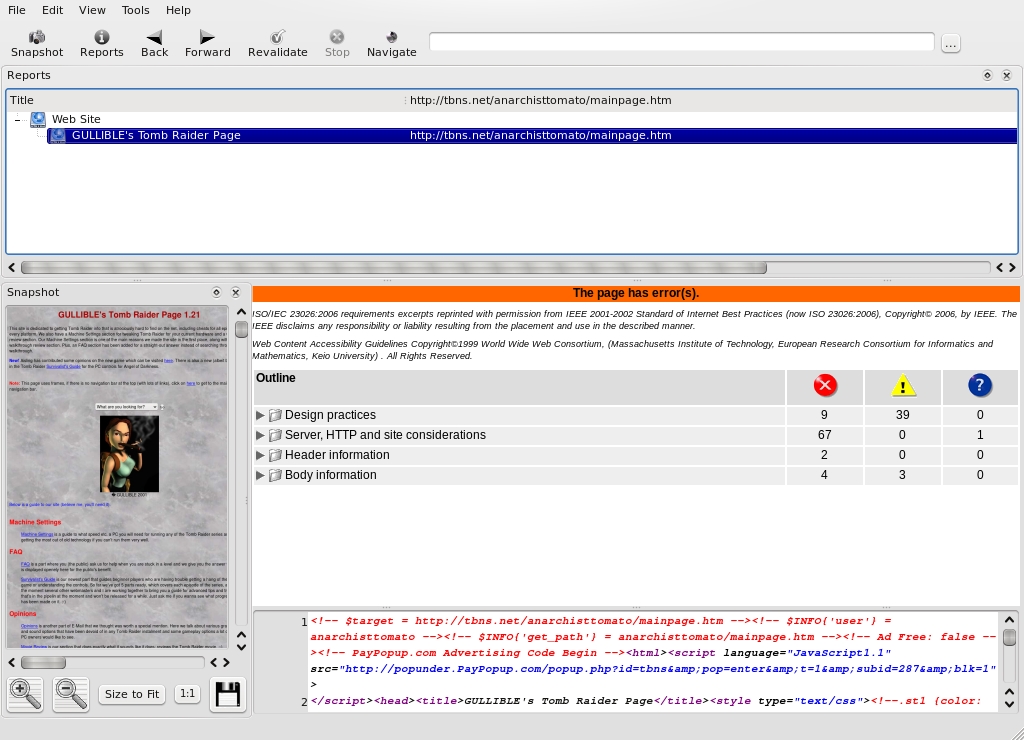
RightWebPage—the Web Conformance Checker that Turns Pedantry into an Art Form
Installation
Head to the Web site's download section, and under GNU/Linux, there are the options of RPM and deb packages in both 32- and 64-bit flavors, as well as the obligatory tarball. I went with the deb package and ran into some dependencies. Once I installed the packages tidy and opensp though, things were fine. I'm ashamed to say that I couldn't work out how to compile the source package though; if you're looking for a ./configure, make, make install, it's not here. However, that is how it was at the time of this writing, and in the space of a month (the last time I looked), things have changed a great deal, so it may have improved by the time you read this.
Once you have RightWebPage installed, you can run it with the command:
$ rightwebpage
Usage
As soon as the program starts, you're presented with an introductory splash screen that takes you through a series of prompts having to do with needed information and parameters to check before you get started. First up is the Web page URL (local or Internet). Next is Conformance Tests to run, Document Type, Excessive Scrolling, Accessibility, User Agent Emulation, Character Encoding...at this point, I got bored and clicked Finish. If you choose a Web page to load, for a while no information appears on the screen. Give it a few moments, and eventually everything appears. Oh, and a word of warning, this process can be very CPU- and RAM-intensive.
Once your Web page has loaded, your data is split into four panels. The first covers the filename(s) of what you're looking at. Next are all the faults it has found (and there probably will be a lot of them), which are broken down into categories and can be browsed at will. The bottom panel contains the actual coding of the page you've loaded, which also can be edited and saved and is quite helpfully color-coded. And, the pièce de résistance, on the left is a preview panel of your Web page fully rendered. Any changes you make can be saved, and you can revalidate the Web page at any time.
Now I must warn you, your ego is in for a bruising. RightWebPage is beyond anal in its stringency. I haven't written any Web sites for a number of years, but when I have, I prided myself on strict adherence to Web standards. Well, to my embarrassment, RightWebPage found 80 warnings and 42 alerts in a page that I thought would fare well! So, if you're looking for a strict teacher, this is it. All in all, this is a brilliant piece of software that will keep you on the straight and narrow in Web design, as long as you're willing to submit to something that is seriously pedantic.
If you're chasing recipes from around the world and want a neat program with clever features to catalogue them all, Gourmet Recipe Manager (or Gourmet for short) is definitely your tool. According to its Freshmeat entry:
Gourmet Recipe Manager is a simple but powerful recipe-managing application. Gourmet is intended for the GNOME desktop environment, but works on any platform that GTK supports, including Windows.
Gourmet allows you to collect, search and organise your recipes, and to generate shopping lists automatically from your collection. The latest version also lets you calculate nutritional information for your recipes using the USDA food database (or entering custom information by hand).
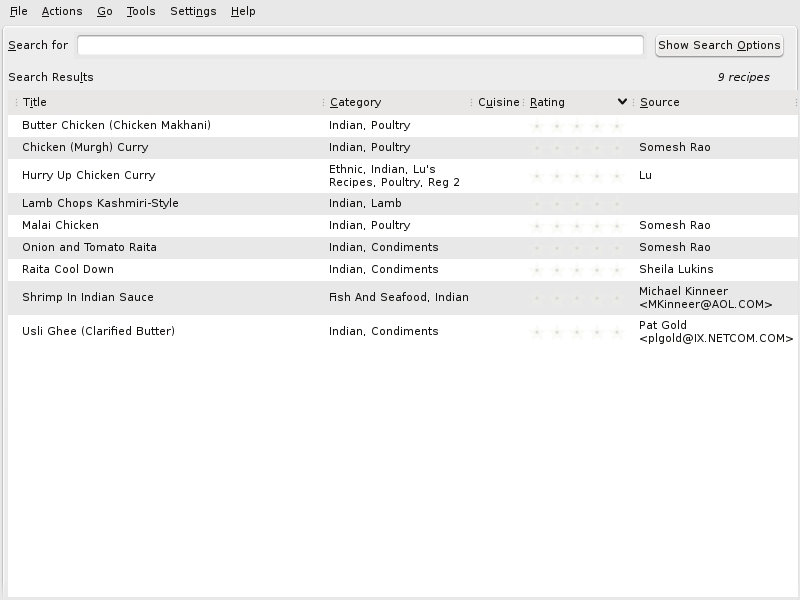
By using openly available formats that are in use all around the world, tens of thousands of recipes are awaiting your download.
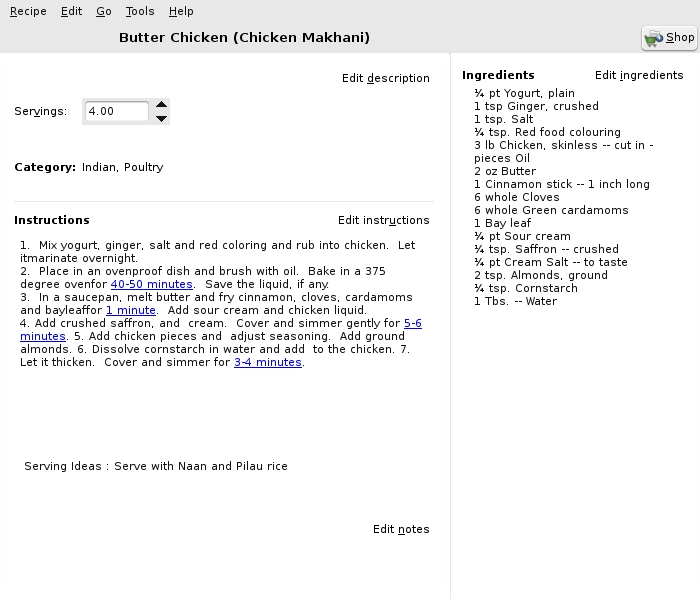
As well as being able to change the number of ingredients dynamically by altering the serving size, there are links to timing mechanisms all through the recipes.
Installation
Binaries are included for Debian- and RPM-based systems, as well as a source code tarball. The Web site states the following dependencies:
Python 2.3 (2.4 is recommended).
PyGTK > 2.3.9 and PyGnome. Note: with PyGTK > 2.5, PyGnome bindings have been split up. To print, you'll need, for example, the python-gnome2-extras package as well as the the python-gnome2 package.
libglade.
SQLite and Python SQLite2 bindings.
distutils (to install), provided by the python-dev package.
Python Imaging Libraries (PIL).
You'll also need the PyRTF library and the Gnomeprint bindings, but these are non-essential. I went with the Debian package and found I needed to install python-sqlalchemy to get the package running on my Ubuntu system. If you go with the source version, download the tarball, extract it, and open a terminal in the new folder.
As root or sudo, enter the following:
# python setup.py install
Once that's out of the way, you now can run the program by looking in your system's menu (it was in Applications→Utilities→Gourmet Recipe Manager under KDE 4), or by entering the command:
$ gourmet
Usage
Before you can start looking at recipes, you need to download some first. I had to search for a file and then import it before I could use anything. I did a search for “mastercook” recipe files (Gourmet also supports Meal-Master recipes, but I found the Mastercook recipes easier to deal with), and found a Web page full of Mastercook recipes zipped up. After downloading the zip and extracting it, I imported the *.mxp file by clicking File→Import file.
Once you have imported a file successfully, there will be a new list of recipes, and you can double-click on any recipe to view it. As well as a recipe name, Gourmet helpfully includes food categories, the author of the recipe, and some even carry a star rating. Once you have opened a recipe, the instructions are presented neatly for you on the bottom left, with the ingredients (and quantity thereof) listed on the right.
Cool features I found include a unit converter, the ability to generate a printable shopping list based on the recipe's ingredients, as well as a built-in timer. On the subject of timing, within each part of the recipe that involves performing a task over a period of time, there's usually a link to a timer that will be preset to however long you need to cook and so on. On each of these timers is a start, pause and reset button, allowing you to get the task timed and underway as you like.
There's also a seriously cool function called Servings, which changes the quantities of the recipe's ingredients when you're serving more or fewer people than the recipe's default. Simply change the number of servings from the default number, and the ingredients list updates dynamically to tell you how much you need of each ingredient for the new number of servings.
Gourmet Recipe Manager is a great tool that is well thought out, and hopefully, it will find an audience among home enthusiasts and gourmet chefs alike. Given that it runs on any platform that supports GTK (especially Windows), hopefully its appeal and usage will extend far beyond just the Linux platform to home PCs everywhere. With the added bonus that there are tens of thousands of possibly supported recipes from all over the world, food in some homes and restaurants may just become a little more exotic.
Students of Japanese have had a number of tools available for Linux for sometime, but here's a project that updates the situation and brings several elements together from other projects to form one sleek application. In the words of the gWaei Web site:
gWaei is a Japanese-English dictionary program for the GNOME desktop. It is made to be a modern drop-in replacement for Gjiten with many of the same features. The dictionary files it uses are from Jim Breen's WWWJDIC Project and are installed separately through the program.
It features the following:
Easy dictionary installation with a click of a button.
Support for searching using regular expressions.
Streams results so the interface is never frozen.
Click Kanji in the results pane to look at information on it.
Simple interface that makes sense.
Intelligent design and Tab switches dictionaries.
Organizes relevant matches to the top of the results.
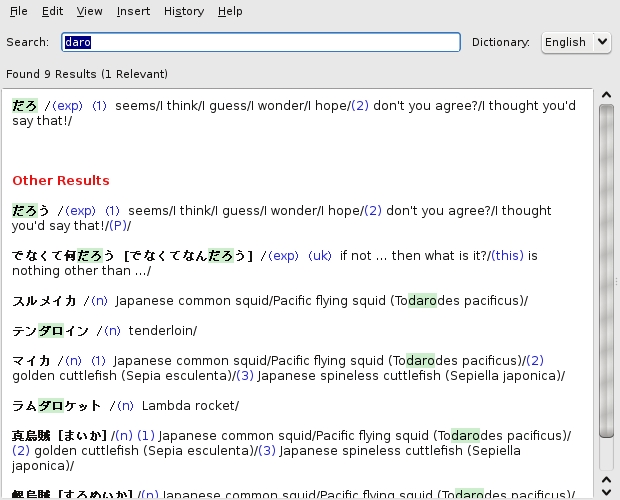
gWaei is a quick and easy-to-use Japanese dictionary that updates some old Linux favorites.

The coolest feature in gWaei is this kanji pad, where you can draw kanji with your mouse, and the computer dynamically alters the selection based on your strokes.
Installation
If you head to the Web site's download section, there are gWaei packages available in deb, RPM and source tarball format. For me, the deb installed with no problems, so I ran with that. When running with the source version, I couldn't find all of the dependencies, but the Web site says you need the following packages, along with their -dev counterparts: gtk+-2.0, gconf-2.0, libcurl, libgnome-2.0 and libsexy.
The documentation also says that compiling the source is the standard fare of:
$ ./configure
$ make
$ sudo make install
After installation, I found gWaei in my menu under Applications→Utilities→gWaei Japanese-English Dictionary. If you can't find gWaei in your menu, enter the command:
$ gwaei
Usage
Once gWaei starts, the first thing you see is a Settings window that's broken into three tabs: Status, Install Dictionaries and Advanced. Status tells you how things are currently set up, and to start off with, all you'll see is Disabled. Click the Install Dictionaries tab, and you'll see that there are buttons already set up to install new dictionaries, called Add, for English, Kanji, Names and Radicals. Once these are all installed, each of them will be changed to Enabled back in the Status tab.
After these are installed, click Close, and you are in the program. The first place you should go is the search bar. Enter something in English or in Romaji (Japanese with the Latin alphabet we use), and meanings and translations appear in the large field below with a probable mix of kanji and kana, and an English translation. You also can enter searches in kana and kanji, but my brother has my Japanese keyboard, so I couldn't really try it out.
For a really cool feature, click Insert→Using Kanjipad, and a blank page comes up where you can draw kanji characters by hand with your mouse. Various kanji characters then appear on the right and update, depending on how many strokes you make and their shape. If you click Insert→Using Radical Search Tool, you can search for radicals on basic kanji characters, which also can be restricted by the number of strokes.
All in all, gWaei is a great program with elegant simplicity, and it has the features you need, whether you're in Japan or the West (or anywhere else that's not Japan for that matter). If you're a Japanese student, this should be standard issue in your arsenal.
John Knight is a 24-year-old, drumming- and climbing-obsessed maniac from the world's most isolated city—Perth, Western Australia. He can usually be found either buried in an Audacity screen or thrashing a kick-drum beyond recognition.
