
New Projects - Fresh from the Labs
I mentioned LongoMatch in last month's Projects at a Glance sidebar, hoping I could get it to work this month. I assumed it would be tricky to install, being a video-related project, but much to my surprise and delight, it installed with very little fuss, and I'm proud to feature it here this month. According to LongoMatch's Web site:
LongoMatch is a sports video analysis tool for coaches to assist them in making game video analysis. You can tag the most important plays of a game and group them by categories to study each detail of game strategy. A list with all the tagged plays lets you review them with a simple click, even in slow motion. The timeline gives a quick overview of the game and lets you adjust the lead and lag time of each play frame by frame. LongoMatch has support for playlists, an easy way to create presentations with plays from different games. Besides, you can create new videos with your favorite plays using the video editing feature.

LongoMatch allows you to mark out important parts of a game or any video.

This is Analyze Mode, where you can fine-tune the timing of your highlights.
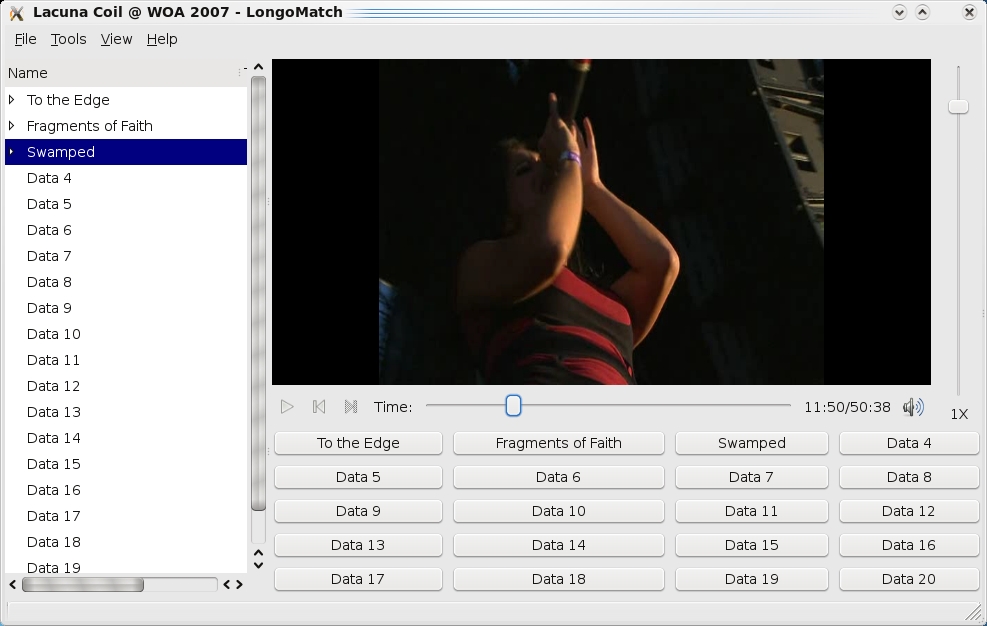
Despite being designed for sporting matches, LongoMatch can be used to mark out sections of any video. Here it's being used to mark out a music concert.
Installation
My hat is off to Andoni Morales who made the entire installation process pain-free. Head to the download page, and your choices are repositories to add for Ubuntu (I know this isn't Ubuntu Journal, sorry) or a source tarball. If you are an Ubuntu user, add the repositories mentioned, update apt-get, and select the package longomatch.
If you're not an Ubuntu user and have to use the source, don't panic, Andoni has marked out the packages you need: autotools-dev, pkg-config, mono-gmcs, libdb4o6.0-cil, libgtk2.0-cil, libgstreamer0.10-dev, libgstreamer-plugins-base0.10-dev, libgtk2.0-dev, libmono2.0-cil and libmono-cairo2.0-cil.
If you use a Debian-based distro, you can use this command (to be run as root or sudo):
apt-get install autotools-dev pkg-config mono-gmcs
 ↪libdb4o6.0-cil libgtk2.0-cil libgstreamer0.10-dev
 ↪libgstreamer-plugins-base0.10-dev libgtk2.0-dev
 ↪libmono2.0-cil libmono-cairo2.0-cil
Once the dependencies are out of the way, grab the source tarball, extract it, and open a terminal in the new folder. Enter the commands:
$ ./configure
$ make
And, as root or sudo:
# make install
# ldconfig
Once the source has finished compiling, you can run the program by entering:
$ longomatch
Usage
Before starting, you need a video to analyze. Let's assume it's a sporting video with two teams, but it doesn't have to be (more on that later). Once inside, you need to start a New Project under the File menu. The New Project window prompts you to enter the name of a Local Team and a Visitor Team, the number of each team's goals, as well as the date of the match. These tools simply make things easier for a sport that fits this profile—soccer being the main example—but they're not requirements, especially if your sport doesn't fit these constraints (my sport is rock climbing for instance, for which video analysis is also very helpful).
Once you've selected your video and are ready to go, LongoMatch automatically goes to its main screen, Capture Mode, and starts playing your chosen video. When you want to highlight something, such as a scored goal, a penalty and so on, click the Pause button. Then, click the Data 1 button below to note your first bit of information. If you notice the field on the far left of the screen (where it also says Data 1, Data 2, Data 3 and so on), you'll see a marking arrow has been placed next to the name of Data 1. If you double-click on it, you now can rename it to whatever you want, such as “free kick”.
Click the Play button again, and the video plays until the next event you want to mark. Repeat the steps for Data 1 on the Data 2 button. From here, you will start to build a timeline of events, and obviously, you take the same steps for each data point. If you want to fast-forward or rewind, you can use the slider bar, which is very handy on tedious junior soccer matches! The vertical slider bar on the right controls the playback speed, allowing you to slow down to catch an important Chelsea goal or speed up when you're watching nine-year-olds play out their enthralling 90 minutes of football.
Once you're finished with the Capture Mode and are ready to look at what you've marked for analysis, click on the View menu and choose the Analyze Mode. From here, you can see all the moments marked out on a timeline. Double-click on any of these marked-out sections, and LongoMatch takes you straight to that point in the video.
However, each marked-out point is given a default length that may be too long or too short for what you want to highlight. Click on the start or end of a data point's red bar and drag it left or right, which makes the bar longer or shorter in each section, letting you tighten up the contents of your highlights. The cool thing is that the video updates as you slowly drag the bar around, which really helps with accuracy and pinpointing crucial playback moments.
What I quickly realized with LongoMatch is that it doesn't need to be used only for sporting analysis. It can be used to analyze any video. If you simply ignore the prompts at the start in the New Project section, you can load any video you like and then mark out interesting points. For instance, I used it to mark out interesting sections of a music video, which I then can fast-forward to in the Analyze Mode's timeline section. Getting back to the subject of sports, I can use it on climbing footage to mark out crucial sections of a route to learn the moves and study each one individually.
Andoni has made something very useful here that will find an audience with many coaches and referees, plus it will ease a great deal of stress for poor dads who've been stuck with the job of highlighting their kids' sporting matches! As LongoMatch is developed in Mono, it also runs on Windows, meaning that the audience for this project is potentially quite broad. It's already getting a following amongst hockey and rugby teams. And, let's not forget the added bonus that this can be used as a general video analysis tool as well, which could make it popular with those who want to use it for multimedia purposes, provided they ignore the sporting features (perhaps a fork is in order, or an alternative GUI?). I'm interested to see where this goes, in the likes of The GIMP or Blender it could become a distro mainstay in one form or another.
I was delighted this month to see that Kanatest still is in development, as it's a tool I've been using for quite some time now, and I used it to learn Katakana for the first time (part of a Japanese phonetic alphabet). Recently, there have been improvements and added features, so I thought I'd jump in and have a look. According to the Web site:
Kanatest is a Japanese kana (Hiragana and Katakana) simple flashcard tool. During testing, Kanatest displays a randomly selected kana char (respecting mode and lesson) and waits for the user to answer with the expected romaji equivalent. This process continues until all questions are answered or all questions are answered correctly (depends on options). At the end of the test, a short info page about drilling time and correctness ratio is displayed. The results are stored, and users can review their performance at any time.

Kanatest presents you with a character in Japanese (kana), and you type it in below in the Roman alphabet.
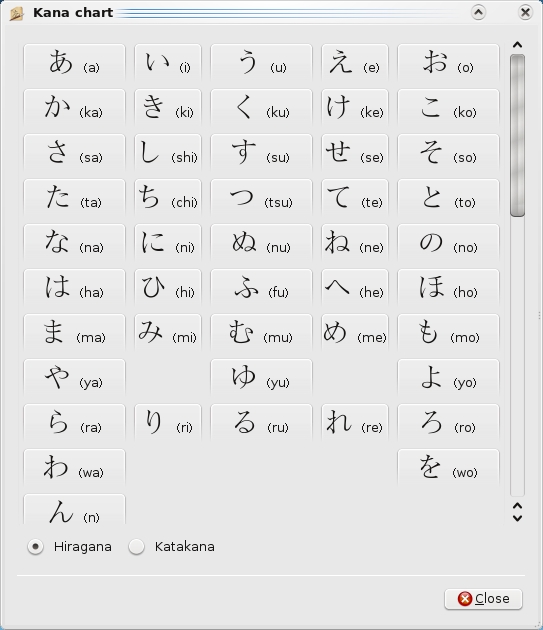
Newer features in Kanatest include a character chart.
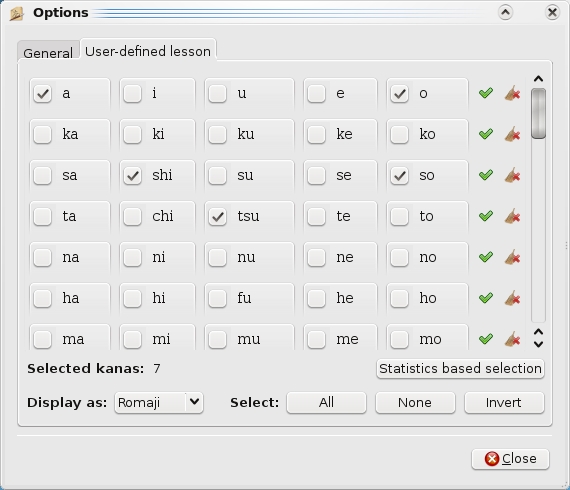
Kanatest also includes user-defined lessons.

At the end of each test, you are presented with your score and accuracy rate—it's been a while since my last lesson, as you can see!
Installation
Although Kanatest is available in a number of repositories, chances are that it's an old version (at least it was at the time of this writing). I went with the tarball for the latest features and didn't run into any pesky requirements during the compilation. To compile it yourself, head to the Web site, grab the latest tarball, extract it, and open a terminal in the new folder.
Compiling Kanatest is the usual case of:
$ ./configure
$ make
$ sudo make install
Once it's compiled, you might find it in your menu (mine was under Applications), or you can start it with:
$ kanatest
Usage
Once the program has loaded, Kanatest is ready to go with that tempting Start button on the bottom left, but you might want to define what kind of lesson you want to run first. If you go with the defaults, Kanatest tests you on Katakana and goes through all the characters. If you want to change the lesson, check the drop-down box called Test mode:, where you can choose between Hiragana, Katakana and Mixed. And, for those who know what they're doing, under Kana set:, you can choose from All kanas, Basic kanas, A-I-U-E-O, KA-KI-KU-KE-KO and so on.
When you're ready to go, click Start. You'll be presented with a screen that shows Japanese phonetic characters above, with an input box where you type in what the character says in Romaji (Japanese using the Roman alphabet). In the middle is a progress bar that shows how many characters you have to go through, and a timer keeps track for those wanting to improve their reading and reaction times. When you get a character wrong on the default settings, the program corrects you, reading out the proper answer, and tallies your correct answers and mistakes against the stopwatch at the end.
What's great for advanced students is that you also can be tested on kana combos such as kyo, ji, kyu and so on. For beginners who have only seen kana for the first time, don't panic, as there's a kana chart available on the program's main screen in that cluster of four buttons on the right. Included in the chart are all the characters in both Hiragana and Katakana, as well as their combinations, such as pya, myu and so on.
For those who aren't really into tweaking things and happily accept defaults, I do recommend checking out the Options section, as this is where you can choose your wanted characters in a user-defined lesson. I thoroughly endorse this move, as there's certain characters I always get confused over, such as Katakana's n, so, shi and tsu. You also can choose to repeat wrongly answered questions instead of having it correct you, as well as change colors, fonts and so on.
Check out the Statistics section too, because here you can keep track of your test scores over time and see your correctness ratio for each kana character.
If you're a Japanese-language student and haven't used Kanatest before, you should do so. It's simple, elegant, painless and probably the best choice there is for testing yourself against kana. If you have used Kanatest before, and it's been a while, check the latest releases, as it really has improved. The user-defined lessons, combined with the Statistics section in particular, make things much better than before.
Brewing something fresh, innovative or mind-bending? Send e-mail to newprojects@linuxjournal.com.
John Knight is a 25-year-old, drumming- and climbing-obsessed maniac from the world's most isolated city—Perth, Western Australia. He can usually be found either buried in an Audacity screen or thrashing a kick-drum beyond recognition.

