
The Neuros OSD Connects Your TV to the Internet
The Neuros OSD is a very small and energy-efficient box that can play digital video, photos and music from several sources, including the Internet, on any TV or home theater system. It also can do the opposite—convert analog video in real time from RCA or S-Video inputs to MP4 format, save it on memory cards, external USB drives or, thanks to its Ethernet port, remote computers. For a Linux/free-software fan, the OSD also is interesting because it runs customizable, Linux-based firmware (OSD stands for Open-Source Device).
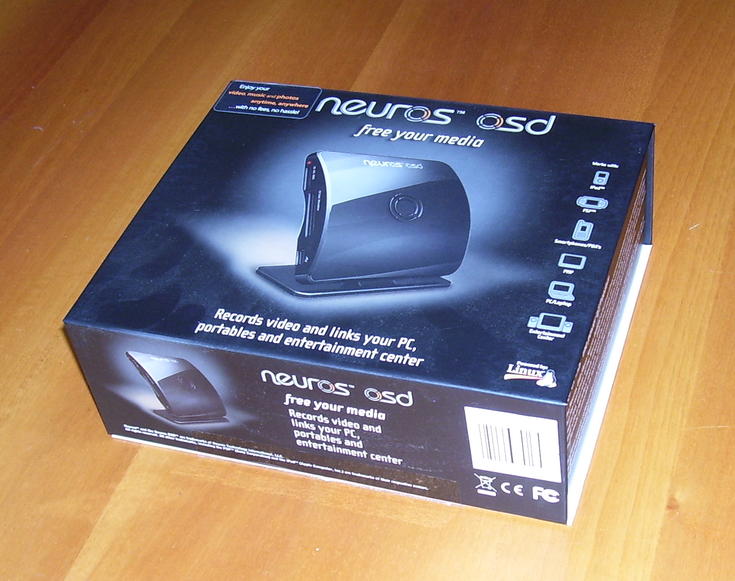
Figure 1. Neuros OSD Box
One of the main reasons for buying an OSD is backup and consolidation of video archives. It's one small box, much cheaper than a normal computer, and it's all you need to migrate tens or hundreds of VCR tapes or DVDs onto one hard drive—if you accept the unavoidable degradation that comes from recording from an analog output. The user interface also has specific settings to optimize recording from a PlayStation. Additionally, a timed recording function also makes the OSD into a bare-bones PVR.
Going the opposite direction, the OSD can play anything it finds on memory cards, USB drives or remote devices on its RCA or S-Video ports. Particularly interesting is the presence of a YouTube browser. Besides MP4, the list of supported formats available on the Neuros Web site includes several variants of .avi, .asf, .mov and others. The firmware upgrade procedure described later in this article can add even more features to the OSD.
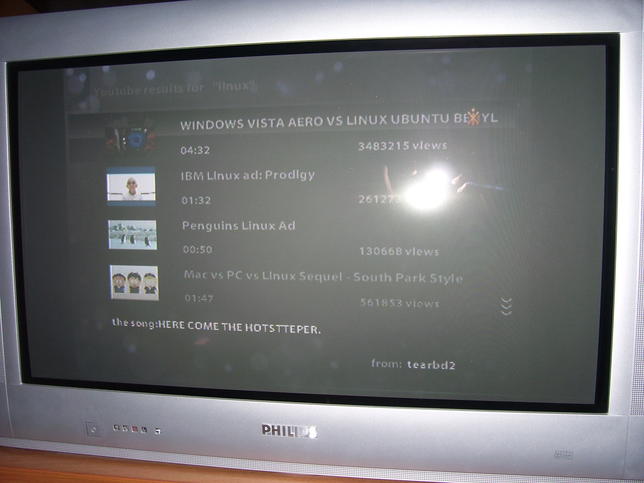
Figure 2. YouTube in the Living Room, without a Computer
When I opened the box, I found several accessories: remote control with batteries, two RCA cables, multivoltage power supply, serial cable and an infrared blaster for controlling your TV, cable box or satellite receiver through the OSD. I got the non-US set, which also includes two RCA-to-SCART adapters. As far as I can tell, that and the plug on the power supply are the only differences between the European and US kits.
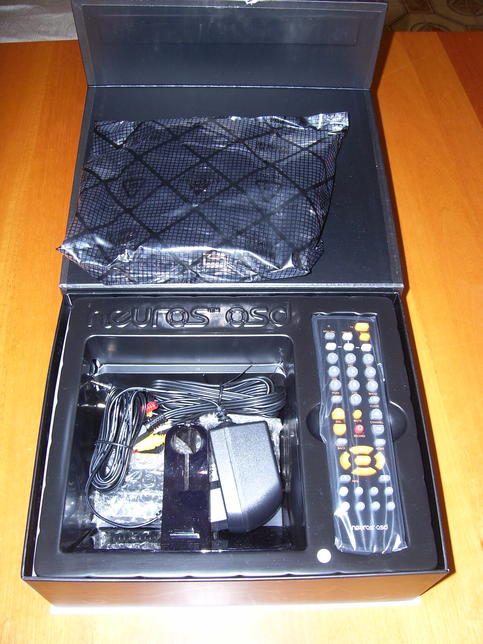
Figure 3. OSD Accessories

Figure 4. Cables, Adapters and Other Accessories Included in the European Kit
The remote comes with very detailed instructions for controlling most TV sets. There also is a Learning Mode with which it can learn the main functions of your TV or VCR remote by directly “listening” while you use it.
Finally, the OSD has a plastic stand that holds it in a vertical position, which I didn't find particularly robust or useful. All the plug-and-forget cables are on one side: power, RCA in and out, S-Video input, IR blaster, serial and Ethernet interfaces. The “user” ports—two for memory cards and one for USB—are on the opposite side. With this layout, the OSD is more stable, which makes it easier to fit on the shelves of ordinary home theatre furniture, as it is flat on the bottom with the user ports facing the room.
I have tested the Neuros OSD on a standard analog PAL TV with a 16:9 32" screen, a generic 1GB USB MP3 player and a 128MB SD memory card from Dikom. For network-related tests, I connected it to a port of a D-Link 604T ADSL modem/router.
Because the first thing you see when you open the box is a big, red sheet of paper saying, “Please upgrade firmware immediately”, that's what I did. The procedure is simple, requiring just a bit of attention. Depending on how old the firmware loaded in your own OSD is with respect to the latest upgrade, some steps I cover here may be different, and some upgrading methods may not apply.
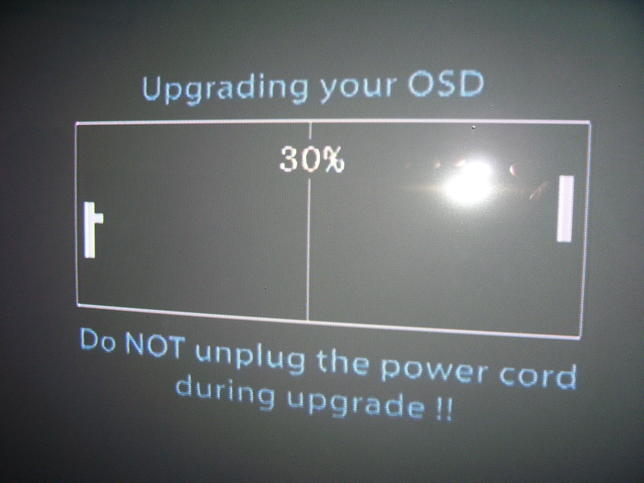
Figure 5. Waiting While the Firmware Upgrades, 1980s Style
First, hook up the OSD to your TV, and check which firmware version it currently is running by going to the Settings→Properties menu of the on-screen user interface. In my case, the version was 3.31-1.24. According to the Neuros Web site, this version wasn't new enough to upgrade directly from the Internet, so I had to download the latest one manually. In my case, this was an 11.7MB file called osd-3.33-1.75-02.849.upk.
Next, I copied that .upk file to a USB key, plugged it in to the OSD, selected the package from the file browser and ran the “Upgrade firmware” option. I chose a USB key because it was handy on my desk, even though the Web site warned that my current firmware may not be able to upgrade from such a device. Sure enough, when I tried it, the upgrade failed in less than one minute, with a “Sorry, package error” message.
The OSD, however, safely rebooted, so I got the memory card, plugged it in, copied the .upk file from the key to the card with the OSD file manager and re-issued the upgrade command. Everything went fine, and in about ten minutes I had the firmware that, among other things, can upgrade directly from the Internet or schedule automatic upgrades of stable or test versions at whatever frequency I choose.
After upgrading, you'll see a “Thank You” screen that invites you to set up the OSD through a few interactive screens. The first one is for LAN configuration. Just as during a standard Linux installation, both static and DHCP configurations are possible. I tried them both without any problems. After configuring network and Wi-Fi, which you can skip altogether, you can configure the IR blaster.
Once everything was up and running, I finally started using the OSD. I've played MP3 files, recorded and played TV shows and YouTube clips and browsed digital pictures. After testing, I can say that the OSD works as advertised. Some parts of the user interface could be more efficient, but all in all, it is simple to use. A French language pack is already available, and Italian, Spanish, German, Dutch and Portuguese should follow soon.
The menu system is similar to standard living-room DVD players, with a sliding bar on the bottom that tells you how much free space there is on the internal memory or the external devices (memory cards or USB drives) you are using. You also can customize the graphic theme and screensaver.
There are three video recording modes. The first is called Quickstart, defined in the OSD manual as “take a leap of faith and simply press Record”. The second is Standard mode, where you can change parameters, and finally, there's Advanced mode, which provides more flexibility and control but requires a bit more competence for proper use. Image and audio quality of TV recordings were almost indistinguishable from the originals, even with the default settings.
The remote has standard, VCR-like keys to control video playback. Video recorded with the OSD takes about one hour per gigabyte at the highest quality. The maximum duration of a recording depends on the maximum file size supported by the host filesystem.
The YouTube browser is simple but effective. All the essential functions are grouped in Videos, Search, Favorites and Settings submenus. The Videos menu has buttons for listing all new clips or just the most-viewed ones for the time period you choose (day, week, month or year). Once you find the video you want, the OSD plays it full-screen. YouTube quality on standard TVs isn't great, but that's not the OSD's fault, and there are no glitches during playback if your Internet connection is fast enough.
The OSD photo viewer has full-screen, thumbnail and slideshow modes. In slideshow mode, you can configure the duration of each slide. The audio player has a playlist-creation functionality.
In my tests, all types of files (video, audio and pictures) were played with the same quality, without degradation or other problems, no matter whether they were on a memory card, USB drive or computer on the local network.
The OSD is a nice and small box with serial port, Ethernet port, Linux inside and very little power consumption. Besides a graphical interface built on the Qtopia toolkit, it has a LUA interpreter, a Telnet server and BusyBox. If this doesn't make a hacker want to mess with the OSD, nothing will. As a matter of fact, there already is a community customizing and extending the OSD in various ways or using it as a mini-server. To get inside the OSD, simply type telnet and the IP address, then log in as root with the default password, pablod. This drops you into a standard shell, within the limits of BusyBox.
In order to browse my PC partition from the TV, using the OSD remote, I simply typed:
mkdir /media/polaris
mount -t nfs 192.168.1.2:/mydata/osd_test /media/polaris
Note that, besides Telnet, you also can open an OSD console on your TV from the Advanced applications menu. The on-screen keyboard is much slower to use, but all the keys are there.
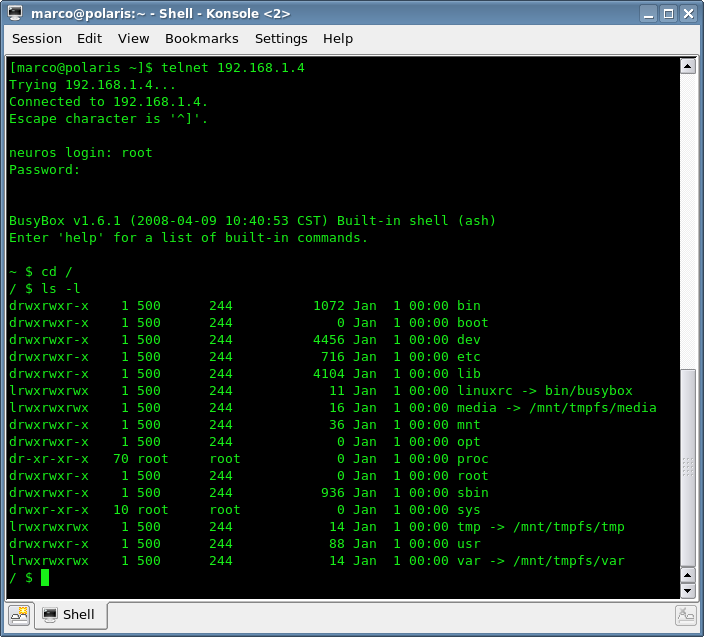
Figure 6. Looking into the OSD via Telnet
The Advanced applications menu also lists an MP4 Video editor (beta). When I tried it on an MP4 file on my computer, it wouldn't even open the NFS-mounted directory, which, as I already mentioned, was reachable without problems by the OSD file browser and picture viewer. Neuros confirmed to me that this application is still just an experiment, usable only on small clips stored in the cards or USB drives.
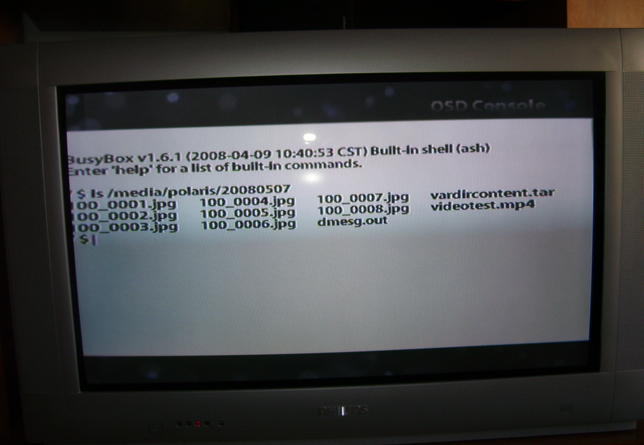
Figure 7. Browsing NFS Partitions from the TV Screen
The list of features coming soon, some of which are Google Summer of Code projects, is really interesting. Besides Samba, Web and FTP servers, the latest announcements mention streaming via Fuse, a Last.fm client and an Ogg Theora codec. Currently, the software that actually plays movies and music and shows the menus, called osdmain, is not designed to communicate with other programs. However, work already is ongoing to overcome this limitation and interact with the OSD over LAN. For more information, check out the Neuros Developer Web site (see Resources).
Besides the main scenarios listed in the Neuros ads, I plan mostly to use the OSD in three other ways that are more interesting to me. First, the OSD makes it possible for kids to play YouTube clips, photos from their digital cameras or their MP3 playlists in the living room, without messing with dad's computer. Second, as the OSD is so small and light, I see it as a traveler's friend. Take it with you on vacations to view your digital photos right away on any motel TV or back them up to a USB drive, without carrying along a more expensive, fragile and bulkier laptop. Portability and the small size also mean I finally will be able to “steal” hours of VHS family movies whenever I visit relatives who often don't even own a computer. Saying, “Hi, Auntie, may I plug this tiny box in to your VCR and leave it there while we have dinner?” takes more time than actually doing it.
The USB interface supports only the 1.1 version of the standard. Neuros itself warns that recording to USB could cause frame drops due to speed bottlenecks. Adding a memory card adapter (which Neuros sells separately) to the kit would have made it more versatile. Also, the list of supported formats isn't 100% reliable. The firmware I tested, for example, can't handle the .mov videos generated by my Kodak camera. The audio played fine, but all I saw was a black screen.
The first thing I thought when I read the OSD datasheet was that the absence of digital inputs makes it impossible to copy DVDs or DV tapes without degradation. Neuros answered that the OSD is meant to offer flexibility and compatibility with the most common TV sets, at an affordable cost and with the simplest possible interface. They explained (and I agreed with them) that, in this context, adding digital output is not really necessary, especially because it wouldn't sensibly increase the final display quality. Digital input, instead, would have increased the cost enough to make the OSD really hard to sell.
All in all, I only had one real problem with the OSD, which I saved for last because it is (potentially) quite serious and also because it may well be solved by the time you read this.
As I mentioned before, the single functions work fine. The user interface, however, froze badly enough, in certain cases, to make the OSD unusable without doing a power cycle. To be more specific, this happened regularly when I had the Ethernet cable, the USB key and memory card all plugged in at the same time. The memory card alone also slowed the device, so part of the problem may be physical or formatting problems with the card itself. Even with other configurations, however, I noticed a recurring pattern. Heavy-load tasks, like playing or encoding video or audio, would go on without problem for hours, but using the remote too quickly or for more than a few minutes could slow down the OSD to a halt, especially when a storage device was plugged in.
By the looks of it, this is almost surely a bug in the particular firmware version that I tested, so don't judge the OSD by this problem, and check the Neuros Web site for updates. The Neuros OSD remains a handy and versatile device, although it's not exactly cheap. Taken one by one, all the features work well, and the device can be hacked and extended in many ways, so it could be a useful addition to your digital living room.
Price and Availability
At the time of this writing in May 2008, the OSD sells for $179 US at the Neuros on-line store. Outside the US, it will be available in some department stores in the UK and France (starting in June), with broader distribution in other countries starting later in the summer of 2008.
Resources
Supported Video Formats: www.neurostechnology.com/neuros-osd-playback-settings
User Guide: wiki.neurostechnology.com/index.php/OSD_Guide
Neuros Open-Source Page: open.neurostechnology.com
Developer IRC Channel: open.neurostechnology.com/irc
Developer Wiki: wiki.neurostechnology.com
Neuros On-line Store: store.neurostechnology.com
Marco Fioretti is a freelance writer and digital rights activist, author of the “Family Guide to Digital Freedom” (digifreedom.net) and member of several groups working on promoting wider adoption of Free as in Freedom formats and software.
