
MythVideo: Managing Your Videos
MythVideo is a video management plugin for the open-source personal video recorder (PVR) system known as MythTV. Its primary purpose is to help organize digital videos that are saved on a MythTV back-end server for display on front-end client systems. The most common use of MythVideo is to create a personal digital archive of videos ripped from DVDs.
In this article, I explain how to configure both your hardware and the MythVideo software so you can make the best use of your computers and disk space, while still providing a comfortable user experience with uninterrupted playback of your digital videos. First, I walk through the process of using and configuring MythVideo and then cover some tips on improving both the process and the end result.
It is assumed that you have MythTV and its associated software installed. MythVideo doesn't require support for live TV, so I don't cover configuration of live TV components in this article.
The MythTV system has a client/server architecture that utilizes plugins to extend its feature set. The server side is known as the back end, and it is generally responsible for providing the hardware required for live TV recording and the storing of audio and video content for use within the MythTV system. It also provides database features used by both MythTV and its plugins.

Figure 1. MythTV Utilizing the MythCenter Theme
The client side is known as the front end, and it primarily is used for playback of content that is stored on the back end. This can include viewing videos or listening to music, but it also includes browsing photos and the Web, making Internet phone calls, displaying the weather forecast and even ordering movies from Netflix. Front ends and back ends are separate pieces of software that communicate over a network, but they also can run on the same computer.
MythVideo is a plugin that runs on a front-end client and communicates with the back-end server to manage videos. It provides administrative tools for adding new videos to the system or for editing video information, along with tools for selecting videos for playback. Videos are stored on the back end but must be made available over a network using NFS in order to be played by the front end.
The MythTV display is divided into pages. There are three sets of pages specific to using MythVideo: the video selection pages, the video manager pages and the video settings pages. The video selection pages (Videos on the main menu) is where you browse your video collection, select a video and play it. There are three ways to view your collection: browsing one at a time, as a pageable gallery and as a list. Each method allows you to view the video title, summary information (running time, directory, plot summary and so forth) and artwork.
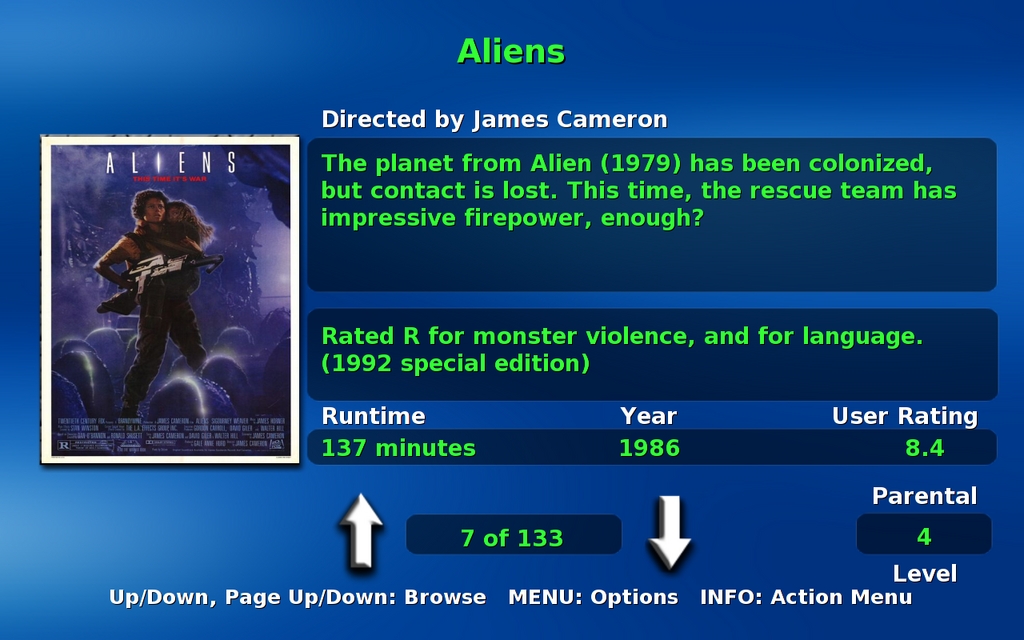
Figure 2. Browse Mode
A Word about MythTV Themes
Many themes are available for MythTV, and each can be configured in a variety of ways. The MythMediaCenter theme was used while writing this article, and the theme was configured (see Setup→Appearance) to use the Classic menu theme. Screenshots in the article reflect this specific setup.
Despite the difference in themes and configurations, the underlying functionality related to MythVideo remains the same. All themes offer the same set of video browsing options and the same administrative interfaces. The only difference between themes is where you find the menu option that takes you to each of these features. If you have problems finding a particular page described in this article, feel free to drop me an e-mail, and I'll try to help you out.
Browse Mode sorts all your videos alphabetically, and although the information it displays is detailed and easy to read, it can take some time to browse a large collection. Use paging keys (by default, this is the Page Down key on a keyboard) to page through the list a little faster.
List Mode displays two small windows. The left side is the current folder and the right is the contents of that folder. If you have all your videos in one folder, List Mode is only a slight improvement over Browse Mode. However, if you arrange your videos in topical folders (by genre, for example), List Mode makes finding a video much easier than Browse Mode.
But, if you've arranged your videos in genre-oriented folders, which is the recommended manner for this article, the Gallery Mode probably is easier to use than either Browse or List modes. This is because the Gallery Mode lets you see a user-defined set of thumbnail poster art for the videos in the current folder. This mode does run a little more slowly than list mode, however, as MythVideo needs to cache the rows-by-column set of thumbnails for the current folder at least once.
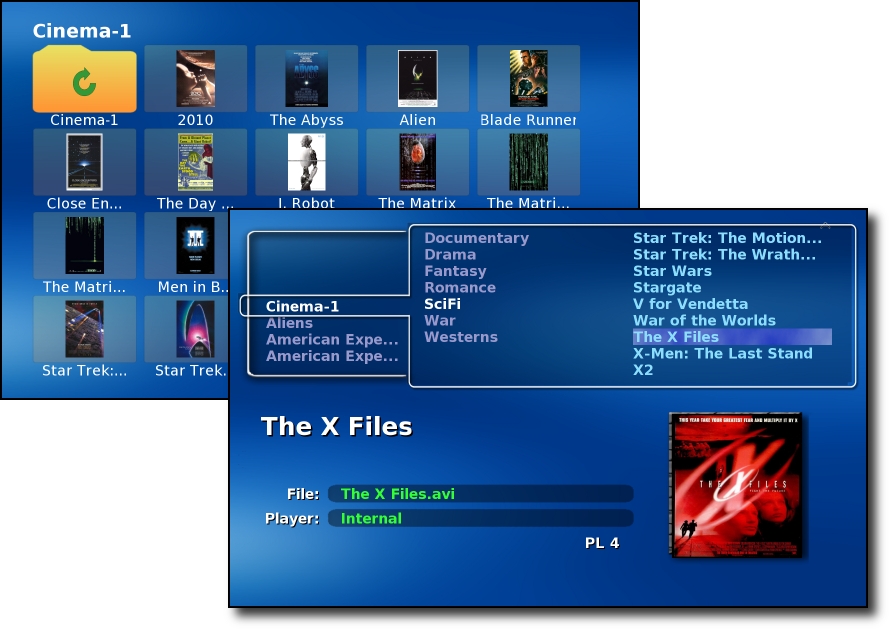
Figure 3. Gallery (Upper Left) and List (Lower Right) Modes
Keyboards vs. Remote Controls
If you're just getting started with MythTV, use a keyboard. The default keyboard mappings are easy to learn and modestly well documented on the MythTV Wiki. However, moving to a TV remote control (using LIRC and an infrared receiver) is an advanced topic that only experienced users will want to tackle, partly because setting up LIRC is not easy but also because, once set up, you still need to teach LIRC about your specific remote and how it interacts with MythTV.
MythVideo can be configured on two sets of pages. The first is found under Setup→Video Settings. These pages allow global configuration of items like the MythVideo storage directory (under General Settings), how the gallery will lay out thumbnails (also under General Settings), which tools to use for playback (under Player Settings) and ripping options (under Rip Settings).
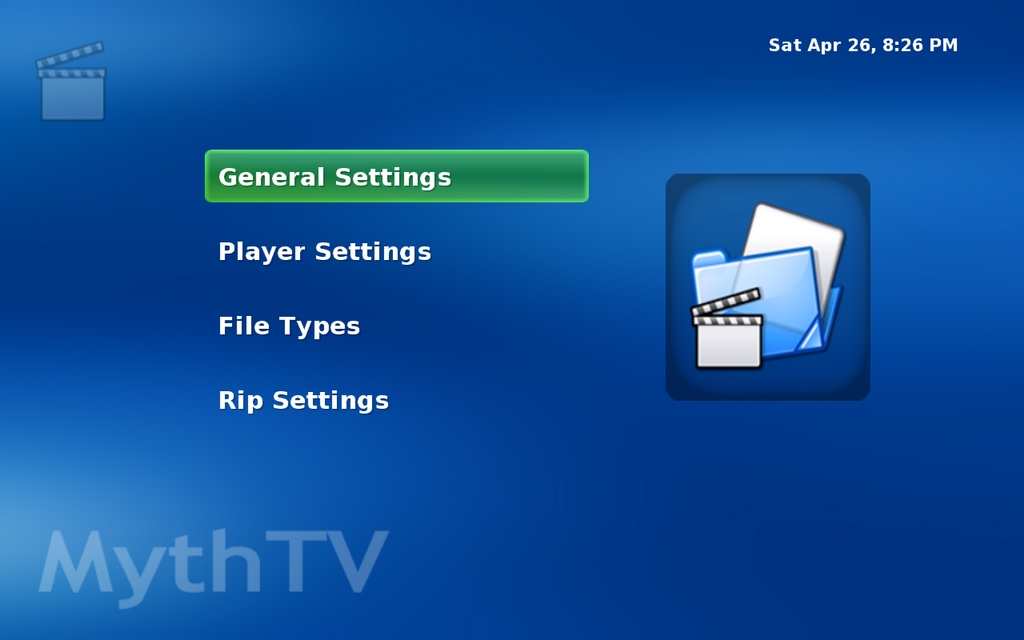
Figure 4. Video Settings Main Page
The Video Settings are global in scope, which means they apply to all videos unless a video has its own configuration. Setting video-specific configuration is done with the Video Manager (Videos→Video Manager). This section of MythVideo allows you to acquire metadata for videos, set a video-specific player, choose how to play videos in sequence (one after another), and choose poster art to display while browsing videos.
Familiarize yourself with the Video Manager, as it will become important when cleaning up artwork for your videos, not to mention when dealing with videos that don't play well with the internal video player.
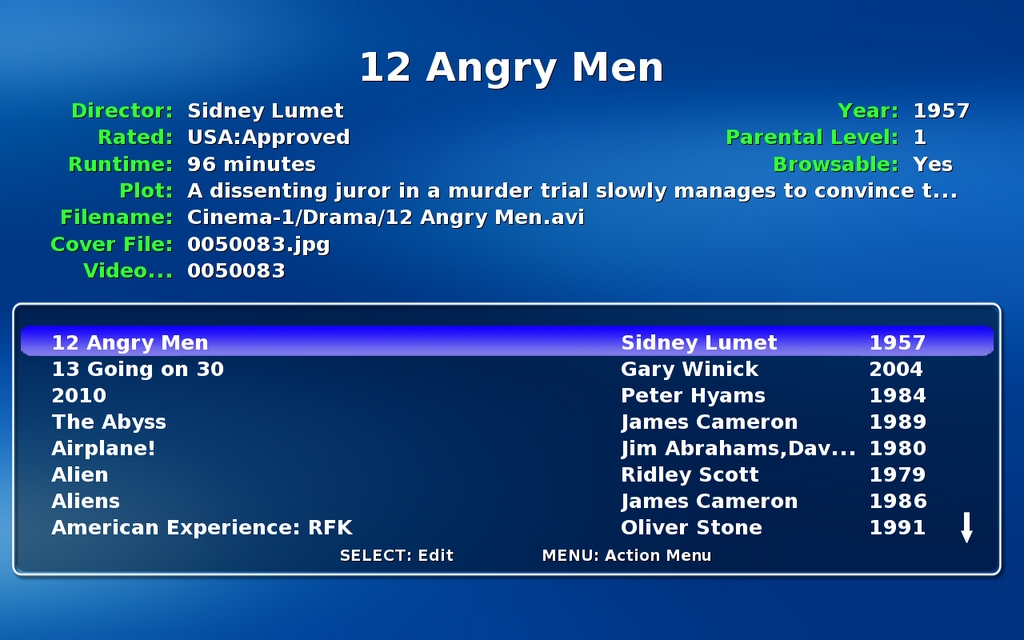
Figure 5. Video Manager Main Page
The MythTV internal video player does a good job with most videos, and I recommend it over external players (at least for use with MythTV). But, I've found it to have a problem with some videos ripped with MEncoder, though this may be due to a bad DVD reader and not to MEncoder. Still, the way around this (until I can replace the faulty hardware) is to choose an external player, such as MPlayer or Xine. And, using the Video Manager is the best way of dealing with this problem should it occur.
The first step in using MythVideo is to rip your DVDs. There are a number of tools for doing this, including a MythTV DVD ripper, but I've found AcidRip to be the easiest to use for beginners (advanced users will want to move on to DVD::RIP or try using the command-line utilities MEncoder and Transcode). You'll want the smallest files you can get, without significant loss of quality, using the AVI file format with the audio and video ripped to MPEG-3 and MPEG-2, respectively. Other formats might produce better quality or smaller files, but if you're just getting started, start with these settings. Fortunately, these selections are the default with AcidRip, so the only thing you need to do is play with the file size in order to find the smallest size (see the General tab File Size field) with the best video quality (see the Video tab bits/px and Bitrate fields).
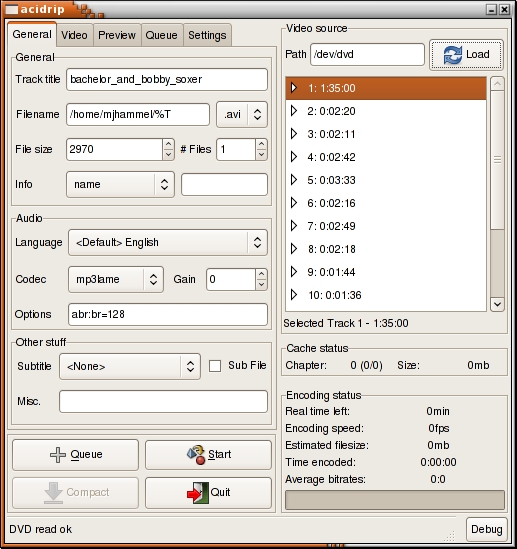
Figure 6. AcidRip
Once you have a ripped file, you need to store it in MythVideo's storage directory (see the Video Settings section discussed previously). I have internal disk space of about 150GB on an IDE drive and 500GB on an external USB drive. I use the internal drive for TV recordings and the external drive for videos. I mount the external drive under /store and set this in the Video Settings pages.
The videos are ripped by AcidRip and then copied to the external drive manually. This is so that I can rip them to temporary storage first and verify they work under MPlayer or Xine before installing to MythVideo's directories. I do this to save wear and tear on the external drives, some of which have less than stellar reliability.
Once you copy a video into the MythVideo storage area, you need to grab its metadata using the Video Manager. If you're using a remote control with MythTV, note that this step is easier to do with a keyboard, though you can use the built-in keyboard with your remote control. I don't recommend this if you have lots of new videos to add or if you add videos often.
To update the database, choose Videos→Video Manager. This takes you to a page where you can select a video to edit. Your collection is listed alphabetically by video title with the director and year also listed. New additions to the MythVideo storage directories show up with the filename, followed by Unknown for the director and a question mark for the year.
Page through the videos, if necessary, until you find the new entry. With the entry highlighted, press M for the menu, then select Search. If all goes well, MythVideo will find the video on the IMDb database and fill in the metadata for you.
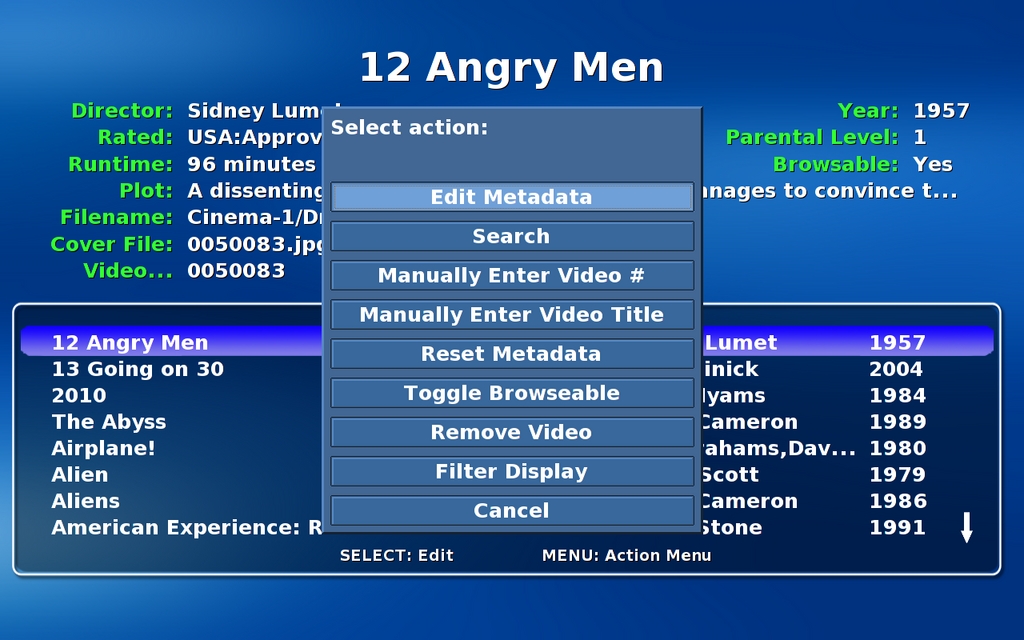
Figure 7. Video Manager Menu
If MythVideo locates the video in the IMDb database, you'll need to find the video manually with your Web browser. The URL for the video will be suffixed with an ID, something like tt0362227. Drop the leading alphabetic characters and note just the numeric portion of this ID. In the Video Manager, in the menu, choose Manually Enter Video Number, type in the number and then press Enter. MythVideo will fetch the appropriate information based on the video ID.
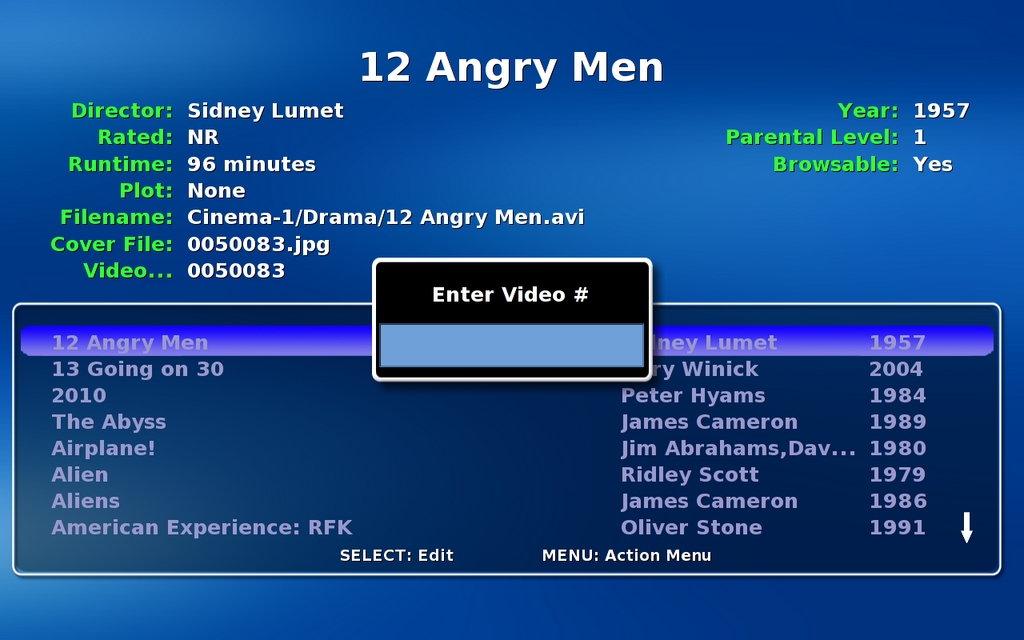
Figure 8. Video Manager Manual Search
Now that you know the basics, there are a few tricks to make this all work a little better. First, you'll want large storage drives for your videos. Even when ripped to the relatively small AVI files, a collection of 100 videos each ripped to 2GB in size will take up 200GB of disk space. And, if you're like me, you've probably purchased much more than 100 DVDs.
Next, you'll want to separate your videos from your live TV recordings. My internal IDE is a 7200RPM drive, and my external USB 500GB drive is only 5200RPM. The latter is fast enough for playback but not ideal for video recording. That's another reason I rip to temporary storage (on a fast IDE drive) before copying to the external USB drive.
External drives are easier to install than their internal counterparts. However, you'll need to make each drive a different directory under the main MythVideo storage directory. I created a directory called /store/movies/Cinema-1 for my first external drive, then mounted the external drive to that directory. The /etc/fstab entry looks like this:
# MythTV drives
/dev/sdc1  /store/movies/Cinema-1  ext3  defaults  0 0
If you have multiple drives, you may need to write a program to identify what drives are allocated to which device files at bootup time, because it's possible that the drives may not be recognized in the same order each time. This is a problem when dealing with external USB drives and a reason I'm currently using only one very large drive.
A minor problem with USB drives is that they spin down when not in use. This means the first time you browse your video collection to that drive, there may be a modestly long pause while the drive spins up. Fortunately, this is, at most, an inconvenience and will not affect playback of the video.
I've had good luck with my Western Digital 500GB USB drive, but I've had poor luck with Maxtor drives—two of three drives have failed inside of the first week (the other is working fine, however). At the time of this writing, the Seagate FreeAgent drives were having problems related to power-saving mode under Linux. Workarounds are available, but until Seagate resolves the problem, you probably should avoid those drives.
Another tip is to place your DVD readers on separate machines, if available. This will allow you to rip your videos to NFS mountpoints without affecting performance off your MythTV back end. I export /store/rip from my back end to all my systems and rip to that directory from various places, including my laptop. Again, /store/rip is on the internal IDE drive, so it doesn't adversely affect playback of saved videos from the external drive. My exports file, /etc/exports, looks like this:
/store 192.168.1.0/255.255.255.0(rw,sync,no_root_squash)
/store/movies/Cinema-1 192.168.1.0/255.255.255.0(rw,sync,no_root_squash)
/music 192.168.1.0/255.255.255.0(rw,sync,no_root_squash)
Note that my back-end server is behind a firewall with no direct access from the outside world. I'm not streaming any videos across the Internet, which is fairly pointless, as the throughput would be quite bad from my home. The videos are accessible only from within my home network.
Now, let's look at naming your ripped videos. AcidRip pulls the name of the video from the disk but generally uses all lowercase letters and replaces spaces with underscores. You always should change this to be the same as the title of the video as it is listed on IMDb.com. Because the metadata lookup will use that name, you'll have a far greater chance of having the automated lookup succeed if you simply use the correct title for the video's filename when you rip the video.
You'll also want to categorize your videos. The primary reason for this is that you won't want to scroll through 100s of videos in any mode (Browse, List or Gallery) using MythVideo.
If you create top-level directories with the category names and then copy the videos into those directories instead of the top-level MythVideo directory, browsing the files in any of the available modes will be a bit easier. Ideally, MythVideo would allow you to categorize the files without creating directories manually, but because it doesn't do that yet, this is the next best way to handle the issue. As an added bonus, you can add an image file called folder.png (or folder.jpg) to each category directory and that image file will be used as an icon in the Gallery display.
My directory structure looks like this:
/store/movies: top-level storage directory configured for MythVideo.
/store/movies/Cinema-X: mountpoints for each external drive, with X replaced by a number.
/store/movies/Cinema-X/category: video categories, with category being one of the following: Action, Comedy, Drama, Romance, War, Classics, Documentary, Fantasy, SciFi and Westerns.
Note that each external drive, when mounted, also includes a lost+found directory. MythVideo is smart enough to ignore this directory, as should you when managing your videos.
The artwork retrieved for your videos for display while browsing the collection is not always ideal. Some videos end up with rather obscure poster art. If this bothers you, the simple solution is to scan the cover of your DVD case and save it to your posters directory. This directory is configured under General Settings in the Video Settings page. After you scan the case cover art, save the file in this directory using the same filename as the original poster file retrieved from IMDb. The filename for the poster of each video is listed in the Video Manager page. Alternatively, you can save it using a different name and then manually edit the metadata from the Video manager.
The size of your scan doesn't matter, although you might want to make it roughly the same size as the original poster art to reduce the time MythTV spends resizing the image. Resizing occurs all the time and is based on the settings for the number of rows and columns to display or whether you're in List or Browse mode. So, there is no really ideal size. The file format for poster art should be JPEG.
Resources
MythVideo: www.mythtv.org/wiki/index.php/MythVideo
AcidRip: untrepid.com/acidrip
DVD::RIP: www.exit1.org/dvdrip
Transcode: www.transcoding.org/cgi-bin/transcode
Mencoder/MPlayer: www.mplayerhq.hu/design7/news.html
Xine: xinehq.de
VLC: www.videolan.org/vlc
IMDb: imdb.com
LIRC: www.lirc.org
Michael J. Hammel is a Principal Software Engineer for Colorado Engineering, Inc. (CEI) in Colorado Springs, Colorado, with more than 20 years of software development and management experience. He has written more than 100 articles for numerous on-line and print magazines and is the author of three books on The GIMP, the premier open-source graphics editing package.

