
Mixing It Up with the Behringer BCF2000
Linux and open source are practical matters for me. I couldn't run my business without them. But occasionally, the demands of a job grow way beyond what the tools I'm using can handle.
Take Audacity, for example. As far as sound-effects-editing software goes, it strikes almost an ideal balance between user-friendly and extremely powerful. Snd and ReZound let you do a lot more, and Sweep lets you bring in nondestructive editing and some other nifty things, but all of them sacrifice a certain amount of intelligibility in the process (from the non-engineer's perspective). Now, I am an engineer, at least in the practical sense. I've been editing, recording and mixing audio now for almost a decade, and I do know better than to use Audacity for complicated long-form projects. Knowing better and doing better are two different things, and Audacity is just so darn simple that it's easy to get stuck with it even when you know better than to consider using it for certain kinds of jobs. Like, for example, my current big project: a 13-hour full-cast audio book with ambient sound, original music and complex stereo imaging.
I've long used Ardour for recording and for mixing music, but for the past several years, I've used Audacity mostly to do my mixing and sound FX editing. I must confess, I've actually mixed a number of long-form video projects, several short films and countless long-form podcast episodes in Audacity over the last few years, before the post-production work I was doing got complicated enough that I needed to be able to work with the signals in ways that Audacity simply doesn't let me do. The need to change EQ and reverb parameters over time, do complex stereo imaging and subtle sound-layer shifting all jumped out at me in glaring relief when I launched my recent dramatized podcast novel.
However, shifting to Ardour for mixing (instead of just recording) immediately opened up a whole new wondrous world where my options quickly multiplied to the point of paralysis. A 20-track mix isn't a big deal when you're mixing down mono and you're doing simple, sound separation EQs, but when you're using elements that change over time on each track, the time that goes into mixing a show goes up exponentially with every new element you add. Mixing it all one element at a time with a mouse can be done, but as I found out very quickly, that way madness lies.
In the world of well-monied studios, such things are handled by devices called control surfaces. In the most basic sense, a control surface is a mouse that's shaped like a mixing board. It plugs in to a computer's MIDI port and uses the MIDI command language to control different elements in a given piece of software. Ardour (along with most MIDI programs, like Rosegarden) plays very nicely with control surfaces that are supported by the kernel. Most good control surfaces with motorized faders, like the ones made by Mackie, start selling at around $800 for an eight-track unit. This is well out of the price range for hobbyists, and it's a stretch for small studios like mine. However, there is another surface on the market at $200 that competes very well with the $800 Mackie, and it is completely, gloriously supported by the Linux kernel.
The device is the Behringer BCF2000 (Figure 1), and it has a number of nice little features. It has eight faders, eight pan pots, 16 programmable buttons, an additional bank of four buttons for transport control (play, stop, fast forward and so on), and all of these buttons, faders, dials and switches are programmable, groupable and toggleable so that, with the proper configuration, you can control up to 32 tracks at any given time.
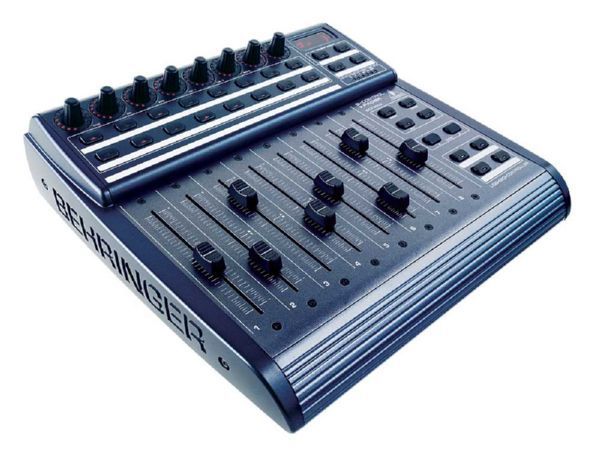
Figure 1. Behringer BCF2000
But, it gets better. The units are stackable—you can link a number of them in a daisy chain and have them act in tandem, and you also can link another MIDI device, such as a keyboard, through the BCF2000. The scalability of the unit is a big deal—a 24-track Digidesign control surface runs around $10,000, while three stackable Behringers cost only $600 plus another $30 or $40 for extra MIDI cables and will give you 80% of the same functionality. (For that last 20% on the Digidesign 24-track systems, you get more sophisticated transport control, more programmability and a real jog/shuttle wheel. If you're creative with your configuration though, you can approximate a jog/shuttle on the Behringer, and stacking the units will give you everything a hobbyist or a small studio really needs.)
Although you can use the Behringer control surface family (the BCF2000 is one of several models in the BC line) with any MIDI program that supports control surfaces, if you're looking to control Rosegarden or TerminatorX, the companion BCR2000 might be a better bet for you. The internal electronics are nearly the same, but the physical interface is better for voice and event triggering, while the BCF2000 is laid out like a mixing board and is ideal for the kinds of complicated mixing that I do for my audio projects.
Setting up the Behringer is pretty straightforward. Take it out of the box, plug it in to the wall, hook it up to your computer over the USB port or the MIDI port and power it up. Before you actually can use it, it'll need a firmware update. If you go to www.behringer.com/05_support/bc_download/bc_downloads.cfm, you'll find the latest version of the firmware. Download the most recent package, unzip it and follow the directions inside. You load the firmware to the unit with a cp command—no Wine or DOSEMU necessary.
Setting up the unit after this actually is pretty simple. Pull up a JACK controller, such as qjackctl (Figure 2), and start JACK. Then, start Ardour. Now, in the Connections window, look at the ALSA tab. If you've plugged the interface in through your USB port, it will show up as an ALSA-MIDI device (Figure 3).

Figure 2. qjackctl Main Interface

Figure 3. ALSA Tab of the Connections Window in qjackctl
When that's done, cross-connect Ardour and the BCF2000, so that each will control the other. This allows you to control Ardour with the faders and pots on the BCF, and it allows Ardour (with a little extra work) to feed back to the BCF on playback—this sounds kind of gimmicky on the surface, but trust me, it becomes really important, really fast, later on (more on that later).
Once you've cross-connected the surface and Ardour, you can save the setup for future sessions, so you don't have to go through this rigmarole every time. Click on the patchbay button in qjacktcl. In the patchbay window that appears, click New, and then press Yes when you're presented with a dialog that asks whether you would like to “Create patchbay definition as a snapshot of all actual client connections”. Save the definition. Now, any time you start JACK, you can load up that patchbay setup by selecting it and clicking Activate.
When it comes to working with the BCF2000 in Ardour, once you get the basics down, everything else is pretty straightforward. There is a caveat though. Depending on your distribution and the version of Ardour you're running, everything might not work. So first, let's check to see whether everything's kosher.
First, using the presets controller on the mixer, set it for preset 2 (this is the factory preset most congenial for mixing). This preset designates the bottom right-hand bank of four buttons as your transport controls, controlling the following (starting from the top left and going clockwise): Locate 0, Fast Forward, Play and Stop.
Open Ardour, and set up a project suitable for mixing. Under File, select Add Tracks, and add seven new tracks, just for kicks (mono or stereo doesn't matter—pick what you prefer). When presented with the editor window, before you do anything, go to the Options pull-down menu and select Control Surfaces. Under the secondary menu that appears, make sure that General MIDI is checked and Mackie is unchecked. Then, under the tertiary menu Controls, check Feedback. Once this is done, you should be able to assign controls to the faders, pan controls and the jog/shuttle control. In order to do this, simply mouse over the control you want to assign (chose a fader first), then hold down Ctrl and click your middle mouse button. You'll see a little floating window pop up that says Operate Controller Now. Do what it says—operate the controller on the BCF2000 that you want to have control the interface element you're trying to assign. As you move the control on the mixer, you should see a corresponding change in the program's GUI.
Now, here's the fun part. Take your mouse and move the fader in Ardour—that same one you just assigned. You should see the fader you assigned to the track move on the mixer in response to manipulating the interface. If everything is working both ways, you're ready to roll.
If you run into problems, particularly problems with getting the faders to fly properly, take a look at the relevant portion of the manual for instructions on debugging: ardour.org/files/manual/sn-bcf2000.html.
Now that your surface is up and running, it's time to mix your first project. To start, you're going to need some sounds. Record or import a few sound files, and line them up on your tracks (Figure 4).

Figure 4. An Eight-Channel Song Mixdown in Ardour
In the Window pull-down menu, select the Show Mixer option, and switch over to the mixer window. At the bottom of each track's fader, you'll see a little blue button that says either M, W, P or T. This sets the automation mode of the track: Manual, Write, Play or Touch, respectively. Manual mode is what you use if a track needs a constant volume level throughout the project—sometimes. For a simple mix, this might be all you need, but if that was all you were doing, you wouldn't have bought a control surface (Figure 5).
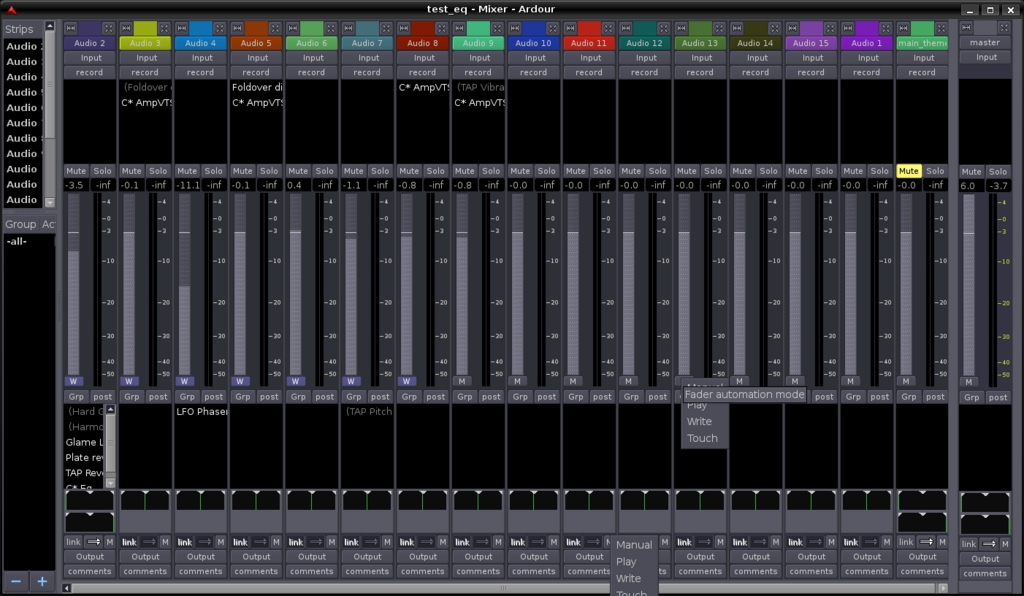
Figure 5. Ardour's Mixer Window with the Automation Modes for a Pan Pot and a Fader Showing
To perform your mix and write automation to the project, you need to set a track to “write”. Be careful though; if you leave it set on write and then play the transport, it will write—and overwrite all automation you may have programmed already. Always, always, turn write mode off unless you're actively writing automation.
To play back and check your work, set the mode button to Play. To play it back and make adjustments as you go, set it to Touch mode, which plays through the existing automation, but begins writing if you adjust a fader, for as long as you're writing a fader.
An analogous situation works for pan pots at the bottom of the track—these pots can be assigned to pots on the board so that you can automate stereo imaging (instruments or people moving through the audio space, bullets whizzing across the room and so forth).
So, set the pots and faders for the tracks you want to work with to Write mode, press Play and ride your controls. That's all there is to it.
Using the Behringer as a MIDI control surface is nice, but it does require hand-assigning every button for every project. In my experience, it also doesn't do a good job at honoring the bank selectors—in MIDI mode you have eight tracks' worth of controls, and only that. If you want to mix a 24-track project, you have to be good about grouping your submixes and break your project down into passes. It's a viable way to work, but it can become a pain, and reassigning your faders as you go can confuse you when you change over (naturally, if you're running a number of BCFs in tandem, this limitation ceases to be a serious problem).
There is a better way to use the BCF2000 with Ardour, and that's in Mackie Emulation mode. Basically, you tell Ardour you're already connected to an eight-track Mackie control surface. The Mackie preset gives you a seven-plus-master mix layout, with pan pots at the top (except for the master track—there your pan pot is a jog/shuttle wheel) and each track having mute and solo buttons—very handy. It assigns the tracks in numbered order from left to right (corresponding to your track order in Ardour from top to bottom), with track eight being the Master bus.
Why is this a better way? It gives you access to all the controls on the BCF. MIDI mode allows easy assignment of pots and faders, but try assigning one of the buttons, and you'll find yourself quickly tempted to burn the thing at the stake. Button presses seem to register on assignment, but then when you go to use them, they don't work. This problem may be correctable by building a preset in Behringer's preset building software (Figure 6), depending on the preset you build and your version of Ardour. Your mileage may vary.

Figure 6. Behringer's cross-platform preset writer—works well in Linux.
Section 10.6 of the manual gives detailed (and accurate) setup instructions for putting the Behringer in Mackie Emulation mode. Unfortunately, the effectiveness of Mackie mode seems to be in flux in Ardour's current development cycle. Some versions work very well—others don't work at all. Again, your mileage may vary (www.ardour.org/files/manual/sn-mackie.html).
Despite the bumps in the road due to Ardour's rapid development cycle, I wouldn't trade this little mixer for the world. It's easily saved me ten hours a week mixing down my podcasts, and the quality of the mixes has gone up as well. Mixing software faders with a mouse is a sucker's game compared to the precision you get mixing hardware faders with your fingers. For $200, this control surface delivers motorized faders and high-definition response in a well-designed, solid package that's fully supported by the Linux kernel and ALSA-MIDI.
That means it's also useful in a number of other high-level MIDI and audio programs for Linux, such as Rosegarden or LMMS or other programs that can accept MIDI control symbols. Let the mixing begin!
Dan Sawyer is the founder of ArtisticWhispers Productions (www.artisticwhispers.com), a small audio/video studio in the San Francisco Bay Area. He has been an enthusiastic advocate for free and open-source software since the late 1990s. He currently is podcasting his science-fiction thriller Antithesis and his short story anthology Sculpting God. He also hosts “The Polyschizmatic Reprobates Hour”, a cultural commentary podcast. Author contact information is available at www.jdsawyer.net.

