
Lazarus for Cross-Platform Development
Lazarus is an open-source library of visual components and a powerful IDE for rapid cross-platform development. The IDE contains all the features of a modern development suite, including a debugger, code completion, visual designers, refactoring tools, and translation and documentation tools. The Lazarus Project started on Linux ten years ago and now runs on all major platforms: Linux, Windows and Mac OS X. The Lazarus Project's motto is “Write once compile anywhere”, and it provides cross-platform libraries, a cross-platform compiler and a cross-platform IDE.
Lazarus' features include the following:
An easy-to-learn language: Pascal.
A visual form designer.
Producing native code executables that execute with speeds comparable to C/C++—no virtual machine here!
Allowing direct access to system libraries.
Supporting embedded assembler code.
Easily handling big projects with millions of lines.
Compatibility with the Delphi visual component library.
And, if all that weren't enough, Lazarus also is open source and free of charge, even for commercial development. The Lazarus IDE is shown in Figure 1.
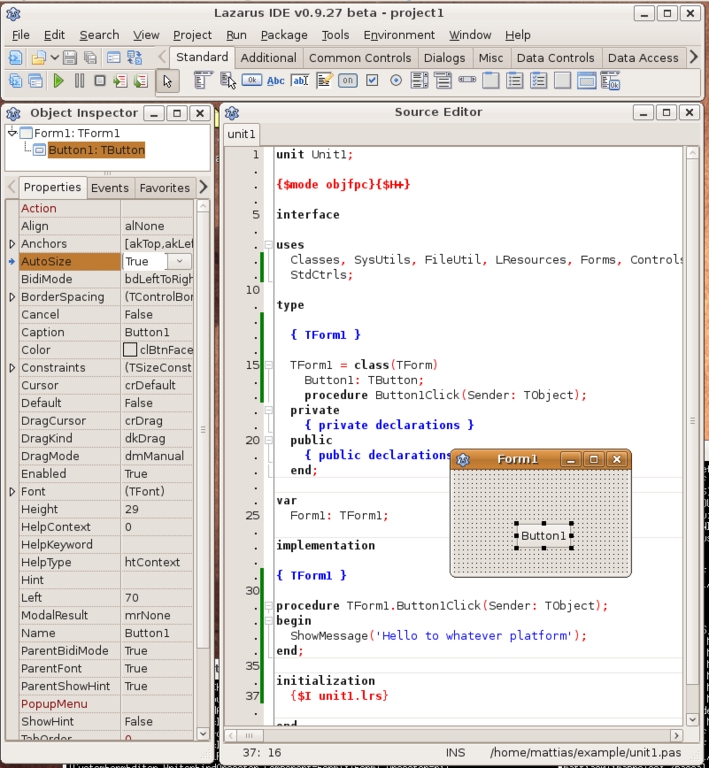
Figure 1. Lazarus IDE
Lazarus uses the powerful Free Pascal Compiler (FPC), which understands Object Pascal (a descendant of Pascal). Free Pascal (aka, FPK Pascal) is a 32- and 64-bit professional Object Pascal compiler. It is available for the following operating systems: Linux, FreeBSD, Mac OS X/Darwin, DOS, Win32, Win64, WinCE, OS/2, Netware (libc and classic) and MorphOS, and for different processors: Intel x86, AMD64/x86_64, PowerPC, PowerPC64, SPARC and ARM. You can find binaries, packages and daily snapshots at the Free Pascal and Lazarus Web sites (see Resources). Free Pascal creates native code executables, like C and C++, and uses the GNU tools and object format, so it can use C libraries directly, and, of course, C/C++ code can use FPC libraries. The speed and size of the created code is comparable to GCC.
FPC also compiles fast—normally more than 10,000 lines of code per second. That is because in Object Pascal, forward declarations are more limited than in C/C++. This saves a lot of time, even for small programs, and allows you to be more productive. After a while, you'll compile without thinking, just to highlight even obvious errors.
The Free Pascal Compiler itself is written entirely in Object Pascal. At the time of this writing, the compiler is at version 2.2.4.
Note:
FPC runs on more platforms than Lazarus. On those platforms, you can use the FP IDE, which runs in a terminal. The FP IDE usually is installed together with FPC and you can start it by typing fp.
Like its ancestor Pascal, Object Pascal is very easy to learn. C and Java programmers will understand most Pascal code without any tutorials. The language is very type-strict, and many code inconsistencies are spotted at compile time. This is especially useful for big projects, when a refactoring eventually is needed, and all affected places must be found. The compiler also warns when a statement works on the current platform but may fail on another—for example, when an expression works differently on 32- and 64-bit systems.
Lazarus gives FPC a face by providing the Lazarus Component Library (LCL), a library of visual components, such as buttons, edit fields, file dialogs and much more. These components run on Linux, MS Windows, Mac OS X, FreeBSD and Solaris using native widgets. Additionally, on Linux, you have the choice between GTK or Qt as a back end. The LCL calls the back-end widget sets and provides the glue between the platform-independent API and the widget set. The code itself needs to access only the LCL API, so no change is required when switching the widget set.
An LCL application compiled with GTK creates a native GTK application running on most Linux distributions out of the box. Under Windows, the choices are the WinAPI, GTK and Qt. For Windows CE, the back end is called wince. Under Mac OS X, the choices are Carbon, GTK and Qt. The widget set can be chosen automatically by the IDE or selected manually in the dialog for the compiler options. This allows you simply to copy a project developed under Linux to Windows and compile.
Some other LCL interfaces are under development—for example, fpgui, a widget set written completely in Object Pascal and Cocoa for the new Mac OS X libraries. So, if you don't care about native widgets and you want your application to look and feel exactly the same on all platforms, you can make use of the LCL and the fpgui library, which currently runs on MS Windows, MS Windows CE and Linux with X.
The Lazarus IDE uses the LCL and has an integrated visual form designer, which allows you to edit forms graphically, like Glade or Trolltech's Qt Designer. Lazarus' designer works directly with the corresponding Pascal unit source. For instance, double-clicking on a button in the designer automatically creates the OnClick in the source code and connects the button and the event handler. No further work is needed—simply compile and run. And, it works backward too. Remove a method from the code, and the IDE will disconnect it from the designed form.
The IDE even supports connecting two designed forms. That means a component on form1 can access the components on form2. No extra source code is required for this, just some mouse clicks.
The designer also allows you to inherit forms visually. For example, a base form can be created for all of an application's dialogs. Descendants can be created visually that inherit from this dialog. No extra source code is required. Even embedding a form into another form as a subcomponent can be done visually.
Of course, everything done in the designer can be done via source code at runtime too. The form data is stored in .lfm files, which are simple text files, so they are cross-platform also.
Lazarus provides an outstanding native code solution. The compiler and most libraries are written with cross-platform in mind. That is why programs written in Free Pascal do not need to run a configure script before compilation. The base types, like char, byte, integer and string, work the same on all platforms. An integer always is a signed 32-bit value. The 64-bit integer is called int64. The native integer for a processor is called PtrInt for signed and PtrUInt for unsigned values. Lazarus itself can be compiled with a simple make or graphically in the IDE itself. And, of course, Lazarus is developed with Lazarus.
FPC's runtime library does not use libc; rather, it uses kernel functions, which change less often. Therefore, the created executables normally work on various Linux distributions and do not need to be recompiled for each new glibc version.
With Lazarus, you can write and debug the biggest part under Linux. But eventually, you'll need to test it on the other targets. However, you do not need to install Lazarus and all the development tools on all your target platforms. Cross compiling can be used to develop under Linux and target another operating system or processor. For example, you could develop under Linux and create Windows executables, and then test them with Wine or in a virtual machine running Windows, or on an actual Windows system. Cross compiling is a big time-saver, because it allows you to test on several platforms quickly and to use your favorite programs while developing.
Note, however, that cross compiling does require you to install the cross-compile tools and libraries, which can be tricky. Precompiled versions do not yet exist for all possible hosts and targets. Easy directions are provided for Linux to Windows, because of Wine, and for Windows to Windows CE, because there are installers with all needed tools.
First, you need to cross compile and install the GNU binutils. This is well documented on several sites, including the Lazarus Wiki (see Resources). For many targets, this is as simple as downloading a single tar.gz and running a script with some parameters.
The next step is to cross compile the Free Pascal libraries. If you want to cross compile to another processor type, you need to cross compile the compiler too. Again, for many targets, complete scripts are available.
If your program requires third-party libraries, these must be cross compiled too. If they are written completely in Object Pascal, normally you can just compile them. Lazarus will do that automatically for you. If they use system libraries, it can become difficult. The problems are then the same as for C/C++ compilers.
Once you've installed the cross compiler and libraries, cross compiling becomes easy in Lazarus. Simply pass the -T option to the compiler. For example, pass -Twin32 to compile a 32-bit Windows executable instead of a Linux binary. The -P option defines the target processor. Normally, you don't even need to pass special search paths, because of the path scheme used. For instance, the Pascal units for the fpc 2.3.1 compiler, for the processor type i386, and for target operating system Linux are installed under /usr/lib/fpc/2.3.1/units/i386-linux/. All filenames and search paths of the compiler and the IDE support macros, which greatly reduces the amount of command-line parameters and configuration settings.
Lazarus reduces the amount of platform-specific settings even further. The IDE allows you to combine several source directories into a Lazarus package. A Lazarus package can be a library or just a logical module of a big project. A package has its own search paths, its own compiler settings and its own macros. All filenames and search paths are stored relative to the configuration file (.lpk file). A package can use other packages and inherit search paths and compiler settings. You can store a package anywhere on the disk. All search paths are adapted automatically on the fly. And, because every source has its own namespace, there is seldom a name conflict. You can switch to another version simply by opening the .lpk file. Each package also has its own output directories, normally one for each platform, which are created automatically.
When a package's source file is changed, the IDE automatically compiles the package and all packages in the current project that depend on it. You can fine-tune this automation for each package.
When you switch the target platform in the IDE, all packages' output directories are switched. The compiler options dialog is shown in Figure 2.
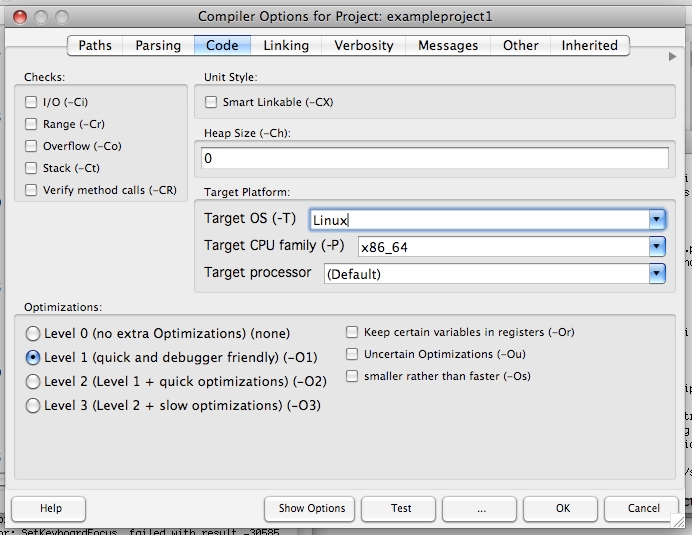
Figure 2. Lazarus Compiler Options
Most modern IDEs have some code-completion features. The IDE uses Codetools to parse the sources. Codetools is a library of parsers, search and refactoring tools and is independent of a specific compiler version. This allows the IDE to handle several versions of the compiler and to switch between them easily.
It also supports cross-editing. For example, it's possible to develop under Linux and write code for Windows. When a cross-platform compiler is installed, simply set the target OS to Windows in the IDE. The IDE code navigation and code-completion features now will work as if you were working under Windows. The following example illustrates this:
{$IFDEF Linux}
// write code for Linux here
{$ENDIF}
The curly brackets are compiler directives and work the same as C preprocessor directives. The code between the directives will be skipped by the compiler except when compiling for Linux. The IDE is a little bit smarter. When a different target operating system is active, the enclosed code will in most instances act like a comment. However, tools such as find declaration still will work within this code so that you don't have to switch the target too often. Some other macros that may be of use are:
{$IFDEF MSWindows}
// code for all kinds of windows
{$ENDIF}
{$IFDEF LCLGTK2}
// code when using GTK2 as widget set
{$ENDIF}
{$IFDEF big_endian}
// code for big endian processors like the powerpc
{$ENDIF}
{$IFDEF CPU64}
// code for 64 bit processors
{$ENDIF}
Generally though, high-level code doesn't need these macros, because the FPC system libraries provide most of the cross-platform functions and constants that you'll need. For example, the Lazarus IDE, with about 200,000 lines of code, uses them in less than 100 places.
There are numerous functions for cross-platform file handling that automatically use the correct path delimiter, case and other system specials. Instead of using the slash to separate directories, you should use the constant PathDelim. Under Linux, double path delimiters are treated as one, so you can concatenate filenames simply. This does not work on MS Windows, where empty directory names are allowed. Therefore, filenames should be normalized with one of the following functions:
TrimFilename: removes leading and trailing spaces, combines double-path delimiters and does some minor cleanup.
CleanAndExpandFilename: expands the ~ for the home directory under Linux, trims the file as above and chomps any trailing path delimiter.
CleanAndExpandDirectory: works the same as CleanAndExpandFilename, but appends a delimiter if missing.
A very useful function is CompareFilenames, which compares two strings encoded in UTF-8 in the usual manner for the operating system. Under Linux, it compares them case-sensitively and distinguishes the various encodings of an a-umlaut. Under Mac OS X, the filesystem is usually case-insensitive, and all a-umlauts are normalized and treated the same. CompareFilenames does not check the actual filesystem, which might be case-insensitive. It is a quick compare function for sorting filenames.
When your application needs to store some configuration files, use the function GetAppConfigFile to get the standard directory. Under Linux, this is /home/username/.config/projectname/. For configuration files, standard formats like XML or INI files are recommended, which can be created by the easy-to-use classes TXMLConfig in the unit xmlcfg and TIniFile in the unit INI files.
Every operating system has its own idea of an application. Windows embeds the Explorer icon and version information in the binary. Since Windows XP, a manifest file can be added to enable theme support. Under Mac OS X, an application is called an application bundle and is a directory with several XML and resource files. In the OS X Finder, the directory is shown as executable program, and the real files are hidden. A graphical application without this bundle file can be started but does not receive any input. The IDE automatically creates and updates these special files and structures for you.
Many packages extend the IDE with useful tools and graphical editors. Some examples follow.
For cross-platform OpenGL development, Lazarus provides a simple component named TOpenGLControl, which can be used on any LCL dialog. There are more-advanced third-party packages, like GLScene and Asmoday, that provide an object-oriented API for OpenGL.
You can write cross-platform dæmons that run under Linux as dæmons and under MS Windows as services with the lazdaemon package.
There are several cross-platform packages for databases. For example, the sqldblaz package provides cross-platform access and cross-database access to many common database systems.
This article gives a brief overview of how Lazarus and FPC make cross-platform development easy with a fast native compiler. Developers have the choice to optimize as far as they want, even down to assembly level or by accessing system libraries directly. The visual editors allow you to design dialogs and database applications quickly. The package system greatly simplifies the structuring of large projects and porting and distributing code to other platforms. The IDE cross-editing features allow developers to work under Linux and code for another target.
Resources
Free Pascal: www.freepascal.org
Lazarus: www.lazarus.freepascal.org
Multiplatform Programming Guide: wiki.lazarus.freepascal.org/Multiplatform_Programming_Guide
Cross Compiling under Linux: wiki.lazarus.freepascal.org/Cross_compiling_for_Win32_under_Linux
Cross Compiling with Lazarus: wiki.lazarus.freepascal.org/Cross_compiling
How to Write Portable Code: www.stack.nl/~marcov/porting.pdf
Mattias Gaertner joined the Lazarus Project in 2001, cutting his last ties to Windows and switching happily to Linux. Your comments are welcome at mattias@freepascal.org.

