
Introducing OpenLaszlo 4
Users' expectations on the Web are changing. No longer content to fill in forms and wait for pages to refresh, modern Web users want to interact with the browser in the same way they do with any other desktop application—that is, interactively and instantly. Recently, this has been made easier by the emergence of AJAX and its JavaScript-centred programming paradigm. But, AJAX is not the only technology that can help here. There is, of course, the ubiquitous Flash technology, but its closed-source heritage puts off the community. And, then there's OpenLaszlo.
Originally a Flash-centric technology, OpenLaszlo Release 4 (hereafter referred to as OpenLaszlo) breaks free from its Flash heritage and supports DHTML as an additional deployment platform. This means that applications written in OpenLaszlo can execute in any browser that supports DHTML or Flash's SWF, which practically covers every major browser on every operating system. As the name suggests, OpenLaszlo is an open-source product, released under the Common Public License, and OpenLaszlo's creators, Laszlo Systems, are keen to see a strong open-source developer community form around this main product offering.
OpenLaszlo is billed as a Rich Internet Application (RIA) development platform. Its goal in life is to add desktop-like functionality to browser-based applications, and it accomplishes this in a non-conventional, yet highly productive way. In this article, I explain how to install and configure OpenLaszlo, and then I present a few small example applications showcasing some of what OpenLaszlo has to offer.
OpenLaszlo is a Web development platform built on top of release 1.4 of the Java SDK. Packaged as a Java Servlet, OpenLaszlo can be dropped into any compatible Java Servlet container. The Apache Tomcat server comes with the OpenLaszlo distribution and is already configured and ready to go, so I use it in this article. Whether or not you use Tomcat, it still is necessary to install the Java SDK before attempting to install OpenLaszlo (assuming it's not already installed). If you are on a Debian-derived version of GNU/Linux (like me), installing release 1.4 of the SDK is a breeze:
sudo apt-get install j2sdk1.4
Users of non-Debian distributions should check their package repositories for the Java SDK and install appropriately. Once the Java SDK install is complete, edit the /etc/bash.bashrc file as root, adding the following lines to the end of the file:
export JAVA_HOME="/usr/lib/j2se/1.4"
export PATH=$JAVA_HOME/bin:$PATH
These lines effectively allow Java programs to find the Java runtime environment. Be sure to set these environment variables, as without them, nothing works. With the Java SDK configured, it's time to get OpenLaszlo. Download the latest compressed tarball from the OpenLaszlo site (see Resources), then copy it to your /usr/local directory:
sudo cp openlaszlo-4.0.10-unix.tar.gz /usr/local
At the time of this writing, the latest and greatest OpenLaszlo is release 4.0.10. Be sure to adjust the release number within these instructions if you're using a newer release. Change directory to /usr/local, and unpack the distribution:
cd /usr/local
sudo tar zxvf openlaszlo-4.0.10-unix.tar.gz
This creates an lps-4.0.10 directory under /usr/local with all the OpenLaszlo goodies unpacked in place. Of importance is the existence of the Tomcat server under the newly created Server directory at lps-4.0.10/Server/tomcat-5.0.24/. To start the server with the OpenLaszlo servlet preconfigured, type:
sudo /usr/local/lps-4.0.10/Server/tomcat-5.0.24/bin/startup.sh
which results in the following output:
Using CATALINA_BASE:   /usr/local/lps-4.0.10/Server/tomcat-5.0.24
Using CATALINA_HOME:   /usr/local/lps-4.0.10/Server/tomcat-5.0.24
Using CATALINA_TMPDIR: /usr/local/lps-4.0.10/Server/tomcat-5.0.24/temp
Using JAVA_HOME:       /usr/lib/j2se/1.4
Tomcat and Openlaszlo are now up and running on port 8080.
An OpenLaszlo test page is provided, and you can access it by typing the following URL into the browser: http://localhost:8080/lps-4.0.10/examples/hello.lzx.
This results in the string “Hello Laszlo!” appearing within the browser after a few seconds. (The first time, OpenLaszlo takes a while to load, but subsequent reloads are as quick as a flash.) Ask your browser to view the HTML source, and a perfectly formed page of HTML is displayed, albeit missing a little human-readable white-space.
The output produced is created by an OpenLaszlo application, written in a declarative, XML-based programming language called LZX. Here's the source code to hello.lzx, which is pretty much run-of-the-mill XML:
<canvas>
    <text>Hello to Linux Journal from Laszlo!</text>
</canvas>
This simple example illustrates an important point about OpenLaszlo. Openlaszlo's programming language is declarative in nature, not procedural. What this means is that you specify what you want OpenLaszlo to do as opposed to specifying how OpenLaszlo is to go about performing what you want done. OpenLaszlo then works out the series of steps that need to be performed and performs them for you. (In a way, this is exactly like how regular expressions work, in that you specify the pattern you are looking for, not how to find it.) So, when you program OpenLaszlo, you declare the behaviour you require in LZX, and you write LZX in XML. Hard-core programming types might think that writing code in XML is far too unwieldy. But, it's not code per se; it's a declaration of the desired behaviour. Once you get your head around this idea, LZX and OpenLaszlo make quite a bit of sense.
The root XML node in all OpenLaszlo applications is the <canvas> tag, which contains the declarative code that describes the application's behaviour. To see how all this works, let's play with some LZX code, building on the simple test application above. Create a file called ljhello.lzx, and put the following LZX code in it:
<canvas>
  <window title="My First App"
          x="50" y="50"
          height="200" width="500"
          realizable="true">
    <text id="message"
          text="Hello from Linux Journal!"/>
  </window>
</canvas>
Save the file, then copy it to a location where OpenLaszlo and the Tomcat server can find it:
sudo cp ljhello.lzx /usr/local/lps-4.0.10/Server/lps-4.0.10/
Typing http://localhost:8080/lps-4.0.10/ljhello.lzx into a browser results in the creation of a movable, realizable window, as shown in Figure 1.
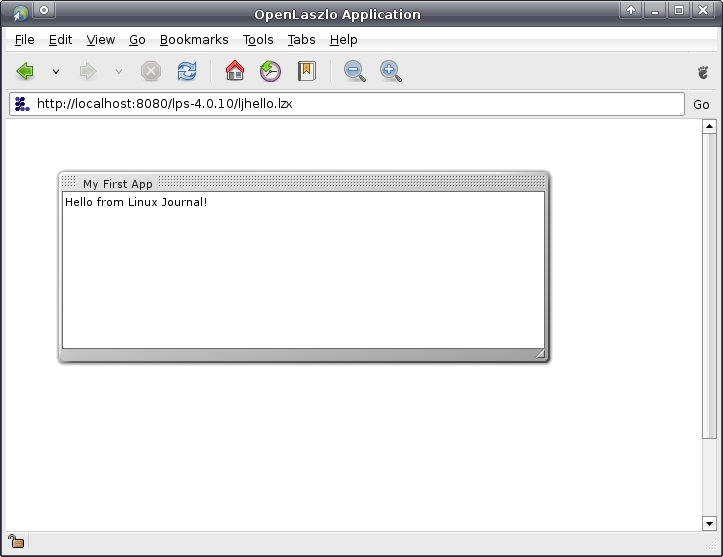
Figure 1. Our First OpenLaszlo Application: ljhello.lzx
Referring to the LZX code, it is not too difficult to work out what's specified for this application. We start with a blank canvas, then create a window that has a title, an x/y position, height/width values and the realizable property switched on. Within the window, we ask for some text, give the text an identifier and an initial value. Note how the use of indentation within the LZX code helps to describe which components of the application are related to which other components rather naturally. Within the browser, the resulting window can be grabbed and dragged, as well as resized.
For the purposes of demonstration, let's imagine we have a small on-line store that wants to provide access to its client list via a nice, modern Web-based interface. To provide the required functionality, let's put the data into a MySQL database and provide access to the list via an OpenLaszlo application.
To begin, log in to the MySQL client as root, then create a database called store and a MySQL user called store_manager:
mysql> create database store;
mysql> use mysql;
mysql> grant all on store.* to store_manager identified by 'passwordhere';
Log in to MySQL as this new user, and create a table to hold the client list:
mysql -u store_manager -p store

mysql> create table client_details
       (
	    id int not null auto_increment primary key,
	    name varchar (64) not null,
	    address varchar (255),
	    contact_tel_no varchar (64),
            email_address varchar (64)
       );
A small collection of SQL insert statements (formatted to fit this page) provides us with some data to play with:
mysql> insert into client_details value ( 0,       \
'Joe Bloggs', '25 Somewhere Street, Anytown, USA', \
'00-1-415-555-3226', 'joe@bloggs.com' );
mysql> insert into client_details value ( 0,       \
'Jane Doe', 'Apt. 2a, 16 Treatsville, Canada',     \
'00-1-416-555-1222', 'jane@idontknow.ca' );
mysql> insert into client_details value ( 0,       \
'Harry Smith', 'P.O. Box 46, Streetstown, USA',    \
'00-1-581-555-9823', 'harry@harrysmith.com' );
mysql> insert into client_details value ( 0,       \
'Julie Jones','CharmsRus, BT Tower, London, UK',   \
'00-44-081-555-2398', 'julie@charmsrus.co.uk' );
With the database table ready, and some sample data inserted, we next need to get the data into a format that OpenLaszlo can understand. It shouldn't surprise you to learn that the best format for your data when communicating with OpenLaszlo is XML. OpenLaszlo has some rather neat, built-in functionality for working with XML data. To demonstrate this, we first have to arrange for MySQL to produce some XML output.
There are a number of ways to do this, and I'm going to write a simple CGI in Ruby that connects to the database, selects all the data from the required table and turns it into XML. My program, called get_data.rb, will execute from Apache's CGI directory, which is /usr/lib/cgi-bin on my system. Here's the Ruby code I wrote:
#! /usr/bin/ruby

require 'cgi'
require 'dbi'

resp = CGI.new

puts resp.header( "text/xml" )

dsn =  "DBI:Mysql:store"
user = "store_manager"
pass = "passwordhere"

sql =  "SELECT * FROM client_details"

DBI.connect( dsn, user, pass ) do |dbh|
    rows = dbh.select_all( sql )
    DBI::Utils::XMLFormatter.table( rows,
                                    "clients",
                                    "client" )
end
This code is straightforward. The key line is the call to DBI::Utils::XMLFormatter, which takes the result of the SQL query and produces correctly formatted XML. To see the results, install get_data.rb into Apache's cgi-bin directory (setting get_data.rb to be executable), and then type the following into a browser: http://localhost/cgi-bin/get_data.rb. Figure 2 shows the XML produced by the get_data.rb CGI script.
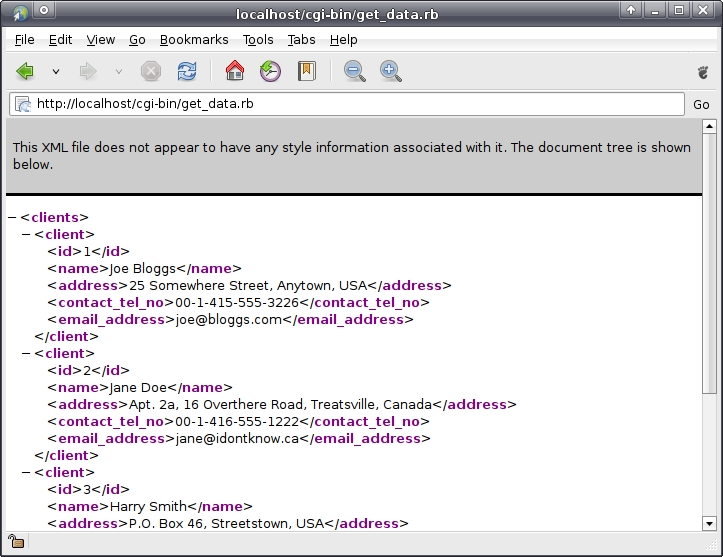
Figure 2. The XML Output Produced by the get_data.rb CGI Script
To access this data from within an OpenLaszlo application, all that's required is the appropriate declaration using the LZX dataset tag. Here's another file, called clients.lzx, which displays the name of each of the store's clients in an OpenLaszlo window:
<canvas>
  <dataset    src="http://localhost/cgi-bin/get_data.rb"
              name="dataClients"
              request="true" />

  <window     title="Client Listing"
              name="top"
              height="300" width="200"
              x="50" y="50"
              realizable="true">
    <view>
      <text>
        <datapath xpath="dataClients:/clients/client/name/text()"/>
      </text>
      <simplelayout/>
    </view>

    <scrollbar/>

  </window>

</canvas>
As in the previous example, there's a window with some text in it. Note that the text is contained within an LZX view, which combines the text with something called simplelayout, an in-built OpenLaszlo style that stacks text one line on top of another. The window, called top, also has a scrollbar associated with it. The dataset LZX tag informs the OpenLaszlo application where to get the data from (src), what to call the dataset (name) and instructs the application to go and get the data as soon as it is loaded (request). The datapath tag is a standard XML XPath specification pointing to the dataset that we want to use. In this case, we want to retrieve the text of the name tag, which is contained within the inner-enclosing client tag, which is itself contained within the outer-enclosing clients tag. Referring back to Figure 2, it is easy to see the data that we are referring to within this XPath specifier.
To try out this application, copy the LZX file to the appropriate directory on the server (using the same destination directory as for the ljhello.lzx file), then start the application running within your browser using the following URL: http://localhost:8080/lps-4.0.10/clients.lzx.
This produces an OpenLaszlo window with the names of the four clients displayed within it, as shown in Figure 3.

Figure 3. Displaying a List of Names within the OpenLaszlo Application
Although of interest, this list would be made more useful if a single click on the client name produced another window within the browser containing the rest of the client's data. Arranging for this behaviour is not difficult. The first thing we need to do is provide some visual feedback to our users as they select a client name from the first window. Add this code to the window's <text> element:
<handler name="onclick">
   client_info.datapath.setFromPointer( this.datapath );
</handler>

<handler name="onmouseover">
   this.setBGColor( 0xBBBBFF );
</handler>

<handler name="onmouseout">
   this.setBGColor( null );
</handler>
This snippet of LZX highlights OpenLaszlo's ability to embed JavaScript within XML elements. What this code instructs the browser to do is to set the data pointer for something called client_info to the currently selected datapath once users click a name on the list. It also changes the background color as users move their mouse over the client names, providing nice, desktop-like visual feedback. But, what's this client_info thing, and what does it refer to? It's another OpenLaszlo window defined with the following LZX code:
<window name="client_info"
        x="300" y="100"
        width="300" height="200"
        title="Client Specifics">

  <datapath/>
    <text datapath="../address/text()"
          width="100%"
          multiline="true" />
    <text datapath="../contact_tel_no/text()"
          fontsize="16"/>
    <text datapath="../email_address/text()"
          fontsize="14"/>
    <simplelayout/>

</window>
This window has its own name and title values, as well as x, y, width and height values that position it initially to the right of the client listing window. It also has a datapath tag, together with three text elements that reference (using an appropriate XPath specification) the other data elements within our database table. We've specified that the address uses the entire width of the client_info window and can word wrap, while the other two pieces of data are displayed in differently set font sizes. When this LZX application (called clients2.lzx) is loaded into the browser, the client list appears in the original window, and as each client name is clicked, the second window refreshes to display the address, telephone number and e-mail address of the currently selected client. If you are following along, note how the user receives visual feedback as each client name is clicked. Figure 4 shows an example, with one client name highlighted (clicked) and the associated details appearing in the second window.

Figure 4. Displaying Specific Details for a Selected Client
Let's finish this example with a bit of fun by adding some LZX animation effects to our OpenLaszlo application. Specifically, whenever users click on a client name in the first window, in addition to refreshing the data, we want the second window to roll up (shrink), pause, and then roll back down again (grow). To make this work, we need to wrap the onclick handler code with calls to our animators:
<handler name="onclick">
  client_info.winShrink.doStart();
  client_info.datapath.setFromPointer( this.datapath );
  client_info.winGrow.doStart();
</handler>
Specifying animation with LZX involves writing XML. Here's the shrinking and growing LZX code for this application (which I've called client3.lzx). This code is added to the second window's XML:
<animatorgroup name="winShrink"
               start="false"
               duration="0">
    <animator attribute="height" to="50"/>
    <animator attribute="height" to="50"/>
</animatorgroup>

<animatorgroup name="winGrow"
               start="false"
               duration="200">
    <animator attribute="height" to="200"/>
    <animator attribute="height" to="200"/>
</animatorgroup>
I define two animatorgroups and give each of them a name. Note how the animatorgroup name is referenced within the onclick handler, above. Within each animatorgroup, I provide some timing data (duration) and new attribute values for the height of the window. When the window shrinks, the height drops to 50 pixels. When the window grows, the height rises to 200 pixels. When combined, the visual effect is that of the window rolling up, pausing, then rolling back down to display the updated client details. Unfortunately, I can't show this in a screenshot, so you'll have to try it to see the effect in action (or take my word for it). The main point, of course, is that the visual effect has been realised without writing code, per se. All I did was define the behaviour I wanted in LZX.
Check out the Laszlo Systems Web site for more information on OpenLaszlo (see Resources). Be sure to take 30 minutes to view the rather excellent screencast provided, which has OpenLaszlo guru Adam Wolff stepping through some of the technology's features (note: Adam's video inspired much of the material in this article). To learn most of what there is to know about LZX, check out the Manning Publications book: Laszlo in Action (see Resources). All of the LZX and Ruby code presented in this article is available for download from the Linux Journal FTP site (see Resources).
Resources
The OpenLaszlo Home Page: www.openlaszlo.org
Laszlo in Action by Manning Publications: laszloinaction.com
Article Source Code: ftp.linuxjournal.com/pub/lj/issue171/10071.tgz
Paul Barry (paul.barry@itcarlow.ie) lectures at the Institute of Technology, Carlow in Ireland. Find out more about the stuff he does at his Web site: glasnost.itcarlow.ie/~barryp.

