
The Incredible Shrinking Laptop
I think of the range of different laptops in the world as falling into three basic models: mini, standard and huge. The huge laptops are those with 17" (or larger) screens. The standard laptops are those with 14"–15" screens. Mini laptops are a new breed. Popularly known as Netbooks, they come with small 9"–10" screens, small keyboards, 802.11b/g/n wireless adapters and usually no optical drive. For me, the huge laptops are much too large to bother with. I consider standard-size laptops the perfect trade-off between portability and functionality—they're big enough to have full-size keyboards, and the screens are decent in size, but they still are small enough to be fairly portable. There are, of course, many laptops that fall between or outside these three categories, but they provide a good starting point for me.
Standard and huge laptops have been around for a while, and most of the recent excitement in the laptop world has centered around the mini or Netbook segment. I was curious whether one of these ultraportable Netbooks would make a compelling replacement for the old Dell Latitude D610 I've been carrying around for several years, so I picked up the recently released Mini 9. The Mini is Dell's entrant into the Netbook market.
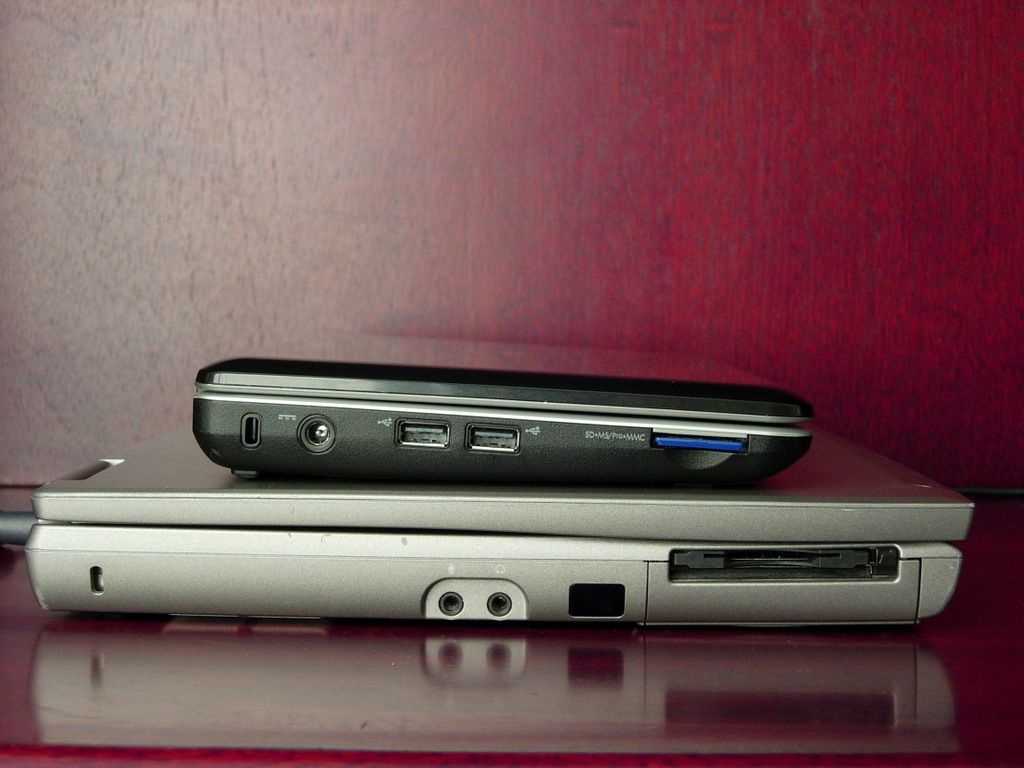
Figure 1. The size difference between the Mini and the D610 is striking.
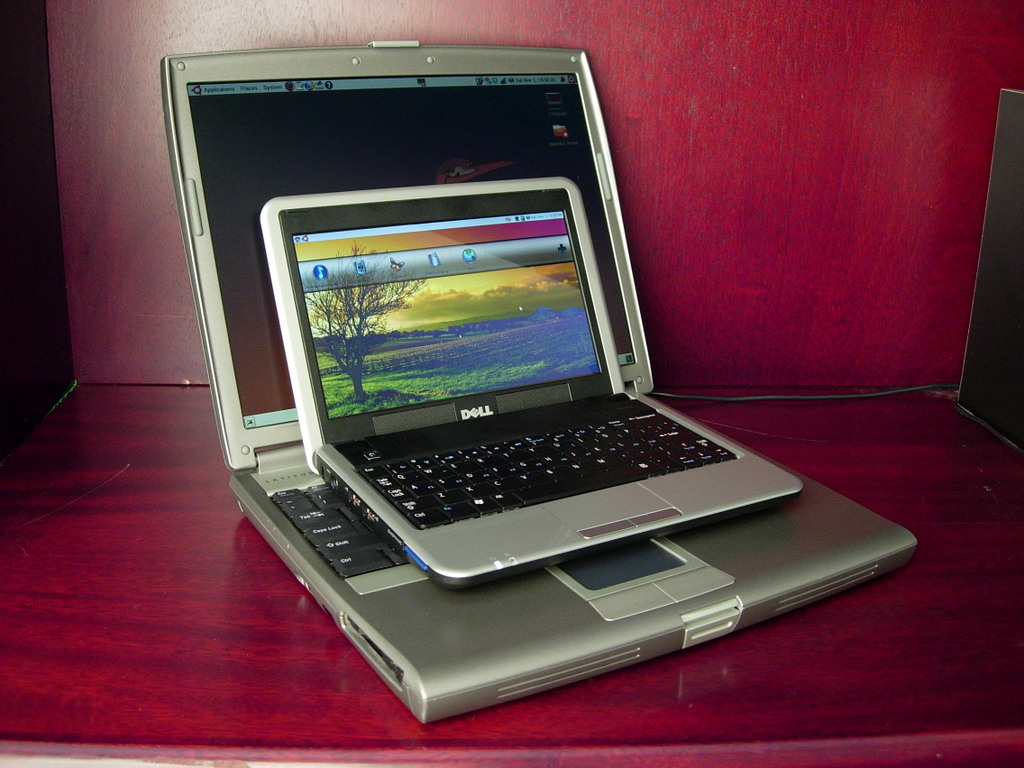
Figure 2. The D610 looks like it could swallow the Mini and have room for dessert.
True to form, there are several options from which to choose when purchasing a Mini 9 from Dell. These include all the standards like a larger hard drive, more memory, integrated Bluetooth and a built-in Webcam. You even can choose to “upgrade” the Ubuntu 8.04.1 OS that the base model comes with to Windows XP. Why anyone would want to do that is beyond me, but the option is there if you want it.
I chose to keep things simple and get the base model. I did this for a few reasons, the first of which was the nice $349 ($373 after taxes) price tag. The second reason is so many reviews cover fully loaded machines with every option possible, which I think leads to a false sense of capability. For this review, I wanted to explore exactly how good the base model is.
The base Mini 9 (at the time of this writing) comes with an Intel Atom processor N270 running at 1.6GHz and a 533MHz 512K L2 Cache. It also comes with 512MB of RAM, a 4GB SSD (solid-state drive), 8.9" screen, 802.11g wireless networking and a 32-Watt-hour four-cell battery. Unfortunately, no Webcam is included in the base model.
The build quality of the Mini is very good. The screen hinge is precise and reliable, and the case has little to no flex. It just feels solid. The ports are pretty standard: three USB ports (two on the left side, one on the right), an SD/MMC/memory stick card reader, a VGA port, headphone and microphone jacks, and an Ethernet port. With everything else on the Mini, including the keyboard, display and trackpad, being shrunk, it is nice that the ports are the standard full-size variants instead of proprietary miniature versions that require special cables you can't find anywhere.
It comes as no surprise that the D610 has the Mini beat in the ports department. It has all the ports the Mini has (except the card reader) as well as an additional USB port, a DVD drive, S-Video out, Modem, parallel port and serial port. It makes up for the lack of a built-in card reader with a PCMCIA slot, which coincidently enough, I have filled with a four-in-one card reader.
The resolution of the Dell Mini 9's 8.9" screen is 1024x600. The width of the screen is good for most Web sites. The 600-pixel height normally would not be enough in my mind, but the Mini gets around this by turning the Windows key into a dedicated “full-screen” button that works in most applications. I'm glad Dell did something with that key, as otherwise it would be a wasted space on a keyboard that's cramped enough already. I've actually caught myself pressing the windows key on my other systems when I wanted to take an application full screen. The D610 has a 14" screen, but the resolution is practically the same: 1024x768. The extra height of the D610 screen is nice, but it's not enough to give it a clear advantage over the Mini.
One additional note about the screen on the Mini is that it's very bright, easily beating the D610. The screen also is viewable in almost all lighting conditions. The D610 screen is easily overpowered in sunlight, so the Mini has a definite advantage there.
The speakers on the Mini are nothing special. They sit on either side of the Dell logo beneath the screen, and they get the job done. They're not as loud as the speakers on the D610, but the sound quality is similarly average. For everyday listening on either laptop, a good pair of headphones is the best choice.
The trackpad on the Mini is molded in as part of the case plastic instead of being a separate piece like on the D610. Dell wisely chose to keep the left and right mouse buttons below the trackpad instead of moving them off to the side like other Netbook manufacturers. The sensitivity and accuracy beats the trackpad on the D610 easily, but the finger nub on the D610 is better than either trackpad. My preference is to use a mouse whenever possible, but I can live with the Mini's trackpad when a mouse is not available.
The four-cell battery the Mini comes with has been good for 3.5–4.5 hours of battery life, depending on the load to which I have subjected it. I can't remember what the battery life was on the D610 when it was new, but the Mini beats it by at least an hour now.
Dell calls the OS installed on the Mini the “Mini OS powered by Ubuntu 8.04”. The main difference between it and regular Ubuntu 8.04 is the desktop replacement software, which gives you handy shortcuts to your most-used applications instead of the normal Ubuntu desktop. It also dispenses with the bottom GNOME panel and opts instead to put everything up at the top to save space.
One of the primary things that attracted me to the Mini is its inclusion of Ubuntu pre-installed. My D610 runs Ubuntu fine, and almost everything “just works” on it. By “almost” I mean everything except the wireless driver, which tends to break every time I upgrade to a new version of Ubuntu or apply an especially big update. I can fix the wireless easily, but it's a pain to have to do so as often as I do. Because the Mini comes with Ubuntu pre-installed, my hope was that everything would “just work” out of the box with no effort on my part, and Dell did not disappoint.
Boot times are in the minute range, which is not super speedy, but also not slow enough to be annoying.
When booting the Mini the first time, Dell displays a few notices about where and how to request service, should it be required, and then leads you through the process of creating an initial user and making various setting choices, including language and login preferences.
One thing the setup does not do is prompt you for your networking settings. Instead, you are expected to configure this after you log in the first time. That wasn't a big deal to me, but I think it could lead to a “what do I do now?” moment for novice users.
As mentioned before, after logging in to the Mini 9 you are, by default, shown a custom launcher interface instead of a regular Ubuntu desktop. The launcher comes configured with a generic set of categories: Productivity, Web, Entertainment, Games and Learn. Under each one is a set of applications. The oddest choice in my mind is that the Nautilus file manager is stuck in the Entertainment category. The categorization of other applications makes more sense: OpenOffice.org Writer is under Productivity, Rhythmbox is under Entertainment, Firefox and Pidgin are in the Web group and so on. All in all, the selection of apps is nice and surprisingly broad, and new users will find plenty to keep them occupied for a good long while.

Figure 3. The Mini has an attractive desktop with several custom wallpapers.
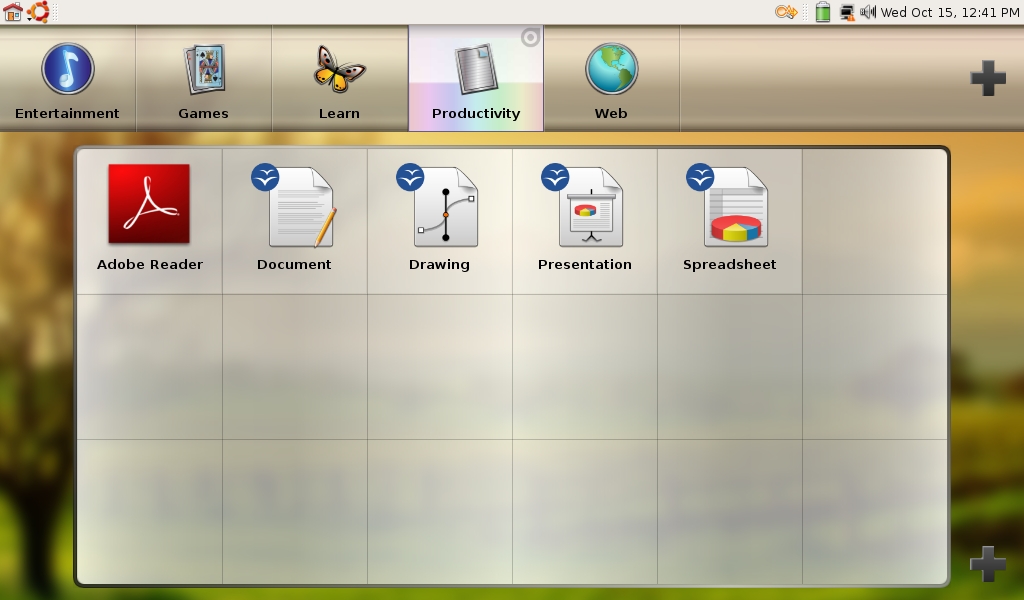
Figure 4. The Productivity category has links to the various OpenOffice.org products and to Acrobat Reader.
The categories and apps in the groups can be modified easily. When you hover your mouse over a group or application tile, a little teardrop icon appears in the upper-right corner. Clicking on that spins the tile around and presents you with a small configuration dialog. You can change the icon that appears on the tile, the name of the tile and, in the case of launcher tiles, you can configure the application, folder or Web site the tile opens.
Apart from the launcher, the rest of the system is regular Ubuntu. The APT package management works wonderfully, and the Mini comes configured to use a special Mini-9-only repository hosted by Canonical. It contains everything I've tried to install, but it doesn't track in lockstep with the main Ubuntu repositories—for example, at the time of this writing, Ubuntu 8.10 is not available through it, but it does provide timely security updates.
With only four gigabytes to work with, disk space is an issue, but not as much as I thought it would be. As it comes from the factory, the Mini uses about 3GB of disk space for the OS and applications, leaving a single gigabyte free on the base model. Instead of loading this remaining space with media files, I put them on an SD card, and that arrangement has worked very well. With a couple 8GB or 16GB SDHC cards, I don't think I will ever lack for “space” on the Mini.
The Mini comes preconfigured with several useful add-ons, including Java, Adobe Flash and Adobe Acrobat. There also are several add-ons that are not so useful (to me anyway), such as the Yahoo Toolbar and the Dell Video Chat program. Of course, if I were a Yahoo user or had purchased the integrated Webcam, those add-ons probably would be on my useful list, so I can't knock them too much.
Not everything is rosy in Mini-land. There are a few things that I just do not like or cannot seem to adapt to.
The biggest complaint I have with the Mini is that the keyboard is cramped. In fairness, I expected the keyboard to be cramped, and in some ways, the keyboard is better than I expected. The alphanumeric keys are nearly full size, with the punctuation and modifier keys on the left and right sides half as wide. The keyboard has a good feel, and I would be perfectly happy with it if not for a few big problems I have with the keyboard layout. The first issue I have with the layout is the single (') and double (") quotes key has been moved from the home row to the bottom of the keyboard next to the arrow keys. This is a stupid place for a key that I use all the time. There's a reason this key is on the home row. My little finger ends up hitting the Return key all the time whenever I want to quote anything.
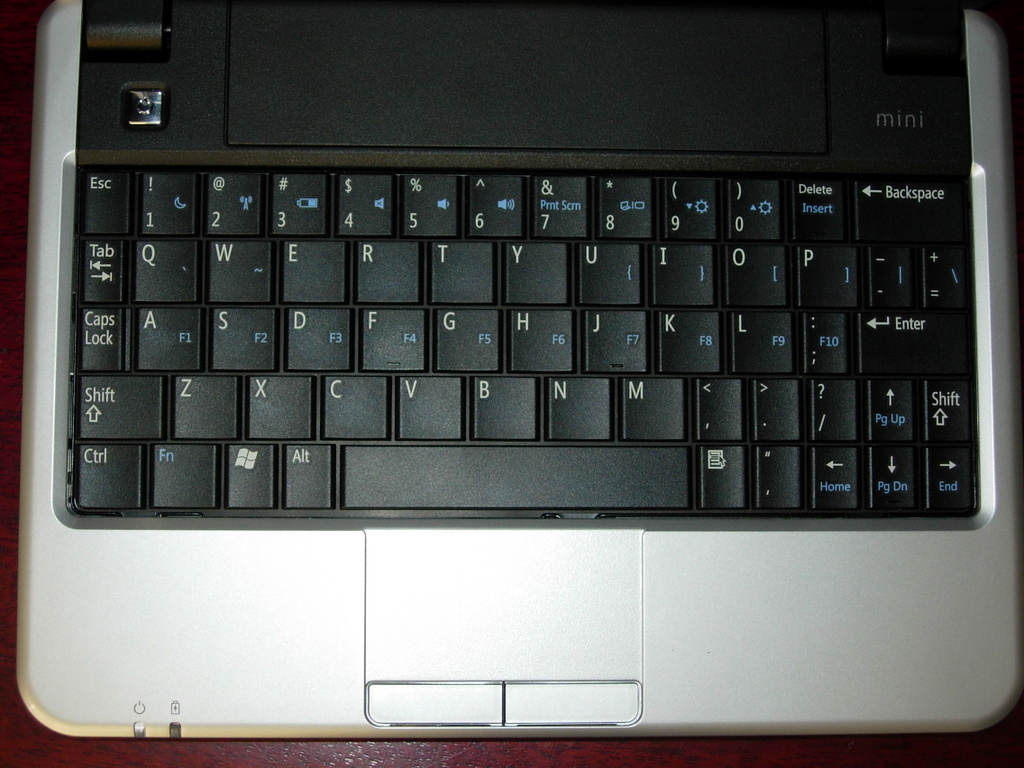
Figure 5. The Mini's keyboard is full of compromises—some good, some bad.
Another issue I have with the keyboard layout is some keys have been pushed off the regular keyboard entirely and can be accessed only while pressing the Fn key. These include the function keys (F1–F10), the braces keys ({, }, [ and ]), pipe (|), backslash (\), accent (`) and tilde (~) keys. I'm sure most people won't miss many of those keys, but for me, the difficulty in getting to them is an annoyance that prevents me from doing much of any shell scripting or even long-winded blog posts on it.
The last issue I have with the keyboard, and which my fingers are as yet unable to get used to, is the dash (-) and equals (=) keys have been pushed down one row to make room for the Delete and Backspace keys. Instead of being to the right of the number keys, they are to the right of the P key (where the braces keys should be). In typing terms, this means I keep pressing Delete every time I try to enter a dash or underscore.
I can't be too hard on the keyboard though, because the fact is, there's just not enough space to put every key where my fingers think it should go. What we get is a compromise, and like all compromises, there are things I like and things I don't.
Another issue I have with the Mini is time-related. When resuming from sleep, the Network Manager takes an additional 10–20 seconds or so after the computer wakes up before it gets the network up and running. This extra waiting is annoying, but there's probably not much that can be done about it.
I have also experienced an occasional Network Manager glitch where it refuses to stay connected to my wireless router and refuses to auto-connect when I log in. Usually a reboot fixes it. It may be that Network Manager and I just don't get along.
The Mini 9 from Dell is a great little laptop. It is very capable and can do just about everything I want a laptop to do. For those who can adapt to working with a smaller keyboard, it is at least as capable as any three- or four-year-old laptop, like my D610, without the driver headaches. And, if portability is a big concern, it is hard to beat the dimensions and weight of the Mini. It is the only laptop I've used that fits into my motorcycle tank bag, which is a big plus in my book.
However, I have decided not to keep it. I'm not sending it back or anything; instead, I'm going to give it to my eldest daughter for her birthday. She's old enough for her own computer, and her hands fit the keyboard better than mine. I've also let her “borrow” it a few times over the past few weeks, and she thinks it's “really cool” (her words). But, don't tell her that she's getting it, I want it to be a surprise.
Daniel Bartholomew lives with his wife and children in North Carolina. His on-line home is at daniel-bartholomew.com.
