
Host Identity Protocol for Linux
An IP address determines the name and network location of a computer on the Internet. The network stack reuses this IP address at all layers, including the application layer. As a consequence, existing network connections break when an IP address changes. For example, suppose you are streaming a video from your favorite Web site and you switch from a WLAN to LAN connection. Then, your host's IP address changes and breaks the stream. This happens because the video-streaming application and the host use different IP addresses. Even though the host uses the new IP address, the application still uses the old address.
What creates this problem in the current Internet architecture? The IP address specifies both the name and the topological location of a host on the Internet. Here's an analogy: a person named Abhinav Pathak who lives in New Delhi should still be called Abhinav Pathak when he is visiting London. As simple as it may seem, this analogy currently does not work on today's Internet.
Host Identity Protocol (HIP) assigns a permanent, location-independent name to a host. HIP names a host essentially using a public key, which is referred to as Host Identity in HIP literature. As public keys are quite long, usually it is more convenient to use a 128-bit fingerprint of the HI, which is called the Host Identity Tag (HIT). The HIT resembles an IPv6 address, and it gives the host a permanent name. The Internet Assigned Numbers Authority (IANA) allocated an IPv6 address prefix for HITs (2001:0010::/28).
The HIT is similar to an SSH fingerprint, but unlike SSH, it can be used by all applications. HIP also supports IPv4-compatible names called Local Scope Identifiers (LSIs). HITs in HIP are statistically unique and inherently secure because they are derived from public keys and, therefore, are difficult to forge.
In HIP, sockets in transport protocols, such as TCP, are bound to HITs rather than IP addresses. The networking stack translates the HITs to IP addresses before packet transmission on the wire. The reverse occurs on the host receiving HIP packets. When the host changes the network, the networking stack changes the IP address for the translation. The application doesn't notice the change because it is using the constant HIT. This is how HIP solves the problem of host mobility.
HIIT has developed an implementation of HIP for Linux (HIPL), which is available from the InfraHIP II Web pages. In this article, we describe how you can benefit from HIP and explain how to install and run HIP on your Linux system.
Linux is ported to many platforms and devices, such as laptops, smartphones and PDAs. These devices are mobile but usually lack mobility support from the networking stack. Many networking applications on Linux don't provide communications privacy either. HIP solves both of these problems and also provides support for multihomed hosts. Here, we describe four practical problems that HIP solves.
Access to host services usually is constrained using IP addresses. For example, consider the access control files for Linux. The hosts.allow and hosts.deny files contain the service names and hostnames (or IP addresses) of the hosts that are allowed to access certain services.
Suppose a server grants permission to a particular client to access its remote services, such as SSH, FTP and so on. It specifies its hosts files as follows:
$ cat /etc/hosts.deny
ALL: ALL

$ cat /etc/hosts.allow
ALL: 10.0.0.10
This states that only a client with an IP address of 10.0.0.10 is allowed to access services running on this host. All other IPs are blocked.
Now, what happens when the client with IP 10.0.0.10 moves to a new network and its IP address changes? Or, what happens if its DHCP lease time expires and it is granted another IP address? In such cases, the client would no longer be able to access the server. Either it has to regain its IP address or the server has to update its hosts.allow and hosts.deny files.
HIP easily solves this problem. The server's /etc/hosts.allow file contains the HIT of the client instead of the IP address. The client has the same HIT independent of its IP address and, hence, its network location. The entry in the /etc/hosts.allow file looks like this with HIP:
$ cat /etc/hosts.allow
ALL: [2001:15:e156:8a78:3226:dbaa:f2ff:ed06]
This shows that the client with the HIT (that is, name) 2001:15:e156:8a78:3226:dbaa:f2ff:ed06 is allowed to access the services on the server.
The HIP software running on the server uses public keys to authenticate the client before the client can use a particular service. A crucial part of the authentication is for the server to check that the client's HIT (fingerprint) matches the public key. This way, the server can cryptographically verify that the client is the one it claims to be.
HIP authenticates and secures communication between two hosts. HIP authenticates hosts and establishes a symmetric key between them to secure the data communication. The data flow between the end hosts is encrypted by IPsec Encapsulating Security Payload (ESP) with the symmetric key set up by HIP. HIP introduces mechanisms, such as cryptographic puzzles, that protect HIP responders (servers) against DoS attacks. Applications simply need to use HITs instead of IP addresses. Application source code does not need to be modified.
HIP provides transparent mobility support for existing network applications. TCP connections are bound to HITs instead of IP addresses. HITs do not change for a given host. HITs are further mapped to IP addresses. When an IP address changes, new mappings between the HIT and the new IP address are formed. When a host moves to a new network and obtains a new IP address, the host informs its peers about its new IP address, and TCP connections are sustained.
WLAN access points and broadband modems employ NATs due to the lack of IPv4 addresses. However, you have to configure your NAT settings manually if you want to use P2P software or connect to your computer behind a NAT. It may even be impossible if your ISP employs a second NAT.
With HIP, hosts can address each other with HITs across private address realms of NATs. HIP makes use of two alternative NAT traversal technologies, ICE and Teredo, to traverse the NATs. Setting up a server behind a NAT using HIP does not require manual configuration of the NAT. The HIPL on-line manual infrahip.hiit.fi/hipl/manual/ch21.html describes the details.
The InfraHIP site offers free services for the HIP community. For example, you can register your HIT to the DNS or Distributed Hash Table (DHT). The site also offers free HIP forwarding services to assist in NAT traversal and locating mobile nodes.
The Host Identity Protocol architecture (Figure 1) defines a new namespace, the Host Identity namespace, which decouples the name and locator roles of IP addresses. With HIP, the transport layer operates on host identities instead of IP addresses as endpoint names. The host identity layer is between the transport layer and the network layer. The responsibility of the new layer is to translate identities to routable locators before a host transmits the packet. The reverse applies to incoming packets.

Figure 1. The Host Identity layer is located between the transport and network layers.
The actual Host Identity Protocol (HIP) is composed of a two round-trip, end-to-end Diffie-Hellman key-exchange protocol, called base exchange, mobility updates and some additional messages. The networking stack triggers the base exchange automatically when an application tries to connect to an HIT.

Figure 2. HIP Base Exchange
During a base exchange, a client (initiator) and a server (responder) authenticate each other with their public keys and create symmetric encryption keys for IPsec to encrypt the application's traffic. In addition, the initiator must solve a computational puzzle. The responder selects the difficulty of the puzzle according to its load. When the responder is busy or under DoS attack, the responder can increase the puzzle difficulty level to delay new connections.
We can describe this process as follows:
I --> DNS: lookup R
I <-- DNS: return R's address and HI/HIT
The initiator application connects to an HIT:
I1   I --> R (Hi, Here is my I1, let's talk with HIP)
R1   R --> I (OK, Here is my R1, solve this HIP puzzle)
I2   I --> R (Computing, here is my counter I2)
R2   R --> I (OK. Let's finish base exchange with my R2)

I --> R (ESP protected data)
R --> I (ESP protected data)
HIP provides a mechanism similar to base exchange to handle IP address changes. When a host detects a new IP address, it informs all its peers of the address change. The hosts adjust their IPsec security associations accordingly, and the applications running on the hosts continue sending data to each other as if nothing happened.
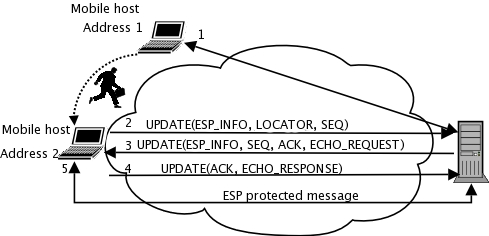
Figure 3. HIP Mobility Updates
When two hosts are connected to each other using HIP and one of them moves, the mobile host tells its current location to the other. If both hosts move at the same time, they can lose contact with each other. In this case, an HIP rendezvous server assists the hosts. The rendezvous server has a fixed IP address and, therefore, it offers a stable contact point for mobile hosts. The rendezvous server relays only the first packet, and after the contact, the hosts can communicate with each other directly. HIP includes another similar service, called HIP Relay, that forwards all HIP packets to support NAT traversal.
The HIPL software bundle consists of the following main components:
HIPD (HIP Dæmon): HIP control, IPsec key and mobility management software.
HIPFW (HIP firewall utility dæmon): supports HIP packet filtering to enable public key-based access control and LSI implementation. It also provides userspace IPsec support for legacy hosts running kernel versions below 2.6.27.
DNS Proxy for HIP: translates hostname queries to DNS to HITs to applications when an HIT can be found.
You can install HIPL from the precompiled binaries or source code.
To install HIPL on Ubuntu Jaunty, add a new file, /etc/apt/sources.list.d/hipl.list, with the following contents:
deb http://packages.infrahip.net/ubuntu jaunty main

$ apt-get update
$ apt-get install hipl-all
For Fedora 9 and above, first make sure that SELinux configuration is disabled in /etc/selinux/config, and reboot your machine:
SELINUX=disabled
Next, add a new file /etc/yum.repos.d/hipl.repo:
[hipl]
name=HIPL
baseurl=http://packages.infrahip.net/fedora/base/$releasever/$basearch
gpgcheck=0
enabled=1
Then, run:
yum install hipl-all
For details on HIPL installation for other distributions, see infrahip.hiit.fi/index.php?index=download.
Alternatively, you can compile the HIPL software bundle manually from the sources. To do so, first download and extract the HIPL software bundle from infrahip.hiit.fi/hipl/hipl.tar.gz. Run autogen.sh --help to list the library and header dependencies. After you have installed the missing dependencies, you can compile the software by running the script without any arguments. To complete the manual installation, run make install.
The default installation encapsulates all HIP and IPsec traffic over UDP to support client-side NAT traversal. At minimum, you need to allow UDP port number 50500 in both directions for IPv4. The HIPL manual describes this in more detail at infrahip.hiit.fi/hipl/manual/ch02.html.
Once installation has been completed, you should start the HIP dæmon as follows:
$ sudo hipd
When you start the hipd the first time, it generates its configuration files and identities in the /etc/hip/ directory. Your identity is visible as an IPv6 address on the dummy0 device. To see your host's identity, run the following:
$ ifconfig dummy0
## OR
$ ip addr show dev dummy0
Correspondingly, your IPv4-based “alias” for the HIT is listed on the dummy0:1 interface.
To perform name lookups for other hosts, you also have to start the HIP DNS proxy as follows:
$ sudo hipdnsproxy
HIP can be used with many applications and protocols, including FTP, SSH, VLC, LDAP, sendmail, Pidgin and VNC. However, the easiest way to validate your HIPL software installation is to start Firefox and connect to the Web server located at crossroads.infrahip.net. The Web server is running HIP and displays whether HIP was used for the connection. You optionally can install a Firefox add-on (https://addons.mozilla.org/en-US/firefox/addon/10551), if you prefer a client-side indicator for HIP.
Now, let's stream some video with VLC and then try mobility. The example in this section assumes you have two computers with HIPL installations. We also assume that the computers are running in the same LAN with DHCP services. In this example, the two computers connect to LAN using the eth0 device.
First, display an HIT for the first host, and start VLC client on one computer:
client$ hipconf get hi default     # HIT_OF_CLIENT
client$ vlc -vvv 'rtp://@[HIT_OF_CLIENT]:50004'
Then, start the VLC server on the second host:
server$ vlc -vvv SOMEFILE.avi \
            --sout '#rtp{mux=ts,dst=[HIT_OF_CLIENT]}'
The string HIT_OF_CLIENT should not be taken literally. Instead, you can discover it from the output of the hipconf command at the client. The brackets around the HIT are mandatory for VLC to distinguish IPv4 addresses from IPv6.
Because the video stream is established directly to an HIT, the connection is guaranteed to use HIP; otherwise, the stream just fails. In this case, we did not use a hostname, and the server learns the client's IP address by broadcasting the first HIP packet to the LAN. The use of hostnames also is possible, and the HIPL software bundle publishes your hostname on InfraHIP's free name lookup servers by default.
Finally, let's test mobility. Type the following on the command line to obtain a new IP address from your network:
$ sudo dhclient eth0
You may see a small glitch during the dhclient run caused by a short disconnectivity period from the network. If you also have wireless connectivity, feel free to experiment with handovers from the wired network to wireless and vice versa.
HIPL is open-source software for Linux. We are actively improving the software according to feedback from user mailing lists (www.freelists.org/list/hipl-users). We welcome all Linux enthusiasts to the HIPL community, and we are looking for more users and developers.
Host Identity Protocol brings communications privacy and mobility support for existing applications by introducing a new cryptographic namespace. It also allows you to set up servers behind NATs easily. In this article, we discussed how HIP works and how you can install it on your Linux box. We have shown how you can use HIP with Firefox and how to stream video with VLC successfully during network IP address change.
Resources
HIP Architecture RFC: www.rfc-editor.org/rfc/rfc4423.txt
HIP Base RFC: www.rfc-editor.org/rfc/rfc5201.txt
InfraHIP Project: infrahip.hiit.fi
Freshmeat Page for HIPL: freshmeat.net/projects/hipl/?branch_id=64825&release_id=228615
Host Identity Protocol (HIP): Towards the Secure Mobile Internet by Andrei Gurtov, Wiley, June 2008
M. Komu, S. Tarkoma, J. Kangasharju and A. Gurtov, “Applying a Cryptographic Namespace to Applications”, in Proc. of First International ACM Workshop on Dynamic Interconnection of Networks, September 2005: www.niksula.cs.hut.fi/~mkomu/docs/f17-komu.pdf
OpenHIP: www.openhip.org
HIP for inter.net Project: hip4inter.net
IETF: www.ietf.org
Miredo: www.remlab.net/miredo/
Abhinav Pathak (pathaka@purdue.edu) is a PhD student at Purdue University. He completed his Bachelor's degree in computer science from IIT Kanpur. He worked as a research assistant at HIIT.
Miika Komu (miika@iki.fi) is a researcher at HIIT. He does HIP standardization and is one of the developers for the InfraHIP Project. He also practices martial arts at a Takado club.
Andrei Gurtov (gurtov@hiit.fi) is a principal scientist and group leader at HIIT. He received his PhD degree from the University of Helsinki in 2004. He has written a book on HIP as well as more than 70 other publications. Andrei is a fan of sailing.

