
Hacking Your Portable Linux Server
In the past few months, a small community has been budding around the Western Digital MyBook II, a popular paperback-sized external hard drive. It quickly was discovered that the Ethernet-capable version was powered by an embedded Linux system, and a word-of-Web process started to break its security to gain SSH access, install additional services, tune functionality and more. It resembles the phenomenon spawned by the hacking-friendly Linksys WRT54G, albeit on a smaller scale.
Thrilled by what I was seeing, I started to consider building a small appliance of my own, and Western Digital's sudden revamping of its product line brought the eBay prices of older models below the $100 mark, which converged nicely with my manager's request for a daily backup scheme enabling downtimes of less than a day should the worst happen to my laptop.
So, off I went, intent on hacking out my own Linux-based NAS. I acquired two units: the smaller, single-drive 500GB model (less than $100 on eBay at the time of this writing) and a larger, RAID-capable, twin-drive model spanning one terabyte ($300 for a used unit). Given the ever-falling prices of hardware and the expanding product offering, you should be able to purchase these at lower prices or with larger capacities. It also is worth noting that nothing prevents carefully opening up the device's innards and replacing the enclosed SATA drives with larger-capacity ones. One final bit of shopping advice: the drives addressed in this article are Ethernet-capable World Edition models, all of which have entirely white cases.
Upon first inspection, the device resembles a small book, with a perforated, Morse-code patterned edge that enables venting—if you actually decode the message, you will find a few words and a couple typos in it. The unit is rather silent and generates no more noise than the average hard drive. The front of the device sports two concentric LED rings, circling a single button used to power on and off the device. In addition to showing the on/off state of the device, the LEDs also are used to visualize disk activity as well as to provide a stylish disk capacity gauge (Figure 1).
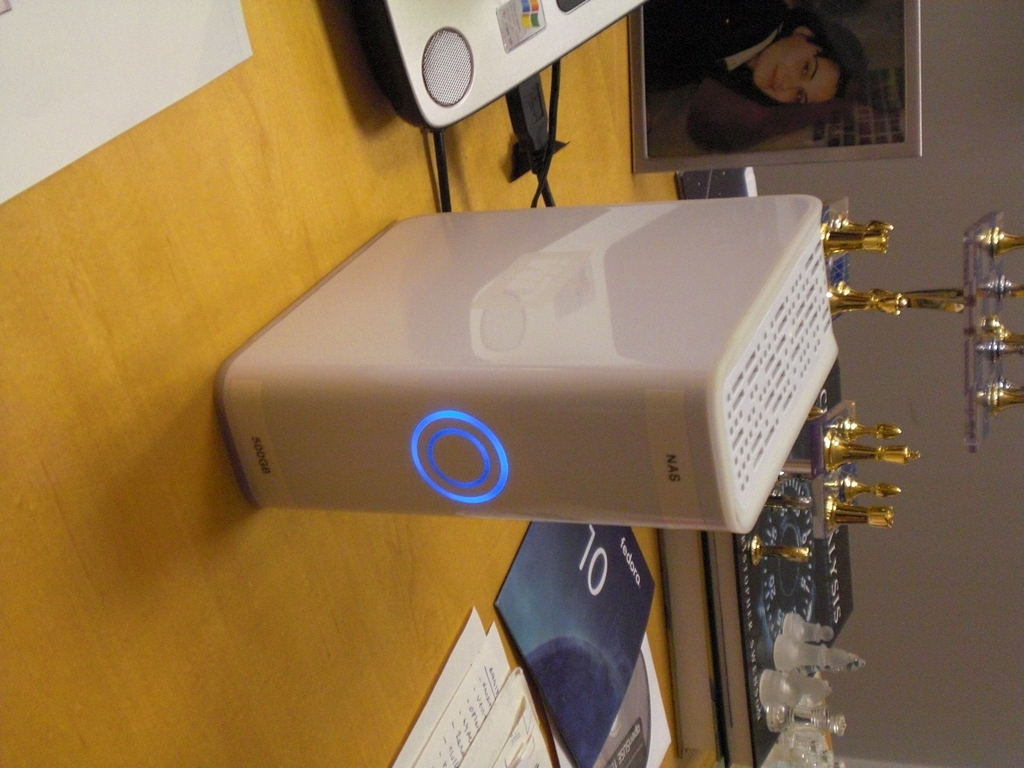
Figure 1. The Single-Drive Device Lurking on the Author's Desk
On the inside are one or two 500GB 7,200 RPM SATA drives and a small board housing an Oxford Semiconductor 0XE800 ARM CPU with an ARM926EJ-S core, a 32MB Hynix RAM chip and the Via Cicada Simpliphy vt6122 Gigabit Ethernet chipset. The device also includes an externally accessible USB port to supplement the RJ-45 Ethernet connector, and it supports AES-128 encryption in-hardware. Despite its limited RAM capacity, Linux's conservative use of resources puts little bounds on the uses the device reasonably can be put to by your creativity. Do not plan to saturate the Gigabit Ethernet link, however, because the CPU will not carry you much beyond 5MB/sec—a limitation that does not affect single-user backup or applications involving several users.
The drives are ext-3 formatted in the World Edition series, as NAS access shields the predominant Windows and Macintosh user population from the actual filesystem choice—a detail that is exceedingly convenient, as it allows you to pull drives from the device and mount them in any Linux host for recovery should the support board ever fail.
Initially, you need to boot in the “World of Warcraft” partition of your system—the one running one of those proprietary operating systems—and install the Western Digital MioNet Access tools. You will need these only for the initial step—to find out what IP address your as-of-yet uncommunicative device has received from DHCP; you will not need the WD tools afterward. If you have a network sniffer set up, it may be faster for you simply to catch the DHCP assignment as it happens and save the time of registration and download. You also can check your DHCP server tables, if you have access to them, or simply read the data off the mounted Windows share that will be set up once you install the tools. Either way, once you are in possession of the IP address the device is using, you will point a Web browser to it and configure the settings that the Web interface exposes. You will be asked to provide authentication, which will match the credentials you created during the WD setup process, or, if you used a more exotic process, it will use the system defaults (“admin”, with a password of “123456”).
The device's built-in WD Shared Storage Manager (Figure 2) is a very lightweight and useful application, which you will leave enabled, even in this Linux-centric setup, as a convenient way to create users and carry out the most common configuration tasks. I recommend you take the time to configure most settings exposed here as part of your initial customization, as the convenience simply cannot be outdone. At a minimum, you should iterate over the General Setup section and configure your device name and workgroup (these configure Samba), date and time, and review your network settings. As preparation for the next step, you need to create a user (File Sharing→User Management) that you will use to log in at the console, as access via your existing Web administrator account will not be permitted.
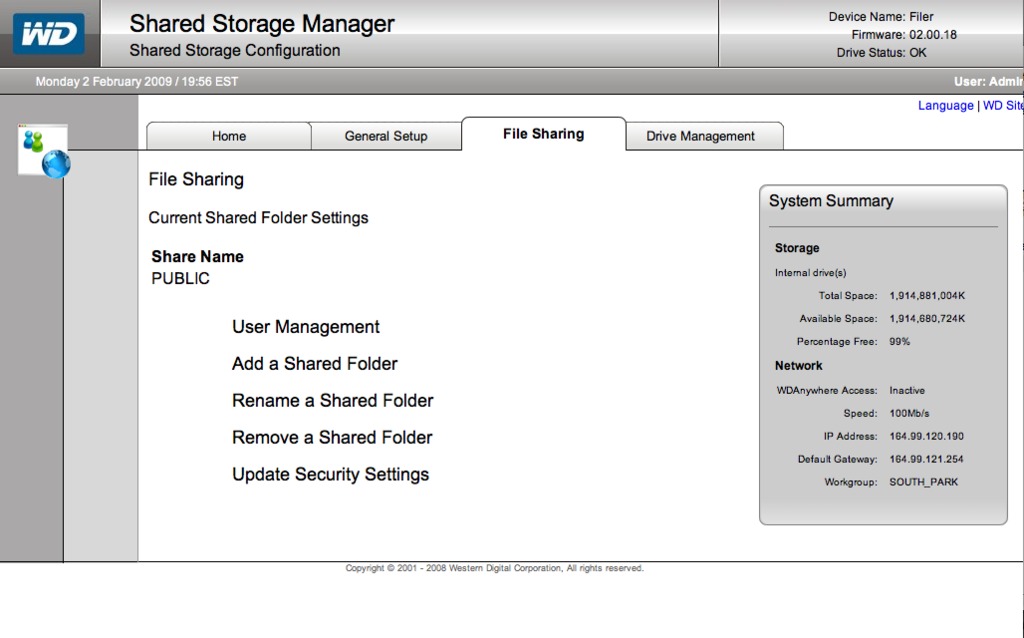
Figure 2. The built-in Web interface provides easy access to basic Samba configuration.
One more change you should consider at this point is whether to set up RAID. The device supports two modes of operation: data striping (RAID 0), which has performance advantages and offers the total capacity of both drives combined, and data mirroring (RAID 1), which provides the storage capacity of only one of the drives but protects you by creating two fully redundant copies of your data. The default setting (Drive Management→Change Drive Type) is data striping—should you want to change it, this is the time to do it. Once a RAID rebuild is started, all data on the shared, nonsystem part of the drive will be lost. More important, although the drive shares will become writable in a few minutes while the rebuild is still underway, wait until it has completed entirely as you will need to tinker with the device's firmware upgrade path next (and triggering reboots while the RAID array is rebuilding is a surefire way to tempt fate into bricking your device). Just let it run overnight and come back to it the next morning. You can see whether the rebuild has completed by checking the drive status in the Shared Storage Manager; it will switch back from synchronizing to OK.
To start unlocking the multifaceted abilities of this wonderful device, you first need to obtain console access. To be clear, this voids the device's warranty, as Western Digital obviously is not in the business of supporting Linux servers in all their possible configurations and software options, and that kind of flexibility is precisely what we are after. Bear in mind that although these steps were researched and verified conscientiously, the author and Linux Journal accept no liability for rendering your device inoperable as a result of these instructions—proceed at your own risk.
The WD Hacking community was spawned by Martin Hinner's creation of a backdoor process that uses the drive's built-in firmware update process to reset the device's root password, spawn the SSH dæmon and generate the SSH host keys. Just like everyone else, let's head to Martin's Web page (see Resources) and follow the instructions found there. In effect, all you have to do is navigate to a URL on your device. The URL includes a GET parameter for the upgrade script to run. The parameter references a script on Martin's site, but this script, rather than performing an upgrade, generates SSH keys, clears the root password and starts the SSH dæmon.
Once the “upgrade” is initiated, you will not receive feedback on the Web page that it has completed, and you probably should not do anything to your device in this interval, lest you rouse those bricking fairies. Simply wait three minutes, then start attempting to log in via SSH with the user (not administrator and not root) account you created earlier in the Shared Storage Manager. As soon as you see the SSH dæmon respond with a login prompt, you will know the break-in succeeded. If you set up your user account correctly, you will be able to log in. If you are having trouble logging in, take care that your user name is spelled in CAPS (ssh USER@ipaddress), as you will note that the user management Web interface creates all accounts in that fashion. One more troubleshooting tip: the latest firmware revisions actually output a message that the update has failed, although the SSH dæmon has, in fact, been spawned successfully and is ready for your connection.
Once successfully logged in to your device, you can escalate your privileges by switching user to root (su -) as the superuser password is now blank. You will need to carry out a few tasks—the first one of which is adding the SSH dæmon to the default startup list to ensure that your newly gained access lasts past your next reboot. Head to /etc/inittab, and add the following after the system startup section:
# Start a few good daemons
::sysinit:/usr/sbin/sshd
After making your changes, make sure they have been written to disk by doing a “sync”, and fix a few details of your user account, such as granting yourself a home directory and possibly a lowercase user name. Do all your /etc/passwd and /etc/shadow housekeeping before rebooting to verify that the SSH dæmon is now spawning by default and that your user accounts are working as intended.
You're past the most difficult point; now you can proceed to explore the system and tweak it to your heart's content. Unless you plan to use the MioNet service, some recommend switching its dæmon off, as it is a Java process that weighs on both CPU and RAM. As the MioNet service enables wide-area file sharing, I elected to turn off the service, but to do so cleanly, in case I decided I needed the functionality after all. Edit /etc/init.d/post_network_start.sh, and comment out line 17 of the script:
    $SCRIPTS_PATH/crond.sh start
#    $SCRIPTS_PATH/mionet.sh start
    touch $POST_NETWORK_STARTED_FILE
This stops the dæmon from being spawned automatically at boot, but if you need its services, you can start it up from the Shared Storage Manager interface (General Setup→WD Anywhere Access) as needed, giving you the best of both worlds.
The system is built around a 2.6.17.14 kernel, with BusyBox centralizing many of the command-line tools. There are no man pages, but the system is an otherwise reasonable minimal Linux instance, including the majority of the common management levers (ps, top, free, ifconfig, wget and so on) as well as a development toolchain with all the trimmings (gcc 3.4.2, gmake and so on), enabling you to build any software that may be missing. The mounts show a good picture of the device:
# df -h
Filesystem   Size  Used Avail Use% Mounted on
rootfs       2.8G  277M  2.4G  11% /
/dev/root    2.8G  277M  2.4G  11% /
/dev/md3     950M   19M  884M   3% /var
/dev/md4     455G  199M  455G   1% /shares/internal
It also is worth mentioning that on the dual-drive unit, the system partitions are mirrored by default, regardless of the RAID state of the share space:
# cat /proc/mdstat
Personalities : [linear] [raid1]
md1 : active raid1 sdb1[1] sda1[0]
     2939776 blocks [2/2] [UU]

md2 : active raid1 sdb2[1] sda2[0]
     104320 blocks [2/2] [UU]

md3 : active raid1 sdb3[1] sda3[0]
     987904 blocks [2/2] [UU]

md4 : active linear sdb4[1] sda4[0]
     1945407104 blocks 64k rounding

unused devices: <none>
Another important detail is the behavior of the power button: regulated by a small dæmon also controlling the LEDs, it will bring the device down performing a proper reboot if pressed for two seconds, or it will cause a soft shutdown if held for four seconds—train yourself to recognize the light schemes by looking at the device when you issue software reboots (the device has a hard reset button on the back were it to become seriously wedged). Besides looking wicked cool, the LED rings visualize both disk activity and available disk space, as well as RAID failures, joining form and function.
If you followed my advice to set the device name and workgroup earlier, your hostname is taken care of already. The device boots in DHCP mode by default, which can be altered easily for those who want a tiny, power-conscious but rather homebound server at their disposal. I find the greatest promise of the WDMBII in its easy mobility, however, and that poses the question of how to recognize its location quickly in a new setting—nothing that a good bit of scripting cannot fix.
The first approach to this is to have the device notify you of its IP address as it boots. I personally leverage instant messaging for these sorts of system notifications and have an “automation” group in my contact list featuring several borg-looking avatars that are authorized to send me all manner of alerts when the situation warrants. The key to this script is the SendXMPP tool (see Resources), which provides the ability to send instant messages with ease from the console. SendXMPP carries a few Perl module dependencies that you need to download from the CPAN archive and build. Retrieve the tarfiles via wget, extract and follow the customary perl Makefile.PL; make; make install procedure as root—the CPAN shell does not seem to work in the strict RAM confines of the WDMBII. After building two or three modules, you will be able to include the following one-line wizardry in /etc/init.d/post_network_start.sh (line 20):
#    $SCRIPTS_PATH/mionet.sh start
     touch $POST_NETWORK_STARTED_FILE

     # Announce IP address of operation to admin
     OUT=`ifconfig | grep -A2 "eth0"`; \
         echo -e "(lander) now operational: \n$OUT" \
             | /usr/local/bin/sendxmpp -r lander-notifier \
                 -f /root/.sendxmpprc lucifred@jabber.org
fi
The script parses the current network configuration and sends it with appropriate text wrapping and an XMPP resource (-r) describing the device to one of my notification accounts. The user ID and password are retrieved from /root/.sendxmpprc (-f). Once the script is installed, the device will notify me of its IP address at every bootup in any network where DHCP is enabled and access to the Jabber server in question has not been restricted. The result message is very effective in allowing me to locate the device and possibly even troubleshoot occasional connectivity glitches:
(lander) now operational:
eth0     Link encap:Ethernet
              HWaddr 00:90:A9:15:DD:73
         inet addr:164.99.120.96
              Bcast:164.99.121.255
              Mask:255.255.254.0
         UP BROADCAST RUNNING MULTICAST  MTU:1500  Metric:1
This approach will serve most road warriors willing to put up with connecting to IP addresses. But, power users controlling their own domains can do even better. By setting up a dynamic DNS subdomain, one can enable the device to update at boot a fully qualified domain name, valid to the Internet at large. The intricacies of DNS zone configuration are beyond the scope of this article, but the Perl script to leverage a properly configured domain remains relatively simple:
# Variables to configure the script's operation
my $hostname   = 'ooga';                     # Device hostname
my $domain     = 'dynamic.booga.org.';       # Domain name
my $nameserver = 'ns1.booga.org';            # Primary nameserver
                                             # for your zone
my $keyname    = 'md5key';                   # Name of the key
my $key        = 'se64bAsE64BASE64BasE64=='; # HMAC-MD5 TSIG key
my $interface  = 'eth0';                     # Interface whose IP
                                             # is to be published
Refer to the Resources section of this article for a reference to the Web page where the author maintains the script. This more extensive solution makes our briefcase-friendly, quick-booting mini-server a full-fledged participant in the Internet.
The most obvious workload for our portable server is file-centric: well equipped with SMB support from Samba and NFS support built in to the kernel, as well as the lighttpd Web server and the rsync client, the system is ready to shine in this space. Enterprising users have built HOWTOs describing how to expand further the array of services to FTP and even BitTorrent, but I should not forget to mention that the system has a healthy complement of essential dæmons: ntp, cron and even Apple's mDNS are at your disposal out of the box.
The built-in toolchain enables the compilation of packages natively, but cross-compilation also is a possibility for jobs requiring more RAM than the device has available. It is, however, possible to find prebuilt packages for a number of services, as the device shares the ARM core of many others, its closest cousin being the Gumstix micro-board (check the many Gumstix sites for suitable binaries before starting a large cross-compiled build).
The WD Mybook II World Edition is clearly a device warranting the attention of hardware hackers looking for a small, cheap, low-power platform on which to build their projects. Western Digital's wisdom in not stripping the system portion of the device should be recognized in that it has provided us with a wonderful target for our tinkering. Although sporting only 98 BogoMIPS, its hardware has unusual capabilities (hardware AES encryption and native support for Java bytecode among them) that provide further application levers for our appliance-building projects. I introduced here the hardware, its capabilities, how to breach its security and how to enable it with top-class network configuration at bootup on nearly any network. I hope you, the reader, will follow me and others in this exploration of what our imaginations can make of this small hardware wonder.
Resources
Enabling SSH Access on MyBook World Edition, by Martin Hinner: martin.hinner.info/mybook/sshaccess.php
How to Set Up My Book World Edition II, by Paul Henman: henman.livejournal.com/1161953.html
SendXMPP: sendxmpp.platon.sk
CPAN (Comprehensive Perl Archive Network): www.cpan.org
Daemon-less Wide-Area DNS Update, by Federico Lucifredi: primates.ximian.com/~flucifredi/dns-update.html
Using SSH and FTP on Western Digital MyBook Word, by Edouard Brière: www.nanalegumene.net/using-ssh-and-ftp-on-western-digital-mybook-world
BiTtorrent on Mybook World: done, by Edouard Brière: www.nanalegumene.net/bittorrent-on-mybook-world-done
Binaries for Gumstix Board: www.nslu2-linux.org/wiki/Optware/Gumstix
Federico Lucifredi is the maintainer of “man” as well as the Systems Management Product Manager for the OpenSUSE and SUSE Linux Enterprise product lines at Novell. He loves to tinker with old hardware and build contraptions that puzzle his colleagues.



