
Hack and / - Dr hjkl Meets the Vimperator
In November 2009, I wrote an entire column (“Dr hjkl and Mr Hack”) devoted to programs with vi-style keybindings. In the column, I introduced the Vimperator plugin for Firefox and discussed how it worked, but at the time, I mentioned, “The Vimperator plugin is extensive enough to deserve a column of its own (in fact, e-mail me at lj@greenfly.net if you'd be interested in that.)” Well, I received a number of responses, so between that and my love for all things with vi keybindings, I think it's worth giving the Vimperator plugin the full column it deserves.
As I mentioned in my previous column, the main reason I love vi-style keybindings is that they keep your fingers on the home row (the asdfghjkl; row on your keyboard)—something quite important if you touch type. Once you get used to using hjkl to navigate documents, it and the rest of the keybindings become second nature. If you touch type with any decent speed, you realize how much it slows you down to reach for the mouse or even the arrow keys—particularly for something simple like clicking a link. Now, most Web browsers have some limited way to browse a page with a keyboard, but they almost always use the arrow and Page Up and Page Down keys, all of which are pretty far from the home row.
In the past, I've used a number of methods to add some level of vi-style keybindings to Firefox. At first, I used a custom configuration to my Firefox config, and later, I used the mozless extension. Both worked okay, at least for certain versions of Firefox, but they still were a limited version of the real thing. Well, the Vimperator plugin is the real deal. It goes far beyond simple keybindings and actually creates a modal interface with an incredible level of detail. You not only get hjkl navigation, but you also can open tabs and even record macros just like in vim. What's more, Vimperator was built with Web page navigation in mind, so there are keybindings available to make it easy to click on links and even hover over elements on the page—all from the keyboard.
The first step is to install the Vimperator plugin. Visit vimperator.org, click on the Download Vimperator button on the page, and go through the typical Firefox plugin installation process. Once you start Firefox again, the first thing you will notice is that your menu bar is gone (Figure 1)! Now, this might be fine once you get accustomed to Vimperator, but I found it a little jarring at first, so you might want to type :set guioptions+=mT to turn the menu bars back on for now. Notice that as with vim, you press the : key to enter command-line mode. Vimperator turns Firefox into a modal browser like vim that has a command-line mode (accessed when you press the : key) as well as a normal and insert mode. Also as with vim, when you get stuck in some strange mode, you generally can just press Esc a few times to get back to normal. If you find you want the menu bar back permanently, add the following to your ~/.vimperatorrc file:
set guioptions+=mT
This file acts like ~/.vimrc, so you can add any other Vimperator-specific settings here as well.
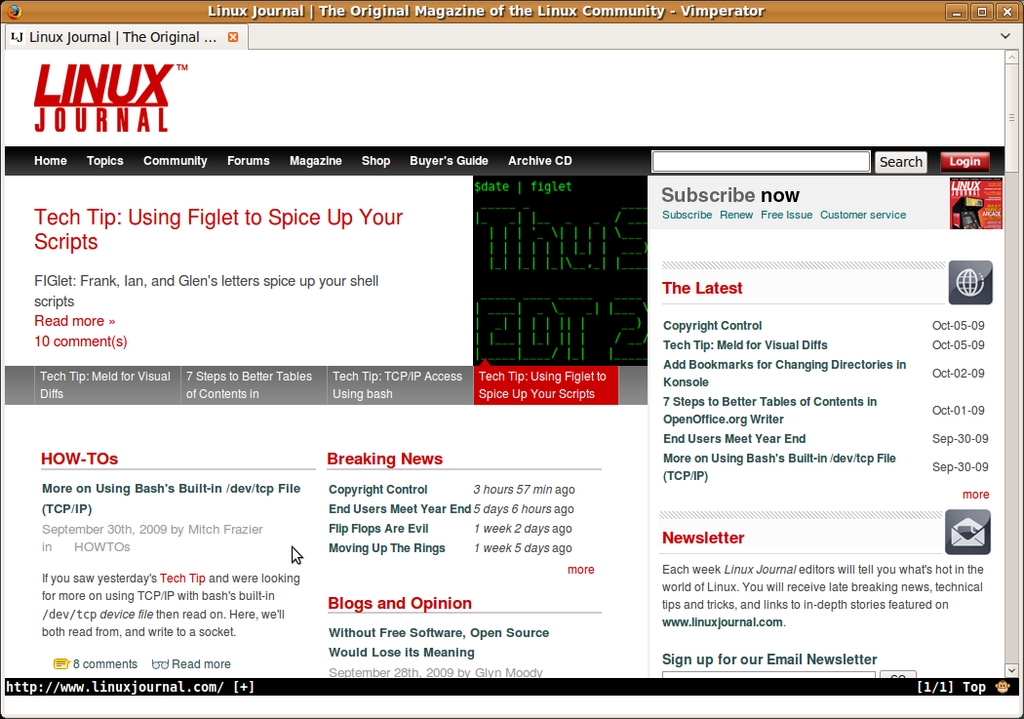
Figure 1. Vimperator-Enabled Firefox without the Menu Bar
The basic navigation with Vimperator should be pretty familiar to you if you've ever used vim before, but in case you are still new to that kind of navigation, here's a quick list of keybindings:
h — scroll left.
j — scroll down one line.
k — scroll up one line.
l — scroll right.
gg — move to the top of the page.
G — move to the bottom of the page.
/ — enter search mode.
n — move to the next match in your search.
N — move to the previous match.
Spacebar — move down one page.
Shift-spacebar — move up one page.
Esc — go back to standard navigation mode.
F1 — show Vimperator help.
So for instance, if I wanted to use Vimperator to search for “Sarah Conner”, I would press /, type in Sarah Conner and press Enter. Vimperator would jump to the first instance on the page. If the first Sarah Conner wasn't the right match, I would press n to move to the next match or N to go back to the previous match. If I wanted to start a new search from the top of the page, I could type gg to move back to the top, then / to enter search mode, and then type, for instance, “John Conner” and press Enter.
As with vim, you also can add numerical modifiers to any of these commands, so if you want to move down five lines instead of just one, you can press 5j. If you forget the keybinding for a particular function, just press F1 or type :help to see the full Vimperator help screen.
Vimperator would be useful even if it provided only the standard navigation keys, but it also adds a complete set of keys to access standard browsing functions. Here is a list of some of the standard ones:
H — go back in the current tab's history.
L — go forward in the current tab's history.
gt — go to the next tab.
gT — go to the previous tab.
d — close the current tab.
u — undo: open a previously closed tab (works with multiple previously closed tabs).
r — reload the current page.
R — reload the current page without the local cache.
Now, I've found that when I use tools like S5 for Web-based presentations, the keybindings it expects conflict with Vimperator. Luckily, Vimperator makes it easy to disable its keys temporarily. Simply press Ctrl-z, and all keybindings will go back to standard Firefox mode until you press Esc. I also use this mode when I browse Google Reader, because it already accepts vi-style key bindings to browse through RSS feeds. If you just need to enter one key that Vimperator won't intercept, you can press Ctrl-v, and after you press the key, Vimperator will go back to its normal mode.
Once you have the standard movement down, you might wonder, how do I actually open a new URL without a menu bar? Either press o (or type :open) followed by the URL you want to open to load that URL in your current tab, or press t (or type :tabopen) to type in a URL to open in a new tab. In addition to these basic keys, there also are a number of variations to them:
T — open a :tabopen prompt, but fill in the URL with the URL of your current tab.
O — create an :open prompt, but fill in the URL with the URL of your current tab.
w — like :tabopen but only opens the URL in a new window.
W — like T, it creates a :winopen prompt and fills out the URL with the URL in the current tab.
p — open a URL based on the contents of the clipboard.
Once you type in a URL, you also can press the Tab key to trigger Tab-complete based on your browser history. Speaking of browser history, you still can access that and the other standard Firefox functions from command-line mode:
:bmarks — access all of your Firefox bookmarks in command-line mode.
:history — view your browser history.
:emenu — access functions in the standard Firefox menu.
:dialog — access other Firefox dialog windows; type :help :dialog for more information.
In my mind, the real power of Vimperator besides the standard keybindings is the fact that you can use the keyboard to open links, move to input boxes and even simulate mouse hovering. Vimperator calls this Hint mode, and to activate it, press the f key on any Web page. All of the “hintable” objects on the page, such as hyperlinks, text-entry boxes and drop-down menus will be highlighted with a number assigned to them (Figure 2). To select one of the highlighted items, you either can type in the number next to it and press Enter, or you can start typing part of the highlighted text. For instance, if you are reading a multipage article on the Web and see links to each page of the article along with a Next link, you could press f and then type N e x t. As you type, hints that no longer match drop away, and once there is only one match left, it automatically will load. When you use f, hints will open up in the current tab, but if you want to open the page in a new tab, simply start Hint mode with F instead of f. Like with other modes, you can press the Esc key to exit Hint mode.
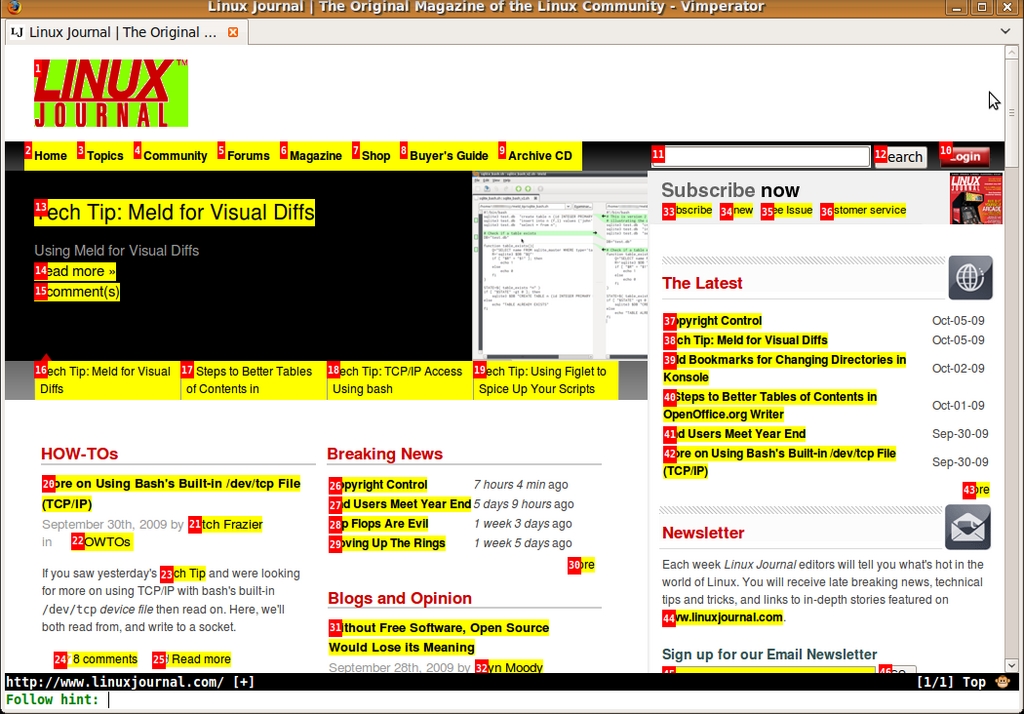
Figure 2. LinuxJournal.com in Hint Mode
The f and F keys activate a Quick Hint mode, but you also can activate an Extended Hint mode to enable other actions on a link beyond a left-mouse click. To enable Extended Hint mode, press the ; key, followed by a special key to set the type of action you want to perform, and finally type the number associated with a particular hint. Here is an abridged list of some hint modes you might want to use, but for the full list, check the Vimperator help page. Keep in mind that you will press the ; key before any of these keys:
; — pressing two ; keys in a row will focus a link and hover over it with a mouse; this is useful for activating JavaScript drop-down menus.
s — save the destination of a link.
f — focus a particular frame.
y — yank the destination location for a link.
Y — yank the text description of a link.
Believe me, I've barely scratched the surface of Vimperator here. It really reminds me of vim in the sense that I always feel like I'm using only 10% of the available features. As with vim though, Vimperator rewards you while you progress through its learning curve. I use Vimperator on all of my Firefox sessions, and it seems weird (and slow) to me now to browse Web sites with a mouse.
Kyle Rankin is a Systems Architect in the San Francisco Bay Area and the author of a number of books, including The Official Ubuntu Server Book, Knoppix Hacks and Ubuntu Hacks. He is currently the president of the North Bay Linux Users' Group.

