
Graphic Administration with Webmin
When you start administering a Linux system, one of the biggest challenges is learning exactly what to do, and how to do it. There simply are too many tools, settings, parameters, configuration files, dæmons and what have you to consider. Obviously, if you ever want to become a full-fledged sysadmin on your own, you have to learn everything. But, until you get to that point, you still need to get things done, and you would do well by installing and using Webmin, a Web-based, comprehensive administration tool for Linux systems.
Webmin runs on your server and presents a Web-based interface, allowing you to do all sorts of system administration tasks—from the very simple to the very complex ones—without ever touching a configuration file or restarting any process or dæmon on your own. As an aside, it isn't just any run-of-the-mill tool. If you mention Webmin at a Linux Users Group reunion, it's guaranteed to raise a lively argument—much akin to the “using closed graphics drivers” or “banning all non-open-source software from distributions” discussions on forums and chat channels.
For some people, the idea of using anything but the command line to manage a server is barely short of heretical, and they believe you should not even consider using Linux if you plan on employing such a tool. (A Linux user I know once said dismissively, “If you want to use graphic tools, use Windows.”) However, for other people, any tool that helps them avoid mistakes or the need to memorize a lot of parameters is a welcome addition to their toolset.
Webmin won't let you avoid actually learning about Linux though. You can't merely start using it and change configuration settings without knowing perfectly well what you are doing. If you know what needs be done and how to do it, Webmin can save you from having to memorize lists of parameters or configuration files, and it will help you get things done quickly and safely. On the other hand, don't ever use Webmin as an experimentation tool. It's quite likely you could really mess things up.
Webmin runs not only on Linux, but on UNIX and FreeBSD as well. Here's a partial list of supported systems and distributions: Asianux, Caldera, Debian, FreeBSD, Gentoo (and Sabayon), HP-UX, IBM AIX, LinuxPPC, Lycoris, Mac OS X, Mandriva (and Mandrake and Conectiva), MEPIS, NetBSD, OpenBSD, PCLinuxOS, PlayStation Linux, Red Hat (and CentOS and Fedora), Scientific Linux, SCO OpenServer and UnixWare, Slackware, Sun Java Desktop System, Sun Solaris, SUSE and OpenSUSE Linux, Turbolinux, Ubuntu (and derivatives like Kubuntu or Xubuntu), Xandros, Yellow Dog Linux and Yoper Linux.
If your favorite distribution isn't included, some Webmin modules might not work, so be careful. If you are using a distribution derived from one that is on the list, it's a fair bet you won't have any problems, but don't say I didn't warn you.
By the way, why this state of affairs? The problem is a lack of standardization. Distributions use different locations for various configuration files, and if Webmin can't find them, it won't be able to function. This may change for the better over time, when (if) all distributions fully embrace the Linux Standard Base (LSB) and comply with the standards related to file placement. But, that certainly hasn't happened yet. To mention a simple example, I'm currently using OpenSUSE, and it uses /srv/www/htdocs as the root for Web sites. Most other distributions use /var/www/html. So, you can see that a configuration module might have serious problems finding Web files if it didn't know about this difference.
What do you need to run Webmin? Just a browser, Perl, a Java Runtime Environment (JRE) for some functions and the root password. After you become familiar with Webmin, you'll be able to forget about ever editing configuration files (like all those in the /etc directory) or starting, stopping and reloading services. If you set up Webmin correctly, you even will be able to administer your server from a remote machine.
Webmin is available under the GPL, so you can get it without any problems. The latest version (as of the time of this writing) is 1.380, and it's being developed actively. The easiest way to install Webmin is with your favorite package manager. Even though I am an OpenSUSE user, I prefer Smart to YaST, so a simple smart install webmin command did the job for me. If you don't get the latest version this way, don't worry. You can fix that just by using Webmin itself; keep reading.
The other method of installation is to go to the download site, download the appropriate version for your system, and follow the instructions on the left side of the page. There are two options here. You can get the full package (with all available modules), or you can get the minimal edition and add the modules you require afterward, using Webmin's own update features.
After installing Webmin, you need to start a service. Working as root (use su), do chkconfig webmin on (to ensure that Webmin starts every time you turn on your machine. Then do /etc/init.d/webmin start to start it immediately. You're all set.
Using Webmin is simple. Open your favorite browser, and navigate to http://localhost:10000 (or the equivalent, http://127.0.0.1:10000), and you'll see Webmin's login page. Next, enter the user name and password for the system administrator (in many distributions, that would be root, but Ubuntu and others grant sysadmin rights to specific users instead), and click the Login button. You could check the Remember login permanently box, but that's a security risk, so I recommend not doing that.
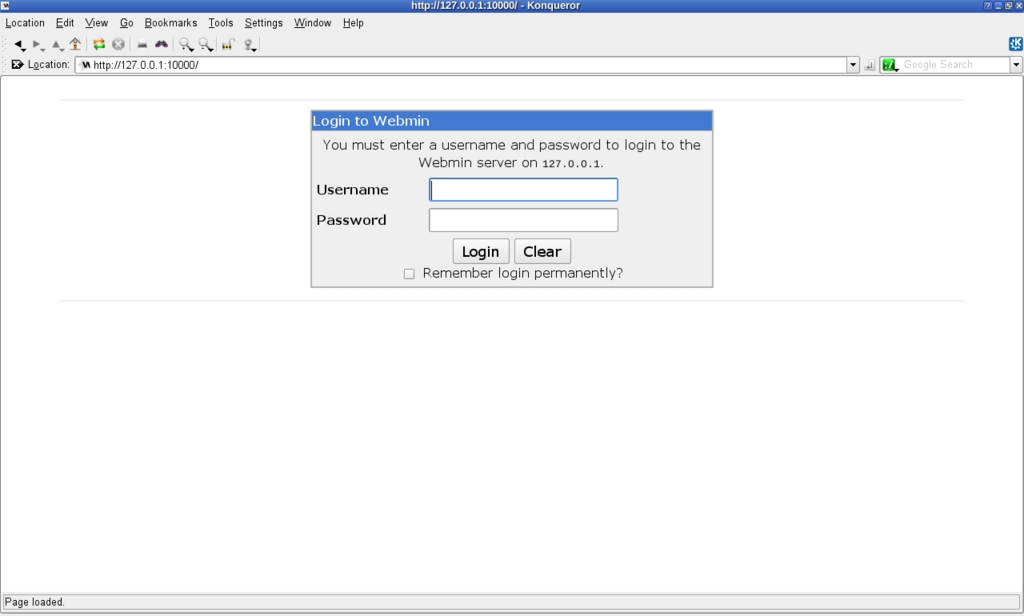
Figure 1. Initial Webmin Login Screen

Figure 2. After logging in, you'll see a menu and system information on the screen.
If you want to save yourself some typing, save that address as a bookmark. For example, in Firefox, either press Ctrl-D or go to Bookmarks→Create new bookmark. Alternatively, for even less typing, create a desktop icon. If you use KDE, right-click on your desktop, select Create New→Link to Location (URL), enter the URL above, and click OK. (The process is similar if you use GNOME.) You can make it even snazzier by right-clicking on the newly created icon and changing its image to /usr/libexec/webmin/images/webmin.xpm (this path might be different for distributions other than OpenSUSE).
Once you have Webmin installed correctly, upgrading it or adding more modules is a breeze. On the left-side menu, select Webmin→Webmin Configuration, and you'll see a screen full of icons. If you click Upgrade Webmin (the up-pointing blue arrow), you can upgrade Webmin itself from the Internet. Note that you can click on Scheduled Update to set up a cron task that will connect to the Web and download all needed updates on its own. This is a safe option (for you'll definitely get all updates and bug fixes as soon as possible), but it's also an unsafe one (should the Webmin Web site itself ever be hacked). So, I leave it up to you to decide whether you want to do this.
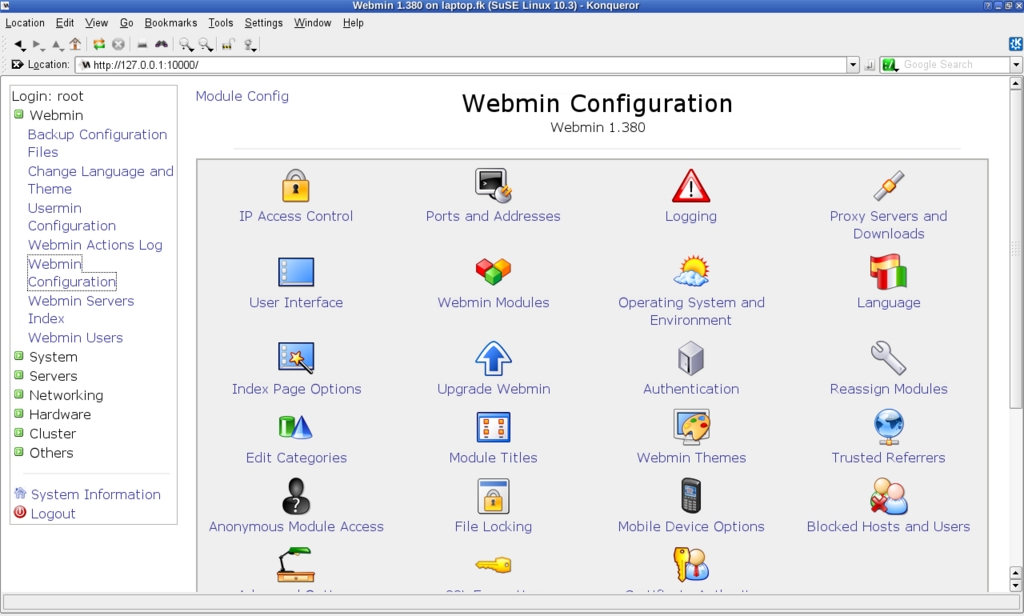
Figure 3. Webmin Configuration Screen
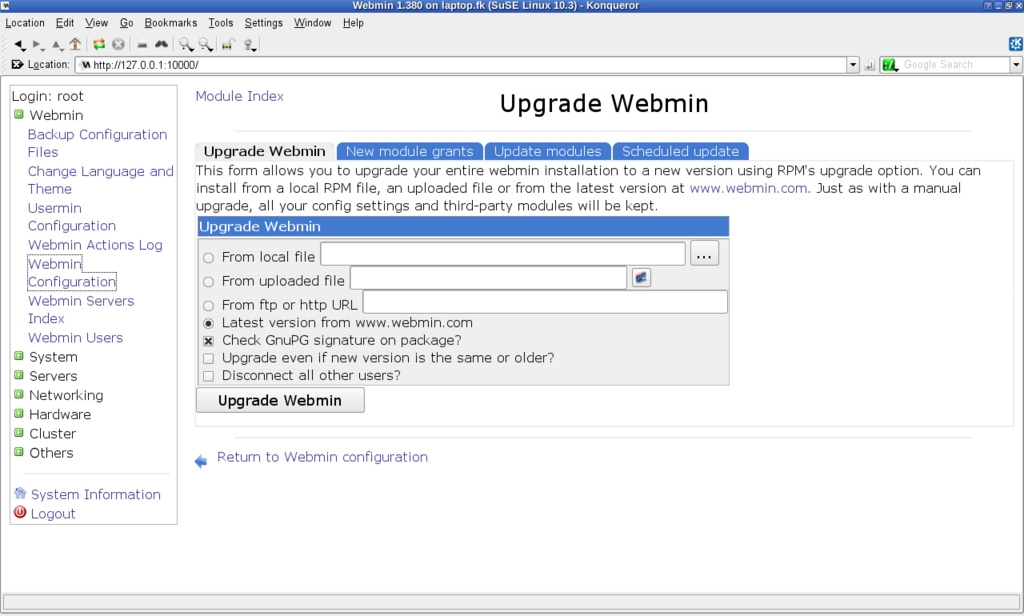
Figure 4. You can upgrade Webmin or add new modules without any other tools.
On the same Webmin Configuration page, if you click the Webmin Modules icon (the one with small boxes), you can browse all available modules on the Webmin site or even download third-party modules from other sites. Choosing the Standard Module option provides a pop-up window with dozens of modules (I haven't been able to figure out whether there's a method to the list's organization). If you click a module name, and then click Install Module, Webmin downloads it and sets it up for you.
Before moving on, let's talk about security and users. Webmin has its own users, which are not the same as the operating system users. The very first time you log in, it automatically creates a root user. You shouldn't let every user work with this account. It's safer if you create specific accounts and restrict each one to needed functions. To do this, click Webmin on the left-side menu, and then Webmin Users.
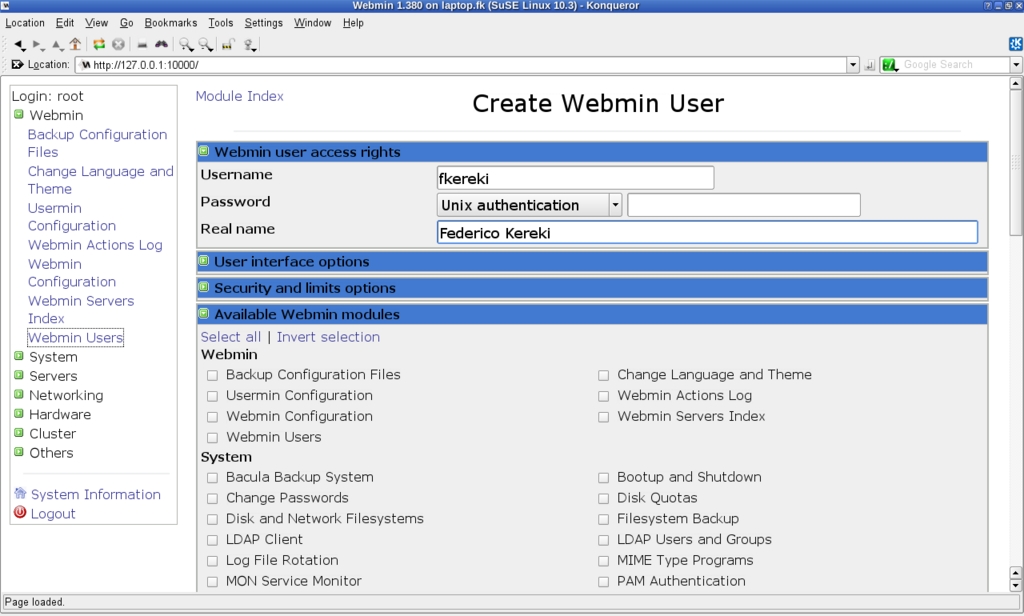
Figure 5. Webmin has its own database of users.
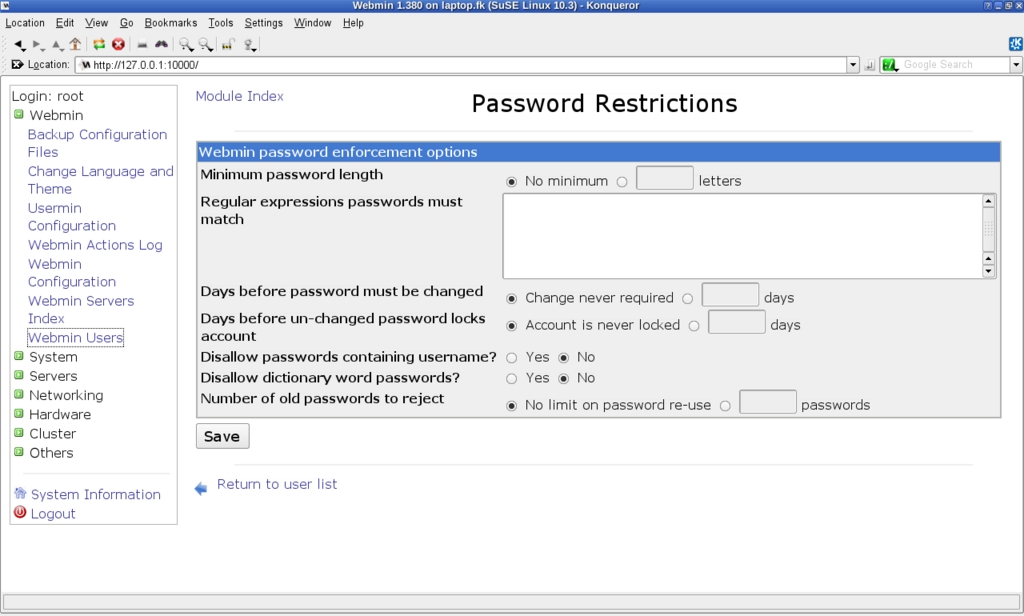
Figure 6. Using password restrictions provides higher security levels.
When adding users, you can opt to give them a specific Webmin password or use “Unix authentication”. The former option is usually safer (but only if users choose a password different from their standard passwords), and the latter option is the friendliest one. The Password Restrictions screen lets you set specific controls, so users can't use too short, simple or easy-to-guess passwords.
Instead of assigning rights to each user, you can create groups. Go to Webmin→Webmin Users, and click Create a new Webmin group. Select what functions should be allowed to members of this group, and finish by clicking Create. From now on, when you create new users, you can specify to which group they belong, and their rights will be assigned automatically.
You also should take a look at the Unix User Synchronization option, which allows the automatic synchronization of Linux users and Webmin users. You can set it up so that every time a Linux user is created/deleted, a corresponding Webmin user also is created/deleted. The Unix User Authentication option also might be of interest if you have many users who should be allowed access to Webmin. Additionally, you can use the View Login Sessions to check whatever the users might have done.
Using Webmin is quite simple, as you might already have guessed from the examples above. Choose a category from the menu on the left side of the screen, and it opens up, showing a list of available modules. The main page for each module usually includes a Module Config link on its top-left corner, which lets you do some configuration, and a Help link that provides documentation on the module's functions. Here are the categories:
Webmin: provides general configuration, including language and theme selection (you can use Webmin in more than 40 languages), upgrades, module installation, logging options, log browsing and more. If you want to make your installation more secure, check the Authentication option (allowing, among other things, protection against brute-force password-cracking attacks), and also check IP Access Control and Blocked Hosts and Users. If you have the Servers module installed, you can use it to scan for other Webmin servers and administrate them remotely—although it won't be as speedy.
System: covers many different functions. You can control backups with the third-party option for the Bacula backup system or with a far simpler filesystem backup that uses either tar or the dump-and-restore family of commands to save directories to tape or to a file on another filesystem. Bootup and Shutdown lets you specify which services will be run at which levels, and also (obviously) to reboot or shut down the system. For user management, check Users and Groups (which allows you to create, edit or delete both users and groups) and Change Passwords, whose function is obvious. The Disk and Network Filesystems module lets you mount or unmount devices and filesystems, and Disk Quotas will be of interest if you have assigned file space quotas to users. You can schedule commands to run once (think atd) or have periodical jobs (think cron). You can get a top-like display of processes (but it won't refresh on its own) with the Running Processes option, and you can find plenty of information by clicking on a process id. Finally, to cut the list short, the Software Packages option allows you to install or remove a software package on the server remotely.
Servers: this category has to do with all the possible servers you might be running, including Web-related functions, such as Apache or FTP; mail functions (Fetchmail, Postfix, Qmail, Sendmail) and filters (ProcMail, SpamAssassin); file sharing (Samba); databases (MySQL, PostgreSQL); network functions (DHCP, SSH, DNS, SLP); proxying (Squid); and several similar functions. There are several options for each of these modules, so you'll want to click on each of them to see the available features.
Networking: covers more-specific network-related options, including configuration (interfaces, routing, gateways, DNS client, host addresses); services; connection (ADSL client, Bandwidth Monitoring, PPP, SSL tunnels, VPN); security (Kerberos5, IPsec); firewalls (the Linux Firewall provides an iptables-based configuration, and there's an option for the Shoreline shorewall firewall too); and more, including NFS and NIS.
Hardware: lets you control disks and volumes (including LVM, RAID and disk partitions; you also can use Smart to check the status of your disk units); printers; CD burning; and the system clock. If you are using GRUB, you can edit its options from here too.
Clusters: includes several options you will use only if you are running two or more machines forming a cluster, with the Heartbeat monitor—a rather more specialized setup, which proves once again that you need to know what you're doing before starting to mess with Webmin.
Others: a catchall for several options, including a command shell (implemented via a Java applet) for full console access, or Custom Commands, which allows you to set up and execute commonly used commands, with optional parameter substitution—a fine tool if you need to make some commands available to inexperienced users. There also is a File Manager (another Java applet), SSH/Telnet remote login, an HTTP tunnel for accessing Web pages, data files upload and download, and more.
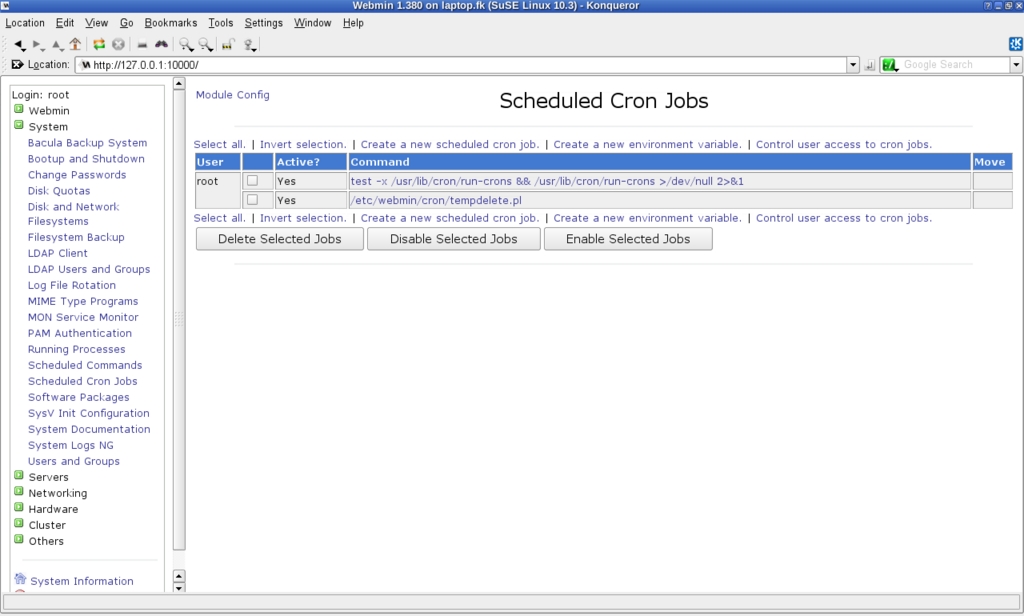
Figure 7. You can manage future (cron) jobs easily.

Figure 8. You can configure Apache fully with Webmin. Here, you can edit the default server attributes.
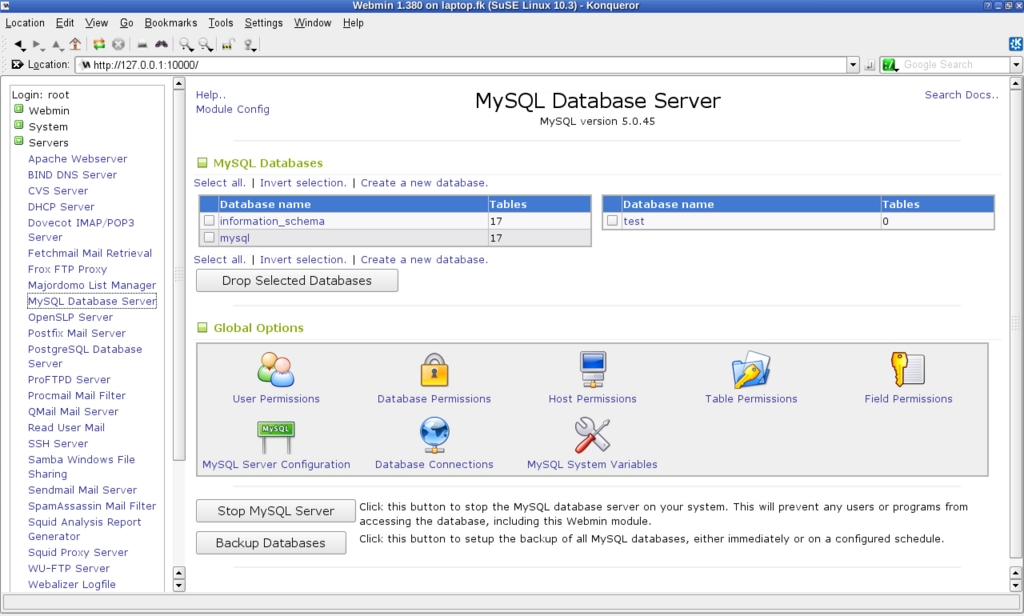
Figure 9. Webmin provides an alternative to PHPMyAdmin for configuring MySQL databases.
Can you benefit from Webmin? Who should use it? Jamie Cameron, Webmin's creator, said this program “may be better suited for less-experienced users who are unfamiliar with configuration file formats than for enterprise sysadmins who already have a detailed understanding of UNIX”. I fully agree with that opinion, although I'd add that even if you are quite familiar with configuration files and the like, you might welcome an easier (and sometimes quicker) way of doing things.
Webmin packs a quite impressive, always growing, number of functions, but it allows you to use only what you require, through clear menus and forms, and it detects possible errors before they can do any harm. You should at least consider it for its learning value, because you can examine configuration files before and after each change, and, thus, learn how something was (or should have been) done. You can't avoid learning about each function before diving in, but Webmin provides at least an easier road to becoming a more proficient sysadmin.
Usermin: a Tool for End Users
Usermin is a close relative of Webmin, designed to allow end users to manage several administrative functions on their own, such as changing passwords and user details, managing mail (though a standard e-mail client is a better solution) and more. Usermin is available by default when you install Webmin. You can access it by navigating to http://127.0.0.1:20000, where you'll see an interface very much like Webmin's, but with far fewer functions. In fact, you can configure which functions will appear with Webmin. Start that program, go to Webmin→Usermin Configuration→Available Modules, and select which modules should be available via Usermin. You don't need to log in to use Usermin; it will assume the rights of the current user.
Resources
Webmin and Usermin: www.webmin.com
Webmin Download Site: www.webmin.com/download.html
Linux Standard Base: www.linux-foundation.org/en/LSB
Smart: labix.org/smart
Federico Kereki is an Uruguayan Systems Engineer, with more than 20 years' experience teaching at universities, doing development and consulting work, and writing articles and course material. He has been using Linux for many years, having installed it at several different companies. He is particularly interested in the better security and performance of Linux boxes.

