
Fresh from the Labs
This is a lovely little application that gives you very little grief. Think halfway between Amarok and Kaboodle, and you'll get the idea. For those of you who just want to play a few files at a time and hate fancy music players with more features than you could ever want, Minirok is for you. The player is minimalistic and dressed-down, but it still allows for features, such as playlists, skinning, Last.fm support, keybindings and DCOP support for KDE integration. According to Minirok's Web site:
Minirok is a small music player for the K Desktop Environment. As its name hints, it's modeled after Amarok, but with a reduced set of features. In particular, it is designed to cover all the needs and wishes of the author, leaving everything else out. The look and feel is almost identical to Amarok's, though. The main interface is a tree view of the filesystem, with a playlist that can be populated only via drag and drop. There is no collection built from tags, so it's targeted at people whose collections are already structured in a tree at the filesystem level. Searches can be performed both in the tree view and the playlist.
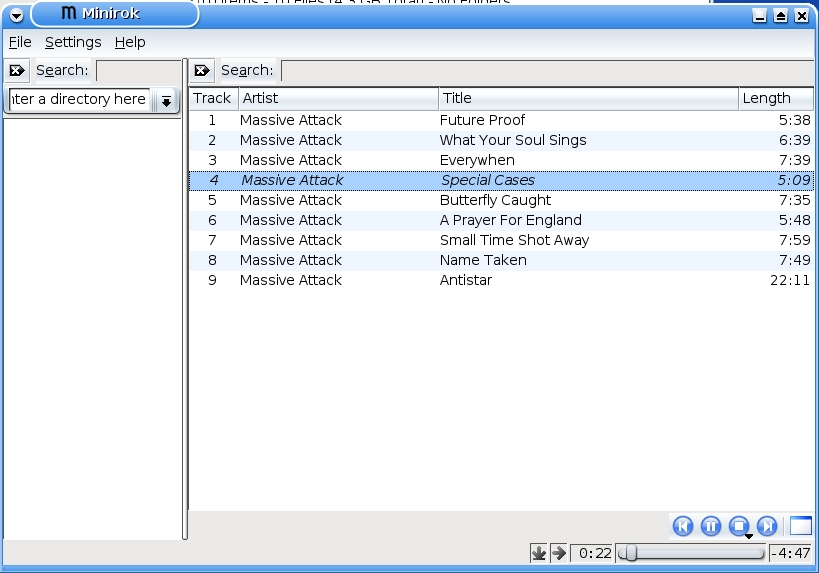
Figure 1. For those sick of do-it-all players, here's the wonderfully simple Minirok.
Installation
If you head to the Minirok Web site, both tarballs and .debs are available (the Debian packages are a little bit older than the source tarballs). As far as dependencies go, aside from PyQt and PyKDE, the only dependency that's relatively obscure is python-mutagen—a Python module that handles audio metadata. Apt users should be able to install the module via the following:
# apt-get install python-mutagen
After this command, the .deb should install, and the tarball should build with no trouble. To install the .deb package, open a terminal to the directory the .deb sits in, and use the command:
# dpkg -i minirok_0.7-1_all.deb
To install via source, download and extract the tarball. Open a terminal in the new directory, and enter the command:
# ./setup.sh install
Usage
Minirok should be in your menu under Multimedia. If not, simply run the command minirok. Once you're in, just click and drag a folder or MP3 into the window pane on the right. As far as controls go, the button on the bottom right that looks like a window clears the playlist, so if you've made everything cluttered and want to start fresh, there's your button. Otherwise, it's a simple case of skip forward or back a track, stop, play/pause and a slider bar. On the left are two buttons: the first, a downward-pointing arrow, is for repeat, and the second, a right-pointing arrow, is for randomizing. And, that's about it—really nice and minimal!
For the moment, things are fairly stable due to a minimal interface, with only the occasional bug. I found that it didn't like some kinds of MP3s, and sometimes it doesn't lead onto the next track on a playlist, but those issues seemed to be fixed in the latest tarball. Overall, this project's been my favourite this month. It fills a niche and doesn't give you all that installation grief.
If you're looking for a good tool for finding duplicate files, this is it. I've been researching these tools for a while, but I didn't trust any to touch my filesystem, as many of my duplicate files are there on purpose. Perfect Match (or pmatch for short) is non-destructive. Using the default options simply prints out a list of what files are duplicated and lets you decide for yourself which ones you'd like to remove.
As for goals and aspirations, according to author Tomasz Muras' Web site:
Some time ago, I was looking for a utility that would find (and possibly remove) duplicate files. I have found a few of them but none was complex enough for what I wanted...hence the idea of Perfect Match! My main requirements were quick compare—that is, first compare files based on size, then hash—and to perform some logic when choosing which duplicate should be removed.
Installation
For the moment, there is no installer available for pmatch, so you'll have to take a few steps here and there, but thankfully, not too many, as it's a small project. The main dependency is Ruby, and a subproject called RubyGems—a system for managing Ruby software libraries. Chances are that RubyGems already is in your distribution's repository, so doing a simple:
# apt-get install rubygems
will work for most people. If not, check out the RubyGems home page (rubgems.org). Once RubyGems is installed, you'll need a gem called log4r. Use the following command:
# gem install log4r
Once those two steps are out of the way, you're ready to download pmatch. Head to the project's Web site, and save the tarball to your hard drive. For some reason, none of my GUI archive tools liked the tarball, so open a terminal to the directory it sits in, and enter the command:
$ tar -jxf pmatch_0.2.tar.bz2
From here, pmatch is ready to use, but only locally via the command ./pmatch. To install pmatch system-wide, enter the following two commands:
# cp pmatch /usr/local/bin/
# chmod 755 /usr/local/bin/pmatch
From here, any user should be able to use pmatch at any time.
Usage
To use pmatch in its basic form, enter the command pmatch followed by the directory you want to examine. As an example, after doing so, I received the following shell output:
nhoj@ubuntu:~$ pmatch musostuff/storm-day/
rm musostuff/storm-day//verse2/raw-drums.wav
rm musostuff/storm-day//sessions/steve-17-06-06/verse-drum-track.wav
rm musostuff/storm-day//sessions/nhoj-session-26-2-06/session2.wav
rm musostuff/storm-day//sessions/nhoj-session-26-2-06/session1.wav
Don't freak out when you see an rm followed by a filename. These are purely recommendations for the moment. If you actually want to perform these changes, you can do so by piping the command through to bash, like so:
$ pmatch musostuff/storm-day/ | bash
Now these commands actually will execute and remove said files. For more advanced usage and information on how pmatch works, check the Usage section of the Perfect Match home page.
Overall, this is a handy little project, which probably will make it into many users' toolkits and hopefully into distro archives. Once the project has fully matured, I wouldn't be surprised to see some GUI front ends making their way to our desktops.
I thought I'd finish this article with what has to be one of the quirkiest and most colorful projects I've come across—FpcBol. A desktop for children, FpcBol (or bol for short) is designed to be colorful and easy to use, with icons only (no menus), along with parental controls, and it's trim enough to work on older PCs. That all sounds cool, and some of it we've seen before, but the desktop and interface are the strangest I've come across and unlike anything I've used before—not necessarily a bad thing! Are you as intrigued as I was? Follow me....

Figure 2. The Gorgeous Visuals of FpcBol
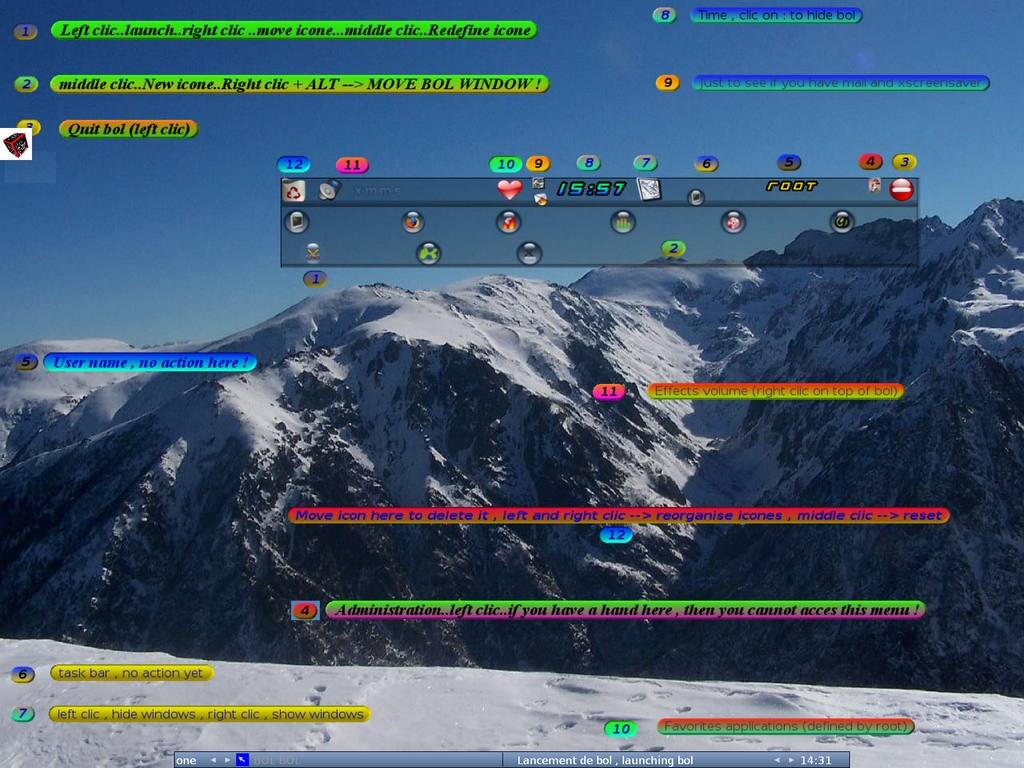
Figure 3. FpcBol Transformed in Its Crazy Help Mode
Installation
First things first, the installation side of things is unfinished and in a state of flux. Florence Mathias (the project maintainer) and I were actually working together in a way on this one. He was changing the installation scripts daily while I gave him feedback. I thoroughly recommend checking out the How-To section on the project's Web site (itself simply a collection of colorful pictures and screenshots). With bol being based on Free Pascal and SDL, there are a number of obscure requirements and the How-To section has pictorial instructions of steps to take on individual distributions.
When you're ready to download the source tarball, click on the FpcBol picture on the Web site, which will take you to the SourceForge page's file archive. Once downloaded, extract the tarball, and open a terminal in the new directory. To any users of Debian-based systems, such as Ubuntu, MEPIS and so on, I thoroughly recommend running the install_debian script—it downloads all of the needed dependencies and will save you a great deal of frustration:
# ./install_debian
To start the installation, use the self-proclaimed ugly install script as follows (as root or sudo):
# ./install
The script will go through a series of dependency and configuration checks. To start, it will see if you have something called bol.icone and download the latest for you if you don't (you won't, unless you've been through this process before). This is about 20MB, so go make a cup of tea and come back again.
A tricky error that probably will come up is a message saying:
jedi-sdl not present
untar sdl.tar.gz (tar xvfz sdl.tar.gz) under
/usr/lib/fpc/<version>/units/<cpu>/sdl
Look in the sources directory of bol, and you'll find a file called sdl.tar.bz. As root, copy it to your needed directory (/usr/lib/fpc/2.0.4/units/i386-linux in my case), change to that directory and extract the archive. Rerun the install script, and you should make it past this stage. If not, check that you have extracted sdl.tar.bz to the right directory.
If you receive the error, “Xmuu library not present !!!!!”, check your local file /etc/ld.so.conf to make sure it has the following lines:
/lib
/usr/lib
/usr/local/lib
/usr/X11/lib
If these areas have all passed, a lovely little part of the program pops up with a spinning cube to test whether certain parts of bol will work in advance. Click on the small cube, and answer Y if it worked. If not, you're probably missing some needed libraries. After this, the script will ask you for the path to your mail reader and provide an example path for you. Enter the path for your favored mail application, and this should be the end of the script. Note that a script to install local configuration files for individual users is also provided. If you want to do this to make the first run cleaner, run the script by entering the following:
# ./install_users
Phew! That was a long one, but a cleaned-up installer is on the to-do list for this project and may well be perfected by the time you read this. Some instructions are provided in the script, along with README files on how to integrate bol into your login menu, but I'll let you read that yourself.
Usage
You can fire this up straightaway on top of another desktop, so let's go through that for now, and you can take it from there. Open a terminal, and enter:
$ /usr/local/bol/lance_bol
A bunch of initialization info will pass through the terminal before you're suddenly greeted by a crazy rotating cube in full-screen. I think this may be some kind of loading screen (I don't know), but the cube is cool. After a few seconds, your desktop will start changing, with a new background and a translucent rectangle (the workbench) at the top of your screen. The workbench is the part that drives bol, so let's concentrate on that.
The lower icons are application buttons. Hover your mouse over them, and they'll do a cool animation, and the name of the application will appear at the top of the workbench. Left-clicking on it will launch it. The heart icon represents favorites. Clicking it will change the lower icons to a favorite applications list. If you want to clear up your screen from clutter, the icon fifth from the right will show only the desktop and minimize everything else. What's the important button? Click the blue one with a question mark, third from the right—it's the help button! Your screen will suddenly be taken over by an assortment of writing and colors—it was so crazy I had to take a screenshot.
When you've had enough, double-click the red button on the right, and a confirmation screen will take over the workbench, telling you to right-click to exit (you'll see what I mean). Upon exiting the desktop, you'll be greeted by the cube again, but this time in reverse...groovy!
FpcBol is one of the craziest projects I've seen in a while. Its lack of menus may appeal to noncomputer-literate users. The graphical intensity will appeal to children, with moving icons, gorgeous colors and changing desktop backgrounds of interesting scenery. All in all, everything is gorgeous-looking and very...French! Kids will love it. The end result is definitely worth it, even if the installer is cumbersome at times. At the time of this writing, FpcBol just hit 1.0 alpha, and it may hit full release by the time this prints. Florence could do with a hand to complete things, particularly with improving the English and the installation scripting, so if any coders out there are fond of the project, why not help him out? There also isn't much documentation for the GUI and some of the cooler aspects like Parental Control and its log files, so I'd be keen to see how FpcBol turns out after gaining a decent audience.
Brewing something fresh, innovative, or just a little crazy? Send me e-mail at knight.john.a@gmail.com.
John Knight is a 23-year-old, drumming- and climbing-obsessed maniac from the world's most isolated city—Perth, Western Australia. He can usually be found either buried in an Audacity screen or thrashing a kick-drum beyond recognition.
