
Fresh from the Labs
First up this month is a weight manager, Pondus. According to its Web site: “Pondus is a personal weight management program written in Python and Gtk+2 released under the GPL. It aims to be simple to use, lightweight and fast. The data can be plotted to get a quick overview of the history of your weight and is stored in XML files for easy access and modification with other programs.” Simple it is, indeed, and the installation isn't too shabby either. Pondus lets you track your weight over a period of time and displays your progress with a graph. It also switches between metric and imperial measurements.
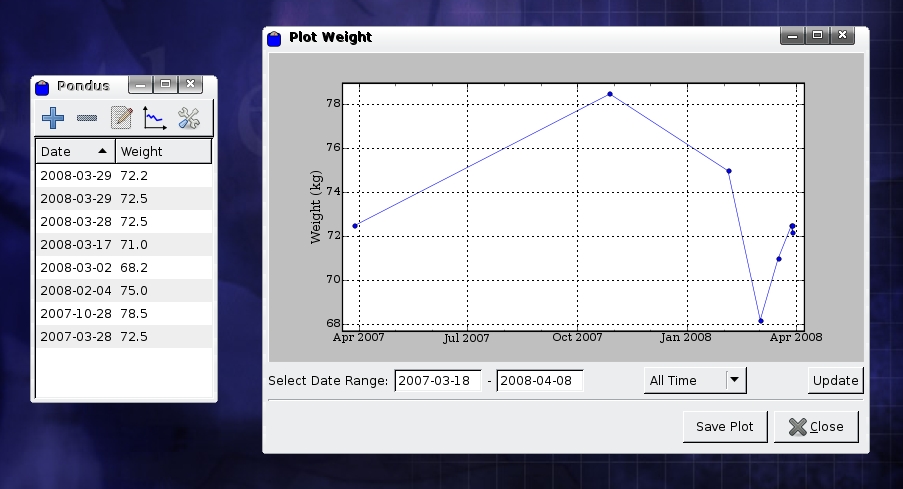
Figure 1. The Lovely Minimalism of Pondus and My Weight Chart
Installation
In terms of dependencies, you need a few Python-related libraries installed before you can start. Whenever you compile something, the installer invariably asks for the development files, so make sure you install the python-dev files first. If you still run into problems, some Googling turned up a posting in a forum about some of the packages on which Pondus depends:
python 2.4.4-6
python-gobject 2.14.1-1
python-gtk2 2.12.1-1
python-matplotlib 0.90.1-2
python-support 0.7.6
Once the dependencies are out of the way, download the source package from the project's Web site, extract the contents and open a terminal in the new folder.
As root, enter the command:
# python setup.py install
If all goes well, Pondus should compile and even install itself in your Applications menu. On my system, I found a new menu entry under Utilities→Pondus. If you can't find Pondus on your menu, you can start it by entering the command pondus.
Usage
Pondus is very minimalist, but that's not necessarily a bad thing. Upon entering Pondus, you'll see a small window with five buttons. The first adds a line of data—that being your weight and the date for entry. The second removes a line, and the third edits a line of data. Once you have entered some weights and times, you then can display it as a graph by clicking the fourth button. If you want to switch between pounds and kilograms, the fifth button opens the settings window and lets you change that (this is one of only two options, the other is to remember the window size).
Tracking your progress is really what Pondus is about though, so you will want to jump over to the graph section—the fourth button, or Plot data. Click the button, and a window titled Plot Weight appears with a neat line graph representing your weight over a period of time. If you look at the bottom right, there's a drop-down box with All Time written in it. This allows you to filter out the rest of the information to what you've had over the past year, or just the past month. If you want to filter your time to something more specific, on the bottom left are two fields called Select Date Range. Enter the start date you want to see in the first field and the end date in the second field, click Update on the far right, and the graph will update with the selected information. For those of you who want to save a copy of what your progress has been, clicking the Save Plot button at the bottom lets you save your graph as a .png file. I'm a weedy little runt myself, so I'm not trying to lose weight, but rather gain it, so check my screenshot for an example (which is in kilograms by the way, I don't way 72 pounds).
Overall, Pondus is a very simple and clean application that will appeal to many new PC users, as it sits in a nice and small window and doesn't baffle you with a zillion options. I'm guessing that Pondus probably will add more features over time, but hopefully not too many, as doing so might alienate its target audience. It's a lovely, neat little program.
BeeDiff (beediff) is a GUI program for comparing text differences between two files, and any differences will be highlighted in different colors depending on the type of difference. Any differences found then can be deleted or copied between files. BeeDiff is developed with new Qt4 libraries, and as such, it's very quick and lightweight. It also happens to be quite easy to install, which is another bonus.
Installation
For installation purposes, you have two choices: an i586 binary or a source tarball.
If you choose the binary, first download the provided tarball and extract the contents to a folder of your choice.
Then, as root or using sudo, copy the binary to /usr/bin or your preferred binary directory to run BeeDiff system-wide.
Next, copy the included icon, beediff.png, to /usr/share/icons or whichever icon directory you prefer.

Figure 2. BeeDiff—the Insomniac Coder's Best Friend
If you would rather run BeeDiff locally, you can run it by entering:
$./beediff
from whichever directory you've extracted it to. If your system is set up right, you also might be able to run it simply by clicking on it in your file manager.
If you would prefer to compile it (if you don't have an i586-compatible processor, for example), that's also very easy. Simply download and extract the tarball provided on the Web site, and open a terminal in the new beediff folder.
As root or sudo, run the command:
# ./install
and the script will do all the compiling and installation for you.
Once this is done, entering beediff at the command line should launch the program.
At first, I had an error running the binary or compiling it, and it was due to having old libraries installed. When I went to run the binary, I got this:
nhoj@ubuntu:~/src/beediff_1.5_i586/beediff$ beediff
beediff: symbol lookup error: beediff: undefined symbol:
_ZN10QBoxLayout10setSpacingEi
And, I got this with the source compilation:
QBtSeparator.cpp:139: error: 'const class QColor'
 ↪has no member named 'darker'
QBtSeparator.cpp:142: error: 'const class QColor'
 ↪has no member named 'darker'
QBtSeparator.cpp:145: error: 'const class QColor'
 ↪has no member named 'darker'
make: *** [tmp/QBtSeparator.o] Error 1
install: cannot stat `beediff': No such file or directory
nhoj@ubuntu:~/src/beediff$
BeeDiff requires at least Qt 4.3—Piotr the author was using 4.3.2. Install the latest version you can along with the development libraries. Once I installed these, BeeDiff ran, binary and source included.
Usage
BeeDiff is pretty much geared for comparing two files that have the same origin, so comparing pieces of code and scripts will be the best use of BeeDiff's abilities. Fire up BeeDiff and once inside, you'll notice two main panes. Here, you will load a text file into each one. The left pane is the original, and the right pane is for comparing against it. On the top right of each pane is a button to browse for the file you want to load.
Once loaded, any different lines will be highlighted in different colors:
Red: lines that have been deleted.
Blue: lines that have been added.
Yellow-green: lines that have been changed.
After analyzing what lines are different, you then can take several actions. Along the toolbar to the right (and in the menu under Operations) are four icons: Remove all from left, Remove all from right, Merge all to left and Merge all to right. The Remove buttons obviously delete the text in question, but the Merge buttons let you grab any divergent lines and copy them across to the other file and save it—very handy.
BeeDiff is another no-nonsense application that does what it says on the tin and doesn't pretend to be anything else. This program should save scripters and coders many a late night of headaches and may prove to be quite handy in this time of common allegations between companies and projects of “stolen code”.
First up, this is a YouTube downloader. Not very interesting, as everyone has used them before, right? Indeed, but a few months back, YouTube changed some embedding options, rendering most of these lovely tools useless. Well, this little script has been updated and downloads YouTube videos just fine. To install, simply save the URL provided onto your hard drive—that's it! Make sure you save the filename as is though, not with an .html extension.

Figure 3. youtube-dl—a Groovy Command-Line Utility to Save YouTube Videos to Hard Drive
To use it, open a console in the directory where you saved the file. Make sure you can execute the file by entering:
$ chmod u+x youtube-dl
Now you're ready to go! Find your favorite YouTube clip and copy its URL. Go back to your console and enter ./youtube-dl, and paste the clip's URL after it, like so:
$ ./youtube-dl http://youtube.com/watch?v=tNTWwbYYlgU
youtube-dl now saves it to your hard drive, and it even has a spiffy text-based progress monitor. Once downloaded, the filename just looks like random garbage. Rename the file to nameofyourvideo.flv (the .flv extension is the most important part), and open it with a strong video player such as VideoLAN or MPlayer.
This clever little script runs on anything that has a Net connection and Perl. It grabs MP3s from a MySpace page and saves them locally. Like youtube-dl, this is not new, but it automates a number of things and does it locally from your hard drive without weird requirements. The best part is that it grabs all the songs and saves them in the format of [band] - [song title].mp3 automatically. Like youtube-dl, simply save the project file to your hard drive and flag it as executable, like so:
$ chmod u+x getmsp3
Now, simply run the script and enter the URL of the band you want after the command:
$ ./getmsmp3 http://www.myspace.com/soundskp
Of course, we can't encourage you to download illegally, so I've provided you with the URL of our own band, which you're welcome to download (slightly redundant though, as we've provided the option to download our files anyway).
Here's a project I'm dying to see the outcome of—a free (as in beer) speed camera warning system designed to run across a large range of mobile phones and GPS devices. FoxyTag is a collaborative system designed to encourage users to share speed camera data—the more users and feedback, the more reliable the system becomes. The system doesn't merely assume a speed camera is in one place either. Users have the options to report a permanent camera or the installation or removal of a mobile camera.

Figure 4. The People's Speed Camera Locator—FoxyTag
However, Michel Deriaz, the project's leader at Geneva University, isn't trying to promote speeding or unsafe driving. According to FoxyTag's Web site:
FoxyTag motivates neither speeding nor any other risky behavior, but allows drivers to concentrate on the road instead of having their eyes fixed on the speedometer, by fear of being flashed. We observe that drivers tend to brake suddenly when they see a speed camera (even if they are not speeding), which can provoke traffic jams or even accidents (chain collisions or slidings, like in this video [see the Web site for the link]). FoxyTag signals in advance the presence of speed cameras, so that drivers have enough time to check their speed and adapt it if necessary.
As for mobile phones, any Java mobile phone with MIDP 2.0, CLDC 1.1 and Bluetooth should be compatible. For GPS systems, any Bluetooth GPS should be compatible (including GPS modules of some navigation systems), and Michel recommends a Sirf III GPS. Unfortunately, I have neither. Hopefully, we can rustle up the needed hardware and cover this project further. I'd love to see the results of this one.
John Knight is a 23-year-old, drumming- and climbing-obsessed maniac from the world's most isolated city—Perth, Western Australia. He can usually be found either buried in an Audacity screen or thrashing a kick-drum beyond recognition.

