
Enlightenment—the Next Generation of Linux Desktops
Do you remember the first time you saw the phenomenally successful “Get a Mac” ad campaign? The American ads feature actor Justin Long as the friendly, calm and casual Mac, paired with funny-man John Hodgman as the uptight, insecure and nerdy PC. And, the ads always begin the same way: “Hi...I'm a Mac, and I'm a PC.” The obvious intent of each personification is to show that the Mac resembles a more youthful Steve Jobs, and the PC closely resembles Bill Gates. It's brilliant marketing. The gist of the ads is this: PCs are prone to malware of all types and are difficult to use, and the Mac is not only easy to use, but it's also safe and secure. For those who switch to a Mac, all their problems will disappear. The target audience for this campaign is not the avid PC user but rather those who use a PC because they are unaware of other options. And, this message has been extremely effective, with Mac sales increasing a whopping 12% at the end of fiscal year 2006—that's a total of 1.3 million new Mac users.
So, why is the “Get a Mac” campaign so successful? Because the ads utilize a technique known as framing, where the viewer's perception is manipulated through selective information. In this case, the ads support a framed dualism where the viewer's presented choices are only PC or Mac. No other choices (although obviously they exist) are mentioned. This leads the viewer to think the Mac is better than the PC for a multitude of reasons, each highlighted by the various ads. And, who wouldn't want to be more like the hip Justin Long?
We Linux users are thrust into an unspoken dualism of our own. Through the various flame wars pitting the KDE desktop over GNOME, the major distributions choosing sides and Linux founder Linus Torvalds throwing his weight behind KDE, it may appear to newbie Linux users or prospective users that Linux is a dualistic system. You choose either KDE or GNOME. Unlike the dualism shown in the Mac ads, both KDE and GNOME have good qualities. No one desktop reigns supreme. They both utilize the same Linux kernel, and both are equally successful.
Lost in the smokescreen of the desktop wars are the lesser-known desktops and window managers of which the lightweight Xfce desktop and the Enlightenment window manager are a part. This article focuses on Enlightenment, primarily the new and improved E17 (formerly known as DR17, because it's a developer release still in beta). Created in 1997, Enlightenment, hereafter referred to as E, originally was based on the FVWM window manager. Since then, it has forked out on its own and no longer shares borrowed code from FVWM or any other window manager or desktop. This lays precedent to the claim of E's developers that E17 is at the forefront of the next generation of desktops. However, the word desktop conjures up thoughts of KDE and GNOME, but that is not what is meant by “next generation”. Rather, E is a desktop shell.
Desktop shell means an entity that sits somewhere between a minimal window manager and a full-featured desktop experience (like KDE or GNOME). For this reason, E's developers state that E is not intended to compete with either of those desktops. Instead, E is a desktop shell, combining a window manager with a file manager and configuration utilities. This new structure “will provide integration between files and your environment in a seamless manner while encompassing a graphically rich and flexible architecture”.

Figure 1. E's Very Useful Task Bar—an Essential Part of E17
E is possible because of the exclusive EFL (Enlightenment Foundation Libraries) written on behalf of E17. Parts of EFL are stable—like the newly updated Eet, a data encoding, decoding and storage library, which has been granted a 1.0 status. However, most of the coding is not yet complete, which places E17 in beta, rendering the system not completely stable as a desktop. Still, many users are choosing E17, thanks to its amazing ability to resurrect older PCs and bring systems with as little as 100MHz CPUs and 64MB of RAM to life again. Plus, E17 provides much-needed eye candy, with dazzling 2-D effects, to these older PCs—effects that would use a large amount of system resources through Compiz Fusion. No special 3-D graphics cards are needed for these effects on E. It's all in the EFL code.
In addition, EFL enables the potential for animated themes, animated boot screens, virtual desktops (up to 24) with separate animated backgrounds and more. Menus and borders are equally animated—or they can be if the theme allows—making E17 a unique experience.
In fact, that very uniqueness could be its potential downfall. Because E is not like anything else, users probably will encounter a short learning curve when using the desktop—figuring out where things are placed, how to summon the menu and how to configure various desktop elements. At first, one of the most disturbing features for me was calling up the menu by right-clicking my mouse on the desktop canvas. It takes a little getting used to, but after a while, it becomes second nature. It's the little things like this, the eccentricities of E, that seem awkward at first.
E17 noticeably lacks a stable file manager. As I mentioned earlier, the E developers melded the window manager with the file manager and configuration utilities, resulting in the next generation of desktop shells. Without the file manager, which is under heavy development, E is nothing more than a window manager. So, those distributions using E17 are integrating alternate file managers atop E to bridge this hole. Once the E file manager (EFM) is stable enough for everyday usage, it too will be configurable with eye candy equivalent in style to the rest of E. You will be able to search your files like any other file manager, with visual thumbnails that open into the application of your choice.
Other elements of E still on the plate include engage, the Mac OS X look-alike task bar (usable); entice, an image viewer; express, E's instant-messaging client; elation, a DVD-player GUI; embrace, an e-mail checker; elinguish, a BitTorent client; and several other components.
Almost everything about E is configurable. E includes a configuration panel allowing you to change many features, such as the wallpaper, theme, fonts, screen resolution, power settings, mouse and keyboard settings and more. This is nothing exceptional. I'm merely pointing out that E resembles a desktop with configuration options like KDE and GNOME. Clearly E is intended to be more than a simple window manager resting above a desktop foundation like frosting on a cake. E is both cake and frosting, but the cake still is being whipped together.
Another useful configuration option for E17 is the ability to change the language on the fly. Twenty languages currently are supported, including English, French, Russian, Korean, Chinese and Japanese. And, there is no need to restart the X server to switch between languages. It's instant.
E also includes the ability to add or remove little applications called modules. E's modules are similar to KDE's SuperKaramba or the Mac dashboard, adding functionalities like weather, calendars, volume control, temperature monitor, CPU frequency widget, battery monitor (for laptops), clock and more. The sky's the limit for future development of additional modules. And, selected modules appear in real time. There is no need to restart X or press a special combination of buttons to view them. It will be interesting to see the many modules that develop once E17 is officially released as a 1.0.
The question remains, is E17 ready for a standalone desktop? Probably not for business purposes, but it can be quite useful personally. Although E can crash, most crashes are not system-related, so whenever an application crashes, it simply can be closed down and restarted. This can and does happen occasionally, and these minor inconveniences should be worked out in later releases.
There are a few simple ways to try E17. If you are running Ubuntu, there is a method from the user forums where you can install E to be one of the choices available at boot. However, post-installation, you will be missing pertinent files that enable every feature to work properly. For that reason, you might want to try a distribution from a live CD with everything tweaked to work. Using E17 as a window manager above either GNOME or KDE does not provide the full extent of E's power. Besides, this sort of defeats the purpose of resurrecting older equipment. If you install E as a window manager, you lose its power and speed. Yes, E is very fast—think Xfce on steroids.
Tutorials for installing E17 exist for Ubuntu, Fedora, Gentoo and Arch Linux. If you are interested in running E17 as a window manager, refer to the user forums for these distributions for directions. Instructions for Ubuntu are at ubuntuforums.org/showthread.php?t=97199&highlight=E17+cvs, and instructions for Fedora and Mandrake users are at sps.nus.edu.sg/~didierbe.
As mentioned previously, the best way to try E17 is by choosing a live CD with E pre-installed. There are a few from which to choose, and I briefly highlight each here. The following desktop experiences range from a lesser extreme, where E is moderately used, to a full extreme, where E is used exclusively.
Hardware requirements are 700MHz CPU, 384MB of RAM, 8GB disk space, graphics card capable of 1024x768 resolution, sound card and Internet connection.
There was a lot of hype over gOS when it was still being discussed in forums. It was thought that Google was creating a Linux distribution of its own. But, this turned out to be in error. gOS is a polished distribution that utilizes certain elements of Enlightenment for its beautiful special effects. It also uses the GNOME desktop and Compiz—thus, the slightly more modern hardware requirements. Space 2.9 is geared toward the 100,000,000 MySpace users. The revolutionary space dock used by gOS closely resembles the Mac OS X dock with stacks that open and swerve to reveal further options beneath.
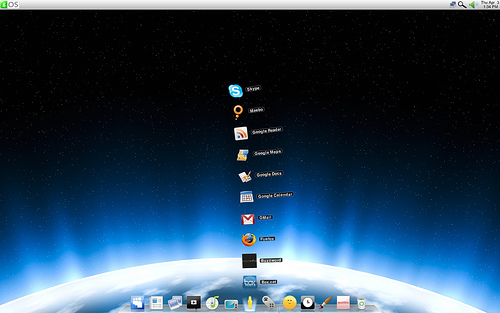
Figure 2. A Look at gOS
gOS is an excellent system for the modern digital life. It includes everything users ever would need in an Internet system. However, gOS falls short in its full usage of E17. There are too many other elements in play where E is neither seen nor heard. For instance, E's Engage dock is replaced with a gOS creation. Plus, E's eye candy has been overridden by Compiz Fusion. So, where is E? In my opinion, gOS is a Mac copycat, and that's not a bad thing. In fact, I think it's a welcome twist to the numerous Windows look-alikes in the Linux community. So, if you're looking for a fast, fun to use and Mac-like distribution, try gOS.
Hardware requirements are 300MHz CPU and 128MB of RAM.
Elive is an attempt at a pure E17 desktop experience. It also includes the former E16 stable release; both are available at boot. I really enjoyed the E17 experience using Elive. It's small enough that it can be run comfortably from the live CD without installing it. Although some features, such as playing DVDs, were not enabled. The Elive CD is the fastest live CD I have tried to date, which must be due to the inherent speed of E.
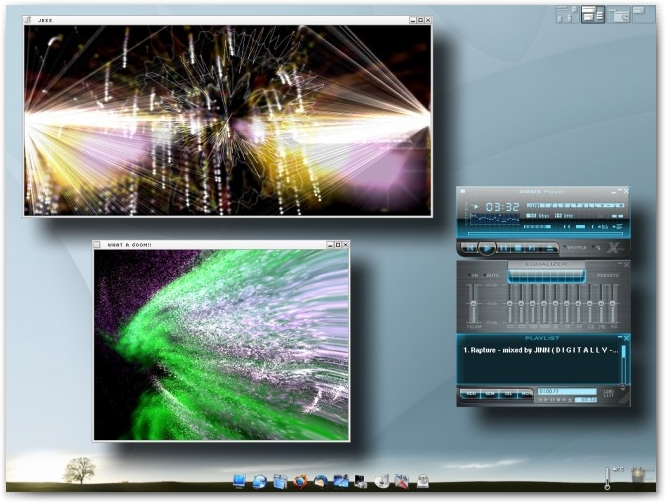
Figure 3. A Glimpse at the Elive CD
Elive has a very polished look and offers two themes: night or day. I did not experience any crashes while using the system, although don't expect everything to work without problems, as E17 still is under development. If stability is what you prefer, you can try the E16 desktop, but E16 is not as pretty.
Elive contains its own configuration panel, called Epanel, which enables users to control the entire E system—adding and removing packages, configuring hardware (Elive has great hardware support by the way) and customizing the overall look and feel of the system.
If you want a true E experience, try Elive. My only issue with Elive is that it requires users to pay a minimal fee before downloading. The default is $15 US, though this can be dropped to $5. And yes, it is possible to download it free of charge, but to do so, you must send the developers an e-mail asking for an invitation code.
My only only concern with Elive is that Enlightenment is not ready as a full-featured desktop experience—some features seem unfinished. But, Elive is a wonderful awe-inspiring walk down the path to Enlightenment.
So, if you want to try E17 exclusively, with no added components from other window managers/desktops, don't hesitate to download Elive. After all, $5 will aid Elive's developers to continue their noble work.
I first should mention that OpenGEU is not an official Ubuntu derivative. It is based on Ubuntu and shares its repositories, but it's not Ubuntu. OpenGEU's subtitle explains the philosophy behind this newer distribution: “when a GNOME reaches Enlightenment”. OpenGEU's ambition is to fill in the missing parts of E17 with the working parts of the GNOME desktop or Xfce. And, it does this very well. This hybrid system is a fully functional Enlightenment desktop with the power of Ubuntu's GNOME desktop melded with the effects of E17. For example, the file manager missing from E17 is filled with the Xfce Thunar file manager, and it works without a hitch.
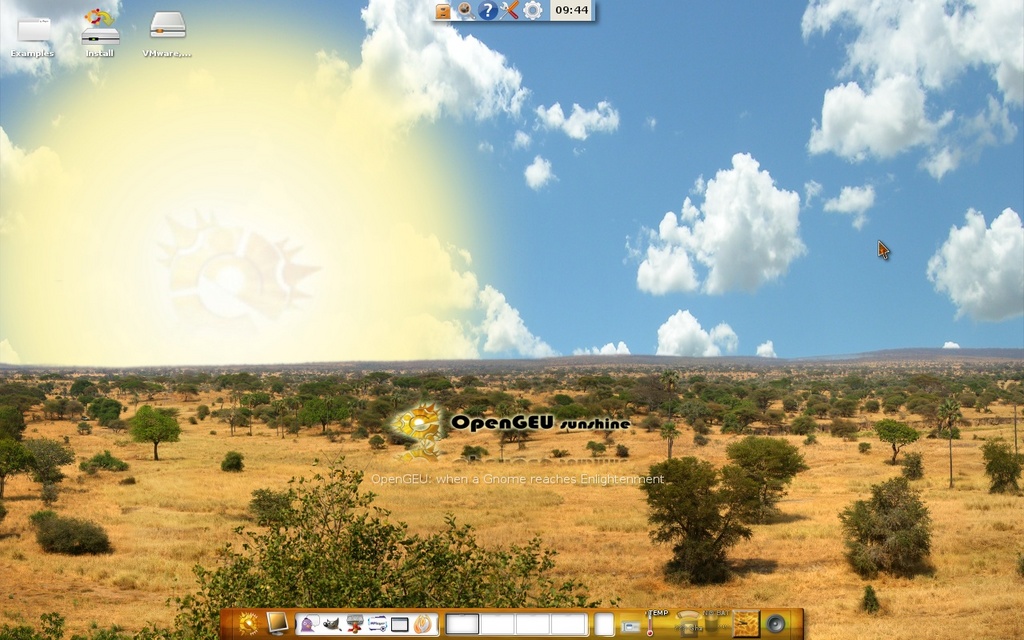
Figure 4. OpenGEU
OpenGEU includes two themes: sunshine and moonlight. Both are exquisitely beautiful with animated elements—typical E style. In the sunshine theme, the sunbeams appear to shine forth at certain times, and under the moonlight theme, the Enlightenment E logo apparent on the moon reflects within the ripples of an ocean of water at regular intervals. Users can change between themes at the press of a button. Other themes are included, and users can download additional themes from get-E.org.
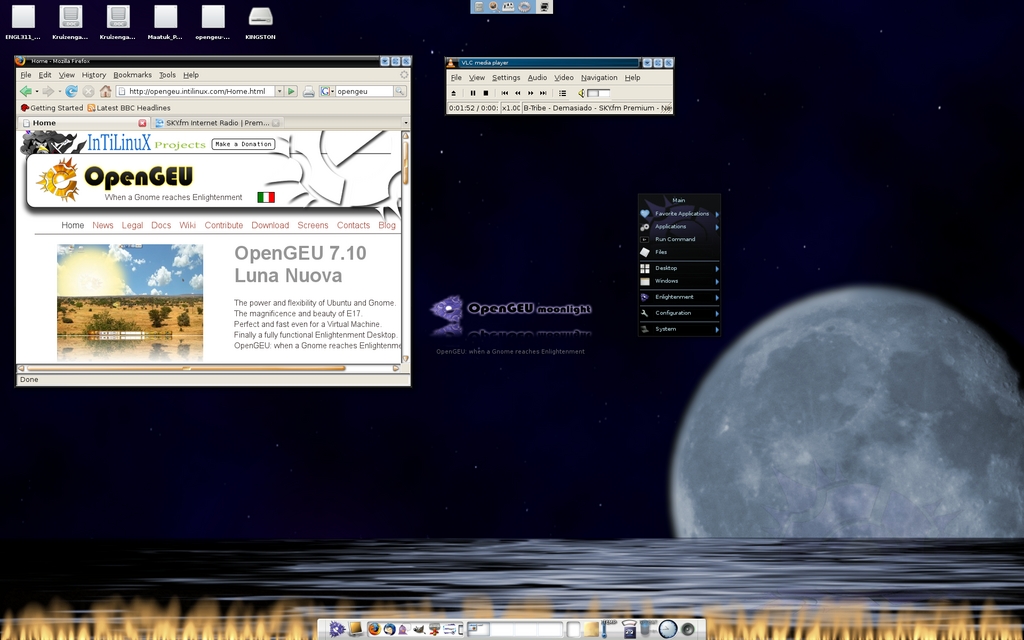
Figure 5. OpenGEU's Moonlight Theme
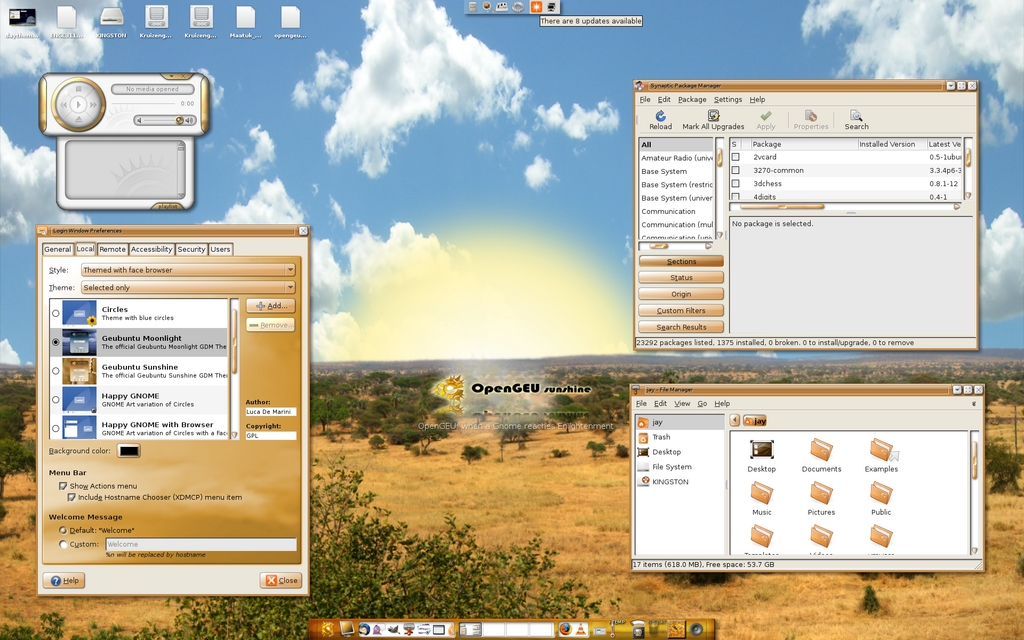
Figure 6. OpenGEU's Sunshine Theme
OpenGEU not only borrows Xfce's Thunar file manager, but it also borrows its panel. And, the bar across the top of the screen is from GNOME. But, hidden beneath the scenes is E. I am delighted with the mix. The distribution is not without its bugs, but E's performance does not appear to be altered in the least through the addition of various GNOME and Xfce components. OpenGEU is a glimpse of what we can expect from the 1.0 E release.
There was one strange “bug” that I discovered when clicking on a file from my desktop. Instead of defaulting to the Thunar file manager, E's own file manager opened, and it left a bad taste in my mouth. I was humored by the wiggling icons, but the total experience is not finalized. It lacks a certain appeal—that look of completeness. I can understand why Thunar was chosen in its place. Perhaps EFM should be removed from OpenGEU entirely.
OpenGEU is different enough to be noticed by family and friends. It's easy to use, simple to install and fanatically fun. You can expect E's total functionality with animations, fading and shadows. I used OpenGEU for quite some time for the purpose of this review, and it is the most pleasant E experience I encountered. This is one distribution I'll definitely be watching, and it's the distribution from which I am writing this review. If you are looking for the ultimate E experience, try OpenGEU. You won't be disappointed.
E17 is under heavy development and probably not useful for business purposes. However, it's ready for personal use, especially for those with older PCs that could stand to be revived. System requirements for E are extremely low, with dazzling 2-D effects rivaling the best of Compiz Fusion without the need for an up-to-date graphics card. Completely rewritten using EFL, E is not like any other window manager or desktop in existence. It's intended to be the next generation of desktops—a desktop shell that sits somewhere between window manager and full-fledged desktop. E is not for everyone, but for most users, E should be a pleasant experience. And, it's lightning fast to boot. I hope that Linux users, old and new alike, will come to recognize that there's more to Linux than just KDE and GNOME.
Jay Kruizenga resides in Grand Rapids, Michigan. A small-business owner, Linux advocate and freelance writer, Jay spends most of his free time reading, writing or creating projects.

