
Domo Arigato Mr Androidato—An Introduction to the New Google Mobile Linux Framework, Android
The Open Handset Alliance (OHA) is an industry trade group comprising more than 30 technology and mobile companies. The focus of the OHA is to accelerate innovation in the mobile application and hardware space and to provide consumers with a more comprehensive and inexpensive mobile device experience. Android is a new, mobile application development framework developed by Google for the OHA that represents part of a greater promise from OHA members to make the open platform an industry success.
In addition to announcing its intent to bid on the C Block of the 700MHz wireless spectrum recently, Google continues to lead the charge to ensure that the FCC mandates the spectrum be open for all mobile devices and all operating systems. These two points are partly why the Android announcement is so important. Imagine using your phone as you do now, but with the option to modify it like you do your desktop computer. With Android, you will be able to tweak a subset of software on your phone to your liking—more so than merely changing the background, selecting a ring tone or downloading carrier-sanctioned software. If this idea becomes a reality, it might herald the beginning of a new era of personal computing and possibly even foster the creation of a new generation of small mobile phone companies and software vendors. Without waxing too philosophically on the benefits of an open spectrum, open devices, open software and open access, let's get to the meat of the problem, or shall we say, the logic of the Android.
The key features of the Android Software Development Kit (SDK) include an application framework, a memory-optimized runtime environment named Dalvik (so called because of one of the main engineer's affinity for the Icelandic town), an integrated browser based on WebKit, a custom 2-D graphics library, a 3-D graphics library based on OpenGL ES 1.0, structured data storage through SQLite, support for a variety of media formats (MPEG-4, H.264, MP3, AAC, AMR, JPG, PNG and GIF), and hardware-dependent support for a multitude of components (GSM, Bluetooth, EDGE, 3G, Wi-Fi, camera, GPS, compass and accelerometer). All of this functionality is accessible through the Eclipse IDE or on its own through the user's own Java environment. The platform also includes an emulator, debugging utilities, memory and performance profiling tools, and the source code for a set of example programs.
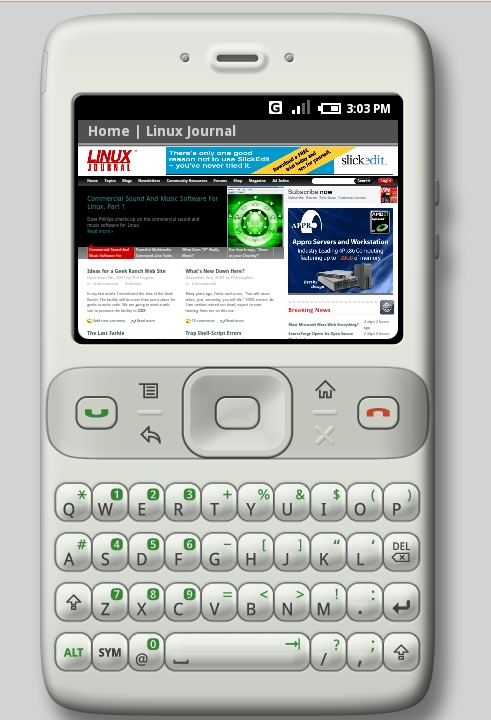
Figure 1. Browsing the Linux Journal Web site using the WebKit-based browser on the Android emulator. This particular screenshot highlights the built-in zoom feature that enables you to see a full-size view of a Web site.
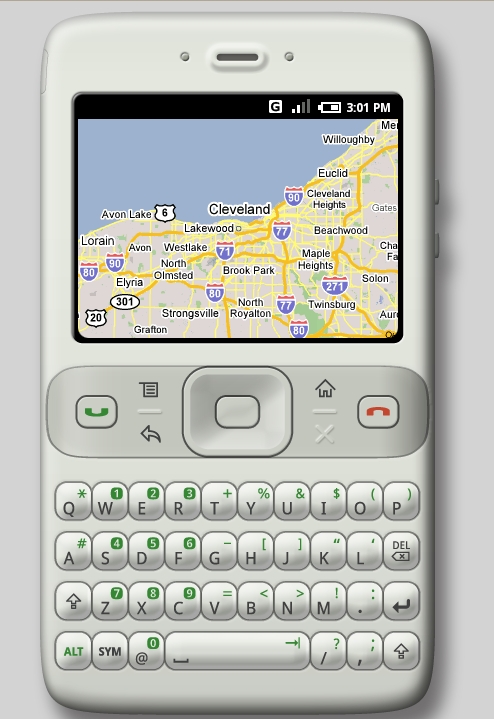
Figure 2. Using the built-in Maps feature to find my hometown in Ohio. The maps feature works similarly to the one found on the Internet—first providing a world view, then allowing you to pick a particular region and keep zooming until you reach the magnification limit or are satisfied with what you see.
The Android framework consists of four layers, as shown in Figure 3. At the top of the stack is the aptly named Applications layer, so called because it is where finished applications are assembled and situated in the framework. The second is the Application Framework layer, where the building blocks of each application are created using the underlying system libraries and associated application code. Next comes the Library and Runtime layer where core system libraries, Google Java libraries and the Dalvik virtual machine reside. The fourth and final layer is the Kernel layer, where Linux (version 2.6.x) communicates with the underlying hardware.
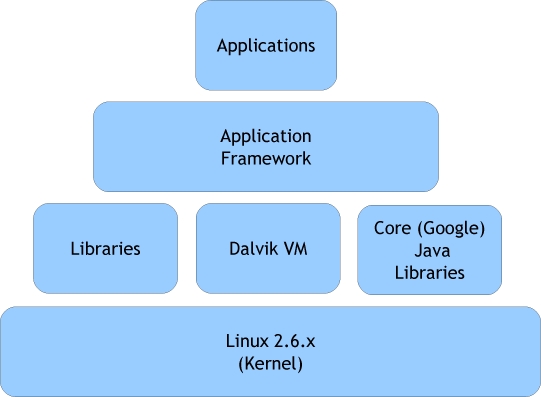
Figure 3. Hierarchical View of the Android Framework
Table 1. How the Android Framework Compares to Existing Mobile Frameworks
| Android | Motodev | Maemo | OpenMoko | Qtopia | |
|---|---|---|---|---|---|
| License(s) | Apache2 (mirrored GPLv2.0/LGPL components) | GPLv2.0 (kernel)/proprietary | Many free and open-source licenses | GPLv2.0/LGPLv2.1 | GPLv2.0 (Community Edition) |
| Company | OHA/Google | Motorola | Nokia | FIC/OE | Trolltech |
| SDK (price) | Eclipse plugin or standalone (free) | Eclipse plugin (Community Edition, free) | VistaMax or Laika (some parts require a device) | OpenEmbedded (free) | Qt Tools (Community Edition, free) |
| Sign-up Required | No | Yes | Depends (OS requires valid device ID) | No | Yes (Community Edition, free) |
| Primary UI | Java | Qt | GTK+ | GTK+ | Qt |
| Primary Application Language(s) | Java (underlying libraries C/C++) | Java ME/C++ | Languages with GTK+ bindings | Languages with GTK+ bindings | Languages with Qt bindings |
| Preferred Simulator | Android emulator | MotoDev emulator/Java ME emulator | QEMU | QEMU (and others) | Greenphone emulator (QEMU) |
| Primary Devices | Unknown (probably OHA devices) | Most Motorola mobile devices | Nokia N Series (and others) | Neo1973 | Neo1973 (Greenphone discontinued) |
| Licensing | Free (some services cost extra) | Free (some services cost extra) | Free (device required for some OS bits) | Free | Free (noncommercial only) |
The Android operating system is a multiprocess system, wherein system and application processes run within their own ID space. Security between applications and the system is maintained at the process level using standard Linux facilities, such as Discretionary Access Controls (DACs). When an application is installed, it is given a unique user ID on the system for the duration of its installation lifetime. This unique user ID affords the application a dedicated and protected execution stack within the Android system.
The default behavior of an Android application is to operate within its own container on objects it owns. In other words, Android applications have no permission to perform operations that might adversely impact the user experience or associated data. This behavior can be modified in two ways: 1) the programmer can explicitly share application space with another application, or 2) the programmer can explicitly share application components with other applications and the system. These exceptions are made through the application manifest file.
The manifest file, AndroidManifest.xml, is a file required in every application, and it resides in the root of the application folder. It not only provides a means for defining the security characteristics of your application, but it also provides an outline of your application in the form of exposed application components known as activities, intents, receivers, services and providers. More information on the manifest file is available on the Android Web site (see Resources).
Designed with reuse in mind, this layer enables programmers to piece together five types of components to create the basic building blocks of an application:
Views
Content Providers
Resource Managers
Notification Managers
Activity Managers
The first component, Views, represents the most basic piece of a user interface. Each view is responsible for managing the layout and events associated with the screen area it represents. Views can be grouped together to form Viewgroups and arranged into a hierarchical tree, with other views and Viewgroups. This tree forms a user interface for a particular application activity, such as entering a new contact into a contact book or adding a note to your diary.
The next component is the Content Provider. Content Providers enable a programmer to define a resource from which to pull or push data using a Content Universal Resource Indicator (ContentURI) wrapper and a Universal Resource Indicator (URI). Each ContentURI wraps around a unique type of data, such as contacts, settings and call logs, and provides helper methods for accessing associated data referenced through a URI. Programmers are free to dictate how they want to store, retrieve and modify publicly shared application data, but they must create the provider with a repeatable way to query and return data.
To accomplish this requirement, each URI must contain at least three components: the standard prefix of content://, the data authority and the data path to the content provider. An additional component can be added to the URI if the programmer wants to request a specific piece of data by unique ID, but the fourth component is only necessary when the application programmer is faced with having to know the exact ID of a record. When put together, a typical URI might look like content://contacts/people/42.
You also can use a URI to return a whole set of records. For instance, if you wanted to return the complete set of contacts, you would use content://contacts/people. Quite useful, no? But, what happens when you want to look up Ford in your contact book and can't remember the ID of the corresponding record? Android provides helper classes for each type of ContentURI for this exact situation, enabling users to find data provided by a particular Content Provider easily. The exact details on how to create, use and modify Content Providers, and how to use more-advanced concepts, like managed cursors, are explained in more detail on the Android Web site.
The next component is the Resource Manager. Resource Managers provide a way to work with application-associated files that do not contain code, such as icons, layouts and files associated with application internationalization and localization. Because all resource files are compiled into the binary at build time by the Android build system, Resource Managers are sensitive to where files are located in the source tree. To make build errors related to misplaced external files easier to avoid, all Android projects created through the Eclipse plugin contain a resource directory named res at the root of the application source tree. The resource directory contains subfolders for specific types of data, which the compiler searches and verifies application code against at build time. The exact details on dealing with Resource Managers are quite complex, and the specifications for dealing with Localization and Internationalization are not yet complete, so if you would like to know more, please follow the link provided in the Resources for this article.
The next component is the Notification Manager. Notification Managers provide developers with the ability to alert users to events occurring on their devices. Some examples include displaying a view in the form of a notification window when an e-mail arrives, alerting users to incoming calls by flashing the back light, or maybe even nagging users with a loud Britney Spears ring tone when the battery is running low. These are all typical examples of how you might use a Notification Manager in an Android application. The exact details on how to implement a Notification Manager also are located on the Android Web site (see Resources).
The final component of the Application Framework layer is the Activity Manager. Activity Managers are arguably the most important part of any application running in the Android framework. Activities are defined as user-performed atomic tasks that, when initiated by the user, elicit new behavior from the application. Such behavior might create a new view, retrieve data from a content provider or access underlying hardware to make a phone call. Such tasks are the foundation on which applications are built in the Android framework. Activity Managers are the components responsible for maintaining the navigation stack within an application and performing various housekeeping tasks based upon available resources and the particular state of an activity. In general, Activity Managers try to keep processes related to activities around for as long as possible, but at times, they might be forced to free up resources by terminating particular activities. More information about implementing Activity Managers is available on the Android Web site (see Resources).
The third layer in the Android framework consists of a set of shared C/C++ libraries, core Java libraries and the Dalvik virtual machine. The current set of libraries available in the Android SDK includes a BSD-derived implementation of libc optimized for embedded Linux devices, media libraries based on PacketVideo's OpenCORE, a display subsystem and 2-D/3-D management library called surface manager, LibWebCore, the SGL 2-D graphics engine, 3-D libraries associated with the OpenGL ES 1.0 API, FreeType and SQLite.
In addition to these libraries are the assorted core Google Java libraries. Some people have questioned the Android implementation of Java as proprietary, although others claim the implementation is a necessity for Google to optimize the Android framework. The important thing to remember is that the Google Java libraries provide only a subset of what the Sun Java libraries provide. The remaining portion of this layer is Dalvik. Dalvik is a memory-optimized Java Virtual Machine (JVM) created by Google to run optimized .dex bytecode. In addition to the Google Java libraries, Dalvik and the associated bytecode compiler dx remain a potential source of contention in the Free and Open-Source Software world. Google claims the source will be available soon, but remains mum about why it decided not to pursue these changes through Sun's open-source Java efforts.
The layer closest to the physical hardware in the Android framework is the Linux kernel. Android is scheduled to ship with version 2.6.x, and it will rely on Linux to manage a variety of services, such as security, memory management, process management, networking and drivers for a variety of devices.
If you are interested in working with the Android SDK, you can do so through Eclipse or through other development environments or IDEs. If you want to use the Eclipse IDE, you need to have version 3.2 or 3.3 installed, along with the Eclipse JDT Plugin, as well as version 5 or 6 of the Java Development Kit (JDK). You also may want to install the Android Development Tools (ADT) Plugin through the Software Updates menu using the following link: https://dl-ssl.google.com/android/eclipse. The ADT Plugin automates a lot of what you would have to do manually in order to develop Android applications, and it is recommended if you are new to Java development or if you are generally lazy like most programmers.
After you are done setting up your environment, you need to add the most important piece, the Android SDK. You can find the most recent version of the SDK at code.google.com/android/download.html. After downloading the SDK, it is recommended you verify the md5 checksum before unzipping the contents. Once you have verified the contents, you then need to unzip the contents to a location of your choice and add the corresponding path to the Android menu within your Eclipse preferences menu.
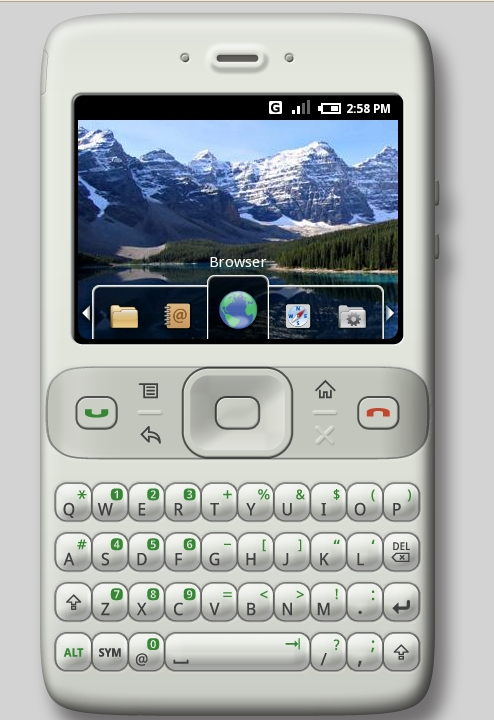
Figure 4. The default menu for Android shown through the emulator. You can navigate the menu by clicking the buttons with your mouse or selecting them with your keypad.
If you do not want to use Eclipse, you still need JDK 5 or 6 and Apache Ant 1.6.5 or later, in addition to the Android SDK. I leave it up to you to perform the necessary steps associated with sourcing the SDK components into the proper path if you choose not to use Eclipse. If you run into problems, it is important to note that the GNU compiler for Java (GCJ) is not supported, and that if you have JDK 1.4 installed, you will not be able to use the Android framework. If you have questions about installing the Android SDK and/or configuring your environment, more in-depth information is available on the Android Web site.
One of the best things about the Android SDK is how easy it is to get up and running. Using my existing Eclipse Europa environment, I was able to start work on my first application only a few minutes after downloading all of the components. It literally took me a few mouse clicks and keystrokes to get the equivalent of a “Hello, world!” application running in the Android emulator, and only a few more minutes to get a Notepad application running. The next best thing about Android is that it is completely focused on application development and not on peripheral requirements, such as kernel compilation and installation. If you want to be completely focused on mobile Java application development, Android might be the mobile Linux framework for you. In short, Google has painstakingly taken the time to provide a great abstraction layer for developing mobile Linux applications, and it has provided a path to existing Java application programmers to create Google-enabled and OHA-supported applications.
Despite all these wonderful things, I must confess that I still felt slightly unsatisfied with Android. On the one hand, I was very happy to be able to start working on application development so quickly, but on the other hand, I felt like, that's it? Maybe it's because I was working with the beta version of the SDK and not all of the components have been released yet, but for some reason, I felt more like a kid snapping Legos together than a developer creating an application stack on which to run my new application. So, if you are like me and want control over your entire stack, I still recommend sticking with a more transparent and flexible approach like the OpenMoko framework. Just remember, that like all other free and open-source software projects, the choice is yours.
Resources
Android: code.google.com/android
Android SDK: code.google.com/android/download.html
Open Handset Alliance: www.openhandsetalliance.com
A Java Developers Thoughts on Dalvik: www.oreillynet.com/onjava/blog/2007/11/dalvik_googles_tweaked_nonstan.html
Eclipse: www.eclipse.org
Adam M. Dutko is a Lead Web Designer for a small family-owned business located in Kent, Ohio. He maintains the mrxvt and astyle packages for Fedora, brews beer and works on Wireless Sensor Networks at the Cleveland State University Software Engineering Lab. He currently lives in Lakewood, Ohio, with his wonderful wife, Gretchen. You can read more about him at littlehat.homelinux.org:8000.

