
Economy Size Geek - A Pico-Sized Platform with Potential
I saw a short video on YouTube about something called a Beagle Board, and it looked really interesting. It was this incredibly tiny board with plenty of ports. It even had an HDMI, which meant it would be easy to hook up to the LCD television in my living room. I put in my order to Digi-Key, and a few weeks later, it showed up. (I ordered it while Digi-Key was working on a new version, so your order should arrive faster.)
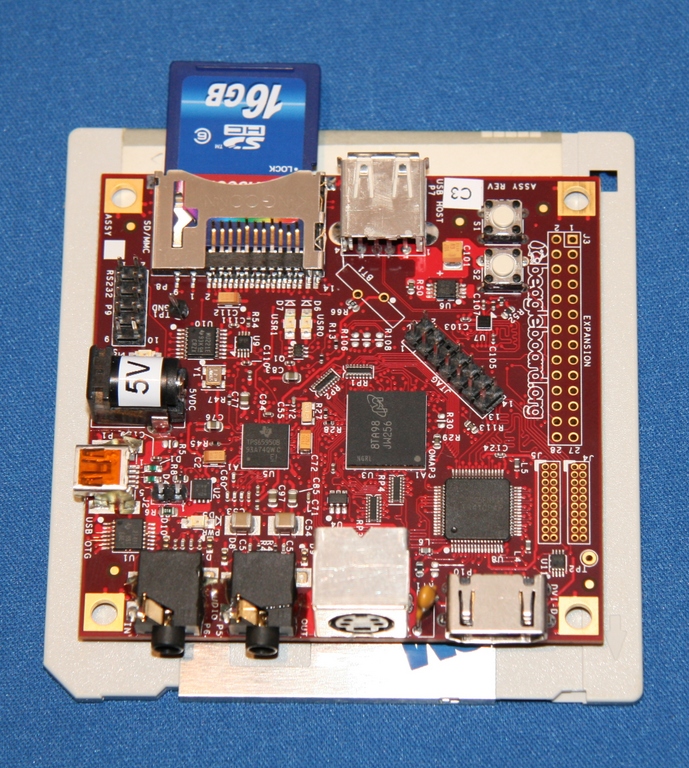
Figure 1. Up close with the Beagle Board—the gray thing underneath it is a floppy disk for scale.
When the package arrived, and I pulled out the box, my first reaction was wow! This thing is tiny! When I opened the box, I realized that Digi-Key wasn't kidding by calling it the Beagle Board. The only thing in the box was a shiny red PCB (Printed Circuit Board). I had seen the board in the video, but until I got it, I didn't realize it came as a bare board. This led to my second order from Digi-Key. I didn't own the proper 5V power supply to make it work. I also added on a Beagle Board serial cable, which was lucky because it is an essential part of the setup process. I already had a serial-USB dongle, so if your computer does not have a serial port, you will need that as well.

Figure 2. Detailed View of the Beagle Board
The Beagle Board has a ton of features built in, with options to add on more. The main feature of the Beagle Board, besides its 3"x3" form factor, is the OMAP 3530 processor. This tiny ARM processor handles all the heavy lifting on the board. The rev C. board that I have even has an extra USB port that is not shown in the picture, making it even easier to hook up USB peripherals to the board. In my case, that would be a USB hub, keyboard, mouse, Wi-Fi dongle and a thumbdrive.
The Beagle Board was developed by a very small team of engineers inside Texas Instruments. TI has a “small dreams” program where employees are given some funding to pursue a good idea. The first prototypes were released in June 2008. The engineers' goal was to provide a platform that gave users access to desktop-like performance without the bulk or expense. The team also was trying to find a way to make it easy for a hobbyist to pick up the board and experiment without requiring a lot of embedded experience.
I can say that in my time working with the Beagle Board, they were able to achieve both goals. It isn't the fastest computer I have ever used, but it is very usable. It is so tiny, I occasionally would misplace it on my work bench. On the embedded side, I had some bumps choosing the right components, but once I got a working system, it was very straightforward.
A great place to get started is at elinux.org/BeagleBoardBeginners. The two big things to make sure of when you get into playing with the Beagle Board are compatibility and connectivity.
I used the Beagle Board serial cable to monitor what was going on. In several cases, I had incompatibilities (it took some tweaking to get the Beagle to show up properly on my living-room TV). I also grabbed a Wi-Fi dongle from Linksys, figuring that it would just work. In this case, it was too new. I went back and got the Belkin G F5D7050 that everyone else seems to be using, and I was able to get on the wireless network.
The Beagle Board beginners page actually links to a shopping list, showing you what you need and which versions to buy. I did not find that information until much later, so I am trying to help you avoid one of my mistakes.
The Beagle Board bootloader needs to be configured in order to run Linux. The good news is that once you do this setup, you don't have to do it again. You actually can do this step before you do anything else, and it's a good way to make sure you have everything ready for communication with your Beagle Board.
First, install minicom on your Linux host. You will need to change some settings:
sudo minicom -s
Inside minicom, you need to enter the “Serial port setup”. Make sure you set the correct device to which to talk. In my case, I have the serial cable connected to a serial-to-USB dongle. That means my serial device is /dev/ttyUSB0. Make sure the Bps/Par/Bits is set to 115200 8N1. Turn off all hardware and software control. Once that is done, save it as the default.
Now, connect the serial cable to your Beagle Board, start minicom, and power on the Beagle Board. You should see a message about the OMAP3530 being ready. It also will show you a countdown until autoboot. You need to press a key to stop the boot process, so you can change some settings.
Once you are at the OMAP3 beagleboard.org prompt, type the following:
setenv bootcmd 'mmcinit; fatload mmc 0:1 0x80300000
 ↪uImage; bootm 0x80300000'
setenv bootargs 'console=ttyS2,115200n8 console=tty0
 ↪root=/dev/mmcblk0p2
rootwait rootfstype=ext3 ro omapfb.mode=dvi:1024x768MR-24@60'

saveenv
printenv
This configures your Beagle Board to look for the kernel image you are going to create. Now you need to get an SD card and prepare it to work for the Beagle Board.
The important thing to understand about the SD card you're using is that it needs to be partitioned and formatted in a very specific way. Using fdisk or gparted, remove all existing partitions on the card. Then, create two partitions. The first one needs to be 50MB and formatted to fat32. The second partition can use the rest of the space on the card and should be formatted to ext3.
For the OS installs, you will be putting a uImage file on the fat32 partition. The rest of your files will go on the Linux ext3 partition. As you go through the process of building your install image, make sure you keep your uImage and Linux root filesystem in sync with the same kernel versions.
The fine people at Ångström have worked hard on a distribution that is easy and stable to run on embedded devices. This is a good place to start if you just want to boot your Beagle Board into a Linux environment quickly.
I even found a handy tool to build your own custom Ångström image at amethyst.openembedded.net/~koen/narcissus. This is still experimental, but it was nice to be able to choose what I wanted in my image quickly.
If you want something even easier, Ångström also offers a tarball containing a working system that demonstrates the capabilities of the Beagle Board. Simply download the latest tarball from www.angstrom-distribution.org/demo/beagleboard, and get the uImage that has the same timestamp. Untar the tarball directly onto the ext3 partition of your SD card, and put the uImage (make sure you rename it to uImage) on the fat32 partition.
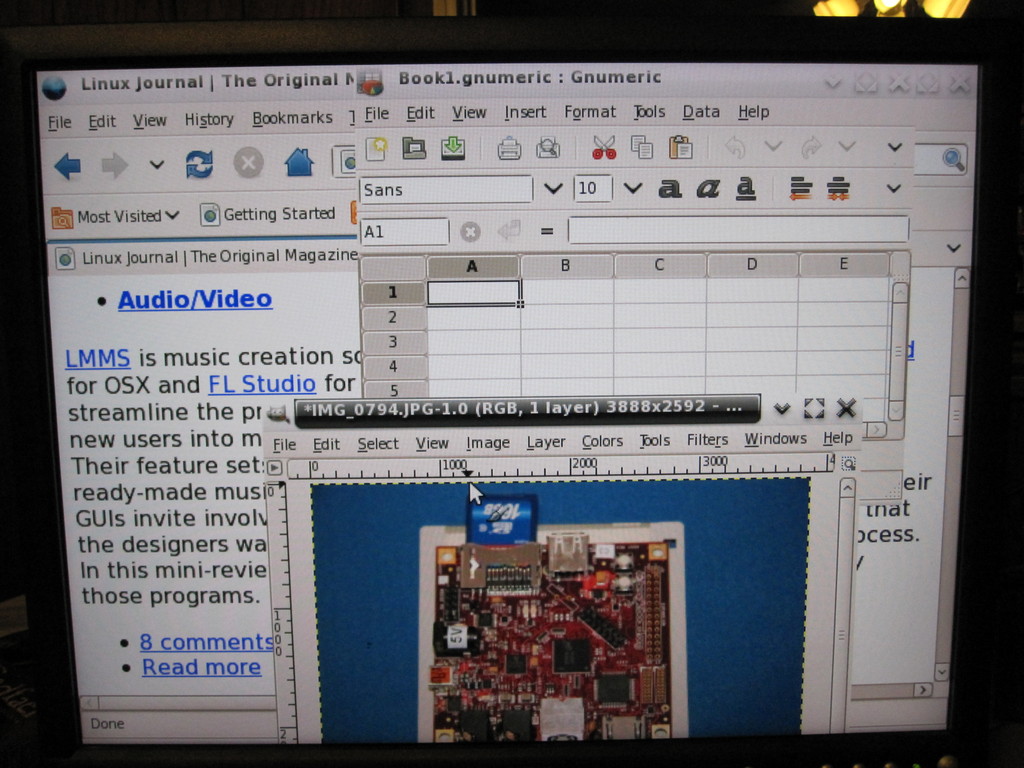
Figure 3. Ångström Running GIMP, Gnumeric and Firefox
The nice thing about Ångström is how easy it is to get up and running. The downside is I am not very familiar with that distribution as an environment. I ran into some problems configuring the Wi-Fi for the board, so I decided to switch to Ubuntu. Installing Ubuntu is more complicated upfront, but once installed, it was a lot easier for me to work with.
The other nice thing about Ubuntu is that Canonical announced late last year that it would officially support the ARM architecture (www.ubuntu.com/news/arm-linux). This means Canonical would be working on making sure that the packages I know and love on my x86 are all available on the ARM. Because the OMAP processor in the Beagle Board is an ARM chip, it will benefit from all this support.
A step-by-step guide for installing Ubuntu can be found at elinux.org/BeagleBoardUbuntu. By the time this article is published, Karmic Koala should be officially released, so instead of giving you out-of-date instructions, I recommend you follow the link to get the latest information.
I actually installed Jaunty, as that was the stable version of Ubuntu at the time of this writing. Once it was up and running, any software I needed was simply an apt-get away (in most cases). In this case, that meant adding wicd (light network manager), Firefox and VLC.
It would be easy enough to use the Beagle Board as a simple workstation. You can browse, look at documents, listen to music and even watch video. Those tasks demonstrate the board's flexibility combined with the wealth of open-source software. On one hand, it is really amazing to have so much processing power packed into such a tiny form factor. On the other hand, turning the Beagle Board into a desktop seems like a waste of that form factor (unless you mount it inside a keyboard).
My initial goal was to use it as a set-top box. I was going to use it to stream Hulu to my living-room television. I did some research and found that you can build your own IR USB receiver (USB-IR-Boy). That would make it easy for me to interface a standard remote to the Beagle Board. Before I started ordering parts, I decided it would be better to see how good the streaming capabilities were. This walked me straight into a problem with no clear workaround. In order to stream Hulu, your browser must support Flash. At this time, the only Flash available for the ARM processor family is Flash Lite. Flash Lite seems to be licensed in a way that makes it impossible to distribute to a single end user. It is targeted more at handset vendors who will be shipping millions of units. I installed Gnash just to see if it was compatible, and it didn't work either. But, Adobe has announced that it is working on Flash 10 for ARM-powered devices (www.adobe.com/aboutadobe/pressroom/pressreleases/200811/111708ARMAdobeFlash.html).
So all is not lost. On the open standards front, I can hope that the progress being made on HTML 5 and video will remove the need for a proprietary solution to see video on the Web.
My first plan dashed, I realized there was another project that I've been meaning to play with—namely building a MAME cabinet. In honor of the Beagle Board's tiny size, I started looking at building a Mini-MAME cabinet. This basically is a smaller version of an arcade cabinet, and it has some advantages—namely that it will not take up too much space, and it will be usable by my one-year-old son sooner. Once again, before I ordered any parts, I installed all the MAME packages just to test things out. Bam! (That's the sound of me hitting another wall.) In this case, the MAME packages have been compiled and packaged, but they are not set correctly to run on an ARM processor. I made some attempts at hacking the Makefile to fix the problem, but I was unsuccessful. There are videos of the Beagle Board running MAME, but I was not able to duplicate their success.
Neither of these examples should dampen your enthusiasm for the Beagle Board. I included them to highlight the challenges involved in working in an embedded/non-x86 environment. The good news is that the software issues I ran into will likely be fixed as more energy is put into supporting the ARM platform.
All in all, it is a neat platform. It allows me to attack problems that are too small for a full-blown PC without requiring me to be an embedded expert (which I'm not).
Dirk Elmendorf is cofounder of Rackspace, some-time home-brewer, longtime Linux advocate and even longer-time programmer.

