
Economy Size Geek - Installation Toolkit
I don't know if it's because I have a column in Linux Journal or because of the release of Karmic Koala, but either way, I seem to be installing Linux a lot lately. If there is one lesson I have learned from time spent on other hobbies, it's that things are always easier if you have the right tools handy. In this case, that means taking a step back from the install process to see what tools might help.
ISO 9660 is the standard for storing images of CD-ROM filesystems. Although I vaguely remember trying to install Slackware from floppy disks, and once in a while, I'll see a DVD-ROM ISO for a distro, most stick to the 650MB image. As a result, I have lots of them. These days, having the right ISO is useful for a fresh desktop install (once you finish burning it), or it can be used directly if you are creating a virtual machine. This is pretty much the entry level of installation tools. My only piece of advice is make sure that when you burn an ISO, burn the contents and not the file. If, when you mount the disc and see ubuntu-9.10-desktop-amd64.iso on the disc, you missed a step.
Another option for installation media is the thumbdrive. Prices have dropped, capacities have skyrocketed, motherboard support has expanded, and tools have improved. All that adds up to making this a really great option.
Ubuntu ships with a tool called usb-creator. It's a very straightforward tool for converting your thumbdrive into a bootable utility. However, I prefer UNetbootin (unetbootin.sourceforge.net). This handy tool does the same thing, but it adds a helpful hand by offering to auto-download a variety of Linux distributions.
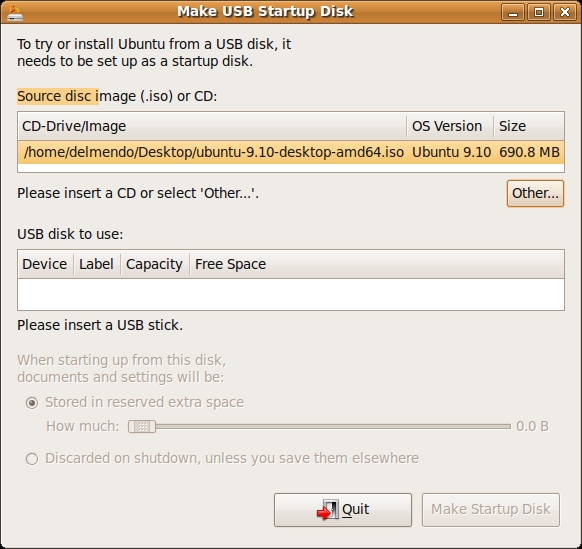
Figure 1. usb-creator
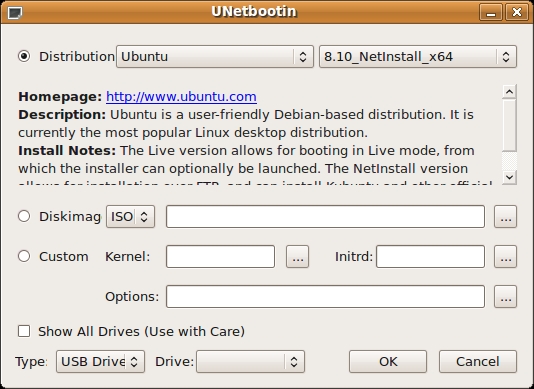
Figure 2. UNetbootin
Both tools make it incredibly easy to make your thumbdrive bootable. One thing to keep in mind: in most cases, you need only 650MB, but when I wrote this, it was cheaper on Amazon to buy 2GB thumbdrives than 1GB thumbdrives. Manufacturers constantly are chasing the biggest capacities, which means the sweet spot in pricing often is just behind this—much like hard drives (have you priced an 80GB hard drive lately?). I ended up buying a three-pack of 2GB thumbdrives just for this purpose. They are installed with the current x86 version of Ubuntu, SystemRescueCD and Clonezilla. I am contemplating adding on the x64 version of Ubuntu (as I seem to be choosing that more often) and Darik's Boot and Nuke (comes in handy as you decommission equipment). The nice thing about the thumbdrive form factor is that I can just keep them on a key chain in my laptop bag. I don't have to worry about scratching them, and when updates come out, I can re-install over them.
CDs and thumbdrives work great, but if you are going to be doing a lot of installing, there is another tool to add to you arsenal—PXE booting. PXE (pronounced “pixie”) stands for Preboot eXecution Environment. I've used it a lot at hosting companies I've worked at, but I never have gotten around to setting it up on my home network.
PXE allows you to boot a computer off your network. In this case, I am going to set it up so I can boot the installation environment and then switch back to booting locally. More work is involved if you want to make thin clients (meaning, if you want a computer to boot off the network and not have any local storage).
In order for this to work, you need a server on your network to host the PXE, DHCP and other services required. The target computer has to be connected to the same network, and the BIOS of that computer must support PXE (or as I learned later, you have a gPXE ISO and a CD drive). The good news is that most modern motherboards support PXE (usually labeled as boot off of LAN). You may be able to tell the computer to offer you a boot menu on startup. This allows you to boot off the network one time without forcing you to modify your BIOS.
I sat down to start the process. I have a file server (keg) that will handle all the PXE services. PXE also expects DHCP. Many of the guides I found on-line assume the PXE server also will handle DHCP. In my case, all the networking is handled by my main DD-WRT router (co2). That means I will have to modify it as well to make things work.
The DHCP server needs to offer up a PXE boot image for this to work. In my case, that meant I needed to update my DD-WRT configuration. I decided to change it first. I went to the Services tab on my router and added dhcp-boot=pxelinux.0,keg,192.168.210.254 to the box for Additional DNSMasq options. That is the PXE image, the name of my file server and my file server's IP. If you are running a DHCP server as well, you need to add something similar, depending on what DHCP software you are running.
Now the rest of the configuration happens on my file server. I installed a tftp server to serve up the PXE boot image:
sudo apt-get install tftpd-hpa
This creates a directory (/var/lib/tftpboot) and a config file (/etc/default/tftpd-hpa). Edit the config file by changing RUN_DAEMON="no" to RUN_DAEMON="yes". Then:
sudo /etc/init.d/tftpd-hpa restart
The next step is to get an installer:
sudo cd /var/lib/tftpboot
sudo wget -r -nH --cut-dirs=8 -np ftp://archive.ubuntu.com/
↪ubuntu/dists/karmic/main/installer-i386/current/images/netboot/
Now you can boot up your machine and have it load the standard Karmic installer. Part of the fun and flexibility of having a PXE server is that you can choose what to install on the fly. I'm going to start with adding on the x64 installer for Karmic. First, I needed to clean up the directory structure a bit. I removed everything (except the pxelinux.0 and pxelinux.cfg, which both turned out to be symlinks to files I deleted):
sudo mkdir -p ubuntu/karmic/i386
sudo mkdir ubuntu/karmic/amd64
sudo wget -r -nH --cut-dirs=8 -np ftp://archive.ubuntu.com/
↪ubuntu/dists/karmic/main/installer-i386/current/images/netboot
 ↪-P /var/lib/tftpboot/ubuntu/karmic/i386
sudo wget -r -nH --cut-dirs=8 -np ftp://archive.ubuntu.com/
↪ubuntu/dists/karmic/main/installer-amd64/current/images/netboot
 ↪-P /var/lib/tftpboot/ubuntu/karmic/amd64
sudo cp ubuntu/karmic/i386/ubuntu-installer/i386/pxelinux.0
 ↪/var/lib/tftpboot/
sudo mkdir /var/lib/tftpboot/pxelinux.cfg
Now, set up a menu to choose between the two installers. Create a /var/lib/tftpboot/boot.txt file with:
- Install Options -

karmic_i386_install
karmic_i386_expert
karmic_amd64_install
karmic_amd64_expert
Create a /var/lib/tftpboot/pxelinux.cfg/default file with:
DISPLAY boot.txt

LABEL karmic_i386_install
        kernel ubuntu/karmic/i386/ubuntu-installer/i386/linux
        append vga=normal initrd=ubuntu/karmic/i386/
        ↪ubuntu-installer/i386/initrd.gz --
LABEL karmic_i386_expert
        kernel ubuntu/karmic/i386/ubuntu-installer/i386/linux
        append priority=low vga=normal initrd=ubuntu/karmic/
        ↪i386/ubuntu-installer/i386/initrd.gz --
LABEL karmic_amd64_install
        kernel ubuntu/karmic/amd64/ubuntu-installer/amd64/linux
        append vga=normal initrd=ubuntu/karmic/amd64/
        ↪ubuntu-installer/amd64/initrd.gz --
LABEL karmic_amd64_expert
        kernel ubuntu/karmic/amd64/ubuntu-installer/amd64/linux
        append priority=low vga=normal initrd=ubuntu/karmic/
        ↪amd64/ubuntu-installer/amd64/initrd.gz --
From here on, you just need to download a distribution you want to support and add it to the menu. If you are the graphical type, you even can modify the system to allow menus and pretty icons.
PXE is great, because it allows you to boot up and choose the installer you need. The problem is that it assumes you are on the physical network. In the case of my wireless computers (Netbooks, laptops and that one computer that sits out in my brew house), I couldn't use PXE. The main workaround is to get a wireless bridge so the device can boot over a physical port on the bridge, and let the bridge worry about the Wi-Fi. The question of how to do that has floated around so long, I am not holding out hope a solution will show up any time soon.
Let's say you want some of the features of PXE, but you don't want to bother installing a server. It turns out you have two different options for doing pretty much the same thing over the Internet. You can use boot.kernel.org or www.netboot.me. Both are using gPXE, which allows you to do the same things I did, but you don't need to have any infrastructure (although you may want to have a lot of bandwidth, depending on how much installing you do).
This brings me to another recommendation—if you are going to be doing a lot of installing or if you have a large collection of Ubuntu boxes, make sure you install an apt cache. There are several solutions for this. One is just to mirror an Ubuntu server to a central server on your network. That seems like a lot of disk space and bandwidth, but it could be worthwhile if you are going to be installing a lot of machines that all use a lot of packages.
In my case, I went with a slightly less resource-intensive solution—an apt caching system. There are a number from which to choose. I originally was leaning toward approx (git.debian.org/?p=pkg-ocaml-maint/packages/approx.git), because it is supposed to be stable and very easy to use. The problem is that it will allow only one client to update at a time. That's not the end of the world, but I would prefer not to have the limitation.
As a result, I switched to apt-cacher-ng. It has an added benefit of a Web page that shows you the status and how much you have cached, which is very useful for troubleshooting. I had to download the deb from its site (www.unix-ag.uni-kl.de/~bloch/acng). I installed it on keg since it handles these kind of network services:
cd /tmp
wget
http://ftp.debian.org/debian/pool/main/a/apt-cacher-ng/
↪apt-cacher-ng_0.4.2-1_i386.deb
sudo dpkg -i apt-cacher-ng_0.4.2-1_i386.deb
Unfortunately, keg is running jaunty (I still have more Linux to update). So I actually had to install apt-cacher-ng 0.4 because of a libc conflict.
In the past, when I have installed this kind of software, I always ended up updating the /etc/apt/sources.list file to point to this server. As a result, I often forgot to point new sources at the cache. It turns out that apt provides an easy way to override the location from which you are downloading your debs:
sudo echo 'Acquire::http { Proxy "http://192.168.210.254:3142"; };' >
 ↪/etc/apt/apt.conf.d/001apt-catcher
In this case, I put keg's IP in the configuration, mostly so it would be easy to copy that to other computers on my network. apt-cacher-ng also provides a Web interface to see statistics and do other management. It is available on my file server at http://192.168.210.254:3142/acng-report.html. You will need to replace the IP in the above configurations with the IP of your apt-cacher-ng server.
Now that I have all of this set up, I can install Linux to my heart's content. There is only one problem. Every time I install it, I know I am going to have to spend some time configuring the box to my liking. It's not impossible to get everything set up by hand, but it is incredibly annoying. So the next thing I wanted was a way to customize my install.
I have three different use cases: a standard package I would like installed automatically (MySQL), a nonstandard package I would like installed automatically (Skype) and a piece of software that is not a package that I would like installed automatically (Rubymine).
Two different tools can handle automating the install process—preseeding and kickstart. Preseeding is a technology that comes to Ubuntu from Debian, and it allows you to automate the process of answering questions the installer will ask. Kickstart is a technology from Red Hat, developed to automate installing a Linux system. I have used preseeding for small tasks in the past, and I have used kickstart to automate the installation of a large number of servers. I never really thought about mixing the two technologies together, but it turns out, you can.
You can install a graphical client for generating kickstart configurations by installing the following tool:
sudo apt-get install system-config-kickstart
Then, you can run the application by going to Applications→System Tools→Kickstart. This allows you to use kickstart's features, but they have added support for calling preseed—meaning you get the best of both worlds.
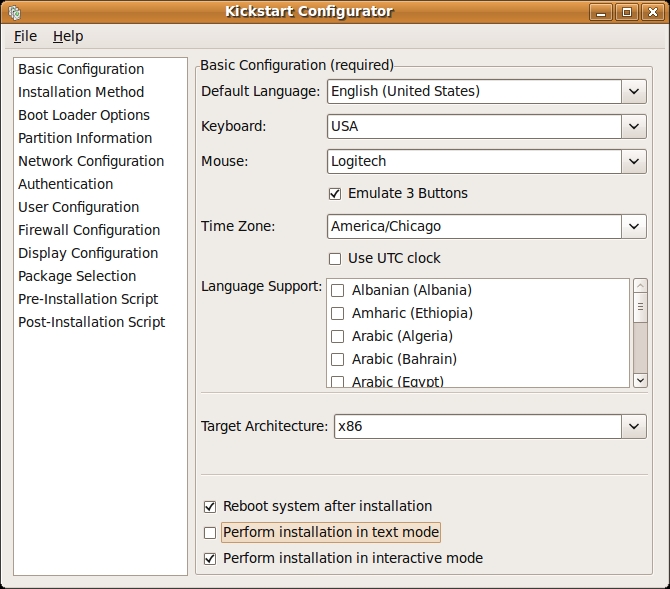
Figure 3. Kickstart Configurator
This allowed me to go through and preselect things (like defaulting to America/Chicago time zone). An important option is selecting the right source for the location from which to download the packages. If you provide the name of your apt-cacher-ng (in my case 192.168.210.254:3142) and tell it the URL is /us.archive.ubuntu.com/ubuntu, the installation will use your cache automatically, which is the reason you set it up, right?
The screenshot of the Apt-Cache NG reports (Figure 4) shows the cache results after two installs. What the picture does not show is that during the first install, I left to do something else (because of the download speed), but all installs after that went fast enough that I could watch the install process.
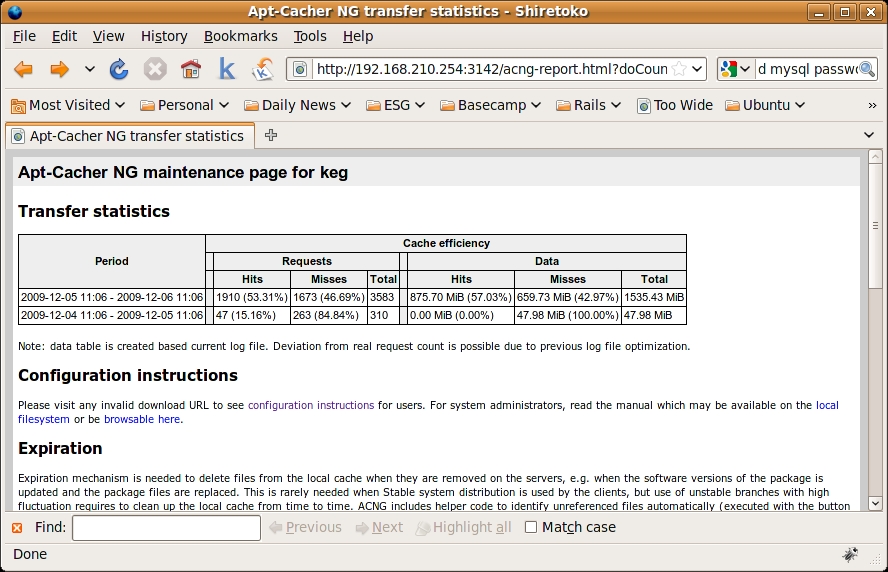
Figure 4. Apt-Cache NG Reports
There appears to be a long-standing bug in the tool when it comes to package selection. It does not actually show you a list of packages from which to choose, and you cannot type in packages. (A list of valid groups can be retrieved by executing tasksel --list-tasks). In the end, I used the GUI to generate a basic ks.cfg file. Then, I edited the rest by hand. This allowed me better control over the process.
I used the preseed command to supply my own password to the MySQL server being installed. You can get a list of options available for preseeding by installing a package (debconf-utils), and then use the following command to see what is set:
sudo debconf-get-selections|grep -i mysql
Each one of these settings can be provided in the preseed section of the ks.cfg.
For the other two cases, I just handled it in the post section, which allowed me to download the files from the network and move them to the right place. Also note, I am getting them directly from the provider. In an actual production environment, I would keep a local copy.
Here is the relevant section of my ks.cfg:
#Package install information

preseed --owner mysql-server-5.1
 ↪mysql-server/root_password password qwerty
preseed --owner mysql-server-5.1
 ↪mysql-server/root_password_again password qwerty

%packages
@ ubuntu-desktop
mysql-server-5.1
mysql-common
mysql-client-5.1
debconf
debconf-utils
wget
#Skype dependencies
libqt4-network
libqt4-dbus
libqtcore4
libqtgui4
libxss1
libxv1
libaudio2
libmng1
libqt4-xml


%post --nochroot
mv /target/etc/rc.local /target/etc/rc.local.orig
echo '#!/bin/bash
cd /root;/root/first_boot
exit 0' > /target/etc/rc.local
cat > /target/root/first_boot << EOF
#!/bin/bash
cd /root
#Fetching skype
wget http://www.skype.com/go/getskype-linux-beta-ubuntu-32
dpkg -i skype-ubuntu-intrepid_2.1.0.47-1_i386.deb
#Fetching Rubymine
wget http://download.jetbrains.com/idea/rubymine-2.0.tar.gz
mkdir /opt/rubymine
tar -xz  --strip 1  -C /opt/rubymine/ -f rubymine-2.0.tar.gz
rm /etc/rc.local
mv /etc/rc.local.orig /etc/rc.local
EOF
chmod a+x /target/etc/rc.local
chmod a+x /target/root/first_boot
Now that you have a kickstart configuration file, you need to get the system to use it. You need to host the file with a Web server. In my case, keg already has Apache running, so I can just stick it up there.
Then, I just add a new option to my boot.txt:
karmic_i386_install_seeded
And, I added a new stanza to my pxelinux.cfg/default:
LABEL karmic_i386_install_seeded
        kernel ubuntu/karmic/i386/ubuntu-installer/i386/linux
        append vga=normal initrd=ubuntu/karmic/i386/
        ↪ubuntu-installer/i386/initrd.gz
         ↪ks=http://192.168.210.254/ks.cfg --
Now I can choose to boot a standard installer or one that has been preseeded with other software. My first install was completed using a KVM virtual machine. To get it to PXE boot, I needed to set it up to bridge onto my internal network (so it could get a DHCP address and talk to the PXE server), and I had to download a gPXE ISO (rom-o-matic.net/gpxe/gpxe-0.9.9/contrib/rom-o-matic). That allowed me to PXE boot the machine even though the KVM BIOS did not support PXE.
The kickstart/preseed stuff was more complicated than I would have liked. It took a lot of rebooting and re-installing to get the syntax correct so that all three cases worked. I found tons of introductory documentation, but as soon as I needed something more detailed, I was on my own. For example, I did not have the owner option set on my preseed, and I originally wanted to do the downloading and installing of Skype in the post but had to resort to using a first boot script. It made me understand why people end up writing their own “post-install” scripts instead of using these larger tools. That being said, now that I have all this together, installation should be a breeze. Maybe I finally will get around to bringing all my machines up to a common and current version of Ubuntu.
Dirk Elmendorf is cofounder of Rackspace, some-time home-brewer, longtime Linux advocate and even longer-time programmer.


