
Dojo's Industrial-Strength Grid Widget
In almost any application that's complex enough to require a database for persistent storage, there is a need to render data in a tabular format for display or interaction. Although a seemingly simple task, it quickly becomes quite involved once you introduce the need to sort columns, reorder columns, account for editing the contents of cells and managing pagination. As you might expect, this is one of those problems that has been solved so many times that commoditized solutions, such as Dojo's grid widget, now are available for use. After all, you'd much rather concentrate on actually building out the interesting parts of your app than creating and maintaining the infrastructure that holds it all together, right?
If you've been following along with my previous LJ articles on Dojo (see Resources), you should have a good idea of how to get Dojo up and running with minimal hassle using AOL's Content Delivery Network (or if you prefer, get it from the official Dojo Web site). As a reminder, the minimal page template is basically an HTML page with a script tag and a dojo.addOnLoad block that waits until all cross-domain loading has completed before it executes in order to guarantee that dependencies inside the code block have been met before it executes. You may recall that the skeleton for this page looks something like this:
<html>
<head>
  <title>Minimal Development Template</title>
  <script
      type="text/javascript"
      src="http://o.aolcdn.com/dojo/1.2/dojo/dojo.xd.js">
  </script>
  <script type="text/javascript">
    dojo.addOnLoad(function() {
       /* Add Dojo-dependent logic here to
          avoid race conditions */
    });
  </script>
</head>
<body>
</body>
</html>
Note:
Prior to the Dojo 1.2 release, the grid was under heavy development and largely in a state of flux. Although its API still is subject to change, the 1.2 release substantially firmed it up, and aside from accessibility considerations, it is expected to remain intact. Bottom line: don't let the dojox namespace or previous experiences with the grid prior to 1.2 scare you off; it's ready for prime time. Although at the time of this writing, Dojo version 1.3 is just about to be released, the code examples reference version 1.2 and work just fine. There should be minimal, if any, changes necessary to update the examples to version 1.3.
Now I'm going to move to putting the grid widget to work, so consult a reference such as Dojo: The Definitive Guide (O'Reilly, June 2008) or on-line documentation at the Dojo Campus if you need a quick refresher.
The grid widget is necessarily data-centric and builds directly upon the abstractions offered by the toolkit's robust data APIs, so a very brief introduction is helpful for setting that context. In Dojo parlance, the abstraction that the data APIs offer is a store that contains items, where a store can implement a particular subset of the four dojo.data APIs:
Read: APIs for querying items in a store.
Identify: APIs for uniquely identifying items in a store.
Write: APIs for creating, modifying and deleting items in a store.
Notification: APIs for triggering event handlers when items in a store are created, modified or deleted.
The toolkit comes stocked with two handy store implementations that are bundled into the dojo.data module: the ItemFileReadStore and the ItemFileWriteStore. The ItemFileReadStore implements the Read and Identity APIs, while the ItemFileWriteStore implements all four of these APIs. Be aware, however, that the dojox.data module contains a plethora of additional data modules for common tasks that you will want to leverage to your advantage; interfacing with comma-separated value (CSV) files, Flickr, Amazon's S3 service, OPML files and Atom content are just a few of the handy implementations available (Figures 1 and 2).

Figure 1. Building on top of an abstraction such as the dojo.data layer thins out the application logic and provides a uniform abstraction for accessing data that is more maintainable and much less brittle.
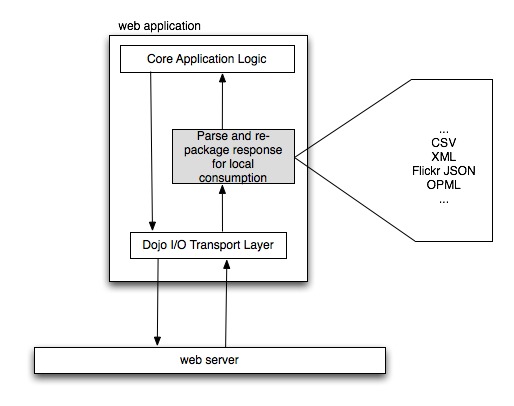
Figure 2. Retrieving remote data from a server and massaging it into the format expected by client-side JavaScript code has been a bane of Web development for some time, and generally produces brittle designs that do not sufficiently decouple the application logic from the underlying data format being used.
In general, you provide data to an ItemFileReadStore or ItemFileWriteStore in one of three ways:
By feeding it a file containing JSON data that meets a particular structure.
By feeding it a JavaScript object conforming to the same structure as the JSON file data.
By programmatically creating new items for the store.
Let's briefly consider examples that illustrate these operations. The grid widget simply reflects whatever data is in the store that backs it, so understanding how to manipulate data stores is essential to controlling what ultimately appears in a grid widget (Listing 1).
Listing 1. ItemFileWriteStore Example
<html>
<head>
  <title>ItemFileWriteStore Example</title>
  <script
      type="text/javascript"
      src="http://o.aolcdn.com/dojo/1.2/dojo/dojo.xd.js">
  </script>
  <script type="text/javascript">
    dojo.require("dojo.data.ItemFileWriteStore");
    dojo.addOnLoad(
      function() {

        /* Creating a store with inline JavaScript data */
        var store = new dojo.data.ItemFileWriteStore({
          data : {
            identifier : "id",
            items : [
                     {"id" : 1, "label" : "foo"},
                     {"id" : 2, "label" : "bar"},
                     {"id" : 3, "label" : "baz"}
            ]
          }
        });

        /* Add another item - a synchronous operation */
        store.newItem({"id" : 4, "label" : "qux"});

        /* Fetch an item with id=4 - an asynchronous operation */
        store.fetch({
          query  : {id : 4},
          onItem : function(item) {
            console.log("Asynchronous callback for fetching item:",
                        item);

            /* Delete the item with id=4, a synchronous operation */
            store.deleteItem(item);

            /* Save the results */
            store.save();

            /* Could have reverted the results with
               store.revert(); */
          }
        });
      });
</script>
</head>
<body>
</body>
</html>
Although the example in Listing 1 illustrates providing inline JavaScript data for the store to consume, the same data could just as easily have been provided by way of an I/O request to the server. For example, the store could have taken a URL parameter on construction, which would have fetched a file. Assuming its contents were the same JavaScript object identified by the data property in the previous example, the results would have been the same:
/* Another way to create a store */
var store = new dojo.data.ItemFileReadStore({
  url : "/some/server/side/url"
});
For more information on the dojo.data API, consult Chapter 9 of Dojo: The Definitive Guide, on-line documentation available at the Dojo Campus, or read the API well-documented specs that are packaged in the Dojo source code itself in the dojo.data.api namespace.
With newly found knowledge of how to create and manipulate data stores, we're now ready to bind one of those stores to the grid widget. Listing 2 is a full-blown example of programmatically creating a simple DataGrid and attaching an ItemFileReadStore.
Listing 2. Simple Data Grid
<html>
<head>
  <title>Simple Data Grid</title>

  <link rel="stylesheet" type="text/css" href=
  "http://o.aolcdn.com/dojo/1.2/dojo/resources/dojo.css"/>
  <link rel="stylesheet" type="text/css" href=
  "http://o.aolcdn.com/dojo/1.2/dijit/themes/tundra/tundra.css"/>
  <link rel="stylesheet" type="text/css" href=
  "http://o.aolcdn.com/dojo/1.2/dojox/grid/resources/Grid.css"/>
  <link rel="stylesheet" type="text/css" href=
  "http://o.aolcdn.com/dojo/1.2/dojox/grid/resources/tundraGrid.css"/>

  <style type="text/css">
    #gridNode {
      width: 200px;
     height: 200px;
    }
  </style>

  <script type="text/javascript"
          src="http://o.aolcdn.com/dojo/1.2/dojo/dojo.xd.js">
  </script>

  <script type="text/javascript">
    dojo.require("dojo.data.ItemFileReadStore");
    dojo.require("dojox.grid.DataGrid");

    dojo.addOnLoad(
      function() {
        /* Create a store with inline JavaScript data */
        var gridStore = new dojo.data.ItemFileReadStore({
          data : {
            identifier : "id",
            items      : [
                          {"id" : 1, "label" : "foo"},
                          {"id" : 2, "label" : "bar"},
                          {"id" : 3, "label" : "baz"}
            ]
          }
        });

        /* A simple layout that specifies column headers and
         * mappings to fields in the store */
        var gridLayout = [
                {name : "ID",    field : "id",    width : "50%"},
                {name : "Label", field : "label", width : "50%"}
        ];

        /* Programmatically construct a data grid */
        var grid = new dojox.grid.DataGrid({
                           store     : gridStore,
                           structure : gridLayout
                   }, "gridNode");

        /* Tell the grid to lay itself out since
         * it was programmatically constructed */
        grid.startup();
      });
</script>
</head>
<body class="tundra">
  <div id="gridNode"></div>
</body>
</html>

Figure 3. A simple grid created from Listing 2; column sorting is built in by default.
Additions to Listing 2 include adding some CSS files to style the grid and a few extra lines of script to specify column information. The final call to startup() is a fairly standard Dijit life-cycle method that needs to be called to tell widgets to lay themselves out when they are constructed programmatically.
Now, let's turn to creating a grid widget in markup. As you're about to see, creating a grid in markup is as simple as defining an HTML table structure (Listing 3).
Listing 3. Simple Data Grid
<html>
<head>
  <title>Simple Data Grid</title>

  <link rel="stylesheet" type="text/css" href=
  "http://o.aolcdn.com/dojo/1.2/dojo/resources/dojo.css"/>
  <link rel="stylesheet" type="text/css" href=
  "http://o.aolcdn.com/dojo/1.2/dijit/themes/tundra/tundra.css"/>
  <link rel="stylesheet" type="text/css" href=
  "http://o.aolcdn.com/dojo/1.2/dojox/grid/resources/Grid.css"/>
  <link rel="stylesheet" type="text/css" href=
  "http://o.aolcdn.com/dojo/1.2/dojox/grid/resources/tundraGrid.css"/>

  <style type="text/css">
    #gridNode {
       width: 200px;
       height: 200px;
    }
  </style>

  <script type="text/javascript"
          src="http://o.aolcdn.com/dojo/1.2/dojo/dojo.xd.js"
          djConfig="parseOnLoad:true">
  </script>

  <script type="text/javascript">
    dojo.require("dojo.data.ItemFileReadStore");
    dojo.require("dojox.grid.DataGrid");
    dojo.require("dojo.parser");
  </script>
</head>
<body class="tundra">
  <!--Fetch data from a store -->
  <span dojoType="dojo.data.ItemFileReadStore"
        jsId="gridStore"
        url="data.json">
  </span>

  <!-- Define the grid directly in markup and allow the parser
       to take care of the rest -->
 <table id="gridNode" dojoType="dojox.grid.DataGrid" store="gridStore">
    <thead>
      <tr>
        <th width="50%" field="id">ID</th>
        <th width="50%" field="label">Label</th>
      </tr>
    </thead>
  </table>
</body>
</html>
Aside from declaring the ItemFileReadStore and DataGrid in markup, the only other change to note is that the parseOnLoad configuration switch was provided to the SCRIPT tag that loads Dojo.
The dojo.parser module also was included as a dependency, because it's what actually scans the BODY of the page for dojoType tags and instantiates any widgets that are found. Depending on your programming background and your project's overall design, you may prefer markup-driven development to a script-driven approach. Dojo provides facilities for you to accomplish the very same objectives either way, so you're covered in either case and have the flexibility to choose.
A discussion of every possible DataGrid property or method is well beyond the scope of this article, but it's worthwhile to walk through a few of the more common operations you'll likely need to get up and running. Once you have a grid loaded with data, it's likely that one of the first things you'll want to do is determine what is selected and access the data contained in the selection. The DataGrid exposes a property called selection that is a fairly sophisticated Object providing the key methods for retrieving and manipulating the selection. Recalling that the way to retrieve a reference to a widget is through the dijit.byId method, you can gain access to the selection from Listing 3 simply by calling dijit.byId("gridNode").selection. Using Firebug or consulting the source code or on-line documentation, you would discover a number of useful properties. A few of the most commonly used include:
getSelected(): returns an array of dojo.data items that are reflected by the current selection.
select(/*Integer*/ idx): sets the current selection to the row index identified.
deselect(/*Integer*/ idx): removes the row index from the current selection.
selectRange(/*Integer*/startIdx, /*Integer*/ endIdx): selects the rows identified by the start and end indexes, inclusively.
clear(): clears the selection.
onSelected(/*Integer*/ idx): an extension point that can be overridden to supply custom functionality whenever a particular row is selected.
onDeselected(/*Integer*/ idx): an extension point that can be overridden to supply custom functionality whenever a particular row is deselected.
Consider the following examples to get an idea of how you might put the DataGrid's selection property to work:
/* Assume a grid identified by a node with id=gridNode
 * that has lots of rows and no selection */

/* select rows 11-20 inclusive */
dijit.byId("gridNode").selection.selectRange(11,20);

/* Attach a custom event handler for row selection */
dijit.byId("gridNode").selection.onSelected = function(idx) {
  console.log("onSelected", idx);
};

/* Clears the selection and reselects only row 13.
 * Note that the onSelected event handler fires. */
dijit.byId("gridNode").selection.select(13);
As with many OSS projects, the only authoritative API reference is the source code itself or the documentation generated directly from it, so check there for a complete listing and for more details.
Although the DataGrid's selection property provides useful methods, such as getSelection, that facilitate accessing dojo.data items that back the interface, the DataGrid itself offers myriad methods of its own that provide more direct and finely grained access to the grid and the data that backs it. Here's a quick synopsis of just a few common ones:
getItem(/*Integer*/ idx): returns a dojo.data item reflected in the row index.
setQuery(/*Object*/ query, /*Object*/ queryOptions): filters the data in the table by executing the query and query options against the store that backs the grid.
setStore(/*Object*/ store, /*Object*/ query, /*Object*/ queryOptions): disposes of references to the existing store and attaches a new one, optionally passing in a query and query options for filtering.
onRowClick(/*Event*/ evt): called when a cell is clicked; evt is a decorated W3C Event object.
onCellClick(/*Event*/ evt): called when a cell is clicked; evt is a decorated W3C Event object.
onCellFocus(/*Object*/ cell, /*Integer*/ rowIdx): called when a cell receives focus.
setStructure(/*Object|Array*/ structure): provides a row of changing the grid's layout after it is initially rendered.
scrollToRow(/*Index*/ idx): scrolls the grid to the row index.
setSortInfo(/*Object*/ obj): called to set sorting criteria.
sort(): sorts the grid according to the information supplied by setSortInfo.
columnReordering: a property that allows for drag-and-drop column reordering on the grid.
As usual, once the API has been unearthed, the implementation details of putting the grid to work are usually straightforward enough. Here are a few examples to get the wheels turning:
/* Filter the grid such that only row items having
 * a name that starts with the letter B appear */
dijit.byId("gridNode").setQuery({name : "B*"});

/* Get the item reflected in row 23 */
dijit.byId("gridNode").getItem(23);

dijit.byId("gridNode").onRowClick = function(evt) {
  /* Display interesting parts of the decorated Event Object */
  console.log("onRowClick: cell", evt.cell);
  console.log("onRowClick: cellIndex", evt.cellIndex);
  console.log("onRowClick: row", evt.row);
  console.log("onRowClick: rowIndex", evt.rowIndex);
  console.log("onRowClick: grid", evt.grid);
};
Given that a grid widget often is nothing more than a visual interface into a data store, it won't be long before you'll not only want to view the data in the store, but also edit it and persist it back to the server. A great testament to the flexibility of Dojo's data APIs is how the grid's architecture builds directly upon the Write and Notification APIs in particular to make this as easy as it should be—meaning, so long as your store implements Read, Identity, Write and Notification, a grid that you attach to it is capable of providing editable cells that “just work”. In other words, the reason you can attach a stock component like an ItemFileWriteStore to the DataGrid and get editable data isn't because of specialized logic that binds the two together, but simply because the ItemFileWriteStore implements the full spectrum of dojo.data APIs. Although the ItemFileReadStore is used for pedagogical purposes, numerous highly useful store implementations are included as part of the dojox.data module.
The necessary changes to the minimal example we have been working with in the previous Listings are surprisingly simple; just change the store to an implementation that supports the Write and Notification APIs and provide a couple extra attributes in the markup for any columns that should be editable. The dojox.grid.cells module provides lightweight wrappers around many common form widgets from Dijit, so let's take a look at a simple change that would make the Label column editable by introducing a select box:
<body class="tundra">
  <!--Remember to have dojo.require'd the ItemFileWriteStore -->
  <span dojoType="dojo.data.ItemFileWriteStore"
        jsId="gridStore"
        url="data.json">
  </span>

  <table id="gridNode"
         dojoType="dojox.grid.DataGrid"
         store="gridStore">
    <thead>
      <tr>
        <th width="50%" field="id">ID</th>
        <th width="50%" field="label"
            cellType="dojox.grid.cells.Select"
            options="foo,bar,baz,qux"
            editable="true">Label</th>
      </tr>
    </thead>
  </table>
</body>
As you might imagine, the DataGrid's custom event handlers, such as onFocus, onBlur, onApplyEdit, onCancelEdit and so on, become increasingly useful for an editable interface. As always, you also may attach event handlers to the store that backs the grid if handling changes at the data level seems more appropriate for your application than tracking UI-related events. Figure 4 shows the editable grid.

Figure 4. An Example of an Editable Interface in the DataGrid
So far, the examples demonstrated here are using ItemFileReadStore or ItemFileWriteStore, which necessarily implies that your data set is small enough that it's practical to load it into the client. In other words, we've been dodging the issue of having such a large data set (say, millions of records) that it can't all be loaded into the client. Let's put together a final example that demonstrates the grid at work using a server-backed store, such as the dojox.data.QueryReadStore. The markup for defining the DataGrid should look familiar enough. Note that because the QueryReadStore implements only the Read and Identity APIs, trying to make cells editable would have no effect. It's totally possible, however, to extend the QueryReadStore with Write and Notification support or attach a store, such as the dojox.data.JsonRestStore, that implements all four dojo.data APIs to produce an editable interface:
<body class="tundra">
  <!--Fetch data from a store as usual.
      This time, it just happens to be a QueryReadStore -->
  <span dojoType="dojox.data.QueryReadStore"
        jsId="gridStore"
        url="/data">
  </span>

  <!-- Define the grid directly in markup and allow the parser
       to take care of the rest -->
  <table id="gridNode"
         dojoType="dojox.grid.DataGrid" store="gridStore">
    <thead>
      <tr>
        <th width="50%" field="id">ID</th>
        <th width="50%" field="label">Label</th>
      </tr>
    </thead>
  </table>
</body>
To try out the example, however, you need a basic server implementation that returns pages of data whenever the QueryReadStore requests them. A minimalistic server written in CherryPy is shown in Listing 4.

Figure 5. Given a server-backed store, the DataGrid can render arbitrary numbers of rows—all without pagination!
Listing 4. An ultra-simple Web server that provides slices of a very large (mock) data source for a dojox.grid.Grid client that uses a dojox.data.QueryReadStore to page the data on demand.
import cherrypy #do an "easy_install cherrypy" to get it
from cherrypy.lib.static import serve_file

import demjson #do an "easy_install demjson" to get it
import os
from random import randint #for building up mock data

json = demjson.JSON(compactly=False)
jsonify = json.encode

NUM_ITEMS = 1000000

class Content:
    def __init__(self):
        """
        Maybe you would call out to a db with some sql to get some
        data based on the query string that comes into /data. For
        now, we'll build up some static data to use.
        """

        self.items = []

        possible_item_labels = ["foo", "bar", "baz", "qux"]
        id=0
        for i in xrange(NUM_ITEMS):
            self.items.append({
                    'id' : id,
                    'label' : possible_item_labels[randint(0,3)]
            })
            id +=1

        #keep track of sort order b/c sorting is expensive...
        self.current_sort_order = ""

    @cherrypy.expose
    def data(self, **kw):
        """
        Serve up the data via http://localhost:8000/data

        kw will contain whatever is in your store's query.
        By default the query string will come across as
        something like:
        ?name=*&start=0&count=20 to populate the table

        Note: you may get into trouble if you have multiple users
        trying to access this url and changing the sort order of
        items all at the same time (but relax, this is just
        a little demo.)
        """

        #sorting the items by values for a given dictionary key...
        if kw.get('sort') and self.current_sort_order != kw.get('sort'):
            if kw['sort'][0] == '-': #descending order, slice off the -
                self.items.sort(lambda m,n:cmp(m.get(kw['sort'][1:]), \
                n.get(kw['sort'][1:])),reverse=True)
            else: #ascending order
                self.items.sort(lambda m,n:cmp(m.get(kw['sort']), \
                n.get(kw['sort'])))
            self.current_sort_order = kw['sort']

        #slicing the data...
        start = int(kw['start'])
        end = start + int(kw['count'])

        #serving up the slice of interest as well as the total size
        return jsonify({
            'numRows':NUM_ITEMS,
            'items':self.items[start:end],
            'identifier' : 'id'
        })

    @cherrypy.expose
    def index(self, **kw):
        """
        Serve up the web page through http://localhost:8000/
        """
        return serve_file(os.path.join(os.getcwd(), 'page.html'))
        #the page containing the grid

cherrypy.server.socket_port = 8000
cherrypy.quickstart(Content(),'/')
Although we barely scratched the surface of the DataGrid widget's utility or power, you hopefully have a good feel for some of the things you can do with it. Dojo's source code includes a number of useful examples that are bundled as tests, and they provide a great way to get rolling with more grid goodness. You also might drop by the #dojo IRC room on freenode.net to get some help or share what you're doing.
Resources
“Dojo: the JavaScript Toolkit with Industrial-Strength Mojo” by Matthew Russell, LJ, July 2008: www.linuxjournal.com/article/9900
“Dojo, Now with Drawing Tools!” by Matthew Russell, LJ, February 2009: www.linuxjournal.com/article/10308
The Dojo Toolkit: dojotoolkit.org
Dojo Campus: dojocampus.org
Dojo Campus Data Tutorial: docs.dojocampus.org/quickstart/data/usingdatastores
Official Dojo API: api.dojotoolkit.org
Official dojox.grid.DataGrid API: api.dojotoolkit.org/jsdoc/dojox/1.2/dojox.grid
Lots of Working Grid Examples: archive.dojotoolkit.org/nightly/dojotoolkit/dojox/grid/tests
Important Grid Bug for Firefox Users: bugs.dojotoolkit.org/ticket/8242
Matthew Russell is an open Web technology consultant and the author of Dojo: The Definitive Guide (O'Reilly, June 2008).



