
Detecting Botnets
We've all heard the stories about botnets and some emerging, professional tools to manage them in a business-like style, but many engineers probably have not had an opportunity to play with them or even research them completely.
Botnets and computer zombies are increasing dramatically. The ShadowServer Foundation continues to gather interesting statistics on this trend, showing how many botnets were found in the last two years (Figure 1).
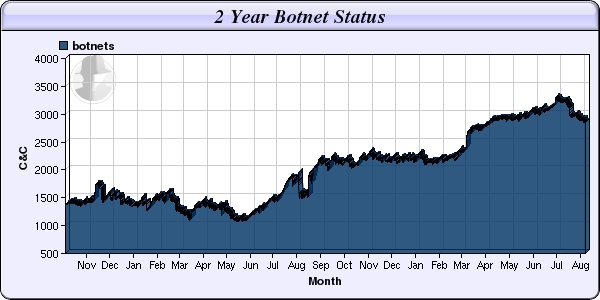
Figure 1. Known Botnets in the Past Two Years
The questions are simple. How can we be sure that no zombie computers exist on our network? Are patching, antivirus, anti-rootkit and antispam protections sufficient? Is something else is necessary? Can we really trust one leading security IT vendor? Would it be better to implement two? Should we exercise some other techniques?
Unfortunately, there are no easy answers to those questions. In March 2008, a security company called Damballa was the source of news that a new Kraken botnet existed in the wild and was far more resource-reaching than the Storm one. Damballa reported seeing approximately 400,000 compromised computers (victims)—some of them from at least 50 Fortune 500 companies. It's an interesting example, because many security (mostly antivirus) vendors responded quickly that they already had protection in place and that the threat was old, so no need to worry. Was this really a threat, and how did Damballa get these numbers?
To simplify the story, Damballa discovered (probably during a security audit) a new malware with hard-coded addresses (URLs) of control centers (CCs—computers that manage tasks for zombie machines and all infected computers report to them). Damballa also found that some of those hard-coded addresses were not registered in a DNS service (the botnet probably was tested at that time, and the authors were preparing to launch it later). Damballa registered those domains as its own and ended up controlling quite a large botnet for research. Now, Damballa could identify IP addresses of zombie computers that started to report to its CC, and it discovered a number of devices sitting inside large corporate networks. Damballa could play with the bots and discover their potential power for malicious activity.
Much discussion has ensued about Damballa's ethical behavior. It hasn't contacted any security company about the methods of infection it discovered. It hasn't published any details of the exploits used to any bugtrack, nor has it contacted any vendors to alert them of the issue. Damballa wanted all the credit itself.
I don't approve of those things, but as a security technologist, having the opportunity to research such botnets is really tempting, and I can understand (but still not agree with) those decisions. Having an army of zombies under the control of a security organization is much better than having them in the wild. On the other hand, Damballa allowed malware to spread undetected just to justify its research.
But, that's not the point. The real point is Damballa proved that undetected botnets could exist, even in highly secured environments, in companies that have dedicated resources to fighting malware.
So, if large corporations that have committed a small fortune to protect system and network resources can be vulnerable, who's safe? Apparently, having state-of-the-art antivirus and malware protection isn't enough. What can you do about it, and how should you protect your IT systems and fight undetectable malware?
One solution is something called Darknet.
The idea of Darknet isn't new. It evolved from honeypots—a solution that's undervalued and underestimated, although it's really easy to implement. The term Darknet refers to a private or public chunk of a network that is empty of any servers/services. In fact, there is at least one silent host on this network, catching and inspecting all packets. We can call it a silent honeypot. The idea is simple. We don't expect any traffic on this network, so any packet found here is not legitimate and needs to be analyzed.
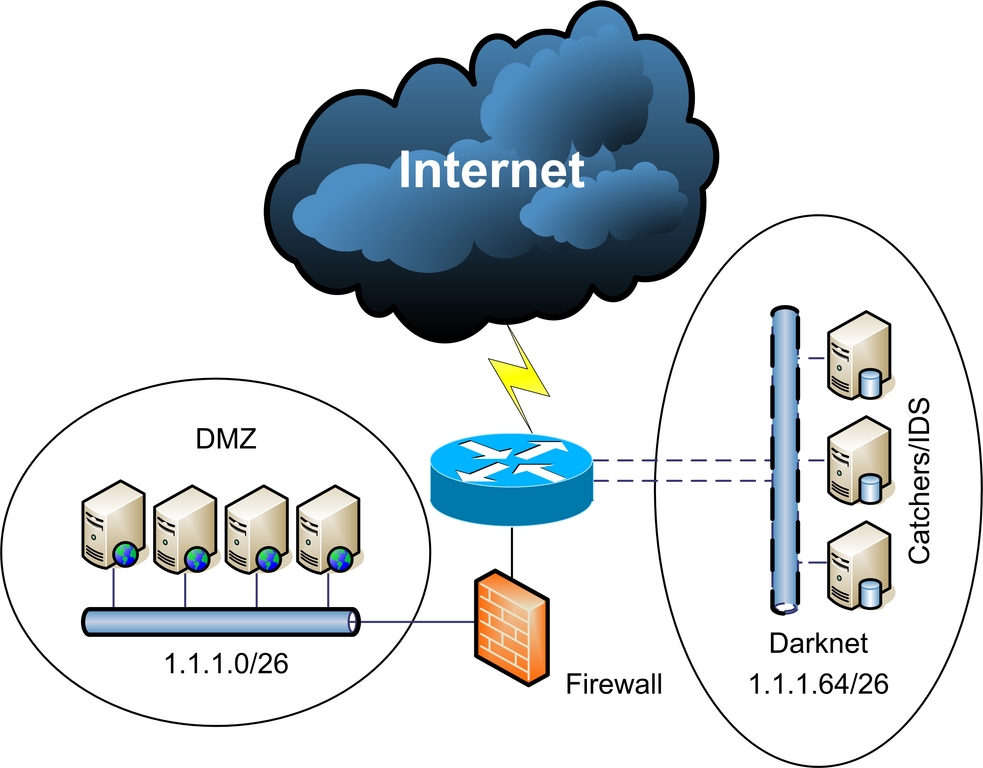
Figure 2. Darknet sits quietly waiting and listening.
As shown in Figure 2, the network has been divided into two parts with a /26 mask. The Darknet part consists of silent “traffic catchers” or Network Intrusion Detection Systems (NIDS).
There are plenty of sophisticated commercial Network Intrusion Detection Systems, but if you don't want to pay a lot of money, you can use some of the open-source and free solutions, such as Snort, Argus or even the fully functional Darknet solution from Team Cymru (see Resources). These tools allow you to gather detailed packets for analysis of new or zero-day exploits in the wild.
Figure 3 from the Team Cymru Web site shows how Darknet detected a worm just minutes after its release.
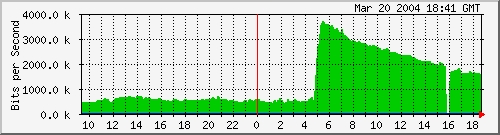
Figure 3. Notice the unusual spike in traffic.
In this example, Darknet has a public address space, which means it will catch all the traffic from outside the network. So, we will have all the information about what threats are currently in the wild, and we will be alerted about new traffic patterns and potential zero-day exploits. But, how can we detect botnets inside our network? To answer that question, we need to look deeper into malware behavior.
About 90% of malware these days behaves in specific and common ways, so from the network traffic perspective, we can say that typical malware has some distinct characteristics:
It will assure its survival. It's not exactly network-related, but it will copy itself to the Start folder or add itself to startup scripts or the registry (Windows).
It will try to replicate and spread (infect other computers in its neighborhood) by searching for e-mail addresses and sending messages from a user's mailbox (mail channel); creating files on Windows shared folders, network drives and P2P shares (let's call that the P2P channel); or direct infections—using zero-day exploits on unpatched systems.
It will try to contact the control center (CC) to download other malware and to get instructions—usually from Web sites (Web channel) or Internet Relay Chat (IRC channel). Often these CCs are located on computers using dynamic IP addresses (dynamic DNS) or located in countries known to be sources of malicious software (China, Russia and so forth) or on suspicious networks (such as the so-called Russian Business Network).
It will be used for malicious purposes—typically spam (mail channel), data leakage/spyware/identity theft/phishing, DDOS, ransomware, often via the Web channel also.
As we can see, malware often uses the most popular channels to spread and operate—mainly Web, mail, P2P and IRC channels.
Knowing this information, we can create a Darknet inside our network and place some traffic catchers or IDS systems there to analyze and gather all suspicious data.
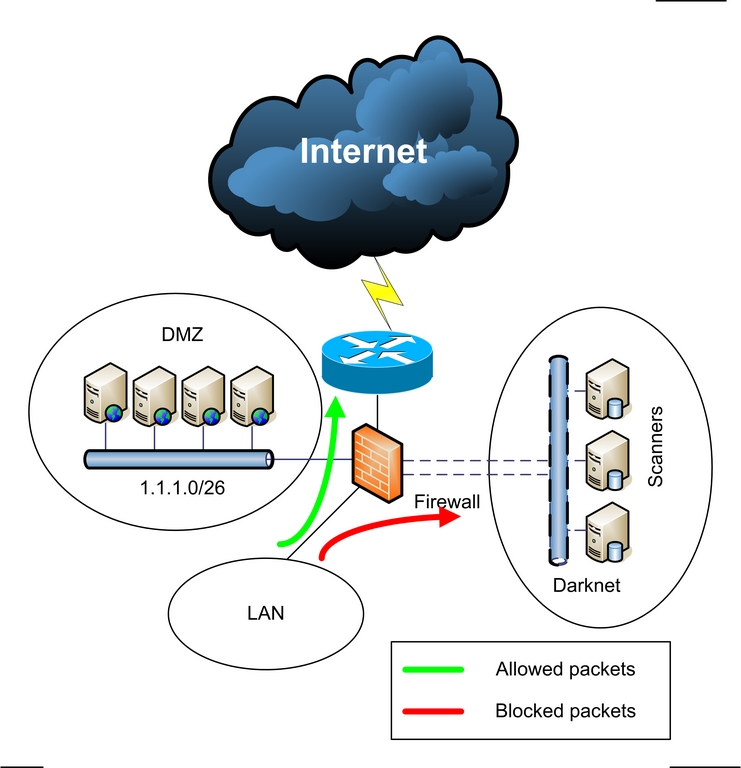
Figure 4. Suspicious packets are examined instead of simply discarded.
The method shown in Figure 4 can be explained in one sentence: “All outgoing traffic that is not legitimate (violates a company's policy) or traffic that is suspicious will be forwarded for analysis.”
One question remains. How do we decide what traffic is malicious or unwanted? The ultimate solution would be to forward all packets with an “evil bit” set in a funny way (RFC 3514). Unfortunately, this is a little more complicated.
Let's consider an example. If we have a company with internal mail and a name server (DNS/WINS), we can redirect all outgoing traffic (other than from these servers) to ports TCP 25 (SMTP), TCP/UDP 53 (DNS), TCP 6667-6669 (IRC) and all known P2P software (like Limeware) to Darknet hosts for analyses. As computers inside the network don't really send traffic directly to mail servers or connect to the IRC, we can block these channels to avoid spreading malware. If the nature of a company's business is focused on a local area or country, we also can redirect all WWW port TCP 80 requests to suspicious domains (such as .cn or .ru), dynamic DNS domains and so on.
To accomplish this task, we can set up basic iptables rules on a Linux firewall, as in this example (we are redirecting all requests coming from an internal eth0 interface destined for TCP 6669 IRC port to internal host 1.1.1.1):
iptables -A PREROUTING -t nat -i eth0 -p tcp --dport
 ↪6669 -j DNAT --to 1.1.1.1:6669
iptables -A FORWARD -p tcp -i eth0 -d 1.1.1.1 --dport
 ↪6669 -j ACCEPT
We also will need to configure the internal server with address 1.1.1.1 to catch all the traffic. There are two ways to do that: we can record all the packets going to this server, or we can install some services (WWW, IRC, SMTP, POP3, DNS) and then monitor them for connections and integrity.
Let's focus on a simple packet-capture machine. More sophisticated solutions (such as the ones from antivirus companies) usually have a dozen machines (most likely VMware images) with different operating systems, open shares, Web servers, P2P clients, mail agents, instant-messaging clients and so on.
After the attack/infection, system changes will be compared to the input state (VMware snapshot) to analyze malware behavior and to ease the remediation process.
Such labs can be very complex, but to achieve basic functionality (traffic monitoring and threat alerting), it is enough to have one computer with your favorite Linux distribution.
One of the many tools for sniffing traffic and gathering statistics is ntop. You can download it from www.ntop.org or use a package manager on your system to install it. There already are cooked packages for popular Linux distributions, such as Red Hat, Debian/Ubuntu and SUSE. Before using it, you have to set up an admin password by running the following:
sudo ntop --set-admin-password
And start it with:
sudo /etc/init.d/ntop start
Now you can go to your IP address (http://127.0.0.1:300) and look for some statistics. This is a very powerful tool that provides a lot of information. You can sort by packets, ports, hosts and so on. Network usage graphs also are helpful in determining the amount of traffic getting into your system.
Remember, no packets should be legitimate in Darknet, so this tool provides great statistical data as to what hosts/networks are responsible for illegal traffic.
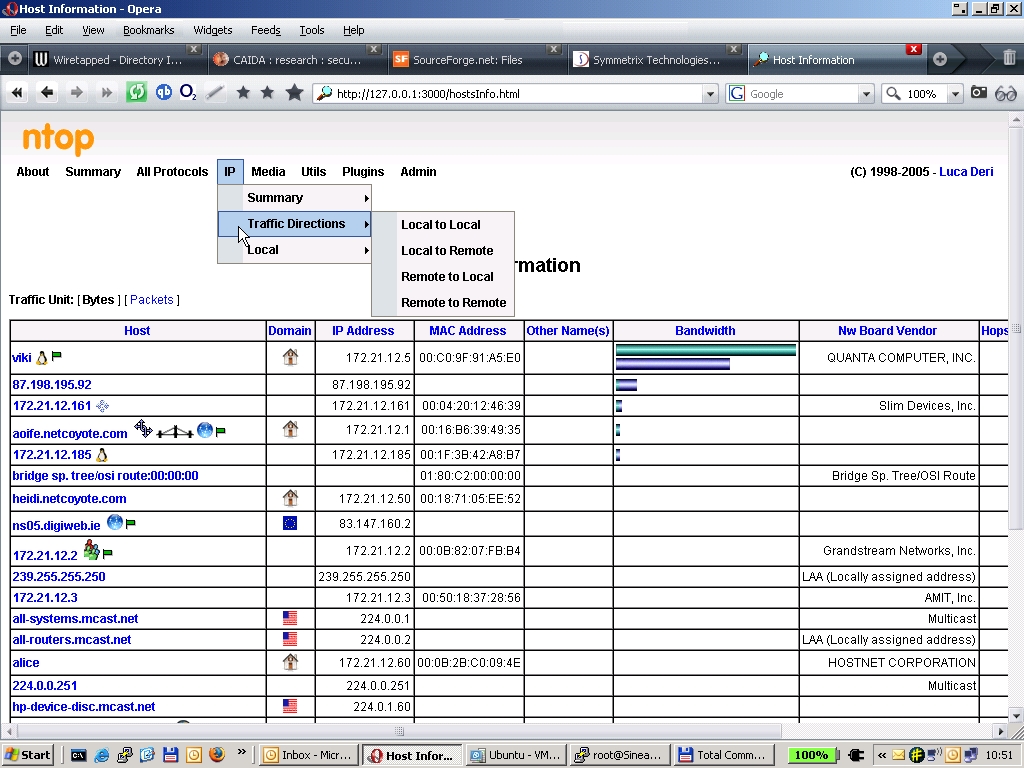
Figure 5. ntop breaks down the flagged traffic to help identify the source of illegal traffic.
Figure 5 shows ntop's graphic interface and its ability to detect host operating systems, vendor and other details in Host view.
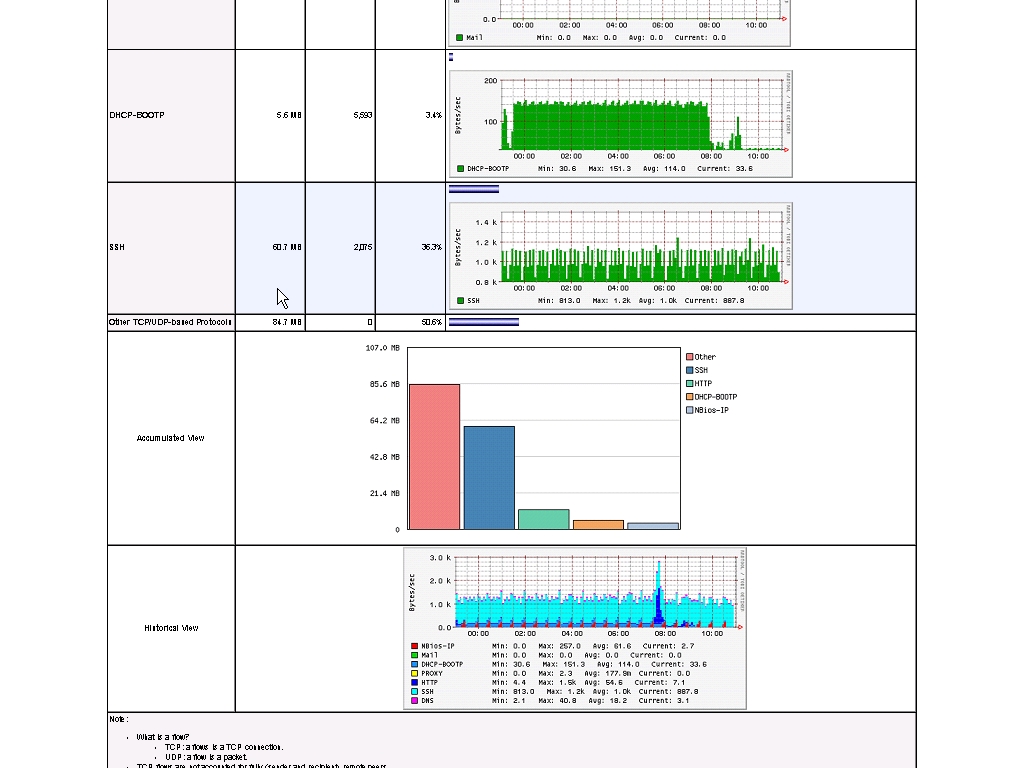
Figure 6. ntop offers a wide variety of graphed information.
Figure 6 presents standard ntop graph capabilities, thanks to built-in support for RRDTool.
To get alerts regarding what exploits are used (if any) on your network, you need a network IDS system. The best one that's publicly available is Snort. You can get it from www.snort.org, and it also is available on many systems as a binary package.
One thing you need to configure in /etc/snort/snort.conf is setting your $HOME_NETWORK variable to match IP addresses and netmask to your configuration. Snort is an intrusion detection system based on a pattern database.
If traffic matches, it will write an alert to a log file (by default in /var/log/snort) and record the packets for later analysis (you can reply to them using the tcpdump -r command or examine them using tools like Wireshark).
With powerful yet not complicated rules, you can write your own signatures or edit existing ones to record traffic that matches your custom criteria. Additionally, you can consider installing Snort support tools, such as IDScenter (see Resources).
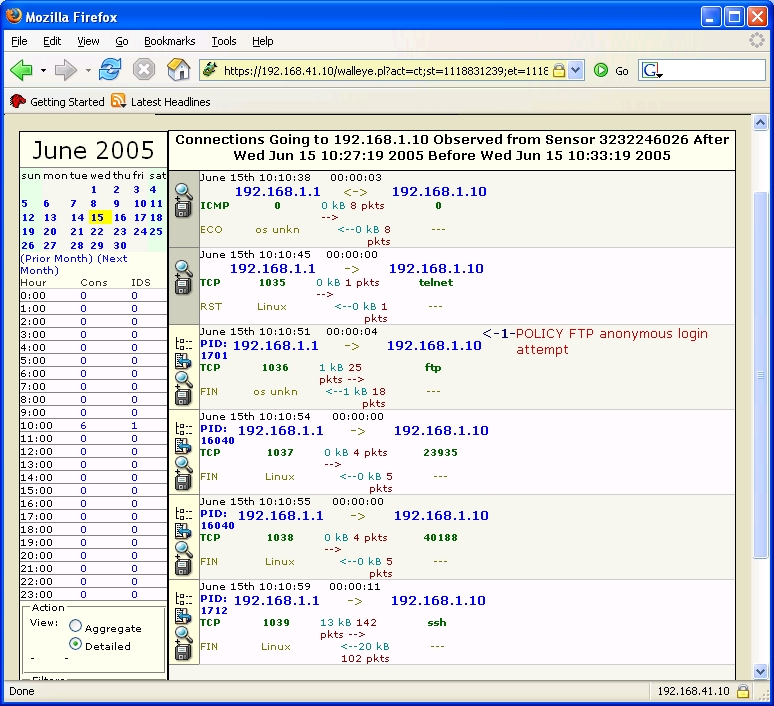
Figure 7. The honeypot GUI shows recorded incidents.
There also is a Honeynet project, based on Snort and Sebek technologies. It provides a cut-down Linux system, based on Fedora and custom-built tools with a GUI for incident management (Figure 7).
If you want to go further, there also are projects, such as HIHAT (Highly Interactive Honeypot Analyses Toolkit), that transform popular PHP applications, such as PHPNuke or osCommerce, to fully functional logging, reporting and alerting tools.
You easily can detect commands and SQL injections, cross-site scripting and map involved IPs to geographic locations, as shown in Figure 8.
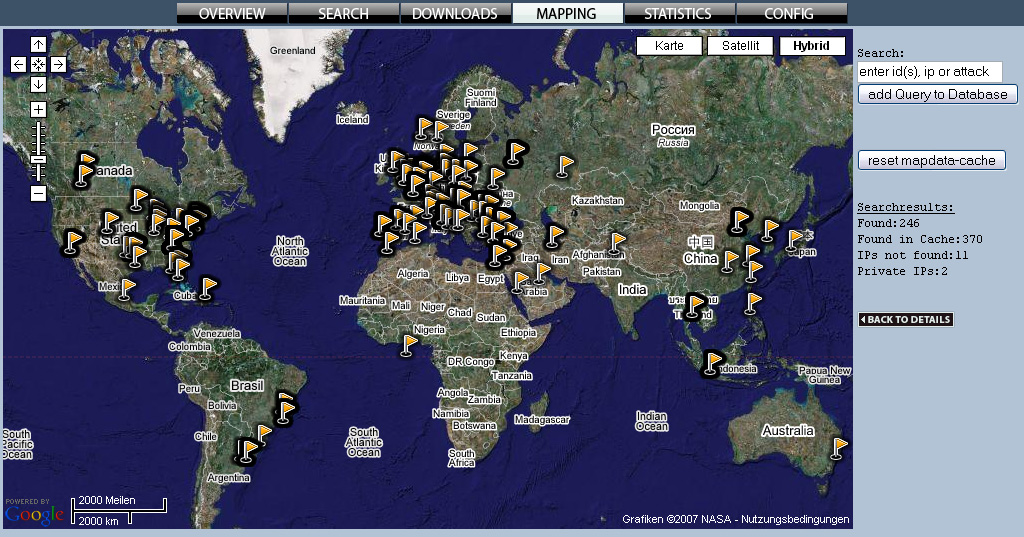
Figure 8. By mapping IP addresses, we can see geographic trends.
This simple configuration of putting a server on an internal Darknet allows us to detect and receive alerts on the following:
Actively spreading malware.
Covert channels and possible data leakage.
Suspicious activities (deliberate or not), such as abuse of a company's policy and network reconnaissance attempts (for example, port scanning).
Provide audit trails and record evidence for later investigation.
Provide general network usage statistics for base-lining.
Although you decided to block IRC access from inside the network, it might not be that clear for other employees in your company. If Mary from another department tries to connect to her favorite IRC channel at lunchtime, you'll probably catch it, but that doesn't mean there is a malware on Mary's workstation trying to contact the control center. However, a number of the same type of connections from one or multiple computers often is a good indication that something is going wrong.
In my work every day, I see some strange behavior. People always are trying to install illegitimate software, sometimes without even knowing it. Sometimes an employee's children try continuously installing Limewire on a company laptop given to them for playing a game or browsing the Internet.
With a little bit of information, you should be able to gather some statistics and distinguish real threats from normal misuse or other isolated incidents.
Securing information systems is a very hard task. Today we are in ongoing war against attackers—fighting the battles of time and money. Time is crucial in securing all environments when there is a threat in the wild, but first you need to know about it. If you know your enemies, their intentions and weapons, it is much easier to react and mitigate attacks. That's what Darknet and honeypots are all about.
Resources
ShadowServer Foundation: www.shadowserver.org
Damballa: www.damballa.com
Snort IDS: www.snort.org
Argus: www.qosient.com/argus/flow.htm
Team Cymru Project: www.team-cymru.org/Services/darknets.html
Setting an Evil Bit RFC3514: rfc.net/rfc3514.html
Snort IDS: www.engagesecurity.com/products/idscenter
Honeywall Project: https://projects.honeynet.org/honeywall
HIHAT Project: hihat.sourceforge.net
CAIDA Network Telescope Research: www.caida.org/research/security/telescope
University of Michigan—The Internet Motion Sensor: A Distributed Blackhole Monitoring System: www.isoc.org/isoc/conferences/ndss/05/proceedings/papers/ims-ndss05.pdf
Tracking Global Threats with the Internet Motion Sensor: www.nanog.org/mtg-0410/pdf/bailey.pdf
Commercial Example of the Darknet Implementation: https://tms.symantec.com/Default.aspx
The Honeynet Project: www.honeynet.org
Grzegorz Landecki, CCNP, CISSP, is a security technologist at Cyber Security Team in Dublin, Ireland, responsible for protecting a major US company's 85K+, globally located computers.

