
Dash Express
I spend a lot of time in my car. Like a fair number of people who work in the San Francisco Bay Area, I commute a long distance—in my case, 60 miles one way. I've learned to time my commute to avoid the worst of the traffic, but I still spend about three hours each day in my car. I've tried different GPS (Global Positioning System) units here and there, but because most of my time in the car is spent going to the same place, I don't typically need a lot of driving directions. A GPS would sit unused only until I travel or go to a new restaurant, which is only every once in a while.
Now, I like gadgets at least as much as the next Linux geek, so when I first heard about the Dash Express GPS, I instantly was intrigued. Basically, Dash has created a new GPS unit aimed at the commuter market. This GPS adds a GPRS cellular connection, so that it has an always-on Internet connection while you drive. The Internet connection can be used to get new software updates and maps, but one of the main selling points for the Internet connection is improved traffic, routing and search data. The Dash network keeps track of each GPS unit anonymously and combines its data with traffic sensors and other data points to gauge up-to-the-minute traffic data it then shares with each Dash user.
The Internet connection also allows the Dash Express to source other Internet services when you do a search. Along with the built-in database of locations of interest, you also can search Yahoo for anything from the closest coffee shop to the best sushi place nearby, as Yahoo searches not only return locations but also ratings for each result.
One of the most interesting aspects of the Dash for me and other Linux users is the open-source nature of the device. For one, the hardware itself runs Linux. The hardware is actually similar to what is being used in the OpenMoko cellphones. In addition, Dash has opened its API, so interested parties can register as developers and write their own applications to run on the Dash Express. Later in this review, I talk about my own experience writing a Dash application.
Of course, the GPS unit and cellular connection aren't free. The Dash Express currently retails for $299 and includes three months of free cellular connection. After that, the cellular connection costs $12.99 with a month-to-month contract, $10.99 per month with a one-year contract and $9.99 per month with a two-year contract. If you choose not to renew the cellular connection, the unit still functions like a standard GPS, but you no longer will be able to use Send2Car, Dash applications, Yahoo searches and other features that require the Internet.
Although the Internet features might seem cool, a GPS device still needs to be able to find your destinations and route you there correctly. Plus, if you don't renew the cellular connection, you'd like to know that the device still would be useful. First, though, let me point out the elephant in the room. One of the first things you will notice about the Dash Express is that it is big compared to other modern GPS devices (4.8"Wx4.1"Hx2.8"D and 13.3 ounces). Although the face of the device is about the same size as other devices, it's as thick as the Garmin GPSes from a few generations ago. Along with its thickness, the top of the device actually extends back a few inches in a sort of L shape and houses the speaker. Unfortunately, this means you won't be storing the Dash Express in your pocket or possibly even in a small glove compartment.
The installation is pretty straightforward, and out of the box, the device will connect to a cellular network (or open Wi-Fi access point) for any Internet features. The interface itself is simplified compared to some other GPS units and relies almost entirely on the touchscreen for input, apart from a physical menu and volume button on the top of the device. When you calculate a route, you will see and hear turn-by-turn directions from the main map screen. The interface is pretty clean (Figure 1) with most of the screen taken up by the map.
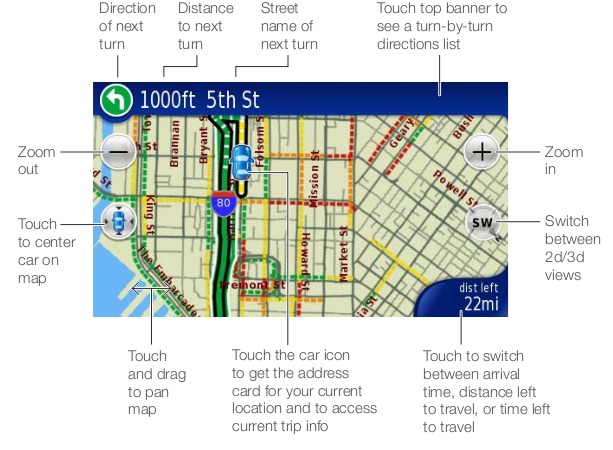
Figure 1. Dash Express Interface
As a standalone GPS, the Dash is so-so. A few times I searched for a business only to find that when I got there it was out of business. The routing isn't entirely perfect either and seems to favor larger highways and more direct routes, even if they are slower. My town has four different exits on the highway, but even though the first exit is the fastest, the Dash always routed through a different exit. There is a particularly bad bottleneck along my commute that occasionally backs up for miles. There's an alternate route to my house right before the bottleneck that normally takes longer except when there is very heavy traffic at the bottleneck, but the Dash seemed unaware of this as an alternate route.
The Dash does appear to be dealing with the routing issues actively. You can report a problem directly from the device, and it will tar up all of its logs and other information about your current location and send it off to Dash via the cell connection. Once you get home, you will see an e-mail response in your inbox, and you can go to Dash's Web site to fill out the details of your problem. I did, in fact, report an issue with routing around the bottleneck, and Dash was quick to respond. Apparently, the next iteration of its map and routing internally does not have the issue, so presumably my problem will be fixed at the next update.
There are a lot of different GPS units from which to choose, but the Dash Express is the first to include a cellular connection in its device. It really is the main feature that differentiates it from competitors, so it's even more important that this extra functionality is compelling. So, how do the Internet features fare?
When the Dash Express has a cellular signal, you will see the word connected on the search button at the main menu. Without a cellular signal, you can perform only local search, and the rest of the search options are grayed out. When connected, the default input box at the search window searches Yahoo for keywords you enter. In addition to the Yahoo searches, there are a number of saved search categories, including Airports, Food, Gas and Movie Theaters. The Gas and Movie Theater saved searches make special use of the Internet connection. The Movie Theater search will not only show you the theaters in your area, but it also will list the current show times. For the Gas search, each result also includes local gas prices along with how recently that information was gathered. You also can sort your results by price, which makes it quick and easy to find the cheapest gas in your area.
One of the most-touted features of the Internet connection is live traffic information. As I mentioned before, the Dash anonymously gathers the location information of all Dash units and combines it with trusted road sensors, information from commercial fleets and other data sources to create what it calls the Dash Network. On the main map screen, each street with traffic data shows up color-coded. Green represents good traffic; yellow indicates slight congestion; orange, moderate traffic; and red means heavy traffic. In addition, the Dash uses solid lines when the traffic information comes from its trusted Dash Network and dotted lines when the information is from less-trusted sources. So essentially, if someone else with a Dash Express is on the same road ahead of me, I can get very accurate traffic information. As you drive to your destination, if the GPS unit detects traffic ahead, you will get an alert on your screen with the option to calculate alternate routes.
One of the more straightforward Internet features is Send2Dash. Often one of the more annoying features of a GPS is typing in an address on the touchscreen. With Send2Dash, you can log in to a custom portal on the Dash site, type in an address and then send it to your own Dash, where it will show up the next time it starts. This makes it nice and easy to build an address book. There's even a Firefox plugin, so you can highlight an address and then right-click and select Send to Car.
The Internet-enabled features on the Dash—specifically the enhanced searches—are great features, especially the Gas search. The Yahoo searches also work well as a supplement and second opinion to the internal map of destinations. The traffic, however, is a mixed bag. When it's accurate, it has been a lifesaver. It takes some time and familiarity with the map to interpret what light, moderate or heavy traffic really means, and how much weight to give to the dotted less-reliable traffic lines. Once you figure it out, however, you can search ahead while you commute and often see problems before they affect you.
On the downside, traffic information isn't always as “live” as I'd like it to be. I've seen a situation or two where I've been in pretty heavy congestion or even in stopped traffic a number of minutes before the Dash updates. Of course, maybe I'm the traffic canary in the coal mine helping the rest of the Dash community in the Bay Area. I know that Dash is working on traffic reporting, but for now, I recommend supplementing the Dash data with something like the Yahoo Traffic Incidents Dash application.
Like Apple with the iPhone, the Dash has allowed third parties to write custom applications, “Dash apps”, for use on the device. The applications are easy to add from Dash's Web portal, and so far, all of them are free. There are a number of interesting applications, but here are some of the more notable ones:
Trapster—search for and report speed traps and red-light cameras along your route.
Weatherbug—weather forecasts for your location or destination.
Yahoo Traffic Incidents—accidents or slowdowns along your route.
Trulia—local available real-estate with pricing.
Baktrax—a list of local radio stations and the last few songs they played.
All in all, the Dash apps are one of the more compelling reasons to have a Dash Express right now. It's these sorts of programs that move the Dash from a standard GPS to use when you are lost to a GPS you use on your dashboard every day.
Earlier in the year, the Dash opened up its API to the community, so anyone could register on its site as a developer and write custom Dash apps. Since then, the API has been updated and expanded with some new features, and it still appears to be in active development. Even so, there already seems to be a pretty active developer community springing up in the Dash forums, and quite a few community-developed Dash apps are already available on the site.
I wanted to see how easy it was to develop my own Dash app, so I downloaded the latest edition of the API documentation, registered as a developer on the site, and started with a sample PHP program I found on the forum. Essentially, when you conduct a search with a Dash app, the Dash Express then sends an HTTP GET to a Web service you specify that contains a few variables including the Dash's GPS location and potentially a custom value from a text entry window on the Dash itself. Your Web service replies back with its results formatted in some basic XML (the structure is defined in the API documentation) that the Dash then displays. Here's a sample of the XML output that Dash accepts:
<?xml version="1.0" encoding="UTF-8"?>
<resultSet><serviceId>10114</serviceId><count>1</count>
<sort>di</sort>
<result><title>Title</title>
<point>38.2440154167-122.6531425</point>
<description>requestType->search   serviceId->10114
point->38.24401541666667 -122.6531425   count->20
offset->0   sort->null signature->ed002f9a2f86013c9affd8d9e1b9f90e
</description><address>12000 San Jose
Blvd</address><city>Jacksonville</city>
<regionCode>FL</regionCode><countryCode>US</countryCode>
<postalCode>32223</postalCode></result></resultSet>
After all these years, I still tend to favor Perl for this sort of thing, so the first thing I did was port the sample PHP script to Perl. Once I got that working, I decided to try to write something actually useful. I wasn't ready to dig heavily into sourcing sites like Google Maps for location data, so instead, I decided to write something more basic. I planned to write an application that would take the current mileage as input and then read from a basic CSV file and report back any maintenance due within plus or minus 10,000 miles. The first column in the CSV file has the mileage when the maintenance was due, the second column has a description of the maintenance, and the third column is optional but had a 1 or 0 depending on whether the task was completed. Here's some sample lines from the file:
151000,Change Oil,1
156000,Change Oil and Filter,1
161000,Change Oil
160000,Replace Tires
180000,Replace Coolant
160000,Replace Air Filter
Listing 1 shows the script that reads from the file and outputs the XML for the Dash.
Listing 1. The Script
#!/usr/bin/perl

use CGI qw(:standard);

my $infile = 'maintenance.txt';
my $mileage_range = "10000"; # Only show entries within this range

if(param())
{
   $requestType = param("requestType");
   $serviceId = param("serviceId");
   $point = param("point");
   $count = param("count");
   $offset = param("offset");
   $sort = param("sort");
   $signature = param("signature");
   $mileage = param("q");
   my %hash;
   my $items = 0;

   parse_infile($infile, \%hash);

   foreach (sort keys %hash){
      if(abs($_ - $mileage) < $mileage_range){
	 next if($hash{$_}{'c'} == 1);

	 $delta = $_ - $mileage;
	 if($delta >= 0){
	    $title = "$_ - $hash{$_}{'desc'}";
	    $desc = "<![CDATA[<html>In <b>$delta</b>
 ↪miles:<br>$hash{$_}{'desc'}</html>]]>";
	 }
	 else {
	    $title = "PAST DUE: $hash{$_}{'desc'}";
	    $desc = "<![CDATA[<html><font color=#FF0000>
  ↪<b>" . abs($delta) . "</b> miles <i>PAST DUE</i>
  ↪</font>:<br>$hash{$_}{'desc'}</html>]]>";
	 }

	 $output .= output_result($title, $desc);
	 $items++;
      }
   }

   print header('text/xml');
   print '<?xml version="1.0" encoding="UTF-8"?>'
            . "\n<resultSet>"
            . "<serviceId>$serviceId</serviceId>"
            . "<count>$items</count>";

   print $output;
   print '</resultSet>';
   exit;
}

sub output_result {
   my $title = shift;
   my $desc = shift;
   my $output;

   $output =  "\n<result>"
            . "<title>$title</title>"
            . "<description>$desc</description>"
            . '</result>';

   return $output;
}

sub parse_infile {
   my $infile = shift;
   my $href = shift;
   my ($mileage, $desc, $completed);

   open INFILE, $infile or die "Can't open $infile: $!\n";
   while(<INFILE>){
      chomp;
      $mileage = $desc = $completed = "";
      ($mileage, $desc, $completed) = split ',', $_;
      $$href{$mileage}{'desc'} = $desc;
      $$href{$mileage}{'c'} = $completed;
   }
   close INFILE;
}
It's pretty basic, but it works. The whole process from testing the PHP script to writing the final application took only about two hours. Once you write the program, you can create a new Dash app instance via an interface on the my.dash.net site and add it to your saved searches. You also can choose to keep the program to yourself, or you can make it public so any Dash user can use it.
The ease of developing applications for the Dash is a definite plus for me. There are still some limitations in its API (for instance, there is only one text box available for user entry at the time of this writing), but the API still appears to be under heavy development and already has had feature updates. Even as it is, if you have some imagination and some programming ability, you can write some pretty useful applications.
Okay, so I couldn't help myself. Here was a device that I knew ran Linux with not only a GPRS connection, but also a Wi-Fi connection. There had to be a way to get to a Linux prompt on the thing.
First, I let the Dash associate with my home Wi-Fi and then tried to SSH to it. It turns out, it actually does have SSH listening; however, I didn't know the password (if there even were one, I haven't had a chance to attempt SSH brute-force attacks yet), and it could use SSH keys.
The Dash Express does have a USB port on the side and even comes with a USB cable to connect it to your computer, but currently, there is no official use for this port other than charging the battery. When you connect it to Linux, dmesg gives some hope:
Sep  1 21:53:11 minimus kernel: [ 1447.814648]
 usb 2-1: new full speed USB device using uhci_hcd
  and address 2
Sep  1 21:53:11 minimus kernel: [ 1447.880419]
 usb 2-1: configuration #1 chosen from 2 choices
Sep  1 21:53:11 minimus kernel: [ 1448.182503]
 usb0: register 'cdc_ether' at usb-0000:00:1d.1-1,
 CDC Ethernet Device, d6:a5:89:03:18:fe
Sep  1 21:53:11 minimus kernel: [ 1448.182834] usbcore:
 registered new interface driver cdc_ether
Sep  1 21:53:12 minimus dhcdbd: message_handler:
 message handler not found under /com/redhat/dhcp/usb0
 for sub-path usb0.dbus.get.reason
So, the device does show up as some sort of USB Ethernet device. Some research on the Internet led to a page that described how the OpenMoko phone had a similar connection, but unfortunately, if the Dash Express assigned itself a static IP, it didn't use the same one as the OpenMoko. I tried an nmap host discovery on all of the private IP space and even collected a few minutes of packets from the USB network to see whether there were any clues there, but as of yet, I haven't been able to get into the device.
Overall, the Dash Express is a very interesting GPS device. The Linux user in me wants to root for the underdog, especially if that underdog uses Linux as the OS on the device. The programmer in me is really drawn to the open API and the ability to write my own applications on the device and use the applications from a community of developers. The commuter in me likes a device aimed at delivering accurate traffic data. The gadget geek in me likes the concept of adding an Internet connection to a GPS device and is really interested in the potential that sort of improvement brings.
When it comes down to it, potential is the keyword for the Dash Express. Today, the Dash is a very useful GPS product with some advanced search features and Dash apps that no other competitor has—it just has some rough edges in some of the more fundamental GPS functions. It's the overall potential of the platform that is most compelling to me. I know that the rough parts are being worked on actively, and in the meantime, the community has added some great new free features to the device. As long as Dash can stay responsive to its users and especially to its developers (and maybe give us Linux geeks a peek under the hood), I think it's the GPS for geeks.
Kyle Rankin is a Senior Systems Administrator in the San Francisco Bay Area and the author of a number of books, including Knoppix Hacks and Ubuntu Hacks for O'Reilly Media. He is currently the president of the North Bay Linux Users' Group.

