
The Conkeror Web Browser Conquers Small Screens
Conkeror is a Web browser with an Emacs-style look, feel and configuration. It uses Firefox's HTML rendering engine and works with most Firefox extensions, but it provides a keyboard-driven interface and makes excellent use of screen space. It's a fitting Web browser for Netbooks with their imprecise touchpads and small screens. Conkeror uses the same free software license as Firefox.

Figure 1. Conkeror Web Browser
Users of Debian Lenny, Debian Sid and Ubuntu Jaunty should install the conkeror and conkeror-spawn-process-helper packages. Users of other distributions should install the XULRunner package (xulruner-1.9 or xulrunner). If you installed the Firefox package, that package installed XULRunner for you. After you install XULRunner, download a Conkeror snapshot and unpack it into your usual software directory—you don't need to compile anything. See Resources for a link to the Conkeror snapshot download.
To put the Conkeror launcher in one of your regular executable directories so that you can start Conkeror from a command prompt or application launcher, create a symbolic link from the conkeror/contrib/run-conkeror file to one of your usual executable directories. For example:
$ ln -s /usr/local/share/lib/conkeror/contrib/run-conkeror \
        /usr/local/bin/conkeror.
If your distribution doesn't include Firefox, download XULRunner from Mozilla and unpack it into your usual software directory. Then, download a Conkeror snapshot and unpack it also into your usual software directory. See Resources for links to the downloads.
You must perform an extra step to make the Conkeror launcher work. First, copy the xulrunner-stub file from the XULRunner directory into the Conkeror directory. Then, create a symbolic link from that file to one of your usual executable directories. For example:
$ cp /usr/local/share/lib/xulrunner-1.9/xulrunner-stub \
     /usr/local/share/lib/conkeror/xulrunner-stub
$ ln -s /usr/local/share/lib/conkeror/xulrunner-stub \
        /usr/local/bin/conkeror.
You don't need to configure Conkeror to get started; simply start the conkeror executable you installed. Conkeror's start page lists which keys perform which actions (keybindings). The first keybinding listed, g, goes to the URL you specify. For example, load the Linux Journal home page by pressing g and typing linuxjournal.com. Follow links by clicking them, as you would do in Firefox, and press B to return to previous pages or F to advance to later pages.
Return to the basic list of keybindings on the start page by pressing, C-h i. In Conkeror and Emacs, C- stands for, “hold Ctrl and press the next key”. For example, C-h i stands for “hold Ctrl, press h, release Ctrl and h, and press i”. Conkeror uses other Emacs keybinding abbreviations also: M- means hold the Meta key (the Alt key on PC keyboards and the Option key on Macintosh keyboards); S- means hold the Shift key. For a complete list of Conkeror keybindings, press C-h b.
Although you can follow links by clicking them, you should learn to follow them using the keyboard to get the most out of Conkeror. To follow a link with the keyboard, press f. Conkeror places a small number next to each link (Figure 2), including link images. Enter a number to follow its link or type letters from the name of the link you want. As you type letters, Conkeror removes the numbers from links that don't match those letters and renumbers the remaining links. Even on a slow computer, this happens instantly. If only one link matches the letters you entered, Conkeror automatically follows it.
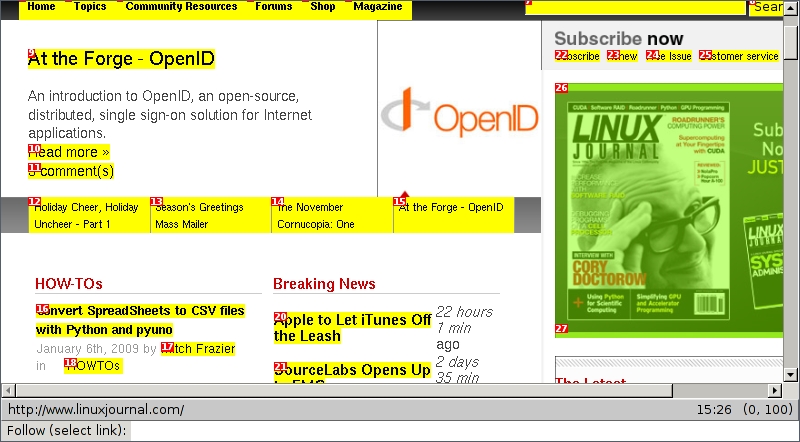
Figure 2. Following Links in Conkeror
For example, let's assume the three link names: foo, bar and baz. Typing f and 3 follows the third link, baz. Typing f and baz also follows the baz link. Typing f and b removes the number next to foo, so that you can press 1 to select bar or 2 to select baz.
As in Firefox, you can start a search within Conkeror. Press g, type “google”, type your search term, and press Return to go to the Google result for your search term. Replace “google” with “lucky” to go straight to the first Google result, or replace it with any of the following words to use another search engine: “wikipedia” “sourceforge” or “dictionary”. When you search Google, Conkeror asks Google to guess what you're searching for and displays the best matching results in a list. Press Tab to select the top result, use the keyboard arrow keys to select an alternative result, or simply finish typing your search terms and press Enter. This also works for Wikipedia searches.
Firefox uses tabs to keep separate Web pages in the same browser; Conkeror uses buffers to do the same thing. To open a link in a new buffer, press C-u f and select the link using the link-following instructions above. For example, say you're back on the page with the foo, bar and baz links. To open baz in a new window, press C-u f and type baz. Press C-u before any command that opens a Web page to load that page in a new buffer. For example, C-u g goes to a URL or loads a search result page in a new buffer, and C-u C-h i loads the start page in a new buffer. Also, links that try to open a new window will be opened in a new buffer.
Return to the previous buffer by pressing M-p (Alt-p on PCs and Option-p on Macs); advance to the next buffer by pressing M-n. Press C-x b to display a list of open buffers (Figure 3). Each buffer in the list has a name—its URL plus its title. Select a buffer name from the list using the keyboard arrow keys or narrow the list by typing part of a buffer's name. Press Enter at any time to show the selected buffer.
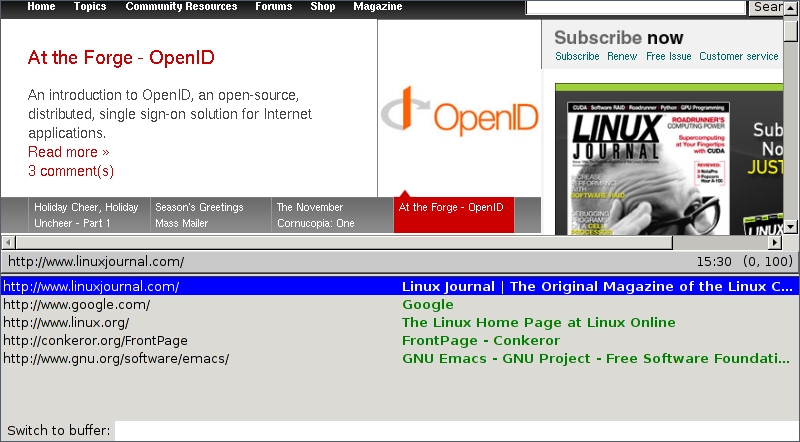
Figure 3. The Buffer List
Close a buffer—in Conkeror's terminology, kill a buffer—by pressing C-x k to display the list of buffers. Select a buffer the same way you did above, and press Enter to kill it. Conkeror selects the current buffer by default, so you can kill it quickly by pressing C-x k <Enter>. When you close the last buffer, Conkeror exits. Close Conkeror and all its buffers automatically by pressing C-x C-c.
Power users of any Web browser often edit the URL to go to a different part of the Web site they're visiting. Press C-x C-v to edit the current URL in Conkeror. Combine this with C-u to open the modified URL in a new buffer: C-u C-x C-v.
Bookmarking a URL in Conkeror lets you return to it using Tab completion when you change URLs. Press b to bookmark the current URL, choose a name for the bookmark (Conkeror fills in the page title by default), and press Enter. Press g to go to a new URL, type in a few letters from either the bookmark title or the bookmark URL, and press Tab. Conkeror shows you a list of bookmarks that match the letters you typed; use the keyboard arrow keys to select a bookmark and press Enter to go to it.
Sometimes when you try bookmarking a page, Conkeror asks you to choose a frame. It places a number next to each frame on the page and lets you choose a frame by entering its number. If you want to bookmark the URL containing all the frames, enter the number 0.
Access all of Conkeror's commands—even those that aren't bound to a keybinding—by pressing M-x, typing the command name and pressing Enter. Press Tab to complete any command name; for example, press M-x, type print, and press Tab to make Conkeror select the print-buffer command. If you press M-x and Tab without typing anything, Conkeror lists all of its commands. I suggest you review this list to get an idea of everything Conkeror can do.
Conkeror includes special scripts, called modes, that change its behavior on specific sites—for example, the simple XKCD mode for the xkcd.com comic-strip site. When you visit xkcd.com in Firefox, it displays the comic's title when you move your mouse over the image. When you visit xkcd.com in Conkeror, it activates XKCD mode (Figure 4) and displays the title below the image in a special font—you don't need to move your mouse over the image.
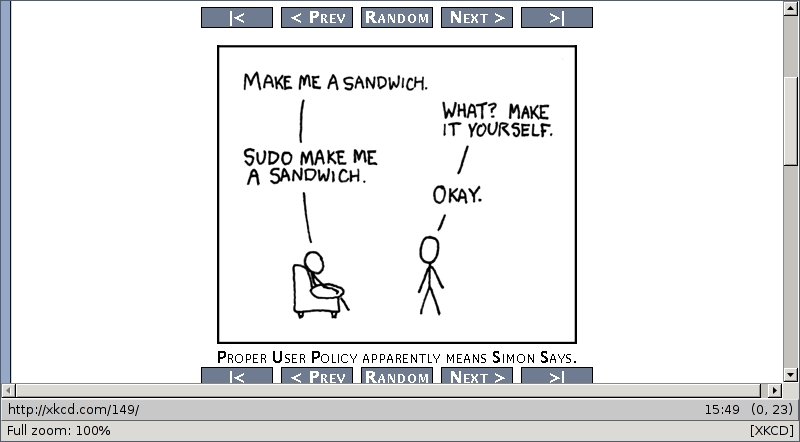
Figure 4. XKCD Mode in Action
The Gmail mode redefines many of Conkeror's default keybindings so that you can use the default Gmail keybindings. Other modes include a Google Maps mode, a Reddit mode and a YouTube mode.
When you visit a site that has a mode, for example Google Maps, Conkeror loads that site's mode. When you leave the site, Conkeror automatically unloads the mode. You can try using modes on other sites by loading the mode's command through the M-x menu. For example: M-x xkcd-mode. However, most modes don't make sense on alternative sites.
Firefox has a pretty Preferences configuration screen. Conkeror doesn't. But, you can change any browser setting in Conkeror on the about:config page. Press g, type about:config, and press Enter to go to the page and double-click the settings you want to change. Conkeror shows changed settings in bold. Use the search bar that appears on the top of the page to find specific settings quickly. For example, enter proxy to find all the proxy settings.
Although you can find and change settings easily in about:config, some users prefer a dynamic Emacs-style configuration file. This file can change about:config settings, define keybindings, add new commands, load external modules and define events using JavaScript. You can turn any file into a Conkeror configuration file, but the file must exist before you try using it. For example, add the following line to the file .conkeror.rc to prevent Conkeror from displaying a warning message before showing the about:config page:
user_pref("general.warnOnAboutConfig", false);
After creating the configuration file, you must tell Conkeror where to find it. Go to the Conkeror start page by pressing C-h i, scroll to the Conkeror RC File section, and enter the full pathname of the configuration file in the text box. For example, I entered the following text: /home/harding/.conkeror.rc. Press the Set RC File button. You need to do this only once.
Just below the Set RC File button, Conkeror lists several example directives for you to put in your configuration file. For instance, one line tells Conkeror how to use a custom search engine when you press g. You also can add new commands and new keybindings to Conkeror. For more examples, follow the Conkeror Wiki link in the Resources section of this article.
The next section tells you how to use Firefox extensions in Conkeror, but some Firefox extensions don't want to work with a browser that isn't named Firefox. Most Firefox extensions work in Conkeror if you tell the extension you're really using Firefox. I suggest you put the following line in your configuration file to make Conkeror ignore compatibility problems:
user_pref("extensions.checkCompatibility", false);
Most Firefox extensions work in Conkeror, but if you're used to Firefox extensions, installing an extension in Conkeror may feel like a step backward. First, find the extension on the Mozilla Web site (or another Web site), and download it to your computer. (Firefox extension filenames end in .xpi.) Then, press M-x, type extensions, and press Enter to start the extension manager. Choose the Extensions tab, click the Install button, use the file navigator to select the file you downloaded, and click Open. As in Firefox, you must restart Conkeror to load the extension.
Conkeror lets you edit HTML text boxes in an external text editor—for example, Emacs (Figure 5). Conkeror copies the text box's contents to a temporary file, opens your text editor on the file and reads the changed file back into the text box when you close your editor. To use this feature, you must compile Conkeror's small helper program, conkeror-spawn-helper. (If you used the instructions above to install the two Conkeror packages in Debian or Ubuntu, you may skip this paragraph.) Go to the Conkeror source directory you installed and run the following command: make. You don't need to run make install, because make compiles the program in the directory Conkeror uses.
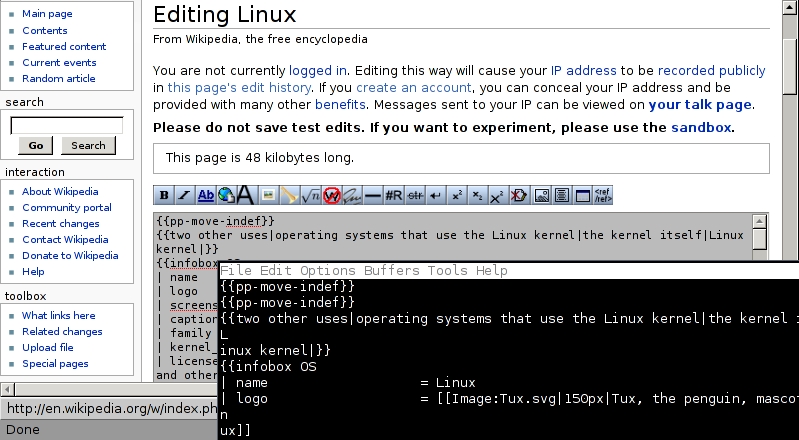
Figure 5. Editing a Wikipedia Article in Conkeror
Next, you need to tell Conkeror which text editor to use. Conkeror looks for the editor command in the $EDITOR environmental variable, but if $EDITOR isn't set, Conkeror starts Emacs. Most distributions let you set the $EDITOR variable by adding the following line to your ~/.xsession and ~/.xinitrc files:
export EDITOR=my_editor
Replace my_editor above with the name of the editor you want to use—for example, for the graphical VIM editor, gvim; the GNOME editor, gedit; or the KDE editor, kate. If you want to use a console editor, prefix the environmental variable's value with the name of a terminal emulator—for example:
export EDITOR="xterm -e vim"
However, if you use external editors in other programs, you may not want to do everything in a graphical editor. To make Conkeror alone start a specific editor, add the following line to your Conkeror RC file and don't set the $EDITOR variable:
editor_shell_command = "my_editor";
After all that configuration, using the external editor should seem simple. Use the Tab key or the mouse to place the input cursor in a text box and press C-i. You can edit small boxes—for example, a box for your name—or large boxes—for example, the edit box in a Wikipedia article. Conkeror grays out the text box while you edit. When you finish editing by closing your text editor, Conkeror restores the original background color.
The Conkeror start page links to its built-in tutorial, which you activate by pressing C-h t. The tutorial teaches you how to browse the Web with Conkeror.
Similar to Emacs' help, Conkeror's help can describe its own commands. The C-h f keybinding describes commands, and the C-h k keybinding describes keybindings. For example, to find out what the print-buffer command does, type C-h f and print-buffer. Conkeror will tell you that, “print-buffer is an interactive command in commands.js [to] print the currently loaded page.” Similarly, press C-h k and f, and Conkeror tells you “f is bound to the command follow in bindings/default/content-buffer/element.js.”
For complex problems, Conkeror can help you search its wiki. Press g, and type conkerorwiki, and enter your search terms. Conkeror searches its wiki, which includes troubleshooting information and lots of ways to get the most out of Conkeror. Of course, you always can go directly to the Conkeror wiki using the link in Resources.
I hesitated before trying Conkeror the first time. As a longtime vi user, I wasn't interested in anything based on Emacs. But, I did need a Web browser that could make the most of my Netbook's 5"-tall screen and crummy touchpad. Conkeror fit the bill, and I tried it. It impressed me. Although Conkeror may seem complicated in its sophistication, I spent most of my time going to pages, following links and editing text boxes—three things Conkeror makes easy and quick. After I slowly learned to use its other features, I found no reason I shouldn't enjoy the advantages of an advanced keyboard-driven Web browser on my desktop as well.
Resources
Conkeror Home Page and Wiki: conkeror.org
Download Conkeror Snapshot: repo.or.cz/w/conkeror.git?a=snapshot;h=master;sf=tgz
Download Mozilla XULRunner: releases.mozilla.org/pub/mozilla.org/xulrunner/releases/1.9.0.1/runtimes
David A. Harding lives in New Jersey and works as a freelance technology writer. He has a Linux Professional Institute system administration certification and can often be found organizing local GNU/Linux events.



