
Cooking with Linux - Security's Front Door
What is this I see on our specials chalkboard, François? Mxyztplk? That is the root password for our main server! Mon Dieu! What do I see here? Those are all our administrative passwords! Why would you post secret information where everyone can see it? Quoi? So you would not forget? But François, neither will anyone else. I see you have posted your own login passwords as well. Please, erase those immediately and wash the chalkboard when you are done. Merci. Now, just to be safe, we will need to generate a whole new set of passwords for all our systems. What were you thinking, mon ami? Of course, I see. We'll discuss this later. Our guests are arriving now. Prepare yourself, François.
Welcome, everyone! How wonderful to see you here at Chez Marcel, home of superb Linux and open-source software and, of course, wine served from one of the world's finest wine cellars. Speaking of wine...François, please head down to the wine cellar, over in the East wing, and bring back the 2005 Sonoma County Kokomo Zinfandel. Vite!
Ah, mes amis, you missed a rare opportunity to see all of Chez Marcel's security, exposed on our Specials du Jour board. Nevertheless, it does provide an excellent backdrop to our menu this evening, as all the items relate to password security. Passwords, mes amis, are still your first line of defense when it comes to computers. Biometric systems, like fingerprint readers, can make secure access more daunting and difficult to breach, but most systems, including countless Web sites, require a user name and password for access, and that's not changing anytime soon. In the end, it usually comes back to passwords, and passwords mean people need to remember them. And, that's where the problem starts.
I've been in offices where people will tell you (if you insist) that everyone pretty much knows everybody else's passwords—just in case. I've seen yellow sticky notes stuck to computer screens with passwords written down so the users don't forget. Even when that information is out of sight, people use simple passwords, like the word “password”, because they're easy to remember.
One way to get secure passwords that aren't your pet's name or your spouse's birthday is to pick a phrase that means something to you, and then play with it. For example, take the phrase “Believe in magic!” Now, take only the consonants of the first and last word, and you have blvmgc. Add an I at the beginning, but make that I a numeric 1 instead. Add an asterisk for the final character, and you have 1blvmgc*—a great password if ever there was one.
Another, more secure way (particularly if you need many passwords), is to enlist the help of a random password generator. One such program is Pierre “khorben” Prochery's makepasswd program (inspired by Rob Levin's Perl script of the same name). Pierre's makepasswd program uses your computer's random number generator to create passwords of varying constraints. It also can generate encrypted passwords. You can get a single, random password by typing makepasswd at a shell prompt. The program also accepts different parameters on the command line, as shown here:
$ makepasswd --chars 8 --count=4
0dAU8BXM
suQt4CF2
5x0yGJ1S
6KTInj58
So, what happened? The --chars 8 parameter tells the program to use exactly eight characters in the resulting password. You also can specify --minchars and --maxchars to get different password lengths. The --count=4 parameter tells the program to generate four passwords. The default is to provide only one password. Type makepasswd --help for a full list of parameters.
Shell users know this well, but those who take the time to learn the ins and outs of their Linux systems learn this too; many graphical programs are front ends to one or more text- or shell-based commands. The same is true for the next item on our menu, KriptPass, which wraps the makepasswd program in a nice, graphical interface. KriptPass is a Kommander script available from Kriptopolis.org. Kommander is a combination program editor and executor that can be used to create any number of graphical applications using the KDE framework. I mention Kommander, because you need it to use KriptPass. So, installing Kommander is the first step. Because it's a KDE application, check your system to see whether you already have Kommander installed. If you don't, check your distribution's repositories and install it. Because KriptPass is based on makepasswd, you need that as well.
Assuming you have Kommander installed, installing and running KriptPass is as simple as downloading it from www.kde-apps.org/content/show.php/KriptPass?content=58800. Extract the script wherever you like, open up Konqueror and simply click on the kriptpass.kmdr file. That's all there's to it (if you like, you can add a shortcut icon on your desktop for future use). The KriptPass window appears (Figure 1), and you'll see three tabs labeled Passwords, Wireless Keys and About.
Note:
More information on Kommander is available from the official Kommander Web site at kommander.kdewebdev.org.
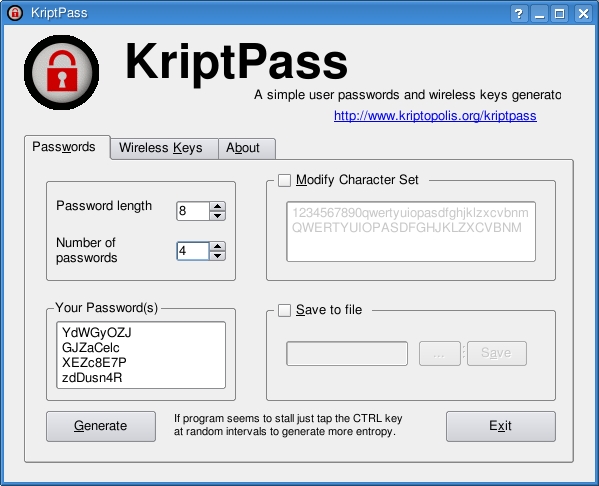
Figure 1. KriptPass is a Kommander script that provides a graphical front end to the text-based makepasswd command.
It's frightfully easy to use. Select the Password length and the number of passwords you want to generate, and then click Generate. You can cut and paste your new password into whatever application requires a password change. You also can save those passwords to a file by clicking the Save to file check box and selecting a name. If you want your password to use specific characters, check Modify Character Set, and enter your characters. The default uses the ten digits as well as the 26 letters in uppercase and lowercase—just like that, totally random passwords. Increase the password length, and your passwords will be even more secure.
The only catch—and this is the catch with any random, non-pronounceable password—is that the passwords are hard to remember, which, sadly, leads to people writing them down and potentially compromising security. How do we deal with this problem?
Tarek Saidi's KeePassX is a great place for this information. This password manager and data safe provides a secure location for your vast collection of user names and passwords. It's also a cross-platform application that runs under Mac OS X and Windows too. If, like many people, you work on multiple systems and need access to your information, you can copy the database to a USB key and carry it with you. To get and start using KeePassX, visit keepassx.sourceforge.net, or check your distribution's repositories for prebuilt packages (some binary packages are available at the KeePassX Web site).
When you start KeePassX the first time, you'll see that it is divided into two main panes. The left pane is labeled Groups. To the right, in the larger section, are headings for Title, Username, URL and so on. To begin, you need to create a new password database. Click File on the menu bar, and select New Database. A dialog appears asking for a password, which you must enter twice (Figure 2).
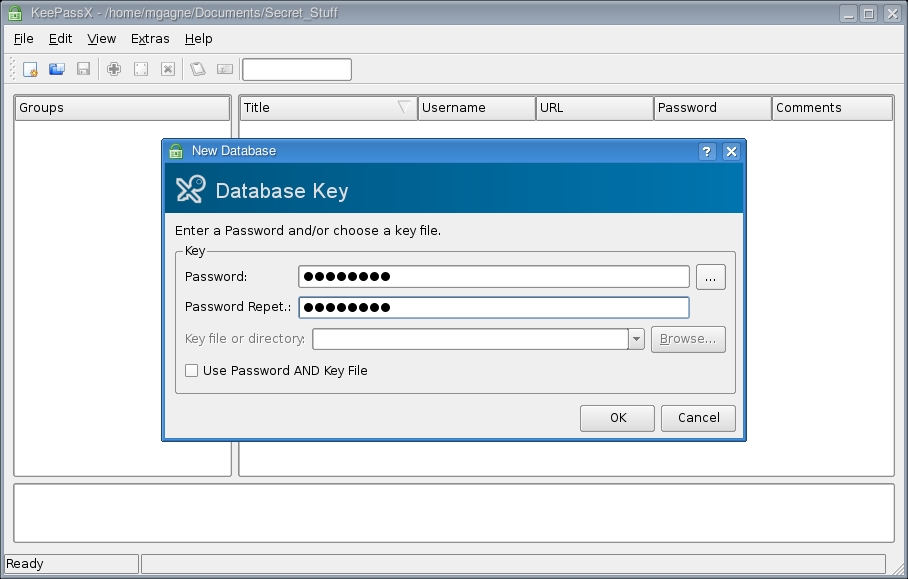
Figure 2. Before you can store anything in KeePassX, you need a database. You can create multiple databases if you want.
The database itself is encrypted using 256-bit AES by default, but you also can select 256-bit Twofish. The number of rounds to encrypt is 6,000, making this a very safe place for your personal information. However, don't ever forget that master password. If you want to change the encryption format or the number of rounds, click File and select Database Properties from the menu bar.
The next step is to enter a group. Click Edit on the menu bar and select Add New Group. The Group Properties dialog appears (Figure 3). This is purely informational and serves as a folder for storing passwords. So, enter a title that means something to you, then select an icon from the drop-down list. Click OK when you are done.

Figure 3. When creating a group, you can select an icon to represent the type of information you are storing.
You can create as many of these as you like with names like System passwords, Family PCs (if you are doing the administration on your family's systems), Customer systems and so on. The groups will appear in the Groups column. Select a group, click Edit on the menu bar and then select Add New Entry (or click the plus sign on the icon bar). The Edit Entry window appears (Figure 4). The Group is selected automatically, but if you want, you can choose another at this point. Enter a title to identify the entry, then enter your user name and password information. As you enter your password, the quality of the password is analyzed and reported on the Quality bar. You can add a comment if you like, but it isn't necessary. Additionally, you can select an expiration date, attach a file or simply click OK if you are done.
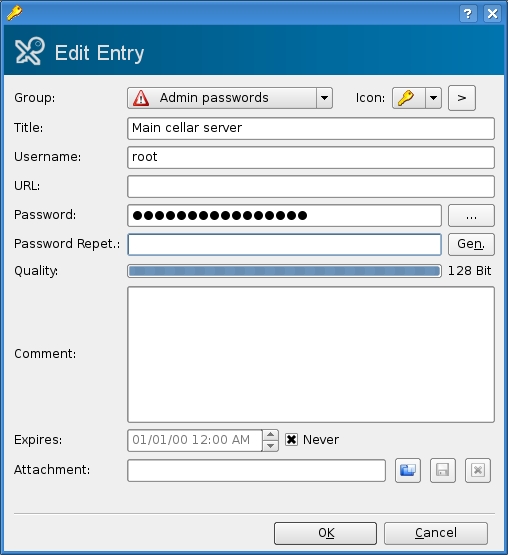
Figure 4. Add a password entry to your KeePassX safe.
Look closely to the right of the Password Repet. field, and you'll see a button labeled Gen. Given the earlier programs we've looked at, this might sound interesting, non? Click the button, and a password generator appears (Figure 5). KeePassX's password generator allows you to define what characters are included in your password, such as the use of special characters, spaces and so on. You also can define the password length; the default is a difficult-to-crack 20 characters.
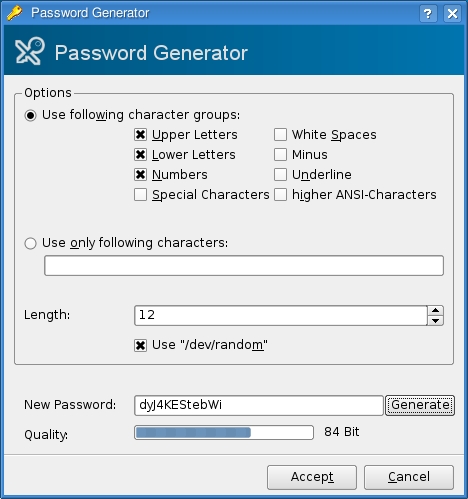
Figure 5. If you prefer, KeePassX can generate a password for you.
Click Generate and your password appears in the New Password field. If you like what you see, click Accept. In some ways, this brings us back to where we started, using a tool to generate secure passwords rather than relying on common words or phrases.
Later, when restarting the program, KeePassX challenges you with your master password before giving you access to the safe. If you are the sort of person who needs a tool like KeePassX, you also will have numerous passwords to look through when checking for a login you haven't used in ages. For that inevitable day, KeePassX provides a quick search feature, right on the main window at the far right of the icon bar (Figure 6). Enter one or more words in your title or comments, then press Enter. To see the actual password, double-click on the result, then click the ... button next to the hidden password.
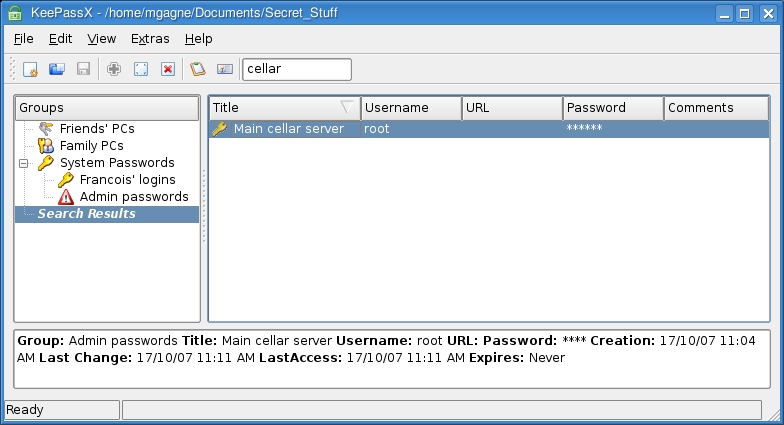
Figure 6. A quick search field is available at the top right of the icon bar. Simply enter part of your title, press Enter and your information is located quickly.
I can see that closing time has arrived, mes amis. Given François' penchant for exposing sensitive information, I may do the locking up myself tonight. Even though I poke fun at François, he still is the best waiter I've ever employed and an artist when it comes to opening and pouring wine. In that, I trust him completely. Please, François, take a moment to refill our guests' glasses a final time. Raise your glasses, mes amis, and let us all drink to one another's health. A votre santé! Bon appétit!
Resources
KeePassX: keepassx.sourceforge.net
KriptPass: www.kde-apps.org/content/show.php/KriptPass?content=58800
makepasswd: people.defora.org/~khorben/projects/makepasswd
Marcel's Web Site: www.marcelgagne.com
The WFTL-LUG, Marcel's Online Linux User Group: www.marcelgagne.com/wftllugform.html
Marcel Gagné is an award-winning writer living in Waterloo, Ontario. He is the author of the all-new Moving to Free Software, his sixth book from Addison-Wesley. He also makes regular television appearances as Call for Help's Linux guy. Marcel is also a pilot, a past Top-40 disc jockey, writes science fiction and fantasy, and folds a mean Origami T-Rex. He can be reached via e-mail at mggagne@salmar.com. You can discover lots of other things (including great Wine links) from his Web site at www.marcelgagne.com.
