
My Triple-Boot Laptop
I bought a new laptop in spring 2006 and decided to make a serious attempt to switch to Linux, or at least make it my primary operating system. I already had some basic experience, having used Linux servers at school for a few years, but I had no experience administering my own machine. My goals for the system were simple. First and foremost, it had to let me accomplish all my work-related tasks: computational programming, image manipulation and producing academic papers and presentations. Second, it had to fulfill my entertainment needs: playing music and video of various types (including streaming media), playing and backing up DVDs, playing games and making phone calls over the Internet. In addition, I had the more general, underlying goal of improving my understanding of the operation of my computer and reducing my reliance on proprietary software.
As it turns out, my choice of hardware had a big impact on the result. My laptop is a Compaq Presario V2630CA, with the following specifications:
1.8GHz AMD Turion 64 processor
512MB of DDR RAM
ATI RADEON XPRESS 200M
80GB hard drive
DVD R/RW and CD-RW combo drive with double-layer support
14" display
56k modem
Integrated Realtek Ethernet card
Integrated Broadcom BCM4318 wireless card
After much trial and error, my current laptop is a triple-boot system, featuring Windows XP, Ubuntu 7.04 (Feisty Fawn) and Arch Linux 2007.08 (don't panic).
The first decision to make was which Linux distribution to install. In the end, I chose Ubuntu. I had heard some pretty good things about it, particularly with respect to its package manager and hardware recognition. Setting up the dual-boot system was pretty easy. The computer came with Windows pre-installed, so all I needed to do was shrink the Windows partition and create a Linux partition structure. I used GParted, the GNOME partition editor, which is very easy to use (Figure 1) and can non-destructively resize partitions formatted with any common filesystem, including NTFS, the proprietary filesystem used by Windows XP and Vista. You shouldn't expect any data loss, but nevertheless, it's a good idea to back up the partition before resizing it. You can burn a bootable GParted CD or run it from the Ubuntu Live CD/DVD.
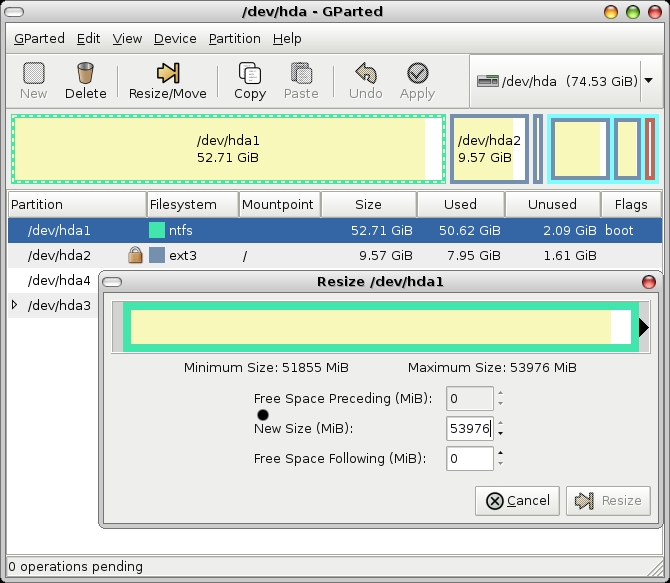
Figure 1. Resizing a Windows XP Partition Using GParted
Next, I created root and swap partitions in the remaining space—the minimum needed by Linux systems—and installed Ubuntu. I later deleted the recovery partition that came with the computer and replaced it with a small shared partition formatted with the FAT32 filesystem, an older DOS filesystem to which both Windows and Linux can write. When I next repartitioned my hard drive to install a third operating system (Arch), I replaced this with a home partition shared by both Linux distributions.
The Ubuntu install was pretty painless, and almost all of my hardware worked right away. The one exception was my wireless card. I soon discovered that it doesn't have a reliable open-source driver and is one of the least compatible with Linux. Ubuntu comes with a native kernel module for the card (bcm43xx), but it worked only sporadically and tended to cause my system to freeze up completely. I tried both the open-source NDISwrapper and Linuxant's proprietary DriverLoader, both of which operate as wrappers for the Windows driver. For $20, you can get a lifetime license for DriverLoader. Both require use of Windows driver files, bcmwl5.inf and bcmwl5.sys, which can be copied directly from your Windows partition (if you have one) or downloaded from the Web.
To install DriverLoader, simply go to Linuxant's Web site and download the installer. NDISwrapper is fully open source and comes pre-installed on Ubuntu. To load the Windows driver, simply use:
ndiswrapper -i bcmwl5.inf
I discovered that NDISwrapper works better in low-signal environments with unencrypted or WEP-encrypted networks, while DriverLoader is more reliable for connecting to WPA2 networks. If you use the GNOME desktop, NetworkManager is an excellent tool for connecting to encrypted or unencrypted wireless networks and making VPN connections (Figure 2). Simply install it with:
sudo apt-get install network-manager-gnome
Then, start it with:
nm-applet&
I found it to be more reliable than KDE's Wireless Assistant and less of a hassle than using scripts, as I travel a lot and often need to connect to new wireless networks.

Figure 2. Left-click the NetworkManager applet to display and connect to available wireless networks.
One of the great things about Ubuntu is that once you install it, you're immediately up and running with most of the stuff you'll need for day-to-day operation, and you're notified automatically when software updates become available. You can use Sun Microsystems' OpenOffice.org as your office suite, the GNU Image Manipulation Program (GIMP) for image manipulation, Totem to watch videos, Novell's Evolution or Mozilla Thunderbird for e-mail, Mozilla Firefox for Web browsing and so on. If you're running the 32-bit version of Ubuntu, it's also easy to install plugins for on-line streaming video, such as Flash and Windows Media. I'd recommend installing MPlayer and its Firefox plugin, which plays most video formats; Flash requires a separate plugin. At the time that I was running 64-bit Ubuntu, I was able to use Flash only by creating a 32-bit chroot environment. Once I created the shared FAT32 partition, it was fairly simple to share the data for my e-mail client and Web browser, Mozilla's Thunderbird and Firefox, between Linux and Windows.
There are several reasons to use two Linux distributions on your laptop. My main reasons for installing Arch were: 1) I wanted to try more Linux distributions to get an idea of which would be best for me; 2) Arch is a particularly, fast, lightweight, leading-edge distribution with an excellent package manager; and 3) it is very different from Ubuntu and less newbie-friendly, providing a great opportunity for learning and customization, and it's a potential intermediate step to Gentoo or other source-based distributions.
The Arch experiment proved to be quite useful for all of these reasons, yet it's easier to use than I expected. I had psyched myself up for a tough install, but it was only marginally more demanding than Ubuntu. After selecting which packages to install from the CD (it recommends installing only the base set of packages during the install process), the installer allows you to edit certain key configuration files. The main one, which encompasses almost all of the major configuration, is rc.conf. This file contains your time preferences, network configuration and selection of kernel modules and dæmons to load at startup. The most important thing is to get your Internet connection up and running by adding the kernel module for your Ethernet card to the list and entering your network information.
Once you've installed the base system, you can install any other applications as you need them. It will not boot automatically to a display manager, such as the GNOME Display Manager (GDM), so you should be pretty comfortable using a console. The package manager pacman is very easy to use. To install a package simply execute the following:
# pacman -S package
Then, to update your system:
# pacman -Syu
Pacman resolves package dependencies automatically and asks for confirmation to install the list of packages. You also can install groups, such as gnome, kde and xfce4.
In addition to the supported packages, Arch also has the Arch User-community Repository (AUR), which contains user-contributed templates allowing you to install additional applications easily from source using the makepkg utility. To install them, simply download the PKGBUILD file from the AUR Web site, and run the following in the directory to which you downloaded it:
# makepkg -si
The -si options are optional and instruct makepkg to install any dependencies that are in the supported Arch repositories and to install the package itself after compiling it. There also are pacman front ends that add support for AUR, allowing you to install AUR packages and keep them up to date easily. For example, yaourt lets you upgrade all packages by executing:
# yaourt -Syu -aur
I need a certain amount of software for scientific and graphical purposes, and there's a large amount of open-source and proprietary software out there, some of which my institution had licenses for. One of my goals in using Linux was to use as much free, open-source software as possible. I was already familiar with some excellent scientific software that was installed on my group's servers, such as Paul Wessel and Walter Smith's Generic Mapping Tools (GMT) and the graphing application Grace, but not the day-to-day software that I needed for my laptop.
The most basic need for people typically is office software. The natural choice for users of Microsoft's Office suites is OpenOffice.org, which essentially performs the same functions. It is able to open and save documents in Office formats or print directly to PDF. I use OpenOffice.org's Impress to prepare conference presentations and lectures, Write for writing papers and Spreadsheet for spreadsheets. However, there are a couple of caveats. First, some types of images are strongly aliased when displayed in slideshow mode in Impress; however, this is easily solved by converting the presentation to PDF. Second, equations created in Word cannot be edited in Write, and vice versa.
The main specialized proprietary applications that I use are the MathWorks' MATLAB (an excellent programming environment that can be installed in Linux) and CorelDRAW (graphical software). The simplest open-source alternative is GNU's Octave, which is in most ways a clone of MATLAB. It is quite easy to use Octave as a drop-in MATLAB replacement, as it uses the same language as MATLAB. With some exceptions, most computational scripts written for MATLAB will run correctly in Octave. The one major exception is graphics. Although MATLAB has an integrated graphical user interface (GUI) and graphics handler, Octave interfaces with several different GUIs and plotting applications. Gnuplot is the default plotter, but it isn't ideal for producing publication-quality graphics. I use the Koctave GUI with Octplot or Grace for plotting (Figure 3); both are pretty good, although only Grace allows you to make changes to a graph once it has been created. MATLAB's main advantage is that it is significantly faster and easier to use. On the other hand, you can install Octave on as many machines as you like, so it may be convenient to use both if you have a MATLAB license.
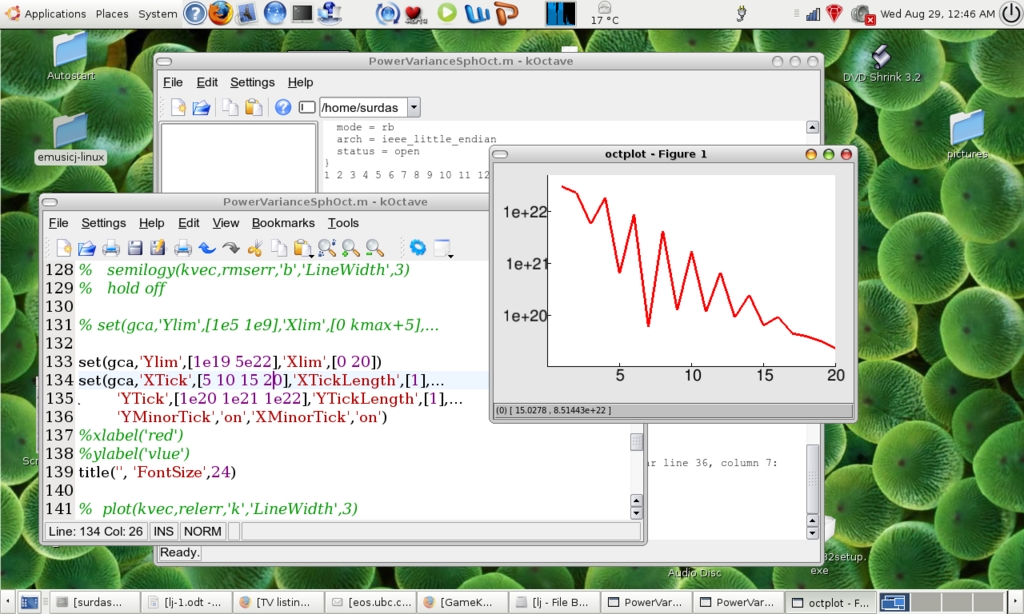
Figure 3. Using Octave with Koctave and Octplot as a MATLAB Replacement
Unfortunately, I didn't find any Linux software that could replace CorelDRAW. However, the GNU Image Manipulation Program (GIMP) is a great tool for image processing. It's very user-friendly and performs many of the functions of Adobe Photoshop or Corel PHOTO-PAINT. Many excellent open-source applications exist for playing music and video that are as good as or better than their proprietary equivalents. If you're using KDE, Amarok does an excellent job of organizing your music and radio stations. If you prefer GNOME (as I do), you'll likely go with Banshee or Exaile. I also use GNOME's Totem for playing DVDs and MPlayer for most other video formats.
If you want to use your laptop to make phone calls when you're on the go, open source is the way to go. Ubuntu comes with the Ekiga softphone built in, and several other open-source and proprietary softphones are available—most free of charge. In addition, the most common VoIP (Voice over IP) protocol, SIP, is open source, allowing you to make free calls to anyone using that protocol. By contrast, Skype users can call only other Skype users for free.
If you still need (or want) to run Windows applications—in my case, CorelDRAW and Word—you have a few options. First, you can create a multiple-boot system, as described above. However, if you use only a few Windows applications, you may be able to run them using CodeWeavers' Wine or CrossOver Office. Wine is free, whereas CrossOver Office is a beefed-up commercial product based on Wine; a license for the Standard version will run you $39.95. They work well for several popular Windows applications, such as Microsoft Office 1997–2003, iTunes and Internet Explorer, but don't count on being able to run your favorite programs.
A third and, in my opinion, more fun option is to install your copy of Windows on a virtual machine using virtualization software, allowing you to run it within Linux. An excellent open-source solution, Fabrice Bellard's QEMU, provides full hardware virtualization. Following the tutorial listed in the Resources for this article, it's quite easy to install QEMU, create a hard disk image and install your copy of Windows (or any other operating system). Once you have the guest operating system running, you can transfer files to and from it by passing in a USB device or mounting the disk as a loopback device (although you will not be able to write to it if it uses the NTFS filesystem). Alternatively, you can set up a network connection between the host and guest OS using TUN/TAP networking and transfer files via FTP. This method also gives you the option of allowing the guest OS access to the Internet, although there are obvious advantages to isolating your Windows install. Here's my QEMU startup script as an example:
#!/bin/sh

ARGS="-boot c -kernel-kqemu -net nic,vlan=0 -net
tap,vlan=0,script=/etc/qemu-ifup -m 512 -localtime -cdrom /dev/hdc -usb
-usbdevice host:xxxx:xxxx -std-vga -full-screen xp.img"

exec qemu $ARGS
The performance is quite good if you use the kqemu acceleration module, particularly if you have a dual-core processor, but I wouldn't recommend running resource-intensive programs. If you're running on batteries, keep in mind that running a virtual machine consumes a lot of power.
What are the advantages of a Linux laptop? The main advantage of Linux in general is the degree of control it gives you over your computer. This is even more important on a laptop, where you have limited resources—particularly with respect to memory and storage. Linux permits a degree of customization that is impossible in any other environment. For example, you can run a stripped-down Arch Linux with the lightweight Fluxbox window manager for a memory- and power-efficient system. Or, if you're plugged in, you can boot into a full-featured Ubuntu system with GNOME or KDE and a powerful composite window manager, such as Novell's Compiz or Beryl, a Compiz fork developed by Quinnstorm (Figure 4). For those who enjoy a little razzle-dazzle, take a look at what these window managers can do on YouTube. My Ubuntu/Arch/Windows setup gives me the flexibility I need to work (or play!) wherever I am. Arch provides a lightning-fast, stripped-down system with reduced power usage, and Ubuntu provides a full-featured, easy-to-use system with an excellent package manager to reduce bloat.
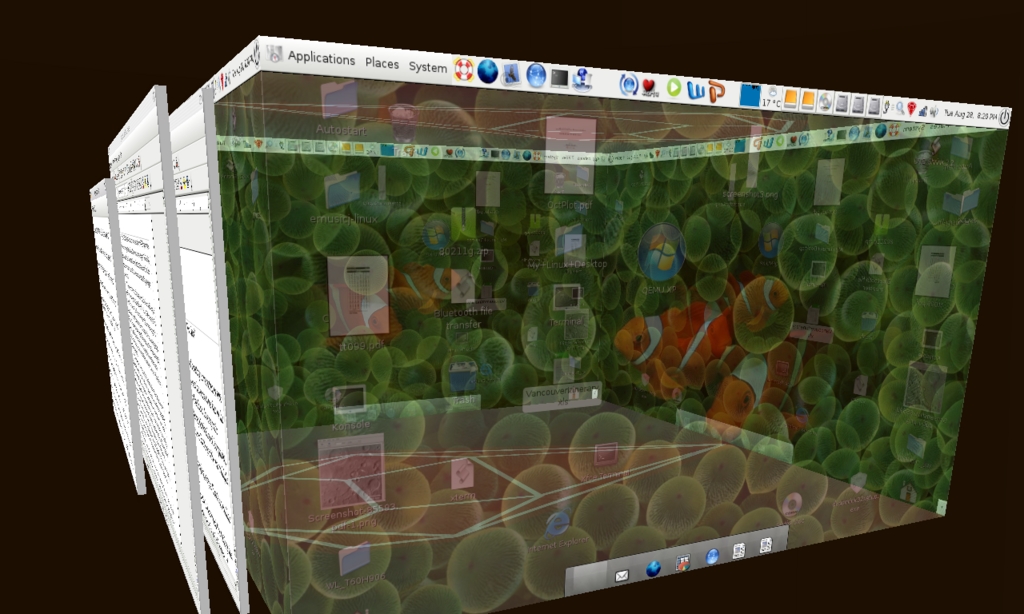
Figure 4. Switching Workspaces Using Beryl
I would like to thank Anthony Egan, my system administrator at Washington University, without whom I probably would never have dared to install Linux on my laptop. He helped me with many of the issues mentioned here and was always available to talk Linux.
Resources
Linuxant: www.linuxant.com
How to Share Firefox and Thunderbird Data between Windows and Linux: ubuntuforums.org/showthread.php?t=203524
Arch Linux User-Community Repository: aur.archlinux.org
GNU's Octave: www.gnu.org/software/octave
CodeWeavers: www.codeweavers.com
How to Install QEMU: https://help.ubuntu.com/community/WindowsXPUnderQemuHowTo
How to Configure QEMU to Share Your Network Connection: ubuntuforums.org/showthread.php?t=179472
P. Surdas Mohit is a postdoctoral fellow at the Institute of Geophysics and Planetary Physics at Scripps Institute of Oceanography and a Visiting Scholar at the University of British Columbia in Vancouver, Canada.
