
Tech Tips
Some time ago, I “discovered” automount, and after using it for a while, I wondered if it would be possible to combine it with FUSE and CurlFtpFs to make automatic filesystem access possible to FTP sites. This wasn't very trivial, because the automount software had some problems with the interpretation of the map file. I solved this problem by creating a helper script faking a curl filesystem.
Here are the steps:
1) If not yet enabled in the kernel, enable autofs by setting CONFIG_AUTOFS and CONFIG_AUTOFS4 to yes or module and rebuild the kernel.
2) Get FUSE from fuse.sourceforge.net and install it.
3) Get CurlFtpFs from curlftpfs.sourceforge.net and install it.
4) Create the map file /etc/auto.ftp:
-fstype=curl,allow_other,ro :ftp\://&/
This will tell the automounter to use the curl filesystem to mount an FTP site. I added the allow_other option so anyone on the system can use this method. See the documentation for FUSE and CurlFtpFs for other possible options.
5) I created the following helper script, /sbin/mount.curl:
#! /bin/sh

mount -t fuse curlftpfs
This will be used by mount to mount the curl filesystem, but it effectively uses the FUSE filesystem with CurlFtpFs to mount the FTP site.
6) Create the directory /mnt/ftp (or any other you like).
7) Then, after issuing the command (as root):
automount /mnt/ftp file /etc/auto.ftp
you can access FTP archives simply by changing to the directory /mnt/ftp/ftp.linuxjournal.com, as if on your own computer. After some time, automount (the default is five minutes, but that can be changed with the -t option with automount) will unmount this directory again and release the connection to the FTP site. Don't forget that every time you access a file, it will be transferred to you via FTP, which can take some time depending on your Internet speed.
—Michiel, from somewhere in cyberspace.
Check the Ultimate Linux Box article in this issue (page 64), and you'll find the “hard way” instructions for installing the latest NVIDIA driver on Ubuntu/Kubuntu. There's an easier way to install NVIDIA (or even ATI) drivers on Ubuntu/Kubuntu and all its spin-offs. You can use a program called Envy, which is designed to automate installation of accelerated graphics drivers.
I heard about Envy but opted to go the “hard way” at first because I'd read numerous reports of Envy failing to work. The hard way isn't very hard for me anymore, because I've gone through the process so many times. It's a shame I wasted my time though, because I found out later that Envy is, in fact, very easy. And, it works just fine with the latest Ubuntu/Kubuntu, Linux Mint and other Ubuntu spin-off distros.
The first thing you need to do is install Envy. Run the command:
sudo apt-get install envy
You may find that it automatically installs a number of dependencies.
Use the command envy -t to run Envy with the text-mode interface. This is especially useful if you weren't able to get a graphical desktop running at all, because you can run this from a text console. It works just as well in a terminal window on a graphical desktop though. See Figure 1 for a picture of the text-mode main menu.
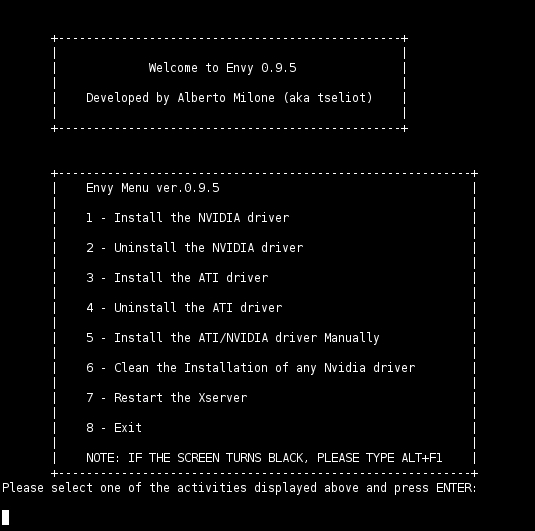
Figure 1. You can run Envy from a console or terminal window.
You can run a graphical version of Envy instead, with the command envy -g. See Figure 2 for a picture of the graphical main menu.

Figure 2. You can run a graphical version of Envy if you managed to get to a GUI desktop.
Select the first menu choice for the NVIDIA driver. You'll have to enter your password if you ran Envy as a normal user. Then, follow the prompts. It will ask you if you want to update your /etc/X11/xorg.conf file. The default answer is “y”, and I recommend you use it.
If you installed Linux and got a graphical desktop with low resolution because it couldn't detect your graphics card properly, you probably won't want to stick with that low resolution. The envy program won't necessarily correct this problem for you. You need to change your Screen section in the /etc/X11/xorg.conf file. For example, I deleted the resolution on the list starting with 1024x768 and replaced it with a 1920x1200 resolution, the only one I use:
Section "Screen"
    Identifier     "Default Screen"
    Device         "nVidia Corporation"
    Monitor        "Generic Monitor"
    DefaultDepth    24
    SubSection     "Display"
        Depth       24
        Modes      "1920x1200"
    EndSubSection
EndSection
—Nicholas Petreley
Linux Journal pays $100 for tech tips we publish. Send tips to techtips@linuxjournal.com.
