
The Ultimate Linux Laptop
So, what does the word ultimate mean in the context of Linux-based laptop computers? Should it be the laptop to blow away all others? Or might the best model be more subtle in its “ultimateness”? Given that we use our laptops in such varied ways, the answer in this context is more elusive than on the desktop or in the server room.
Brainstorming for inspiration on the criteria for the Ultimate Laptop, and given that my laptop and I reside in Michigan, my mind wandered instinctively to cars. “Which vehicle would most people agree is ultimate?”, I pondered. Based on what I see on local streets, I suspect that the Escalade, Corvette or XLR Roadster would win bragging rights. But, that's Michigan. An informal poll of my California friends gave me arguments for several different BMWs, Lexuses (Lexi?), Mini Coopers, Mustangs and more. What is a poor Products Editor to do?
Later, after reviewing the several entries for the Ultimate Linux Laptop competition, the ultimate automotive metaphor finally came to me. Although I probably will be run out of auto country for saying this, the laptop that was most like the Toyota Prius was the winner. In other words, the top machine was the one that would get LJ's readers' heads nodding and saliva flowing with its novel and elegant—but not necessarily just brawny—Linux-based innovations.
Based on these criteria, the winner of the 2007 Ultimate Linux Laptop competition is the EmperorLinux Raven X60 Tablet. The Raven X60 is a portable, powerful, well-designed, Core 2 Duo machine with several unique innovations that Emperor has brought to the Linux space. Shortly, we'll delve into why we selected the Raven X60, but first, here's a little more about the competition itself.
For this first iteration of Ultimate Linux Laptop, we emphasized the innovation-focused “Prius effect” as mentioned above, considering the entire computing experience. We called on vendors to send us their best publicly available total package for around $3,000 US or less. Linux should be pre-installed, and all major features (such as Wi-Fi support, Bluetooth, function keys and so on) should work without major extra input from the user. Furthermore, after testing all the machines, we were more convinced that the complete package is much greater than the sum of its parts. Some machines looked wonderful on paper but simply failed to inspire. Factors such as ergonomic construction, service, documentation and attention to detail noticeably and considerably separated the best from the adequate.
We anticipate that some readers will prefer that the Ultimate Linux Laptop act more like a Porsche than a Prius and provide the most smoke-producing performance possible. Yes, we considered this, and in the future, we may bump up the price point to include exotic machines. This year, however, we felt that the current market for Linux laptops warranted a brains-over-brawn approach.
Luckily, many of the firms that ship pre-installed Linux machines took part in our competition. We cheered the news of Dell's shipping pre-installed Linux laptops and tried to get our hands on one for testing. Unfortunately, however, Dell expressed zero interest in participating, despite repeated calls around Round Rock. In contrast, I spoke with either the CEOs or Vice Presidents of all of the Linux specialist providers. Although many in our community make calls to support Dell, I say that actions speak louder than words. In my experience, our community-based providers generally do an excellent job of supporting what they sell.
Now, on to the Raven X60 Tablet laptop!
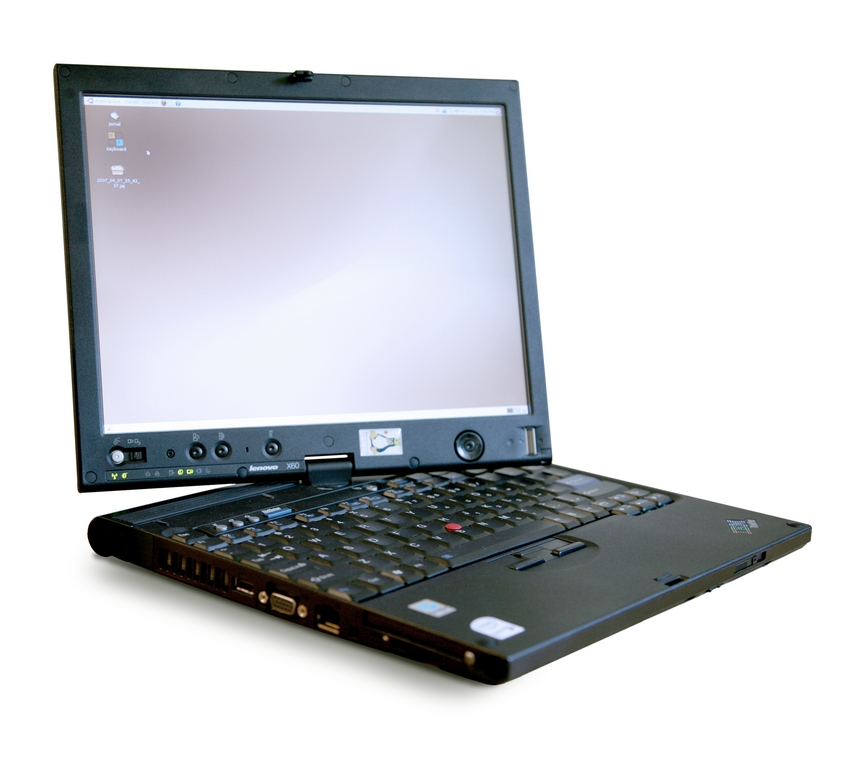
Figure 1. The Raven X60 has a 4,096dpi Wacom Tablet built in to the LCD display.
Here are the specs for the Raven X60 Tablet we tested, priced at $2,950 US:
Dual-boot Ubuntu Feisty Fawn (kernel 2.6.21) and Fedora Core 6 (kernel 2.6.17), both 32-bit.
Processor: Intel 1,667MHz Core 2 Duo L2400 with 2,048KB cache (667MHz FSB).
2,048MB of RAM.
100GB hard disk at 5,400RPM.
DVD+/-RW (in UltraBase, included).
12.1" LCD display at 1400x1050.
Networking: 10/100/1000Mbps Ethernet, 56Kbps modem, 802.11a/b/g (54Mbps) Wi-Fi, Bluetooth (2Mbps).
Weight: 3.4 lbs. alone, 4.4 lbs. with battery, 6.4 lbs. with UltraBase.
Battery: 8-cell, 4.5 amp hours.
Ports: two USB, one CardBus, one RJ-45, one VGA, one secure digital.
Bluetooth support.
Wacom Tablet integrated into LCD display.
Biometric fingerprint scanner.
UltraBase station includes DVD+/-RW, additional ports—parallel, serial, USB (four), PS/2—and pass-through of RJ-45, VGA.
Four features on the Raven X60 Tablet put it all alone into this year's winner's circle. First, the X60, which is simply a Linux-powered Lenovo ThinkPad X60 Tablet, is a well-built ergonomically efficient machine. Lenovo has continued IBM's strong tradition of quality, which is evident in the components used, the construction (such as the display swivel) and the comfortable computing experience (for example, the keyboard and stylus response).
The second stand-out feature is the 4,096dpi Wacom Tablet built in to the LCD display, which works like a charm. Emperor conveniently pre-installs the Jarnal handwriting recognition software with a desktop icon, so you can rotate and flip the display any way you wish, even flat on its back, and start writing. The Dynamic X rotation allows you to cycle between four screen orientations without restarting X. In addition, the included stylus can act as a mouse or a stylus with a pressure-sensitive eraser. Besides tinkering with Jarnal, I had a blast playing with the tablet function on The GIMP, which made me feel like a budding artist. Emperor's president, Lincoln Durey, told me that The GIMP “takes advantage of the 256 levels of pressure sensitivity that the stylus provides”.

Figure 2. Use the tablet for your graphics work on The GIMP, which recognizes 256 levels of pressure. You also can cycle between four different screen orientations.
Yet another slick feature is the Raven X60's biometric fingerprint scanner, which currently works on the GDM, login and sudo PAM services. Once you've trained your own fingerprints, you can use it to log in or simply revert to your password.
The fourth feature to distinguish this machine is its comprehensive, well-designed manual, which is specific to the Raven X60. It's obvious that Emperor considers good documentation a core part of the user's experience, as the manual nicely predicts what information the user will seek. Furthermore, each section clearly explains not only what features exist and how to use them, but also what features are not working yet. This service will save you hours by steering you away from dead ends.
Besides the four aforementioned features, there is much else to like about the Raven X60. Regarding the things under Emperor's control, it provides a well-planned Linux experience. The Raven X60 came dual-boot with Ubuntu Feisty Fawn or Fedora Core 6 installed, both of which had many nice features. (However, Ubuntu was a little more polished than Fedora.) Standard features were all working out of the box (including wireless networking and Bluetooth), and with a few clicks on both distros, I was able to install the codecs that allowed me to play unencrypted DVDs, MP3s and Windows Media and Audio files.
Of course, one of the critical tests of a good pre-installed Linux laptop is how well the function keys work, and the Raven X60 performed well here. Despite sluggish brightness controls, functions such as volume control, external VGA and hibernation worked well. The media player controls worked, but only with Totem.
Emperor also ensured that the docking station, otherwise known as the UltraBase, works; however, it's not hot-plug yet due to it containing an IDE device, but Emperor says that this feature is on the way. The UltraBase, which ships standard with the Raven X60, holds the DVD+/-RW out of the box, but one also could swap in an extra hard drive if desired. It also has several additional ports (parallel, serial, four USB, PS/2) and pass-through for RJ-45 and VGA.

Figure 3. The included UltraBase docking station contains the DVD+/-RW drive, as well as a multitude of additional ports.
Other features where credit is due to Lenovo (and Intel) include the 1,667MHz Core 2 Duo processor, conveniently recessed ports and a non-wimpy display swivel that looks and feels like it will go the distance.
The only complaints to record are that the Raven X60 I reviewed came with 32-bit Linux rather than 64-bit, though Emperor indicated that, at the time of this writing, it is nearly done with tablet support for the latter. By the time you read this, you should be able to utilize Emperor's Web-based configurator to install 64-bit Ubuntu or Fedora for this machine. In addition, the hard drive I received runs at only 5,400RPM, and given that this was the Ultimate Linux Laptop competition, I would've expected to receive the faster model at 7,200RPM.
Because Emperor started with a well-built Lenovo machine and then made sure that its bells and whistles all worked under Linux—most notably the tablet support, biometric fingerprint scanner and excellent documentation—it deserves to take a proud victory lap for its hard work on the Raven X60. These aspects show that the company clearly values attention to detail and wants to maximize your Linux-based laptop experience.
After the victory lap, however, we hope Emperor will continue to innovate and push forward the dynamic domain of Linux-based laptops. It will have to keep looking over its shoulder though, because the market for Linux laptops is maturing, the competition is fierce, and the market for exotics will get more interesting. See you next year!
James Gray is Linux Journal Products Editor and a graduate student in environmental science and management at Michigan State University. A Linux enthusiast since Slack 1.0 in 1993, he currently lives in Lansing, Michigan, with his wife and kitty.
