
Building a Next-Generation Residential Gateway
Before embedded Linux became the de facto standard for networking devices, building a residential gateway (RG) or similar appliance used to be an expensive and nontrivial task. Real-time operating systems (RTOSes) used on these kinds of devices, such as VxWorks or pSOS, are relatively expensive and lack many features needed for an RG, which has to be purchased separately. VxWorks 5.5, for example, comes with a TCP/IP stack that has performance problems and does not even implement an L2 bridge, not to mention a firewall. This situation created a business opportunity for a number of companies, such as Ashley Laurent and Jungo, who sell RG software stacks for various OSes. The advent of embedded Linux distributions, such as uClinux, reduced the process of building an RG to choosing the right hardware, writing the drivers for peripherals and adding some kind of Web-based configuration utility. Embedded Linux reduced the development and cost of RG devices not only by providing many important features that either were missing or expensive in RTOSes, but also by easing the integration and debugging of drivers and applications, thanks to the clear POSIX driver model and kernel/user-mode separation.
However, Linux dominance in the embedded networking market is now challenged by new technologies. In the past, RG devices with ADSL, DOCSIS and 802.11 peripherals rarely were required to pass throughput beyond 10Mbps. New technologies, such as 802.11n and PON, make 100Mbps throughput a reality, challenging embedded engineers with the task of creating RGs capable of handling much higher traffic on the same or at least similarly priced hardware.
Before designing your own residential gateway, it may be worth taking a closer look at one of these devices.
If you decide to take a look inside your 802.11 access point or ADSL gateway, which probably will void your warranty, you will find an embedded board with a CPU (probably some MIPS variant), Ethernet switch, ADSL/DOCSIS and 802.11 chips, as illustrated in Figure 1.
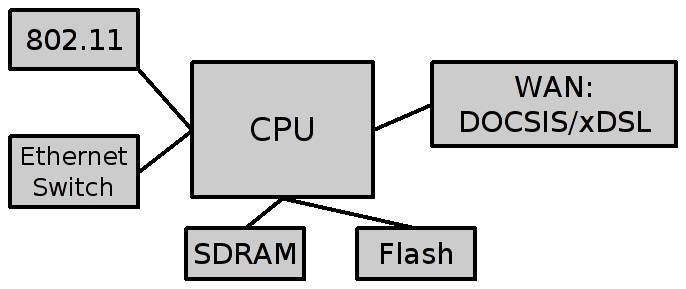
Figure 1. RG Hardware Block Diagram
Some (or even all) of the above can be integrated into one piece of silicon to form a System-on-Chip (SoC). On the other hand, you also may find the same stock mini-PCI (mPCI) 802.11 card connected to an embedded board as the one you will find in your laptop.
Chances are, your home gateway runs Linux. If you'd like to know for sure or maybe hack a bit on it, you have to solder the UART connector, which is relatively easy (most boards come with UART enabled, but without a connector). The software stack usually includes some version of Linux (2.4.x kernels are still pretty common in the embedded world), the usual user-space utilities and libraries, peripheral drivers and a configuration utility—either command-line interface (CLI), Web or both, as shown in Figure 2.

Figure 2. RG Software Block Diagram
Now that you have a general picture of what makes a residential gateway, and assuming you have working hardware (more details on hardware later in this article), let's see what pieces of software you'll need. At the bare minimum, you need kernel sources, some variant of the libc library, basic user-mode utilities (at least a shell) and a cross-compiler toolchain to build them all. In short, you need an embedded Linux distribution. uClinux is a good choice, as it supports a wide range of CPUs (not necessarily CPUs without MMU, as the name might imply), comes with many useful user-mode utilities and has an easy-to-use kernel-style configuration system for all the packages. As always, the choice is not limited only to one distribution. There are a variety of free and commercial Linux distributions from which to choose.
Assuming your board (not just the CPU) is supported by uClinux, the process of building a working image boils down to downloading the distribution itself and the cross-compiler toolchain for your CPU and then simply following the build instructions. If your board is not supported by uClinux, chances are the board manufacturer will provide a board support package (BSP)—that is, adapt uClinux (or some other Linux version) to that hardware. If this is not the case, you have to write the BSP yourself, which is beyond the scope of this article.
The major components of the uClinux distribution are, of course, the kernel itself, the uClibc library and BusyBox. The uClinux kernel has support for MMU-less CPUs, but this feature is of minor importance nowadays. Because the cost of adding the MMU is so small, I expect that most, if not all, embedded CPUs used on an RG will have it. Nevertheless, uClinux is a great distribution, even if you don't exploit the MMU-less CPU support. The same goes for uClibc. It originally was created to support MMU-less systems, which, for instance, cannot have a fork(2) system call. But, even if you don't need this functionality, it is a great alternative for glibc on embedded systems, as glibc has much larger RAM requirements. BusyBox is a collection of standard UNIX utilities, optimized for embedded systems with low RAM. It comes with uClinux, and as with uClibc, you usually will prefer it over full-featured standard utilities, unless you have a system with enough RAM (typically above 16MB).
You need two important pieces of software that are not a part of uClinux. The first piece is a bootloader, which is software that usually resides in ROM (at least partially) and is responsible for loading the Linux image from Flash to RAM and performing some hardware initializations. Unfortunately, there is no standard bootloader for uClinux. In fact, there are no standards for bootloaders in the embedded world, and you cannot use PC bootloaders, such as GRUB or LILO. Your hardware manufacturer almost certainly will provide a bootloader, and I strongly suggest using it. If it does not support Linux, it usually is easier to adopt it than to port a different bootloader to your hardware. If you still choose to port the bootloader, Das U-Boot is a good choice, as are many others.
The second missing piece is a Web-based graphical user interface (GUI), which most users come to expect from RGs. Most, if not all, currently available RGs have a Web interface written from scratch. However, it does not have to be like this anymore with the introduction of the X-Wrt Project, one of the components of the OpenWrt Project, which you almost certainly will want to look at if you are building an RG. OpenWrt is a Linux distribution for the Linksys WRT routers (and not only those).
Add to this a bit of init script writing, and you are done, except for the peripheral (802.11, ADSL and so on) drivers, which is a topic for a another article.
Now to the real fun—choosing (or even better, designing) your hardware. MIPS is the most commonly used CPU architecture in these kinds of devices, with older devices using the MIPS32 4K cores, and newer devices probably using the MIPS32 24K cores. As MIPS 24K is about 3% slower than MIPS 4K at the same clock rate (because of the longer pipeline), it makes sense to use it only if you really need clock rates of about 400MHz. However, benchmarks show that networking devices are memory- and I/O-bound, not CPU-bound (after all, there is not much number crunching in forwarding packets, with a few exceptions discussed later), so you probably will need these high clock rates only if you are going to use DDR RAM and not SDRAM (which is limited to 133MHz).
Another option is the new (at least in the embedded world) multithreading (MT) technology of the MIPS32 34K, which can have a configurable number of Virtual Processing Elements (VPEs) and Thread Contexts (TCs). Without going into too much detail, this technology is a more flexible equivalent of Intel Hyper-Threading, which helps the CPU exploit parallelism at the process and thread level (compared to parallelism at the instruction level, which superscalar processors can exploit quite well). This can boost performance in some cases, especially when there are a few concurrent processes or threads that are I/O- or memory-bound, but benchmarks show that this may not always be the case. In addition, MT has an overhead—MIPS 34K is slightly slower than MIPS 24K at the same clock rate, and the Linux kernel becomes slightly slower when compiled with symmetric multiprocessing (SMP) enabled.
Another CPU you probably should consider is MIPS' closest competitor—ARM. It is used less frequently than MIPS for these particular devices, mostly for historical reasons. ARM7 is very popular, small and has a low power core; however, it is clearly too slow for an RG. If you decide to go with ARM, you should consider one of the ARM9 or ARM10 families of processors, with the major differences, as far as an RG application is concerned, being performance, power consumption and cost.
RAM and Flash choice is obvious; you need at least 8MB of RAM and 2MB of Flash. However, as memory prices are dropping, I expect that future devices will have 64MB of RAM and 4MB of Flash. For the same reason, you probably will have to go with DDR and not SDRAM—as SDRAM actually becomes more expensive than DDR.
Assuming you are going to use one of the reference design boards provided by a manufacturer (board design is beyond the scope of this article anyway), you are ready to test your brand-new RG. Unfortunately, you are in for a big surprise. Your CPU is going to choke at not so unreasonable bandwidths.
One possible solution is to use a more powerful (and significantly more expensive) CPU, such as the Intel IXP or Freescale PowerQUICC network processors. For instance, the 533MHz IXP425 will have no problem sustaining that kind of traffic. Unfortunately, in order to stay competitive, RG manufacturers cannot afford these high-end processors, so a more creative solution is required.
This is the challenge of next-generation RGs—achieve high throughput using low-end hardware. One possible solution is to offload the whole data path of the RG to hardware, the way it works on high-end core routers, which usually employ a general-purpose CPU only for management and control. There are a few chips that can do this for the low-end RG market, such as the Realtek RTL8650B/RTL8651B, which can do routing, NAT and firewall in hardware. Of course, the implementation is limited compared to the Linux TCP/IP stack, but the hardware can be configured to trap the CPU in case it encounters a packet it cannot handle, so that most of the packets will be forwarded from one interface to another without interrupting the CPU. However, this approach has a number of problems, the most serious one being the fact that the hardware TCP/IP stack is limited to a fixed interface (MII in case of RTL8650). It would be difficult and, in some cases, impossible, to connect other interfaces, such as 802.11, DOCSIS and xDSL, to that logic. Therefore, I believe that although this approach can work in some specific cases, it is a wrong idea in general.
Typically, it is a good idea to keep to the software as much as possible, because it's easier to develop and debug. Another optimization approach is based on the observation that RGs (and networking applications in general) are memory-bound, so it would be extremely beneficial to improve memory access. Let's separate data and code for the sake of this discussion. As far as the code is concerned, we want to keep it in cache as much as possible. Ideally, we want the whole critical path routines—that is, starting from one driver's receive function via the TCP/IP stack and to the other driver's send function to stay in cache all the time. This is not possible with most embedded processors, which have only a 32K cache. However, it can be shown that the Linux 2.6 critical path—that is, functions used 95% of the time, under firewall and NAT configuration, including Ethernet drivers' send and receive routines, can fit into a 64K cache, and there are embedded processors with 64K on the market. If your CPU does not have that much cache, but instead has scratchpad SRAM, you can modify the Linux linker script to place certain routines in the SRAM memory region.
If you want to test the above observation (or calculate how much cache your particular application needs), use OProfile, which is a system-wide profiler for Linux that allows you to profile user-mode applications, kernel and drivers, and supports many embedded architectures along with objdump (or any other utility) that will show you how much memory each routine requires.
As for the data, it is absolutely necessary to ensure that all network drivers follow zero-copy methodology, and it may be wise to place frequently accessed data structures in a scratchpad SRAM.
Yet another optimization approach is the mixture of the above two—using profiler, find the most CPU-intensive pieces of code and offload this particular functionality to the hardware. As it turns out, the two most CPU-intensive tasks related to networking are IPSec and the UDP/TCP checksum calculation. It is very convenient (and not very surprising) that both have a well-defined architecture for hardware offloading. UDP and TCP checksum offloading is extremely beneficial, because if it is checked in the hardware on receive and calculated in the hardware on transmit, the CPU will never have to bring the whole packet into the cache, significantly reducing the number of memory accesses. IPSec, on the other hand, is less useful, as an RG is rarely an IPSec termination point—usually IPSec (VPN) traffic is passed through and terminated on the PC.
Another approach that I definitely do not recommend, but one being taken by some manufacturers because it is actually cheaper than the ones mentioned above, is to “optimize” Linux by creating various types of “fast paths”. For instance, if the L2 bridge performance is not satisfactory, it is possible to pass packets from one network driver directly to the other, eliminating at least one context switch and some other code, resulting in performance gain. Although it will not work in general cases, it does work for an RG, where the manufacturer controls the whole system, including all the drivers and the kernel itself. The biggest problem with this approach is that it actually cripples the stock Linux kernel, limiting functionality and introducing bugs. These modifications rarely are submitted to the Linux-kernel mailing list, and even if they were, they never would be accepted. But, they do go into some products you can find in stores.
Using the steps described above, you should be able to build a Linux-based RG with relatively little effort. If performance becomes an issue, which almost certainly will be the case if you cannot use high-end processors, follow the optimizations guidelines outlined above. And, it's always a good idea to run a profiler on your particular system to discover additional bottlenecks.
Although this article discusses RGs, most of the conclusions and guidelines are true for any embedded networking system.
The issue of Linux optimization for RG systems actually leads to a much bigger and more controversial topic. There seems to be a significant communication problem between the Open Source community and embedded developers working for commercial companies. On one hand, features added to the kernel sometimes hurt performance on small embedded systems. On the other hand, Linux improvements done by some companies do not always find their way back to the main kernel tree, often because they are not done properly. One good example of this miscommunication is the 2.6 kernel itself, which included many important improvements for embedded systems, but suffered some performance degradation. As a result, a significant number of embedded systems still run the 2.4 kernel. The reason for this miscommunication is probably the fact that semiconductor companies that usually do embedded software development find it hard to embrace the idea of open source, but it also may be due to the fact that the Open Source community is less interested in embedded systems, because they are harder to hack than a PC. I do believe that the first problem eventually will go away, as semiconductor companies understand how they can benefit from open source, and I try to do my share of explaining wherever I can. As for the second problem, one of the messages of this article is that it's easy and pretty cool to hack embedded systems, and you actually may have the hardware already.
Resources
OProfile: oprofile.sourceforge.net
uClinux: www.uclinux.org
DENX: www.denx.de
Das U-Boot: sourceforge.net/projects/u-boot
uClibc: www.uclibc.org
BusyBox: busybox.net
OpenWrt: openwrt.org
X-Wrt: x-wrt.org
Linux/MIPS: www.linux-mips.org
ARM Linux: www.arm.linux.org.uk
“An Introduction to Embedded Linux Development, Part 1”, by Richard A. Sevenich: www.linuxjournal.com/article/7848
“An Introduction to Embedded Linux Development, Part 2”, by Richard A. Sevenich: www.linuxjournal.com/article/7911
“An Introduction to Embedded Linux Development, Part 3”, by Richard A. Sevenich: www.linuxjournal.com/article/8001
Alexander Sirotkin works for Metalink Broadband as a software architect. Metalink Ltd. (NASDAQ: MTLK) is a leading provider of high-performance wireless and wireline broadband communication silicon solutions. Alexander has more than ten years' experience in software, operating systems and networking, and he holds MSc and BSc degrees in Applied Statistics, Computer Science and Physics from Tel-Aviv University.
