
Take a Peek at Some of the Freshest Projects Around
Initial screenshots of LMMS will give you a hint of FruityLoops and the like, but in reality, LMMS takes a completely different tack. LMMS takes on a micro-managed approach, and it probably will appeal to control freaks who want to generate their own samples or instruments from scratch. With the ability to layer instruments and tracks, you can create whole songs from the ground up.
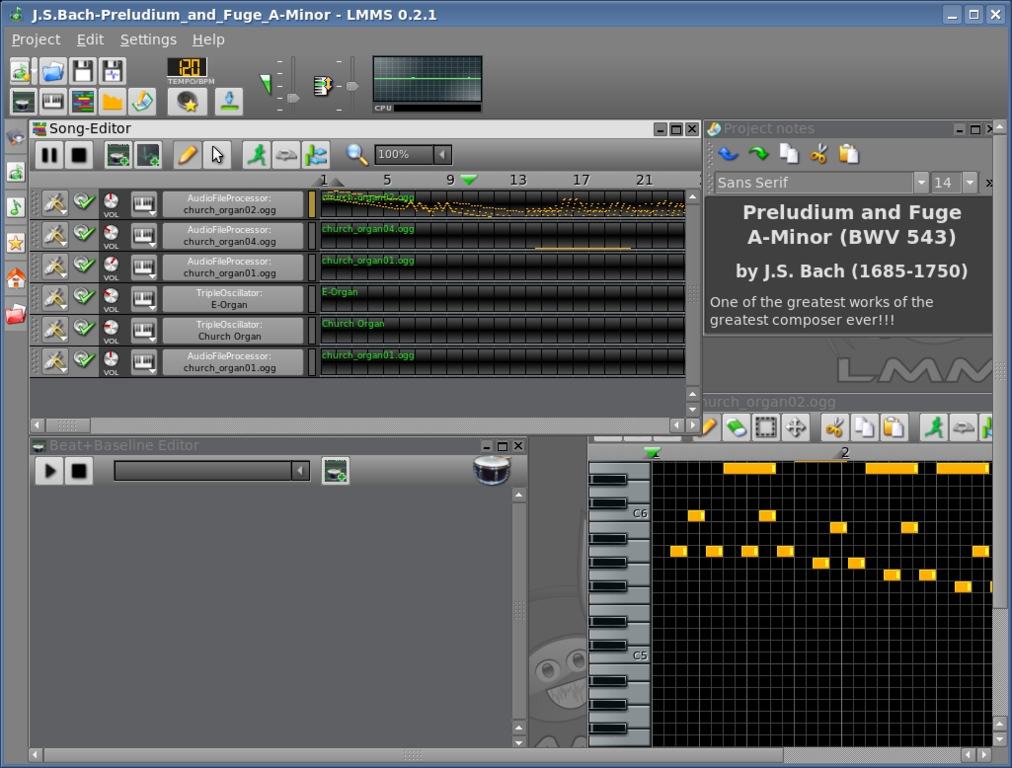
LMMS—the Music Suite for the Ultimate Control Freak
Unlike most compositional software under Linux, LMMS takes an alternative approach to midi for many circumstances, by synthesizing through wave instead. This sidesteps the often annoying process of making midi work under Linux, although midi still can be used and is very much a part of LMMS. By tweaking all the knobs and available options, you can generate entirely original sounds and use them in any way you see fit.
I managed to generate some brilliant effects and samples for my own musical projects. This likely will appeal most to dance-music DJs and also to fans of Nine Inch Nails or the more recent Massive Attack-style music for those who want unique samples, or it will appeal to fans of retro 1980s synthesized sound for those who want to make whole orchestrations.
Installation is a breeze, as LMMS resides in many distributions' repositories. Under Debian-based distributions, all I had to do was a simple:
# apt-get install lmms
For those who can't find a binary for their system, however, a simple:
$ ./configure
$ make
(as root or sudo)
# make install
with the source is all that is required. Thankfully, LMMS doesn't have too many strange dependencies, so it should compile right off the bat for most systems.
Once you dive into the world of LMMS, a steep learning curve presents itself. Some tutorials and demos are included, but these will leave most users in the dark on many issues (but they are worth examining as they do uncover the uses of many GUI items). The demos are indeed worth a look and show off the capabilities of the program. The demos include Bach's “Preludium and Fuge in A Minor”, which is impressive when you watch the keys played in real time under each instrument's settings, and other cool demos are included that range from general dance music to the occasional more atmospheric piece.
The best tip for exploring LMMS for the first time is to click on the yellow star on the left whose tab is titled My presets. From here, you can play around with some already-tweaked instrument settings and various GUI buttons and sound settings until you come up with something that sounds interesting and the interface becomes more familiar. Also, be sure to look at the green musical note above the yellow star, titled My samples. This contains the base instruments to begin with and offers a large variety, including (but not limited to) some impressive drum samples, Latin guitars, as well as some amazing string, choir and atmospheric effects.
Despite all of the features and demos, however, it's worth visiting the LMMS Wiki. Documentation is still lacking for this project, but hopefully this improves in the future, particularly in relation to chord compositions and note editing. Documentation issues aside, the program is quite stable at the moment and can at least be used as a good beat sequencer. If you can figure out the interface for instrument composition, whole tracks also will be at your fingertips.
Some other impressive features are JACK and LADSPA support, but best of all is the ability to mix an instrument in surround as opposed to just stereo. When I asked lead developer Tobias Doerffel about the development status, he mentioned that LMMS is still rather unstable on 64-bit platforms, but after this is fixed, it will be in a quite usable state. He also wants to include a mixer that mixes all of the tracks as well as improve the available JACK support.
Currently, this is fairly mature beta software that looks extremely promising, and it is lacking only decent documentation—definitely worth a look for any home musician.
For more information on LMMS, see:
Home Page: lmms.sourceforge.net
Download Page: lmms.sourceforge.net/download.php
Wiki: wiki.mindrules.net
For all you system administrators out there keeping track of important log files with tail, this is definitely worth a look. When using the follow mode (tail -f filename), tail re-reads a file once a second by default. inotail takes a different approach by making use of a newer kernel feature, the inotify API. Instead of a clumsy cyclical update based purely on time, inotail listens to special events sent by the kernel using the new API.
After testing inotail, I was happy to see its results. I simply took a text file and read it with the command inotail -f test.txt. With the text file, I added lines one at a time and saved the document each time as I added a line. As soon as I pressed Save, the inotail screen output instantly updated without a hitch. Okay, so it's not exactly going to impress your mates, but system administrators probably are going to find an instant use for this far more elegant approach to keeping an eye on file updates.
I'm afraid that you still will have to compile this one from source, but it isn't hard. According to developer Tobiad Klauser's Web site, inotail should be in the Debian repository soon, but it isn't there at the time of this writing. To compile and install inotail, simply extract the tarball (available on the main page of the Web site), and go to the new directory. Enter the commands:
$ make
(as root or sudo)
# make install
As with most source compilations, this places the executable in /usr/local/bin by default. If you would rather place it in /usr/bin, enter the command:
# make prefix=/usr install
The only real factor hampering this project for now is time. inotail requires at least a 2.6.13 kernel, which still is fairly young for many system administrators who tend to use somewhat older and more mature distributions than the rest of us. After a year or so has passed, when inotail has been accepted into the Debian archive and administrators have upgraded their distributions, inotail should be finding its way into many an admin's toolbox.
Home Page: distanz.ch/inotail

Karmen—for a Clean and Minimalist Environment
For those of you who like minimalist window managers, Karmen may be your future choice. Designed to “just work”, it has no dependencies except Xlib and no configuration file to fiddle around with. According to the README file, these are its main goals for full release:
Intuitive, efficient window management.
Provide a high-quality look and feel.
Standards compliance (ICCCM and EWMH/NetWM).
Work well as a standalone window manager.
Work well with other desktop utilities and environments.
Focus on window management and let other tools do the rest.
Head to the main Web site to grab the latest tarball. Indeed, installing it was a cinch. Doing a simple:
$ ./configure
$ make
(as root or sudo)
# make install
was all that was required, and as it says on the tin, there are no weird little dependencies to get in the way. It also happens to be quick and sleek, and each time I turned my head back around to look at the monitor, configure, make or make install was already done!
Once you have the Karmen desktop running, moving windows around is nice and familiar in a KDE/GNOME/Windows way, with clicking to focus and window resizing working in the intuitive way users have come to expect. Rather than the all-too-common annoyance of having to click on a window's titlebar to change focus that plagues many lightweight window managers, Karmen lets you switch window focus by clicking within a window's body. Maximizing is a different affair though; whereas two obvious minus and close buttons sit at the top right of a window, maximizing requires that you double-click the titlebar—not immediately obvious. For a list of windows (whether active or minimized), right-click on the desktop, and a new menu appears, allowing you to bring to focus any windows currently running.
Another interesting note: Karmen seems to be quite a keyboard-driven window manager. For instance, to tell a window to stay on top of others, click the titlebar with the Shift key held down. Shift-clicking again disables the stay-on-top property of the window. A welcome addition to minimalist window managers, pressing the familiar old Alt-Tab cycles between windows. In fact, most basic GUI functions can be performed via the keyboard, generally by using a combination of Alt and another key.
However, Karmen is quite young in its development, with some strong limitations in its current form. Still lacking is any kind of menu for major functions, such as logging out or choosing a simple xterm. Indeed, Karmen still requires that you kill its process manually to exit—obviously something that will be changed in the future, but a definite indicator of a project that's still in its infancy. Lacking too are startup scripts to start the window manager cleanly; you either have to make your own script or edit .xinitrc. For those who can't be bothered with this, you also could start Karmen from the command line, but you have to add & xterm specifically after the command. Thankfully, these topics are touched upon in a nice man page—a professional touch at this early stage. Also, for now, Karmen is a strictly one-desktop affair, but hopefully this also will change.
All limitations aside, however, developer Johan Veenhuizen's approach seems to be one of working on individual sections cleanly and then moving on. The coding is indeed very clean and stable—although in its infancy—and looks like it will be a snazzy little desktop once finished. I reckon Karmen definitely will find a home with many niche users once it matures.
Karmen: karmen.sourceforge.net
For this last project, I thought I'd throw in something for the mad scientists out there. According to the home page, GAMGI's goals are to provide the community with a free software package to construct, view and analyze atomic structures, and to make it as powerful and as simple to use as possible. GAMGI's developers also are probably the most hard-core free-software advocates I've seen since Stallman himself. Scattered throughout the installation instructions and user manuals are loads of exhortations to harness the power of source and compile it yourself, as well as many other passionate free-software-related endeavors.
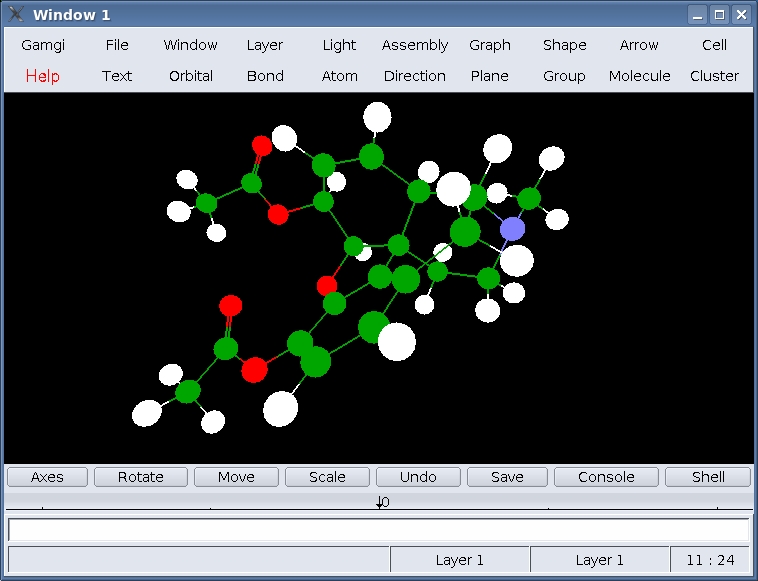
GAMGI—for the mad scientist. Can you believe that thing is a heroin molecule?
Here are GAMGI's stated aims from these obviously passionate developers:
GAMGI aims to be useful for: 1) the scientific community working in atomistic modeling, which needs a graphic interface to build and analyze atomic structures; 2) the scientific community at large, which needs a graphic interface to study atomic structures and to prepare images for presentations; 3) teaching the atomic structure of matter in schools and universities, even inviting students to run GAMGI at home; 4) science promotion, in exhibitions and science museums.
Installation can be a little tricky for the newbie, but anyone comfortable with things such as make's role or symlinking should be okay. GAMGI is designed to be as standardized as possible in its requirements, and it should work with any standard X11 installation, though it does have one or two esoteric library requirements. Glib and GTK should be fine with most systems, as well as FreeType, but you may have to seek out and install Expat and Gtkglarea.
For those seeking a simple binary, an RPM is usually provided at GAMGI's download page. The RPM is designed to be LSB-compliant and should convert easily with a utility such as alien for Debian-based systems. At the time of this writing, however, the link was taken down, so please check the site again at a later date or bug the developers. For those seeking to compile from source (keeping the developers happy), a few more steps than your run-of-the-mill tarball need to be taken. First, it's easiest if GAMGI is extracted and compiled somewhere public, such as /usr/local/src, as you probably will want to symlink to the compiled binary later. Grab the tarball from the given link and extract it.
Once extracted, simply open a console and make your way to the src directory under the new folder. Now run the command make, and if all goes well, GAMGI should compile successfully. If make returns errors, check that you have all of the needed libraries installed. If they are, your shared libraries may be installed to another path than what GAMGI's make script is expecting. Edit the make_local file in the src directory and continue. Once compilation has completed, you can run the gamgi binary from the src directory, or symlink to it for easier access with the command:
# ln -s /usr/local/src/gamgi-(version)/src/gamgi
 ↪/usr/bin/gamgi
Once all that nasty stuff is out of the way, the weird science can begin. Some interesting templates and tutorials have been included in GAMGI's dat directory. From the menu, choose File→Import and choose an atomic structure at random. Ever wondered what adrenaline looks like? Try molecule/drugs/adrenaline.xml. Presto! An adrenaline molecule appears in the main black window. To play around with the view, press and hold the left, middle or right mouse buttons and move the mouse around. The left button controls rotation, the middle buttons controls the X and Y axes, and the right button controls the zoom function. You have to admit, it is pretty cool to play with!
To explore further, there are a bunch of other menus related to all things atomic, but I haven't the foggiest idea how to use any of them (or what they even do). I think this is best left to the atomic scientists. Check the doc directory for further instructions, and have a read through the well-constructed HTML manual pages, or head over to the GAMGI home page and converse with fellow white-coated boffins. Either way, I'm sure I'll sleep easy tonight now that I know what a propane molecule looks like and have confirmed that I am, indeed, a geek!
For more information, see:
Home page: www.gamgi.org
Wiki: www.gamgi.org/wiki
John Knight is a 23-year-old drumming, climbing and music-obsessed maniac who usually can be found squeezing Audacity to within an inch of its life.

