
A $7,000 Server Comparison
The story of Linux on non-x86 architectures started in 1994 with a port to the now-abandoned Alpha architecture. Other ports quickly followed, and over the years, Linux has gained support for most desktop and server CPU designs. Today, however, only five CPU architectures are promoted actively by their manufacturers as Linux-compatible. This article explores how entry-level servers based non-x86 designs compare to the current x86 systems in the same price range.
Comparing the x86 server market is usually fairly boring. The market is split into two camps around the AMD Opteron and the Intel Xeon. The differences between the various server models inside each camp are fairly small. Number of expansion slots, disk count and the features of the remote management solution seem to be the only distinctions. Performance and memory capabilities are determined by the CPU and chipset.
Outside the x86 market, the picture changes. To compete with the established x86 solutions and the massive budget Intel can invest into CPU development, IBM, Sun and the Intel Itanium team have to be innovative and take ideas to new heights.
The first member of the x86 architecture was the 16-bit 8086 designed by Intel in 1978. Since then, x86 has come a long way. It was extended to 32-bit with the i386 and more recently to 64-bit with the AMD64/EMT64. Despite these extensions, all x86 designs have remained backward-compatible, and even the newest quad-core Xeons and Opterons still run DOS.
This backward compatibility has allowed the x86 processors to become the standard for desktops and also to dominate the market for smaller servers. It is, however, also the reason for much of the criticism that Intel and AMD receive.
In 1978, ideas like pipelining, out-of-order execution and branch prediction were known but did not influence the design of the x86 instruction set. Today, these features are part of most CPUs, and a lot of effort is required to implement these features. This increases complexity, and in many cases, optimal performance is not possible.
EPIC (Explicitly Parallel Instruction Computing) is the instruction set used in the Intel Itanium processors. EPIC was codeveloped by HP and Intel as the successor to both the HP PA-RISC line and the Intel x86 processors. The development started in 1994, but after delays and missed performance targets, the project's goals have changed dramatically. Although HP has discontinued the PA-RISC and Alpha architectures and is now selling a full range of Itanium-based servers, Intel continued the development of x86-based processors and now positions the Itanium processor only for high-end applications.
The main idea behind EPIC is that the compiler has a much better understanding of the program code than the CPU does. This additional knowledge about the program can be used to optimize the code at compile time rather than during execution. The reduced need for hardware-based optimization results in simpler architecture. However, the decision also requires more effort from compiler designers and leads to some interesting behavior (see The Compiler Issue sidebar).
The Compiler Issue
GCC is the standard compiler for Linux and many other platforms. However, GCC has a long history of being criticized for lack of optimization for non-x86 platforms. This seems to be especially true for the Itanium platform, as EPIC is the newest instruction set and GCC developers had the least amount of time to optimize the compiler. A whitepaper on Intel's Web site describes about a 25% performance gain when simply translating MySQL with the Intel Compiler vs GCC 4.1.
To verify this claim, we recompiled bzip2 and PostgreSQL 7.4.16 on the HP rx2660. The performance gains were impressive—29% for bzip2 and 21% for PostgreSQL. Hopefully, Intel and HP will continue working with the GCC team on improving performance, because adoption of a closed-source compiler by Red Hat and others is unlikely.
CMT, short for Chip Multi-Threading, is only one of the names describing methods for increasing CPU resource utilization. Instead of relying on larger caches or higher clock speed, CMT increases performance by offering multiple execution threads on a single processor.
CMT can be implemented in two variants. The first method is the use of multiple identical cores that are combined in the same physical package. This allows server manufacturers to deliver more processing power per socket and is implemented in all current architectures.
The second type of CMT is allowing one CPU core to execute multiple threads to increase resource utilization. This can be done by providing dedicated resources to each thread or simply by allowing the primary thread full access and limiting the secondary thread to the resources not used by the primary thread. Intel has implemented this feature in many Pentium 4 CPUs under the brand name of HyperThreading. HyperThreading can speed up execution by up to 20%, but workloads that rely heavily on cache sizes (such as the bzip2 compression discussed later in the article) suffer from having HyperThreading enabled.
The T1 processor that Sun is utilizing in the CoolThreads T1000 and T2000 systems uses both CMT concepts. It has eight cores, and each core is capable of executing four simultaneous threads. To combine such a high number of cores on one chip, Sun has chosen to implement very basic cores running at a fairly low clock frequency of 1–1.4GHz. This results in low single-thread execution speed, but Sun is betting on the 32 execution thread to make up for this disadvantage.
The Power architecture is the big brother of the PowerPC chips used in the current generation of gaming consoles, many embedded systems and, until recently, in Macs. The POWER5 processor supports all PowerPC features and adds a special hypervisor mode. This mode is similar to the new Intel-VT and AMD-Pacifica visualization technologies and allows multiple operating systems to run on the same system.
The POWER5 team at IBM has decided to balance single-core performance with a multicore and multithreading implementation. The result is the POWER5 Quad-Core Module (QCM) used in the 510Q. It has four processing cores and the capability of running two independent threads per core.
In addition to balancing the design, IBM invested heavily into manufacturing technology and automated design tools. This allows IBM to reach high clock speeds and produce top-performing processors with much less effort than its competitors.
Reviewers often select servers based on the number of CPUs and memory, and then compare the prices. This works well for an x86-based comparison, but the servers covered in this article are too different to be compared by CPU count or number of memory slots. Instead, this article evaluates the servers based on cost. In other words, what kind of features and performance can $7,000 buy?
All servers were purchased with standard one-year warranty and no operating system. The internal disks are used only for the OS installation. The database and application files are located on an external SCSI disk array connected via an LSI Ultra-320 controller.
The Sun Fire T1000 is the smallest of the four CoolThreads servers currently sold by Sun. It is a 1U unit and comes with a 1GHz T1 processor. Depending on the configuration, either six or all eight cores are enabled. Eight slots of registered DDR2 memory support configurations from 2 to 32GB.
Four gigabit Ethernet ports and a remote management card called ALOM (Advanced Lights Out Manager) are standard. The ALOM is one of the most easy-to-use and capable remote management methods found on UNIX servers. One PCI-Express slot is available for expansion.
Like most 1U servers, the T1000 has only a single power supply. A single 3.5" SATA drive comes standard. A cold-swap drive tray for two 2.5" disks is available as an option. Hot-swap disks are not available.
The server selected for the review was equipped with eight 1GHz cores, 8GB of RAM and a single 160GB disk. Quoted at $7,322, this configuration was just barely over the target price for this review.
Because the T1 is a complete SPARC V9 implementation, the T1000 runs Solaris 10 and virtually all Solaris applications. Sun's Web site also lists Gentoo 2006.1 and Ubuntu 6.06 LTS as certified.
The T1000 tested in this article is based on an Ubuntu 6.06 installation. The installation was easy, but required a lot of patience, as the installer obviously is not designed to run on a 9,600bps terminal. Instead of overwriting the current screen with the next, the installation wizard first erases the current screen content, then redraws it completely blank and finally, in a third pass, draws the next screen. At 9,600bps, this results in a five-second delay between the screens. Unfortunately, there is no way around this, because in true UNIX spirit, the T1000 does not have a VGA port.
Solaris on the T1000
Sun provides several documents with tuning information for Solaris on CoolThreads systems. Linux tuning information, however, is barely available. To check how much impact the lack of tuning options makes, all tests were rerun using Solaris 10 11/06 with the recommended tuning. The bzip2 compression results were virtually the same, although the other benchmarks gained an average of 10%. Whether this 10% stems from the better scalability of Solaris 10 or the extensive tuning is hard to say. However, even with this difference, the T1000 still was far behind the other solutions in most tests.
The rx2660 is HP's newest low-end Integrity server. It is the first HP Itanium system that shares the chassis with the Proliant line. From the front, it is difficult to distinguish the rx2660 from the 2U DL380G5 without looking at the model number or Intel logo. The rx2660 even has the front VGA port of the DL380—making it the only proprietary system in this review featuring a VGA output.
Like the T1000, the HP server has eight memory slots for up to 32GB of registered DDR2 memory. This is, however, where the similarities end. The rx2660 is a two-socket system and can be equipped with single- or dual-core processors. The single-core processors run at 1.4GHz and offer 6MB of level-three cache. The dual-core processors can be clocked at 1.4GHz (12MB cache) or at 1.6GHz (18MB cache).
Two gigabit Ethernet ports are standard, and the system has eight 2.5" hot-swap SAS drive bays. Depending on which I/O-cage was selected, either three PCI-X slots or one PCI-X and two PCI-Express slots are available for expansion. The server can take a second power supply for redundancy and offers a slot for an optional iLO2 (Integrated Lights-Out 2) remote management card.
Our test system came with two dual-core 1.4GHz CPUs, 4GB of memory and two internal 36GB SAS disks. The iLO2 remote management card was included, bringing the price to $7,095.
The rx2660 is the most versatile unit in this review. It supports HP-UX 11i, OpenVMS v8.3, Windows 2003 and Linux, without changes to the base unit or firmware. HP currently supports Red Hat Enterprise Linux 4 and SUSE Enterprise Server 10. Several other Linux variants, such as Gentoo and Fedora, have Itanium2 versions, but HP currently does not offer support for those flavors.
This rx2660 discussed in this article is based on RHEL 4 Update 4. After powering on the unit, the system starts the EFI firmware. The EFI prompt is menu-based and makes gathering system information and booting the OS very easy. However, after starting the installation from CD, only two lines about the kernel being decompressed are printed. Then, the boot process seemingly stalls. SUSE Enterprise Server showed the same behavior.
An attempt to install HP-UX eventually brought the solution. The system booted normally until “Console is a serial device, no further output will appear on this output device” appeared on the screen. Switching from the VGA port to the serial console worked and allowed RHEL 4 to install without any further issues.
After changing names several times in the past few years, IBM's Power-based servers are now known under the name IBM System p5. Because of the POWER5 processor's hypervisor, IBM was able to implement the 510Q's most distinguishing feature: LPARs. Short for Logical Partitions, LPARs allow up to 40 OS instances to share the same hardware without the need for any additional software. It even is possible to mix AIX, Red Hat Linux and SUSE Linux on the same server.
The 510Q is equipped with a POWER5+ Quad-Core Module. Due to cooling requirements, the processors in the 510Q are clocked at 1.65GHz—considerably lower than the dual-core model, which comes in 1.9 and 2.1GHz versions. Eight slots can house up to 32GB of DDR2 memory.
Disk storage is provided by up to four internal hot-swap Ultra-320 SCSI drives. Four PCI-X slots are available for expansion. The system also features two gigabit Ethernet controllers.
The back of the system also features two HMC ports. The HMC (short for Hardware Management Console) is a management system that can control up to 254 different LPARs running on up to 48 different servers. Unlike many other p5 models, the 510Q does not require an HMC to operate. Without HMC, the system partitioning capabilities are more limited, but basic features, such as remote console, work without issues.
The p5 510Q used in this review came with four 1.65GHz CPU cores, 6GB of RAM and two 73GB disks. The price was quoted at $6,971.
IBM currently supports AIX 5.2 and 5.3 as well as RHEL 4 and SLES 9 and 10. Gentoo, Fedora and Debian also offer PowerPC distributions. Again, this review is based on the RHEL 4 Update 4. The installation completed without issues and was the easiest installation in this review.
The Proliant DL140G3 is based on Intel's quad-core Xeon 5300 series. This chip essentially is two Core 2 Duo chips mounted on one carrier to fit into a single processor socket. HP has integrated two of these CPUs and up to 16GB of memory into a flat, 1U server. Two disks are available in hot-swap and non-hot-swap variants. The non-hot-swap configuration has space for two expansion PCI-Express slots. In the hot-swap version, one slot is used by an SAS controller. PCI-X variants also are available.
The DL140G3 used in this review was equipped with two Xeon 5345s, 12GB of memory and two hot-swap 36GB SAS disks. The quote came in at $6,531, making the DL140G3 the cheapest server in this comparison.
HP's Web site lists Red Hat Enterprise Linux 3 and 4 as well as SUSE Linux Enterprise Server 9 and 10, all in 32-bit and 64-bit variants. However, none of the 64-bit distributions will boot out of the box. Some searching on the HP Web site led to an advisory recommending disabling the BIOS setting for “8042 Emulation Support”. Once the option was turned off, the installation offered no additional surprises.
Reliability and manageability usually are considered the most important features for the proprietary systems. However, in recent years, management capabilities have increased on the x86-based servers. At the same time, the low-end systems in this comparison have lost many of these features their big brothers have. As an example, Sun's T1000 does not even provide hot-swappable disks.
For this reason, the tests in this article focus on performance, and the systems have to prove themselves in five different scenarios.
File compression is a CPU-intensive task with very low I/O requirements. The first test was run with a single bzip2 -1 (lowest compression) process compressing a 2GB file. This established the baseline performance for each system. Then the test is rerun with 2, 4, 8, 16 and 32 concurrent processes compressing the same 2GB file as before. These additional processes allow the systems to use more of the available processor resources. Because the processes are independent, scaling should be as close to linear as the hardware allows.
After the first run, all benchmarks were executed a second time at the highest compression level, -9. As the man page describes, the higher compression level significantly increases the memory usage of the process.
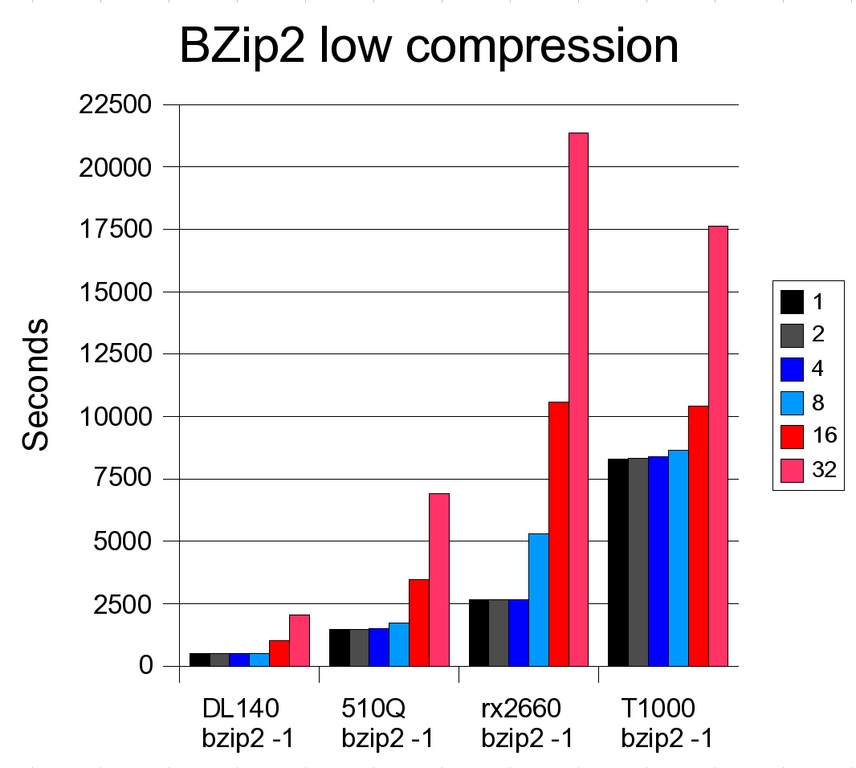
Figure 1. Comparison of bzip2 Low Compression Performance
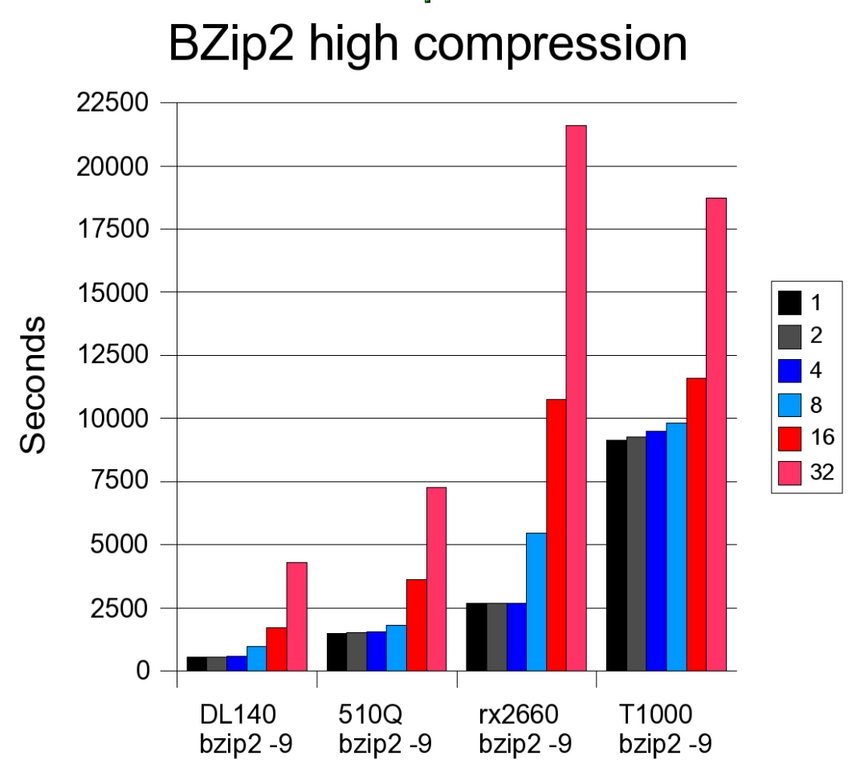
Figure 2. Comparison of bzip2 High Compression Performance
The most interesting result in this test is the T1000. Just as Sun stated, the single-thread performance of the CPU is very weak. However, once 32 threads are being executed simultaneously, the system beats the rx2660.
The second interesting result is the DL140. As soon as eight bzip2 -9 threads are executed, the cache (4MB shared between each two cores) is no longer able to contain all data required. The performance hit is substantial. Although at low concurrency, the difference between low and high compression is below 10%, at 32 threads, the difference is 111%. The other systems show almost the same performance with both compression levels.
As with file compression, compiling C++ code is another scenario with high CPU use and low demands on the I/O and memory subsystems. The major difference, however, is that the compiler instances are not independent. The way most C++ projects lay out their makefiles allows the make program to kick off compiles in only one directory at a time. This limits the number of compiler processes that can be started.
Also, several portions of the build, like dependency generation and linking, cannot be parallelized at all. This makes the C++ compiler test much less thread-friendly but more realistic.
The subject of this test was the Perl 5.8.8 source code. Configure was run accepting all defaults except the library path (/usr/lib64 was missing on the Xeon system), and the optimization setting was increased from the default -O2 to -O4. The compiles were run with one thread and then with one thread more than the number of available CPUs.
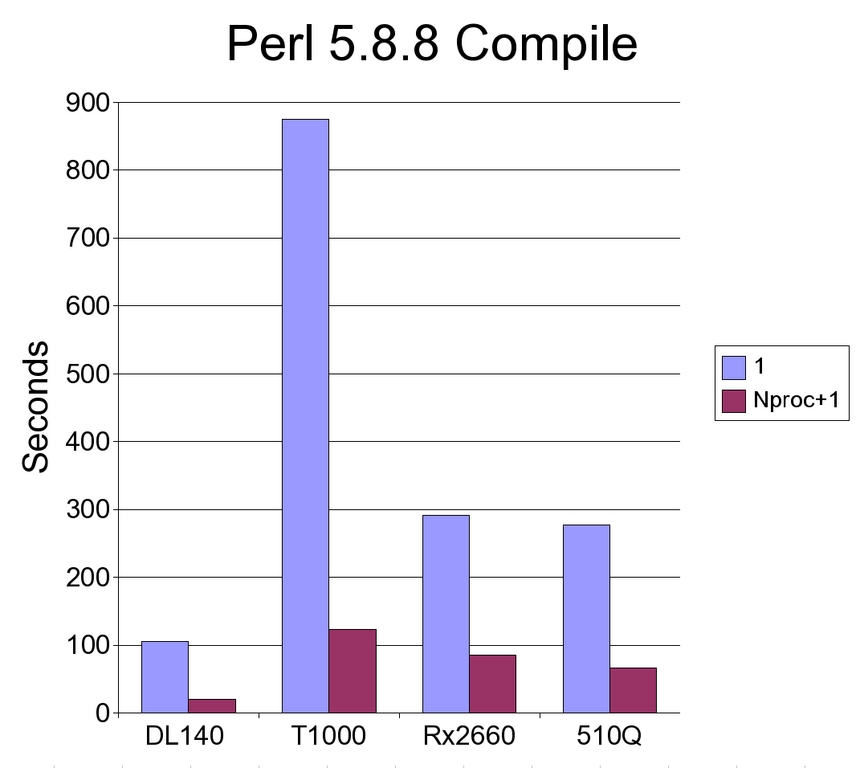
Figure 3. Comparison of Performance with Perl 5.8.8 Compilation
The results were similar to the compression benchmark. Again, the T1000 profited the most from the additional threads, but even at the highest settings, it was not able to keep up with the other solutions.
MySQL is, without question, the best known open-source database; however, its scalability has been questioned on many occasions. Especially in environments that have a larger percentage of writes to the database, the performance is said to suffer in larger SMP systems. This means that systems that rely on a large number of threads have a disadvantage, and systems with high single-core performance should fare better.
The exact version of MySQL depends on the distribution used. Red Hat Enterprise Linux 4 includes MySQL 4.1.20. The T1000 running Ubuntu 2006.6 LTS was running the much newer version 5.0.20. Comparing such different versions sounds strange, but it is in the spirit of the article—compare the servers the way they come and are supported by the vendors. In most enterprise environments, compiling your own version of MySQL is simply not an option—something that is especially painful for the Itanium-based system. To provide a better comparison, the T1000 also was tested with MySQL 4.1.20.
To test MySQL performance, Sysbench 0.4.8 was used. Sysbench is designed to create a workload that is similar to an OLTP load in a real system. The exact command run was:
sysbench --test=oltp --num-threads=512 --mysql-user=root
↪--max-time=240 --max-requests=0
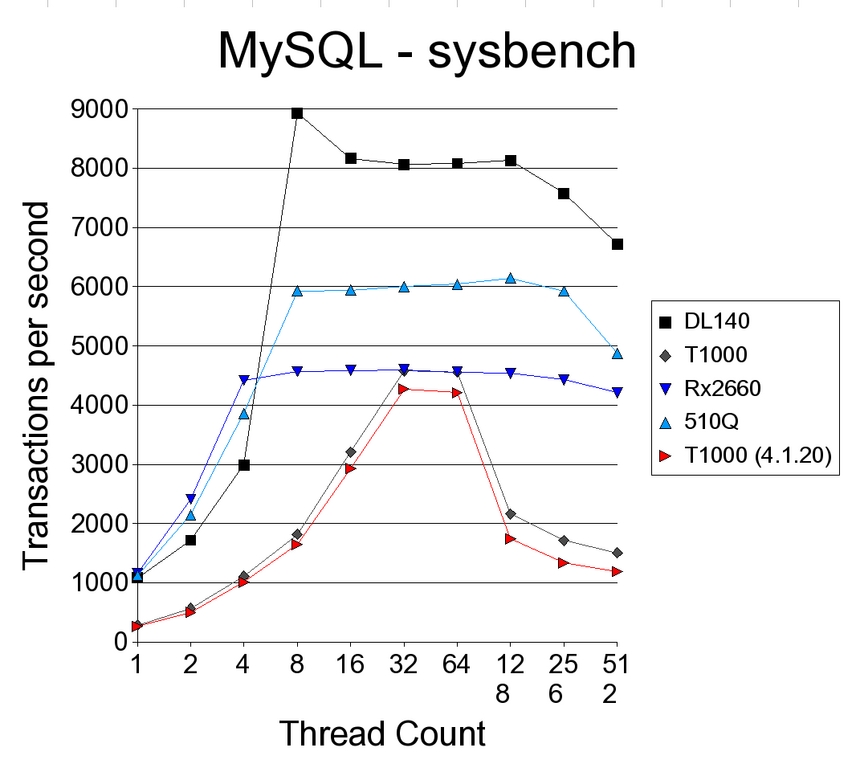
Figure 4. The DL140 benefits most from multiple threads.
The most interesting result in this test was the rx2660. Although all other systems showed a larger performance decrease when being tested with a large thread count, the Itanium system managed to keep virtually the same performance numbers under load.
PostgreSQL is another open-source database. It is not as widespread as MySQL, but many comparisons show that PostgreSQL has better scalability, because of the row version mechanism (MVCC) used. Red Hat shipped PostgreSQL 7.4.16, and Ubuntu came with 8.1
Because Sysbench requires PostgreSQL 8.0 or newer, the tool used to benchmark PostgreSQL was pgbench. The scaling factor selected was 50. Because pgbench results vary greatly, the tests were rerun 32 times for each number of clients and the highest result was taken.
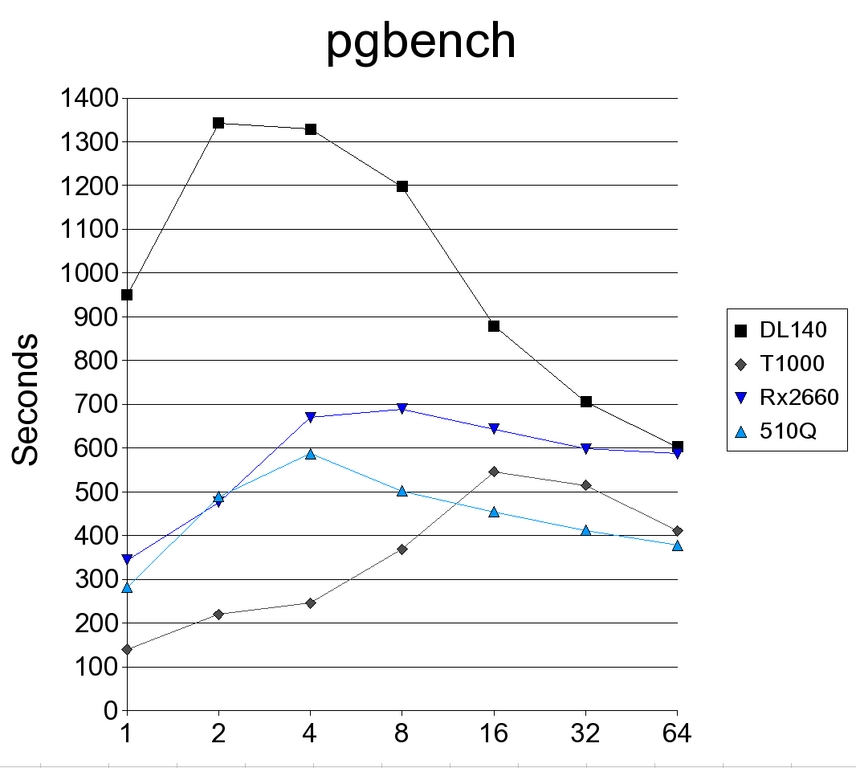
Figure 5. Comparison of Performance Using the PostgreSQL pgbench
The PostgreSQL benchmarks look much like the MySQL results before. Notice, however, the large drop-off of the Xeon system compared with the other systems. The T1000, however, profited from the better scalability of PostgreSQL.
The execution of PHP scripts combines CPU, memory and disk usage. For testing purposes, a small PHP script was written that executes a few MySQL database queries and formats the output into very simple HTML. Additional CPU load stems from compilation of the script (no PHP accelerator was used) and a loop in the middle of the script. An fopen call to a random file and a fread of the first kilobyte was used to simulate disk access.
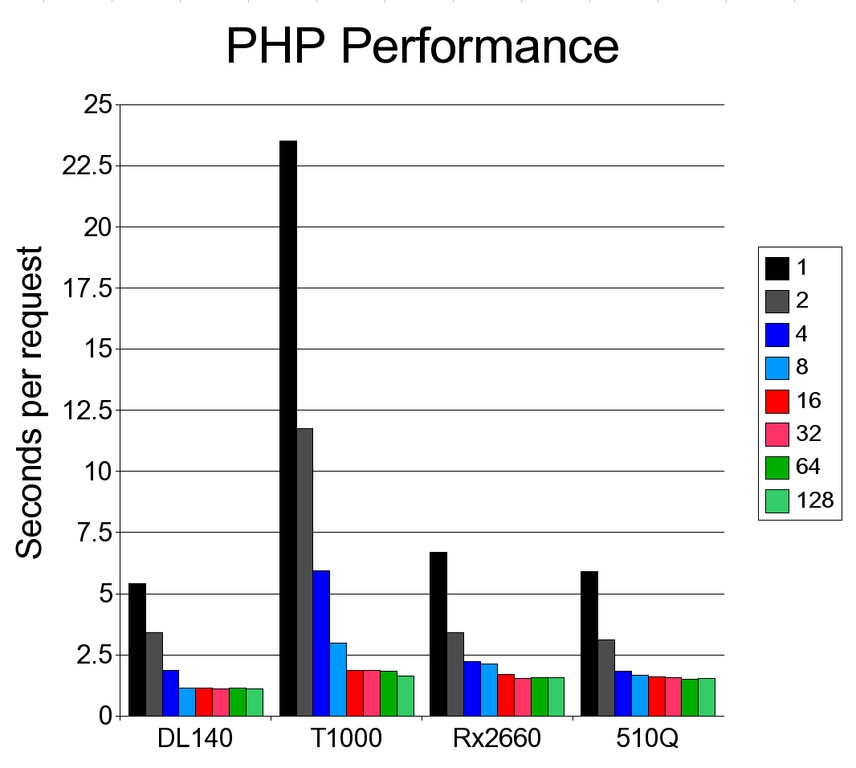
Figure 6. PHP application performance shows mostly narrow differences.
In this benchmark, the performance gap between the different solutions was much more narrow than before. When fully utilized, the three proprietary solutions performed similarly. The T1000 was only a few percentages slower than the POWER5 and Itanium systems. The Xeon, however, maintained at least a 35% lead throughout the test.
Because the tests in this article are all based on open-source software, no compatibility issues were observed. Of course, low-level software that accesses hardware directly has to be customized for the different systems, but all distributions were feature-complete and included all common programs for both desktop and server use.
Once you look at closed-source software, the picture unfortunately changes. The Itanium processor is fairly well supported, while most software that supports the Power platform comes directly from IBM. Worse off is the T1000. Not even the Java JDK is available from Sun.
Although the T1000 consistently came in last, it looked better as the more threads were working concurrently. However, because most Linux developers are using single processor or dual-core systems, it is hard to find open-source applications that are capable of starting 32 threads at once.
The third place goes to the Itanium-based rx2660. The Itanium processor performed well on single-threaded applications, but in the end, it was beat consistently by the POWER5-based 510Q. With an improved version of GCC, Intel and HP surely could change this picture, but for now, there is little chance that the distributions will adopt a proprietary compiler to gain performance.
Eight execution threads earned the IBM System p5 510Q the second place in this comparison. The 510Q bested the T1000 and also held a consistent lead over the rx2660 once all eight threads were utilized. In addition, the possibilities of partitioning the system without the use of Xen or VMware makes this system the best choice among the proprietary boxes.
The biggest surprise, however, was the DL140G3. Originally, it was planned only as a point of reference, but Intel has designed a very impressive solution with the latest quad-core Xeons. For years, Intel or AMD systems running Windows or Linux have competed well against smaller UNIX systems, but never before has an x86-based system enjoyed a performance lead like this. In addition, HP has done an excellent job integrating management capabilities into the server.
In one sentence—there is little to no reason to go with the low-end proprietary server. Performance is worse, and at the low end, reliability features are comparable. Does that mean these chips are dead? Not by a long shot. Intel or AMD systems usually don't go beyond 16 cores, while the UNIX vendors offer systems with up to 144 cores. However, most of these large systems offer no or limited Linux support. In addition to the high CPU count, the virtualization capabilities of the POWER5 systems are impressive—low overhead at no additional cost.
Peter Arremann currently works at Verizon on system administration, automation of software development processes and the company's open-source policy. He has been using Linux for more than a decade and can be reached at loony@loonybin.org.

