
Protecting SSH Servers with Single Packet Authorization
Last month, in the first of a two-part series, I described the theory behind the next generation in passive authentication technologies called Single Packet Authorization (SPA). This article gets away from theory and concentrates on the practical application of SPA with fwknop and iptables to protect SSHD from reconnaissance and attack. With this setup on a Linux system, no one will be able to tell that SSHD is even listening under an nmap scan, and only authenticated and authorized clients will be able to communicate with SSHD.
To begin, we require some information about configuration and network architecture. This article assumes you have installed the latest version of fwknop (1.0.1 at the time of this writing) on the same system where SSHD and iptables are running. You can download fwknop from www.cipherdyne.org/fwknop and install either from the source tar archive by running the install.pl script or via the RPM for RPM-based Linux distributions.
The basic network depicted in Figure 1 illustrates our setup. The fwknop client is executed on the host labeled spa_client (15.1.1.1), and the fwknop server (along with iptables) runs on the system labeled spa_server (16.2.2.2). A malicious system is labeled attacker (18.3.3.3), which is able to sniff all traffic between the spa_client and spa_server systems.
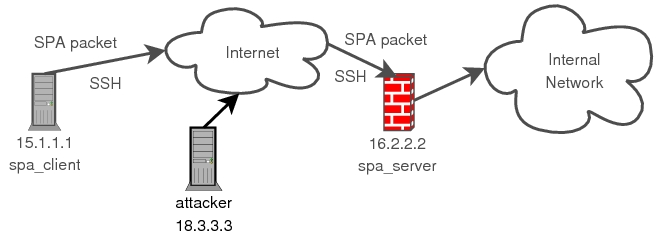
Figure 1. Sample Scenario Where You Use SPA to Protect SSH Communications
The spa_client system has the IP address 15.1.1.1, and the spa_server system has the IP address 16.2.2.2. On the spa_server system, iptables is configured to provide basic connectivity services for the internal network (192.168.10.0/24) and to log and drop all attempts (via the iptables LOG and DROP targets) from the external network to connect to any service on the firewall itself. This policy is quite simplistic, and it is meant to show only that the firewall does not advertise any services (including SSHD) under an nmap scan. Any serious deployment of iptables for a real network would be significantly more complicated. One important feature to note, however, is that the connection tracking facilities provided by Netfilter are used to keep state in the iptables policy. The end result is that connections initiated through the firewall (via the FORWARD chain) and to the firewall (via the INPUT chain) remain open without additional ACCEPT rules to allow packets required to keep the connections established (such as TCP acknowledgements and the like). The iptables policy is built with the following basic firewall.sh script:
[spa_server]# cat firewall.sh
#!/bin/sh
IPTABLES=/sbin/iptables
$IPTABLES -F
$IPTABLES -F -t nat
$IPTABLES -X
$IPTABLES -A INPUT -m state --state
 ↪ESTABLISHED,RELATED -j ACCEPT
$IPTABLES -A FORWARD -m state --state
 ↪ESTABLISHED,RELATED -j ACCEPT
$IPTABLES -t nat -A POSTROUTING -s
 ↪192.168.10.0/24 -o eth0 -j MASQUERADE
$IPTABLES -A INPUT -i ! lo -j LOG --log-prefix
 ↪"DROP "
$IPTABLES -A INPUT -i ! lo -j DROP
$IPTABLES -A FORWARD -i ! lo -j LOG --log-prefix
 ↪"DROP "
$IPTABLES -A FORWARD -i ! lo -j DROP
echo 1 > /proc/sys/net/ipv4/ip_forward
echo "[+] iptables policy activated"
exit
[spa_server]# ./firewall.sh
[+] iptables policy activated
With iptables active, it is time to see what remote access we might have. From the spa_client system, we use nmap to see if SSHD is accessible on the spa_server system:
[spa_client]$  nmap -P0 -sT -p 22 16.2.2.2

Starting Nmap 4.01 ( http://www.insecure.org/nmap/ )
at 2007-02-09 23:55 EST
Interesting ports on 16.2.2.2:
PORT   STATE    SERVICE
22/tcp filtered ssh

Nmap finished: 1 IP address (1 host up) scanned in
12.009 seconds
As expected, iptables is blocking all attempts to communicate with SSHD, and the remaining ports (both TCP and UDP) are similarly protected by the iptables policy. It does not matter if an attacker has a zero-day exploit for the particular version of OpenSSH that is deployed on the spa_server system; all attempts to communicate up the stack are being blocked by iptables.
Confident that iptables is protecting the local network with a Draconian stance, it is time to configure the fwknop server dæmon (fwknopd) on the spa_server system. The file /etc/fwknop/fwknop.conf controls important configuration parameters, such as the interface on which fwknopd sniffs traffic via libpcap, the e-mail address(es) to which fwknopd sends informational alerts and the pcap filter statement designed to sniff SPA packets off the wire. By default, fwknop sends SPA packets over UDP port 62201, so the pcap filter statement in /etc/fwknop/fwknop.conf is set to udp port 62201 by default. However, SPA packets can be sent over any port and protocol (even over ICMP), but the filter statement would need to be updated to handle SPA communications over other port/protocols. More information can be found in the fwknop man page. Although the defaults in this file usually make sense for most deployments, you may need to tweak the PCAP_INTF and EMAIL_ADDRESSES variables for your particular setup.
The /etc/fwknop/access.conf file is the most important fwknopd configuration file—it manages the encryption keys and access control rights used to validate SPA packets from fwknop clients. The following access.conf file is used for the remainder of this article:
[spa_server]# cat /etc/fwknop/access.conf
SOURCE: ANY;
OPEN_PORTS: tcp/22;
FW_ACCESS_TIMEOUT: 30;
KEY: LJ07p2rbga;
GPG_DECRYPT_ID: ABCD1234;
GPG_DECRYPT_PW: p2atc1l30p;
GPG_REMOTE_ID: 5678DEFG;
GPG_HOME_DIR: /root/.gnupg;
The SOURCE variable defines the IP addresses from which fwknopd accepts SPA packets. The value ANY shown above is a wild card to examine SPA packets from any IP address, but it can be restricted to specific IP addresses or subnets, and comma-separated lists are supported (for example, 192.168.10.0/24, 15.1.1.1). The OPEN_PORTS variable informs fwknopd about the set of ports that should be opened upon receiving a valid SPA packet; in this case, fwknopd will open TCP port 22.
Although not shown above, fwknopd can be configured to allow the fwknop client to dictate the set of ports to open by including the PERMIT_CLIENT_PORTS variable and setting it to Y. FW_ACCESS_TIMEOUT specifies the length of time that an ACCEPT rule is added to the iptables policy to allow the traffic defined by the OPEN_PORTS variable. Because the iptables policy in the firewall.sh script above makes use of the connection tracking capabilities provided by Netfilter, an SSH connection will remain established after the initial ACCEPT rule is deleted by fwknopd.
The remaining variables define parameters for the encryption and decryption of SPA packets. This article illustrates the usage of both symmetric and asymmetric ciphers, but only one encryption style is required by fwknop.
All of the GPG_* variables can be omitted if there is a KEY variable and vice versa. The KEY variable defines a shared key between the fwknop client and fwknopd server. This key is used to encrypt/decrypt the SPA packet with the Rijndael symmetric block cipher (see Resources). For asymmetric encryption, GPG_DECRYPT_ID defines the local fwknopd server GnuPG key ID. This key is used by the fwknop client to encrypt SPA packets via an encryption algorithm supported by GnuPG (such as the ElGamal cipher).
GPG_DECRYPT_PW is the decryption password associated with the fwknopd server key. Because this password is placed within the access.conf file in clear text, it is not recommended to use a valuable GnuPG key for the server; a dedicated key should be generated for the purpose of decrypting SPA packets. The fwknop clients sign SPA packets with a GnuPG key on the local key ring, and the password is supplied by the user from the command line and never stored within a file (as we will see below). Hence, any GnuPG key can be used by the fwknop client; even a valuable key used for encrypting sensitive e-mail communications, for example.
The GPG_REMOTE_ID variable defines a list of key IDs that the fwknopd server will accept. Any SPA packet encrypted with the fwknopd server public key must be signed with a private key specified by the GPG_REMOTE_ID variable. This allows fwknopd to restrict the set of people who can gain access to a protected service (SSHD in our case) via a cryptographically strong mechanism. Instructions for creating GnuPG keys for use with fwknop can be found at www.cipherdyne.org/fwknop/docs/gpghowto.html.
With the /etc/fwknop/access.conf file built, it is time to start fwknopd on the spa_server system and put fwknop to work for us:
[spa_server]# /etc/init.d/fwknop start
 * Starting fwknop ...                      [ ok ]
On the spa_client system, we use fwknop to build an SPA packet encrypted via Rijndael and send it on its way to the spa_server system. We want access to SSHD, and the -A argument below encodes the desired access within the SPA packet. The -w argument resolves the IP address of the client system by querying http://www.whatismyip.com (this is useful if the fwknop client is behind a NAT device), the -k argument is the IP address of the destination SPA server, and -v runs in verbose mode so we can view the raw packet data:
[spa_client]$ fwknop -A tcp/22 -w -k 16.2.2.2 -v
[+] Starting fwknop in client mode.
    Resolving external IP via: http://www.whatismyip.com/
    Got external address: 15.1.1.1

[+] Enter an encryption key. This key must match a key
    in the file /etc/fwknop/access.conf on the remote system.

Encryption Key:

[+] Building encrypted single-packet authorization
    (SPA) message...
[+] Packet fields:

        Random data: 7764880827899123
        Username:    mbr
        Timestamp:   1171133745
        Version:     1.0.1
        Action:      1 (access mode)
        Access:      15.1.1.1,tcp/22
        MD5 sum:     yzxKgnAxwUA5M2YhI8NTFQ

[+] Packet data:

U2FsdGVkX1+BvzxXj5Zv6gvfCFXwJ+iJGKPqe2whdYzyigkerSp \
2WtvON/xTd8t6V6saxbg1v4zsK+YNt53BE8EInxVCgpD7y/gEBI \
g8sd+AvU1ekQh9vwJJduseVxDxjmAHx3oNnClo2wckBqd8zA

[+] Sending 150 byte message to 16.2.2.2 over udp/62201...
As you can see from the Packet data section above, the SPA packet is a completely unintelligible blob of encrypted data. On the spa_server system, the following syslog message is generated indicating that an ACCEPT rule has been added for the source IP (15.1.1.1) that generated the SPA packet. Note that the source IP is put within the SPA packet by the fwknop client. In this case, the SPA packet was not spoofed, so the real source address and the source address embedded in the SPA packet match. SPA packets can be spoofed by fwknop with the --Spoof-src command-line argument (requires root):
Feb 10 13:55:44 spa_server fwknopd: received valid Rijndael \
encrypted packet from: 15.1.1.1, remote user: mbr
Feb 10 13:55:44 spa_server fwknopd: adding FWKNOP_INPUT ACCEPT \
rule for 15.1.1.1 -> tcp/22 (30 seconds)
So, for 30 seconds after sending the SPA packet, the iptables policy on the spa_server allows the spa_client system to establish an SSH session:
[spa_client]$ ssh -l mbr 16.2.2.2
mbr@spa_server's password:
After 30 seconds has expired, knoptm (a dæmon responsible for deleting iptables rules added by fwknopd to the iptables policy) deletes the ACCEPT rule and writes the following messages to syslog:
Feb 10 13:52:17 spa_server knoptm: removed iptables \
FWKNOP_INPUT ACCEPT rule for 15.1.1.1 -> tcp/22, \
30 second timeout exceeded
Our SSH session remains established after the ACCEPT rule is deleted because of the state tracking rules in the iptables policy (see the firewall.sh script above). These rules allow packets that are part of an established TCP connection to pass unimpeded.
To use GnuPG to encrypt and sign an SPA packet, you can execute the fwknop command below. In this case, the key ID of the fwknopd server is specified on the command line with the --gpg-recipient argument, and the key ID used to sign the SPA packet is given with the --gpg-signing-key argument (the output below has been abbreviated):
[spa_client]$ fwknop -A tcp/22 --gpg-recipient ABCD1234 \
--gpg-signing-key 5678DEFG -w -k 16.2.2.2

[+] Sending 1010 byte message to 16.2.2.2 over udp/62201
As you can see, the length of the application portion of the SPA packet has increased to more than 1,000 bytes, whereas it was only 150 bytes for the Rijndael example. This is because the key length of GnuPG keys (in this case 2,048 bits) and the characteristics of asymmetric ciphers tend to inflate the size of small chunks of data after being encrypted. There is no strict correspondence between the size of clear-text and cipher-text data as in block ciphers such as Rijndael.
Again, on the spa_server system, fwknop adds the ACCEPT rule for us. This time fwknopd reports that the SPA packet is encrypted with GnuPG, and that a valid signature for the required key ID 5678DEFG is found:
Feb 10 14:38:26 spa_server fwknopd: received valid GnuPG
encrypted packet (signed with required key ID: "5678DEFG")
from: 15.1.1.1, remote user: mbr
Feb 10 14:38:26 spa_server fwknopd: adding
FWKNOP_INPUT ACCEPT rule for 15.1.1.1 -> tcp/22 (30 seconds)
Suppose that the SPA packet from the first example above was sniffed off the wire en route by a crafty individual on the system labeled attacker in the network diagram in Figure 1. The SPA packet always can be placed back on the wire in an effort to gain the same access as the original packet—this is known as a replay attack. There are several ways to acquire the packet data and replay it. One of the most common is to use tcpdump to write a pcap file (in this case tcpdump -i eth0 -l -nn -s 0 -w SPA.pcap port 62201 would work) and then use tcpreplay (see tcpreplay.synfin.net/trac) to copy the SPA packet back onto the wire. Another method, after the packet has been captured, is to use the echo command along with netcat:
[attacker]$ echo "U2FsdGVkX1+BvzxXj5Zv6gvfCFXwJ+iJGKP \
qe2whdYzyigkerSp2WtvON/xTd8t6V6saxbg1v4zsK+YNt53BE8EI \
nxVCgpD7y/gEBIg8sd+AvU1ekQh9vwJJduseVx \
DxjmAHx3oNnClo2wckBqd8zA" |nc -u 16.2.2.2 62201
On the fwknopd server, the duplicate SPA packet is monitored, but because the MD5 sum matches that of the original SPA packet, no access is granted, and the following message is written to syslog on the spa_server system:
Feb 10 14:14:24 spa_server fwknopd: attempted \
message replay from: 18.3.3.3
Single Packet Authorization provides an additional layer of security for services such as SSHD, and this layer strikes at the first step that an attacker must accomplish when trying to compromise a system: reconnaissance. By using iptables in a default-drop stance and fwknop to sniff the wire for specially constructed (that is, encrypted and non-replayed) packets, it is difficult even to tell that a service is listening, let alone communicate with it. The end result is that it is significantly harder to exploit any vulnerabilities a protected service might have.
Resources
fwknop: www.cipherdyne.org/fwknop
An excellent source of additional theoretical information about both port knocking and Single Packet Authorization can be found in Sebastien Jeanquier's Master's thesis at the Royal Holloway College, University of London. The thesis can be downloaded from web.mac.com/s.j, and it includes an excellent argument for why SPA is not “security through obscurity”.
The Rijndael cipher was selected in 2001 for the Advanced Encryption Standard (AES) as the successor to the aging Data Encryption Standard (DES). A good writeup can be found at en.wikipedia.org/wiki/Advanced_Encryption_Standard.
GnuPG is the GNU Privacy Guard, and is an open-source implementation of the OpenPGP standard. More information can be found at www.gnupg.org.
Michael Rash holds a Master's Degree in applied mathematics with a concentration in computer security from the University of Maryland. Michael is the founder of cipherdyne.org, a Web site dedicated to open-source security software for Linux systems, and he works as Security Architect on the Dragon Intrusion Detection System for Enterasys Networks. He is the author of the upcoming book Linux Firewalls: Attack Detection and Response, published by No Starch Press.
