
The Aptana IDE for Ajax Development
Aptana is an IDE for HTML, CSS and JavaScript coding based on Eclipse. I reviewed Aptana using Fedora Core 6 on a modern dual-core machine with 2GB of RAM. Installing Aptana can be a little difficult with Fedora Core 6 and may be so for other modern Linux distributions as well.
Initially, I attempted the install with the “zip (no installer)” download, which is about 43MB without the Java runtime. I extracted the zip file and ran the Aptana script with the Sun JDK 1.5.0 and 1.6.0, but in both cases, the IDE refused to start.
So, I changed to the “BIN Plus Java Runtime 1.4.2” download, which is 74MB, and the Aptana_IDE_Setup.bin file refused to execute with a libc.so.6 error. After searching the forums, I found that you can resolve this issue with a little use of sed (see Resources). Once the graphical installer was complete, Aptana still refused to start with an “XPCOM error -2147467262”.
The fix for the XPCOM issue is to install Mozilla and export MOZILLA_FIVE_HOME to Mozilla's base path. Unfortunately, Mozilla is no longer in Fedora Linux. I found that with the BIN plus runtime installation, after a short period of time, the JVM would SEGV with “Too many open files”.
A much better method is to install Eclipse from your distribution's repository and then install the Aptana plugin.
The IDE offers syntax highlighting, code completion, file navigation through document structure (going to parts of the DOM or JavaScript functions by name), breakpoint debugging of code running in Firefox and some synchronization options.
Syntax highlighting is context-sensitive and works quite nicely across mixed HTML, CSS, PHP and JavaScript content. Code completion didn't work on the little PHP I played with, but it worked quite well for JavaScript—the one exception was when I created a variable for a new instance of XMLHttpRequest, the method name code completion didn't initially work for that variable. This seemed to sort itself out though. Code completion on the browser DOM also shows the browser and version of it in which that feature is supported. According to an August 2006 Web interview with Paul Colton, founder of Aptana, the ability to set requirements for a set of browsers and versions and have the IDE flag methods outside these requirements as errors is a planned feature.
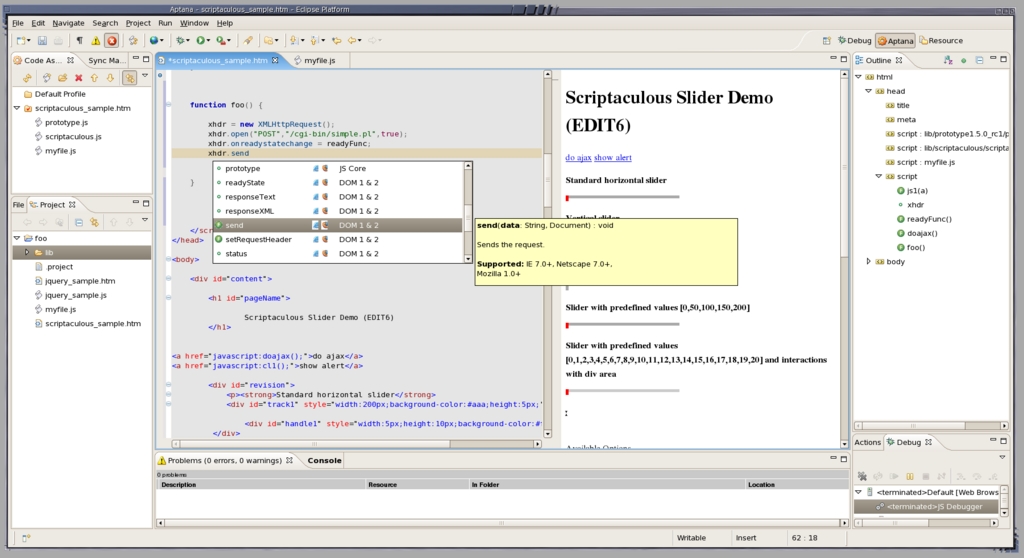
Figure 1. Aptana performing code assist for the send() method of an XMLHttpRequest. Methods for the object are shown, and for the current candidate method, the arguments and minimal browser requirements are shown as extra assistance. The outline view on the far right allows quick navigation through HTML, CSS and JavaScript mixed content. In the middle right is a preview of the current HTML page being edited in the middle left.
Aptana allows you to create a new JavaScript project and select from a bunch of third-party libraries, including Aflax, Dojo, MochiKit, Mootools, Prototype, Rico, Scriptaculous, Yahoo UI, jQuery and yui-ext.
For HTML files, you can have a browser either in another tab or horizontally/vertically next to the file you are editing. This browser is reloaded automatically when you save the HTML. This makes a hack-and-see session for some JavaScript fairly quick.
Selecting debug from the IDE caused Firefox to run and installed the extension so that Aptana could talk to Firefox. With this combination, you can set breakpoints in Aptana, run debug from the IDE (which loads the page into Firefox), and when a breakpoint is hit in Firefox, Aptana springs to the front at that breakpoint. The integration of the IDE with Firefox works well; however, a few times when Aptana became slow, I had to restart Eclipse to recover. This may be a result of my configuration and not Aptana, although I was running Fedora Eclipse with only the Aptana plugin and a bare-bones Firefox setup.
As far as Ajax support, an Ajax Monitor is available that shows the requests and responses issued. Unfortunately, the preview for an HTML file you are editing most surely will bomb out with a permission-denied error if you attempt Ajax with XMLHttpRequest from it. If you use the debug mode in Aptana to start an external instance of Firefox, XMLHttpRequest likely will not work as well. The Firefox instance that Aptana starts will load a URL, such as http://127.0.0.1:8001/foo.htm, which is served by a Web server that Aptana includes. Assume there is an XMLHttpRequest for a simple path, such as /cgi-bin/foo.pl, to make sure you request from the originating server and avoid the permission-denied error from the browser. Then, the browser will ask the Web server running in Aptana on port 8001 for this resource and fail. It would be nice if you could configure the Aptana Web server to proxy some requests to a server and return the result back to the Firefox instance you are using for debugging. If, for example, you change the URL in the Firefox instance that Aptana started for debugging to a version of the site served by Apache, such as http://localhost/foo/myapp.html, your Ajax requests might function properly, but Aptana breakpoints no longer will work.
It would be nice to be able to set up breakpoints in the Ajax Monitor, so the JavaScript onreadystatechange callback would be halted—for example, if an XPath2 matched against the response of a request. You can work around this by setting a suitably verbose expression breakpoint in the JavaScript function, but it would be better if it were integrated more directly into the Ajax Monitor itself.
The IDE includes support for synchronizing files with FTP or SFTP servers, but rsync support is currently missing.
The Aptana screen casts page is a good resource for quickly seeing Aptana's features and how to use them; however, some of the presentations may be less useful for people who are familiar with IDEs in general.
This review has highlighted some short-comings (particularly to do with XMLHttpRequest and debugging stability) and a few bugs here and there. But, overall, Aptana is a very nice IDE for hacking some HTML, CSS, JavaScript and possibly PHP code.
Summary
The Debatable:
The use of Eclipse can be a polarizing factor.
The Good:
The syntax highlighting and completion works well across HTML, CSS and JavaScript mixed content.
Setting breakpoints and stepping around JavaScript code running in a Firefox browser launched from Aptana.
The Bad:
Using Aptana breakpoint debugging with Ajax XMLHttpRequest calls is not simple.
Sometimes things become a little slow, even on grunty hardware.
Debug mode sometimes requires that you restart Aptana to recover.
Resources
Aptana: www.aptana.com
Aptana Screen Casts: www.aptana.tv
Fedora Eclipse: sources.redhat.com/eclipse
Linux Installation Issues: www.aptana.com/forums/viewtopic.php?t=134
Installing Aptana on Linux: www.aptana.com/docs/index.php/Installing_Aptana_on_Linux
Mozilla Issue and Aptana: www.aptana.com/forums/viewtopic.php?t=169&view=next
Tutorials: www.aptana.com/docs/index.php/Aptana_Tutorials
Using the Ajax Monitor View (although there's no information about getting around the permission problem for Aptana Web server sessions): www.aptana.com/docs/index.php/Using_the_AJAX_Monitor_View
Interview with Paul Colton, Founder of Aptana: playbacktime.com/2006/08/30/interview-paul-colton-founder-of-aptana-ajax-web20
Ben Martin has been working on filesystems for more than ten years. He is currently working toward a PhD on combining Semantic Filesystems with Formal Concept Analysis to improve human-filesystem interaction.

