
Ajax Simplified
This is a simple tutorial on Ajax that I hope will ease the fears of those of you who think Ajax can be intimidating. Despite the meaning of the term (Asynchronous JavaScript and XML), Ajax really revolves around a very simple principle. It lets you manipulate the contents of a Web page without having to reload the page. Here are the key steps involved that exploit the power of Ajax:
Capture an event (such as when a user changes an edit field or presses a button).
The event triggers JavaScript code, which sends a query to the Web server.
The JavaScript code retrieves results from the server.
The JavaScript code uses the results to change the contents of the Web page.
JavaScript accesses the Document Object Model (DOM) to change the contents of a Web page without reloading the Web page. For example, suppose your Web page contains the following element:
Total: <input type="text" id="total" />
The id portion of the HTML tag creates an element called total in the DOM, the contents of which you can change via JavaScript with the following JavaScript code:
document.getElementById('total').value = <some value>;
Web designers have been using this capability for a long time. The real power in Ajax comes from the ability to calculate the value for the total at the server side rather than at the client. To keep it simple, here's an example that doesn't really involve any server activity other than returning a result. This example presents a simple form that lets you type in a zip code. When you change the value of the zip-code field, the JavaScript code executes a PHP script at the server side that returns the shipping cost to that zip code. The JavaScript code then modifies the totalshipping field to reflect the server response.
The example page shown in Listing 1 contains only the most basic elements of an Ajax page—the primary functions being getHTTPObject, handleHttpResponse and updateShipping. The onChange event is what triggers the JavaScript function updateShipping. You could use onBlur instead, which would call updateShipping when you simply leave the zip-code field and it loses focus.
The getHTTPObject function is what allows you to make a page request via JavaScript, and the updateShipping function performs the page request. The handleHttpResponse function receives the input from the page request and extracts the information in order to modify an element in the page (in this case, the totalshipping field). These are the three basic functions you need to perform an Ajax operation.
Listing 1. index.html
<!DOCTYPE html PUBLIC "-//W3C//DTD XHTML 1.0 Strict//EN"
"http://www.w3.org/TR/xhtml1/DTD/xhtml1-strict.dtd">
<html xmlns="http://www.w3.org/1999/xhtml" >

<head> <title>Example</title>

<script language="javascript" type="text/javascript">

var url = "getShipping.php?zipcode=";

function handleHttpResponse() {
  if (http.readyState == 4) {
    results = http.responseText;
    document.getElementById('totalshipping').value = results;
  }
}

function updateShipping() {
  var zipValue = document.getElementById("zip").value;

  http.open("GET", url + escape(zipValue), true);
  http.onreadystatechange = handleHttpResponse;
  http.send(null);
}

function getHTTPObject() {
  var xmlhttp;
  xmlhttp = new XMLHttpRequest();
  return xmlhttp;
}

var http = getHTTPObject();

</script>

</head>

<body>
<form action="post">
<p>
ZIP code: <input type="text" size="5" id="zip"
 onChange="updateShipping();" />
</p>
Total Shipping: <input type="text" id="totalshipping" />
</form>
</body>
</html>
Listing 2. getShipping.php
<?php
echo "$5.00";
?>
This first example avoids XML entirely. The following line of code grabs the result as plain text:
results = http.responseText;
If you try out this code, you'll find that when you type a zip code (or virtually anything, because the code does no error checking) and then leave the field, the JavaScript automatically retrieves the value $5.00 from the PHP application and places the value in the Total Shipping field.
Keep in mind that the above example takes as many shortcuts as possible to keep it simple. There is no error checking or error handling whatsoever. There aren't even any HTML tag names, only ids. For example, it would be more common to create an input field that reads <input type="text" name="totalshipping" id="totalshipping" />. You probably wouldn't place the shipping cost in a field that a person could edit (although your form could re-validate the shipping when the person clicked “purchase” to correct any user changes). In addition, the example doesn't actually calculate a shipping cost. The URL in the above code points to a simple PHP script that returns the text value “$5.00” (Listing 2). A real application would take the zip code and use it to calculate the shipping cost and return that value. In short, the example cuts every possible corner to isolate how Ajax works rather than how one should code an Ajax application.
Technically, you can create a full Ajax application without ever using XML, but you will find XML to be a virtual necessity as your Web application grows in complexity. Here is how to do the same simple Web page with XML, once again cutting every corner for the sake of simplicity.
Notice in Listing 3 that we now grab the response with the code http.responseXML and extract the value we want with the code xmlDocument.getElementsByTagName('shipping'). Note also that the XML refers to the total with the tag shipping instead of totalshipping. This difference is unnecessary, but the purpose in this tutorial is to avoid the possible implication that the XML tag name and the HTML input field id must match in order to make the application work. They do not have to match.
Listing 3. index-xml.html
<!DOCTYPE html PUBLIC "-//W3C//DTD XHTML 1.0 Strict//EN"
 "http://www.w3.org/TR/xhtml1/DTD/xhtml1-strict.dtd">
<html xmlns="http://www.w3.org/1999/xhtml" >

<head> <title>Example</title>

<script language="javascript" type="text/javascript">

var url = "getShippingXML.php?zipcode=";

function handleHttpResponse() {
  if (http.readyState == 4) {
    var xmlDocument = http.responseXML;
    var shipping = xmlDocument.getElementsByTagName('shipping')
↪.item(0).firstChild.data;
    document.getElementById('totalshipping').value = shipping;
  }
}

function updateShipping() {
  var zipValue = document.getElementById("zip").value;

  http.open("GET", url + escape(zipValue), true);
  http.onreadystatechange = handleHttpResponse;
  http.send(null);
}

function getHTTPObject() {
  var xmlhttp;
  xmlhttp = new XMLHttpRequest();
  return xmlhttp;
}

var http = getHTTPObject();

</script>

</head>

<body>
<form action="post">
<p>
ZIP code: <input type="text" size="5" name="zip" id="zip"
onChange="updateShipping();" />
</p>
Total Shipping: <input type="text" id="totalshipping" />
</form>
</body>
</html>
The only thing left is to modify our PHP code to return XML instead of plain text. See Listing 4 for the PHP code. In addition to the XML content itself, note the line of code that sends a header identifying the content as XML before returning the XML content itself. The XML places the shipping amount as a child of <order>, along with the unused data, <total>. This is simply a baby step toward representing a more realistic set of data that the page should return.
Listing 4. GetShippingXML.php
<?php
$shipping="$5.00";
$total="$505.00";
$return_value = '<?xml version="1.0" standalone="yes"?>
<order>
 <shipping>'.$shipping.'</shipping>
 <total>'.$total.'</total>
</order>';
header('Content-Type: text/xml');
echo $return_value;
?>
Believe it or not, that's all there is to Ajax. Just about everything else that adds complexity to Ajax application development falls into the following categories.
A real Ajax application would not assume that the PHP file exists. It also would check the validity of the zip code before attempting to send it as a parameter to the server in order to find the shipping cost. (You also could have the server validate the zip code or do minimal validation at the client side, such as ensuring that the user entered five full digits and then perform full validation of the zip code at the server side.)
The above example eschews all error handling in order to keep the focus on the bare bones of how Ajax works. Obviously, you need to include input validation, error detection and error handling in a real application.
The above sample code works with Firefox, but there's no guarantee it will work in any other browser. If you want to write all your Ajax code from scratch, taking into account the variations between Firefox, IE and Opera, buy lots of ibuprofen—you'll need it. Fortunately, a plethora of Ajax libraries exist that manage the differences for you. One of my favorites is Dojo (see Resources).
Ajax relies on the DOM to address the various elements within a page. As your page becomes more complex, it gets harder to keep track of all the elements, their names and ids. Firefox has a built-in DOM inspector that is enormously helpful. If that's not enough, you can install the Firebug add-on to Firefox. Firebug not only provides you with a way to examine the DOM, it also helps you debug your JavaScript code and manage your cascading stylesheets (see Resources for a link to the add-on). Figure 1 shows the XML example page as viewed through Firebug. [Reuven Lerner covers Firebug in this month's At the Forge on page 22.]
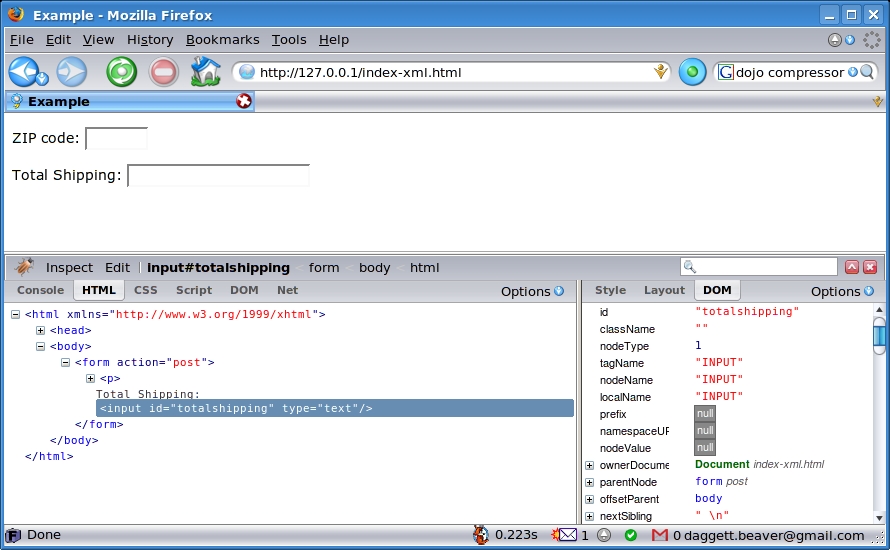
Figure 1. View elements of the DOM with Firebug.
As for what you must do to handle the services at the server side, that's entirely up to your choice of Web application language and choice of database, among other things. Use what you know best, or take the time to learn other Web application languages you suspect will ease the burden of writing server-side code.
JavaScript code optimization is an art, but it always helps to compress your JavaScript code. For example, indent all your code for readability, but when you're finished, the tabs and spaces are simply more bytes users will have to download. You can squeeze your JavaScript down to fewer bytes with one of many JavaScript compressors. The Dojo library is compressed for you, and Dojo provides a compressor you can use on your own code. You even can compress your code on-line via Dojo Shrinksafe (see Resources).
Finally, keep an eye on what you manage at the server side and what you manage at the client side. Depending on what your Ajax Web application does, you may find some performance gains by storing certain information in cookies, or you may speed up performance by storing the information at the server side. Use common sense and experiment between the two approaches to see which performs best.
It's not always easy to build a killer Ajax application, but hopefully this tutorial on the simplicity of how Ajax works will encourage you to give it a try. Now grab a toolkit and go!
Resources
Dojo: dojotoolkit.org
Dojo JavaScript Compressor: dojotoolkit.org/docs/compressor_system.html
Dojo Shrinksafe: alex.dojotoolkit.org/shrinksafe
Nicholas Petreley is Editor in Chief of Linux Journal and a former programmer, teacher, analyst and consultant who has been working with and writing about Linux for more than ten years.
