
An Ajax-Enhanced Web-Based Ethernet Analyzer
I've spent the past six months or so playing with Ruby. I blame the July 2006 issue of Linux Journal for this hiatus from my programming language of choice, Perl, as that issue opened my eyes to the possibilities of using Ruby as a serious tool. I still love, use and teach Perl, but I'm spending more and more time programming in Ruby.
I follow the same process when learning any new programming technology: I identify a good book and work through it, and then start to use the language to build some of the things I love to build with Perl. Identifying the book was easy. The second edition of Programming Ruby by Dave Thomas (known as The PickAxe) is as good an introduction as you are likely to find for any programming language, not just Ruby. Once I'd worked my way through The PickAxe—creating a Ruby tutorial as I went along (see Resources)—I was itching to write some real code. I started with a type of tool that I enjoy building with Perl: a custom Ethernet analyzer.
At this point, probably more than a few readers are saying to themselves: why bother creating an Ethernet analyzer when tcpdump and Ethereal/Wireshark already exist? Those solutions are excellent tools—which I use a lot—but, I'm often looking to build something that involves additional processing plus the capturing and decoding of Ethernet packets, and this customization invariably involves resorting to custom code. Luckily, it turns out that the technology that underpins both tcpdump and Ethereal/Wireshark—as well as the hugely popular Snort IDS—is available as a library and that a number of language bindings exist for it. The packet capturing library, called libpcap, is available from the same project that brought the world tcpdump and can be downloaded with ease from the Web. In fact, it may well be included within your distribution's package management system; it is if you are running a recent release of Ubuntu (as I am). Obviously, the intrepid programmer can use C with libpcap, but—let's be honest here—life's far too short to work at the C level of abstraction when something more agile is needed. Thankfully, Perl provides an excellent set of modules that work with libpcap, and I devote one-sixth of my first book to discussing the Perl technology in detail. To my delight, and after a little digging around, I also found a set of Ruby classes that interface to libpcap (see Resources).
In order to test the libpcap technology for real, I decided to use Ruby to redevelop a tool I created with Perl a number of years ago, which I wrote about within the pages of The Perl Review (see Resources). My Perl tool, called wdw (short for who's doing what?), analyzes requests made to a LAN's DNS service and reports on the site names for which the clients are requesting DNS resolutions. In less than 100 lines of Perl code, I'd written a functioning and useful DNS Ethernet analyzer. I wondered how using Ruby would compare.
Now, I present the 20 or so lines of Ruby I used to re-create wdw (for the entire program, see Listing 1). Do not interpret my numbers as any attempt to claim that Ruby can do what Perl does in one-fifth the number of lines of code. It cannot. It is important to note, however, that Ruby's interface to libpcap is significantly more abstract than the one offered by Perl, so Ruby does more in a single call than Perl does, but that has more to do with the choices made by the creators of each language's libpcap binding, as opposed to any fundamental language difference.
Listing 1. The dns-watcher.rb Source Code
#! /usr/bin/ruby -w

require 'pcap'
require 'net/dns/packet'

dev     = Pcap.lookupdev
capture = Pcap::Capture.open_live( dev, 1500 )

capture.setfilter( 'udp port 53' )

NUMPACKETS  = 50

puts "#{Time.now} - BEGIN run."

capture.loop( NUMPACKETS ) do |packet|

  dns_data = Net::DNS::Packet.parse(packet.udp_data)

  dns_header = dns_data.header

  if dns_header.query? then

    print "Device #{packet.ip_src} "
    print "(to #{packet.ip_dst}) looking for "
    question = dns_data.question
    question.inspect =~ /^\[(.+)\s+IN/
    puts $1
    STDOUT.flush

  end

end

capture.close

puts "#{Time.now} - END run."
Before executing this code, download and install Ruby's libpcap library. Pop on over to the Ruby libpcap Web site (see Resources), and grab the tarball. Or, if you are using Ubuntu, use the Synaptic Package Manager to download and install the libpcap-ruby1.8 package. If a distribution package isn't available, install the tarball in the usual way.
You also need a Ruby library to decode DNS messages. Fortunately, Marco Ceresa has been working hard at porting Perl's excellent Net::DNS module to Ruby, and he recently released his alpha code to RubyForge, so you need that too (see Resources). Despite being alpha, Marco's code is very usable, and Marco is good at releasing a patched library quickly after any problems are brought to his attention. Once downloaded, install Marco's Net::DNS library into your Ruby environment with the following commands:
tar zxvf net-dns-0.3.tgz
cd net-dns-0.3
sudo ruby setup.rb
My Ruby DNS analyzer is called dns-watcher.rb, and it starts by pulling in the required Ruby libraries: one for working with libpcap and the other for decoding DNS messages:
#! /usr/bin/ruby -w

require 'pcap'
require 'net/dns/packet'
I can tell my program which network connection to use for capturing traffic, or I can let libpcap-ruby work out this for me. The following line of code lets Ruby do the work:
dev = Pcap.lookupdev
With the device identified (and stored in dev), we need to enable Ethernet's promiscuous mode, which is essential if we are to capture all the traffic traveling on our LAN. Here's the Ruby code to do this:
capture = Pcap::Capture.open_live( dev, 1500 )
The open_live call takes two parameters: the device to work with and a value that indicates how much of each captured packet to process. Setting the latter to 1500 ensures that the entire Ethernet packet is grabbed from the network every time capturing occurs. The call to open_live will succeed only if the program has the ability to turn on promiscuous mode—that is, it must be run as root or with sudo. With the network card identified and ready to capture traffic, the next line of code applies a packet capturing filter:
capture.setfilter( 'udp port 53' )
I'm asking the libpcap library to concern itself only with capturing packets that match the filter, which in this case is Ethernet packets that contain UDP datagrams with a source or destination protocol port value of 53. As all Net-heads know, 53 is the protocol port reserved for use with the DNS system. All other traffic is ignored. What's cool about the setfilter method is that it can take any filter specification as understood by the tcpdump technology. Motivated readers can learn more about writing filters from the tcpdump man page.
A constant is then defined to set how many captured packets I am interested in, and then a timestamped message is sent to STDOUT to indicate that the analyzer is up and running:
NUMPACKETS = 50
puts "#{Time.now} - BEGIN run."
The libpcap-ruby library contains the loop iterator, which provides a convenient API to the packet capturing technology, and it takes a single parameter, which is the number of packets to capture. Each captured packet is delivered into the iterator's body as a named parameter, which I refer to as packet in my code:
capture.loop( NUMPACKETS ) do |packet|
Within the iterator, the first order of business is to decode the captured packet as a DNS message. The Packet.parse method from Marco's Net::DNS library does exactly that:
dns_data = Net::DNS::Packet.parse( packet.udp_data )
With the DNS message decoded, we can pull out the DNS header information with a call to the header method:
dns_header = dns_data.header
For my purposes, I am interested only in queries going to the DNS server, so I can ignore everything else by checking to see whether the query? method returns true or false:
if dns_header.query? then
Within the body of this if statement, I print out the IP source and destination addresses, before extracting the IP name from the query, which is returned by calling the dns_data.question method. Note the use of a regular expression to extract the IP name from the query:
print "Device #{packet.ip_src}
 ↪(to #{packet.ip_dst}) looking for "
question = dns_data.question
question.inspect =~ /^\[(.+)\s+IN/
puts $1
STDOUT.flush
The program code concludes with the required end block terminators, and then the capture object is closed, and another timestamp is sent to STDOUT:
    end
end
capture.close
puts "#{Time.now} - END run."It's time to give dns-watcher.rb a spin:
sudo ruby dns-watcher.rb
The output from one such invocation is shown in Figure 1. Note that there are not 50 lines of output, as might be expected. Remember, the program's if statement checks to see whether the captured DNS message is a query going to the server and processes the message only if it is. All other DNS messages are ignored by the program, even though they still contribute to the overall count of DNS packets processed.
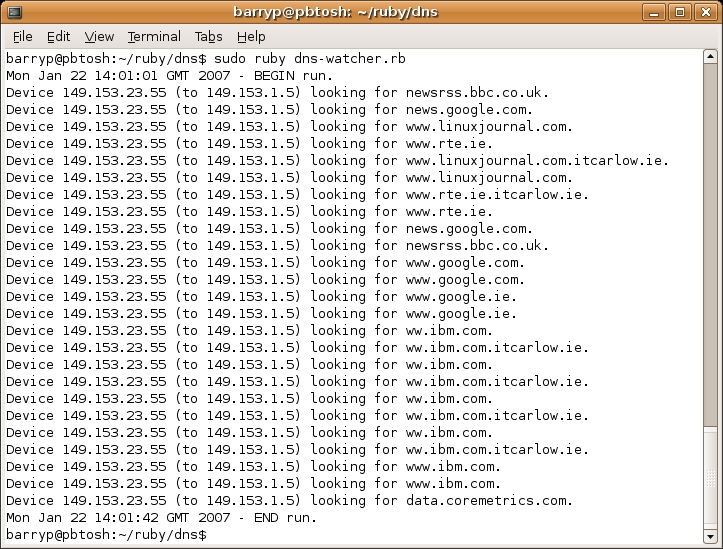
Figure 1. Running dns-watcher.rb from the Command Line
To run the analyzer for a longer amount of time, change the NUMPACKETS constant to some value greater than 50. As shown in Figure 1, it took the analyzer just more than 40 seconds to process 50 DNS messages (on my PC, on my network segment—your mileage will vary). It is not unreasonable to assume that changing the constant value to something like 250 could result in several minutes of processing. Obviously, piping the output to a disk file or to less allows you to review any results at your leisure.
With my little analyzer up and running, I started thinking it would be cool if I could provide a Web-based interface to it. As every Web developer knows, long-running, server-bound processes and the Web tend not to go together, as there's nothing worse than waiting at a browser for long periods of time while such a process executes. During the years, a number of solutions to this problem have been proposed, which involve techniques that employ redirection, cookies, sessions and the like. Although such techniques work, I've always thought they were rather clunky, and I've been on the lookout for something more elegant. Having just completed Reuven M. Lerner's excellent series of LJ articles on Ajax programming [see the October, November and December 2006 issues of LJ], I wondered if I could combine my analyzer with an Ajax-enabled Web page, updating a part of the Web page with the output from the analyzer as and when it was generated.
Listing 2. A Simple HTML Web Page That Starts the Analyzer
<html>
  <head>
    <title>Start a new DNS Analysis</title>
  </head>

  <body>
    Click to
    <a href="/cgi-bin/startwatch.cgi">start</a>.
  </body>
</html>
My strategy is simple enough. I provide a starter Web page that starts the network analysis on the Web server as a backgrounded CGI process, and then redirects to another Web page that displays the results in an HTML text-area widget, updating the text area with the results from the network analysis. The little HTML Web page in Listing 2 gets things moving. All this Web page really does is provide a link that, when clicked, calls the startwatch.cgi script. The latter is itself straightforward CGI, written as a bash script. Here's the entire script:
#! /bin/sh

echo "Content-type: text/html"
echo ""

sudo /usr/bin/ruby /var/www/watcher/dns-watcher.rb \
         > /var/www/watcher/dns-watcher.log &

echo '<html><head>'
echo '<title>Fetching results ... </title>'
echo '<meta http-equiv="Refresh" content="1;'
echo 'URL=/watcher.html">'
echo '</head><body>Fetching results ... </body>'
echo '<html>'
The key line of script is the one that invokes Ruby and feeds the interpreter the dns-watcher.rb program, redirecting the latter's standard output to a file called dns-watcher.log. Note the trailing ampersand at the end of this command, which runs the analyzer as a background process. The script continues by sending a sort HTML Web page to the browser that redirects to the analysis results page, called watcher.html, which is shown in Listing 3.
Listing 3. The Network Analysis Results Web Page
<html>

<head>
  <title>Web-based DNS Watcher</title>

  <script language=javascript src="/js/dns-watcher.js">
  </script>
</head>

<body>

<h1>Web-based DNS Watcher</h1>

Here are the results of your DNS analysis:
<p>
<textarea name="watcherarea" cols="100"
          rows="20" id="watcherarea">
Waiting for results ...
</textarea>

<script>
startWatcher();
</script>

<p>Start
<a href="/startwatcher.html">another analysis</a>
(which stops this one).

</body>
</html>
The results Web page loads in some JavaScript code (dns-watcher.js) within its header section, and then creates a simple HTML results page that contains an initially empty text-area widget called watcherarea. A call to the startWatcher JavaScript method occurs as soon as the browser loads the body section of the results Web page.
Listing 4. The Ajax-Enabled JavaScript Code
var capturing = false;
var matchEnd = new RegExp( "END run" );
var r = new getXMLHttpRequest();

function startWatcher() {
  setInterval( "updateCaptureData()", 1500 );
  capturing = true;
}

function getXMLHttpRequest() {
  try {
    return new ActiveXObject("Msxml2.XMLHTTP");}
  catch(e) {};
  try {
    return new ActiveXObject("Microsoft.XMLHTTP");}
  catch(e) {}
  try {
    return new XMLHttpRequest(); }
  catch(e) {};

  return null;
}

function updateCaptureData() {

  if (capturing) {
    r.open( "GET",
            "/cgi-bin/get_watcher_data.cgi",
            false );
    r.send( null );

    displayCaptureData();
  }
}

function displayCaptureData() {
  var te = document.getElementById("watcherarea");

  if ( r.readyState == 4 ) {
    if ( r.status == 200 ) {

      te.value = r.responseText;
      te.scrollTop = te.scrollHeight;

      if ( matchEnd.test( te.value ) ) {
        capturing = false;
      }
    }
    else
    {
      te.value =
        "Web-based DNS Analysis unavailable.";
    }
  }
}
Listing 4 contains the dns-watcher.js code. A lot of what happens here has been covered by Reuven's excellent Ajax articles. The code starts by declaring some global variables that are used throughout the remainder of the code:
var capturing = false;
var matchEnd = new RegExp( "END run" );
var r = new getXMLHttpRequest();
The capturing boolean is set to true while the analyzer is capturing traffic, and to false otherwise. A regular expression is created to match against a string containing the words “END run”. Finally, an Ajax request object is created with a call to the getXMLHttpRequest method, which is taken directly from Reuven's examples.
The startWatcher method starts the heavy lifting by calling the updateCaptureData method every 1.5 seconds and setting capturing to true:
function startWatcher() {
  setInterval( "updateCaptureData()", 1500 );
  capturing = true;
}
It is within the updateCaptureData method that the Ajax call occurs, with the request object being used to execute another CGI script that accesses the dns-watcher.log disk file and returns its contents. (Listing 5 contains the get_watcher_data.cgi script, which is written in Ruby.) Once the CGI script has been invoked on the Web server, a call to displayCapture occurs:
function updateCaptureData() {

  if (capturing) {
    r.open( "GET",
            "/cgi-bin/get_watcher_data.cgi",
            false );
    r.send( null );

    displayCaptureData();
  }
}
Listing 5. A Simple CGI to Retrieve the Captured Data
#! /usr/bin/ruby -w

puts "Content-type: text/plain\n\n"

IO.foreach("/var/www/watcher/dns-watcher.log") do |l|
  puts l
end
The displayCaptureData method is adapted from Reuven's code and processes the results of the Ajax call, which are available from the request object. These are used to update the watcherarea text-area widget within the results Web page:
te.value = r.responseText;
Note the use of the following line of JavaScript to scroll the text area to the bottom of the results:
te.scrollTop = te.scrollHeight;
And, finally, note that the displayCaptureData method sets the capturing boolean to false as soon as a line that matches the regular expression appears within the data coming from the Ajax request (see Figures 1 and 2 to convince yourself that this in fact matches at the end of the network capture):
if ( matchEnd.test( te.value ) ) {
  capturing = false;
}
This check is very important. Without it, the Web browser continues to send an Ajax request to the server every 1.5 seconds for as long as the watcher.html results page is displayed within the browser, even after the analyzer has finished and isn't generating any more data. With this check in the code, the Ajax behavior is switched off, reducing the load on the Web server (and keeping the Apache2 access log from quickly growing large).
To deploy my solution, I created a simple shell script to copy the required components into the appropriate directory locations on my Web server (which is Apache2 on Ubuntu):
sudo cp watcher.html /var/www/
sudo cp startwatcher.html /var/www/
sudo cp dns-watcher.js /var/www/js/
sudo cp dns-watcher.rb /var/www/watcher/
sudo cp get_watcher_data.cgi /usr/lib/cgi-bin/
sudo cp startwatch.cgi /usr/lib/cgi-bin/
These directory locations may not match those of your Apache2 installation, so adjust accordingly. You also may need to create the js and watcher directories. And, of course, make sure the CGIs have their executable bit set.
One final wrinkle is that the dns-watcher.rb program needs to be executed with root privilege, in order to switch the Web server's NIC into promiscuous mode. As would be expected, Apache2 does not, by default, execute CGI scripts as a root privilege, and for good reason. To get my Web-based analyzer to work, I added the following line to my /etc/sudoers file:
%www-data ALL=(root) NOPASSWD: /usr/bin/ruby
This allows the www-data user, which executes Apache2, to execute Ruby with root privilege, as it is the Ruby interpreter that executes the dns-watcher.rb code on behalf of Apache2. Such a situation may not be acceptable to you—due to the security concerns raised—and I'd be interested to know if any reader has a solution that allows me to execute the analyzer with root privilege more safely.
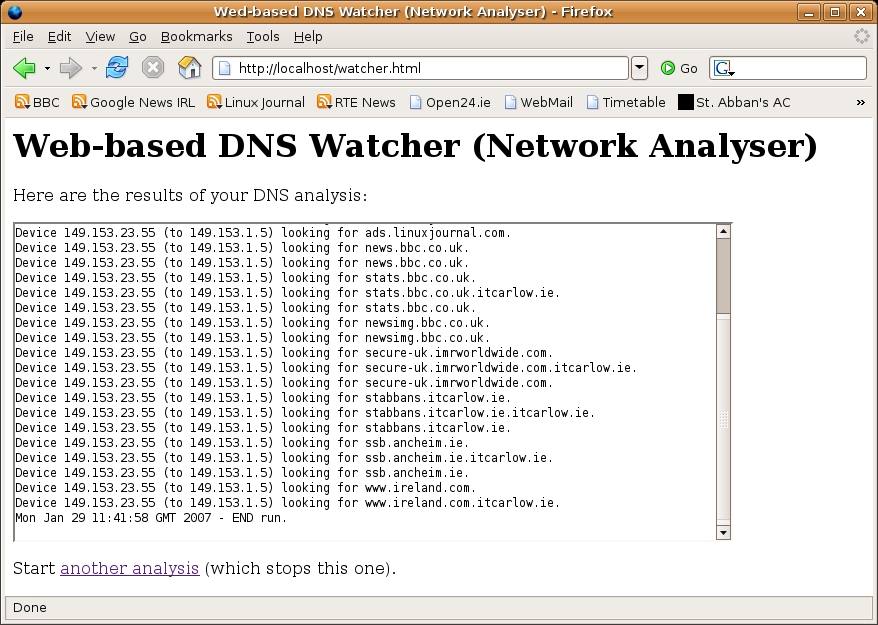
Figure 2. Running dns-watcher.rb from the Web
Figure 2 shows the results of a Web-based network analysis. The long-running, server-bound process is started by the Web server, runs in the background and—as results are generated—any and all output appears within the Web-based front end. Thanks to Ajax, the user's experience closely matches that of the command-line execution of the same program—as soon as data is ready, it's displayed. Adapting my solution to other uses is not difficult; all that's required is a mechanism to redirect some long-running, server-bound process' output to a file, and then access the file's contents via a CGI script that executes as a result of a single Ajax call. As I hope I've demonstrated, Ruby and Ajax make for a clean solution to this particular Web development pattern.
Resources
Paul's Ruby Tutorial: glasnost.itcarlow.ie/~barryp/ruby-tut.html
tcpdump/libpcap: www.tcpdump.org
Ruby's libpcap Library: raa.ruby-lang.org/project/pcap
Ruby Net::DNS Page on RubyForge: rubyforge.org/projects/net-dns
Ethereal: www.ethereal.com
Wireshark: www.wireshark.org
The “who is doing what?” Perl Script: www.theperlreview.com/Issues/v0i6.shtml
Source Code for This Article: ftp.linuxjournal.com/pub/lj/issue157/9614.tgz
Paul Barry (paul.barry@itcarlow.ie) lectures at the Institute of Technology, Carlow in Ireland. Find out more about the stuff he does at glasnost.itcarlow.ie/~barryp.

