
Paranoid Penguin - Introduction to SELinux, Part II
In my last column, we began exploring the concepts, terms and theory behind Security-Enhanced Linux (SELinux). This month, we conclude our overview, ending with a description of the SELinux implementation in Red Hat Enterprise Linux, Fedora and CentOS.
As much as I'd like to dive right in with the new material, SELinux is one of the most complex topics I've tackled in this column, so some review is in order. Rather than simply summarizing last month's column, however, here's a list of SELinux terms:
Discretionary Access Controls (DACs): the underlying security model in Linux, in which every file and directory has three sets of access controls, known as permissions: one set each for user-owner, group-owner and other. These permissions can be changed arbitrarily, at the discretion of the file's or directory's owner
Mandatory Access Controls (MACs): a much stronger security model, of which SELinux is an implementation, in which access controls are preconfigured in a system security policy that generally does not allow system users or processes to set or change access controls (permissions) on the objects they own.
Subject: a process that initiates some action against some system resource.
Action: a system function (writing a file, executing a process, reading data from a socket and so on).
Object: any system resource (process, file, socket and so on) against which subjects may attempt actions.
User: in SELinux, an SELinux-specific user account is separate from underlying Linux user accounts and owns or initiates a subject process.
Role: analogous to Linux groups in that it represents a set of access controls that apply to a specific list of possible users. In SELinux, a user may be associated with multiple roles, but may assume (act within) only one role at a time.
Domain: a combination of subjects and objects permitted to interact with each other.
Type: synonymous with domain in SELinux.
Security context: the user, role and domain/type associated with a given subject or object.
Transition: when a process attempts to change from one role to another by spawning a new process that “runs as” the new role, or when a process attempts to create a new file or directory that belongs to a different role than its parent directory.
Type Enforcement: the security model in SELinux in which processes are confined to domains via security contexts.
As I mentioned last time, Type Enforcement is the most important of the three security models implemented in SELinux. In fact, in the Red Hat Enterprise Linux (RHEL) targeted policy, which I cover at length later in this article, Type Enforcement is the only SELinux security model used.
As important as Type Enforcement is, it's a very process-oriented model. It's most useful for “sandboxing” or isolating dæmons. But, what about actual human users, who may perform a variety of tasks on the system and, therefore, may need to traverse multiple domains?
SELinux's Role-Based Access Control (RBAC) model concerns the ways in which users may transition between the roles they're authorized to assume and, by extension, between the domains in which those roles have rights. In practical terms, such a transition occurs when a process running from within one domain spawns a process into a different domain.
For example, suppose user Mick is authorized to operate in the role Parent, which in turn is associated with the domains Supper and Bedtime. In order for Mick to transition from Supper to Bedtime (for example, to start a shell session in the Bedtime domain, with access to files and processes authorized for that domain but not for the Supper domain), an RBAC rule must explicitly allow the role Parent to transition from Supper to Bedtime. This is in addition to, not instead of, the need for Parent to be defined in security contexts for those two domains.
The third security model in SELinux is Multi-Level Security (MLS). MLS is in turn based on the Bell-LaPadula model for data labeling. The guiding principle of both the Bell-LaPadula model and MLS is “no read up, no write down”. That is to say, a process (user) authorized to read data of one classification may not read data of a higher (more sensitive) classification, nor may that process (user) write data of a given classification anyplace in which it might be accessed by processes (users) authorized only to view data of lower (less sensitive) classifications.
For this model to work, each subject on the system must be associated with a security clearance—that is to say, the maximum sensitivity of data to which that subject may have access. Every file (object) also must be labeled with a classification that specifies the minimum clearance a subject must have in order to access it. The MLS Range field, supported in SELinux since Linux kernel 2.6.12, provides this information in the security contexts of both subjects and objects.
The traditional four data security classifications are, in decreasing order of sensitivity, Top Secret, Secret, Confidential and Unclassified. However, in MLS, many more such hierarchical classifications can be defined in your security policy. Also, each hierarchical classification can be associated with non-hierarchical compartments, which you can use to enforce a need-to-know policy in which subjects authorized at a given classification level may be granted access only to objects associated with specific compartments within that classification.
For example, suppose the process hamburgerd has overall subject clearance of Secret, and specific clearance (within the Secret classification) to the compartments ingredients and handshakes; such a clearance might be notated as { Secret / ingredients, handshakes }. If the file high_sign has an object clearance of { Secret / handshakes }, hamburgerd will be permitted to read it.
Note that by “non-hierarchical”, I mean that compartments within the same classification are peers to each other. If I define two compartments, apples and oranges under the classification Classified, neither compartment is considered more sensitive than the other. However, any compartment associated with the Secret or Top Secret classification will be considered more sensitive than either { Confidential / apples } or { Confidential / oranges }.
I've referred to SELinux's three security models (TE, RBAC and MLS). In Red Hat Enterprise Linux 5, there's actually a fourth: Multi-Category Security (MCS).
As you might imagine, the combination of hierarchical classifications and non-hierarchical compartments makes MLS well suited to large bureaucracies, such as military organizations and intelligence agencies, but too complex for more general purposes. Red Hat has therefore implemented an alternative file-classification model in RHEL 5's implementation of SELinux: Multi-Category Security (MCS).
MCS uses SELinux's MLS Range field, essentially by ignoring the Classification field (assigning a classification of 0 to all subjects and objects) and instead acknowledging only the Compartment field. In this way, the power of data labeling is simplified to something more like the Linux DAC group functionality. In other words, MCS is similar to MLS, but lacks the added complexity of hierarchical classifications.
Now that you understand SELinux's underlying security models and are familiar with at least a portion of SELinux's formidable body of jargon, we can turn our attention to SELinux's debut in the mainstream: Red Hat's targeted policy.
For many if not most system administrators, having to understand SELinux's various security models and complex terms, and managing its myriad configuration files, which may cumulatively contain hundreds or even thousands of lines of text, makes tackling SELinux a highly unattractive undertaking. To address this problem, Red Hat devised a simplified SELinux policy, called targeted, that emphasizes Type Enforcement, greatly simplifies RBAC and omits MLS altogether.
In fact, RHEL's targeted policy doesn't even implement Type Enforcement globally; it only defines domains for 12 specific subject dæmons, placing all other subjects and objects into a default domain, unconfined_t, that has no SELinux restrictions (outside of those 12 applications' respective domains).
The dæmons with SELinux domains in RHEL 4 and 5's targeted policy are:
dhcpd
httpd
mysqld
named
nscd
ntpd
portmap
postgres
snmpd
squid
syslogd
winbind
You may wonder, doesn't this amount to a global policy of “that which isn't expressly denied is permitted?” And, isn't that precisely backward of the “default-deny” stance that Mandatory Access Controls are supposed to provide?
Not really. It's true that the targeted policy falls well short of a trusted SELinux implementation of the kind you'd use for US Department of Defense work. However, neither does it amount to an “allow by default” policy. the regular Linux DAC (filesystem) controls still apply. So, if you think of the targeted policy as an extra set of controls layered on top of, not in lieu of, the normal filesystem permissions, application-level controls, firewall rules and other things you'd have on a hardened Linux system, you can see that even a limited SELinux policy can still play a meaningful role (no pun intended).
In fact, I'll go a step further and say that Red Hat's targeted policy is SELinux's best hope (to date) for mainstream adoption. Red Hat is by far the most popular Linux distribution to ship with any SELinux policy enabled by default; if that policy were locked down so tightly that any customized or substantially reconfigured application was barred from proper operation, most users would simply disable SELinux. (This was, in fact, what happened when Fedora Core 2 shipped with a “default-deny” SELinux policy.)
By enabling an SELinux policy that applies only to a limited, well-tested set of applications, Red Hat is minimizing the chances that a significant percentage of its users will associate SELinux with inconvenience and lost productivity. Furthermore, the targeted policy can be administered by a simple GUI, system-config-securitylevel, that doesn't require the user to know anything about SELinux at all.
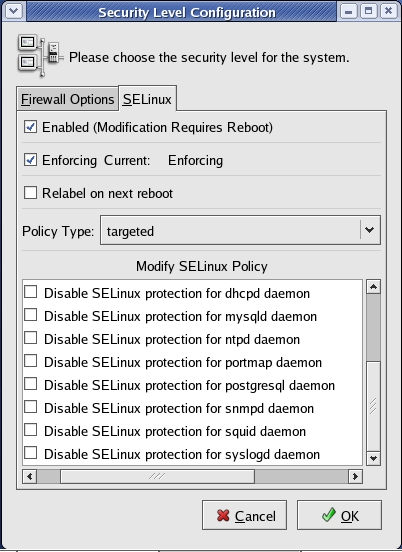
Figure 1. RHEL 4's system-config-securitylevel Tool
The targeted policy ships with RHEL 4 and 5, Fedora Core 3 and later, and CentOS 4 and 5.
The comprehensive “deny-by-default” policy originally developed for Fedora Core 2, called strict, is still maintained for RHEL, Fedora and CentOS, and it can be installed instead of targeted. However, strict is not officially (commercially) supported in RHEL due to its complexity. On most systems, this policy takes a lot of manual tweaking, both by editing the files in /etc/selinux and by using the standard SELinux commands chcon, checkpolicy, getenforce, newrole, run_init, setenforce and setfiles.
Note that Tresys (www.tresys.com) maintains a suite of free, mainly GUI-based, SELinux tools that are a bit easier to use, including SePCuT, SeUser, Apol and SeAudit. These are provided by RHEL's setools RPM package. Note also that on non-Red-Hat-derived Linux distributions, SELinux policies usually reside in /etc/security/selinux.
To customize and use the strict policy on RHEL 4, see Russell Coker's tutorial “Introduction to SELinux on Red Hat Enterprise Linux 4” (see Resources). You need to install the package selinux-policy-strict, available in Fedora's rawhide repository (the selinux-policy-strict package in Fedora Core 5 or 6 may also work in RHEL 4).
It's also possible, of course, to develop and enable your own SELinux policies from scratch, though doing that is well beyond the scope of this article. In fact, entire books have been written on this topic. See Resources for information on SELinux policy creation and customization.
And with that, I hope you're off to a good start with SELinux. Be safe!
Resources
Faye and Russell Coker's article “Taking advantage of SELinux in Red Hat Enterprise Linux”: www.redhat.com/magazine/006apr05/features/selinux
McCarty, Bill. SELinux: NSA's Open Source Security Enhanced Linux. Sebastopol, CA: O'Reilly Media, 2005. Definitive resource, but predates Red Hat and Fedora's implementation of targeted and strict policies.
Mayer, Frank, Karl MacMillan and David Caplan. SELinux by Example: Using Security Enhanced Linux. Upper Saddle River, NJ: Prentice Hall, 2007. Brand-new book, by several SELinux contributors.
Chad Hanson's paper “SELinux and MLS: Putting the Pieces Together”: selinux-symposium.org/2006/papers/03-SELinux-and-MLS.pdf
“Red Hat Enterprise Linux 4: Red Hat SELinux Guide”: www.redhat.com/docs/manuals/enterprise/RHEL-4-Manual/selinux-guide/index.html
Russell Coker's tutorial “Introduction to SELinux on Red Hat Enterprise Linux 4”: www.coker.com.au/selinux/talks/rh-2005/rhel4-tut.html
Mick Bauer (darth.elmo@wiremonkeys.org) is Network Security Architect for one of the US's largest banks. He is the author of the O'Reilly book Linux Server Security, 2nd edition (formerly called Building Secure Servers With Linux), an occasional presenter at information security conferences and composer of the “Network Engineering Polka”.

