
Cooking with Linux - It's About Time!
Time, François...it's all about time. Yes, I'll explain in a bit, but for now, time is running out and our guests will be here shortly. Just make sure the main server is updated against the reference time server. Forget that, mon ami. I'm sure it's accurate, and besides our guests have arrived! To the cellar, immédiatement! Head to the South wing and bring back the 2001 Châteauneuf du Pape, the Guigal we were sampling earlier this evening. I will show our guests to their tables.
Welcome, mes amis to Restaurant Chez Marcel, home of great wine, exquisite Linux and open-source fare and, of course, world-class guests. Please, sit down and make yourselves comfortable. I've sent François to the cellar to bring back tonight's wine selection, and he should be back shortly. You may notice an overabundance of timepieces on your respective desktops, so I'll start with a little movie history, by way of explanation.
I'm going to pretend that some of you are old enough to remember the 1960 George Pal movie version of H.G. Wells' The Time Machine. In the movie, George, the H.G. character, has a room filled with ticking clocks of every kind: cuckoo clocks, grandfather clocks—you name it—no digital clocks though. If you don't remember that, perhaps you remember Robert Zemeckis' 1985's Back to the Future, starring Michael J. Fox. Doc Brown, played by Christopher Lloyd, has his own lab full of ticking clocks. Guess which one takes its inspiration from the other? Take a look at Figure 1, mes amis, and you'll see a Linux desktop version of George's Victorian home or Doc Brown's lab—depending on your video memory.

Figure 1. Does Marcel really know what time it is with all these clocks?
Some of you may be asking yourself why people would possibly want another clock on their system. After all, both KDE and GNOME have a clock embedded in their panels. Click on the clock, and a nice little calendar pops up, as in my desktop screenshot (Figure 1). Clocks are cool though, and some are more cool than others. On today's menu, I have several clocks for your enjoyment. From the super-stylish to the decidedly strange, you are bound to find something you like. Here is something you will definitely like and perhaps even love. My faithful waiter has just returned with the wine. Please pour for our guests, François.
While François pours the wine, I want you to take one more look at the clock in the lower right-hand corner of my KDE kicker panel. That's not the default KDE clock, but Fred Schättgen's StyleClock, a themeable replacement that includes an alarm clock and a countdown timer (your chef has used it to take little naps at his chair).

Figure 2. To configure the StyleClock, simply right-click on the clock.
From the menu, you can set an alarm or a countdown timer. Both modes come with some one-click presets, but both the alarm and timer allow for a custom setting. Of course, we also can select themes for that special visual touch. I happen to like the analog styles, but StyleClock comes with both analog and digital themes. There's also the mandatory, super-geeky, binary clock.
Speaking of binary clocks, if you've been reading this column for a long time, you know that although I tend to run a KDE desktop, I still have an enduring fondness for Window Maker and its trademark dock apps. It is for this reason that I now direct your attention to Thomas “Engerim” Kuiper and Sune Fjod's wmBinClock. This slick little Window Maker dock app can display the time vertically or horizontally (horizontal is the default). You read the time by doing binary translation of LEDs that are either on (1) or off (0). When reading the time horizontally, the seconds are the two vertical rows of LEDs on the right. The two middle LEDs are minutes and so on. This is a great little application, and no, you don't need Window Maker to run it. It works just as well under KDE or GNOME.
Maybe you aren't running a graphical display, or you have a fondness for running things in a terminal window, but you would still like a binary clock. Nico Golde's BinClock displays the time in a terminal window. By default, the time is displayed similarly to wmBinClock (Figure 3), but this is a one-time display. To run the clock continuously, you must use the -l option to loop:
binclock -l

Figure 3. Two binary clocks, wmBinClock and dclock, seem to be keeping good time with each other.
Use the -h option to see a number of command-line options that let you run the clock in a single-line or traditional mode or change the color of the ones and zeros. Of course, if you want to do straight text, you simply could type the date command in your terminal window. If you want a calendar for the current month, type cal. I do, however, want to focus on the desktop.
Clockywock
On a related note, check out Thomas S. Glascock's Clockywock at www.soomka.com. This is an ncurses-based analog clock that runs in a terminal window. It's high technology meets low.
Although binary clocks may be geeky, there's something cool about a nice, retro, analog clock running on your desktop. To avoid looking for and downloading anything, try the venerable Xclock that comes with your system's X software. This baby was originally written by Tony Della Fera, Dave Mankins and Ed Moy. To run the Xclock, simply type xclock (use your Alt-F2 program launcher or the command line). By default, it doesn't show a second hand. To activate that, type xclock -update 1. This adds a second hand that updates every second.
The Xclock hasn't changed much over the years (why mess with success?), but that lack of change got Marc Singer writing his Buici clock, a simple, yet classy clock that does nothing other than show you the time with a nice, red, sweep second hand. For those who like a little more animation than just a sweep second hand, I recommend Kaz Sasayama's rglclock. This is a rotating 3-D Mesa/OpenGL clock that you can drag with the mouse to spin in whatever direction and at whatever speed you like. All three of these are shown in Figure 4.
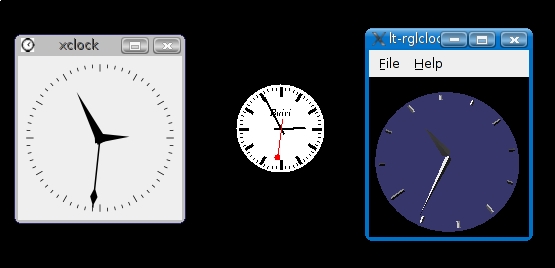
Figure 4. Analog clocks come in many styles, from the classic Xclock on the left, followed by the simple but classy Buici clock in the center, and the spin-happy rglclock to the right.
Taking classy to a higher plane was surely Mirco Mueller's plan when he wrote Cairo Clock. Seriously, this is a gorgeous-looking clock with several different faces, 12- and 24-hour formats and more. To change a running Cairo Clock, right-click and a menu appears letting you change not only the look of the clock, but several other attributes as well (Figure 5). You even can change the size to whatever you like.
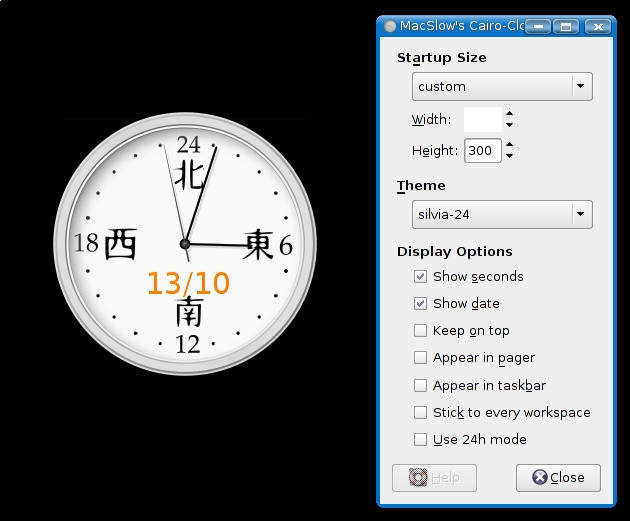
Figure 5. The highly configurable and beautiful Cairo Clock can be changed while it is running.
Although I've spent some time talking about analog clocks, there are some pretty cool digital clocks out there as well. One of my favorites is Jamie Zawinski's XDaliClock (Figure 6), a wonderfully strange digital clock where the numbers don't so much change, as morph. Second by second, and minute by minute, digits melt from one to the other. You'll be watching this one just to see the hours change as 59 minutes and 59 seconds approaches. Use the command xdaliclock -cycle, and you'll not only see the numbers morph, but the background color as well.
Tim Edwards' dclock, a modification of Dan Heller's original code, is a great digital clock that looks like the old seven-segment LED display clocks. dclock has a number of command-line arguments that let you set the date format, the color of the LED segments (both on and off) and more. For instance, typing dclock -date Today is %A, %B %d -fg yellow -bg brown -led_off brown4 generates the clock in the lower part of Figure 6. Furthermore, while the clock is running and your mouse pointer is inside the active window, you can change various settings with single keystrokes. For example, pressing the S key toggles the seconds display, R reverses the video colors and / increases the angle of the digits. Check the documentation for other one-key changes.

Figure 6. The very cool XDaliClock melts away the seconds, while dclock keeps somewhat more solid time.
All this talk of clocks just makes it more apparent that closing time is fast approaching. While François refills your glasses a final time, I'll leave you with perhaps the strangest clock of all, the aptly named UFOClock by Matt Wronkiewi (Figure 7), which is also very cool and worthy of some desktop space.

Figure 7. The UFOClock—timepiece or artifact left behind by an alien race?
The UFOClock displays the time of day, the phase of the moon, ratio of day to night, time to the beginning (or end) of twilight, and the time until the solstice or equinox. If you are asking, yes, I'm still trying to figure it all out. The distribution bundle comes with an example configuration file, so you can set the latitude and longitude of your home location (so you can tell the time of day).
Tip
Chef Marcel also recommends that you visit www.marcelgagne.com/clocks.html for links to even more great Linux clocks.
And now, that time is officially upon us. With all these clocks, there is no way to escape the reality of closing time, and there are still so many clocks to explore. Please, raise your glasses and let us all drink to one another's health. A votre santé Bon appétit!
Resources for this article: /article/9456.
Marcel Gagné is an award-winning writer living in Waterloo, Ontario. He is the author of Moving to Ubuntu Linux, his fifth book from Addison-Wesley. He also makes regular television appearances as Call for Help's Linux guy. Marcel is also a pilot, a past Top-40 disc jockey, writes science fiction and fantasy, and folds a mean Origami T-Rex. He can be reached via e-mail at mggagne@salmar.com. You can discover lots of other things (including great Wine links) from his Web site at www.marcelgagne.com.

