
Streaming Audio with Ices and Icecast
The Sioux Empire Amateur Radio Club operates a repeater on 146.895MHz with the call name W0ZWY. On Tuesday evenings, it provides a time for club announcements. I like to listen in when I can, but sometimes I am still at work when the announcements start and can't get to my radio. I found a way to solve this problem by using a UHF/VHF scanner, Linux, Ices and Icecast. By rebroadcasting the transmission over the Internet, I can listen to the local club repeater anytime, anywhere.
The first step was to find a VHF tuner that could tune to 146.895MHz and output analog audio to a sound card. I found that the least expensive way to go was to buy a consumer-grade UHF/VHF scanner. The scanner needed to have either a line-level output or a headphone jack. I found that line-level outputs are rare, but there are a number of scanners with headphone jacks. I also wanted one with a digital tuner so that it would not drift off frequency over time. I found a Radio Shack PRO-2050 on eBay for around $75 US that met all my requirements.
Using an F-to-BNC adapter, I connected the scanner's antenna jack to the off-air TV antenna on the roof of my house. This worked well because 146.895MHz lies right between off-air TV channels 6 and 7. I spent some time setting the squelch as high as I could, so there would not be static when no one was transmitting. Figure 1 shows my scanner with the audio cable plugged in to the headphone jack.
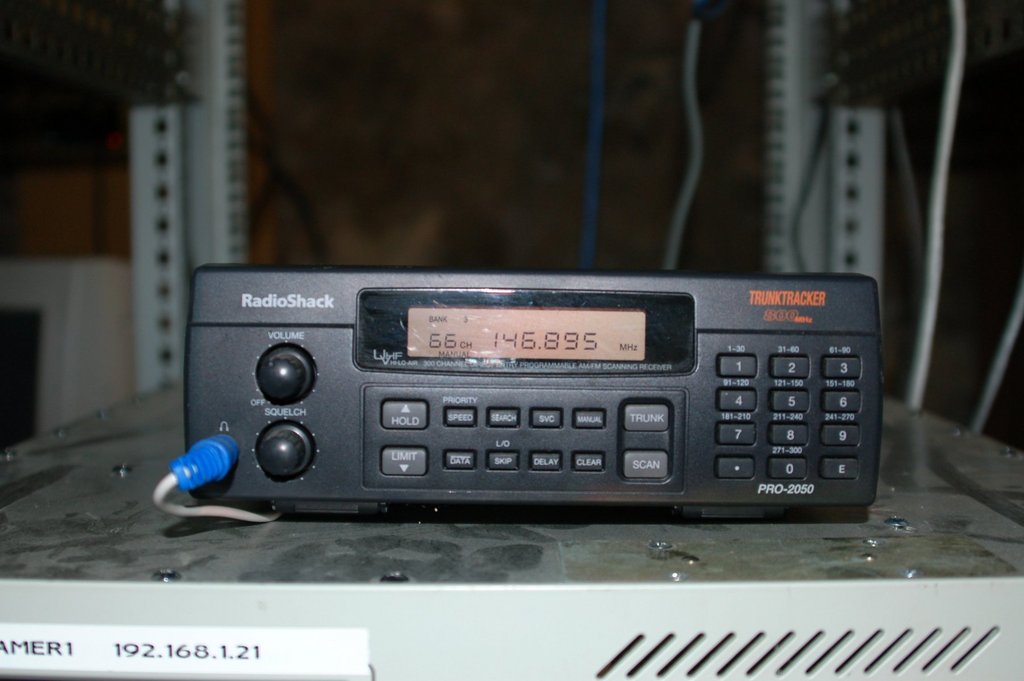
Figure 1. Radio Shack Scanner with Audio Cable Attached
In order to put the audio on the Internet, it first must be encoded. Then, that encoded information can be made available for streaming to clients on the Internet. For these tasks, Icecast and Ices make a great team. Icecast is a media streaming program that supports Ogg Vorbis or MP3 streams. It receives encoded media from one or more sources and makes it available for streaming to multiple clients. Ices is an Ogg Vorbis audio encoder that works well with Icecast. I chose Ogg because it is a patent- and royalty-free format. Plenty of players can decode Ogg. XMMS on Linux and Winamp on Windows are the most common. If you are interested in using MP3 encoding, check out LiveIce by following the link in the Resources for this article.
The encoding and streaming tasks can be done on the same machine, but I chose to do them on separate machines. This makes it easier to add more sources later. Additionally, it removes some of the processing burden from the streaming machine.
For the encoding computer, I chose a 233MHz Pentium I computer that had been unused for many years. I connected the headphone jack from the scanner to the line-in jack on the sound card using a 3.5mm-to-3.5mm audio cable that came from an old set of computer speakers. I connected the network interface to my LAN and set the IP address to 192.168.1.21.
For the streaming computer, I chose to use my existing router, which doubles as a Web server. The main reasons I chose it are that I already own it and it has my only public IP address. This computer has two network interfaces. One is connected to my cable modem and has a public IP address. The other interface is connected to my LAN and has the private IP address 192.168.1.1. Another way to accomplish this would be to use a consumer-grade cable/DSL router and forward port 8000 to the streaming computer's IP address.
Figure 2 shows a diagram of my network, including the scanner, encoder, streamer and cable modem.
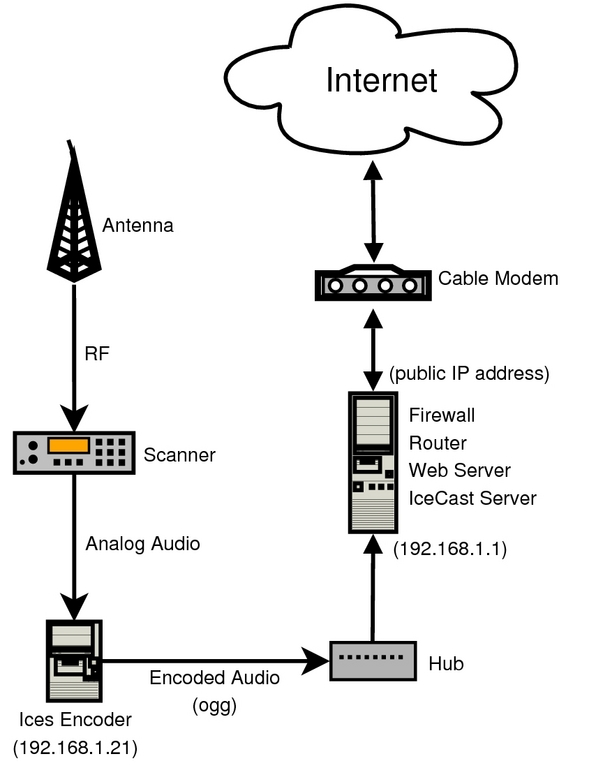
Figure 2. Network Diagram
My streaming computer is running Mandriva. Icecast is available from Mandriva's contrib RPM repository. Once I added that repository, installing Icecast was as easy as typing urpmi icecast from the command prompt. If you want to install from source, you can download the latest release from the Icecast Web site (see Resources). Simply click the download link, extract the archive, and run the familiar commands ./configure; make; make install.
The Icecast configuration file is an XML file and usually resides in /etc/icecast.xml. I was able to use most of the default settings, but I highlight some of the changes I did make here.
The limits section of the file allows you to set the maximum number of source streams (encoders) and the maximum number of clients that can connect to the streaming computer at once. The upload data rate on my cable modem is limited to 256Kbps by my ISP. As such, I need to limit the maximum number of clients to be sure that I don't use all of my upload bandwidth:
<limits>
    <clients>10</clients>
    <sources>2</sources>
</limits>
The authentication section is where you specify the user names and passwords. The source-password is the password used by the encoding machine when it connects. The relay-password is used by relays, which I am not using in my configuration. The admin-user and admin-password allow access to the administration Web page. It is important to change all passwords from the default for security:
<authentication>
    <source-password>hackme</source-password>
    <relay-password>hackme</relay-password>
    <admin-user>admin</admin-user>
    <admin-password>hackme</admin-password>
</authentication>
The hostname is used so that Icecast knows what address to append to the beginning of the links on the Web page:
<hostname>example.com</hostname>
The listen-socket allows you to set the port on which Icecast listens; 8000 is the default:
<listen-socket>
    <port>8000</port>
</listen-socket>
Once the configuration file is all ready, you can start Icecast by running the init script: /etc/init.d/icecast start. If there are any errors during startup, look in the log files to debug them.
My encoding computer is also running Mandriva. Because this machine is running only at 233MHz with 64MB of RAM, I decided to do a minimal install and leave off the window manager. Ices is also available from the contrib repository. So once again, typing urpmi ices is all it took to install Ices. However, you can download the latest releases from the Ices Web site (see Resources). Make sure you use the 2.0 series if you want to use Ogg. It also requires that libshout is installed. Once you have that, you can extract the archive and run ./configure; make; make install to get everything installed.
The Ices configuration file is also an XML file. It is usually stored in /etc/ices.conf.
The beginning of the configuration file has some settings that dictate how Ices runs. It can be helpful to change these during the initial setup, so that Ices runs in the foreground and sends messages to the console. These messages can be very helpful in debugging problems on initial setup. Once everything is set up and running, make sure Ices runs in the background and logs messages to a file:
<background>1</background>
<logpath>/var/log/ices</logpath>
<logfile>ices.log</logfile>
<loglevel>3</loglevel>
<consolelog>0</consolelog>
The rest of the file is under the stream section. This is where you configure settings specific to this particular audio stream. Within the stream section, the metadata section is where you specify information about the stream. This information will be displayed on the Icecast Web page:
<metadata>
    <name>W0ZWY 146.895 MHz</name>
    <genre>Live</genre>
    <description>Live feed of the
        W0ZWY repeater</description>
</metadata>
The input section is the place to define where the audio actually comes from. There are many possibilities, including options for playlists and scripts. Because I want to encode live audio, I used the oss module. Don't be alarmed if your system uses the ALSA sound system instead of OSS. ALSA has OSS compatibility, so this module works with both ALSA and OSS. Use the device parameter to specify the sound device from which to get data. On most systems it will be /dev/dsp. The rate parameter specifies the sample rate of the data in hertz. Most devices use 44100. Use the channels parameter to specify the number of channels available for capture. For most devices this will be 2 (stereo):
<input>
    <module>oss</module>
    <param name='device'>/dev/dsp</param>
    <param name='rate'>44100</param>
    <param name='channels'>2</param>
</input>
The instance section allows you to specify the number of instances of this stream. You might have more than one instance if you want to send the stream to more than one server, or if you want to have different versions of the same stream at different bitrates. For my system, I want only one instance.
The first part of the instance section is where you specify the streaming server information. The hostname tells Ices where to send the data. The port and password must match the values you specified in the Icecast configuration file. The mount option specifies what the name of the stream will be called.
The encode section specifies how the audio will be encoded. The easy way to do it is to set the sample rate and channels to match the input section above. But, I didn't need that much quality for my stream. So, I used the downmix and resample sections to tell Ices to resample the audio to 11127Hz and downmix it to 1 channel (mono). There are two options you can use to adjust the final bitrate of the stream: quality and nominal-bitrate. Notice that I commented out nominal-bitrate and set quality to 2:
<instance>
    <hostname>192.168.1.1</hostname>
    <port>8000</port>
    <password>hackme</password>
    <mount>/146.895.ogg</mount>

    <encode>
        <quality>2</quality>
        <!--nominal-bitrate>32000</nominal-bitrate-->
        <samplerate>11127</samplerate>
        <channels>1</channels>
    </encode>

    <downmix>1</downmix>

    <resample>
        <in-rate>44100</in-rate>
        <out-rate>11127</out-rate>
    </resample>
</instance>
Once the configuration file is all ready, make sure that Ices has permission to access the audio device through /dev/dsp. Mandriva creates an audio group, which owns the /dev/dsp file. It also creates an ices user and group when ices is installed. I simply added ices as a member of the audio group in the /etc/groups file by editing the audio group:
audio:x:81:ices
Finally, you can start Ices by running the init script: /etc/init.d/ices start. If there are any errors during startup, look in the log files to debug them. It also can be helpful to examine the Icecast log files on your streaming computer to debug problems.
Once everything is up and running, you can access the Icecast status page on the port you specified in the configuration file. Figure 3 shows an example of an Icecast status page. Clicking on Click to Listen launches your audio player.

Figure 3. Icecast Status Page
Once I had everything set up and running, I spent a fair amount of time fine-tuning the audio. The first thing I found was that the audio level was quite low. Normally, when I want to turn up the audio level, I use KMix. But, I hadn't installed a window manager on my encoding computer. My system uses ALSA as the sound system, and I found out that there is a great curses-based mixer for ALSA named Alsamixer. It allows you to use the arrow keys to change settings. Figure 4 shows the settings I chose for my card. My final preference was to have the Master and PCM both at 100%. I also chose to mute everything else, because I knew they would not be in use.
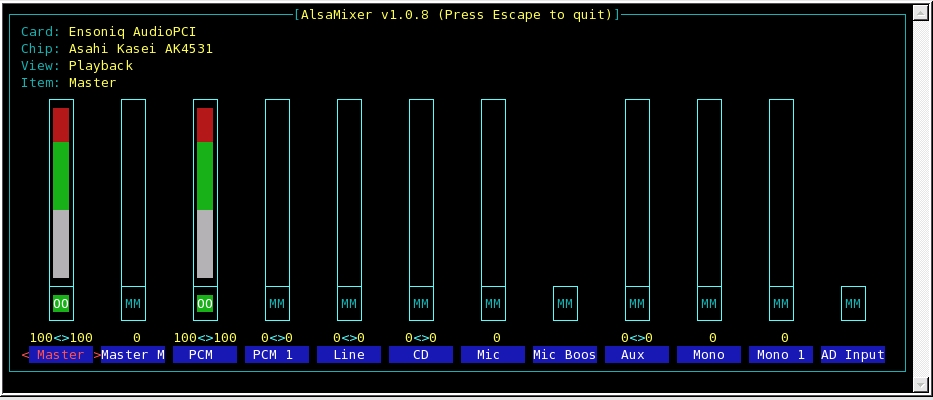
Figure 4. Alsamixer Settings
Now that the audio was loud enough, I still had another problem. The audio sounded choppy. After looking around for a while, I realized that the processor usage was at 100%. I tried to reduce the bitrate by changing the value of the nominal-bitrate setting. With the bitrate set sufficiently low, the audio sounded good. I guess you can't encode very high-quality audio with a 233MHz processor.
When the audio sounded good, my goal was to lower the bitrate as much as possible while keeping an acceptable level of audio quality. In my case, an “acceptable level” is quite low. The traffic on the W0ZWY repeater is only voice, because it is illegal to transmit music in the amateur radio bands.
Three aspects of the encoded audio will affect its quality and bitrate: number of channels, sample rate and bitrate. I started by setting the downmix to 1, because the scanner is only mono. Then, I incrementally decreased the sample rate until I found the lowest setting that rendered acceptable audio; 11127Hz ended up being the minimum. Instead of setting the bitrate with the nominal-bitrate setting, I used the quality setting. The quality setting directly affects the final bitrate. With a few tries, I chose a quality level of 2.
With my final settings, the bitrate stays around 30Kbps, and the processor hovers around 40% usage.
There are probably many other applications where this type of system would be useful. Keep in mind, however, if you are interested in using this type of system for streaming music, make sure you have permission from the artists and recording studios.
This combination of open-source projects really worked well together. Setting up everything was quite simple. I spent most of my time tweaking the quality and sample rate settings. The traffic on my streamer is quite low. I usually have only one or two connections per week. But, it was fun to learn, and it is my little way of participating in the amateur radio community.
Ices Settings and Bitrates
The quality, sample rate and channels settings all will affect the bitrate of the stream. Table 1 shows various combinations of these settings and their resulting bitrates.
Resources
Icecast Web Site: www.icecast.org
Ices Web Site: www.icecast.org/ices.php
LiveIce Web Site: web.arm.ac.uk/~spm/software/liveice.html
Brian Matherly is a Software Engineer at Sencore Electronics in Sioux Falls, South Dakota. He is also an adjunct professor at Colorado Technical University.
