
An Automated Reliable Backup Solution
These days, it is common to fill huge hard drives with movies, music, videos, software, documents and many other forms of data. Manual backups to CD or DVD often are neglected because of the time-consuming manual intervention necessary to overcome media size limitations and data integrity issues. Hence, most of this data is not backed up on a regular basis. I work as a security professional, specifically in the area of software development. In my spare time, I am an open-source enthusiast and have developed a number of open-source projects. Given my broad spectrum of interests, I have a network in my home consisting of 12 computers, which run a combination of Linux, Mac OS X and Windows. Losing my work is unacceptable!
In order to function in my environment, a backup solution must accommodate multiple users of different machines, running different operating systems. All users must have the ability to back up and recover data in a flexible and unattended manner. This requires that data can be recovered at a granularity ranging from a single file to an entire archive stored at any specified date and time. Because multiple users can access the backup system, it is important to incorporate security functions, specifically data confidentiality, which prevents users from being able to see other users' data, and data integrity, which ensures that the data users recover from backups was originally created by them and was not altered.
In addition to security, reliability is another key requirement. The solution must be tolerant of individual hardware faults. In this case, the component most likely to fail is a hard drive, and therefore the solution should implement hard drive fault tolerance. Finally, the solution should use drive space and network bandwidth efficiently. Efficient use of bandwidth allows more users to back up their data simultaneously. Likewise, if hard drive space is used efficiently by each user, more data can be backed up. A few additional requirements that I impose on all of my projects are that they be visually attractive, of an appropriate size and reasonably priced.
I first attempted to find an existing solution. I found a number of solutions that fit into two categories: single-drive network backup appliances and RAID array network backup appliances. A prime example of a solution in the first category is the Western Digital NetCenter product. All of the products I found in this category failed in most, if not all, of the functionality, security, reliability and performance requirements. The appliances found in the second category are generally designed for enterprise use rather than personal use. Hence, they tend to be much more expensive than those found in the first category. The Snap Server 2200 is an example of one of the lower-end versions of an appliance that fits under the second category. It generally sells for about $1,000 US with a decent amount of hard drive space. The products I found in category two also failed in most, if not all, of the functionality, security, performance and general requirements.
Due to the excessive cost and requirements issues of the readily available solutions, I decided to build my own unattended, encrypted, redundant, network-based backup solution using Linux, Duplicity and commercial off-the-shelf (COTS) hardware. Using these tools allowed me to create a network appliance that could make full and incremental backups, which are both encrypted and digitally signed. Incremental backups are backups in which only the changes since the last backup are saved. This reduces both the required storage and the required bandwidth for each backup. Full backups are backups in which the complete files, rather than just the changes, are backed up. These tools also provided the capability of restoring both entire archives and single files backed up at a specified time. For, example, suppose I recently received a virus, and I know that a week ago I did not have the virus. This solution would easily allow me to restore my system as it was one week ago, or two months ago, or as far back as my first backup.
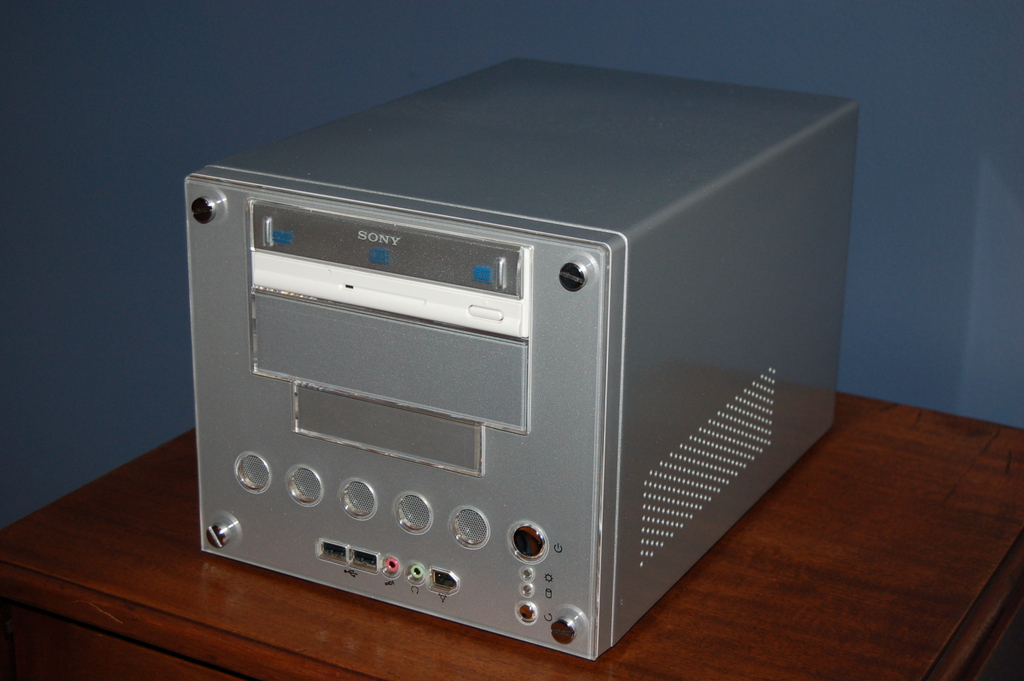
Figure 1. Silver Venus 668 Case (Front)
Duplicity, according to its project Web page, is a backup utility that backs up directories by encrypting tar-format volumes and uploading them to a remote or local file server. Duplicity, the cornerstone of this solution, is integrated with librsync, GnuPG and a number of file transport mechanisms. Duplicity provides a mechanism that meets my functionality, security and performance requirements.
Duplicity first uses librsync to create a tar-format volume consisting of either a full backup or an incremental backup. Then it uses GnuPG to encrypt and digitally sign the tar-format volume, providing the data confidentiality and integrity required. Once the tar-format volume is encrypted and signed, Duplicity transfers the backups to the specified location using one of its many supported file transportation mechanisms. In this case, I used the SSH file transportation mechanism, because it assures that the backups are encrypted while in transit. This is not necessary, as the backups are encrypted and signed prior to being transported, but it does add another layer of protection and complexity for someone trying to break in to the system. Furthermore, SSH is a commonly used service that eliminates the need to install another service, such as FTP, NFS or rsync.
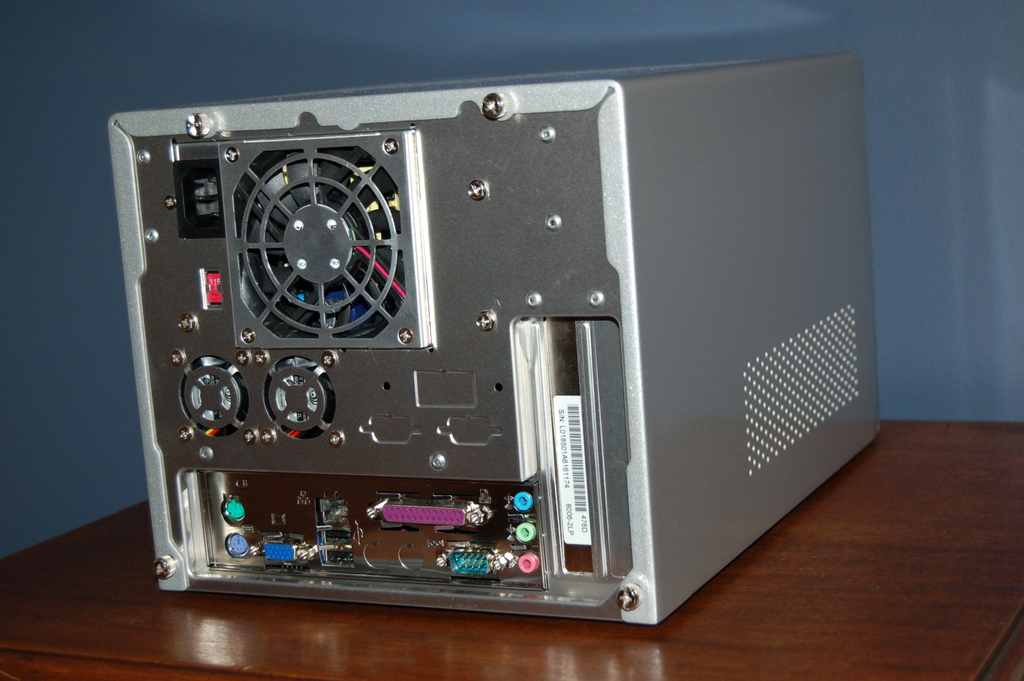
Figure 2. Silver Venus 668 Case (Back)
Once I had committed to building this backup solution, I had to decide which hardware components I was going to use. Given my functionality, reliability, performance and general requirements, I decided to build a RAID 1—mirrored—array-based network solution. This meant that I needed two hard drives and a RAID controller that would support at least two hard drives.
I started by looking at small form-factor motherboards that I might use. I had used Mini-ITX motherboards in a number of other projects and knew that there was close to full Linux support for it. Given that this project did not require a fast CPU, I decided on the EPIA Mini-ITX ML8000A motherboard, which has an 800MHz CPU, a 100Mb network interface and one 32-bit PCI slot built in to it. This met my motherboard, CPU and network interface requirements and provided a PCI slot for the RAID controller.
After deciding on the form factor and motherboard, I had to choose a case and power supply that would provide enough space to fit a PCI hardware RAID controller, the Mini-ITX motherboard and two full-size hard drives, while complying with my general requirements. I compared a large number of Mini-ITX cases. I found only one, the Silver Venus 668, that was flexible enough to support everything I needed. After choosing the motherboard and case, I looked at the RAM requirement, and I chose 512MB of DDR266 RAM. I had great difficulty finding US Mini-ITX distributors. Luckily, I found a company, Logic Supply, which provided me with the motherboard, case, power supply and RAM as a package deal for a total of $301.25 US, including shipping. At this point, I had all of the components except the RAID controller and hard drives.
Finding a satisfactory RAID controller was extremely difficult. Many RAID controllers actually do their processing in operating system-level drivers rather than on a chip in the RAID controller card itself. The 3ware 8006-2LP SATA RAID Controller is a two-drive SATA controller that does its processing on the controller card. I acquired the 3ware 8006-2LP from Monarch Computer Systems for a total of $127.83 US, including shipping.
At this point, I needed only the hard drives. I eventually decided on buying two 200GB Western Digital #2000JS SATA300 8MB Cache drives from Bytecom Systems, Inc., for a total of $176.69 US, including shipping. At this point, I had all of my hardware requirements satisfied. In the end, the hardware components for this system cost a total of $604.77 US—well below the approximate $1,000 US cost of the RAID array network appliances that failed to satisfy most of my requirements.
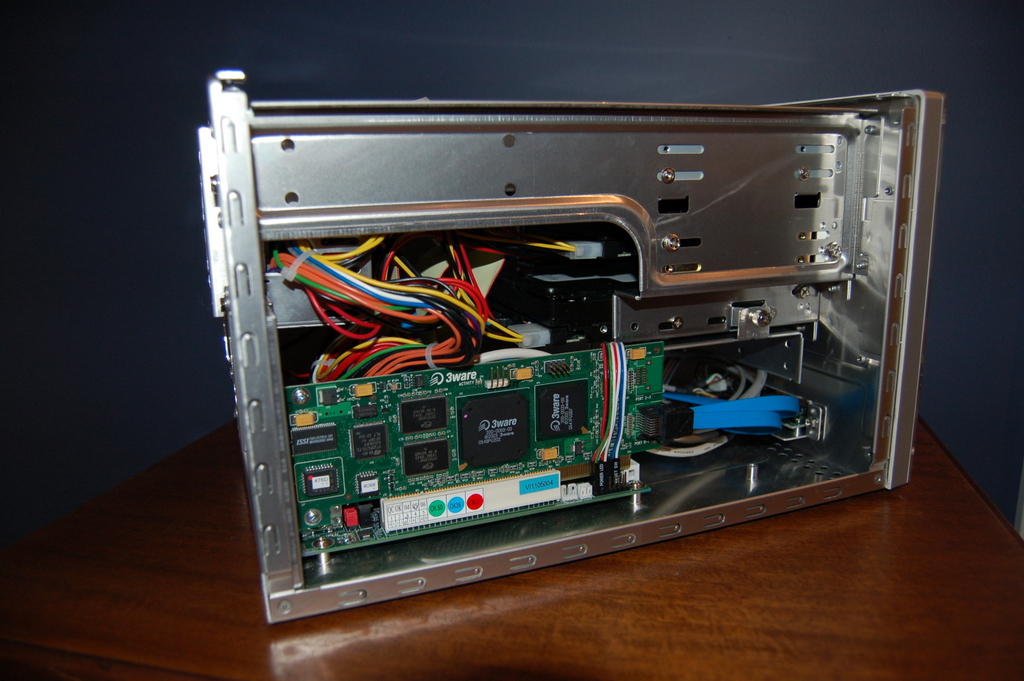
Figure 3. Silver Venus 668 Case (Inside with Hardware)
After building the computer, I decided to install Debian stable 3.1r2 on the newly built server's RAID array because of its superior package management system. I then installed an SSH dæmon so that the file server could be accessed securely. Once the SSH package was installed, I created a user account for myself on the file server. The user account home directory is where the backup data is stored, and all users who want to back up to the server will have their own accounts on the file server.
Once the file server was set up, I had to configure a computer to be backed up. Because Duplicity is integrated with GnuPG and SSH, I configured GnuPG and SSH to work unattended with Duplicity. I set up the following configuration on all the computers that I wanted to back up onto my newly created file server.
I installed Duplicity on a Debian Linux computer using apt-get with the following command as superuser:
# apt-get install duplicity
Once Duplicity was installed, I created a DSA key pair and set up SSH DSA key authentication to provide a means of using SSH without having to enter a password. Some people implement this by creating an SSH key without a password. This is extremely dangerous, because if people obtain the key, they instantly have the same access that the original key owner had. Using a password-protected key requires people who get the key also to have the key's password before they can gain access. To create an SSH key pair and set up SSH DSA key authentication, I ran the following command sequence on the client machine:
$ ssh-keygen -t dsa
$ scp ~/.ssh/id_dsa.pub <username>@<server>:
$ ssh <username>@<server>
$ cat id_dsa.pub >> ~/.ssh/authorized_keys2
$ exit
The first command creates the DSA key pair. The second command copies the previously generated public key to the backup server. The third command starts a remote shell on the backup server. The fourth command appends the public key to the list of authorized keys, enabling key authentication between the client machine and the backup server. The fifth and final command exits the remote shell.
After setting up SSH key authentication, I created a GnuPG key that Duplicity would use to sign and encrypt the backups. I created a key as my normal user on the client machine. Having the GnuPG key associated with a normal user account prevents backing up the entire filesystem. If I decided at some point that I wanted to back up the entire filesystem, I simply would create a GnuPG key as the root user on the client machine. To generate a GPG key, I used the following command:
$ gpg --gen-key
Once both the GnuPG and SSH keys were created, the first thing I did was make a CD containing copies of both my SSH and GnuPG keys. Then I installed and set up Keychain. Keychain is an application that manages long-lived instances of ssh-agent and gpg-agent to provide a mechanism that eliminates the need for password entry for every command that requires either the GnuPG or SSH keys. On a Debian client machine, I first had to install the keychain and ssh-askpass packages. Then I edited the /etc/X11/Xsession.options file and commented out the use-ssh-agent line so that the ssh-agent was not started every time I logged in with an Xsession. Then I added the following lines to my .bashrc file to start up Keychain properly:
/usr/bin/keychain ~/.ssh/id_dsa 2> /dev/null
source ~/.keychain/`hostname`-sh
After that, I added an xterm instantiation to my gnome-session so that an xterm in turn starts an instance of bash, which reads in the .bashrc file and runs Keychain. When Keychain is executed, it checks to see whether the key is already cached; if it is not, it prompts me once for my key passwords every time I start my computer and log in.
Once Keychain was installed and configured, I was able to make unattended backups of directories simply by configuring cron to execute Duplicity. I backed up my home directory with the following command:
$ duplicity --encrypt-key AA43E426 \
--sign-key AA43E426 /home/username \
scp://user@backup_serv/backup/home
After backing up my home directory, I verified the backup with the following command:
$ duplicity --verify --encrypt-key AA43E426 \
--sign-key AA43E426 \
scp://user@backup_serv/backup/home \
/home/username
Suppose that I accidentally removed my home directory on my client machine. To recover it from the backup server, I would use the following command:
$ duplicity --encrypt-key AA43E426 \
--sign-key AA43E426 \
scp://user@backup_serv/backup/home \
/home/username
However, my GnuPG and SSH keys are normally stored in my home directory. Without the keys I cannot recover my backups. Hence, I first recovered my GPG and SSH keys from the CD on which I previously saved my keys.
This solution also provides the capability of cleaning up files on the backup server for a specified date and time. Given this capability, I also added the following command to my cron tab to remove any backups more than two months old:
$ duplicity --remove-older-than 2M \
--encrypt-key AA43E426 --sign-key AA43E426 \
scp://user@backup_serv/backup/home \
/home/username
This command conserves disk space, but it limits how far back I can recover data.
This solution has worked very well for me. It provides the key functionality that I need and meets all of my requirements. It is not perfect, however. Duplicity currently does not support hard-links; it treats them as individual files. Hence, in a backup recovery that contains hard-links, individual files are produced rather than one file with associated hard-links.
Despite Duplicity's lack of support for hard-links, this is still my choice of backup solution. It seems that development of Duplicity has recently picked up, and maybe this phase of development will add hard-link support. Maybe I will find the time to add this support myself. Either way, this provides an unattended, encrypted, redundant network backup solution that takes very little money or effort to set up.
Andrew J. De Ponte is a security professional and avid software developer. He has worked with a variety of UNIX-based distributions since 1997 and believes the key to success in general is the balance of design and productivity. He awaits comments and questions at cyphactor@socall.rr.com.

