
Caller ID with Asterisk and Ajax
I've been using an Asterisk server to handle all of our telephone service for about a year now. During this time, I've discovered many really neat things that can be done with Asterisk, VoIP and various other technologies. One of the more gimmicky things I've done is sent the caller-ID information from incoming calls to a Web page on my browser, in real time. To do this, I had to use Asterisk, Perl, CGI, HTML, CSS, SQL, XML and Asynchronous JavaScript, or Ajax. There are a lot of different pieces to bring together, but sometimes that's what makes a project interesting.
Here's how it works in a nutshell. When someone calls us at the house, the Asterisk server waits for the caller-ID information to be sent. The server then puts this information, and a few other pieces of information, into a file in a subdirectory under /tmp. This is all done in the Asterisk dial plan. Then, I have a Web page open in my browser that runs a JavaScript program every second. This JavaScript program uses an XMLHttpRequest object to query the server for new caller-ID information. The CGI script on the server returns an XML file containing the caller information. The JavaScript program parses the returned XML and displays the content. I've created a Cascading Style Sheet (CSS) that makes the caller information look like a sticky note placed on the Web page. When the incoming call is complete, the Asterisk server creates a Call Detail Record, or CDR, which resides in an SQL database.
Each time the JavaScript contacts the server, the CGI script looks for the CDR. If it exists, the program knows that the call is over and deletes the caller information file in /tmp. This has the effect of causing the sticky notes to disappear when the call is complete.
As an added bonus, the program supports up to four concurrent calls and can be used to indicate outbound calls as well. It's kind of nice to be able to see who's on the phone, regardless of whether the person is the caller or callee, without having to interrupt the person on the phone to ask. When my boys get older, this may become an even more important feature.
For this system to work, you must configure your Asterisk server to put CDRs in an SQL database. By default, Asterisk puts CDRs in a comma-delimited file. The problem is that the flat file CDRs don't contain the call's unique ID, which this system uses to detect when a call has completed. The CDRs that get put into the SQL database contain this field. This shouldn't be a steep requirement though. As I recall, configuring Asterisk to store CDRs in a Postgres database was fairly straightforward and well documented in the cdr_pgsql.conf file. You also could use a MySQL or ODBC database, if you like.
The first, and easiest, part of this project is to modify the Asterisk dial plan to create the flat file when an incoming or outgoing call is made. Once you determine where to make the change, it's a simple one-line addition, as shown here (all one line):
exten => s, n, system(echo "IN#${CALLERID(name)}
↪#${CALLERID(number)}#${UNIQUEID}" >
↪/tmp/panels/cid/${UNIQUEID})
This line creates a file in /tmp/panels/cid that contains four fields, delimited by the # character. Of course, you need to create /tmp/panels/cid and give it appropriate permissions so that the Asterisk server can create files in it and the CGI script can read and delete those files. The first field is either IN or OUT and indicates that the call is INcoming, or OUTgoing. The next two fields call the CALLERID() function to retrieve the caller's name and phone number. The last field is the call's unique identifier. You need to place this line in your dial plan, such that the server has already received the caller-ID information but before the call is handed off to the dial command. If you want to receive information about outgoing calls, you could add a line like this to your dial plan:
exten => s, n, system(echo "OUT##${EXTEN}#${UNIQUEID}"
↪> /tmp/panels/cid/${UNIQUEID})
In the case of the outgoing call, we don't have any caller-ID information to display, so the second field is left blank. We do know the number that was dialed, which is retrieved via the ${EXTEN} variable in the third field.
In both the incoming and outgoing cases, you need to make sure to update the extension field and the priority fields (s and n in this example).
For the purpose of demonstration, I've stripped the Web page down to its most basic requirements, as shown in Listing 1.
Listing 1. Example Web Page
<html>
<head>
  <title>CID Test</title>
  <script language=javascript src=http://hostname/cid.js>
  </script>
  <style type="text/css">
    @import "cid.css";
  </style>
</head>
<body>
  <div id="phone1"></div>
  <div id="phone2"></div>
  <div id="phone3"></div>
  <div id="phone4"></div>
  <script>
    start_cid();
  </script>
  Your Content Would Go Here.
</body>
</html>
This seemingly simple HTML code does a lot of things. First, it loads the cid.js JavaScript code. Then, it imports a stylesheet called cid.css. This stylesheet will give you a lot of flexibility to customize the appearance of the sticky notes. Then, the HTML code creates four div sections, called phone1 through phone4. These sections will be made visible later on and will be filled in with caller information. Finally, the HTML code starts the periodic polling by calling the start_cid() function. We'll discuss that function later.
Even though my CSS skills aren't world-class, I've included a sample cid.css file to get you started (Listing 2).
Listing 2. Sample cid.css File
div#phone1{
  background: #FFFFCC;
  display: none;
  position: absolute;
  border-top: thin solid black;
  border-left: thin solid black;
  border-right: 6px solid black;
  border-bottom: 6px solid black;
  top: 85%;
  left: 2%;
  width: 20%;
  height: 5em;
}

div#phone2{
  background: #FFFFCC;
  display: none;
  position: absolute;
  border-top: thin solid black;
  border-left: thin solid black;
  border-right: 6px solid black;
  border-bottom: 6px solid black;
  top: 85%;
  left: 27%;
  width: 20%;
  height: 5em;
}

div#phone3{
  background: #FFFFCC;
  display: none;
  position: absolute;
  border-top: thin solid black;
  border-left: thin solid black;
  border-right: 6px solid black;
  border-bottom: 6px solid black;
  top: 85%;
  left: 52%;
  width: 20%;
  height: 5em;
}

div#phone4{
  background: #FFFFCC;
  display: none;
  position: absolute;
  border-top: thin solid black;
  border-left: thin solid black;
  border-right: 6px solid black;
  border-bottom: 6px solid black;
  top: 85%;
  left: 77%;
  width: 20%;
  height: 5em;
}
This CSS file could have been made more concise by putting all of the common formatting in a common class; I'll leave that as an exercise for the reader. This stylesheet creates four evenly spaced sticky notes at the bottom of the screen. The sticky notes are yellow with a neat 3-D drop-shadow effect (Figure 1).
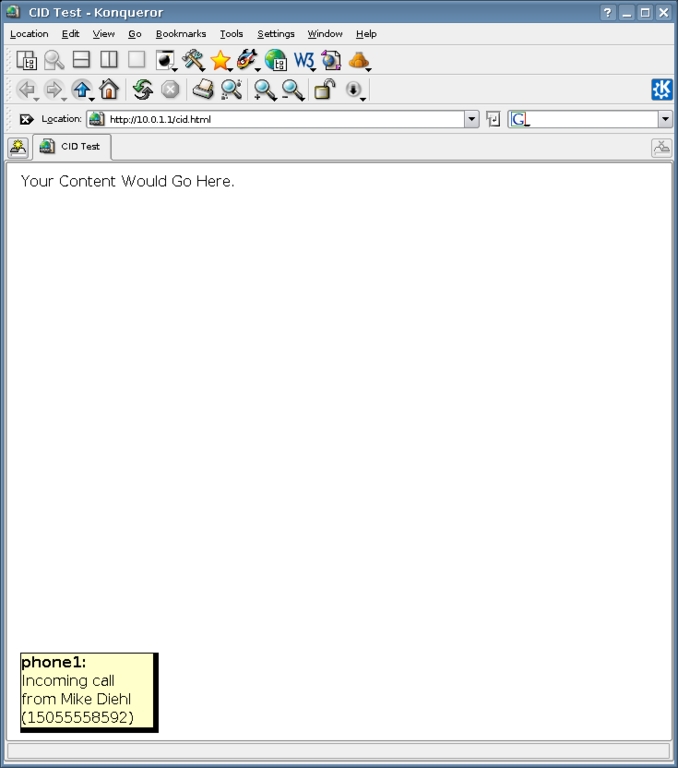
Figure 1. The incoming call information is displayed in a Web page in sticky note format.
Now, it's time to take a look at the CGI script (Listing 3).
Listing 3. CGI Script
#!/usr/bin/perl

use DBI;

$dbh = DBI->connect("dbi:Pg:dbname=database", "postgres", "password")
  || die "Can't connect to database.\n";

print "Content-type: text/xml\n\n\n";

print "<panels>\n";

check_cid("/tmp/panels/cid");

print "</panels>\n";

exit;

sub  check_cid {
  my($dir) = @_;
  my(@a, $a, $file, $count, $top);
  local(*FILE, *DIR);

  opendir DIR, "/tmp/panels/cid";
  while ($file = readdir(DIR)) {

    if ($file eq ".") { next; }
    if ($file eq "..") { next; }

    open FILE, "/tmp/panels/cid/$file";
    chomp($line = <FILE>);
    close FILE;

    ($dir, $name, $number, $uid) = split("#", $line);

    $count++;

    if ($dir eq "IN") {
      $html = "Incoming call from $name ($number)";
    } else {
      $html = "Outgoing call from $name ($number)";
    }

    expire_call($uid);

    print <<EOF
<panel>
  <name>phone$count</name>
  <content>$html</content>
</panel>
EOF
;

  }
}

sub  expire_call {
  my($id) = @_;
  my($sth, $count);

  $sth = $dbh->prepare("select count(*) from cdr where
uniqueid=\'$id\'");
  $sth->execute();

  ($count) = $sth->fetchrow_array();

  if ($count) {
    unlink("/tmp/panels/cid/$id");
  }
}
This Perl script scans the /tmp/panels/cid directory for files, skipping the . and .. entries. Each file it finds is opened and read. The final result is an XML file like the one shown in Listing 4.
Listing 4. Resulting XML File
<panels>
<panel>
  <name>phone1</name>
  <content>Incoming call from Mike Diehl (15055558592)</content>
</panel>
</panels>
Of course, the XML file could contain up to four <panel> blocks corresponding to phone1 through phone4. The <content> block contains the text that is put into each sticky note. I've found that because this is an XML file, it's difficult to embed HTML in the <content> block, so I don't do much formating of this text. It's fairly easy to see how incoming and outgoing calls are handled separately.
As the XML is generated for each phone call and sent to the client, the call to expire_call() is made. This function simply searches the CDR database to see if the phone call has been completed. Asterisk adds CDR records only when a call is concluded, so if the record is in the database, the call is finished and the file in /tmp/panels/cid can be removed.
The JavaScript component is both the workhorse of the system and the most difficult part to understand (Listing 5).
Listing 5. The JavaScript Component
function start_cid () {

  setInterval("update_cid()", 1000);
}

function update_cid () {
  var req;
  var xml;
  var panels;
  var count;
  var name;
  var div;

  req = get_from_server();

  clear_panels();

  xml = req.responseXML.getElementsByTagName("panels")[0];

  panels = xml.getElementsByTagName("panel");

  for (count=0 ; count < panels.length ; count++) {
    panel = panels[count];

    name = panel.getElementsByTagName("name")[0];
    name = name.firstChild.nodeValue;

    content = panel.getElementsByTagName("content")[0];
    content = content.firstChild.nodeValue;

    div = document.getElementById(name);

    div.style.display="block";
    div.innerHTML = "<b>" + name + ": </b>" + content;

    if (div.innerHTML == "") {
      div.style.display="none";
    }
  }
}

function get_from_server () {
  var req;

  if (window.XMLHttpRequest) {
    req = new XMLHttpRequest();
  } else if (window.ActiveXObject) {
    req = new ActiveXObject("Microsoft.XMLHTTP");
  }

  req.open("GET", "/cgi-bin/cid.pl", false);
  req.send(null);

  return req;
}

function clear_panels () {
  for (count=1 ; count < 5 ; count++) {
    document.getElementById("phone" + count).innerHTML = "";
    document.getElementById("phone" + count).style.display="none";
  }

  return;
}
As mentioned previously, the whole system is started by the initial call to start_cid(). All this function does is arrange for the update_cid() function to be called every second. The update_cid() function makes a call to get_from_server() to get an XMLHttpRequest object in a browser-independent fashion. This request object is returned for later use.
Next, the update_cid function calls clear_panels(), which simply arranges for each sticky note to be empty and invisible, initially. The sticky notes will become visible as we put content into them.
The rest of the program is a bit more difficult to follow. Using the request object mentioned earlier, and the getElementsByTagName() function, we get an XML object with the <panels> block intact. Another application of the getElementsByTagName() applied to this XML object gives us an array of individual <panel> blocks.
Then, we start a loop over each <panel> block in the array with the understanding that each time through the loop will correspond to a phone call in progress; we'll create a new sticky note for each call. Each <panel> block contains a <name> and a <content> block, the values of which we extract into appropriate variables. Then, by using the getElementById() document method, we find the <div> element in the HTML document with the same ID as the name of the panel. Now we have all of the information we need about the sticky note: the name, the content and the location in the Web page. So, we set the <div> block to be visible, then assign some content to it via the innerHTML attribute. Finally, we go back to the top of the loop and continue again.
This “poll the server and display the results” process runs every second without any intervention from the user and without having to reload the Web page. This gives the user the perception that the sticky notes simply pop up when the phone rings and disappear when the phone is hung up.
As you can see, JavaScript is a very powerful language. Unfortunately, browser support and development tools for JavaScript are poor to nonexistent. During the development of this program, I had to contend with browser crashes, inadvertently cached information and cryptic runtime error messages. Once I got it working, I had to make sure it worked on each of the browsers I use regularly, Konqueror and Firefox. I suspect that it will run on “that other browser”, but I've not tested it. Because I do most of my software development with vi, I'm not really big on Integrated Development Environments (IDEs), but if you know of one that works well for JavaScript, I'd love to hear from you.
Now that the program is working, it's time to think about ways to improve and extend it. The first obvious change I'd like to make to this program is to have it display a hyperlink that would allow me to bring up additional information about the caller. It could get this information from my contact list or even from an additional database. Maybe it could display a picture of the caller, though it might take a lot of time to photograph all my friends, family and acquaintances. It might also be nice to have a button display for incoming calls that would allow me to reject an incoming call and have it go straight to voice mail. I could also extend this same method to have a Web page display other information besides caller ID. It wouldn't be hard to extend this system to let me know when I have unread voice mail waiting, or when my friends become available for chat via IM.
So there you have it—a fun little toy that brings together many different tools and technologies. Recalling that Qwest used to charge us $6 US a month for caller ID, I wonder what they would charge to make it Web-accessible?
Mike Diehl works for SAIC at Sandia National Laboratories in Albuquerque, New Mexico, where he writes network management software. Mike lives with his wife and two small boys and can be reached via e-mail at mdiehl@diehlnet.com.
