
The Ultimate Future Linux Box
We got our hands on an AMD rev. F Processor (FX-60 or X2-5000+), along with the ASUS M2N32-SLI Deluxe motherboard built for this processor, and we're convinced this points the way to the future of the Ultimate Linux Box.
The movie This Is Spinal Tap is about a fictional heavy metal band with members who aren't very bright. In one scene, a guitarist mentions that if he cranks up his guitar to volume ten, and cranks up the amplifier to volume ten, that's as loud as it gets. There's nowhere left to go. Then he boasts of an amplifier he has whose knobs are numbered up to 11. Rob Reiner, the host, asks if he couldn't just buy an amplifier that is louder at volume ten. The guitarist looks confused for a moment and then says, “But this one goes to 11.”
CPUs are close to the point where they've gotten to ten, and there's nowhere left to go. AMD and Intel have been bumping up against Moore's Law for a while now. They can pump only so many Gigahertz out of a processor. Enter the dual-core processors. At this point in history, it's easier to improve performance by adding a second core than it is to try to keep cranking up the GHz ratings (although AMD and Intel do that too).
That takes care of the processor's technology bottleneck, but it doesn't address the next bottleneck in performance: how to get the processor to talk to RAM in the most efficient way possible. So far, we've seen AMD and Intel attempt to address this bottleneck by pumping up the front-side bus frequency and by supporting newer, faster types of RAM and RAM configurations.
Fast-forward to yesterday (relatively speaking). Intel supports DDR2 RAM, but the best AMD can do is DDR in dual-channel mode—hence the need for the new AM2 socket-based AMD64 processors. The differentiating factor between the old socket 939 line of AMD64 dual-core processors and the new socket AM2 processors of the future is that the new processors include an on-die memory controller for DDR2 RAM. Otherwise, the two processors are essentially the same.
The operative phrase is “on-die”. This is now the differentiating factor between AMD and Intel processors. Currently, Intel must use an onboard memory controller in order to access DDR2 RAM. Although theory and practice do not always match, this, in theory, gives AMD a big advantage over Intel in the long run.
Why? One of the biggest performance bottlenecks with respect to memory access is latency. Latency is the time the processor has to wait before it can get the information it requests. AMD has reduced latency—in theory—by putting the memory controller on the CPU itself instead of relying on an on-the-motherboard memory controller. In fact, all AMD64 processors include the memory controller on-die. The difference between the socket 939 processors and the socket AM2 processors is that the AM2-based processors have a future, because they support DDR2.
DDR is an eventual dead end. Today, DDR2 delivers little if any improvement over DDR, but DDR2 is improving all the time. In fact, Corsair released new DDR2 memory modules at about the same time AMD released the socket AM2 processors. The timing is not a coincidence. You can't see any benefit in the socket AM2 processors without better DDR2 modules.
As it is, you can't see much benefit even with the better DDR2 modules. But that's because we're still in the early stages of DDR2 performance. Until recently, DDR2 performance has been a dog. The newest DDR modules are a lot better than the ones you could get just months ago. And DDR2 should improve steadily over time.
The question will be, which processor will best be able to exploit the performance increases in DDR2? AMD is preparing to win that battle with its on-die memory controller. Only time will tell, but I'd place my bets on AMD. It simply makes more sense to put the memory controller on-die rather than increase latency by relying on a memory controller on the motherboard, as is the way Intel processors currently work.
You've probably seen countless benchmarks of the socket AM2 processors by now, most of which show very little improvement over existing processors. We tried the same type of comparison and found that the X2-5000+ dual-core socket AM2 processor blew away our AMD64 4400+ Athlon x2. That's not too surprising, because there's a fairly significant increase in processing speed. But, we didn't have an apples-to-apples system with which to compare the new one.
Here's the trick. AMD claims that even with DDR2 memory, speed isn't the issue, latency is. If you're familiar with how processors access memory, you'll know this is a perfectly credible statement in theory. But does it play out in practice?
We wanted to see if latency really does affect performance as much as AMD claims and reason dictates. AMD sent out a number of sample products to reviewers early on, when DDR2 modules still had high-latency issues. When AMD finally released the socket AM2 processors, it claimed we would see about a 1% performance increase over the early samples. We didn't have an early sample, so we compared the previous latency capabilities of DDR2 to the current ones by changing the latency settings in BIOS. We ran a memory/cache benchmark using the two different latency settings. You can see the performance with faster settings (4,4,4,12) in Figure 1. See Figure 2 for the benchmark results for the old latency settings (5,5,5,15).
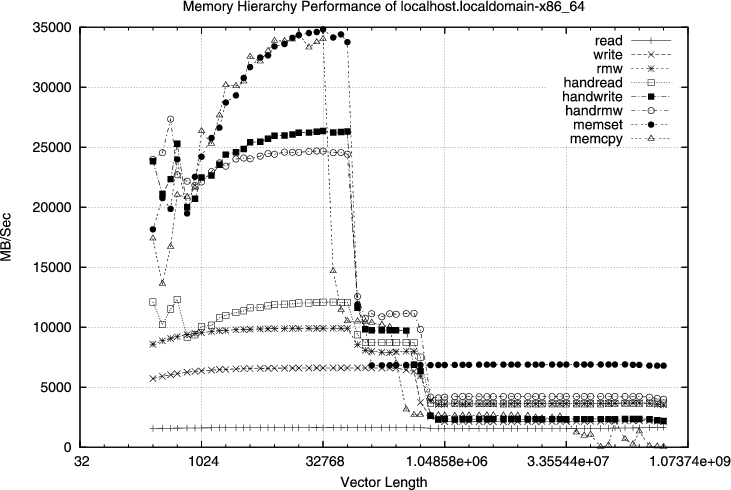
Figure 1.Memory and Cache Performance Benchmark Results for AM2
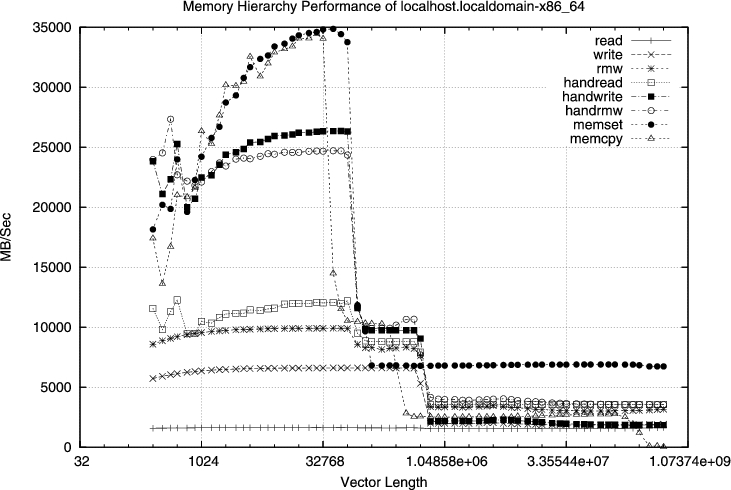
Figure 2. Memory and Cache Performance with Latency Set at 5,5,5,15
Do you see the difference? Maybe not. Try to squint your eyes and turn your head a little and look again. If you look carefully enough, you will see some differences in performance. But we can save you the headache of trying to interpret the numbers in a moment.
First, just for fun, we wanted to show you the huge difference between these benchmarks and the same benchmark on the AMD64 4400+ (see Figure 3).
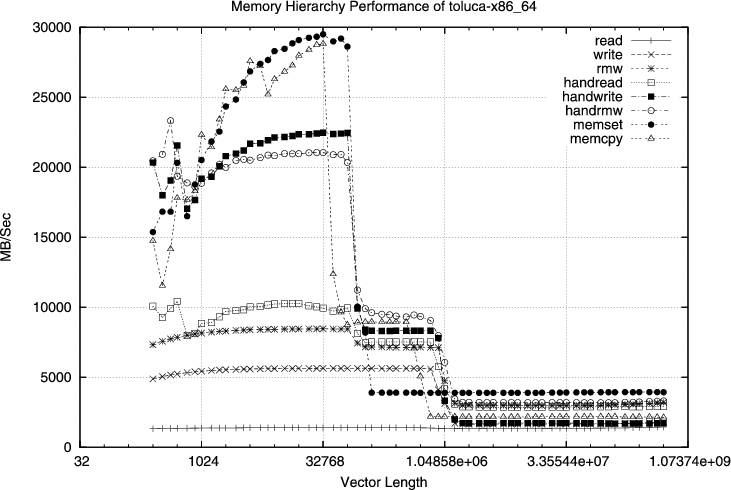
Figure 3. Performance on AMD 4400+ Athlon x2 with 4GB of Dual-Channel DDR400 RAM
Now, back to the latency issue. There really is a performance difference between the two latency settings on the AM2, but admittedly, it's hard to see from the graphs shown here. So, we ran some Windows-based graphics benchmarks to find out if we could see the difference more clearly. We started with AMD's own nbench. We ran nbench on the ASUS M2N32-SLI Deluxe with the 5000+ processor, tricked out with two eVGA 7900GT NVIDIA video cards in SLI mode, with antialiasing and anisotropic filter settings set to application-controlled. Table 1 shows the results of nbench for the different latency timings.
Table 1. Comparing nbench with Different Latency Settings
| Configuration: AM2 SLI-AC 5,5,5,15 | |
| CPU overall performance | 2844 |
| 3-D overall performance | 3992 |
| Overall performance | 3418 |
| Configuration AM2 SLI-AC 4,4,4,12 | |
| CPU overall performance | 2857 |
| 3-D overall performance | 4047 |
| Overall performance | 3450 |
We'll do the math for you. There's about a 1% difference in performance, exactly as AMD had predicted. Just for kicks, we cranked up the graphics settings to the best possible antialiasing and anisotropic filtering. Although the overall performance dropped some due to the extra work, the difference in performance between the two latency settings was about 1% once again.
The next benchmark comparison is apples to oranges, but it does show that the improvement over the AMD64 4400+ is enough to make our mouths water over the new system, regardless of where it's getting its kick. See Table 2. Even with the graphics settings entirely maxed out for best quality, the AM2 system boasted a 15% performance improvement over the 4400+ system, despite the fact that the 4400+ system had four times the RAM installed.
Table 2. The 5000+ AM2 puts the 4400+ 939 to shame.
| AM2 SLI-MAX | |
| CPU overall performance | 2855 |
| 3-D overall performance | 4003 |
| Overall performance | 3429 |
| AMD64 4400+ SLI-MAX | |
| CPU overall performance | 2480 |
| 3-D overall performance | 3459 |
| Overall performance | 2970 |
The problem with all these numbers is that they cannot reflect what a joy it is to behold the new system render graphics. Excerpts from unreleased games (unreleased because no current system can handle them) run like movies on the socket AM2 system, even with all the graphics settings set to the max. They don't quite run like slideshows on the 4400+ system, but the choppiness is extremely annoying, even with all of the graphics settings turned down to a minimum.
More important, the 1% difference in performance with the changes in latency settings may not look like much on paper, but it is often easy to see the improvement when you run the 3-D graphics benchmarks. This is because a 3-D scene looks best at 30 frames per second or better. When the frame rate hovers between 25 frames per second or less and 30-some frames per second, you really notice a 1% performance difference. Even a slightly more choppy rendering of a scene can be noticeably annoying.
We saw something closer to a 2% performance improvement when we ran the Windows-based AquaMark3 benchmark with the different latency settings (Table 3). This particular benchmark doesn't drop into the critical frame rates, so you don't notice the difference in performance as much as you do with other benchmarks. But you can see from the figures that the frame rates do change with different latency settings.
Table 3. AquaMark3 results—you see a 2–6 frames-per-second improvement when changing memory latency.
| AM2 5000+, AM2 SLI with latency settings 5,5,5,15 | |
| DisplayWidth | 1024 |
| DisplayHeight | 768 |
| DisplayDepth | 32 |
| AntialiasingMode | 0 |
| AntialiasingQuality | 0 |
| AnisotropicFiltering | 4 |
| DetailLevel | 4 |
| AvgFPS | 97.668488 |
| MinFPS | 68.000000 |
| MaxFPS | 156.000000 |
| AvgFPSRender | 182.529037 |
| AvgFPSSimulation | 209.958633 |
| AvgTrianglesPerSecond | 29,401,354 |
| MinTrianglesPerSecond | 3,624,963 |
| MaxTrianglesPerSecond | 117,690,170 |
| AquamarkScoreRender | 18252 |
| CPU: AquamarkScoreSimulation | 10498 |
| AquamarkScore | 97668 |
| AM2 SLI with latency settings 4,4,4,12 | |
| DisplayWidth | 1024 |
| DisplayHeight | 768 |
| DisplayDepth | 32 |
| AntialiasingMode | 0 |
| AntialiasingQuality | 0 |
| AnisotropicFiltering | 4 |
| DetailLevel | 4 |
| AvgFPS | 99.716568 |
| MinFPS | 70.000000 |
| MaxFPS | 158.000000 |
| AvgFPSRender | 185.784760 |
| AvgFPSSimulation | 215.265106 |
| AvgTrianglesPerSecond | 30,017,894 |
| MinTrianglesPerSecond | 3,775,542 |
| MaxTrianglesPerSecond | 122,671,018 |
| AquamarkScoreRender | 18579 |
| CPU: AquamarkScoreSimulation | 10764 |
| AquamarkScore | 99716 |
We drooled when we received the AMD rev. F Processor (FX-60 or X2-5000+) along with the ASUS M2N32-SLI Deluxe motherboard built for this processor. Sure, we'd heard about how this is only an incremental improvement over existing AMD64 Socket 939 processors and their motherboards. In fact, most opine that there's no improvement at all. As it turns out, many benchmarks show that there is minimal improvement in performance.
But, we think most reviews are missing the forest for the trees. The AM2 socket-based processors and boards aren't about delivering an exponential improvement in performance today. This is about laying the foundation for exponential improvements in performance for the future. We can't tell you whether it is worth it for you to invest in today's socket-AM2 motherboards and processors. The risk you take is mostly dependent upon how quickly memory manufacturers can improve DDR2 and whether your motherboard will support the improved DDR2 modules.
In the long run, however, DDR2 will most definitely improve, and AMD will undoubtedly ship quad-core processors that require DDR2 and lower latency in order to exploit the advantages of quad-cores. So, although it may be frivolous to invest in a socket AM2 system today, we predict that the time is coming when the benefits will be indisputable. It is entirely possible that Intel can pull a rabbit out of its design hat and trump the AMD approach, but we don't see that happening yet. That's why we consider the socket AM2 systems as the Ultimate Linux Boxes of the future.
Nicholas Petreley is Editor in Chief of Linux Journal and a former programmer, teacher, analyst and consultant who has been working with and writing about Linux for more than ten years.
